
Cléa Aumont
August 29, 2023

Chris Parmer
Updated October 23, 2026
Sankey Diagrams - A Complete Guide
Updated in 2026 with more examples and how to create with coding agents.
A Sankey diagram is a powerful data visualization tool when used correctly. These visuals represent the flow of values from one stage to another using nodes and links, but can often be misused. This article aims to provide guidance on best practices for choosing a Sankey diagram, offering diverse examples to illustrate its potential. It will guide you in choosing an appropriate dataset for an effective Sankey diagram by looking at the nature and the structure of the data, and it provides starter code that turns a dataframe into Sankey data for visualization with Plotly. By following these best practices and leveraging the provided code, you can use Sankey diagrams to gain valuable insights from your data.
What is a Sankey diagram?
A Sankey diagram has three parts:
- Nodes are the stages or categories, drawn as bars. "Revenue", "Natural gas" or "She said yes" are nodes.
- Links are the flows between nodes, drawn as ribbons from a source node to a target node.
- Values set the width of each link. A link carrying 300 units is three times as wide as one carrying 100.
Sankey diagrams can be compared to flow networks: they tend to be acyclic and directed, and the links and nodes are proportional to the flow they carry. In this guide, a set of nodes on the same level is called a tier. A tier is often a column in a dataframe, and it represents one stage of the Sankey.
The chart is named after Captain Matthew Sankey, an Irish engineer who used one in 1898 to show where a steam engine's energy was lost.
A Sankey in the wild: a global supply chain app
As a member of the Professional Services team, I (Cléa) first came across the Sankey diagram on a client project that required a way to visualize the flow of a specific resource on a global scale. The goal was to see where a specific resource came from, where it was converted, and where it was shipped off. Supply chain is a great example of when to use a Sankey diagram, as it naturally contains a set of stages to visualize.
The complexity of coding this Sankey came from letting the user select which columns of a pandas dataframe were used in the Sankey, so the chart could have anywhere from 2 to 8 tiers. The user could also filter the Sankey by node, change the link weights, which varied by year, and group the tiers to display a fixed number of nodes and aggregate the remaining ones into a single node. The following recording shows this Dash app in action.
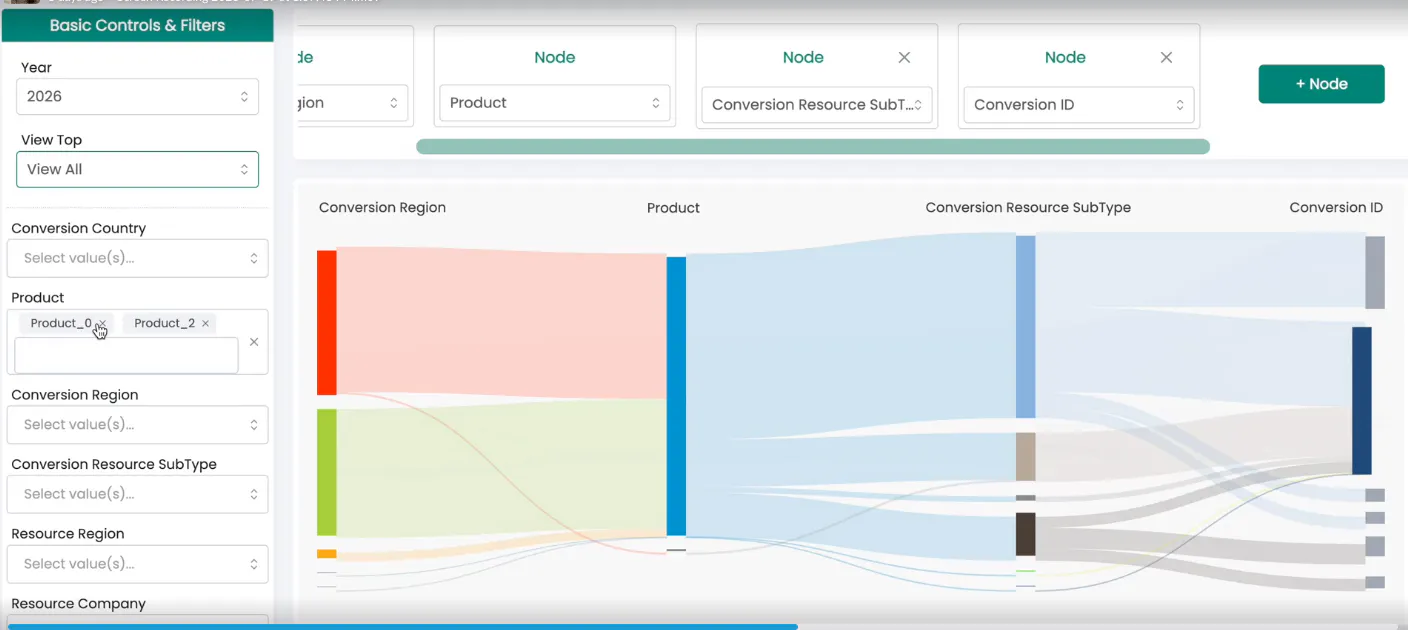

Screen recording of Dash app displaying Sankey chart
The parameters needed to code a Sankey diagram are complex, which made this hard to build. The outcome of the project was highly generalized code for generating Sankey diagrams that lets users customize every aspect of the chart, and that can be reused on any other project. The helper function later in this guide comes from the same idea.
When to use a Sankey diagram
Sankeys are best used to visualize the flow of data from one stage to another, and more specifically, to show how that flow is subdivided at each stage. This could be the flow of resources, money, energy or information, and how it moves within a country, business or network. This type of visualization helps highlight bottlenecks and identify areas of high significance.
The US federal budget (example 3 below) is a good illustration: tax receipts flow in, spending flows out by category, and one glance tells you that net interest now costs more than defense. An income statement works the same way. In Apple's (example 1), you can see the major sources of revenue, the share that goes to costs, and how gross profit compares to operating expenses, all without reading a table.
A simple test: try to write each row of your data as "X units moved from A to B". If that sentence makes sense for every row, a Sankey will probably work. If you find yourself writing "A is related to B", it won't.
When to avoid a Sankey diagram
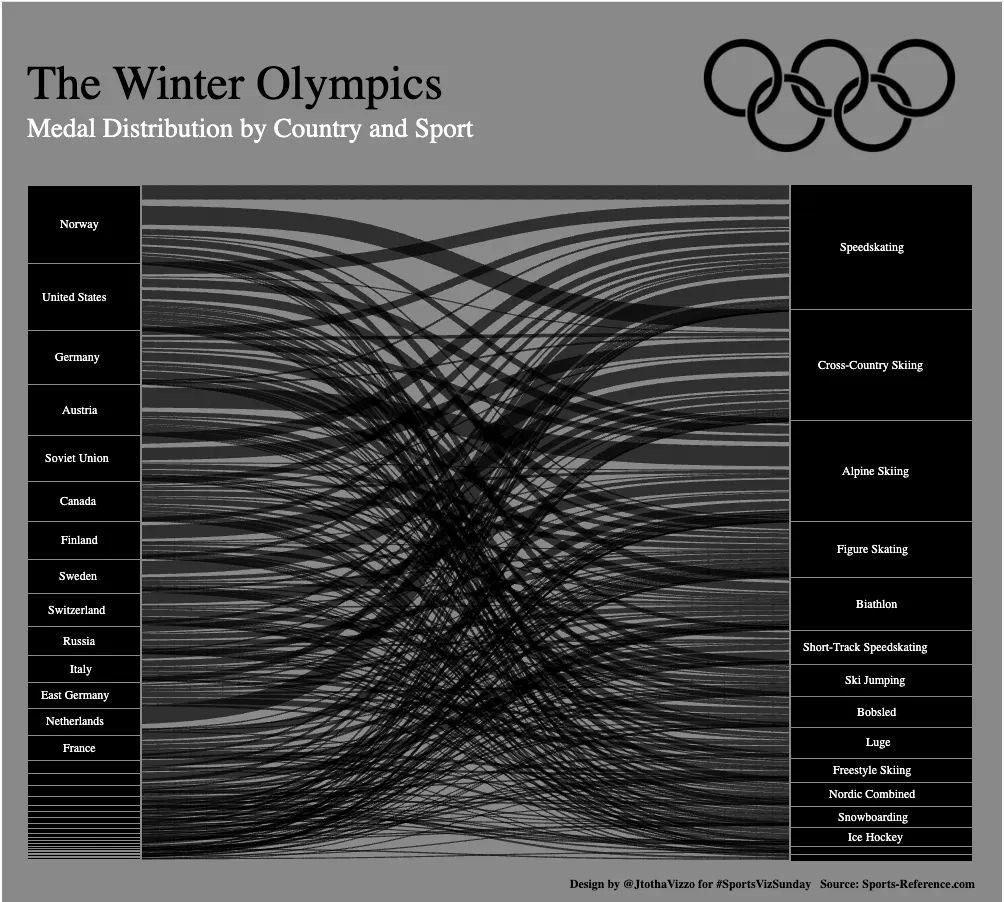
If there isn't a natural flow in the data, a Sankey is probably not the best visualization. As an example, the following Sankey maps countries to Olympic medals. The more data there is, the more convoluted this chart gets, and it's hard to learn much from it beyond which countries won the most medals and which sport awarded the most. In this case, a bar chart would show the distribution of medals more clearly.
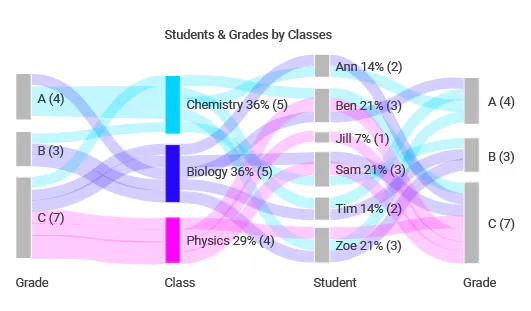
The next example doesn't tell much of a story either. A mapping of students to grades to classes to grades is not a natural flow, and it gets more complex with every data point. On top of that, every student takes every class, which creates a link for every single combination. There is not much use for a Sankey when all of the nodes are connected.
Avoid Sankeys for continuous data, such as time, unless it has been turned into categories like years or specific periods. Datasets that are very large or very sparse are usually a poor fit too.
The natural structure of data
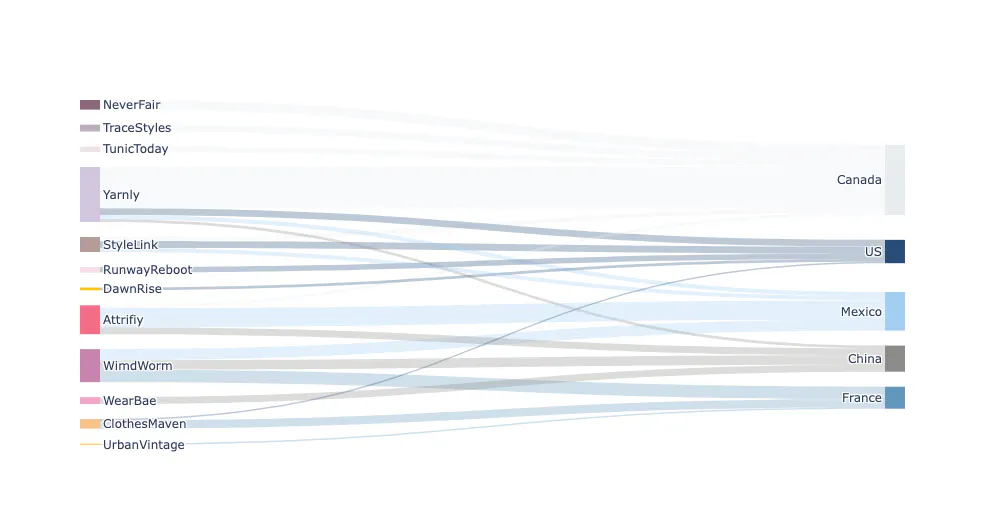
Data with a natural set of stages still doesn't guarantee a good Sankey. There can be too many data points, which makes the diagram convoluted, or too few. Or there may be no natural grouping, so every source node links to every target node and the ribbons cross everywhere. In the following example there is enough data for a decent Sankey, and the data has a natural flow. Once it's drawn, though, it looks like every store ships to every country, and the chart says very little.
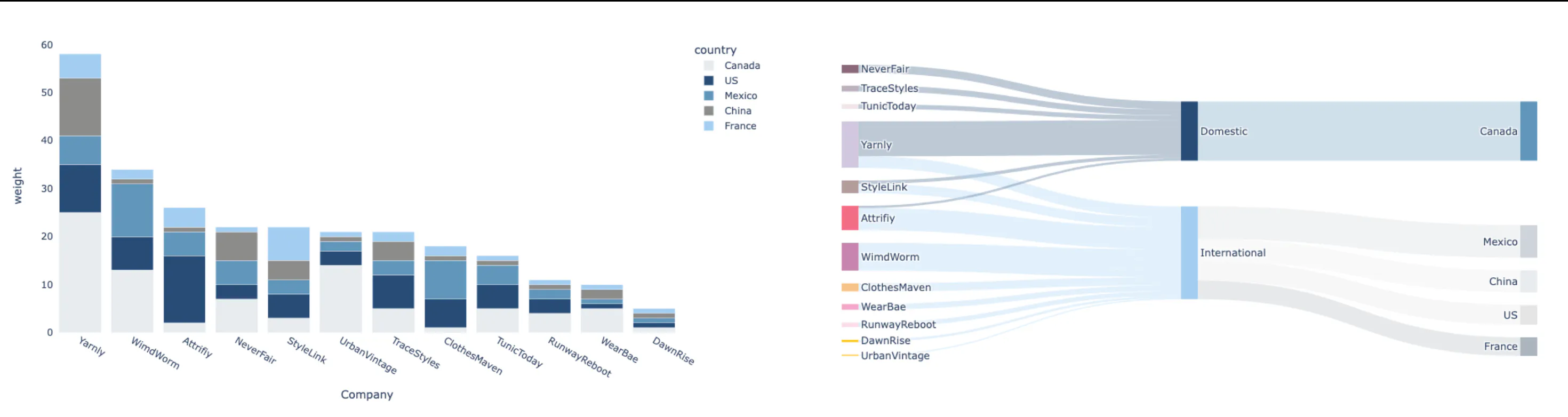
A stacked bar chart could show each store's breakdown by country instead (left, below). Or the Sankey can be saved by adding an intermediary group, a second layer of grouping (right). Split the same data into domestic and international sales first, and the chart suddenly shows the difference between the two and how each one breaks down.
How to make a Sankey diagram
There are three good ways to get from a dataset to a Sankey: write the Plotly code yourself, let Plotly Studio build it for you, or ask a coding agent. They all end up in the same place, a go.Sankey figure you can tweak.
In Python with Plotly
To create a Sankey diagram with Plotly, use plotly.graph_objects.Sankey. It takes four critical arguments:
- The label, which are the nodes (in the stores example above, "Canada" is a node)
- The source, a list of numbers that indicate the starting point of each link
- The target, a list of numbers that indicate the endpoint of each link
- The value, a list of numbers that set the thickness of each link. If it's left blank, no links show up.
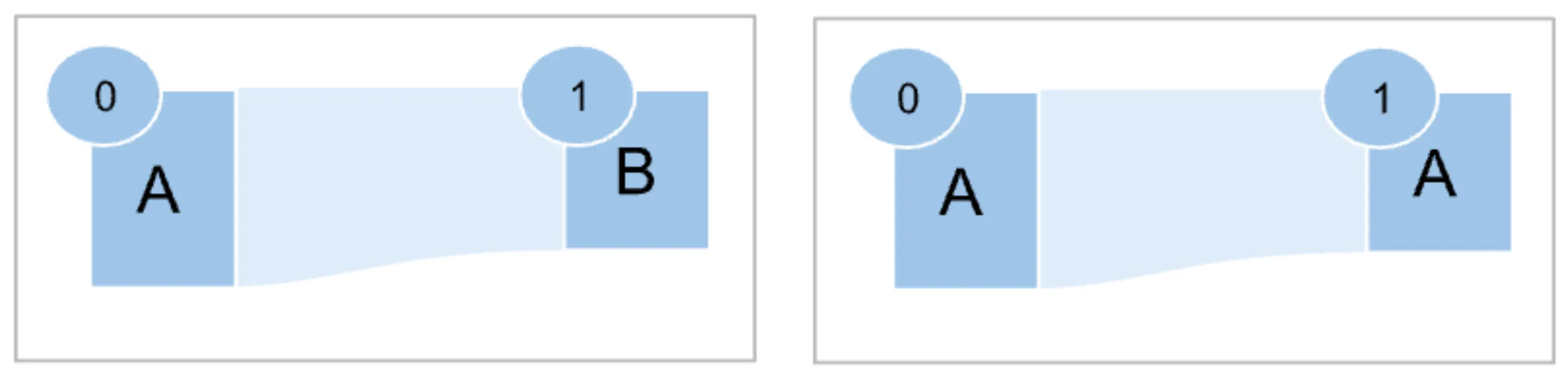
Each node is identified by its position in the label list, and each link is defined by its source and target. A Sankey with two nodes "A" and "B" and one link between them needs label=["A", "B"] (so A is 0 and B is 1), source=[0], target=[1] and a value list of the same length as the sources and targets, with any positive number. Here's a slightly bigger version:
import plotly.graph_objects as gofig = go.Figure(go.Sankey(node=dict(label=["Search", "Email", "Visited site", "Signed up", "Left"]),link=dict(source=[0, 1, 2, 2], # index into node.labeltarget=[2, 2, 3, 4],value=[60, 30, 35, 55],),))fig.show()
This gets tricky with larger datasets. The most common problem is a value that appears in more than one tier, like "Other" or the same country as both origin and destination. Those must be distinct nodes, like the diagram on the right below, where both nodes are labeled "A" but have their own indexes, 0 and 1. If you don't account for it, the node loops back on itself instead of drawing a direct link:
For real datasets, the helper function at the end of this guide turns a table with one row per path into a Sankey and handles duplicate nodes for you.
With Plotly Studio
Plotly Studio is our agentic analytics app. Connect it to your data and ask for the chart the way you'd ask an analyst. Its agent explores the data, writes the Plotly code and shows you the graph, with every step in code you can check:
Show where Titanic passengers ended up, from class to sex to age group to survived or died, with links colored by whether the passenger survived.
When the chart looks right, turn the session into a Dash app and publish it to Plotly Cloud in one click.
With a coding agent
Claude Code, Cursor, Copilot and other coding agents are very good at Plotly, and Sankeys are a case where a precise prompt pays off. Spell out the columns, the grouping and the styling rules you care about. Here's the stores example from earlier as a prompt:
Using plotly in Python, build a Sankey diagram from orders.csv(columns: store, country, orders).- Add a middle column that splits Domestic (Canada) from International.- Keep the top 4 international countries and fold any others into "Other countries".- One color per store; color each link by its store at 45% opacity.- Show the total on every node label, e.g. "Yarnly 58".- Use the Inter font, a white background and a title that states the main takeaway.- Make sure inflow equals outflow at every node and print any node where it doesn't.- Save it as sankey.html and as a PNG at 2x scale.
The line about checking inflow and outflow is worth keeping in every Sankey prompt. It catches the most common bug, a join or a filter that silently drops rows between columns, before it ends up in a chart.
20 Sankey diagram examples with real data
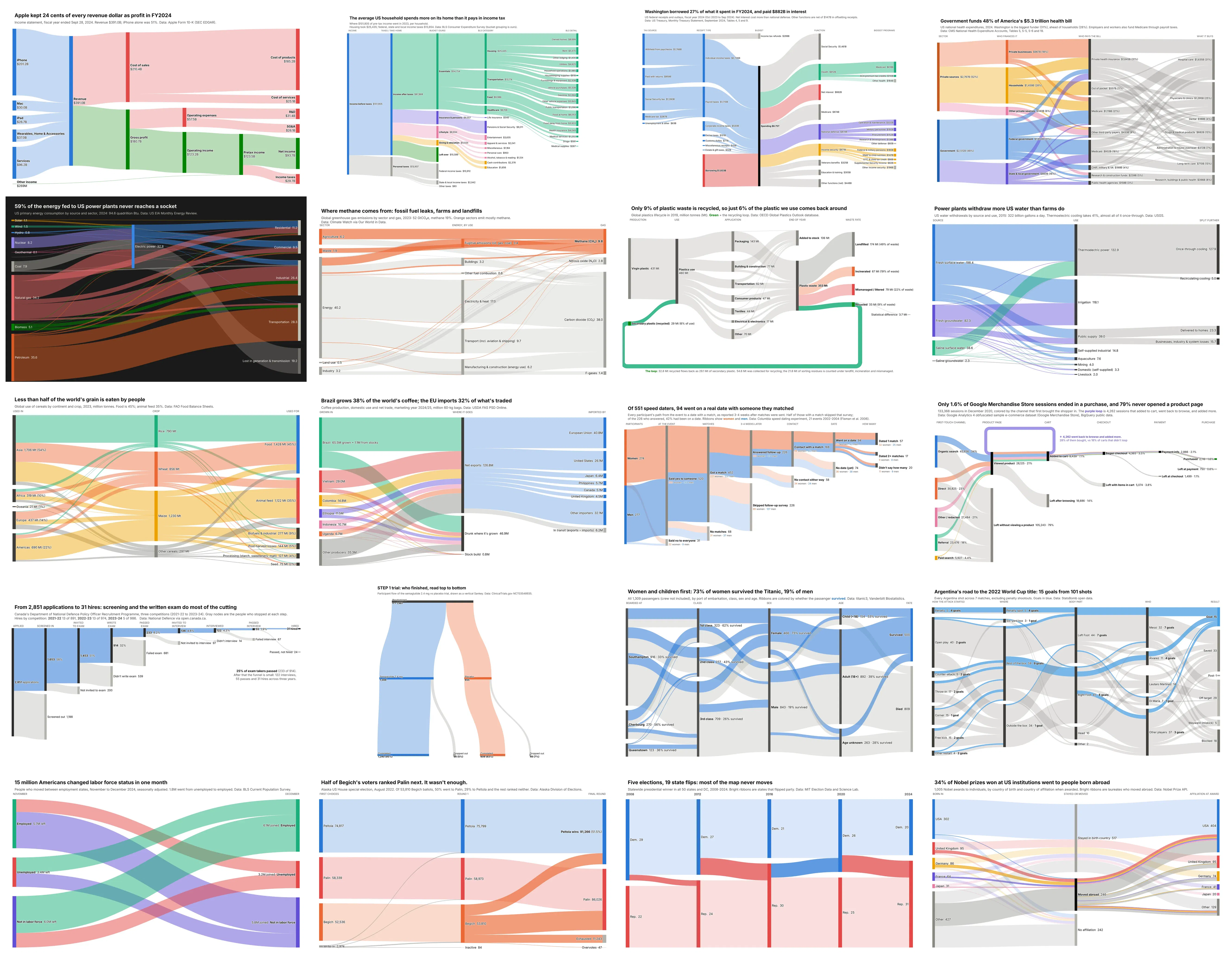
Here are 20 Sankeys built from real public data, grouped by the kind of story they tell: money, physical flows, funnels and journeys, and elections and people. Each one comes with its data source, the trick that makes it work, and a prompt you can paste into Plotly Studio or a coding agent to build it yourself. For a few of them, we also show the same data as a different chart type, so you can see what a Sankey gains and what the alternatives do better.
Money: budgets and financial statements
Money is the most natural thing to draw as a Sankey, because every dollar has to go somewhere. These four follow it from where it comes in to where it ends up, and the more layers you add, the more the chart explains.
1. Apple's income statement (FY2024)
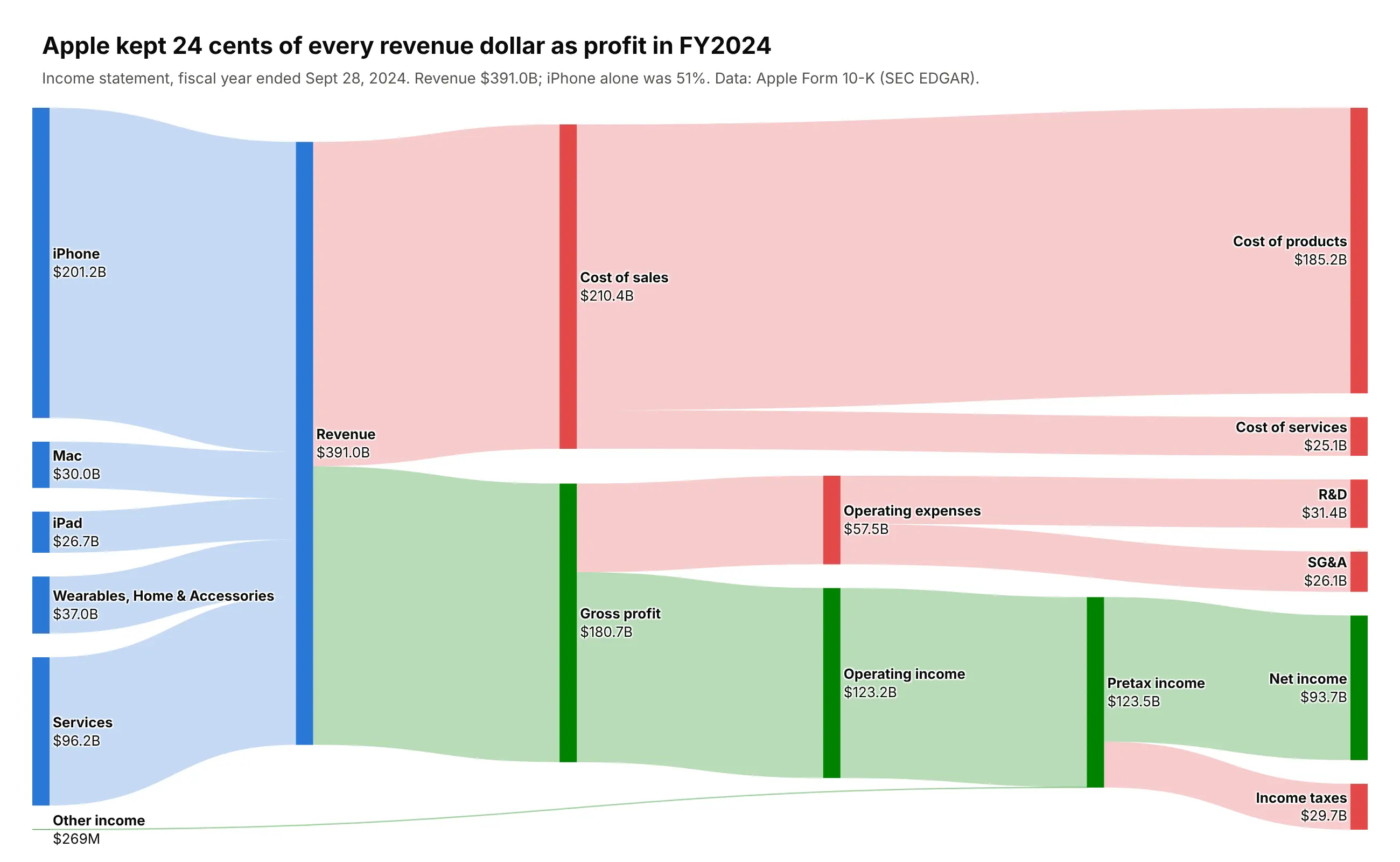
The classic. Apple's five revenue lines merge into $391B of revenue, which splits into cost of sales and gross profit, then operating expenses and operating income, and finally $93.7B of net income and $29.7B of tax. The color is semantic: blue for revenue, green for profit, red for cost. iPhone is 51% of revenue, and the chart makes Apple's other story obvious too: services earn a 74% gross margin against 37% for hardware. Data: Apple Form 10-K via SEC EDGAR. Trick: values printed on every node with <b> and <br> in the label.
Data: Apple's FY2024 Form 10-K on SEC EDGAR (https://www.sec.gov/cgi-bin/browse-edgar?action=getcompany&CIK=0000320193&type=10-K).Use revenue by product line, cost of sales, operating expenses, taxes and net income, in US$.Build a plotly Sankey of Apple's FY2024 income statement.- Color by meaning: revenue nodes blue, profit nodes green, cost and tax nodes red.Each link takes its target's color at 45% opacity.- Show the value in billions on every node label, e.g. "<b>Revenue</b><br>$391.0B".- Title it with the takeaway (iPhone is half of revenue, services carry the margin)and cite the 10-K in the subtitle.- Check that inflow equals outflow at every middle node.
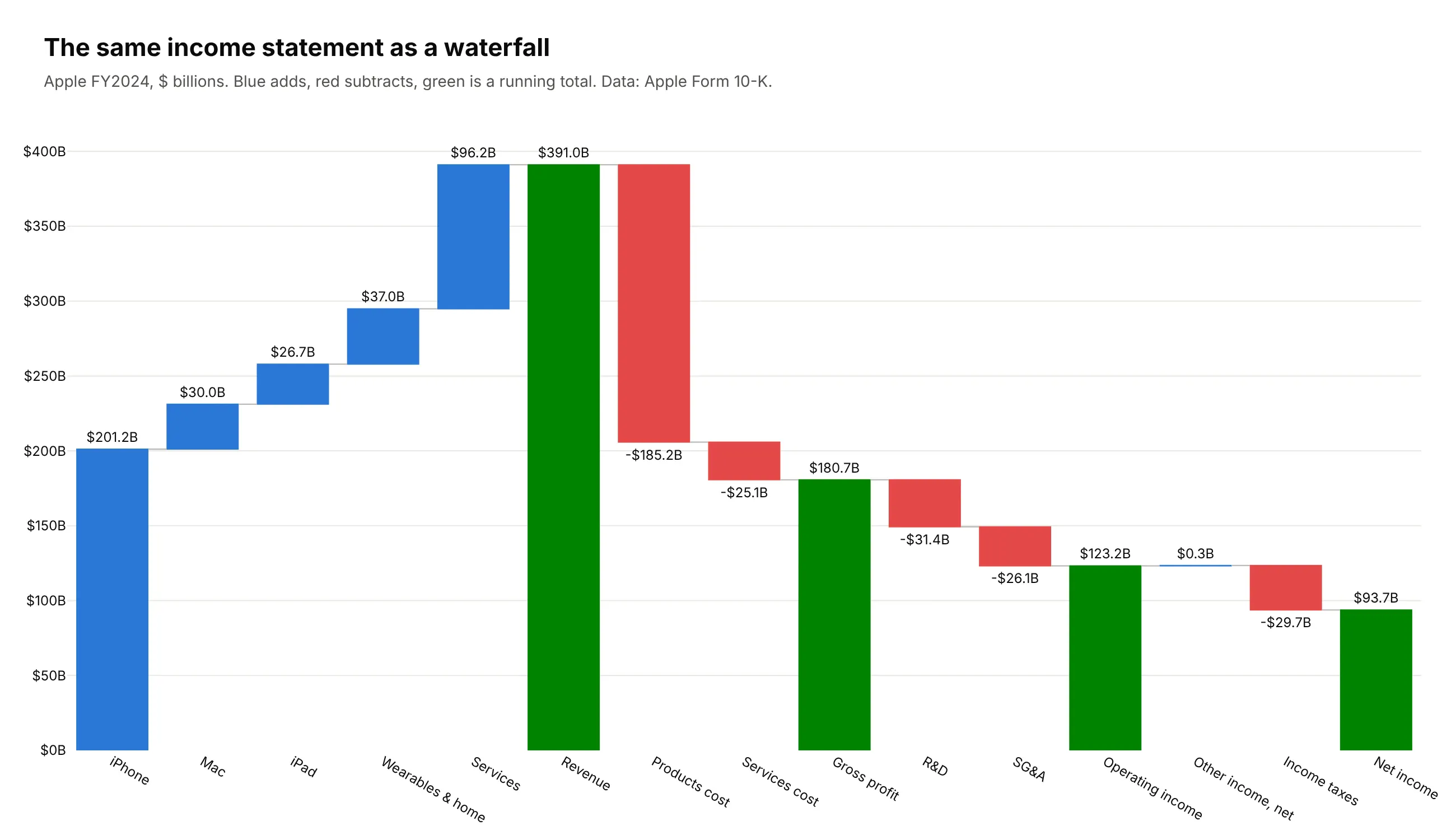
Another way to see it: a waterfall. The finance team's favorite chart for an income statement makes exact amounts easier to read than a Sankey does, but it loses the picture of which revenue line paid for what:
2. Where the average US household's money goes, five levels deep
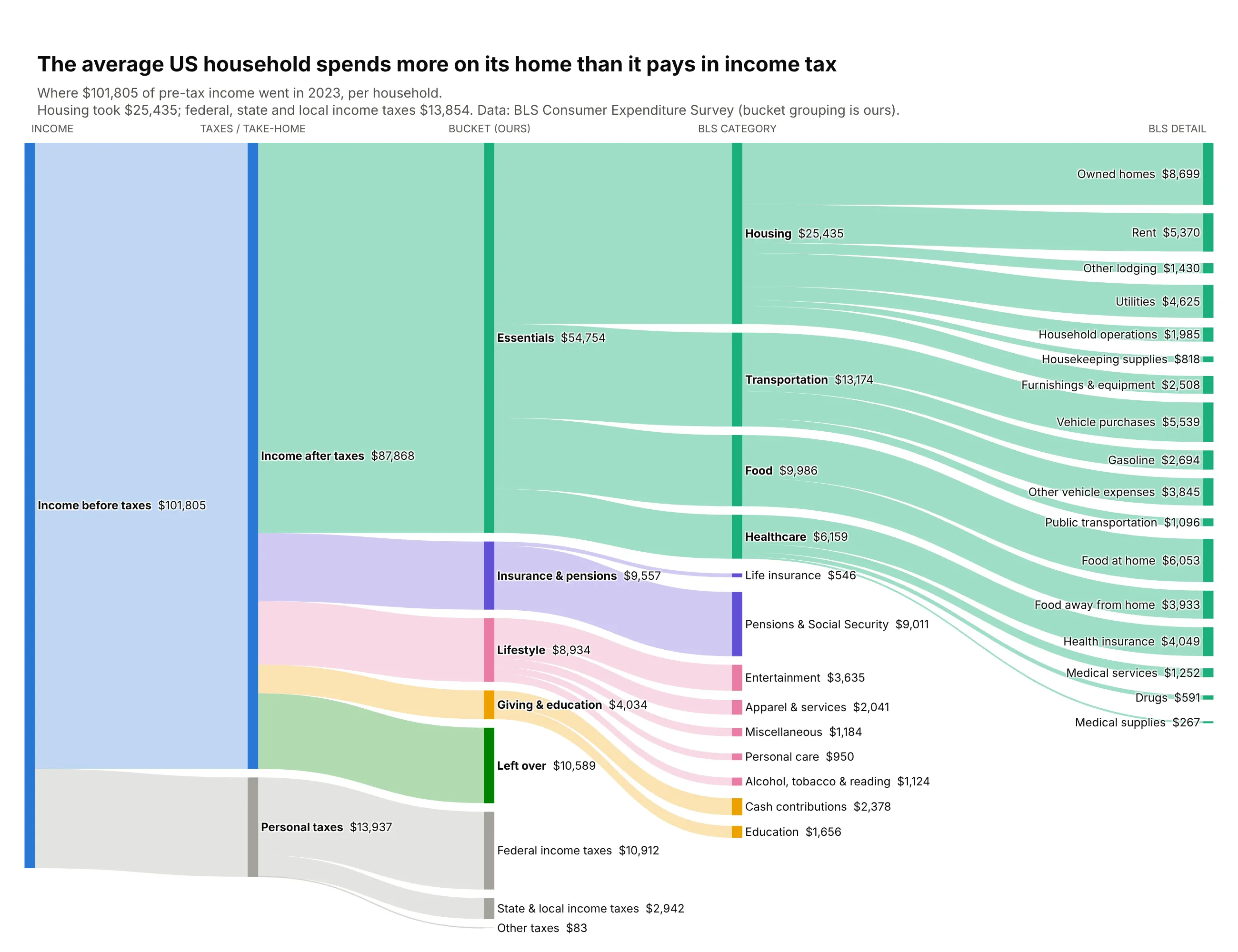
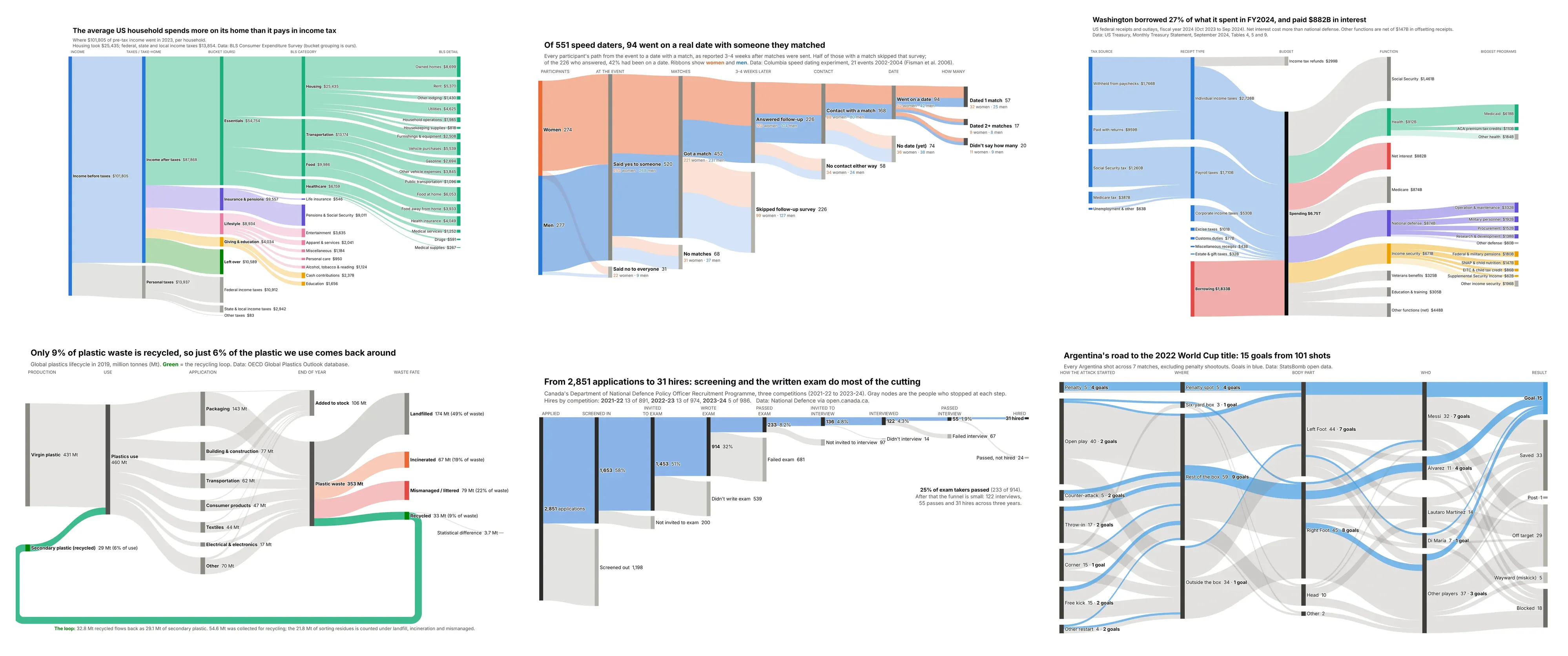
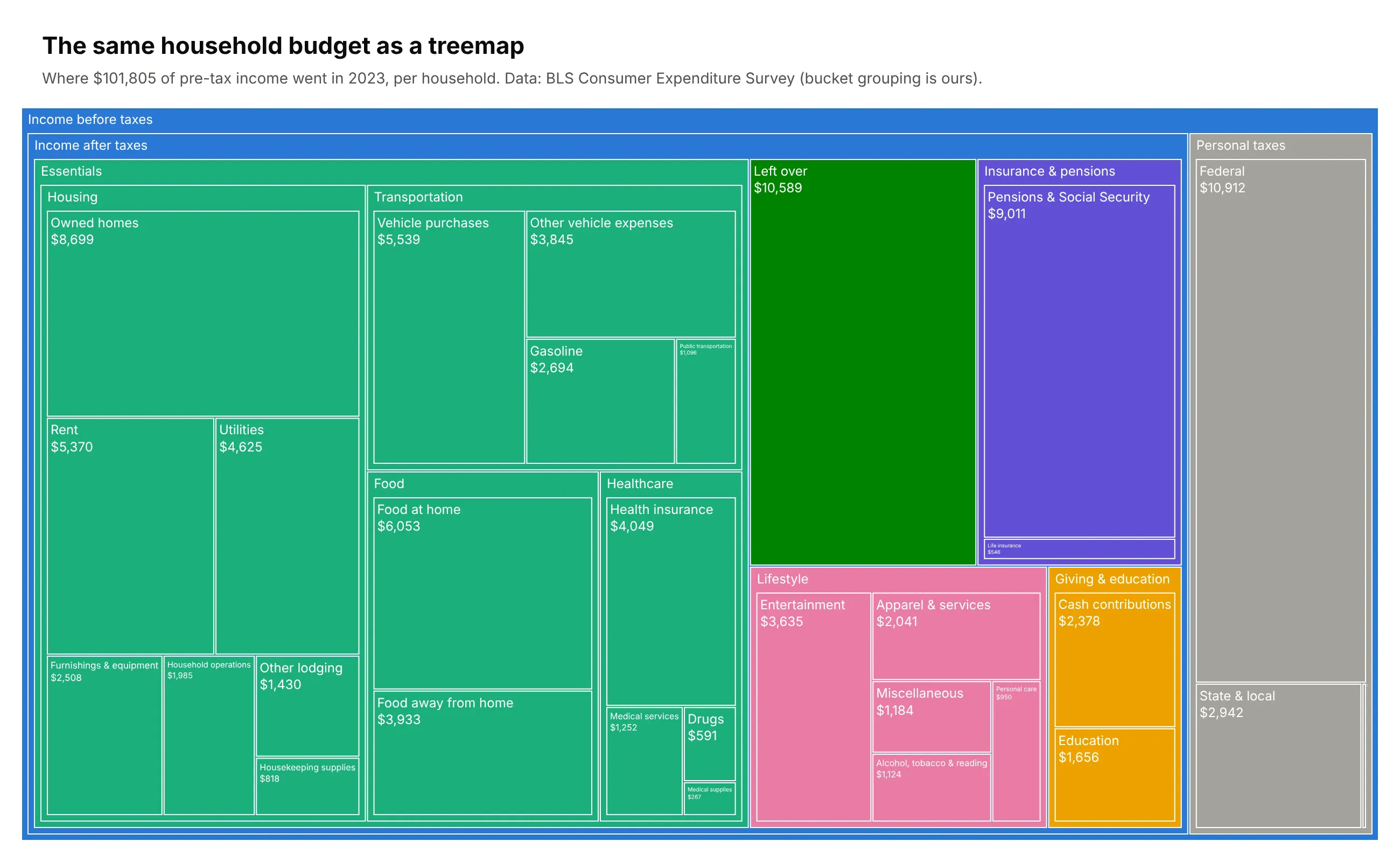
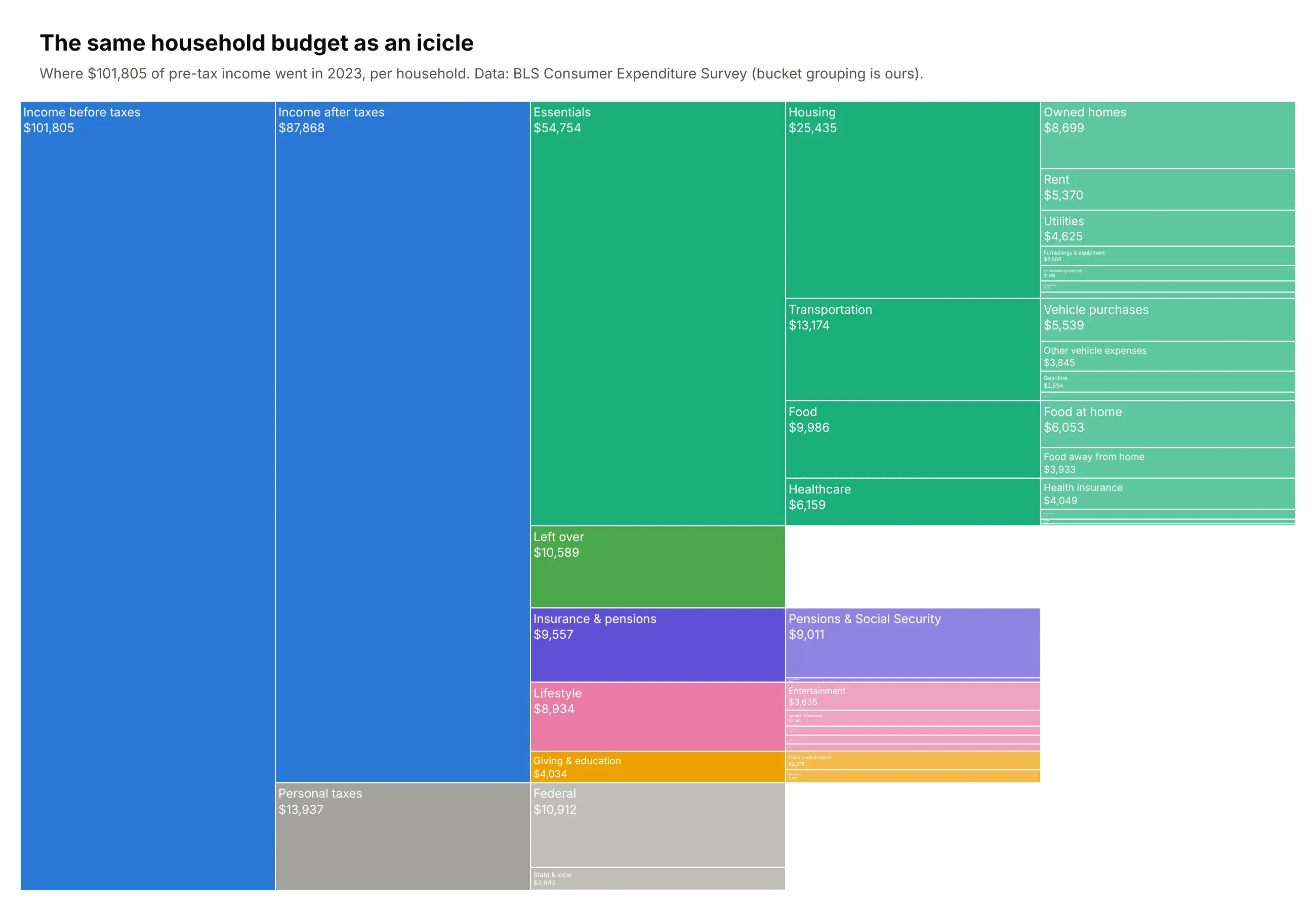
The "where does my paycheck go" chart that Reddit loves, built for the average American household and taken five levels deep. $101,805 of income splits into federal, state and other taxes and take-home pay, then into spending buckets, then BLS categories, then the line items you'd recognize from a bank statement. Housing alone is $25,435, a quarter of pre-tax income and more than twice the federal income tax bill. Shelter by itself ($15,499) costs more than all personal taxes combined. Data: BLS Consumer Expenditure Survey, 2023 (the bucket grouping is ours). Trick: every node is pinned with node.x and node.y, so tax nodes and "Left over" stay in their own column instead of being pushed to the right edge, and each subcategory sits next to its parent.
Data: BLS Consumer Expenditure Survey, 2023, all consumer units (https://www.bls.gov/cex/tables.htm).Use income before taxes, personal taxes, and annual spending by major category and subcategory, per household.Arrange it as a 5-level tree: income -> taxes/after-tax -> buckets -> categories -> subcategories.Build a plotly Sankey of where the average US household's money goes.- One color per bucket (Essentials, Insurance & pensions, Lifestyle, Giving & education,Left over), shared by everything downstream of it. Taxes in grays.- Pin node.x so each level gets its own column, and stack nodes so children sit besidetheir parent. End nodes like taxes and "Left over" must not jump to the last column.- Put the dollar amount on every label; make the figure about 1300x1000 so ~40 labels fit.- Assert that every parent equals the sum of its children.
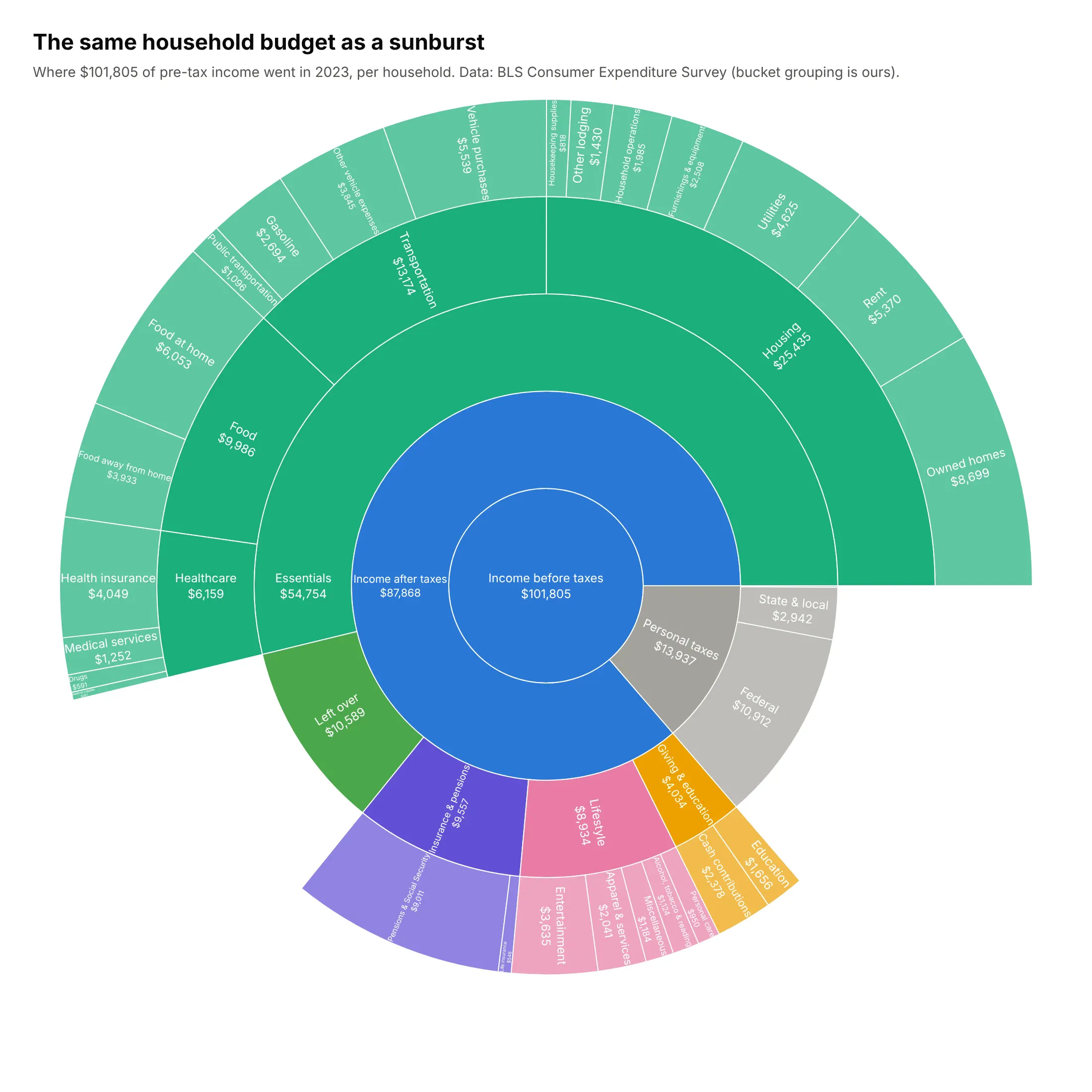
Other ways to see it: sunburst, treemap and icicle. A household budget is a strict hierarchy, where every dollar belongs to exactly one bucket, category and line item. That makes it a natural fit for Plotly's hierarchy charts. A sunburst draws each level as a ring, which shows part-of-whole at every level at once:
A treemap uses area for value and nesting for the hierarchy. It's the best of the three for comparing sizes, rent against car payments for example, but the sense of money flowing from income through taxes to spending disappears:
An icicle is the sunburst unrolled into columns. It reads left to right like a Sankey, but each column must add up exactly to its parent, so it can't show merges, loops or links that skip a level:
3. The US federal budget, from paycheck to program
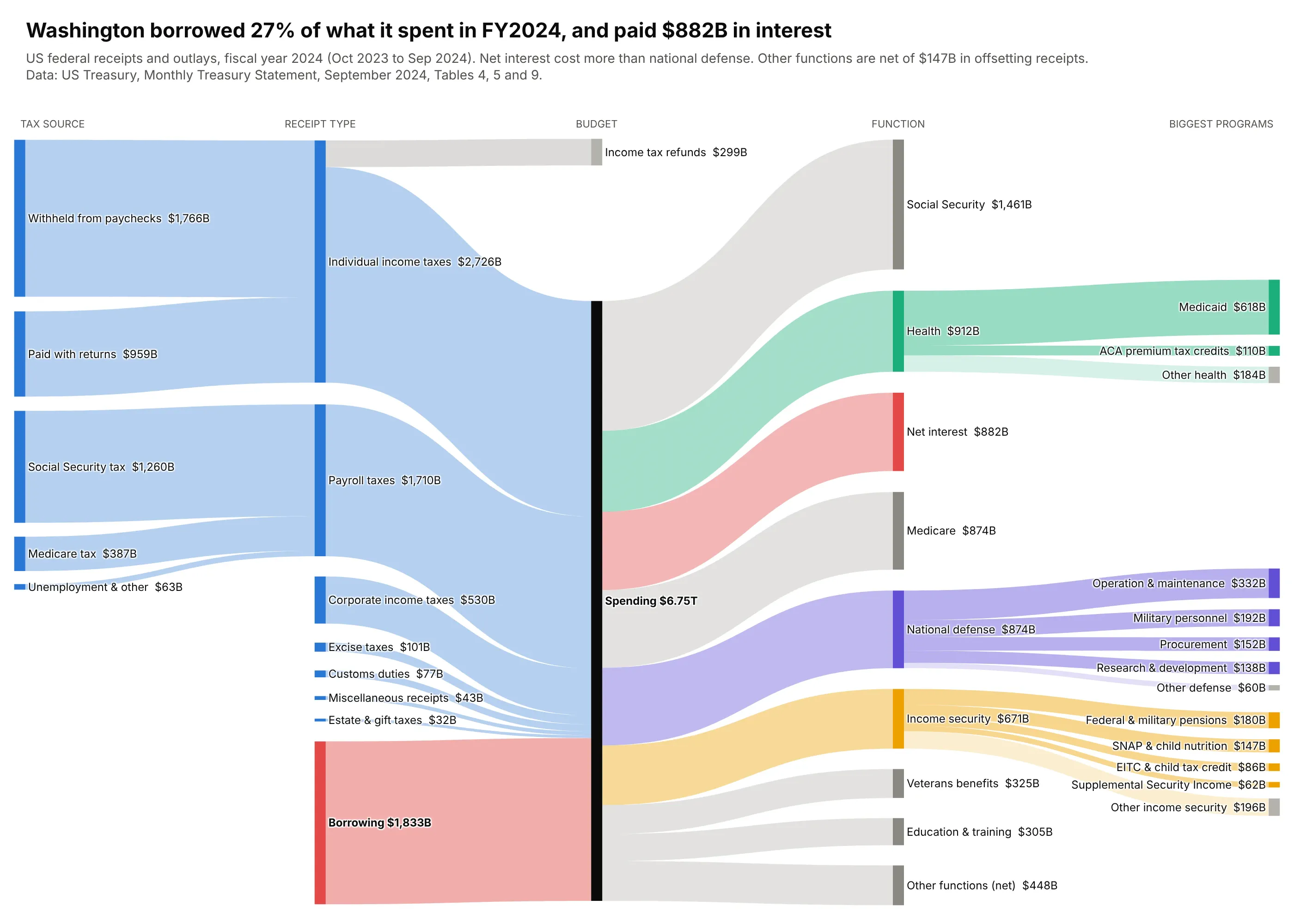
"Where do my taxes go" is the oldest Sankey question there is, and five columns answer it properly. On the left, most income tax is withheld from paychecks before anyone files a return, and payroll taxes split into separate Social Security and Medicare streams. In the middle, a red ribbon shows the government borrowed $1.83 trillion, 27% of what it spent in fiscal 2024. On the right, spending opens into real programs: Medicaid is 68% of the health budget, and net interest ($882B) cost more than national defense ($874B). Data: US Treasury, Monthly Treasury Statement, September 2024, Tables 4, 5 and 9. Trick: model borrowing as an explicit source so both sides balance, and only color the story: borrowing, interest and the three functions that get opened up.
Data: US Treasury Monthly Treasury Statement, September 2024, Tables 4, 5 and 9(https://fiscaldata.treasury.gov/datasets/monthly-treasury-statement/). Fiscal 2024 receipts by source and outlays by function and agency, US$ billions.Build a 5-column plotly Sankey: tax source -> receipt type -> budget -> function -> biggest programs.- Keep "Borrowing" as a red source in the receipt column so receipts plus borrowing equal spending.- Color only the story: borrowing and net interest in red, and the functions that splitinto programs (Health, National defense, Income security) in their own colors. Everything else gray.- Pin node.x/node.y and use link.sort="input" so refunds and small nodes don't cross the main flow.- Show $B on every label and a takeaway title about borrowing and interest.
4. Who really pays for US health care
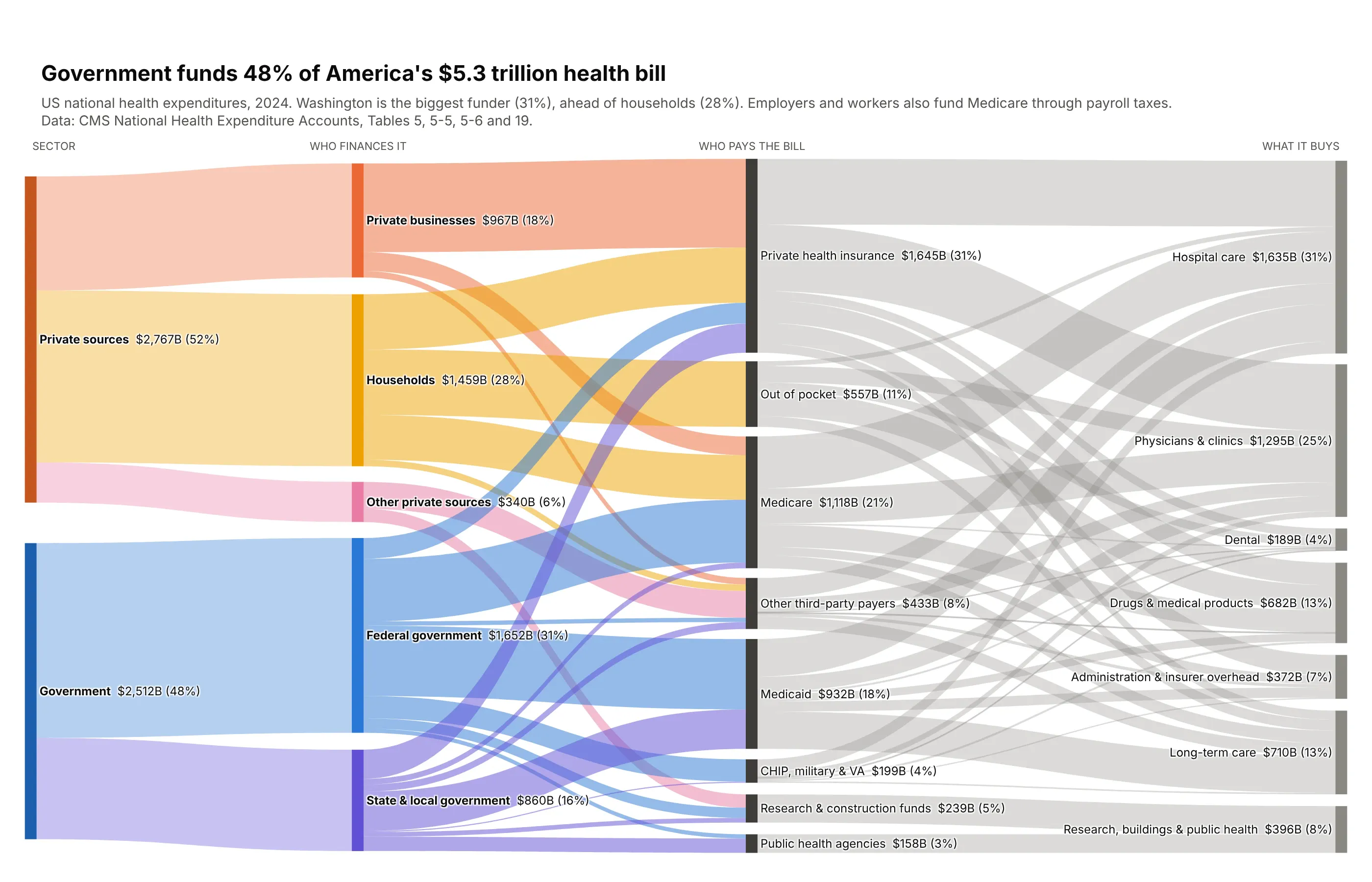
Insurance companies and government programs pay the hospital, but who gives them the money? This chart adds that missing step. Government funds 48% of America's $5.3 trillion health bill, and the federal government alone ($1.65T) puts in more than households do ($1.46T). Medicare gets about half of its money from employers and workers through payroll taxes and premiums. On the right, Medicaid turns out to be the biggest payer for long-term care. Data: CMS National Health Expenditure Accounts, 2024, Tables 5, 5-5, 5-6 and 19. Trick: only the funders get color, warm for private and cool for government; the payer-to-service half is neutral gray, and small services are grouped into seven so the right side stays readable.
Data: CMS National Health Expenditure Accounts, 2024, Tables 5, 5-5, 5-6 and 19(https://www.cms.gov/data-research/statistics-trends-and-reports/national-health-expenditure-data/historical). Spending by sponsor, by payer and by type of care, US$ billions.Build a 4-column plotly Sankey: sector -> sponsor (who finances it) -> payer -> type of care.- Group the 12 services into ~7 (hospital; physicians & clinics; drugs & medical products;long-term care; dental; administration; research, buildings & public health).- Color sponsors warm (private) and cool (government); payer->service links neutral gray.- Order the service column to sit close to its biggest payers (long-term care near Medicaid).- Label every node with $B and % of the total.
Energy, food and materials
Sankeys were invented to draw physical flows, and they're still the best chart for them. These six follow energy, gases, plastic, water, grain and coffee from source to final use, including one that loops back on itself.
5. US energy flow
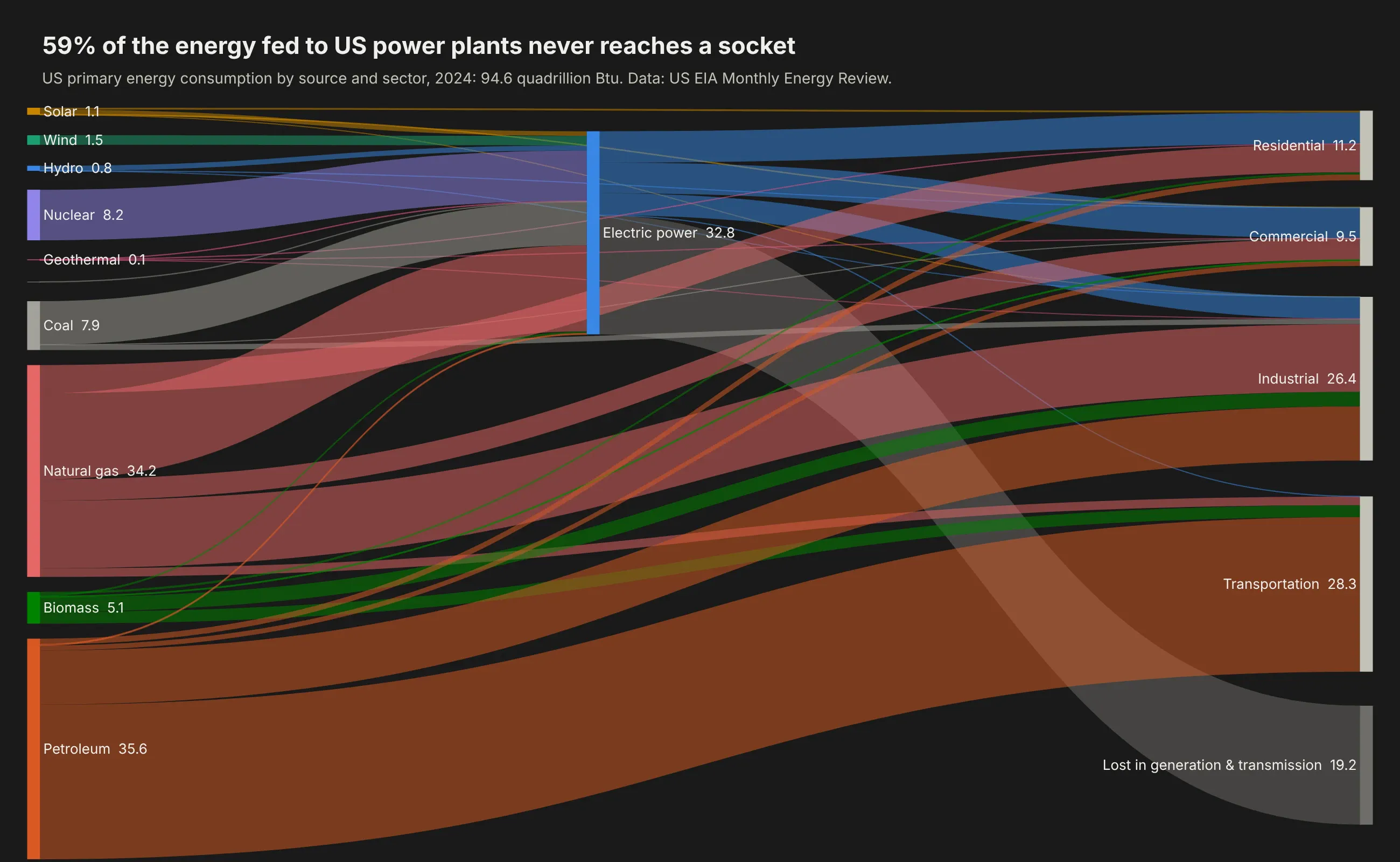
The diagram Sankeys were invented for. Ten primary sources feed either power plants or end-use sectors directly, and power plants feed homes, businesses and industry. Of the 32.8 quadrillion Btu that went into US power plants in 2024, 59% was lost as heat before it reached a socket. Seven in ten units of petroleum go to transportation, while natural gas is split across everything. Data: US EIA Monthly Energy Review, 2024. Trick: node positions pinned with node.x and node.y, and ribbons sorted by source and target position with link.sort="input", which removes most of the crossings plotly's automatic layout leaves behind.
Data: US EIA Monthly Energy Review, 2024, Tables 2.2 to 2.6 (https://www.eia.gov/totalenergy/data/monthly/).Energy consumption by source and sector, quadrillion Btu.Build a dark-theme plotly Sankey of US energy flow: primary sources on the left,electric power in the middle, end-use sectors and losses on the right.- Pin every node with node.x and node.y, sort links by source then target position,and set link.sort="input" so ribbons don't cross needlessly.- One color per source; links take their source's color. Losses in gray.- Background #1a1a19, white labels with textfont shadow="none", values in quads on labels.
6. Where methane comes from
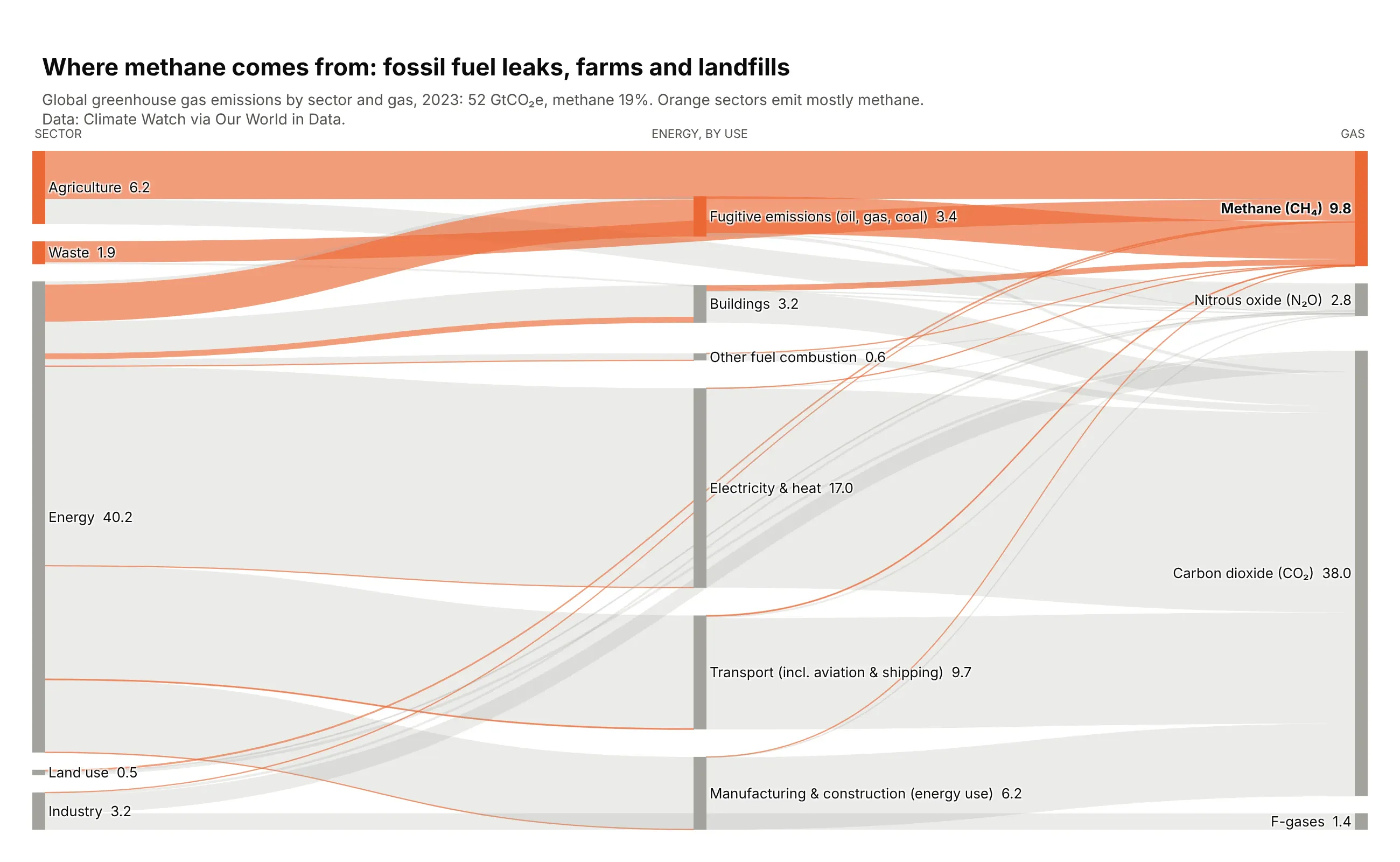
Sector on the left, energy broken down by use in the middle, gas on the right. Everything is gray except methane, which makes up 19% of the 52 GtCO₂e of global emissions, so you see exactly where it comes from: farms, leaks from oil, gas and coal, and landfills. Data: Climate Watch via Our World in Data, 2023. Trick: links can skip a column. Agriculture, waste and industry have no sub-sectors, so their ribbons go straight to the gases while energy stops to split. Putting the methane-heavy rows on top keeps the orange ribbons nearly straight.
Data: Climate Watch greenhouse gas emissions by sector, via Our World in Data, 2023(https://ourworldindata.org/emissions-by-sector). World emissions by sector and gas (CO₂, methane, N₂O, F-gases), MtCO2e.Build a plotly Sankey: sector group -> energy sub-sector -> gas. Groups without sub-sectors(agriculture, waste, industry, land use) link straight to the gases, skipping the middle column.- Make one variable HIGHLIGHT = "Methane (CH₄)". Color its links orange and everything else light gray.- Color a node orange when most of its emissions are the highlighted gas.- Order rows so methane-heavy sources sit on top next to the methane node.- Show GtCO2e on the labels and the highlighted gas's share of the total in the title.
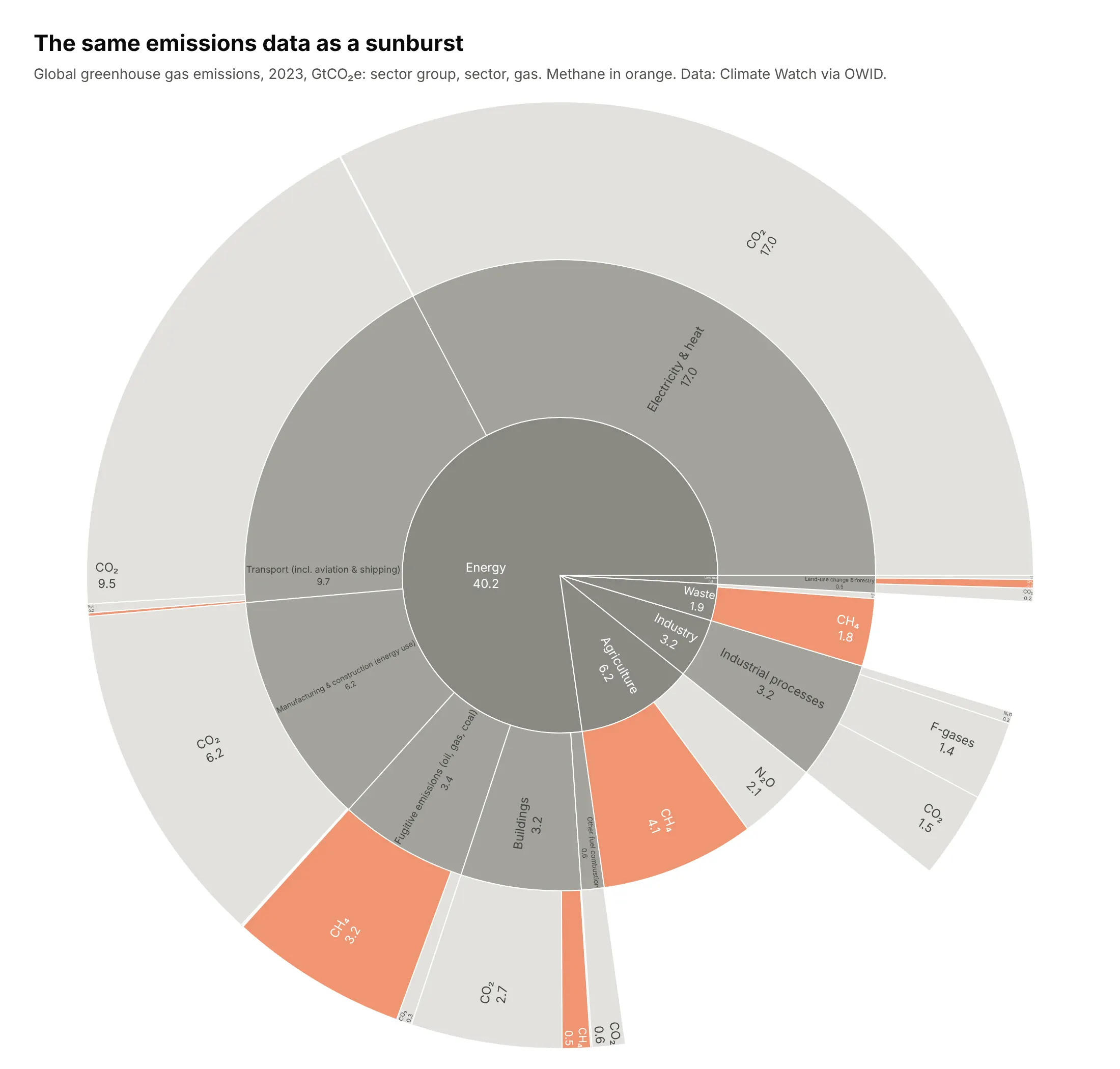
Another way to see it: a sunburst. The same emissions as rings of sector group, sector and gas. It's good for "what share of the total is this", but methane is now scattered across several separate slivers, so "where does methane come from" is harder to answer than in the Sankey, where it all flows into one node:
7. The plastic loop that barely closes
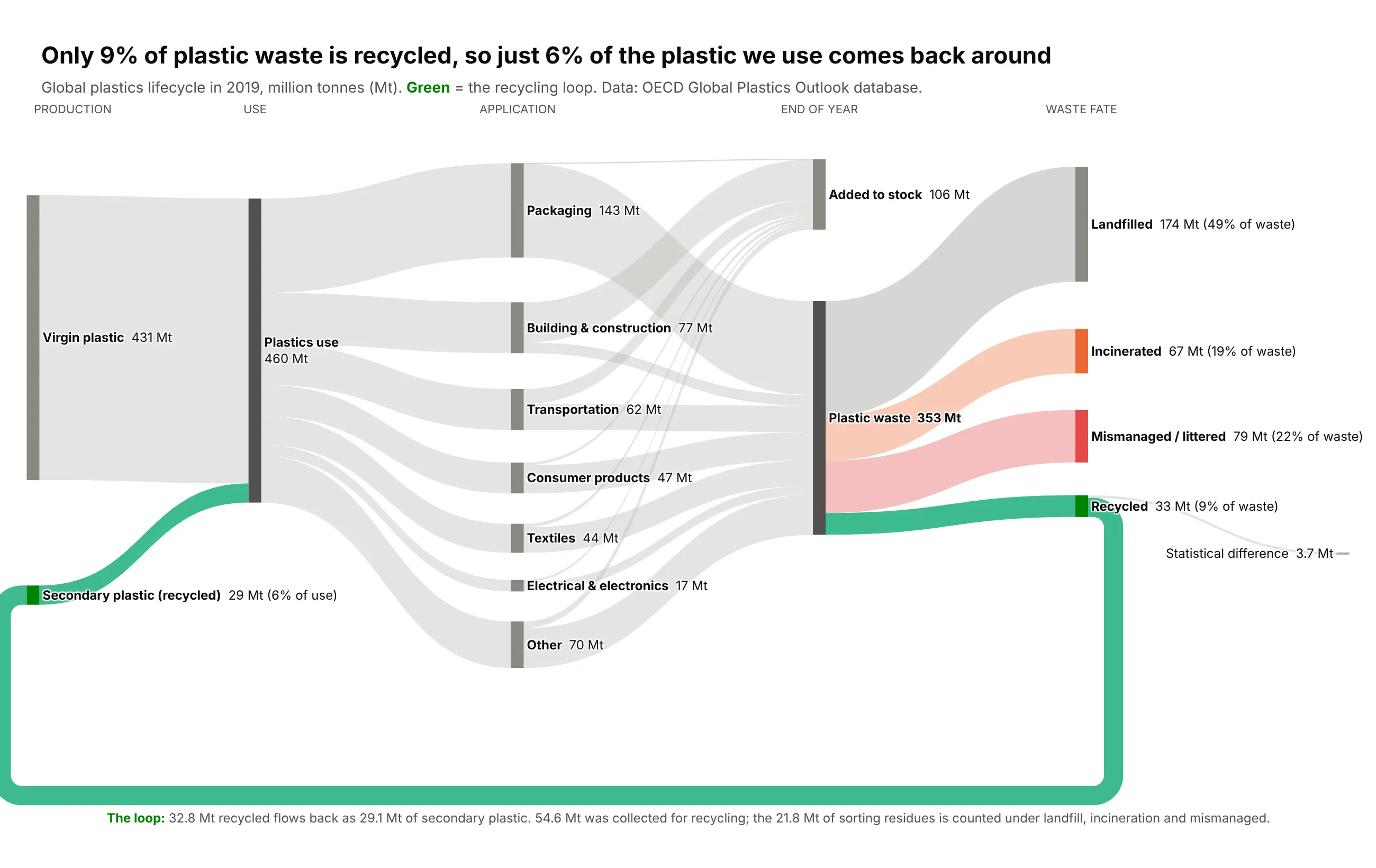
Plastic is supposed to go round in circles, so this Sankey has a real loop in it. Follow the green ribbon: the plastic that actually gets recycled leaves the far right of the chart and travels all the way back to the start, where it becomes "secondary" plastic. Only 9% of 2019's 353 million tonnes of plastic waste made that trip, and it supplied just 6% of the plastic the world used. The rest went to landfill (49%), incinerators (19%) or the open environment (22%). Data: OECD Global Plastics Outlook database, 2019. Trick: a link whose target sits to the left of its source is drawn as a circular link around the whole diagram. Fixed node positions and one bright color make the loop the first thing you see.
Data: OECD Global Plastics Outlook database, 2019 (https://www.oecd.org/en/publications/global-plastics-outlook_de747aef-en.html).World plastics use by type and application, waste by application, and waste by end-of-life fate, million tonnes.Build a plotly Sankey of the global plastic lifecycle with a recycling loop:virgin/secondary plastic -> plastics use -> applications -> added to stock / plastic waste-> landfilled / incinerated / mismanaged / recycled, and recycled -> secondary plastic.- The "Recycled -> Secondary plastic" link goes backwards, so plotly draws it as a loop.Pin every node with node.x/node.y (arrangement="fixed") so the loop runs cleanly under the chart.- Make the loop the only bright green element; everything else muted gray, with softorange/red for incinerated and mismanaged.- Show Mt on every label and the % of waste on each fate.
8. US water use
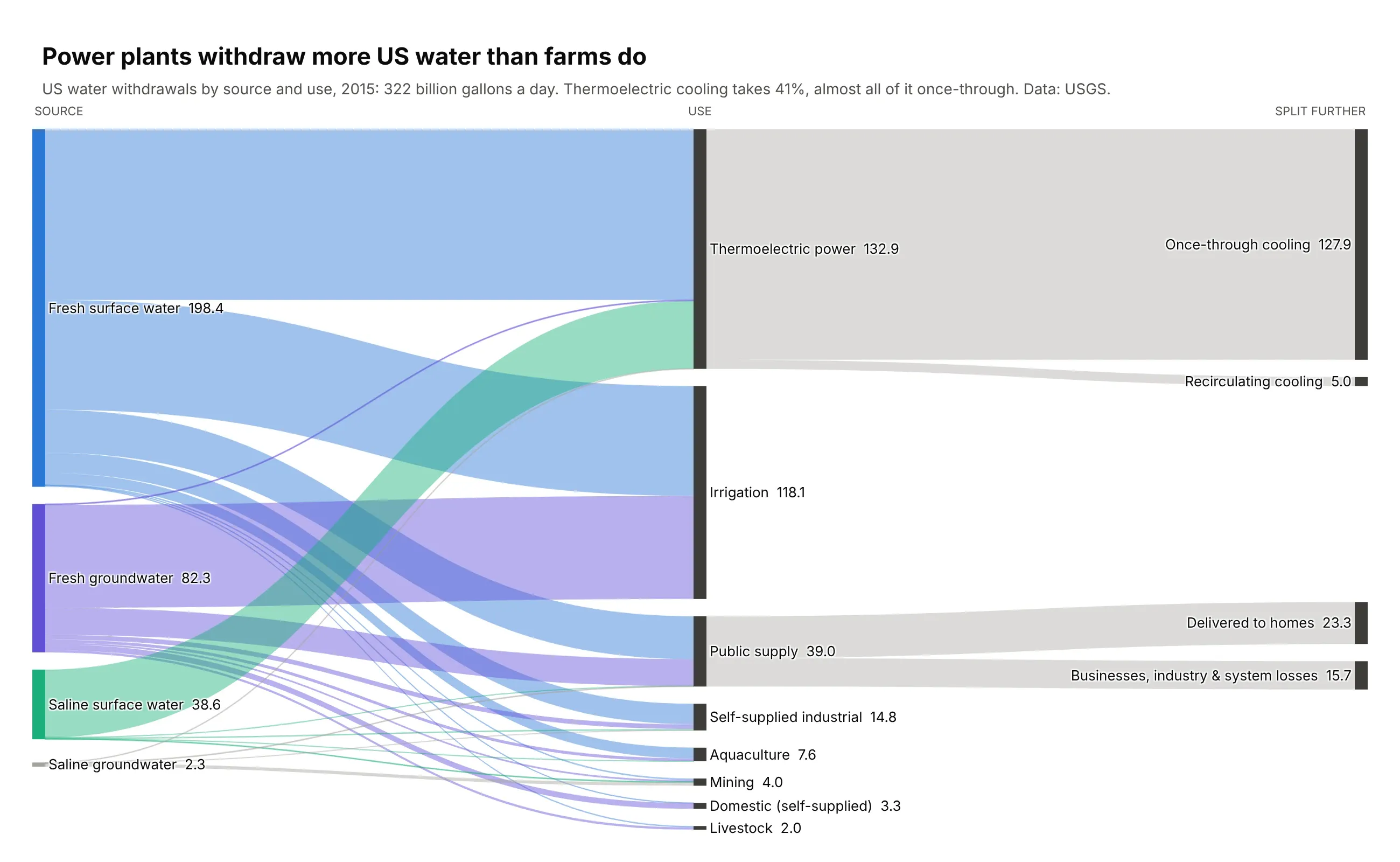
The US withdraws 322 billion gallons of water a day, and the biggest user isn't farms or homes: power plant cooling takes 41%, and 96% of that is once-through cooling that pulls water from a river and sends it back warmer. Irrigation takes 37%, and public water systems deliver just 23 billion gallons a day to homes. Data: USGS, Estimated Use of Water in the United States, 2015. Trick: node.align="left" keeps uses that don't split further in the middle column, so only the two that do (cooling, public supply) reach the third column.
Data: USGS Estimated Use of Water in the United States, 2015 (https://doi.org/10.5066/F7TB15V5).National totals of withdrawals by source (fresh/saline, surface/ground) and by use, million gallons per day.Build a plotly Sankey: water source -> use -> how it's used (where USGS splits a use).- One color per source (fresh surface, fresh ground, saline surface, saline ground);color first-hop links by source, second-hop links neutral gray.- Set node.align="left" so uses without a split stay in the middle column.- Sort uses largest first; show billion gallons per day on every label.
9. Where the world's grain goes
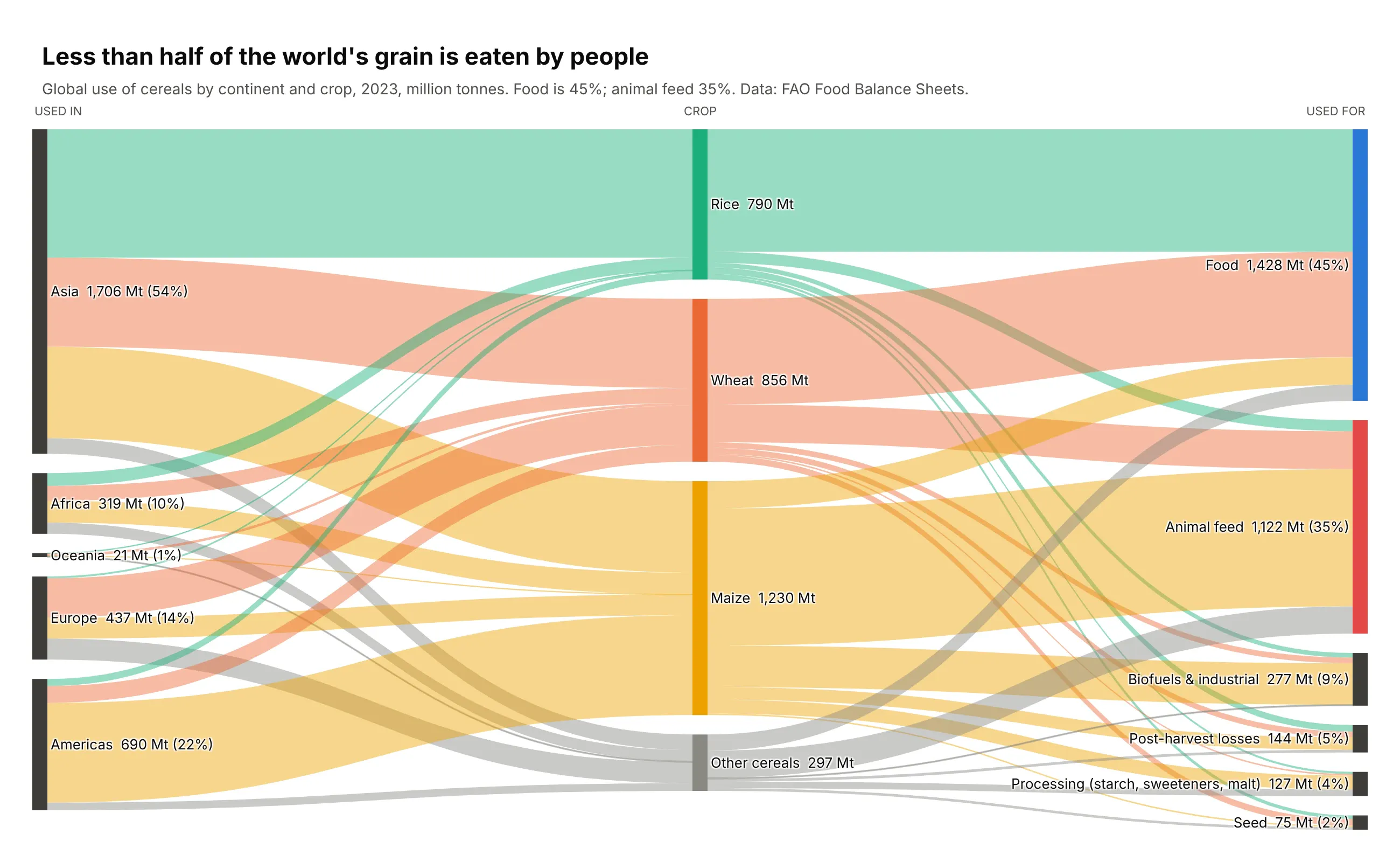
Less than half of the world's grain is eaten by people: 45% goes to food, 35% to animal feed and 9% to biofuels and industry. The split depends on the crop, and the crop depends on where you are. Asia uses 54% of the world's cereals and most of its rice, which is almost all eaten. The Americas lean on maize, and most maize becomes feed or fuel. Data: FAO Food Balance Sheets, 2023 (continents add up to the world total). Trick: order the columns so rice-heavy Asia sits next to rice and rice sits next to food, and maize-heavy Americas sits next to maize and feed. Ordering removes more crossings than any styling option.
Data: FAO Food Balance Sheets, 2023 (https://www.fao.org/faostat/en/#data/FBS).For each continent, rice, wheat, maize and other cereals split by use (food, feed, processing, other uses, losses, seed), million tonnes.Build a plotly Sankey: continent -> crop -> use.- One color per crop, carried through both hops (continent->crop links take the crop color).- Order continents Asia, Africa, Oceania, Europe, Americas and crops Rice, Wheat, Maize,Other so the big ribbons run straight; fix the order with node.sort="input".- Show Mt and % on labels. Title: less than half of the world's grain is eaten by people.
10. World coffee trade
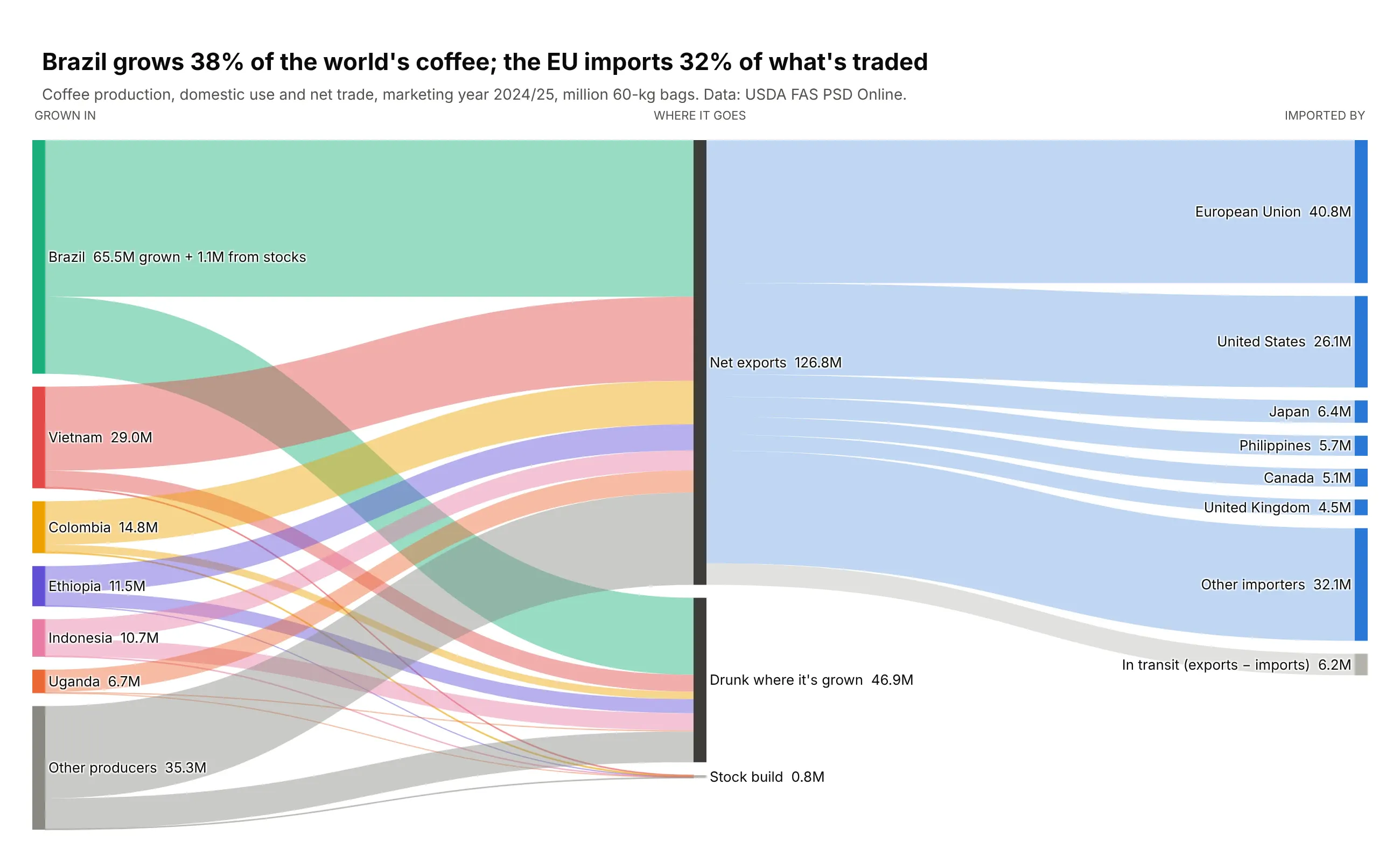
Production, domestic consumption and imports are usually three separate tables. One Sankey joins them: Brazil grows 38% of the world's coffee, and the EU imports 32% of what's traded. Brazil also drinks a third of its own crop. Data: USDA FAS PSD Online, marketing year 2024/25. Trick: a small stock drawdown would have pushed Brazil into a column of its own, so it goes into Brazil's label instead. Watch for tiny flows that wreck a layout, and handle them in text.
Data: USDA FAS PSD Online, coffee, marketing year 2024/25 (https://apps.fas.usda.gov/psdonline/app/index.html#/app/downloads).Production, domestic consumption, exports and imports by country, thousand 60-kg bags.Build a plotly Sankey: production -> producing country -> net exports or domestic use -> importer.- Drop the small stock build and drawdown links and mention them in the country's label instead,so no country gets pushed into its own column.- Use node.align="left". One color per producing country; importers in neutral grays.- Show million bags on every label.
Funnels, journeys and stages
A funnel chart tells you how many people dropped out at each step. A Sankey also tells you where they came from and where they went, which makes it a better funnel. These seven follow people (and one football team's shots) through every stage.
11. From speed date to real date
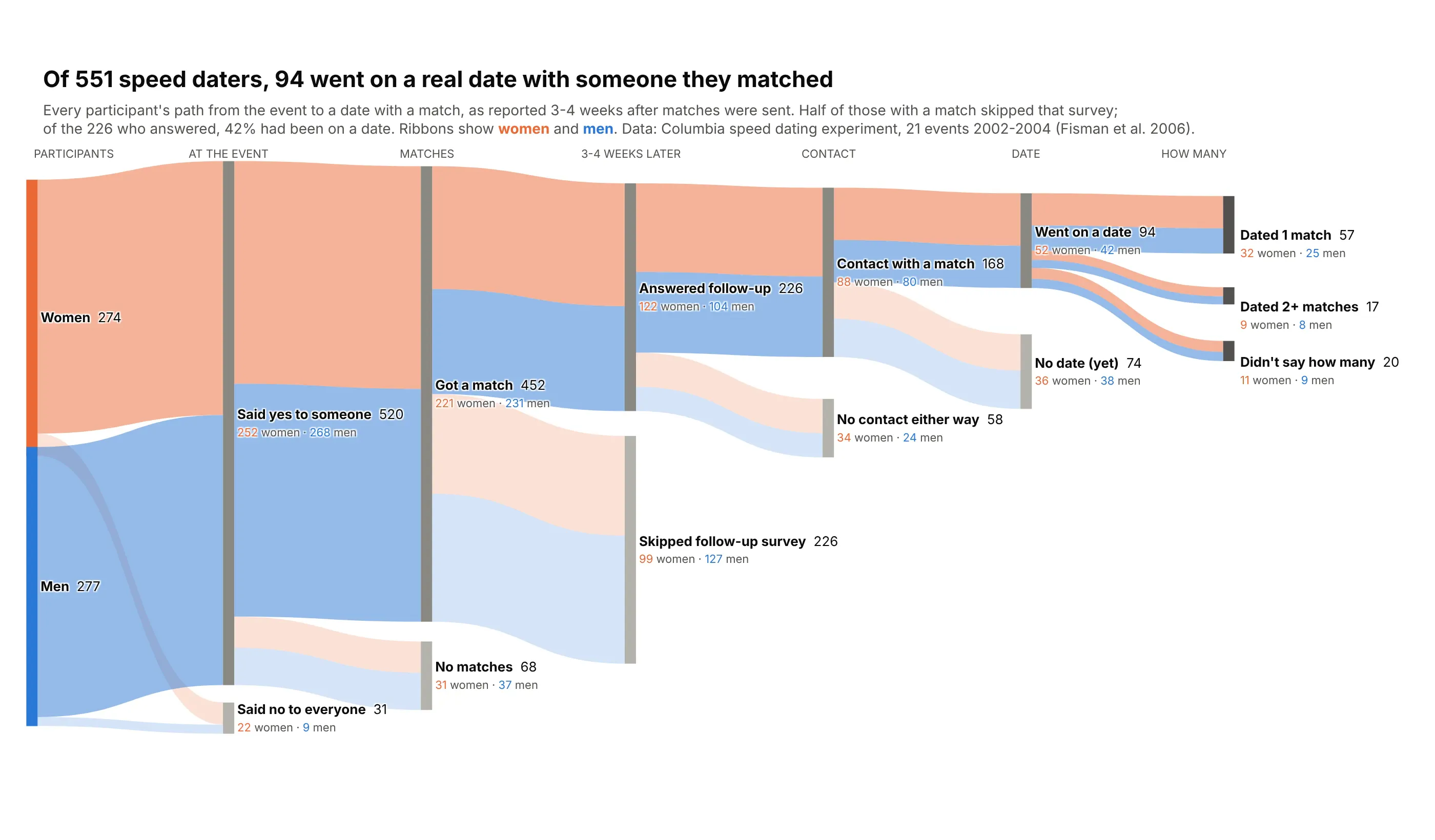
The "my dating app stats" Sankey is a Reddit classic, usually one person's swipes turning into a handful of dates. This one uses a published experiment instead: Columbia University ran 21 speed dating nights and then kept asking people what happened next. Of 551 participants, 94% said yes to somebody and 452 walked away with a match. Then the funnel narrows fast. Half of them never answered the follow-up survey, and of those who did, 168 had contact with a match and only 94 had actually gone on a date with one a month later. Women and men did about equally well (43% vs 40% of those who answered). Data: Fisman, Iyengar, Kamenica and Simonson (2006), Columbia speed dating experiment, full dataset with follow-up surveys. Trick: the main path is pinned along the top and each drop-off hangs just under the stage where people left, while ribbons stay colored by gender all the way across.
Data: Fisman, Iyengar, Kamenica and Simonson (2006), Columbia speed dating experiment, full dataset with follow-up surveys(http://www.stat.columbia.edu/~gelman/arm/examples/speed.dating/, also on Kaggle as "Speed Dating Experiment"). Reduce it to one row per person.Build a plotly Sankey funnel with one column per stage:gender -> said yes -> matched -> answered follow-up -> contact -> date -> how many dated.Each person's path ends at the stage where they dropped out.- Pin the main path along the top with node.x/node.y and hang each drop-off node("Said no to everyone", "No matches", "Skipped follow-up survey", ...) just below its stage, in gray.- Color ribbons by gender all the way through (aggregate links by source, target, gender),with drop-off ribbons fainter.- Label nodes with totals and the women/men split. Title: how many of 551 went on a real date.
12. A shopping funnel with a loop
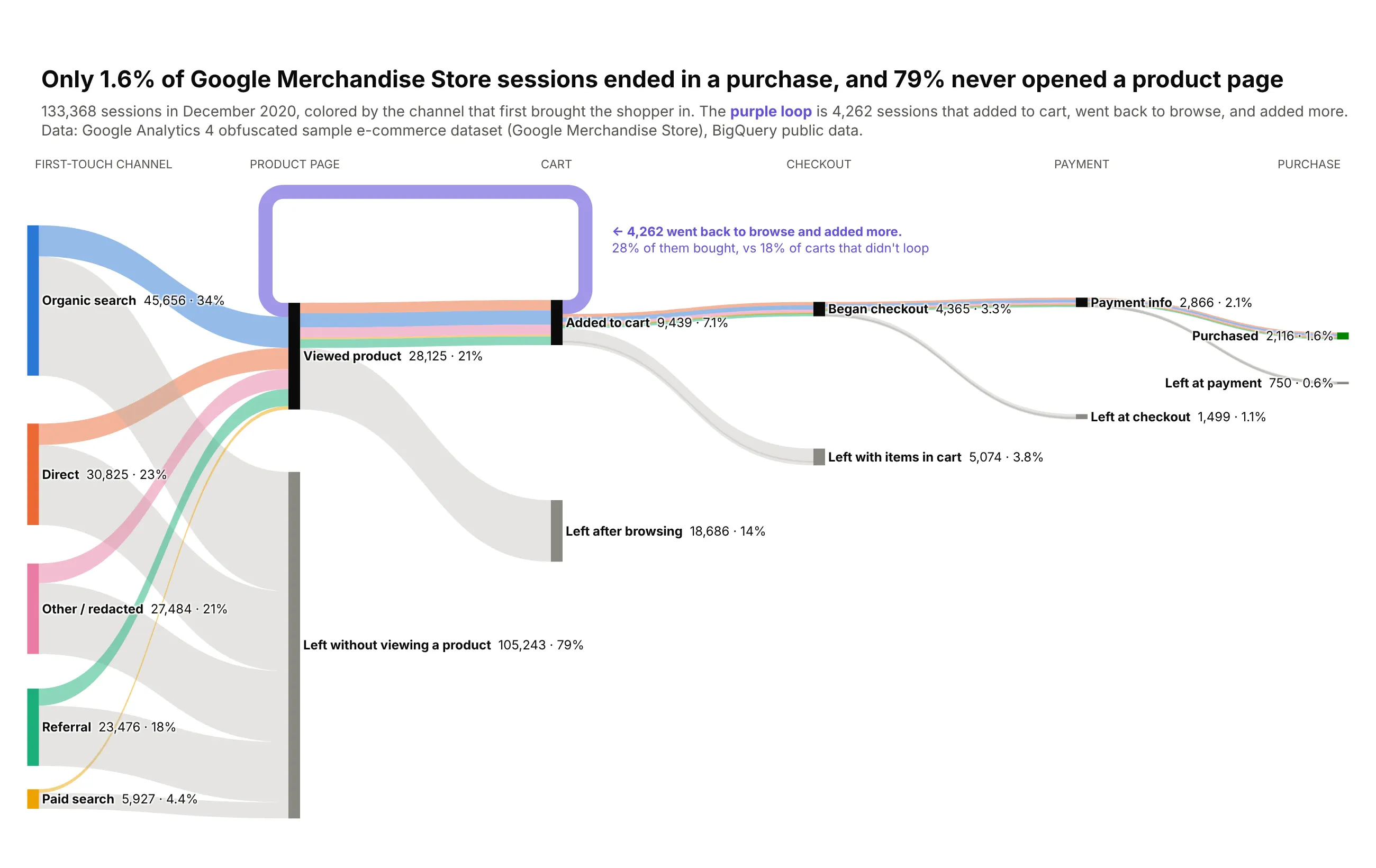
A funnel chart tells you how many shoppers you lose at each step. This one also tells you where they came from and where they went. In December 2020, 79% of sessions on Google's own merchandise store never opened a product page, and only 1.6% ended in a purchase. More than half the sessions that added something to their cart left with it still there. The purple loop is something a funnel chart can't draw: 4,262 shoppers added an item, went back to browse, and added more, and 28% of them bought, against 18% of carts that didn't loop. Data: Google Analytics 4 obfuscated sample e-commerce dataset (Google Merchandise Store), December 2020. Trick: a link whose target sits to the left of its source becomes a circular link, so "back to browsing" draws itself as a loop over the funnel. Exits are gray and forward ribbons keep their channel color.
Data: Google Analytics 4 obfuscated sample e-commerce dataset, Google Merchandise Store, December 2020(https://developers.google.com/analytics/bigquery/web-ecommerce-demo-dataset). Reduce events to one row per session with its first-touch channel and furthest step.Build a plotly Sankey funnel: first-touch channel -> viewed product -> added to cart-> began checkout -> payment info -> purchased, with a gray "Left ..." node at every step.- Add one backwards link "Added to cart -> Viewed product" for sessions that went back tobrowse; plotly draws it as a loop. Color it purple and annotate it.- Color forward ribbons by channel (aggregate by source, target, channel), exits gray.- Pin the purchase path along the top with node.x/node.y and leave room above it for the loop.- Label each step with sessions and % of all sessions.
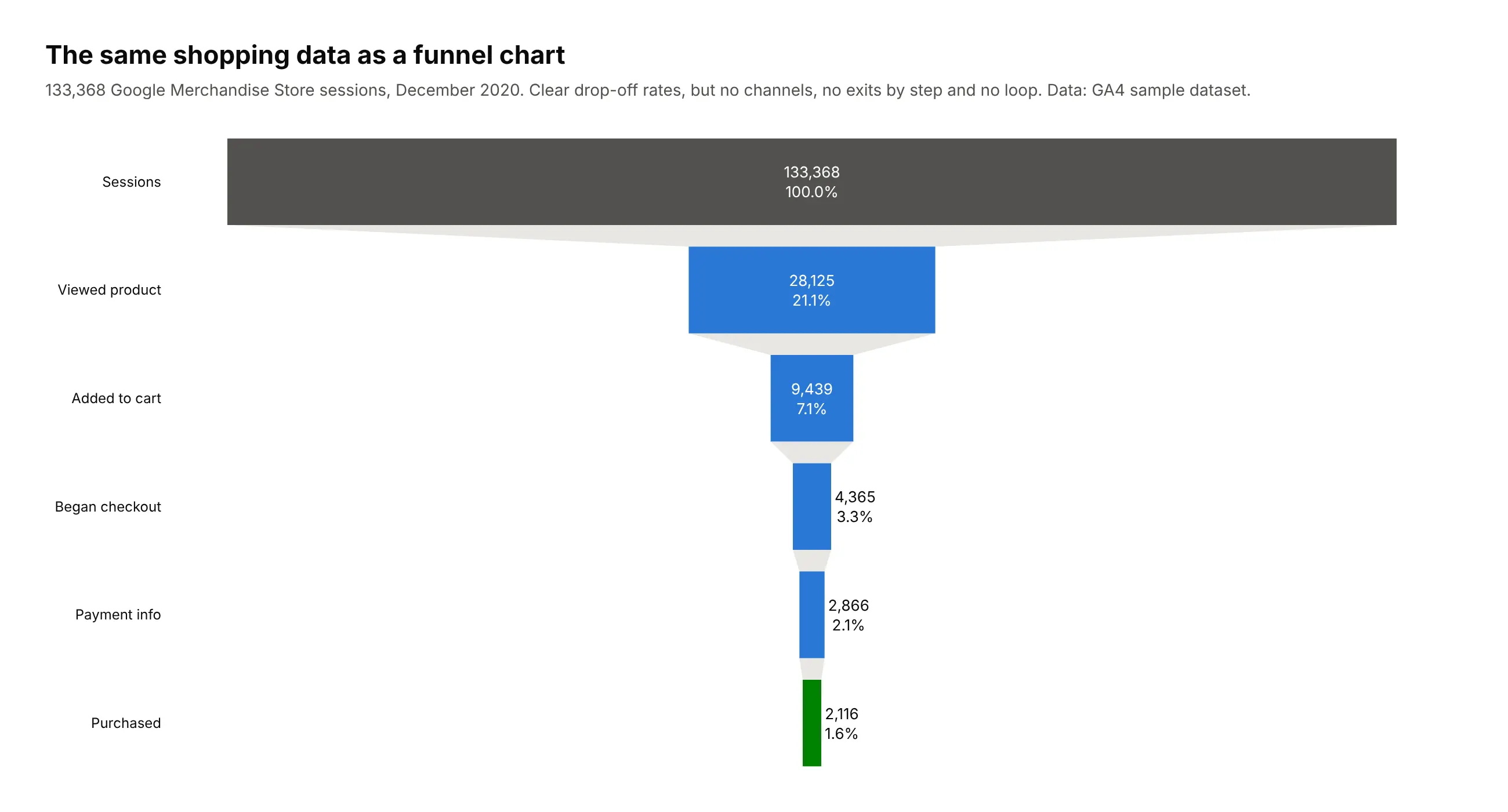
Another way to see it: a funnel chart. The classic funnel gives you clean drop-off rates at a glance. Compare it with the Sankey above: it can't show which channel shoppers came from, where each group left, or the shoppers who looped back from the cart:
13. A nine-stage hiring pipeline
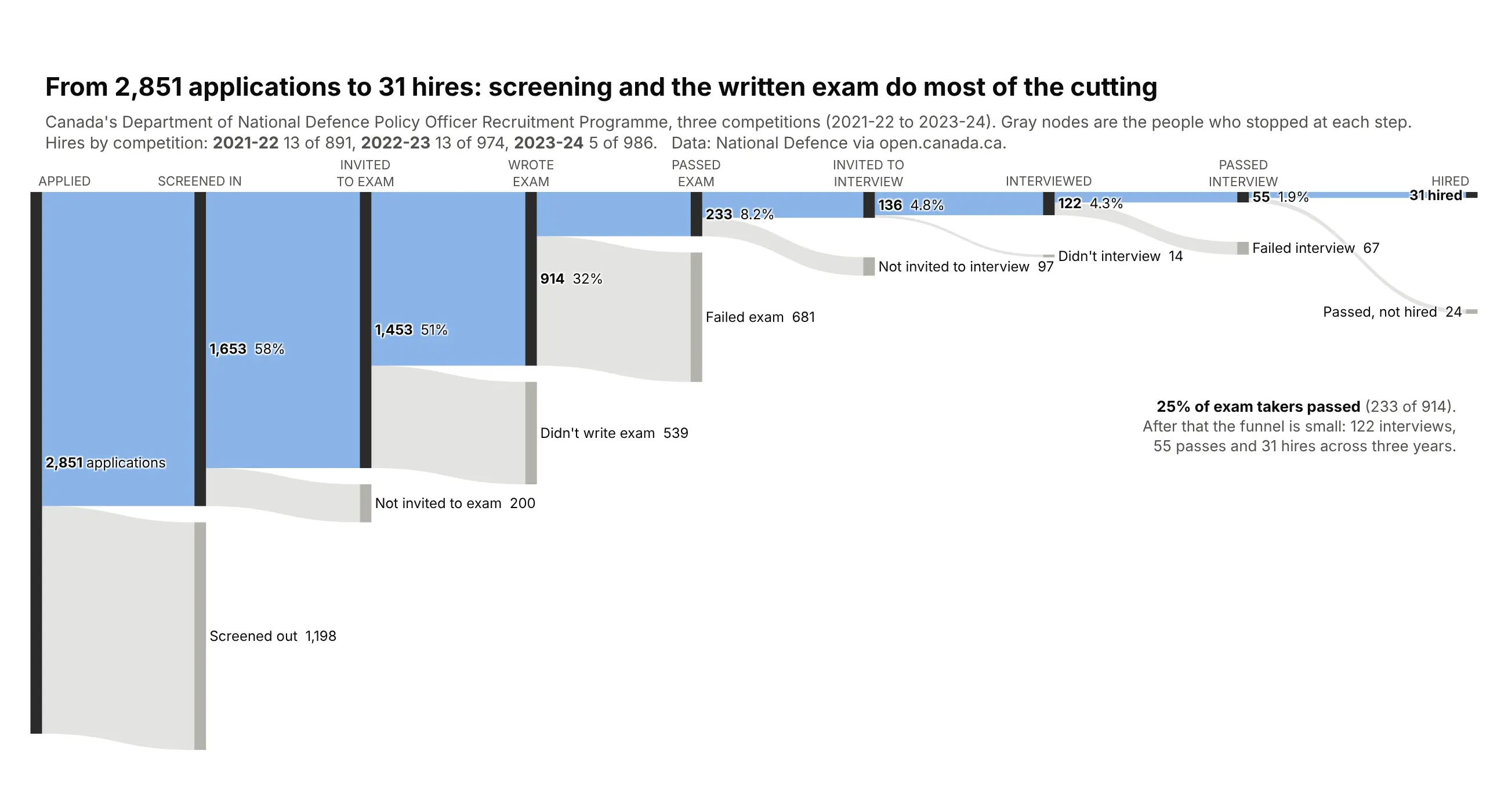
Canada's defence department publishes every step of its policy officer hiring process, which almost no employer does. Across three hiring rounds, 2,851 applications produced 31 hires (1.1%). Most people drop out early: 42% are cut at screening, over a third of those invited never sit the written exam, and only a quarter of those who sit it pass. Even at the end, 24 of the 55 people who passed the interview weren't hired. Data: Department of National Defence (Canada), Policy Officer Recruitment Programme statistics, 2021-22 to 2023-24, via open.canada.ca. Trick: a staircase layout, with the main path pinned to a straight top line and each drop-off hanging below the stage where people left.
Data: Department of National Defence (Canada), Policy Officer Recruitment Programme statistics, 2021-22 to 2023-24(https://open.canada.ca/data/en/dataset/1216234c-9c5c-4f7d-bba9-92ec79a8a6f6). Counts at each hiring stage, three competitions.Build a plotly Sankey of the hiring funnel, summing the three years:Applied -> Screened in -> Invited to exam -> Wrote exam -> Passed exam -> Invited to interview-> Interviewed -> Passed interview -> Hired, with a gray drop-off node at every step.- Pin the main path along the top (node.y near 0) and each drop-off just below its stage.- Main path in blue, drop-offs in gray. Label each stage with its count and % of applications.- Title: from 2,851 applications to 31 hires.
14. A clinical trial's participant flow, read top to bottom
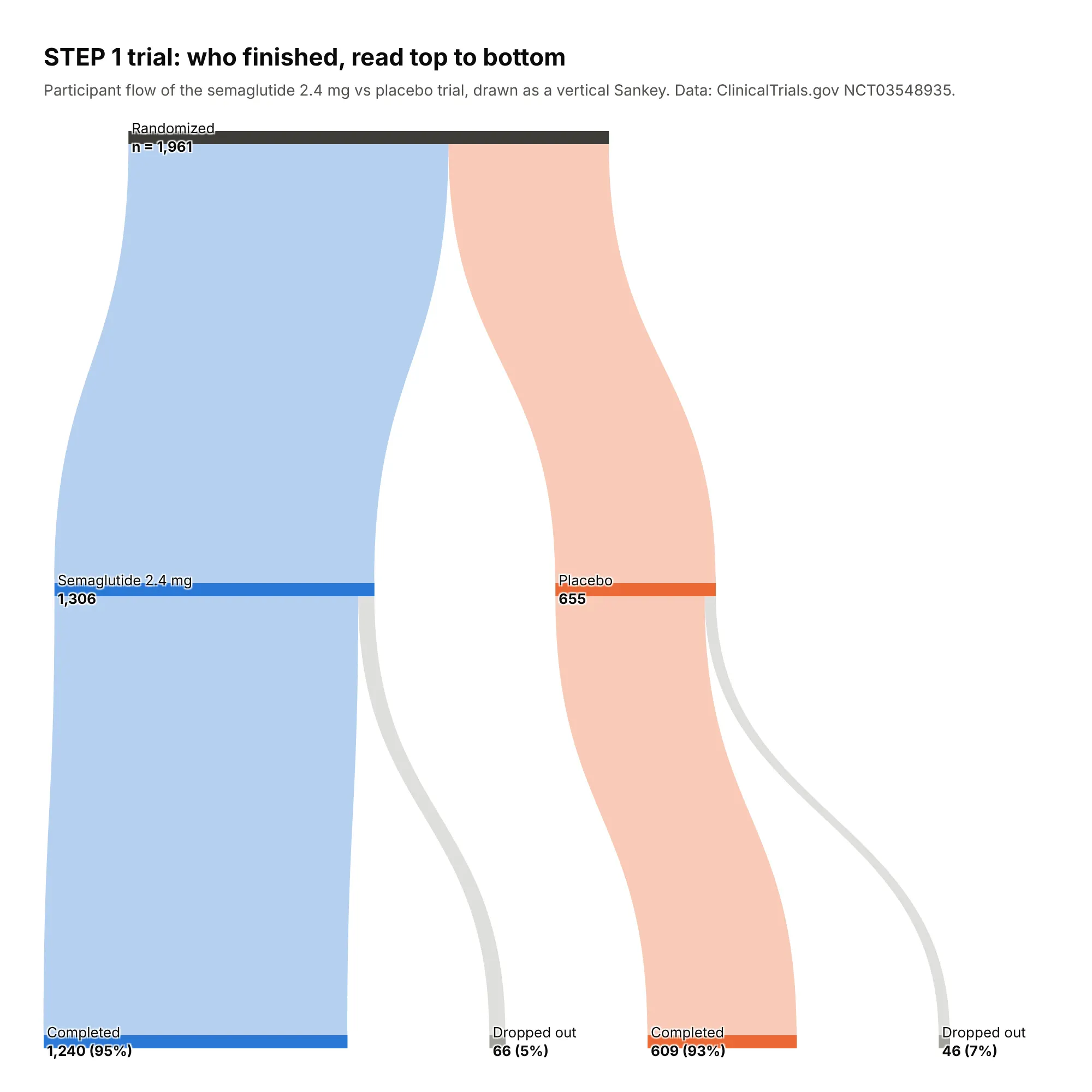
CONSORT diagrams are the boxes-and-arrows chart every clinical trial publishes. Drawn as a vertical Sankey, the STEP 1 trial of semaglutide for weight management shows its 2:1 randomization and each arm's attrition at a glance: 95% of the semaglutide arm completed the trial versus 93% on placebo, and the most common reason for leaving was being lost to follow-up. Data: ClinicalTrials.gov, NCT03548935. Trick: orientation="v" for a top-down read, and node_align="left" so dropouts stop at the stage where they happened.
Data: ClinicalTrials.gov, STEP 1 trial, NCT03548935 (https://clinicaltrials.gov/study/NCT03548935).Use the participant flow module: randomized, each arm, completed, and dropout reasons.Build a vertical plotly Sankey (orientation="v") of the trial's participant flow.- Randomized -> each arm -> Completed trial or Did not complete. Keep each arm's"Did not complete" as its own node, and put the dropout reasons in its hover text.- Semaglutide arm blue, placebo gray, completions green. Use node.align="left".- Show counts and completion rates on the labels. Make the figure square.
15. Who survived the Titanic
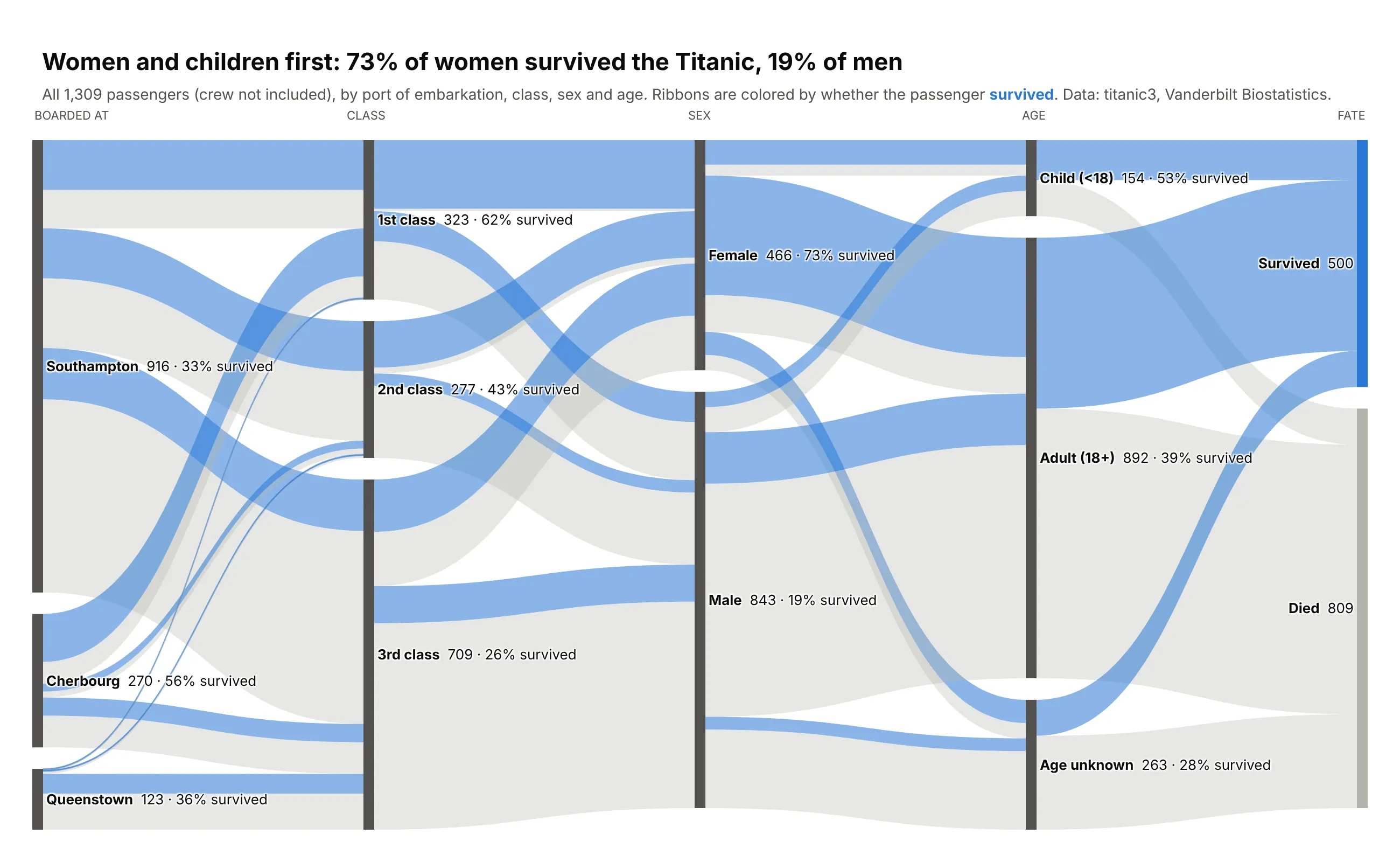
A survival table needs a dozen numbers. This Sankey follows all 1,309 passengers from the port where they boarded through class, sex and age to their fate, and every ribbon is colored by whether that passenger survived. "Women and children first" jumps out: 73% of women survived and 19% of men. So does the class gap, and the first column adds a twist: 56% of Cherbourg passengers survived against 33% from Southampton, because Cherbourg boarded so many first-class passengers. Data: titanic3 passenger list, Vanderbilt Biostatistics. Trick: aggregate links by (source, target, outcome) instead of (source, target), so parallel ribbons keep their identity through every hop. It's the single most useful Sankey technique, and the helper function at the end of this guide does it for you.
Data: titanic3 passenger list, Vanderbilt Biostatistics (https://hbiostat.org/data/repo/titanic3.csv).All 1,309 passengers; bin age into child/adult groups and use port of embarkation, class, sex and survival.Build a plotly Sankey: port -> class -> sex -> age group -> survived or died.- Color every link by the passenger's final outcome (blue survived, gray died),aggregating by (source, target, outcome) so colors carry through all five columns.- Put the passenger count and survival rate on every node, e.g. "Female 466 · 73% survived".- Keep classes in order 1st, 2nd, 3rd with node.sort="input".
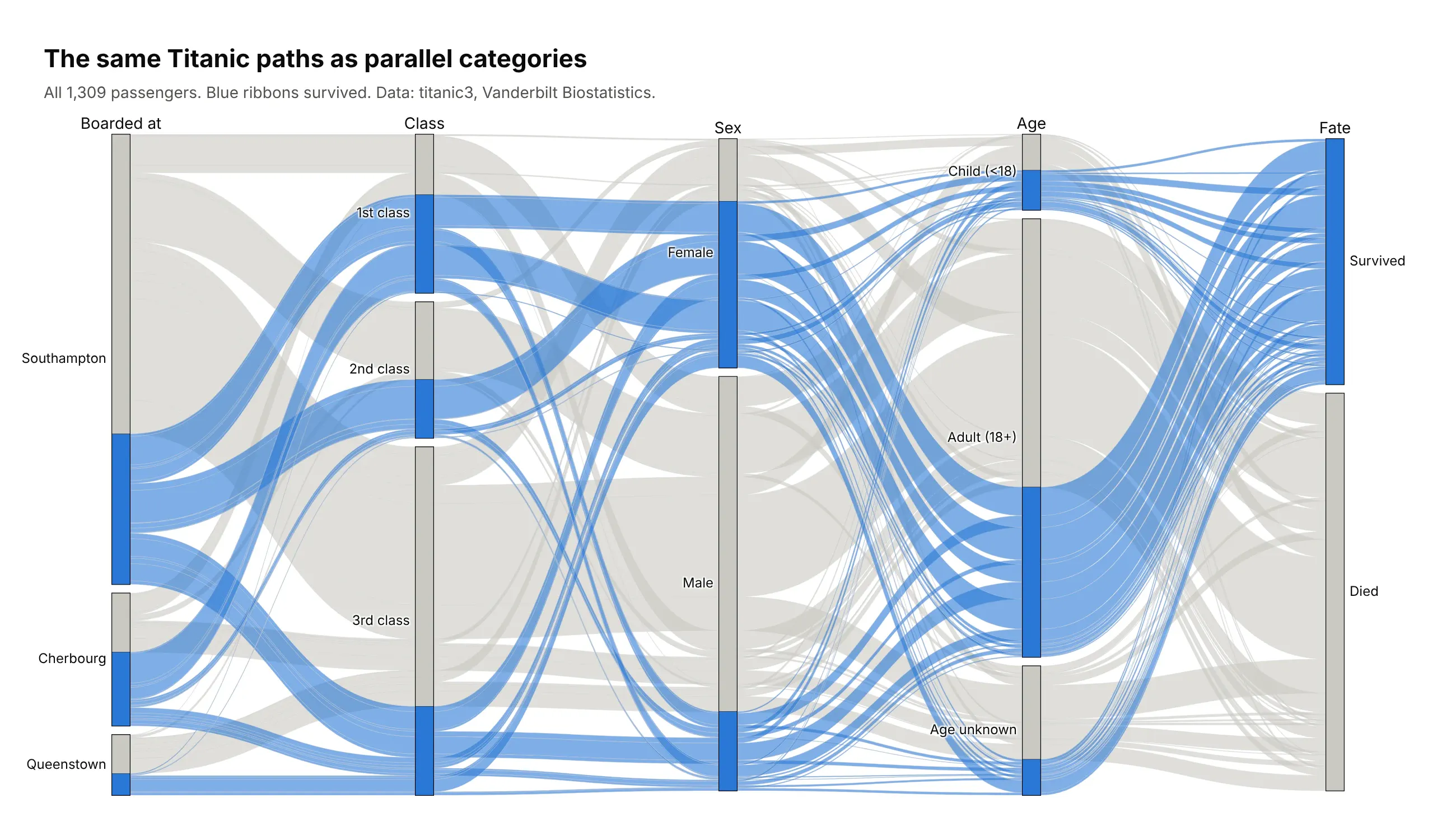
Another way to see it: parallel categories. When every record has a value in every column, like these passengers, parallel categories (go.Parcats) is the Sankey's closest cousin. You hand it the raw columns and it does the node math for you, and readers can drag categories to reorder them:
16. Every shot Argentina took at the 2022 World Cup
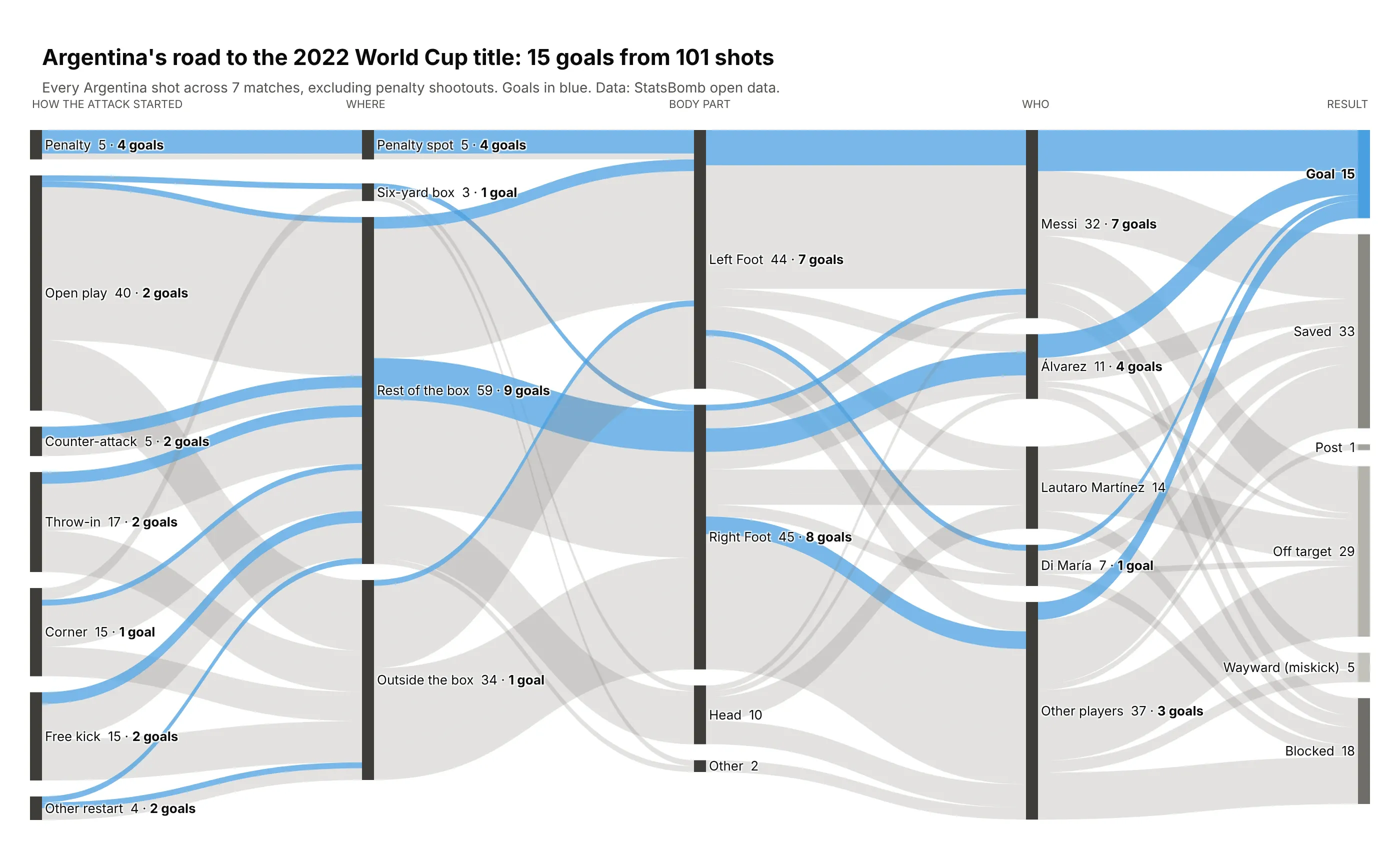
A shot map shows where shots came from. This shows what they turned into, in five steps: how the attack started, where the shot was taken, with which foot, by whom, and what happened. 101 shots, 15 goals across seven matches on the way to the title. A third of the shots came from outside the box and produced one goal, the 10 headers scored nothing, and Messi took 32 shots and scored 7 (four of them penalties). Data: StatsBomb open data (penalty shootouts excluded). Trick: goals in Argentina sky blue and every other outcome in grays, so the goals are the only color on the page and you can trace each one back to how the move began.
Data: StatsBomb open data, 2022 World Cup (https://github.com/statsbomb/open-data).All of Argentina's shots in its seven matches, excluding penalty shootouts.Build a 5-column plotly Sankey: how the attack started -> zone -> body part -> player -> outcome.- Map play patterns to Open play, Counter-attack, Throw-in, Corner, Free kick, Other restart,and give penalties their own "Penalty" start node at the top.- Aggregate links by (source, target, outcome); goal ribbons sky blue (#4a9fe0), the rest light gray.- Label every node with shots and goals ("Messi 32 · 7 goals").
17. The labor market churn under a steady unemployment rate
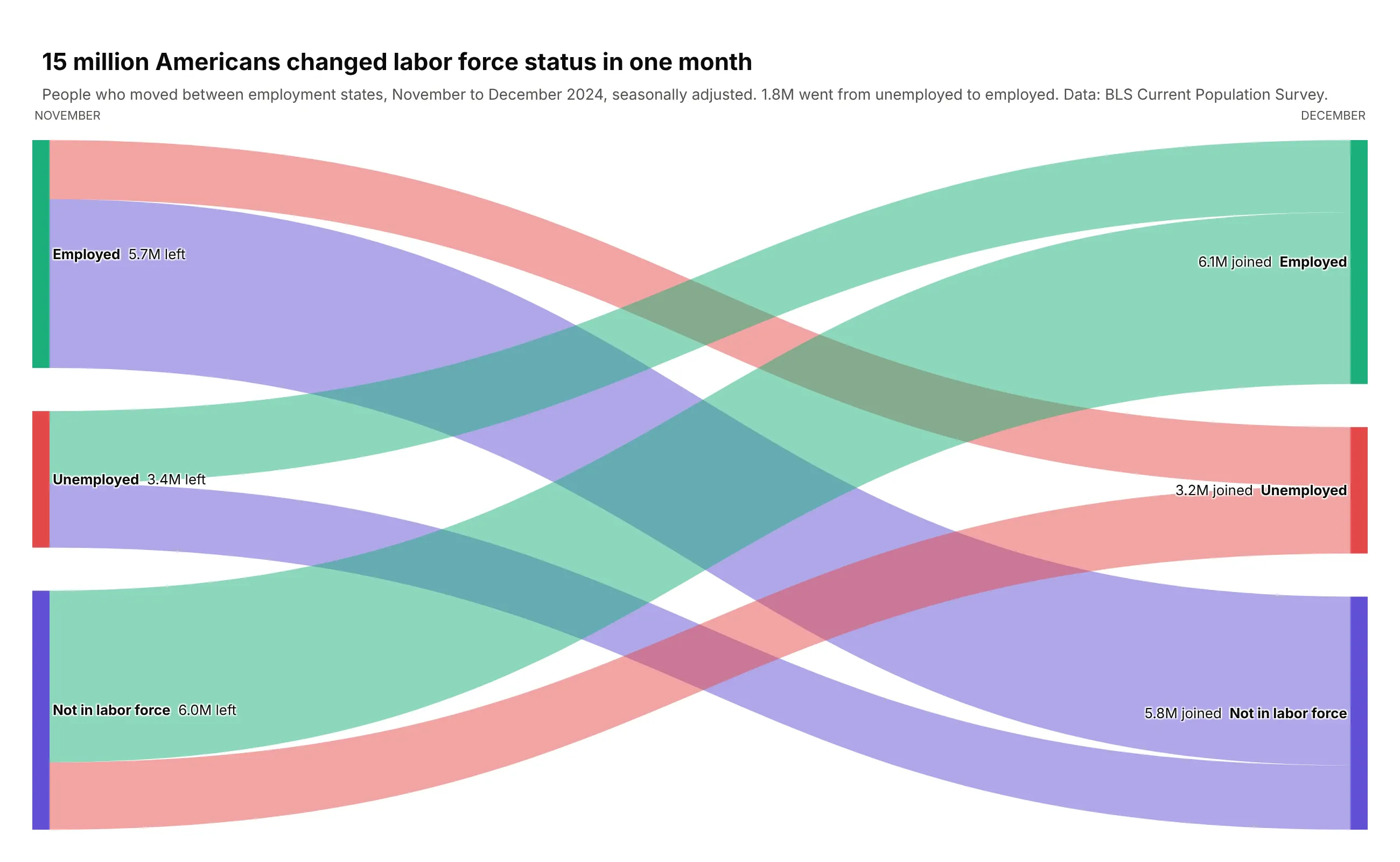
The unemployment rate barely moves from one month to the next, but about 15 million Americans changed labor force status between November and December 2024. 1.8 million went from unemployed to employed, and 4.3 million went straight from outside the labor force into a job. Data: BLS Current Population Survey labor force flows. Trick: leave out the people who stayed put. 155 million employed people stayed employed, and including them would shrink every interesting ribbon to a hairline.
Data: BLS Current Population Survey labor force status flows, seasonally adjusted (https://www.bls.gov/cps/cps_flows.htm).November to December 2024 flows between employed, unemployed and not in the labor force, thousands of people.Build a plotly Sankey of labor force status changes from November to December 2024.- Keep only Employed, Unemployed and Not in labor force, and drop rows where the statusdidn't change (mention the stayers in the subtitle instead).- November on the left, December on the right, same order and color on both sides.- Show millions of people on every node and link hover.
Elections and people
When the same people or places show up in every column, a Sankey shows who switched. These three follow votes, states and Nobel laureates.
18. Alaska's ranked-choice election, round by round
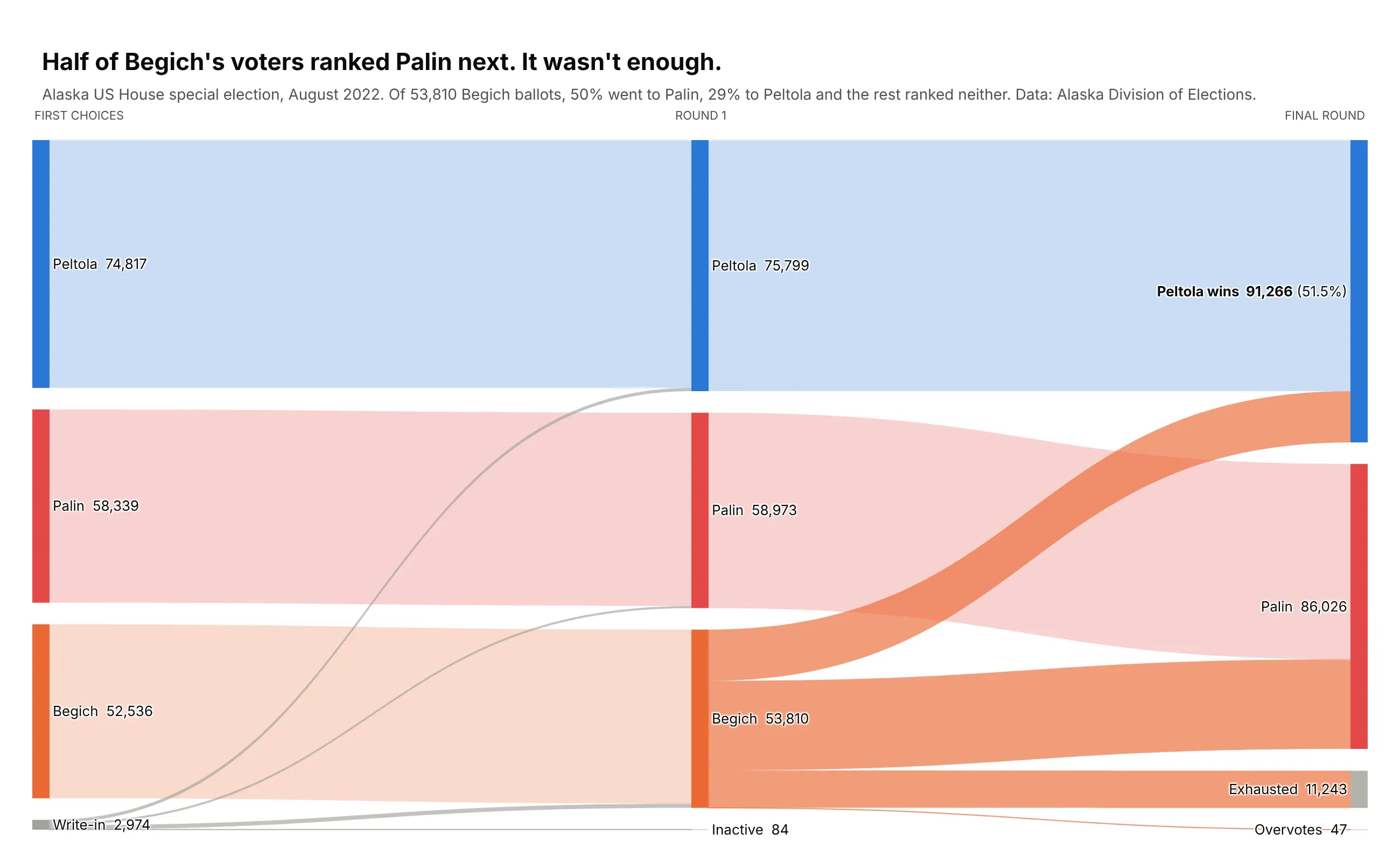
A results table tells you who won. This tells you how. Begich finished third in round 1, and his 53,810 ballots decided the race: 50% went to Palin, 29% to Peltola, and 21% ranked neither. That wasn't enough for Palin, and Peltola won the final round with 51.5%. Data: Alaska Division of Elections, official RCV tabulation. Trick: each candidate keeps one color in every round; transferred votes are bright and votes that stayed put are pale, so your eye goes straight to the transfers.
Data: Alaska Division of Elections, August 2022 special general election, official RCV tabulation(https://www.elections.alaska.gov/results/22SSPG/RcvDetailedReport.pdf). Votes per candidate in each round and the round 2 transfers.Build a plotly Sankey of Alaska's August 2022 special election, one column per round.- Each candidate keeps the same color in every round. Exhausted and inactive ballots are gray.- Links where the candidate changes (transfers) are bright; links where it stays the same are pale.- Use node.align="left" and label the columns "First choice", "Round 1", "Round 2".- Show vote counts and percentages on the node labels.
19. How US states voted, 2008 to 2024 (alluvial)
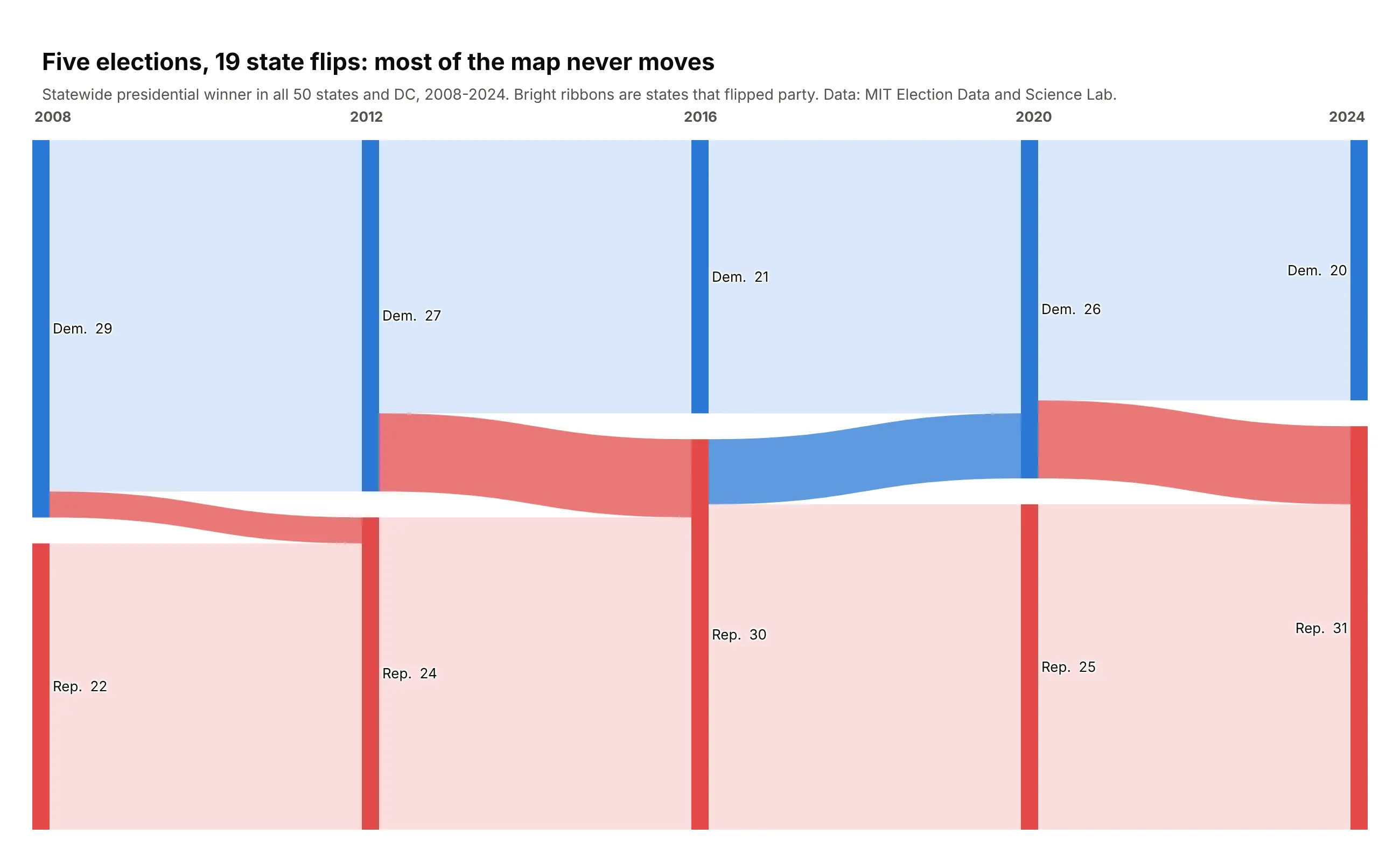
When the columns are time periods, a Sankey becomes an alluvial diagram. Across five elections there were only 19 state flips, and 40 of the 51 states and DC never changed party at all. Michigan, Pennsylvania and Wisconsin flipped in 2016, again in 2020 and again in 2024. Data: MIT Election Data and Science Lab. Trick: pale ribbons for states that stayed, bright ribbons for flips. The flips are a small share of the width, so they need the brightest color on the page.
Data: MIT Election Data and Science Lab, U.S. President 1976-2024 (https://doi.org/10.7910/DVN/42MVDX).The winning party in each state and DC for 2008, 2012, 2016, 2020 and 2024.Build a plotly alluvial (Sankey) with one column per election: 2008, 2012, 2016, 2020, 2024.- Use the number of states as the link value. Democratic nodes blue, Republican red.- Links where the party stays the same are pale; flips use the destination party's color at full strength.- Keep Democratic on top in every column with fixed node.y positions and add year labels above each column.
20. Nobel laureates: born here, moved there
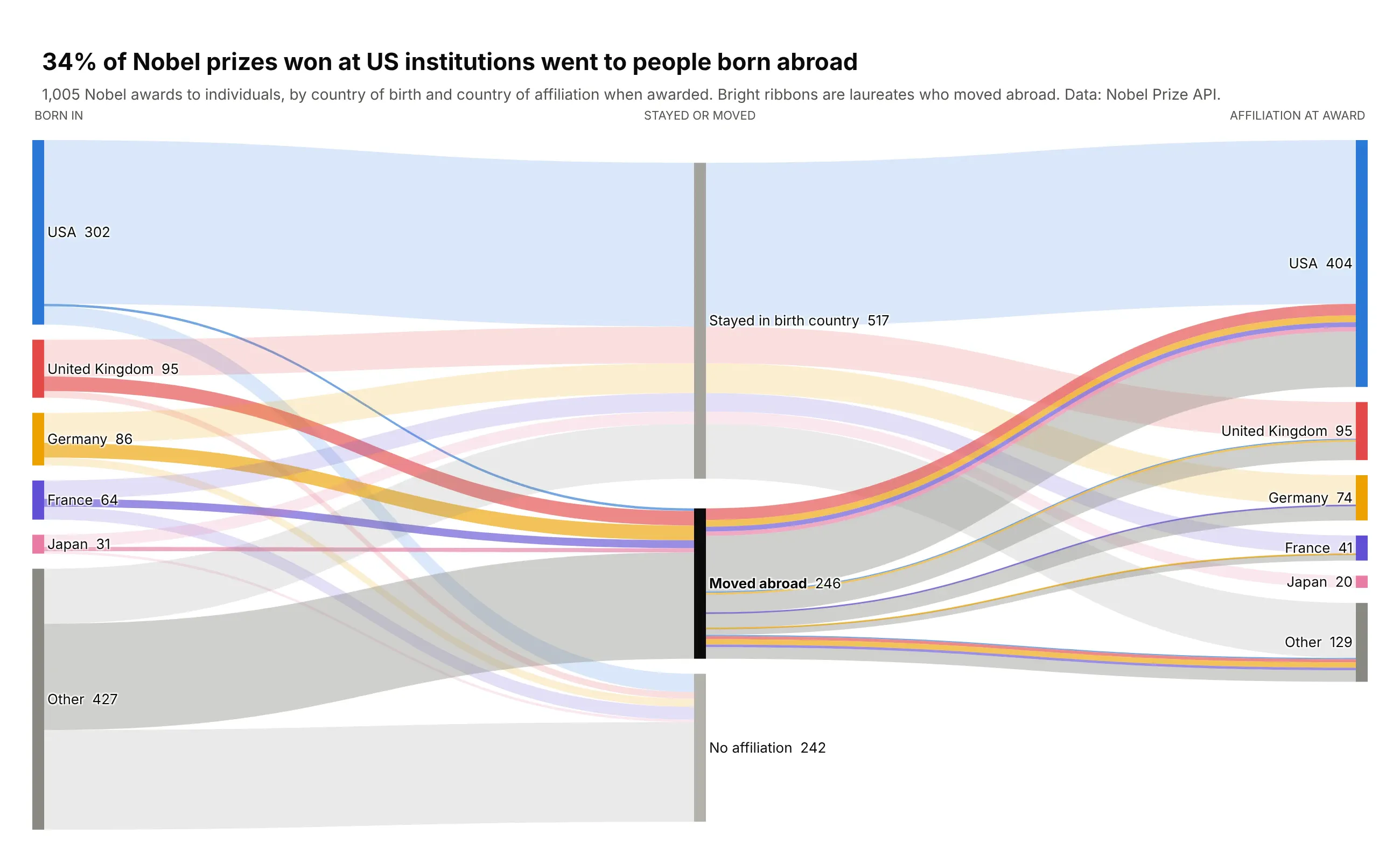
The US wins the most Nobel prizes: 404 of 1,005 awards to individuals went to people at US institutions. The Sankey shows where those people came from. A middle column splits laureates who stayed in their birth country from those who moved abroad (246 people), and 34% of the prizes won at US institutions went to people born somewhere else, with the UK, Germany and France the biggest named sources. Data: Nobel Prize API, all prizes through 2026. Trick: a middle "stayed or moved" step turns a tangled country-to-country matrix into two clean bundles, and every ribbon keeps its birth country's color, bright for movers and pale for stayers.
Data: Nobel Prize API (https://api.nobelprize.org/2.1/laureates).Every award to an individual, with country of birth and country of affiliation at the time of the award.Build a plotly Sankey: country of birth -> stayed or moved abroad -> country of affiliation.- Keep USA, United Kingdom, Germany, France, Japan and fold the rest into "Other".- Laureates with no affiliation stop in the middle column (use node.align="left").- Color every ribbon by birth country; movers bright (0.65), stayers pale (0.18).- Title: the share of prizes won at US institutions that went to people born abroad.
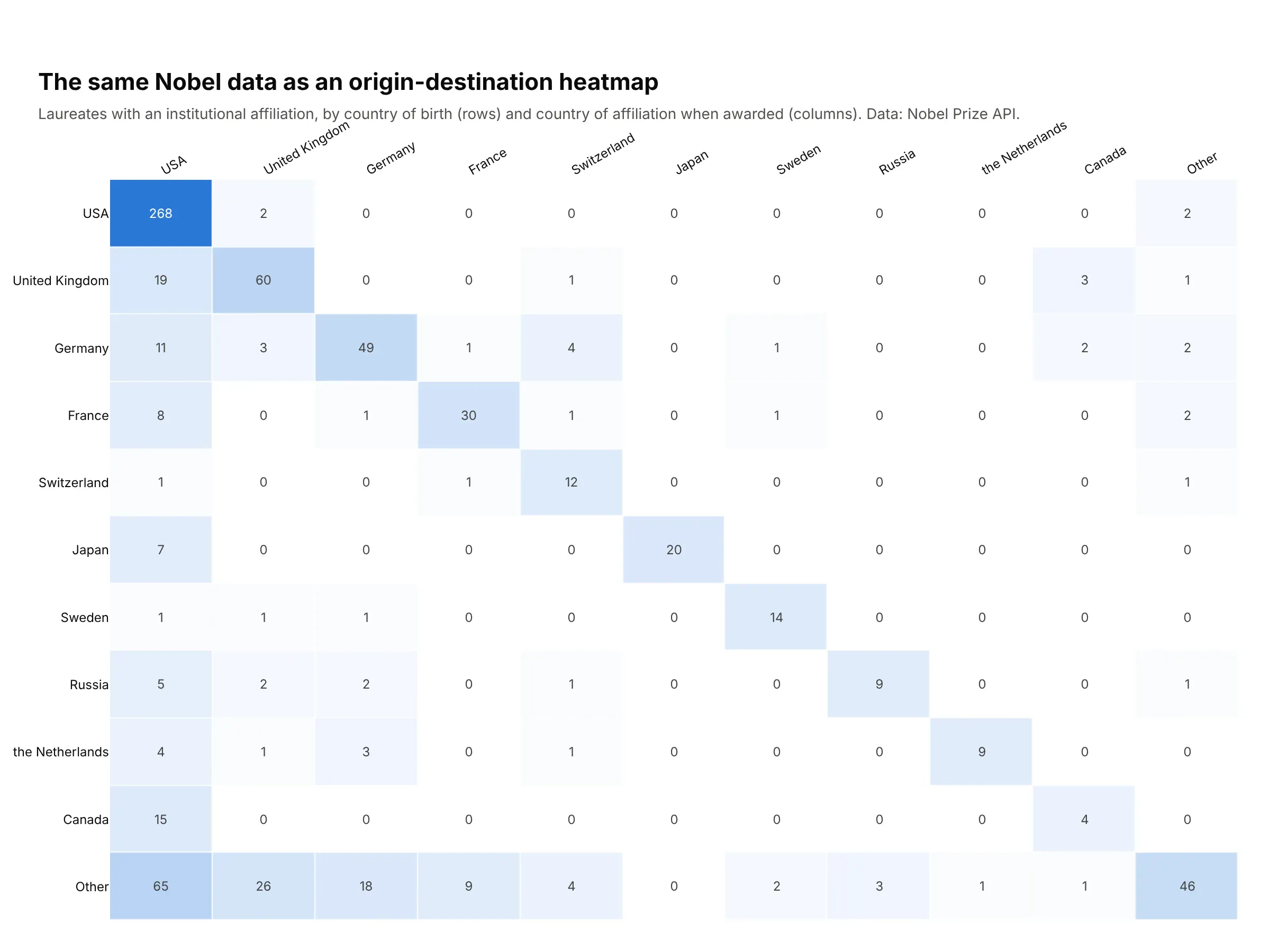
Another way to see it: a heatmap. An origin-destination matrix is the textbook alternative. It scales to many more countries and every cell is easy to look up, with the diagonal holding everyone who stayed home. What it loses is the sense of size and movement: you have to read the numbers to see that much of the US column is people born elsewhere:
Conclusion
A Sankey diagram is the right chart whenever a quantity moves through stages and the split at each stage is the story: budgets and income statements, energy and materials, supply chains and funnels, elections and migration, and anything that changes state over time. Before you draw one, check that your data has a natural flow and a natural grouping. Then keep one unit per diagram, color with a purpose, fold the long tail into "Other", put the takeaway in the title, and use real data whenever you can.
When a Sankey isn't the right fit, the alternatives shown along the way are one line of Plotly away: a waterfall for exact running totals, a treemap or sunburst for part-of-whole, a funnel chart for simple conversion rates, parallel categories when every record has every field, and a heatmap for big origin-destination matrices.
Pick any of the 20 examples above, paste its prompt into Plotly Studio or your coding agent, and swap in your own data.
Reference: code and options
A helper for real data
Real data rarely arrives as index lists. It usually looks like a table with one row per path: class, sex, outcome, count. This helper turns that table into a Sankey. It prefixes node ids with the column name, which solves the duplicate-node problem, and it can split links by any column so ribbons keep their color across hops, like the Titanic and dating funnel examples:
import pandas as pdimport plotly.graph_objects as godef rgba(hex_color, alpha):h = hex_color.lstrip("#")return f"rgba({int(h[:2], 16)}, {int(h[2:4], 16)}, {int(h[4:], 16)}, {alpha})"def sankey_from_paths(df, steps, value, color_by=None, colors=None, link_alpha=0.45):hops = []for a, b in zip(steps, steps[1:]):keys = [a, b] + ([color_by] if color_by and color_by not in (a, b) else [])hop = df.groupby(keys, as_index=False, sort=False)[value].sum()hops.append(hop.assign(src=a + ":" + hop[a].astype(str), tgt=b + ":" + hop[b].astype(str)))links = pd.concat(hops, ignore_index=True)nodes = list(dict.fromkeys(links["src"].tolist() + links["tgt"].tolist()))idx = {n: i for i, n in enumerate(nodes)}names = [n.split(":", 1)[1] for n in nodes]totals = [max(links.loc[links.src == n, value].sum(), links.loc[links.tgt == n, value].sum()) for n in nodes]link_colors = Noneif color_by:colors = colors or {}link_colors = [rgba(colors.get(k, "#a3a29b"), link_alpha) for k in links[color_by]]return go.Figure(go.Sankey(node=dict(label=[f"{name} {total:,}" for name, total in zip(names, totals)],color=[(colors or {}).get(name, "#3d3c39") for name in names],pad=20, thickness=12, line=dict(width=0),),link=dict(source=links["src"].map(idx), target=links["tgt"].map(idx),value=links[value], color=link_colors),))paths = pd.DataFrame({"channel": ["Search", "Search", "Email", "Email"],"plan": ["Free", "Pro", "Free", "Pro"],"outcome": ["Churned", "Retained", "Retained", "Retained"],"users": [120, 80, 40, 60],})fig = sankey_from_paths(paths, ["channel", "plan", "outcome"], "users",color_by="outcome", colors={"Retained": "#008300", "Churned": "#e34948"})fig.show()
When plotly's automatic layout leaves ribbons crossing for no reason, two settings fix most of it. Pin each node with node.x and node.y, then sort your links by the position of their source and target and tell plotly to keep that order:
# ys[i] is the vertical position you gave node iorder = sorted(range(len(source)), key=lambda k: (ys[source[k]], ys[target[k]]))source, target, value = ([seq[k] for k in order] for seq in (source, target, value))fig = go.Figure(go.Sankey(arrangement="snap",node=dict(label=labels, x=xs, y=ys),link=dict(source=source, target=target, value=value, sort="input"),))
That's how the US energy flow in example 5 went from a tangle to a clean chart.
Plotly Sankey options, explained
Here are the options that matter most in go.Sankey, what they do, and when to reach for them. The full reference lives in the Plotly Sankey documentation.
Option
What it does
When to use it
node.label
Node names. Supports <b>, <br> and other basic HTML
Always. Put the value in the label
node.color
One color per node
Encode a category; keep the same entity the same color in every column
node.thickness, node.pad
Width of node bars; gap between nodes
Increase pad when labels collide
node.align
justify (default), left, right or center
left stops dropouts at their stage; right ends every path at the right edge
node.x, node.y
Manual node positions from 0 to 1 (y is the node's center)
Pin columns, match order across columns, fix a tangled layout
node.sort
auto or input
input keeps nodes in the order you gave them
node.groups
Lists of node indexes to merge into one group node
Collapse detail in an interactive chart
node.customdata, node.hovertemplate
Custom hover content for nodes
Add shares, notes or breakdowns
link.source, link.target, link.value
The flows, as node indexes and widths
Always
link.color
One color per link, usually rgba() with transparency
Color by source, target, outcome or a highlight
link.hovercolor
Link color on hover
Make the hovered ribbon pop
link.sort
auto or input
input keeps link order at every node; use it to untangle crossings
link.arrowlen
Arrowhead length in pixels at the end of each link
Process flows where direction matters
link.customdata, link.hovertemplate
Custom hover content for links
Show the path attribute, like "ended in a match"
link.colorscales
Color links by link.label using colorscales
Concentration-style coloring when links carry a label
arrangement
snap, perpendicular, freeform or fixed
fixed for published charts; snap lets readers drag nodes
orientation
h (default) or v
v for top-down processes like CONSORT diagrams
valueformat, valuesuffix
Number format and unit in hover labels
Always set a unit
domain
Where the Sankey sits inside the figure
Several Sankeys in one figure, like small multiples
textfont
Font for labels, including shadow
Set shadow="none" on dark backgrounds