
Chris Parmer, Co-founder & Author of Dash
October 20, 2026
How to Build Internal Apps in 2026
TL;DR
- Write it with a coding agent, run it on a governed platform. In 2026, the fastest way to build an internal app is to have an AI coding agent write it in Python, then run it on a governed platform like Dash Enterprise. Agents have made code cheap to write, and code doesn't limit what an app can do.
- Anyone can build one. You don't need to be a software engineer. Engineers, scientists, analysts and ops leads now build their own tools with coding agents, and describing an app to an agent is easier than building it in a point-and-click tool.
- Pick a framework your agent knows well. Most internal apps work with data, and Python is where most data work happens, so Dash gives agents a lot to build on.
- Let the agent test its own work. Have it run, test and debug the app itself, and send every change through a pull request with tests and a review app.
- Choose the browser, chat or both. Decide whether people should use the app in a browser, in a chat assistant over MCP, or both. Dash can serve both from the same code.
- Deploy where IT already trusts it. Dash Enterprise gives every app a governed home on your own infrastructure, with SSO, role-based access, service accounts and audit logs. Plotly Cloud is the self-service option.
A lot of internal tools are still spreadsheets. A sales team might run its pipeline review out of a shared workbook. Finance might evaluate equipment purchases in a model that one analyst built and maintains.
Others are specialized tools from small vendors that have been around for decades: a SCADA viewer on a control room PC, a monitoring tool for a fleet of compressors or pumps, or the desktop software that shipped with a lab instrument. Many teams also pay for a separate SaaS product for each workflow, like inspections, sample tracking or maintenance scheduling.
These setups are often pretty manual. Someone exports the data from one tool, pastes it into another and fixes the formulas every week.
Until recently you had two ways to replace them. You could ask engineering to build something and wait, or buy a product that promised you wouldn't need engineering at all.
AI coding agents add another option. Tools like Claude Code, Codex, Cursor and GitHub Copilot can write a working app in minutes, which has made custom internal apps much cheaper to build.
Below we go through what to decide when you build one, from what kind of app it is to where it gets deployed. We built four example apps with Dash to show each step. Each one comes with a prompt you can give your own coding agent to build something similar.
A short history of how internal apps got built
Spreadsheets and Access databases (1990s onward). A lot of internal apps were Excel workbooks and Access databases. Excel handles a surprising amount of real work, and anyone can pick it up. The trouble starts when the data changes. Someone has to re-export and paste it in by hand, and it's hard to automate a workbook or connect it to other systems.
Custom apps from IT (2000s). Larger apps were usually built in Java or .NET by an internal IT team. They were solid, but every request went into a backlog, and anything that wasn't a top priority could wait a quarter or two, or never get built.
Industry-specific software (1990s to 2010s). In energy, manufacturing and the sciences, a lot of day-to-day work runs on software from small, specialized vendors. Think SCADA and HMI viewers, oil and gas equipment monitoring, well and reservoir data viewers, chromatography and spectroscopy software, and lab data tools that came bundled with an instrument.
These tools know their domain well, but most are Windows desktop apps licensed per seat. They're hard to connect to other systems, and changes wait on the vendor's release schedule. Some vendors get acquired or stop updating their product. Many of these tools are now good candidates for a rewrite, by the engineers and scientists who use them every day.
BI dashboards (2010s). Tableau, Power BI and Looker took off and let analysts publish charts without help from engineering. They work well for read-only views of well-modeled data. They're harder to use when you need to edit a record, run a calculation on user inputs or kick off a workflow.
The rise of Python (2010s). For decades, technical computing ran on commercial tools like MATLAB, SAS and Spotfire. They were powerful but expensive, licensed per seat and hard to build shareable apps with. Over the 2010s, Python took over. NumPy, pandas, Jupyter and scikit-learn became the default for data science, and engineers and scientists moved their analysis to Python too. By the end of the decade, a lot of the people who understood the domain were already writing Python, and open source libraries like Plotly and Dash let them turn that analysis into charts and apps.
SaaS for specific workflows (2010s). At the same time, a SaaS product appeared for almost every workflow: field inspections, maintenance scheduling, sample tracking, approvals, expense reports. Each one is quick to sign up for. A few years in, a company can have dozens, each with its own login, per-seat price and copy of the data, and none of them quite matching how the team works.
Low-code and no-code builders (late 2010s to early 2020s). Retool, Appsmith and Power Apps let you drag components onto a canvas and connect them to a database. That made sense when writing code was the slow part, and you could have a CRUD app working in an afternoon.
The downsides showed up later. Logic ends up spread across property panels where it's hard to review, and per-seat pricing grows with every viewer. Moving off the platform usually means rebuilding the app.
Vibe coding (2025). Lovable, Bolt and Replit made it possible to describe an app in plain English and get working code back in minutes. Low-code had existed because code was expensive to write, and that was no longer the case.
These tools caught on for prototypes and side projects. They were harder to use at work, because the apps ran on the vendor's servers with no route to internal data and nothing for IT to approve.
AI coding agents on enterprise platforms (2026). Companies are keeping the AI-written code and running it on their own platforms. Developers, engineers, scientists, analysts and people in business teams use coding agents to write apps. Then they deploy them to a platform inside the company's own infrastructure, like Dash Enterprise, that IT has approved for AI-built software.
An agent can write a Python app with a database connection, an editable grid and charts in less time than it takes to assemble the same components on a canvas. What you get is regular code that you can review and test like any other project, and run wherever you like.
Building with a coding agent is easier than point-and-click
For most people, describing an app to a coding agent is now less work than building it in a drag-and-drop builder or a BI tool. Here's why:
- You describe the result, not the steps. In a point-and-click tool you still have to learn the tool: which component to drag, which panel holds the setting, how its formula language works. With an agent you write what you want in plain English, like "a form to log inspections, a table of open findings and a chart of findings by site," and it works out the steps.
- Changes take one sentence. Moving a filter, adding a column or changing a calculation is a short request, not a hunt through menus. The hundredth change is as easy as the first.
- There's no ceiling. Point-and-click tools are easy until you need something they don't support, like a custom calculation, an unusual chart or a connection to a historian. Then you're stuck, or writing code anyway. An agent writing Python can do anything the language can.
- Every change is visible. Clicks leave no record. An agent's changes show up as a diff you can review, test and roll back.
- The agent handles the tedious parts. It writes tests, fixes its own errors and sets up deployment. In a point-and-click tool you'd do that by hand, or skip it.
How Dash Enterprise users are building internal apps now
We see a few patterns come up again and again with Dash Enterprise users:
- More people across the org are building apps. Building an app used to need a software engineer, or at least a data scientist. With a coding agent, anyone who can describe the problem clearly can get a working app, whether that's a process engineer at a refinery, a scientist in the lab, an ops lead on the plant floor or a finance analyst closing the books. People close to the work often know best what would help, so they build tools that save their own team time, and reports they'd otherwise wait in a queue for.
- Spreadsheet models are turning into apps. Teams in finance, operations, engineering and research are rebuilding models that used to live in Excel or MATLAB as interactive apps on live data.
- Aging industry software is getting rewritten. Engineers and scientists are replacing desktop tools from small vendors, like equipment monitoring screens, SCADA viewers and instrument data software, with web apps they own and can change. They know exactly what the old tool did, so they can describe it to an agent in detail.
- Low-code apps are getting rewritten in code. When the per-seat license for a low-code tool comes up for renewal, some teams ask an agent to rebuild the app in Python instead of paying again. It often takes days rather than a quarter.
- Analysis is moving from BI tools to agents. An AI agent can work through several steps on its own, exploring the data, flagging quality issues, interpreting the results and publishing a report. That's quicker than clicking the same report together in a BI tool, and because the output is code, it lives in version control and anyone can ask an agent to build on it.
- Developers are building more internal tools, too. In the 2026 Stack Overflow Developer Survey, 63% of developers said their team built team-level internal tools, and about 1 in 5 built software to replace a paid vendor.
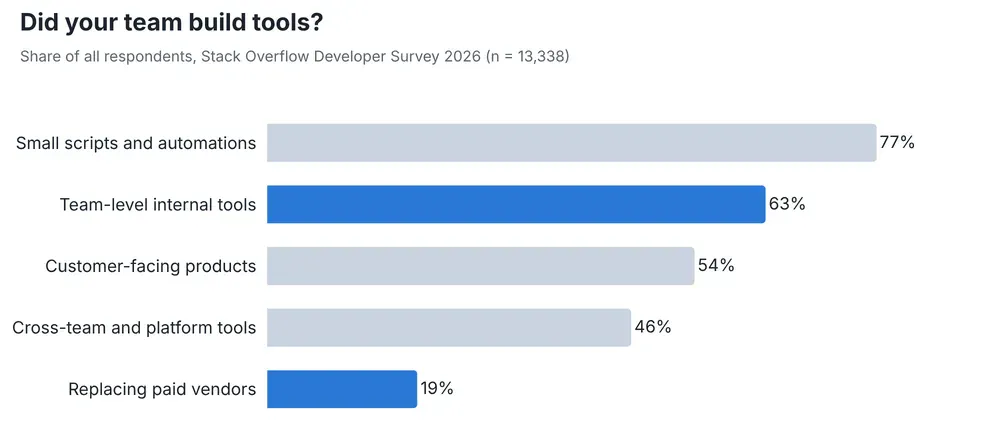
Data: Stack Overflow Developer Survey 2026, licensed under the Open Database License (ODbL) 1.0. Chart by Plotly.
Now that code is cheap to write, we think internal apps should be written mostly by a coding agent, in a widely used framework like Dash, and deployed on a platform your IT team manages. The rest of this guide covers how.
Why build internal apps at all?
When we talk to Dash Enterprise users, a few reasons come up most often.
It fits how your team works. An off-the-shelf tool shows your data the way the vendor imagined it, while an internal app can show only the fields your team uses and apply your company's own rules. The Plant Viewer later in this post shows the exact tags, units and alarm limits your plant uses, and the Capex Calculator routes approvals using your actual policy thresholds. A generic tool wouldn't know about either.
It can cost less. Every SaaS tool charges for its own seats, and on reporting tools most of those seats go to people who only look at the data. When your internal apps run on one platform, you stop paying a separate license for each tool your teams use.
It's less work than a spreadsheet. Describing what you want to an agent ("show open opportunities by stage, let me edit the close date, and write changes back to Salesforce") takes less effort than building and maintaining the equivalent workbook, and the app reads live data rather than last week's CSV export.
It keeps AI analysis useful. AI is good at exploratory analysis, and an app is a good place to keep what it finds. If you ask an agent a research question about your data, it will query the warehouse and try cuts you might not have thought of. Putting the results in an app means people can find them later, which is much better than a long chat transcript that gets lost.
We tested this in DataAnalyticsBench, a 43-question exam that AI agents take against a 20-million-row data warehouse. The best models now get nearly all 43 right, and the questions that separate them are the harder analytical ones, like spotting data quality problems and hidden trends.
Once you have an answer, an app keeps it up to date and lets other people ask their own follow-up questions.
It can take action. Many operational tools need to do things, such as updating a record, acknowledging an alarm or approving a request. That takes application code, which agents are now good at writing.
What internal apps mean for your bottom line
When teams make the case for internal apps, time saved usually comes first, then license costs. Once the apps are in use, the work that becomes possible for the first time tends to matter most. These examples come from Dash Enterprise user stories.
Time back for the people doing the work
A lot of hours go into assembling reports in clunky tools, copying data between systems and stitching workflows together by hand. An app that pulls the data together and keeps it current gives that time back.
- Kansas City Chiefs: the GameDay Scans app brings ticket, parking and staffing data into one place for more than 50 internal users. The Chiefs' analytics team alone saves 32 person-hours a week.
- A financial services firm: a single app replaced a week-long process that used to involve three teams.
- Johnson Matthey: some analyses went from a full day to a few minutes.
Lower license costs
Once teams can build what they need, tools that only partly fit get a closer look when their contracts come up for renewal. That includes per-seat SaaS products for a single workflow and specialized desktop software where every engineer who needs to look at the data needs a license.
- Kansas City Chiefs: the team used Dash to rebuild functions they had been paying other software platforms for. Their user story credits this with savings on annual licensing and avoiding expensive ticketing data products.
- Cox Automotive: passed on analytics platforms priced per user because the cost was too high for what they offered.
Operations that weren't possible before
When you can combine data sources and look at them exactly the way your process needs, you can support work that off-the-shelf tools never covered.
- On the factory and mine floor: Komatsu built three production apps in five weeks, including a vibration data viewer that condition monitoring experts in the US, Chile and Australia use every day. The job didn't fit tools like Grafana and Power BI. Martin Engineering monitors conveyor equipment at mines and ports remotely, and reported a 94% potential elimination of exposure to hazards at one customer site over four months.
- On the trading floor: Uniper, one of Europe's largest gas and power traders, cut the time to deploy a new trading app from as long as four weeks to minutes. Sales and trading associates at CIBC work directly with interactive models built by the bank's quant team.
- On game day: combining data also turns up insights nobody was looking for. The Chiefs' app puts security scanner alarm rates and weather next to ticket and parking scans, so staffing problems show up while there's still time to fix them.
How to build internal apps in 2026: 11 things to get right
1. Know which kind of app you're building
Before you write a prompt, figure out which kind of app you need. A CRUD app, a dashboard and a calculator each need different components and different data access, and telling your agent which one you want gets you a much better first version. We built a working example of each kind. Each comes with a prompt you can paste into your own coding agent to build your version.
We used Claude Code, but any coding agent will work. All the apps fall back to realistic sample data, so they run without credentials.
CRUD apps
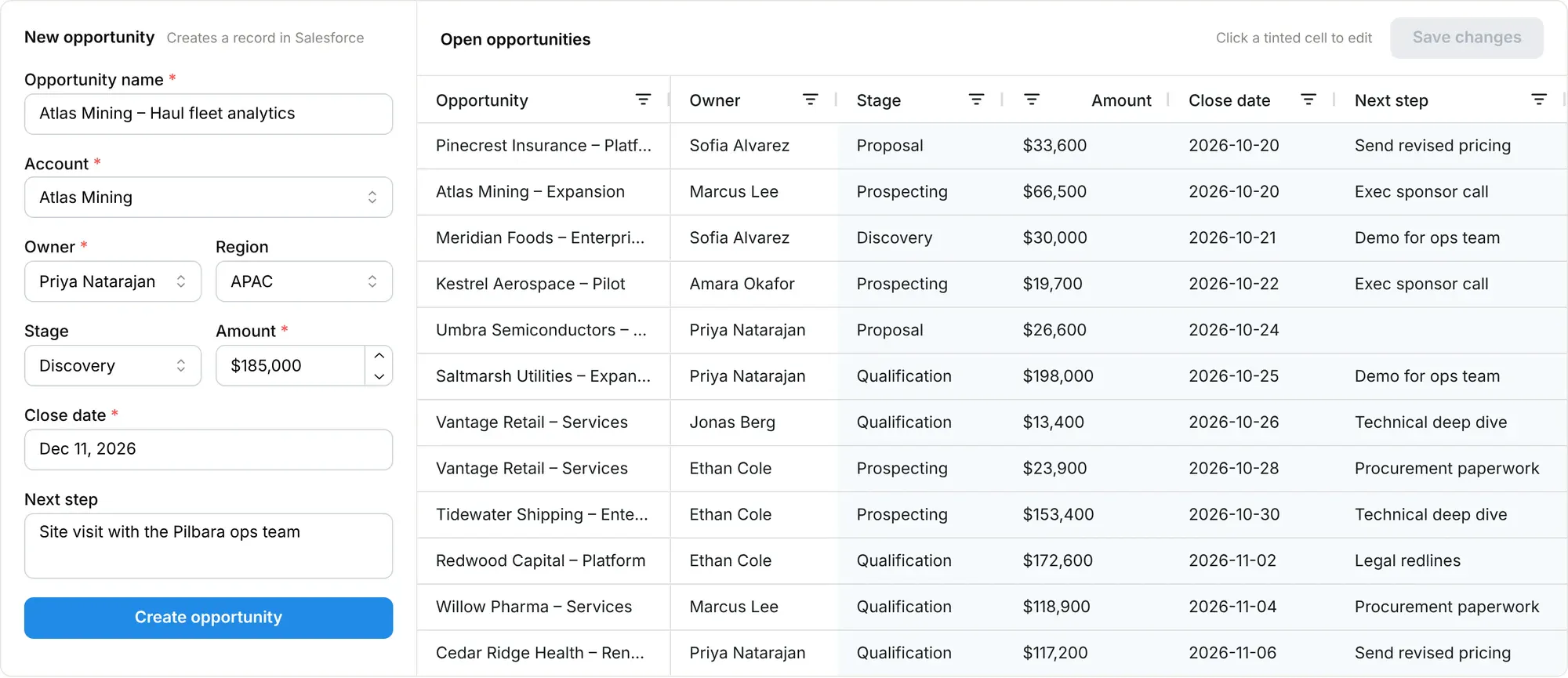
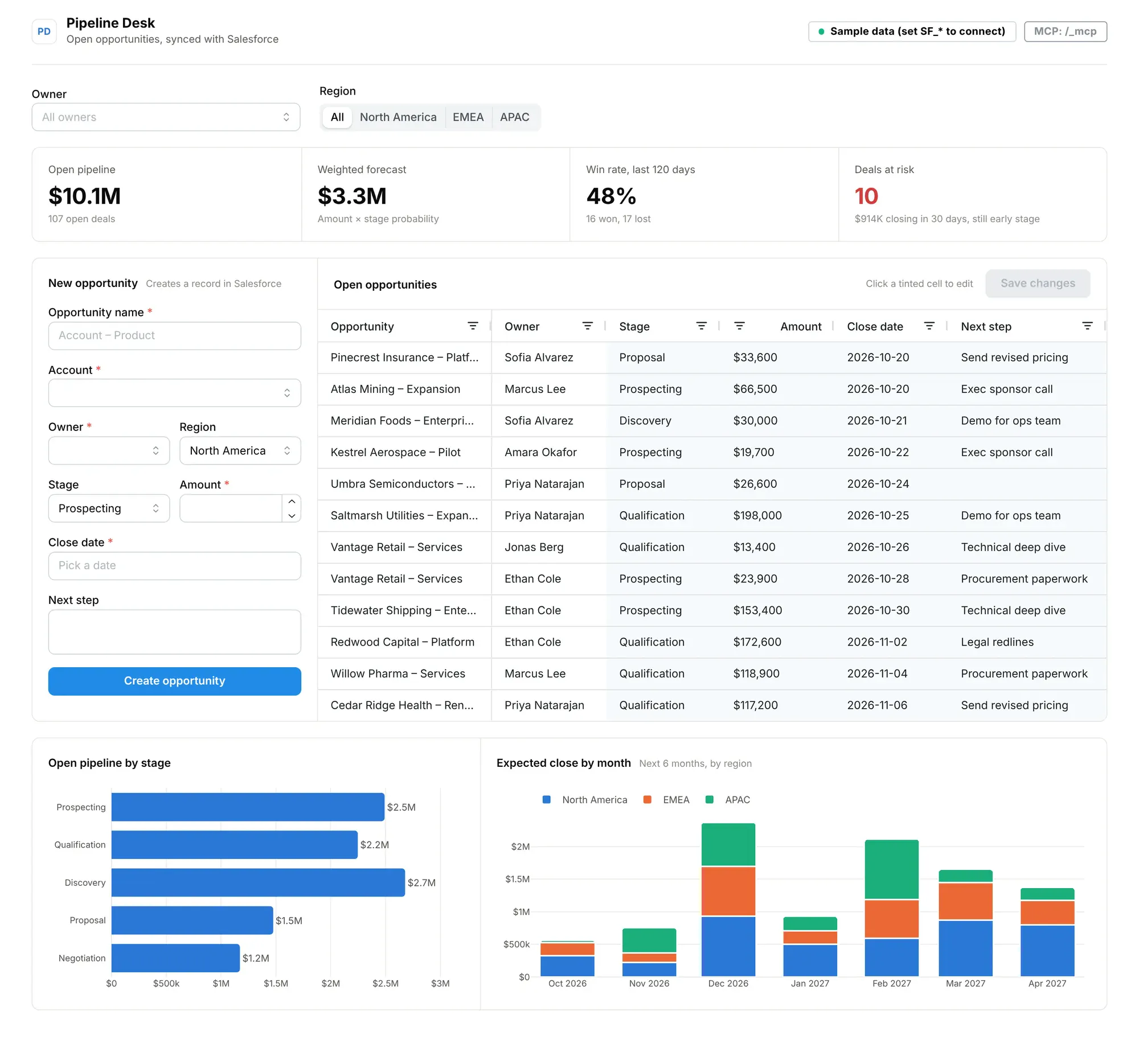
CRUD apps (create, read, update, delete) are the simplest kind. Think of a form plus a spreadsheet: the form adds a new record, the grid lets you edit the ones already there, and both write back to a system of record.
Our example, Pipeline Desk, does this for Salesforce. Sales ops can add an opportunity with a form, edit stages, amounts, close dates and next steps in a grid, and save the changes back to Salesforce in one click. KPIs and pipeline charts sit alongside.
Prompt to build your own:
Build a Dash app called Pipeline Desk for our sales ops team.
- Connect to Salesforce with simple-salesforce using SF_USERNAME, SF_PASSWORD and SF_SECURITY_TOKEN. Fall back to realistic sample opportunities in a local SQLite file when those aren't set.
- Show KPI cards for open pipeline, weighted forecast, win rate over the last 120 days and deals at risk, then an open pipeline by stage chart and an expected close by month chart.
- Add a New opportunity form (name, account, owner, region, stage, amount, close date, next step) with validation that creates the record in Salesforce.
- Next to the form, add an AG Grid of open opportunities where stage, amount, close date and next step are editable, with a Save button that writes only the changed fields back to Salesforce. Add an owner filter.
- Use dash-mantine-components with a clean light theme.
- Turn on Dash MCP and expose pipeline_summary, deals_at_risk and update_stage as tools.
- Run the app, take screenshots with Playwright and fix anything that looks wrong.
Dashboards
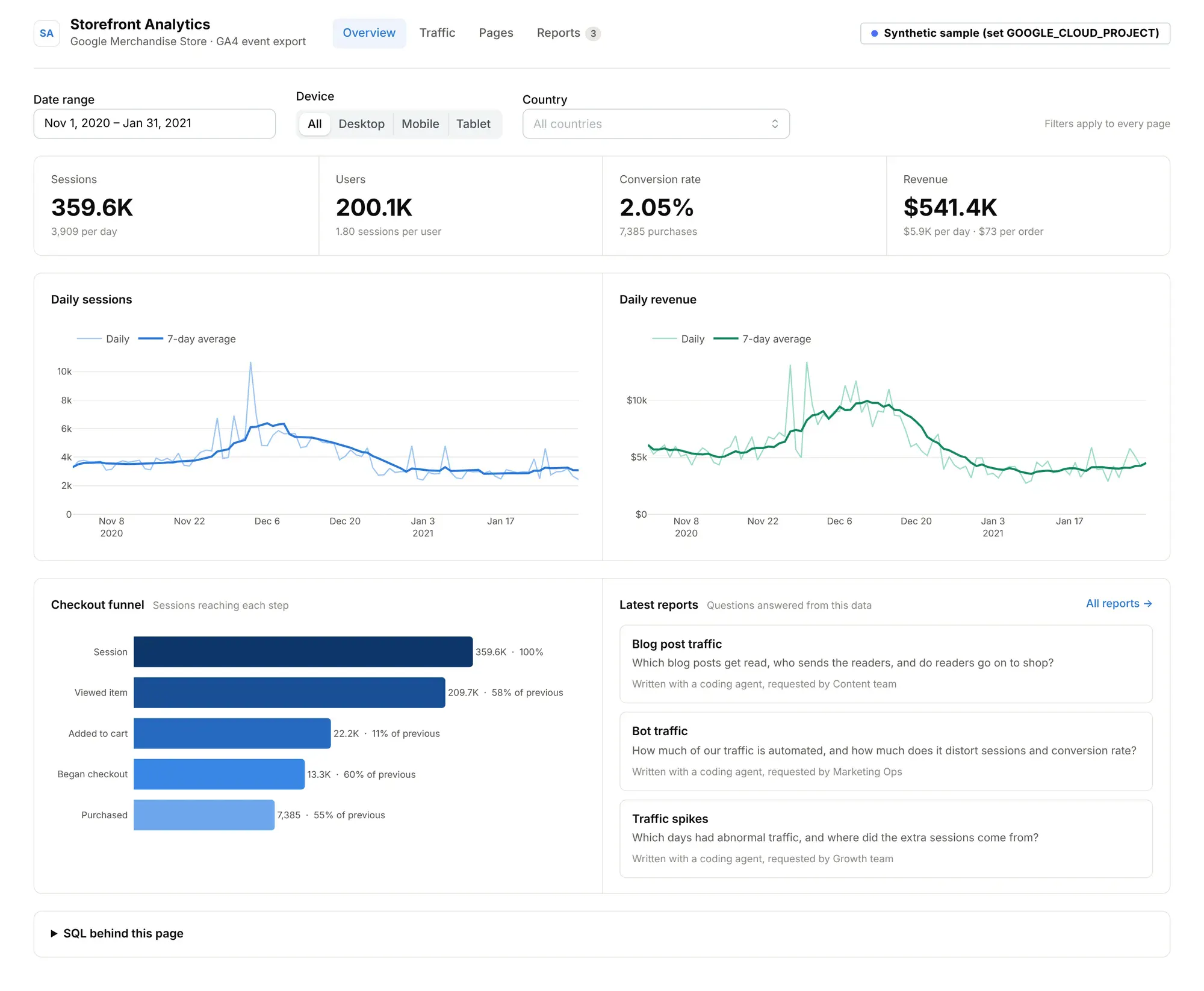
Dashboards show a fixed set of metrics that a team checks regularly, like weekly sales by region, support ticket volume or the month-end close. They're usually read-only and refresh on a schedule. They're the easiest kind of app to replace a recurring spreadsheet report with: describe the charts and filters you want, point the agent at the table, and you'll have a working version quickly. The first few pages of Storefront Analytics, further down, are a typical example.
Industrial monitoring apps
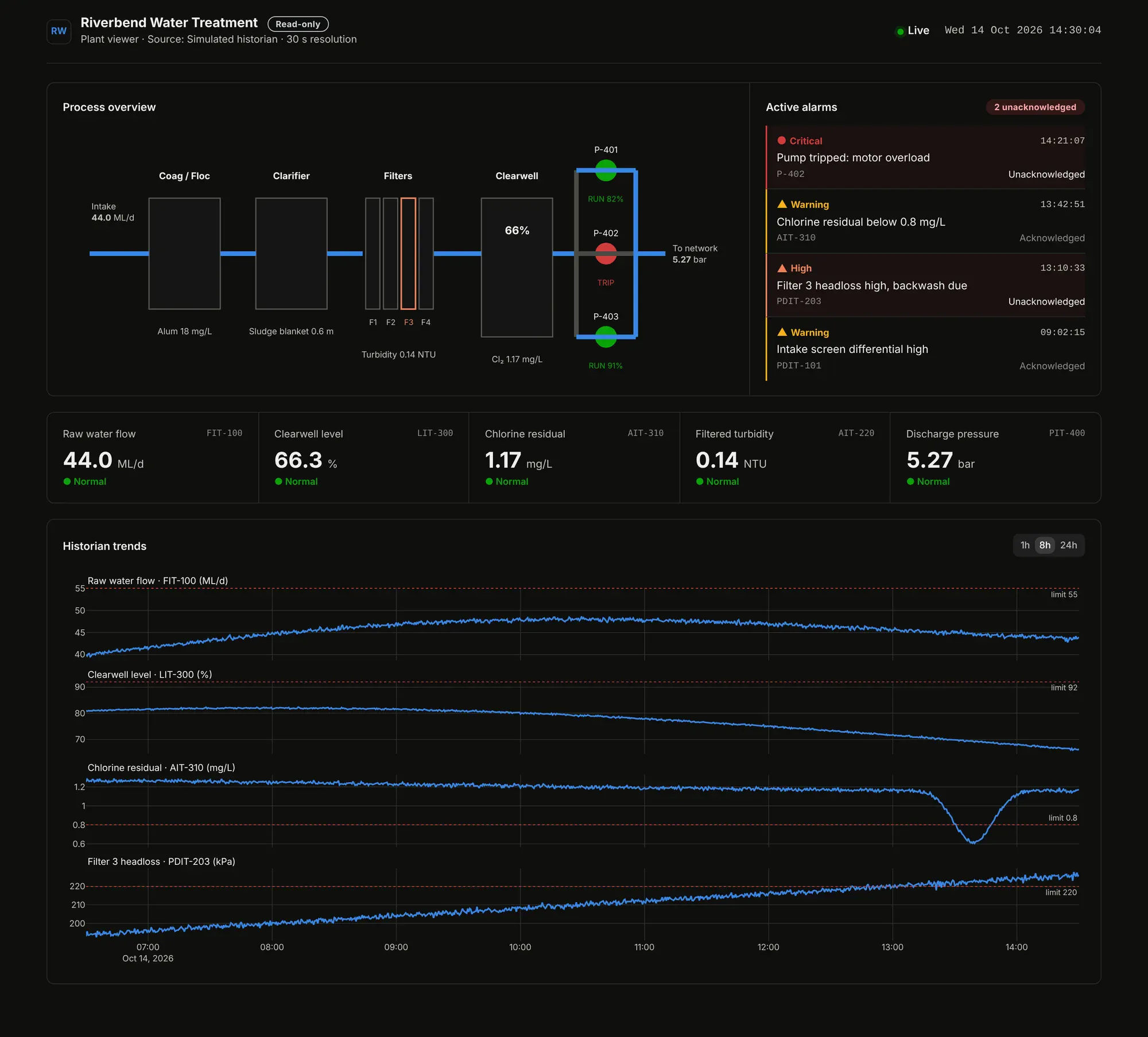
Industrial monitoring apps show the live state of equipment or a process, and how it got there. In energy and manufacturing, these are often the tools that came from a small vendor years ago, and they're some of the most valuable to rebuild. Plant Viewer is a read-only SCADA viewer for a water treatment plant.
It has a live process overview and an alarm list sorted by severity, with historian trends and their alarm limits underneath. Operators and engineers can check on the plant from a browser without a thick-client HMI license, and the app has no way to write to the control network.
Prompt to build your own:
Build a read-only Dash app called Plant Viewer for a water treatment plant.
- Read tags from an AVEVA PI Web API historian using PI_WEB_API_URL, PI_SERVER, PI_USER and PI_PASSWORD. Fall back to simulated live data when they aren't set.
- Show a process overview with the current value on each unit, a table of active alarms sorted by severity, and historian trend charts with the alarm limits drawn in. Refresh every few seconds.
- The app must never write to the historian or the control system.
- Use dash-mantine-components with a clean light theme and consistent good, warning, serious and critical status colors.
- Run the app, take screenshots with Playwright and fix anything that looks wrong.
Analytic tools with a shared report library
Analytic tools let people explore data and answer their own questions. Storefront Analytics runs on Google Analytics (GA4) data in BigQuery. This one uses one of our favorite patterns.
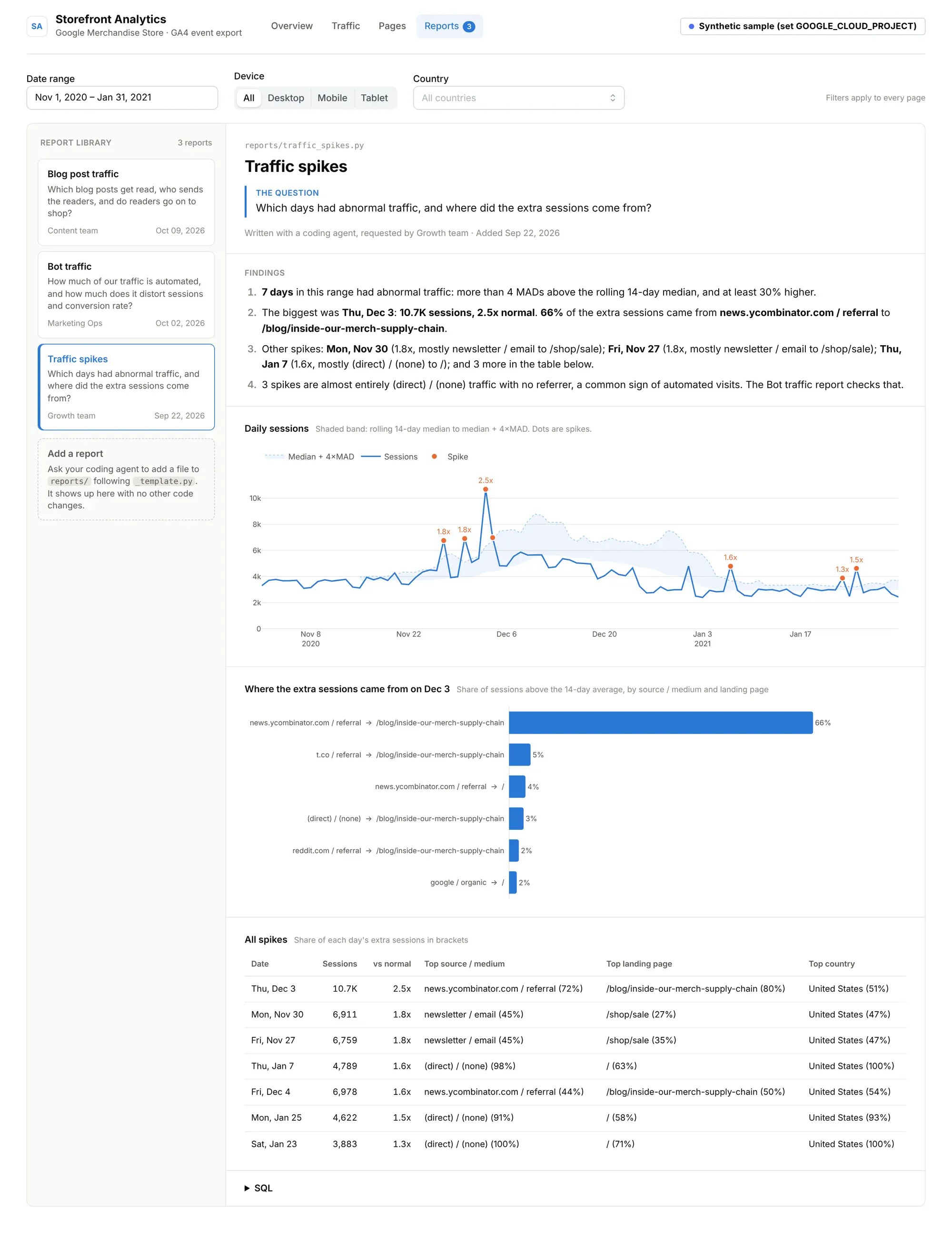
The first few pages are standard web analytics: an overview, traffic by source and device, and the most popular pages. The last page is Reports, a library of deeper analyses that each answer one question, like:
- Traffic spikes: which days had unusual traffic, and where it came from
- Bot traffic: how much traffic looks automated, and how much it inflates sessions and drags down conversion rate
- Blog post traffic: which posts people read, where readers come from, and how many go on to buy something
Each report is a single Python file in the app's reports/ folder, and the app picks up new files automatically. Anyone on the team can add one. They connect their coding agent to the app's GitHub repo, describe the question, and ask it to write a new report. The agent can query the data, try different cuts and check its work, so the reports are far more thorough than anyone would bother building by hand in a BI tool. Every report goes through a pull request and then sits next to the others. Over time the app turns into a shared, reviewed record of the team's analysis.
Prompt to build your own:
Build a multi-page Dash app called Storefront Analytics on our GA4 export in BigQuery (use the public bigquery-public-data.ga4_obfuscated_sample_ecommerce dataset to start).
- Use google-cloud-bigquery with GOOGLE_CLOUD_PROJECT. Fall back to synthetic GA4-shaped data when it isn't set.
- Add a date range, device and country filter that apply to every page.
- Pages: Overview (sessions, users, conversion rate, revenue), Traffic (by source/medium, device and country), Pages (most viewed pages) and Reports.
- On the Reports page, load every Python file in a reports/ folder as a report. Each report has a title, the question it answers, a few sentences of findings computed from the data, charts and its SQL. Add a template and a README that explains how to add a report with a coding agent.
- Write three reports to start: traffic spikes, bot traffic and blog post traffic.
- Every query should use query parameters and aggregate in BigQuery.
- Run the app, take screenshots with Playwright and fix anything that looks wrong.
Calculators and decision tools
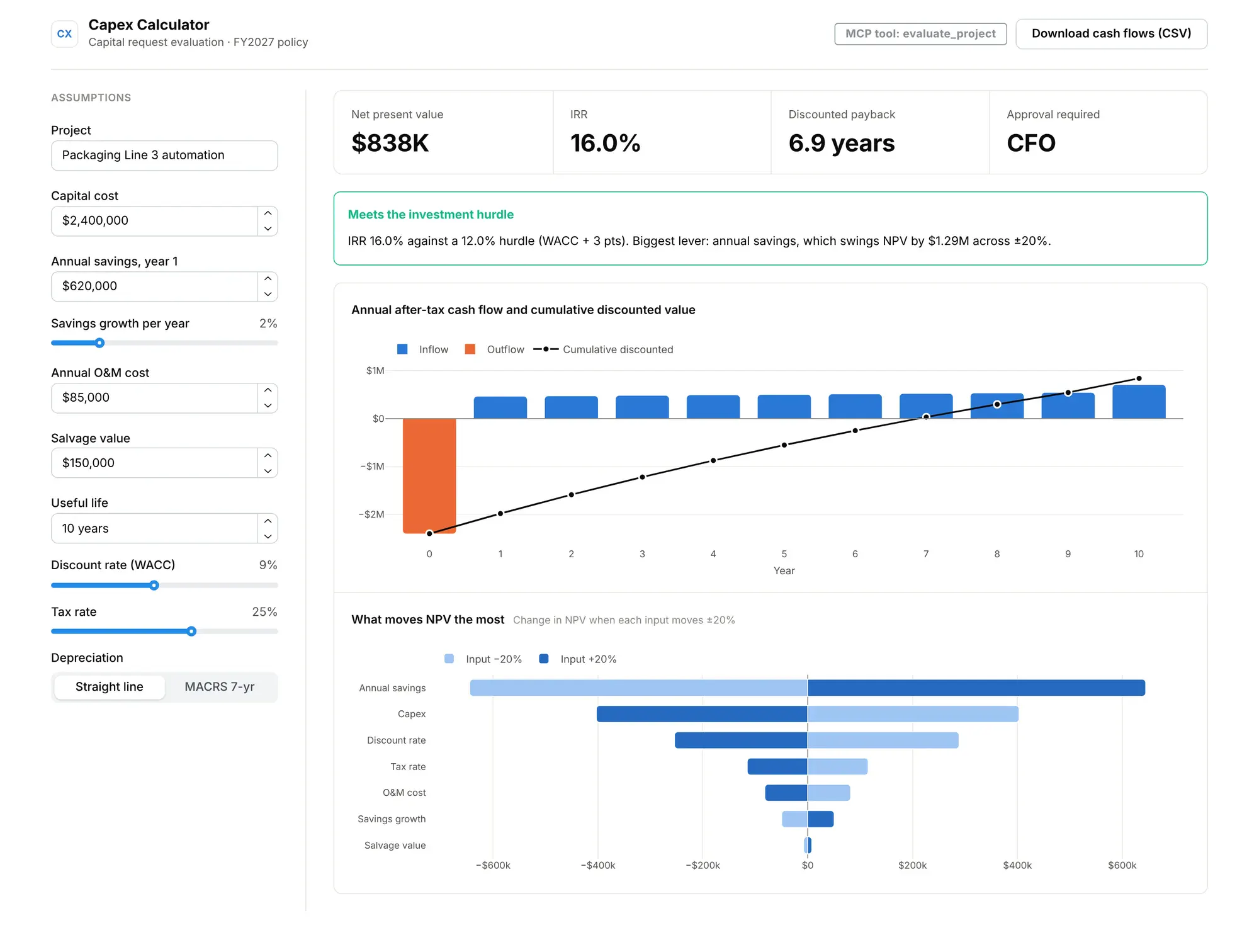
Calculators and decision tools run a set of inputs through business logic to produce an answer. The Capex Calculator replaces a capital request spreadsheet.
You enter a project and get NPV, IRR and discounted payback, along with a sensitivity analysis that shows which assumption matters most and the approval level your policy requires.
Prompt to build your own:
Build a Dash app called Capex Calculator to replace our capital request spreadsheet.
- Inputs: project name, capex, annual savings and their growth rate, annual O&M cost, useful life, discount rate, tax rate, salvage value and depreciation method (straight line or MACRS 7-year).
- Show NPV, IRR, discounted payback and the approval required, a chart of annual after-tax cash flow with cumulative discounted value, and a tornado chart of what moves NPV the most when each assumption swings by 20%.
- Approval levels: up to $250K plant manager, up to $1M VP Operations, up to $5M CFO, and the Board above that.
- Keep all the finance math in a separate finance.py with no UI code, and write pytest tests for it.
- Turn on Dash MCP and expose an evaluate_project tool.
- Run the app, take screenshots with Playwright and fix anything that looks wrong.
Approval workflows, data entry forms, lab sample trackers, equipment inspection logs, admin panels and report generators are other common patterns. Naming the pattern gives your agent a better starting prompt, since "Build a CRUD app over the Opportunity object" will get you a lot further than "build me a sales tool."
2. Build in code, with a framework your agent knows well
Agents build better apps in frameworks they already know well. They do best with languages and libraries that have a lot of public code and stable APIs.
For internal apps that work with data, Python is a natural choice. Your data scientists, engineers and researchers probably use it already, often after moving off MATLAB or SAS, and most databases, industrial systems, lab instruments and SaaS APIs have a Python client. For example, if you build on the Dash framework, an app can be a single Python file that holds the layout and callbacks, with no separate frontend project or JavaScript build to maintain. Dash is downloaded millions of times a month and has about a decade of public examples, so agents have plenty to learn from.
Here's the core of Pipeline Desk. The UI is declared in Python, and a callback updates the KPIs, charts and grid when a filter changes:
from dash import Dash, Input, Output, callback, dccimport dash_ag_grid as dagimport dash_mantine_components as dmcapp = Dash(__name__, title="Pipeline Desk")app.layout = dmc.MantineProvider([dmc.MultiSelect(id="owner", label="Owner", data=OWNERS),dcc.Graph(id="fig-stage"),dag.AgGrid(id="grid", columnDefs=grid_columns, getRowId="params.data.Id"),])@callback(Output("fig-stage", "figure"),Output("grid", "rowData"),Input("owner", "value"),)def refresh(owners):df = data.load_opportunities()if owners:df = df[df.Owner.isin(owners)]return stage_figure(df), df.to_dict("records")
We followed a few habits that make agent-built apps easier to maintain:
- Business logic lives in plain modules. The Capex Calculator's math is in finance.py with no UI code, so finance can review it, it can be unit tested, and it can be exposed as an AI tool through Dash MCP (more on that below).
- Data access lives in one place. Each demo app has a data.py that hides whether the data comes from Salesforce, BigQuery, a historian or a local sample. The UI never talks to a database directly.
- Every app shares a small theme. We gave each one the same theme.py for chart colors and fonts, because agents follow an existing pattern in the code more reliably than style instructions in a prompt.
3. Connect to data the way IT wants you to
Getting safe access to data is usually the hardest part of an internal app. Here's what has worked for us.
Use service identities instead of personal credentials. An app shouldn't run on a developer's password stored in an environment variable. For example, Dash Enterprise 6 supports Kubernetes service accounts for apps (workload identity). An admin grants access once, the app owner picks the service account in the app's settings, and the app can read from a private bucket or warehouse without the developer ever handling the credentials.
Filter at the source and parameterize queries. Storefront Analytics never pulls raw events into Python. It sends parameterized SQL to BigQuery and gets aggregates back. Here's a simplified version of the query behind its Traffic page:
SELECT CONCAT(traffic_source.source, ' / ', traffic_source.medium) AS source_medium,COUNT(DISTINCT user_pseudo_id) AS users,COUNTIF(event_name = 'purchase') AS purchasesFROM `bigquery-public-data.ga4_obfuscated_sample_ecommerce.events_*`WHERE _TABLE_SUFFIX BETWEEN FORMAT_DATE('%Y%m%d', @start) AND FORMAT_DATE('%Y%m%d', @end)AND (@device = 'all' OR device.category = @device)AND (ARRAY_LENGTH(@countries) = 0 OR geo.country IN UNNEST(@countries))GROUP BY source_mediumORDER BY users DESC
Query parameters keep user input out of the SQL string, and the warehouse does the aggregation.
Give each app only the write access it needs. Pipeline Desk writes to Salesforce because editing opportunities is what it's for. Plant Viewer reads from the historian (AVEVA PI Web API in our example, though OPC UA or an Ignition gateway would work the same way) and can't write anything. Because it can't change a setpoint, OT teams are more willing to approve it.
Make apps run without production access. Every demo app falls back to a realistic local dataset when credentials aren't set. That lets an agent build and test the app on a laptop or in a sandbox, and you point it at the real system once it's deployed.
4. Decide where your users should interact: the browser, the chat box, or both
Many of your users already spend a good part of their day in Claude, ChatGPT, Gemini or Microsoft Copilot, and for some tasks they'd rather ask a question there than open another tab.
The Model Context Protocol (MCP) lets AI assistants call tools that live in your systems.
For example, if you build on the Dash framework, the same app can serve a browser UI and an MCP server. Since Dash 4.3, Dash MCP lets you turn this on with one argument and pick which functions assistants can call:
from dash import Dashfrom dash.mcp import configure_mcp_server, mcp_enabledapp = Dash(__name__, enable_mcp=True) # serves MCP at /_mcpconfigure_mcp_server(include_callbacks=False) # only expose what we decorate@mcp_enabled(expose_docstring=True)def deals_at_risk(owner: str | None = None, days: int = 30) -> list[dict]:"""Open deals closing within `days` that are still in an early stage."""...@mcp_enabled(expose_docstring=True)def update_stage(opportunity_id: str, stage: str) -> str:"""Move one opportunity to a new stage. Writes to Salesforce when connected."""...
The people using it don't need a coding agent or a terminal. In Claude, ChatGPT and Microsoft Copilot, the app's MCP address can be added as a custom connector. Depending on the plan, people add it themselves, or an admin adds it once for the whole organization. Each person signs in with their own account, so the connector only sees what they could already see in the app.
A sales manager can then ask their chat assistant "which of Ethan's deals are at risk this month?", and the answer comes from the same deals_at_risk function the dashboard uses. Here's a real response from the demo app:
[{"Name": "Redwood Capital – Platform", "StageName": "Qualification", "Amount": 172600, "CloseDate": "2026-11-02", "NextStep": "Legal redlines"},{"Name": "Tidewater Shipping – Enterprise license", "StageName": "Prospecting", "Amount": 153400, "CloseDate": "2026-10-30", "NextStep": "Technical deep dive"},{"Name": "Vantage Retail – Services", "StageName": "Prospecting", "Amount": 23900, "CloseDate": "2026-10-28", "NextStep": "Procurement paperwork"}]
The Capex Calculator exposes its math the same way. If you ask your assistant "what's the NPV if savings come in 15% lower?", it calls evaluate_project, which returns an NPV of $354K (down from $838K) and an IRR of 12.1%, just above the 12% hurdle. Finance maintains one version of the model, and the browser and the chat assistant both use it.
For more ideas, see 5 MCP server examples you can build in Python, each with a prompt to build it.
Here's roughly how we'd decide which surface to use:
Use the browser app when...
Use chat over MCP when...
People need to scan a lot of data at once
The question is specific and one-off
The task involves editing many records
The user is already working in an assistant
Visual context matters (trends, schematics, maps)
The answer is a number, a list or a short summary
You want a shared view a team looks at together
You want the assistant to combine your app with other tools
You don't need to decide up front. Build the app, expose the functions that make sense as tools, and see where people end up using it. MCP access follows the app's own permissions, so nobody can reach anything through MCP that they couldn't already see in the browser.
5. Put an agent inside the app, too
Dash MCP brings the app into the chat assistant. You can also go the other way and put a chat assistant inside the app, so viewers can ask questions about the data on the page.
For example, Plotly Studio Embedded (currently in beta on Plotly Cloud, and coming to Dash Enterprise customers in Q4 2026) adds an AI chat panel to a published Dash app with one toggle. It picks up the DataFrames your app already loads, and viewers can ask follow-up questions in plain language ("which product had the biggest drop after Christmas?") without the app author having to build a chart for every question. Conversations run in a sandbox with no code execution, network access or filesystem access, and each viewer signs in with their own account. The docs cover setup.
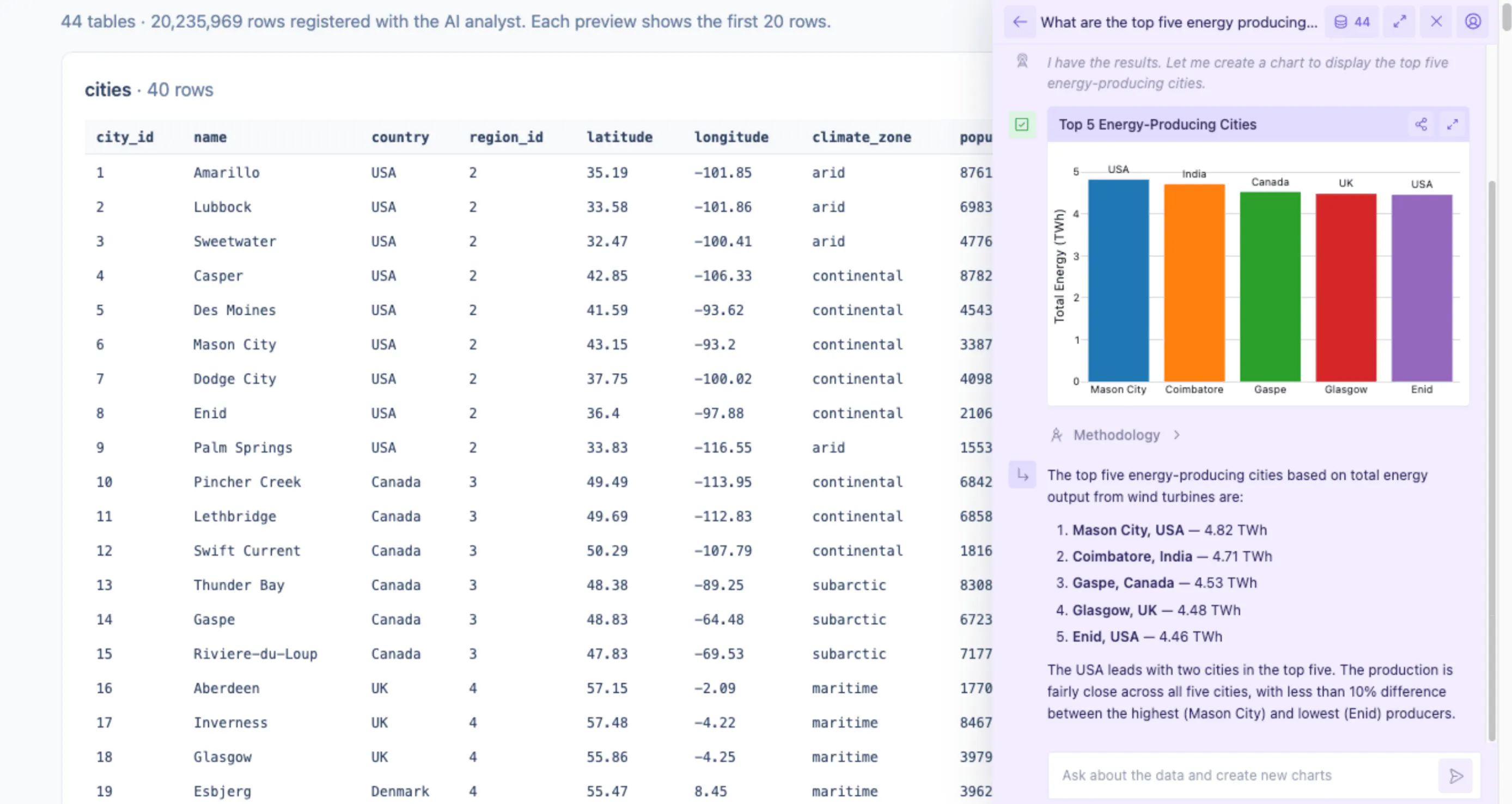
This works well for analytic apps like Storefront Analytics. The pages and reports cover the common questions, and the embedded agent handles one-off follow-ups.
6. Let the agent run, test and debug the app itself
Most of the speedup from coding agents comes from a tight feedback loop. If the agent can't run the code, you end up testing every change yourself. If it can run the app, look at it, read the errors and fix them, it can get much further on its own.
Give your agent as much of this as you safely can:
- A way to run the app locally. For Dash that's python app.py. The agent can start the server, load the page and see what happens.
- A browser it can drive. With Playwright or a browser MCP server, an agent can load the page, take screenshots, click through flows and read the browser console. We took every screenshot in this article that way.
- Access to logs in deployed environments. For example, the Plotly Cloud MCP server lets an agent publish an app and read its logs when something fails, and the `plotly` CLI (plotly app publish, plotly app logs, plotly app status) does the same from a terminal. On Dash Enterprise, the `de` CLI handles deploys.
- Permission to iterate. Approving every file write slows things down. Let the agent make changes in a branch or sandbox and review the diff at the end.
Example: a missing input. While building the Capex Calculator, the first screenshot came back with four input fields missing, even though there was no Python error and the server was running. The agent loaded the page in a headless browser and found TypeError: Cannot read properties of null (reading 'startsWith') in the console, coming from the number input component.
It traced the error to a suffix=None argument, removed it and took the screenshot again. It took about a minute.
Example: a tool that couldn't return its data. The first version of deals_at_risk returned a pandas DataFrame, which the MCP layer couldn't serialize. The agent called the tool directly with curl, saw the error, changed the return type to a list of records and confirmed the fix with a second call.
7. Deploy somewhere IT already trusts
For other people to use an app, it needs a URL with sign-in, and a deployment process that your security team approves once rather than app by app.
There are two good options, depending on how your organization works.
Self-hosted, in your own infrastructure. For example, Dash Enterprise runs on your own Kubernetes cluster, in the cloud or on-prem (including air-gapped networks), close to your data. Coding agents deploy with git push or the de CLI, and IT controls the platform.
Dash Enterprise 6, released in February 2026, rebuilt the platform to be Kubernetes-native, with multi-tenancy, Helm-based installs and upgrades, in-product backup and restore, GitHub integration, and support for your own private container registry.
Self-service, managed for you. For example, Plotly Cloud hosts Dash apps with no infrastructure work. You can publish from the CLI or Dash's dev tools, or ask your agent to publish through the Plotly Cloud MCP server:
pip install "dash[cloud]"plotly user loginplotly app publish --name capex-calculator
Apps are private by default, and you share them by link with specific people.
Plotly Cloud suits smaller teams, and it's also handy for prototypes that will later move to a self-hosted platform.
We published the demo apps in this post this way. The agent that wrote them published each one through the Plotly Cloud MCP server, then checked the build status and runtime logs to make sure the app started cleanly. We never needed to open the Plotly Cloud website.
With either option, IT reviews the platform once instead of reviewing every app.
8. Ship every change through tests and a review app
Because the app is code, a change to it after launch is a pull request, and the practices software teams use to make changes safely apply to internal apps too, and an agent can handle most of the work.
- Tests with every change. Ask the agent to write tests alongside the code. Logic in plain modules gets regular pytest tests, like the NPV and IRR math in the Capex Calculator's finance.py. Dash callbacks can be unit tested as plain Python functions, and `dash.testing` runs end-to-end tests in a real browser that click through the app and fail on console errors.
- Code review in GitHub. A teammate reviews the change as a diff. With Dash Enterprise's GitHub integration, app code lives in repositories in your GitHub organization and follows their branch rules, and merging a pull request triggers the production deploy.
- A review app for each change. Deploy the branch as a separate app with its own URL next to production, so people can try the change before it ships. Creating an app on the platform takes one command, so this costs very little.
- Before and after screenshots. An agent with a browser can load production and the review app, screenshot the same pages in both, and post them on the pull request. Reviewers who don't read Python can still see what changed.
On Dash Enterprise, a CI job for a pull request could look like this:
pytestde deploy . --name capex-calculator-pr-42 -y # review app at its own URLpython -m playwright screenshot --full-page https://dash.yourco.com/capex-calculator/ before.pngpython -m playwright screenshot --full-page https://dash.yourco.com/capex-calculator-pr-42/ after.png
Behind SSO, the screenshot step needs a signed-in browser session. Plotly Cloud works the same way: publish the branch from CI under a new app name, and delete the review app after the pull request merges.
Coding agents are good at building CI pipelines. You don't need to write the workflow files yourself. Here's a prompt you can give your agent to set one up with GitHub Actions and Plotly Cloud:
Set up GitHub Actions for this Dash app, deploying to Plotly Cloud. Follow https://dash.plotly.com/plotly-cloud/ci-cd.
- On every pull request, install the requirements and run pytest and the dash.testing browser tests. Fail the check if any test fails.
- If the tests pass, publish the branch as a separate review app with plotly app publish, named after the app and the pull request number, using a PLOTLY_API_KEY repository secret. Post the review app's URL as a comment on the pull request.
- Use Playwright to take screenshots of the main pages in production and in the review app, and add the before and after images to the pull request comment.
- When the pull request merges, publish to the production app. When it closes, delete the review app.
- Tell me what I need to set up by hand, like creating the API key and giving it edit access to the apps.
And here's one for Dash Enterprise:
Set up a CI pipeline for this Dash app on our Dash Enterprise server at dash.yourco.com, using the de CLI. Follow https://dash.plotly.com/dash-enterprise/cli.
- Sign in as a Dash Enterprise service user whose credentials are stored as DASH_ENTERPRISE_USERNAME and DASH_ENTERPRISE_PASSWORD secrets, using --no-keyfile.
- On every pull request, run pytest and the dash.testing browser tests. If they pass, deploy a review app with de deploy . --name <app>-pr-<number> -y, wait until de apps status reports it's built, and post its URL on the pull request. If the build fails, post the output of de apps logs --type build instead.
- Give the review app the same viewers as production, take before and after screenshots of the main pages while signed in as the service user, and add them to the pull request.
- Delete the review app with de apps delete when the pull request closes.
- Check whether our server uses the GitHub integration. If it does, de deploy isn't available, so tell me how review apps should work in that setup instead.
9. Rely on the platform for security
With coding agents, a lot more apps get built, often by people who aren't security specialists. The platform should handle security so each app author doesn't have to.
Here's what to look for, using recent Dash Enterprise releases as a reference:
- Single sign-on and provisioning. Users and groups come from your identity provider (SAML, LDAP, Active Directory, Okta, PingFederate) with SCIM provisioning, so access is removed when someone leaves.
- Role-based access per app. User, group and app-level permissions, inherited from your identity provider.
- MCP authentication. Any Dash app can also be an MCP server (Dash MCP, 6.3), and the platform handles the sign-in. When someone connects an app to their AI assistant, the assistant walks them through signing in with their Dash Enterprise account, and only people who already have access to the app can connect. App owners turn MCP on per app, with no authentication code to write.
- Shared secrets, set once by IT. Admins store shared credentials, like a warehouse password or an API key, as global environment variables. Every app can use them, but app developers (and their coding agents) never see the values. When IT rotates a credential, every app picks up the new value automatically.
- Credential isolation. Service accounts for data access (6.0) and managed database secrets stored as Kubernetes Secrets (6.3) keep credentials out of app code.
- Control over what apps install. Admins can point every app at your organization's private Python package index, so packages come from a registry IT already approves rather than straight from PyPI.
- Hardened workloads. As of 6.2, every app, workspace and service runs on a read-only filesystem with a seccomp profile applied, and apps can't use sudo by default (6.0).
- Log hygiene. 6.2 added guards against sensitive data being written to logs, and 6.2.2 closed a case where token contents could reach proxy logs.
- Security patching. Point releases through 2026 shipped CVE fixes and component upgrades within weeks.
- Auditability. Viewer analytics and audit logs show who used what.
Decide what agents are allowed to touch as well. A reasonable default is to give agents full access in development sandboxes and have them deploy through the same review process as everyone else, signed in as the person they're working for so every action can be traced. That's why Plotly recommends plotly user login over shared API keys for agents on Plotly Cloud.
10. Write logic once, reuse it everywhere
Keep the business logic (calculations, rules and thresholds) in one module, and have every part of the app use it.
In the Capex Calculator, finance.py defines NPV, IRR, payback, sensitivity and the approval policy:
# Approval thresholds are versioned and reviewed like the rest of the code.APPROVAL_TIERS = [(250_000, "Plant manager"),(1_000_000, "VP Operations"),(5_000_000, "CFO"),(float("inf"), "Board"),]def approver(p: Project) -> str:return next(name for limit, name in APPROVAL_TIERS if p.capex <= limit)
That module powers the browser UI and the MCP tool, as well as the CSV export finance still asks for. When the policy changes, someone edits one line, a reviewer approves the pull request, and every surface picks up the change.
11. Plan for ownership
Most of the cost of an internal app now comes after it's built, from keeping it running and up to date. A few practices help:
- Keep everything in git, including SQL and config. Agents work well with diffs and pull requests, and so do your reviewers.
- A short README per app covering where the data comes from and who owns it. Agents can write and update this for you.
- Mainstream dependencies. Stick to well-established libraries, which are more likely to still be maintained in a few years.
- Named owners. Every app on the platform should list a team as its owner. Dash Enterprise's app transfer and user management commands make it easy to hand an app over when people change roles.
The internal app stack we recommend for 2026
Layer
What to use
Why
UI framework
Dash (open source, Python)
Apps are plain Python, with a large component library and wide coverage in agents' training data
Chat surface
Dash MCP (built into Dash 4.3+)
Expose app functions to Claude, ChatGPT or Microsoft Copilot from the same codebase
In-app AI
Plotly Studio Embedded
Let viewers ask questions about the data in a published app
Hosting, self-managed
Dash Enterprise 6
Runs in your Kubernetes, with SSO, RBAC, service accounts and hardened workloads
Hosting, self-service
Plotly Cloud
Publish from the CLI or your agent in seconds, with private sharing
Agent tooling
Plotly Cloud MCP server, plotly CLI, de CLI
Let coding agents deploy apps and read their logs without leaving the terminal
Coding agent
Claude Code, Codex, Cursor, GitHub Copilot, Plotly Studio, or Pi
Any of these works. Give it a browser and permission to run the app
Frequently asked questions
Build them yourself
The prompts above are a good starting point. Paste one into your coding agent, then swap in your own data sources, branding and business rules.
To run your apps in your own infrastructure with SSO and service accounts, talk to us about Dash Enterprise. To publish one in a few seconds, try Plotly Cloud.