
Chris Parmer
October 24, 2026
Treemaps - A Complete Guide
Updated for 2026 with 20 real-data examples and how to build them with Python, Plotly Studio or a coding agent.
TL;DR
- A treemap shows a hierarchy as nested rectangles, where each rectangle's area is proportional to its value. It is the best chart for seeing the size of hundreds of parts of a whole on one screen.
- Use one when your data is a tree of positive values that add up (budgets, market caps, disk usage, sales by region and product) and the question is "what's big, and where does it sit?"
- Avoid it for close values that need precise comparison, for negative numbers, and for anything over time. A sorted bar chart beats a treemap below about ten items, and above about 1,000 tiles Plotly takes noticeable time to draw one, so aggregate first.
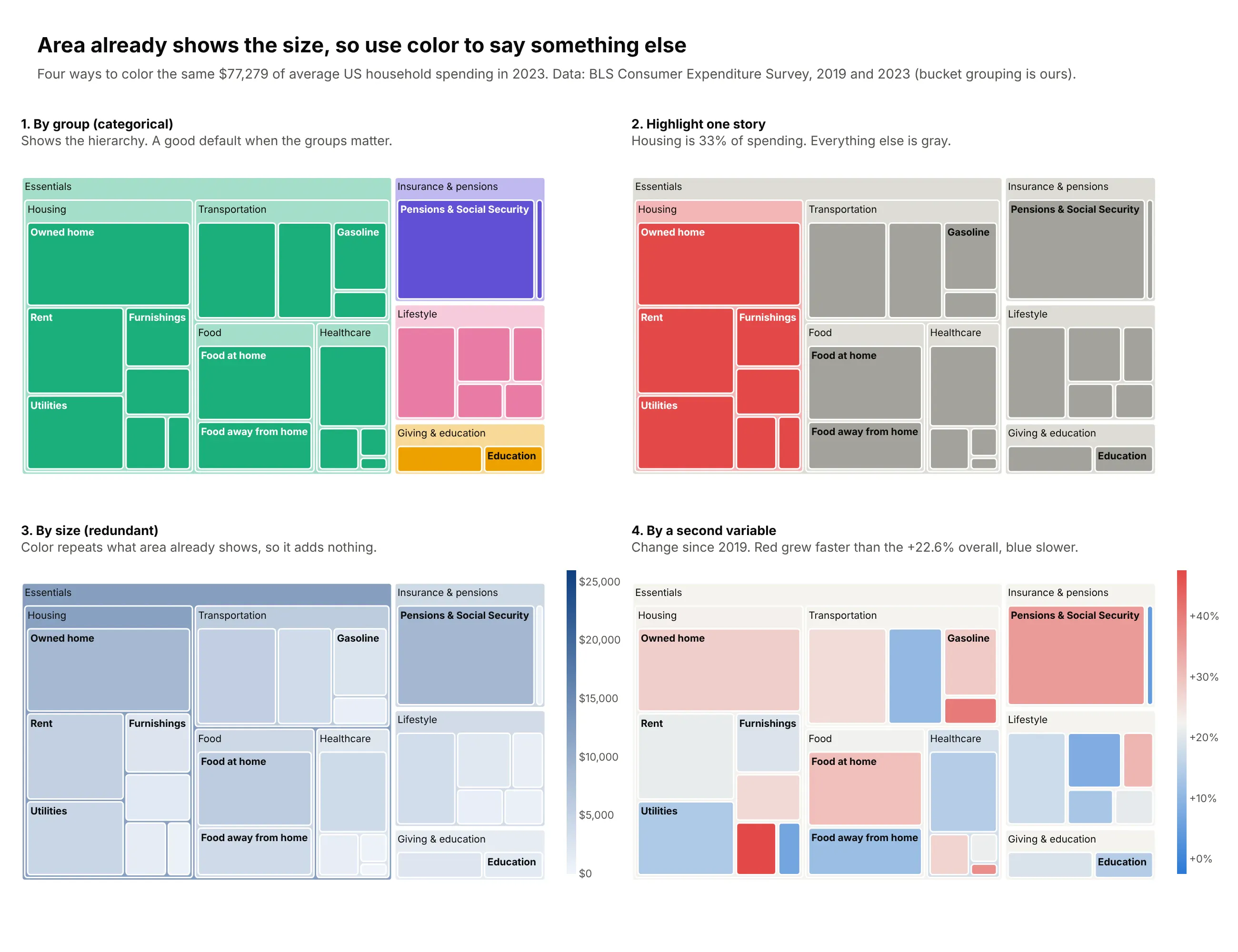
- Area already shows size, so use color for something else: a group, a highlight, or a second measure like growth or return.
- In Python, px.treemap(df, path=[...], values=...) makes one in one line of code. The 20 examples below come with code and a prompt you can paste into Plotly Studio or a coding agent.
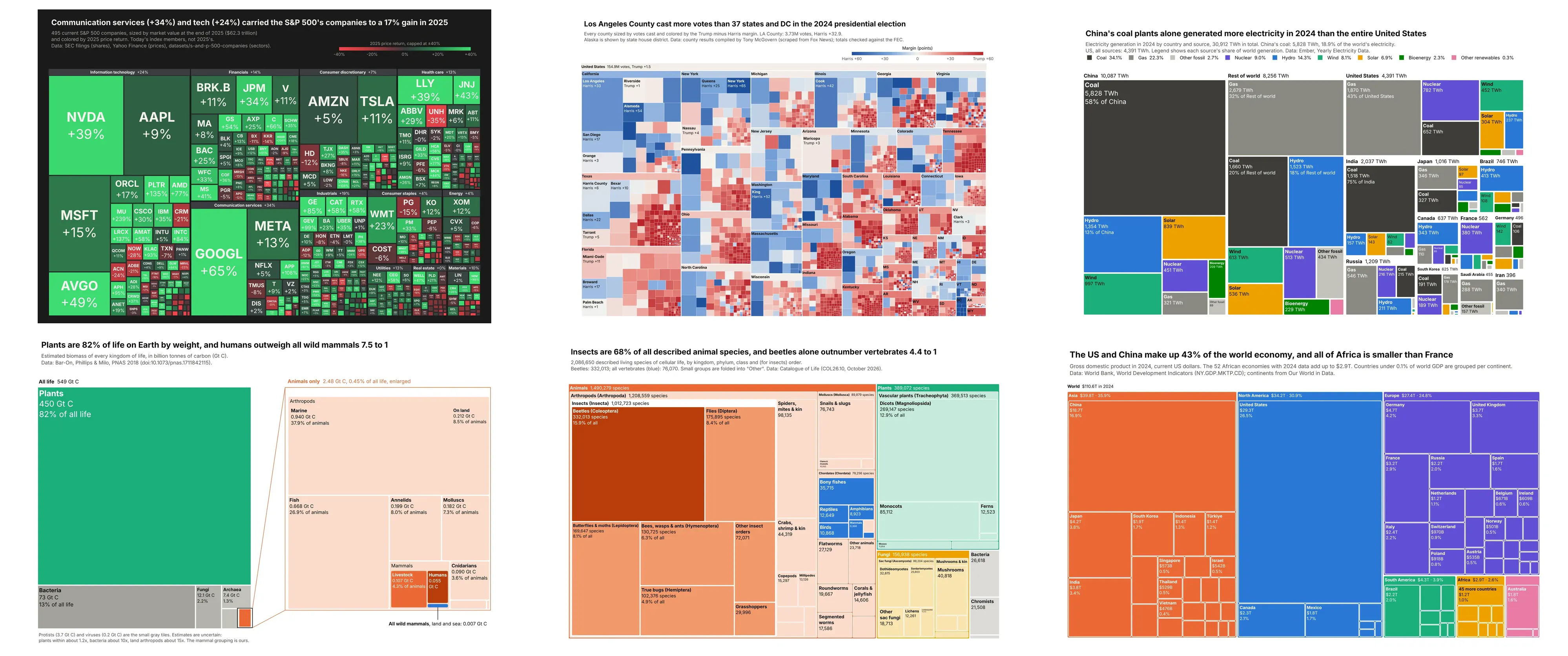
Most data people work with is a hierarchy, even when it arrives as a flat table. Sales roll up from products to categories to regions, a cloud bill rolls up from resources to services to accounts, and a federal budget rolls up from programs to bureaus to agencies. The usual tools for showing parts of a whole start to break down with this kind of data. A pie chart becomes unreadable past five or six slices, and a bar chart can show one level at a time but loses which items belong together.
A treemap fits a few hundred items into one rectangle and keeps the nesting, so you can see the big picture and the detail at once. That's why it shows up wherever there are a lot of parts and the question is where the bulk sits: stock market maps, disk usage tools, budget explorers and trade atlases. This guide covers what a treemap is, when to use one and when not to, the styling choices that separate a clear treemap from a wall of colored boxes, and 20 examples built from real public data, each with a tip on what makes it work and a prompt to rebuild it. A reference table of the Plotly options for customizing a treemap is at the end.
What is a treemap?
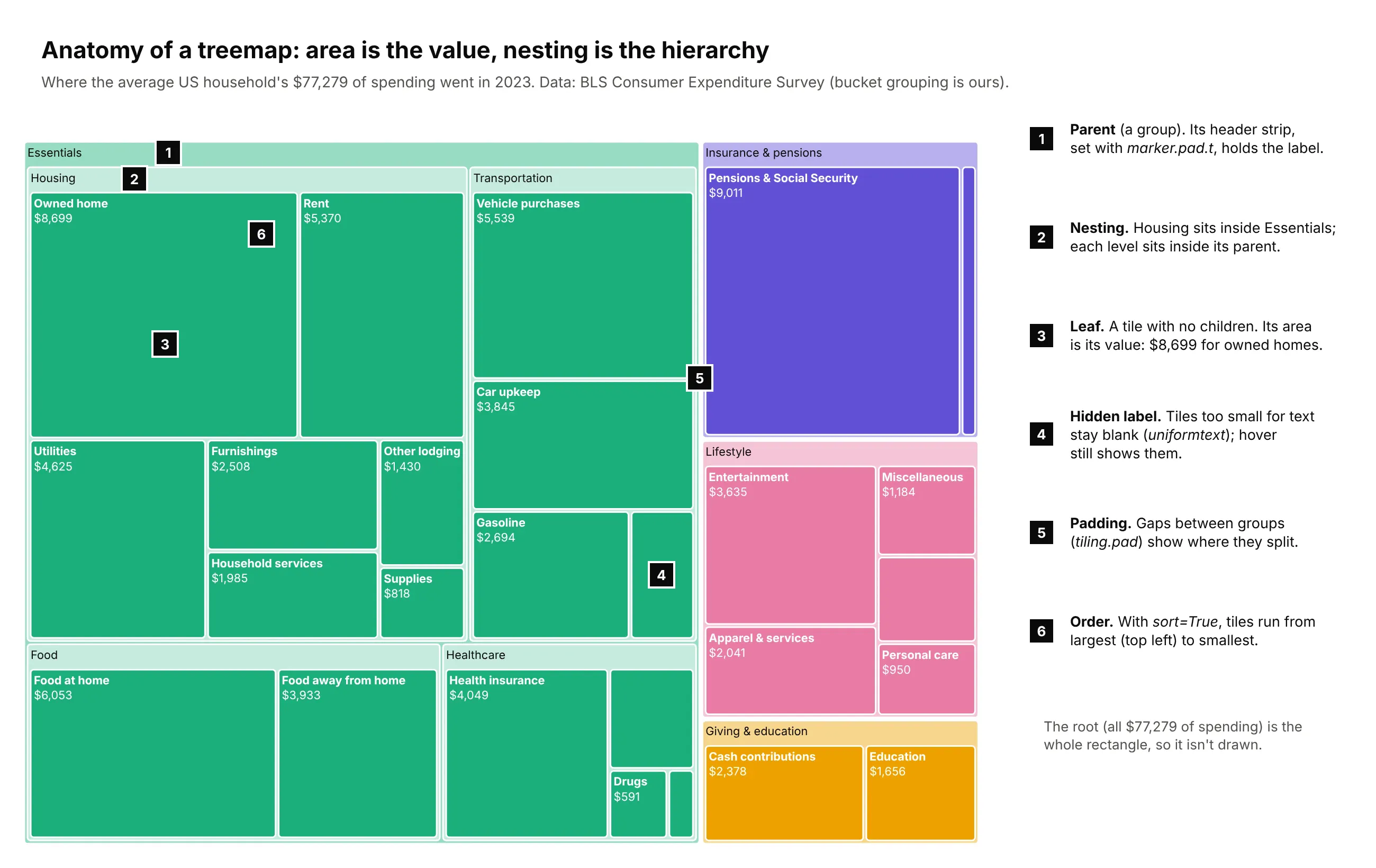
A treemap draws a tree (a hierarchy of categories) as rectangles nested inside rectangles:
- The root is the whole rectangle. It is the total of everything, so it is usually not drawn as a tile of its own.
- Parents are groups, like a sector or a budget bucket. Each parent is a rectangle subdivided into its children, often with a header strip for its label.
- Leaves are the items at the bottom of the tree, with no children of their own. Every leaf's area is proportional to its value.
- Color is free to encode something else: the group a tile belongs to, a highlighted story, or a second number such as growth.
Because every parent is exactly filled by its children, the values have to be positive and have to add up.
A short history
Ben Shneiderman invented the treemap around 1990 at the University of Maryland's Human-Computer Interaction Lab, because the lab's 80-megabyte hard disk, shared by 14 users, kept filling up, and no directory listing could show which folders and files were taking the space. He published the idea in 1992 in ACM Transactions on Graphics ("Tree visualization with tree-maps: 2-d space-filling approach"). The first layouts, called slice-and-dice, cut the rectangle into long thin strips that were hard to compare. In 2000, Mark Bruls, Kees Huizing and Jarke van Wijk published the squarified layout, which keeps tiles as close to square as possible, and it is still the default in Plotly and most other tools.
The treemap became famous through the stock market. Martin Wattenberg's Map of the Market for SmartMoney.com, launched in 1998, drew about 500 companies sized by market capitalization and colored green or red by the day's price change, and that design is still the standard way to show a stock market at a glance (example 1 below is one). Disk usage tools such as WinDirStat still draw treemaps for the job they were invented for (example 16).
Treemap vs sunburst vs icicle vs bar chart
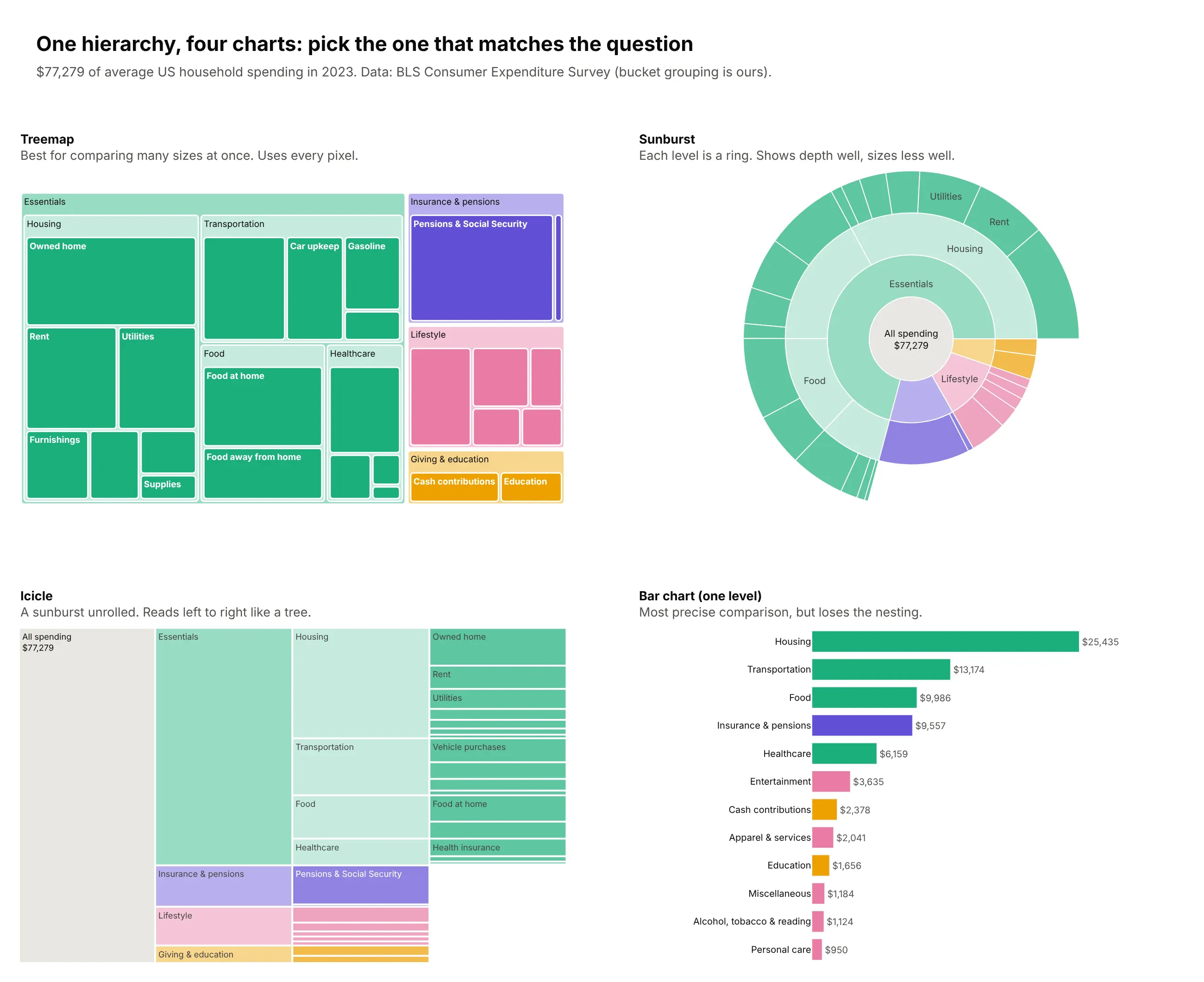
Plotly has three charts for hierarchies, and they draw the same data in different shapes:
- A treemap uses area inside a rectangle. It's the best at comparing many sizes at once and uses every pixel, so it scales to hundreds of leaves.
- A sunburst draws each level as a ring around the center. It shows the depth of the tree clearly, but angles and curved areas are harder to compare than rectangles, and outer rings get crowded.
- An icicle is a sunburst unrolled into columns. It reads left to right like an org chart and makes the levels obvious, but small items become thin slivers. It's the same layout as the flame graphs developers use to read CPU profiles (Brendan Gregg's design), where each row is one level of the call stack and a function's width is the time spent in it.
- A bar chart compares one level very precisely on a common baseline, and loses the nesting.
When to use a treemap
Use a treemap when you have a lot of positive values that belong to groups, and the question is about proportion: what's big, how much of the total it is, and which group it belongs to. It's especially good when the data is too big for a bar chart. A sorted bar chart of 500 companies is a scrolling list, while a treemap of 500 companies fits on one screen and still shows that technology is a third of the market (example 1).
Your data looks like...
Treemap?
Why
A budget, P&L line items or cloud bill by service
Yes
Positive amounts that roll up into a total
Market caps, portfolio holdings or sales by product
Yes
Many items, a few groups, and size is the story
Files and folders, code by module, app bundle size
Yes
The job treemaps were invented for
Population, emissions or GDP by region and country
Yes
Area shows size better than a map, where big countries dominate
Counts of records by category (complaints, species, tickets)
Yes
Shows where the bulk sits and the long tail at once
A second measure like growth, return or margin per item
Yes, as color
Size shows the level, color shows the change
Fewer than about 10 items, one level
No
Use a sorted bar chart; it's more precise
Values that are close in size and need comparing
No
Areas are hard to compare; use bars on a shared baseline
Negative values (losses, net outflows)
No
A tile can't have negative area; use a waterfall or diverging bar
A value changing over time
No
Use a line chart, or small multiples of treemaps for a few dates
Flows between stages (where money goes, step by step)
No
Use a Sankey diagram
Overlapping categories (an item in two groups)
No
A treemap needs a strict tree; use an UpSet plot or a Venn diagram
A quick test: write the sentence "every X belongs to exactly one Y, and the Xs add up to the Y". If it's true for every level of your data and the values are positive, a treemap will work.
When to avoid a treemap
People judge length on a shared baseline far more accurately than they judge area, as William Cleveland and Robert McGill showed in their 1984 graphical perception experiments, and Jeffrey Heer and Michael Bostock confirmed in a crowdsourced replication in 2010. A treemap trades that precision for density. When the number of items is small, or two values are close and the difference matters, a bar chart is the better chart:
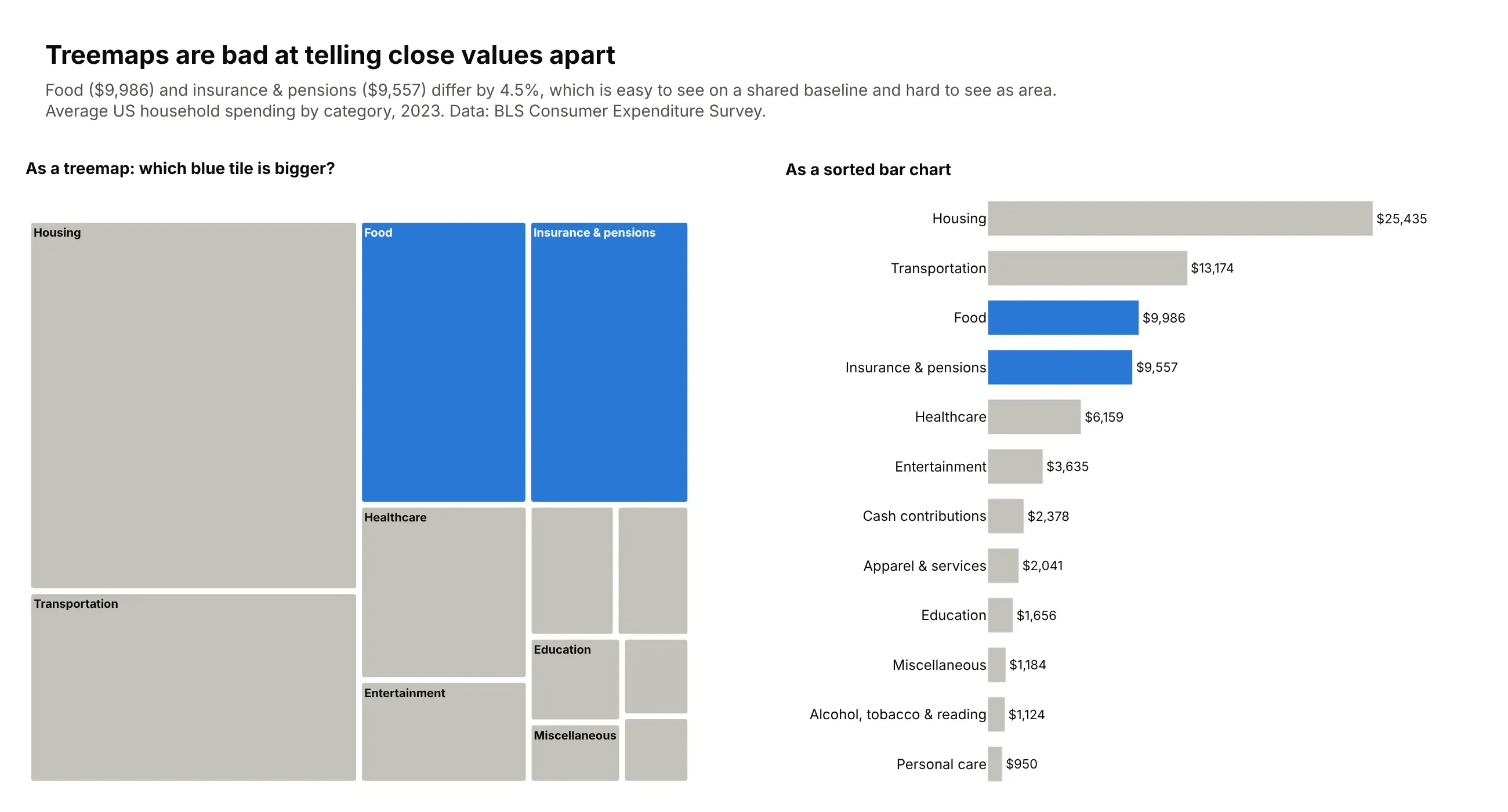
A few more cases where a treemap goes wrong:
- Flat data with no hierarchy and few items. Five tiles in a rectangle is a less precise pie chart.
- Deep trees drawn all at once. Past three levels, nested headers eat the space and the leaves become slivers. Show two or three levels in the static image and let readers drill down in the interactive version (example 15).
- Extreme ranges. When one item is 10,000 times bigger than another, the small one isn't drawn at all. That can be the story (example 11), but if the small items matter, use a log-scaled bar chart or zoom into a second treemap.
- Values that don't add up. Percentages that overlap, averages, or rates (like per-capita income) can't be summed into a parent, so they shouldn't be tile sizes. Put them in the color instead.
Treemap styling guidelines: dos and don'ts
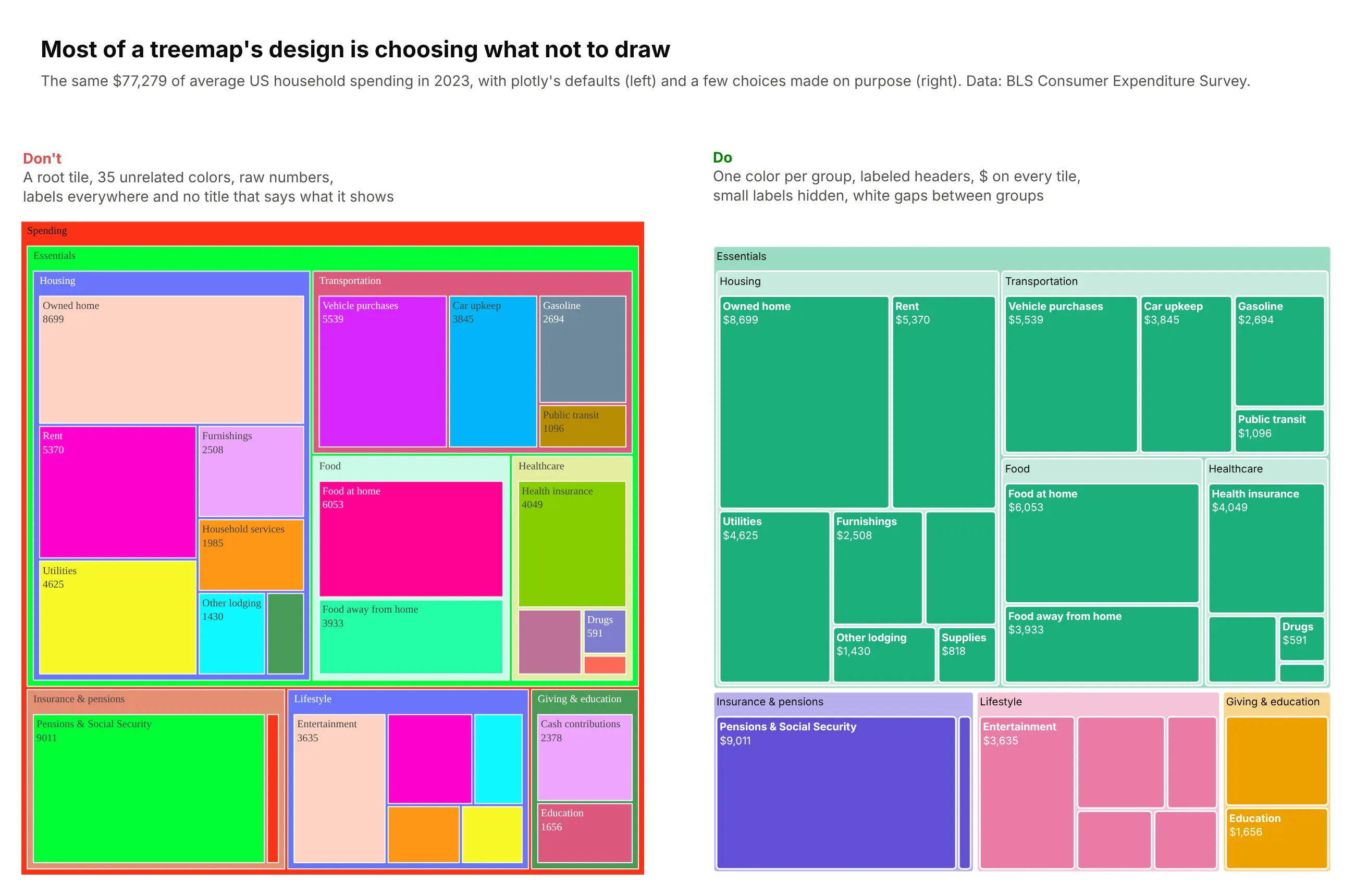
Plotly's defaults are made for exploring: they show every label, give each top-level group its own color from a rainbow palette, and draw the root as a big tile with a breadcrumb bar above it. For a chart you're going to publish, most of the work is deciding what to exclude:
The biggest decision is color. Area already shows the size, so a color scale that repeats the size adds nothing. Color by group when the groups are the point, gray everything except one group when there's a single story, or encode a second variable when there's a relationship to show:
Do
- Write a title that states the takeaway. "Shelter is a third of the CPI basket" beats "CPI weights".
- Put the value and the share on the tiles. texttemplate="<b>%{label}</b><br>%{value:$,.0f}<br>%{percentRoot:.1%}" saves every reader a hover.
- Hide labels that don't fit with uniformtext=dict(minsize=10, mode="hide"). A blank small tile is better than ant-sized text, and the hover still works.
- Separate groups with white lines, tiling.pad and header strips (marker.pad.t), so the eye can find the hierarchy without color.
- Use color for one thing, and say what it means in the subtitle or a colorbar. Center diverging scales on a meaningful value with marker.cmid (zero, or the overall average).
- Fold the long tail into "Other" within each parent, and draw "Other" in gray.
- Hide the root when it's just "Total" (root_color="#ffffff", start the tree at the first real level), and hide the pathbar in static images.
- Name the source and any grouping you made in the subtitle.
Don't
- Don't color by size. It's redundant with area, and it makes the biggest tile shout for no reason.
- Don't use a rainbow. Twenty unrelated colors make the reader look for a meaning that isn't there.
- Don't size tiles by rates, averages or percentages. Only quantities that add up can be areas.
- Don't show more than two or three levels at once in a static chart.
- Don't use a treemap for a handful of values or close comparisons. Use a bar chart.
- Don't rely on hover in a static image. If a number matters, it needs to be printed on the tile or in the text.
Tiling: squarify, binary, slice and dice
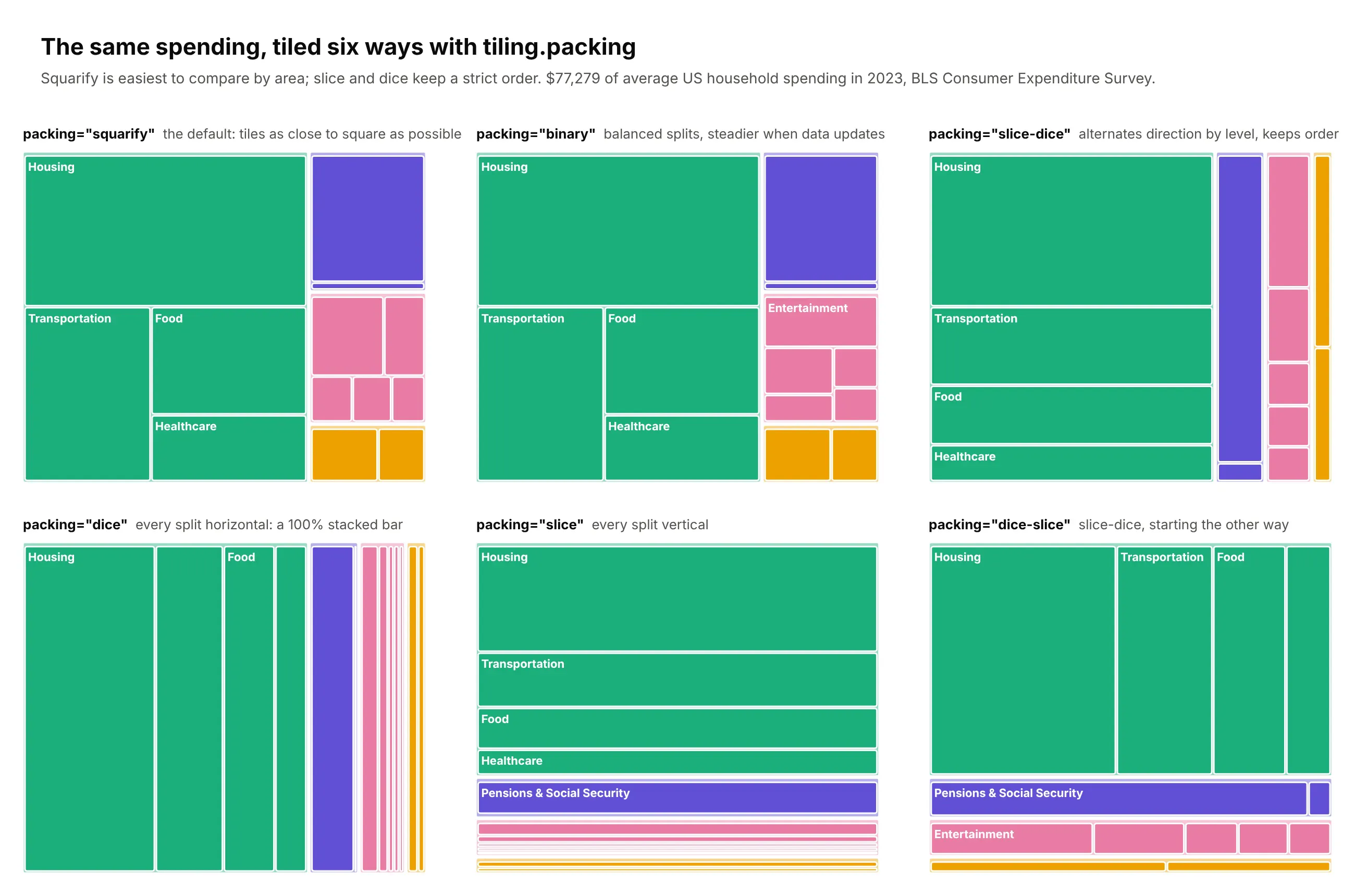
Plotly can lay the tiles out six ways with tiling.packing. Squarify (the default) makes tiles that are easiest to compare. Binary is similar, but splits more evenly, so the layout jumps around less when the data updates in a dashboard. Slice, dice and their combinations keep a strict order, which turns a one-level treemap into a 100% stacked bar and works well for things with a natural order, like age bands or time periods.
Treemap limitations, and how to work around them
Treemaps have a few limits that are worth knowing before you build one for a dashboard or a report. Some come from the chart form itself and some from how Plotly draws it, and most have a workaround.
Performance: keep it under about 1,000 tiles
Plotly draws treemaps as SVG, with about four SVG elements per tile, so the time to draw grows quickly with the number of tiles. We timed Plotly.newPlot on two-level treemaps of 100 to 100,000 tiles in headless Chromium on a 4-vCPU cloud server. Up to 1,000 tiles, a treemap draws in under 0.3 seconds. At 5,000 tiles it takes about 2.4 seconds, at 10,000 about 6 seconds, and at 100,000 tiles (400,000 SVG elements) about 37 seconds. A laptop will be faster than our server, but the curve has the same shape, and timings varied by about 30% from run to run.
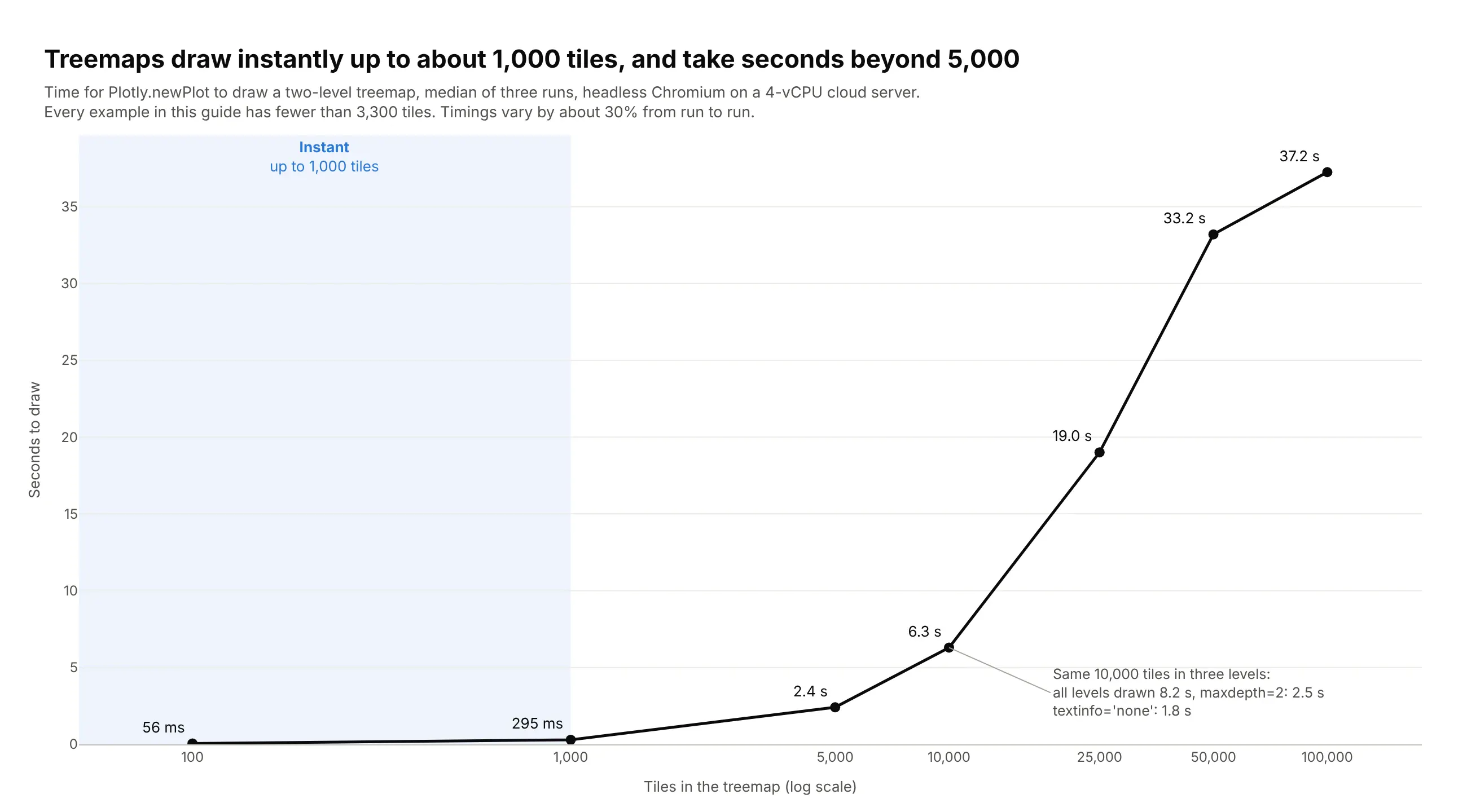
None of the examples in this guide comes close to the limit. The largest are the election map (3,212 tiles, about 1.1 seconds to draw) and the plotly package (1,569 tiles, under half a second); the other 18 draw in under 0.2 seconds. When your data is bigger, these are the fixes, from most to least effective:
- Aggregate before you plot. Fold small items into "Other" tiles in pandas, as most of the examples here do. Nobody can read 10,000 tiles on one screen anyway, and 100 tiles draw in about 60 ms.
- Limit the depth. With 10,000 leaves in three levels, maxdepth=2 cut the draw time from 8.2 to 2.5 seconds, and readers can still click into a branch to see its leaves.
- Turn off tile text. textinfo="none" cut the same chart to 1.8 seconds, because measuring and fitting text is a large share of the work. Keep the hover so the values are still there.
- Load one branch at a time in Dash. Draw only the top two levels, and use the clickData of the dcc.Graph in a callback to fetch and draw the clicked branch, so the browser never holds the whole tree.
Values must be positive and add up
A tile can't have a negative area, so losses, net outflows and declines can't be tile sizes. Size by an absolute quantity and put the signed number in the color, like the returns in example 1 or the job changes in example 7, or draw the gross amounts and say what was netted out, as the federal spending example does. Values also have to add up: rates, averages and percentages can't be summed into a parent, and with branchvalues="total", a parent whose children add up to more than its own value makes plotly draw an empty chart without raising an error. Assert that every parent equals the sum of its children before you plot.
Area is hard to compare, and layouts move
People compare areas much less accurately than lengths on a shared baseline, so a treemap is a poor choice when the reader needs to tell 41% from 44% (see the bar chart comparison earlier in this guide). The squarified layout also reorders tiles when the values change, so the same company or product can jump to another corner between two dates. If you show treemaps for several periods side by side, or update one live in a dashboard, keep your own order with sort=False and use an ordered layout such as tiling.packing="slice-dice", or compare the periods with a line chart instead.
How to make a treemap
There are three good ways to get from a dataset to a treemap: write the Plotly code yourself, let Plotly Studio build it for you, or ask a coding agent. They all end with a Plotly figure you can tweak.
In Python with Plotly
If your data is a flat table with one row per item and a column for each level, Plotly Express does it in one line. px.Constant adds a single root above your top level:
import plotly.express as pxdf = px.data.gapminder().query("year == 2007")fig = px.treemap(df,path=[px.Constant("World"), "continent", "country"],values="pop",color="lifeExp",color_continuous_scale="RdBu",color_continuous_midpoint=df["lifeExp"].mean(),)fig.update_traces(root_color="#ffffff", texttemplate="<b>%{label}</b><br>%{value:,.0f}")fig.show()
When the tree doesn't come from a table, for example when parents have their own values or the same label appears under two parents, use go.Treemap with explicit ids. Give each node a unique id (the path works well), the id of its parent, and a value. With branchvalues="total", each parent's value must equal the sum of its children:
import plotly.graph_objects as gofig = go.Figure(go.Treemap(ids=["Essentials", "Essentials/Housing", "Essentials/Food", "Lifestyle", "Lifestyle/Entertainment"],labels=["Essentials", "Housing", "Food", "Lifestyle", "Entertainment"],parents=["", "Essentials", "Essentials", "", "Lifestyle"],values=[35421, 25435, 9986, 3635, 3635],branchvalues="total",))fig.show()
Real data usually has a long tail, and a treemap of hundreds of tiny tiles is hard to read. This short function keeps the largest top_n children of every parent and folds the rest into one "Other" tile, and px.treemap does the rest:
import pandas as pdimport plotly.express as pxdef fold_tail(df, parent, child, value, top_n=8):"""Keep each parent's top_n children and fold the rest into one "Other" tile."""df = df.groupby([parent, child], as_index=False)[value].sum()rank = df.groupby(parent)[value].rank(ascending=False, method="first")df[child] = df[child].where(rank <= top_n, "Other")return df.groupby([parent, child], as_index=False)[value].sum()sales = pd.DataFrame({"region": ["Europe", "Europe", "Europe", "Europe", "Americas", "Americas", "Asia"],"product": ["Laptops", "Phones", "Cables", "Cases", "Laptops", "Phones", "Phones"],"revenue": [120, 90, 6, 5, 150, 80, 40],})fig = px.treemap(fold_tail(sales, "region", "product", "revenue", top_n=2),path=[px.Constant("All"), "region", "product"], values="revenue")fig.show()
In a Dash app, a treemap is also a navigation control. Clicking a tile zooms into it by default, and the clickData of the dcc.Graph tells your callback which node was clicked (clickData["points"][0]["id"]), so you can filter a table or a second chart to that branch. Setting level from a callback zooms the treemap to a node programmatically.
With Plotly Studio
Plotly Studio is a desktop app where you point an AI at a dataset, ask questions, and it builds charts and a Dash app around the answers. To get a treemap, ask for one and describe the hierarchy and what the color should mean:
Show a treemap of S&P 500 companies grouped by sector, sized by market cap and colored by return this year on a red to green scale centered on zero. Put the ticker and return on every tile, hide labels that don't fit, and add a dropdown to switch the color between 1-day, 1-month and year-to-date return.
Because the result is a Dash app, you can keep asking for more. Ask for a click on a sector to filter a table of its companies, and the treemap becomes the main way people move around the app.
With a coding agent
Claude Code, Cursor, Copilot and other coding agents are very good at Plotly, and a precise prompt gets you most of the way to a publishable treemap. Spell out the hierarchy, what size and color mean, and the checks you want:
Using plotly in Python, build a treemap from spend.csv(columns: team, service, resource, monthly_cost_usd).- Hierarchy: team -> service -> resource. Size = monthly_cost_usd.- Within each service keep the 10 biggest resources and fold the rest into "Other <service>" in gray.- One color per team from this palette: #2a78d6 #eb6834 #1baf7a #eda100 #e87ba4 #6250d6.Children use their team's color; parent header strips use a light tint of it.- Tile text: bold name, $ value and % of total. Hide text that doesn't fit (uniformtext minsize 10).- Don't draw a root tile or the pathbar. White 1.5px lines between tiles, tiling.pad=3.- Use the Inter font, a white background and a title that states the main takeaway.- Assert that every parent equals the sum of its children and print any that don't.- Save it as treemap.html and as a PNG at 2x scale.
The last check is worth keeping in every treemap prompt. Treemaps fail quietly when the numbers don't add up: with branchvalues="total", if any parent's children sum to more than the parent, plotly draws an empty chart and Python raises no error.
20 treemap examples with real data
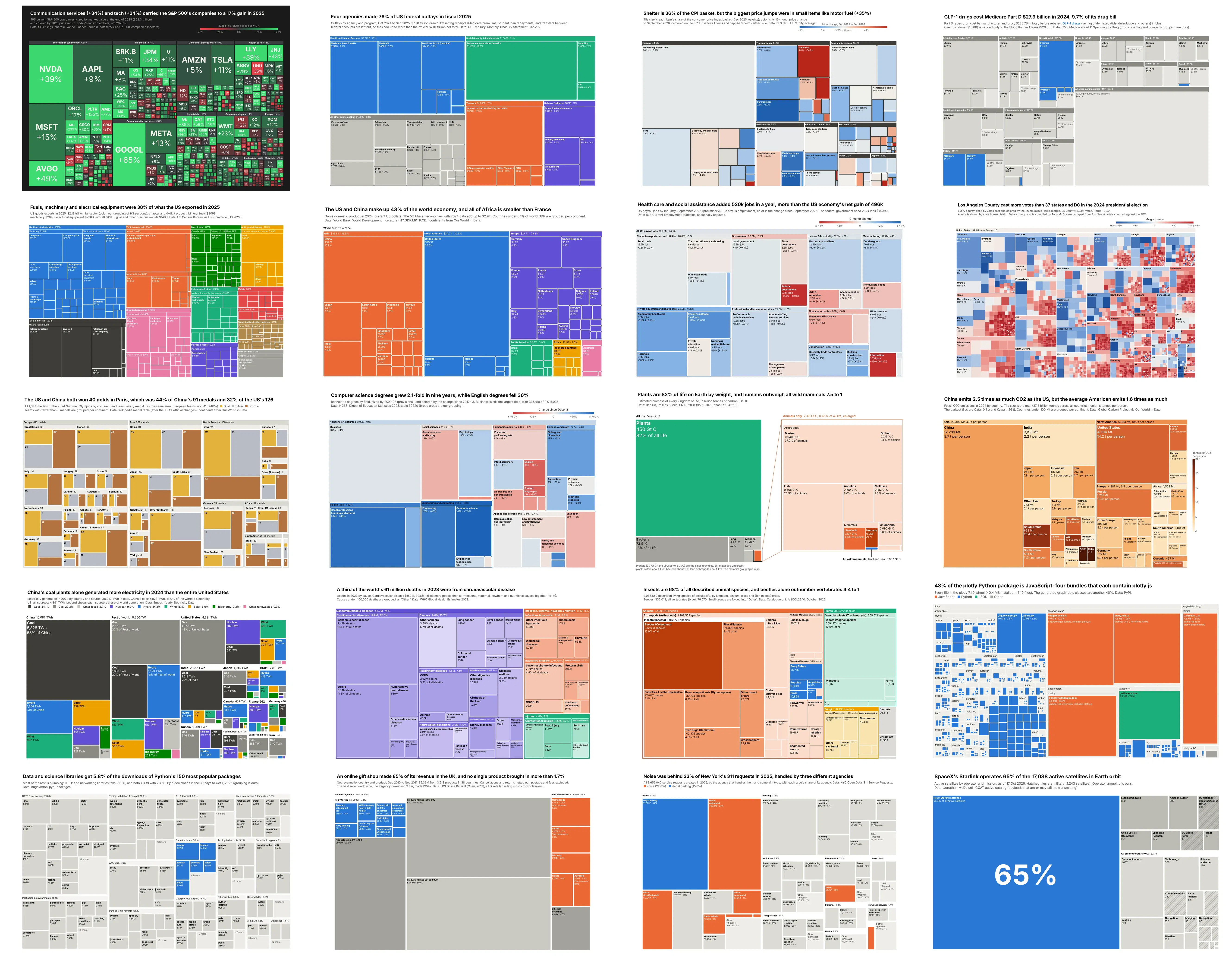
Here are 20 treemaps built from real public data, grouped by the kind of data they show: money and markets, the economy and people, the planet and life, and software, products and cities. Each one comes with its data source, the one technique that makes it work, and a prompt you can paste into Plotly Studio or a coding agent to build it yourself. Every chart was built with plotly and pandas alone, so each prompt gets you most of the way to the same image.
Money and markets
Money is the most common thing people draw as a treemap, because every dollar of a budget, a portfolio or an export basket belongs to exactly one line, and the lines add up. These five also show the main ways to use color: a second measure (returns, inflation), a highlight (one class of drugs) and a top-level group (sectors, agencies).
1. The S&P 500 market map
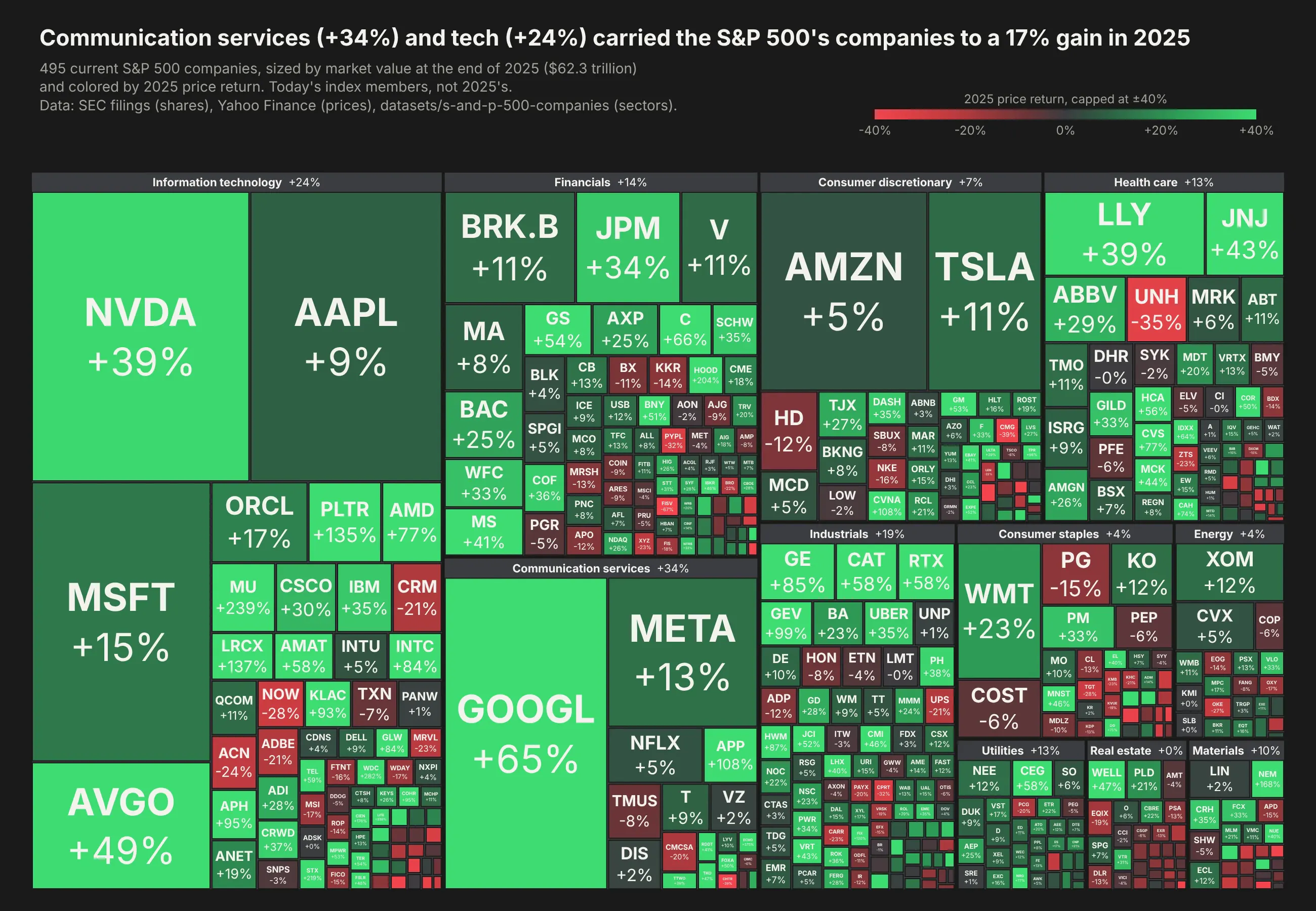
This is the chart that made treemaps famous, in the layout Martin Wattenberg designed for SmartMoney's Map of the Market and finviz later made a daily habit for traders. Each of today's 495 S&P 500 companies is sized by its market value at the end of 2025 ($62.3 trillion in total) and colored by its 2025 price return. Together they gained 17%, but the gains were uneven. Alphabet rose 65% and pulled communication services up 34%, Nvidia (+39%) and Broadcom (+49%) led tech, while Apple (+9%) and Amazon (+5%) barely moved, and UnitedHealth's 35% drop is the brightest red tile in health care. Data: SEC EDGAR (shares outstanding), Yahoo Finance (prices), datasets/s-and-p-500-companies (sectors).
Tip: a diverging red, dark gray and green colorscale centered at zero with marker.cmid=0 and clipped at ±40% with cmin and cmax, on a #1a1a19 background. textfont.size is a list that grows with the square root of market cap, so big companies get big tickers.
Get the data from the S&P 500 constituents list (github.com/datasets/s-and-p-500-companies), shares outstandingfrom SEC EDGAR company facts, and 2024-12-31 and 2025-12-31 closing prices from Yahoo Financeand shape it into a table(columns: ticker, company, sector, sub_industry, shares, close_2024, close_2025, market_cap_bnin US$ billions at 2025-12-31, return_2025 as a fraction, shares_asof, shares_source, splits_after_2025).Build a plotly treemap "map of the market" for the S&P 500 in 2025.- Hierarchy sector -> ticker, sized by market_cap_bn, branchvalues="total".- Dark background #1a1a19. Color tiles with a diverging red / dark gray / green scale centeredat 0 (cmid=0) and clipped at -40%..+40%; add a slim horizontal colorbar.- Label each tile with the ticker in bold and the return (e.g. "NVDA<br>+39%"), with font sizegrowing with sqrt(market cap); no text on tiles under $25B.- Sector headers show the cap-weighted sector return.- Title with the takeaway; subtitle says these are today's index members and cites SEC and Yahoo.- Check that every sector equals the sum of its companies.
Getting the market caps right took more work than the chart. Yahoo's historical closes are adjusted for stock splits made after 2025 (Booking split 25 to 1 in 2026, so its unadjusted market cap came out at about $7 billion), and one company tags its SEC filing with 89.2 billion shares instead of 89.2 million. The fetch script corrects both, and it's a good reminder to sanity-check the biggest and smallest tiles before you publish a market map.
2. US federal spending by agency
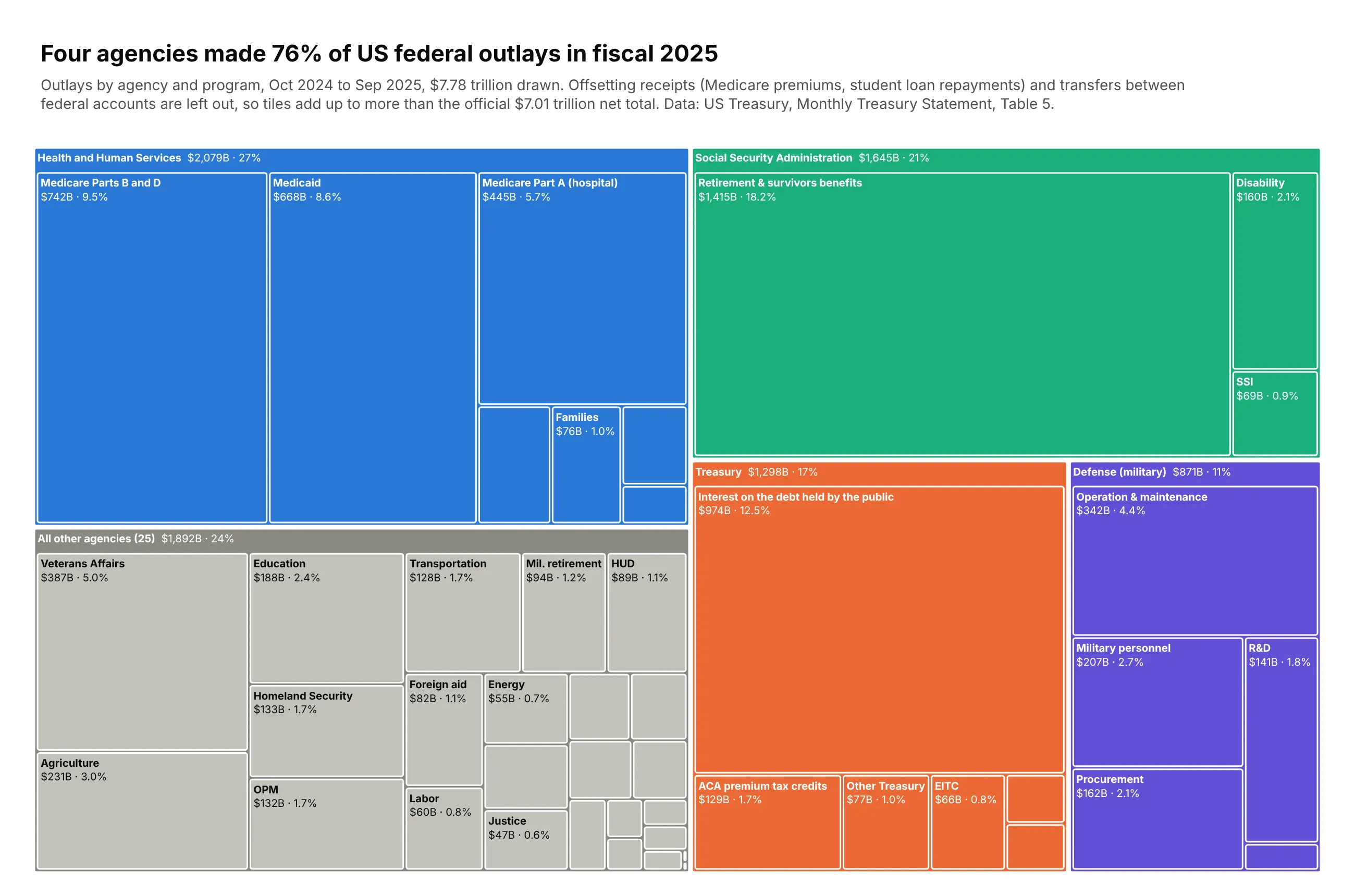
In fiscal 2025, four agencies made 76% of the $7.78 trillion of federal outlays drawn here: Health and Human Services ($2,079B), the Social Security Administration ($1,645B), Treasury ($1,298B) and the Defense Department's military programs ($871B). The other 25 agencies share one gray block. Social Security retirement and survivors benefits ($1,415B) is bigger than every agency except HHS, and interest on the debt held by the public ($974B) is more than all of Defense's military programs. Treemaps can't draw negative numbers, so offsetting receipts such as Medicare premiums are left out and the tiles add up to more than the official $7.01 trillion net total; the subtitle says so. Data: US Treasury, Monthly Treasury Statement, September 2025, Table 5.
Tip: two levels with each tile's share of the total printed through %{percentRoot:.1%} in texttemplate, color for the four big agencies only, and every small agency folded into "All other agencies".
Get the data from the US Treasury's Monthly Treasury Statement, Table 5, September 2025 (fiscaldata.treasury.gov)and shape it into a table(columns: agency, program, line, outlays_bn; US$ billions of FY2025 outlays from the MonthlyTreasury Statement, Table 5; positive lines only, transfers between federal accounts removed).Build a plotly treemap of FY2025 federal spending.- Sum to agency and program. Open the four largest agencies into programs (fold programs under$20B into "Other <agency>"); put every other agency as one tile under "All other agencies".- Use go.Treemap with ids/parents/values and branchvalues="total"; assert parents = sum of children.- Give the four agencies distinct colors and everything else gray; header strips via marker.pad.t.- texttemplate "<b>%{label}</b><br>$%{value:,.0f}B · %{percentRoot:.1%}", uniformtext minsize 10, mode hide.- Subtitle: say negative offsetting receipts are left out, so tiles add up to more than the $7.01T net total.
3. What's in the CPI basket, and what got more expensive
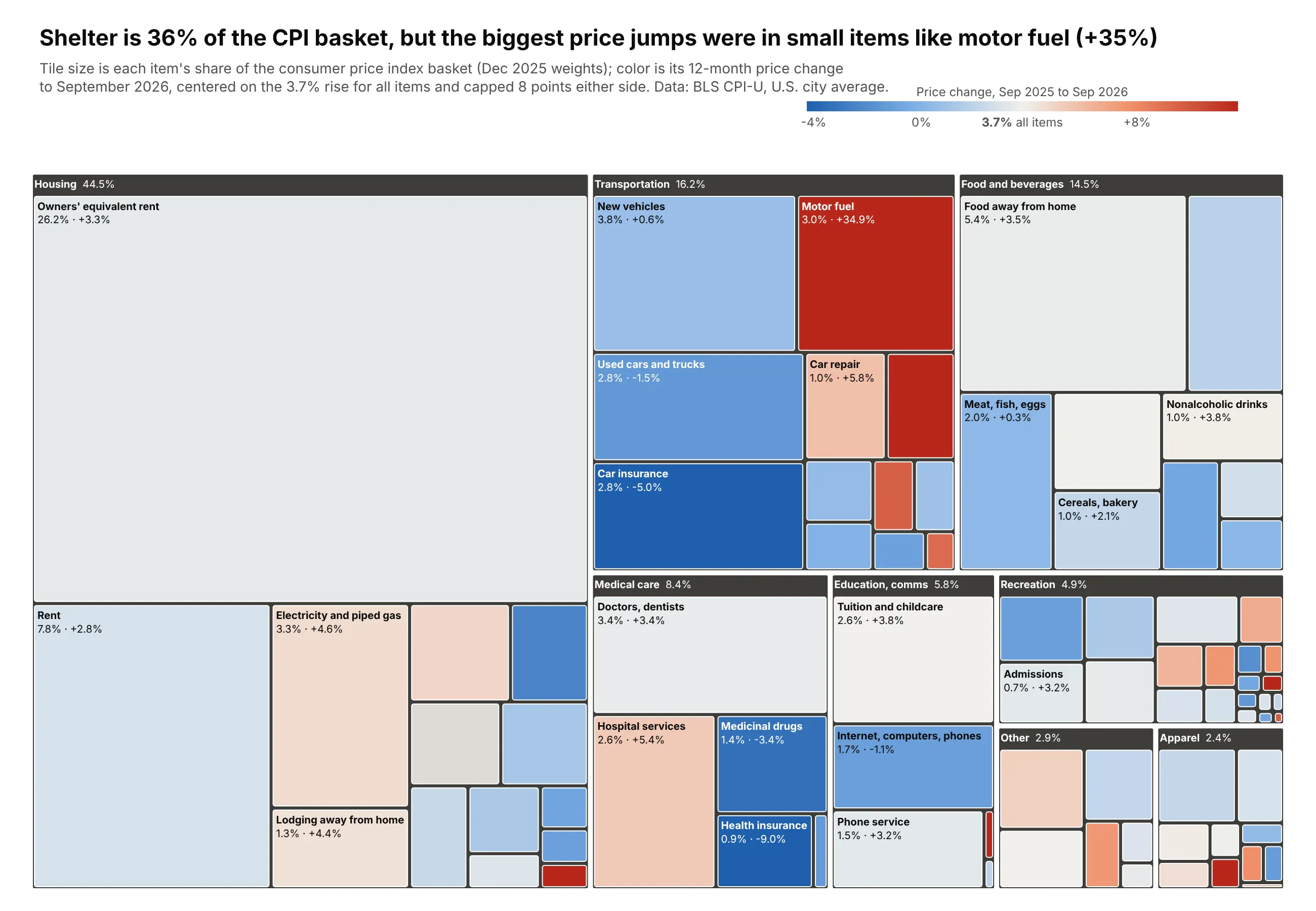
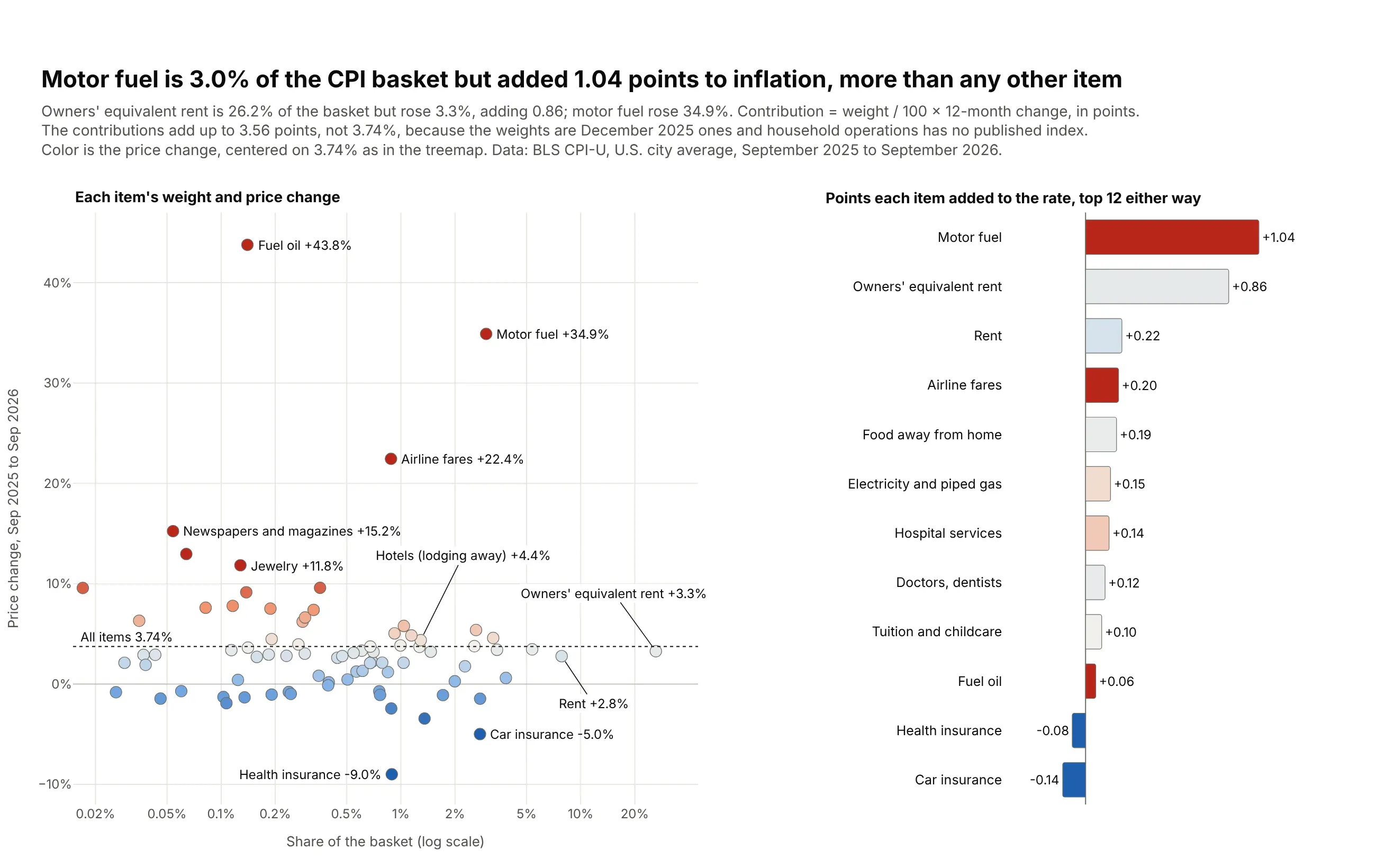
The consumer price index is a weighted basket, and a treemap can show both numbers at once, with weight as area and price change as color. Shelter is 35.6% of the basket, owners' equivalent rent alone is 26.2%, and shelter rose 3.2%, a little below the 3.7% rise for all items. The deep red tiles are small: motor fuel is 3.0% of the basket and rose 35%, and airfares rose 22%, while car insurance (-5.0%), health insurance (-9.0%) and medicinal drugs (-3.4%) got cheaper. Data: BLS CPI-U relative importance (December 2025) and indexes for September 2025 and September 2026, US city average.
Tip: the diverging scale is centered on the 3.7% all-items rate instead of zero, so blue means "rose slower than overall inflation" and red means "faster". Colors are capped 8 points either side, and an invisible scatter trace draws the colorbar.
Get the data from the BLS CPI-U relative importance table (December 2025) and CPI indexes for September 2025and September 2026 (bls.gov)and shape it into a table(columns: group, item, item_code, weight in percent of the CPI-U basket at Dec 2025,index_sep2025, index_sep2026, change_12m as a fraction; BLS CPI-U, U.S. city average).Build a plotly treemap of the CPI basket: group -> item, sized by weight.- Color each item by change_12m on a diverging blue-white-red scale centered on the all-itemsrate (3.74%) and capped 8 points either side; gray where change_12m is empty.- Dark group header strips showing the group's weight; tile text "<b>item</b><br>weight% · +x.x%".- White text on dark tiles, black on light ones; uniformtext minsize 10, mode hide.- Add a horizontal colorbar labeled with the all-items rate. Title with the takeaway; cite BLS.
Another way to see it: a dot plot of each item's weight against its price change, next to a bar chart of how many points each item added to the overall rate, answers "what drove inflation" directly. It shows that motor fuel, at 3.0% of the basket, added 1.04 points, more than owners' equivalent rent (0.86 points) even though rent is 26.2% of the basket. The treemap is still better for seeing what the basket looks like as a whole and where the surprises sit inside it.
4. GLP-1 drugs in Medicare Part D
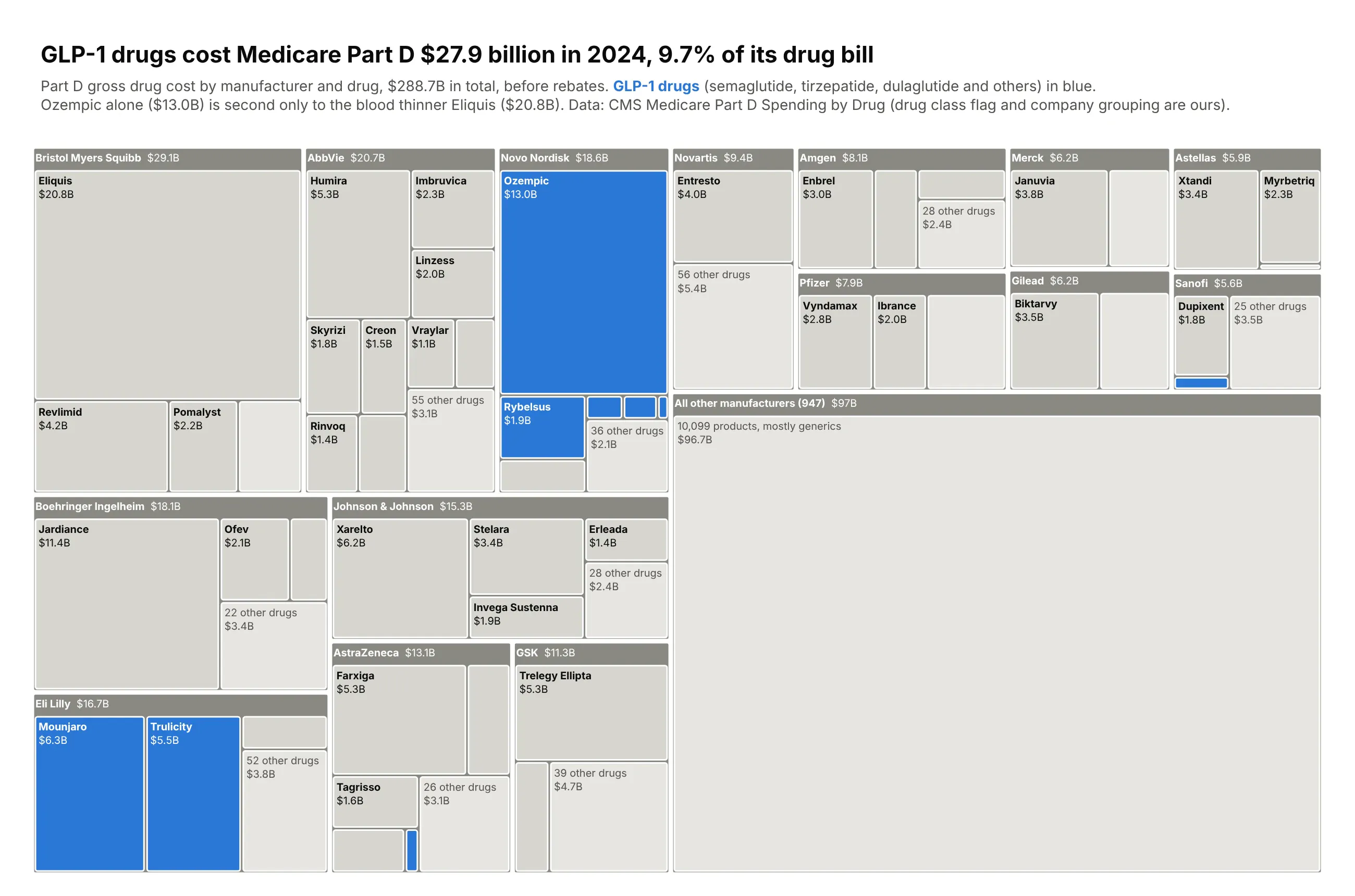
Medicare Part D paid $288.7 billion for drugs in 2024 before rebates. Drawn by manufacturer and drug, with only the GLP-1 drugs in color, the class shows up across Novo Nordisk, Eli Lilly, AstraZeneca and Sanofi and adds up to $27.9 billion, 9.7% of the bill. Ozempic alone cost $13.0B, second only to the blood thinner Eliquis ($20.8B), followed by Lilly's Mounjaro ($6.3B) and Trulicity ($5.5B). The long tail of 947 other manufacturers, mostly generics, is one gray block of $97B. Data: CMS Medicare Part D Spending by Drug, 2024 (the GLP-1 flag and company grouping are ours).
Tip: highlight one group and gray everything else. A single blue picks out the GLP-1 drugs wherever they sit in the hierarchy, which is something a bar chart grouped by manufacturer can't do.
Get the data from CMS Medicare Part D Spending by Drug, 2024 (data.cms.gov)and shape it into a table(columns: manufacturer, drug, generic, spending_mn in US$ millions of 2024 Part D gross drugcost before rebates, beneficiaries, glp1 = True for GLP-1 receptor agonists).Build a plotly treemap: manufacturer -> drug.- Draw the 15 largest manufacturers; inside each, drugs >= $900M (and every GLP-1 drug >= $50M)get their own tile and the rest become "N other drugs". All other manufacturers = one tile.- Color GLP-1 drugs blue and everything else in grays (darker gray manufacturer headers).- Label tiles "<b>drug</b><br>$X.XB"; uniformtext minsize 10, mode hide.- Title with the GLP-1 total and share; subtitle notes gross cost before rebates and that theGLP-1 flag and company grouping are ours. Check parents = sum of children.
5. What the US exports
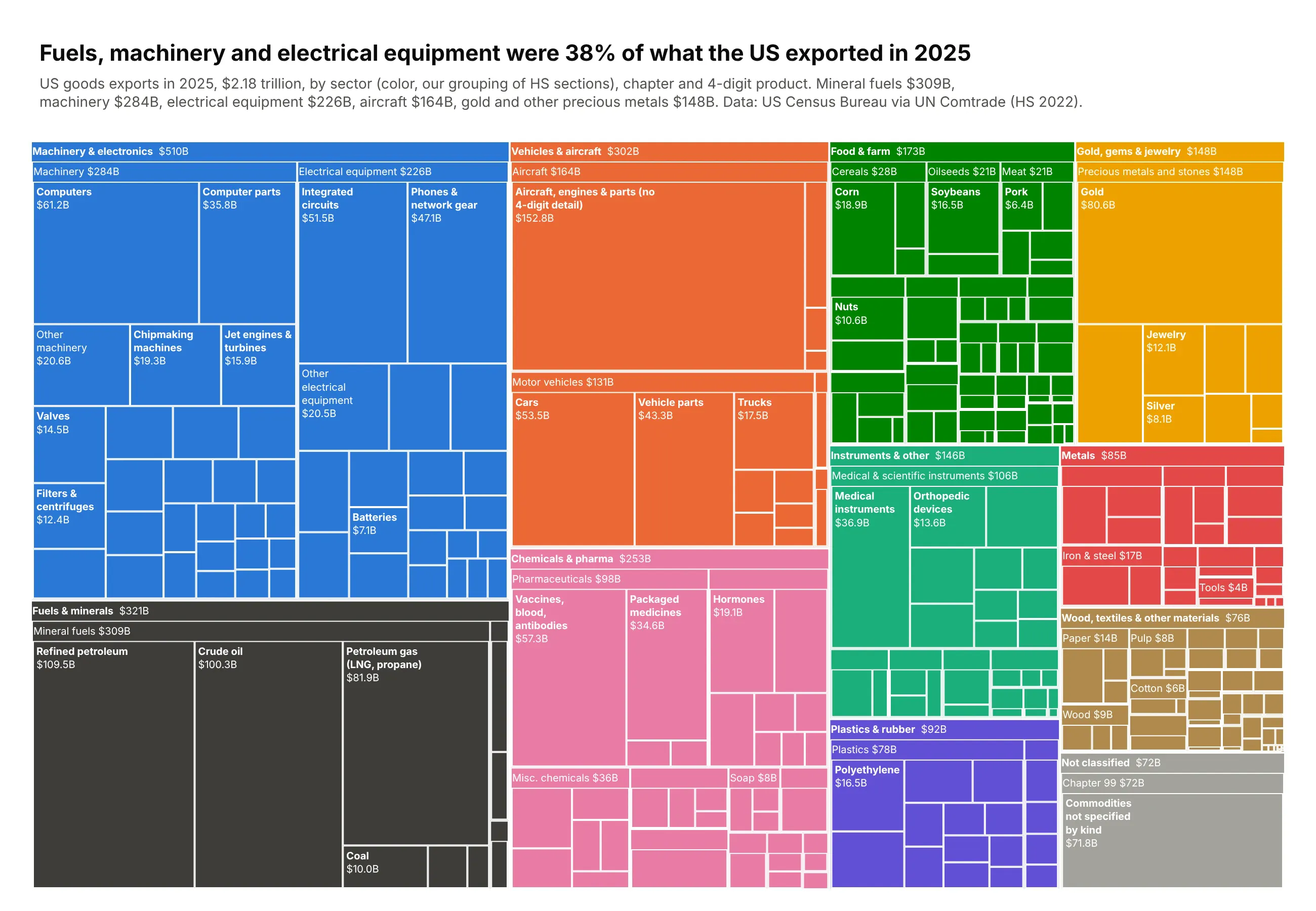
The Atlas of Economic Complexity made this view of a country's export basket familiar: every product gets area in proportion to its value, colored by sector. The US exported $2.18 trillion of goods in 2025, and mineral fuels ($309B, mostly refined petroleum, crude oil and gas), machinery ($284B) and electrical equipment ($226B) were 38% of it. Aircraft ($164B) and precious metals ($148B) come next, and gold alone was $80.6B. Data: US Census Bureau trade data via UN Comtrade, HS 2022 (sector grouping is ours).
Tip: three levels (sector, chapter, product) where only the top level picks the color, so every chapter and product inherits its sector's hue, and uniformtext=dict(minsize=10, mode="hide") drops the labels that don't fit instead of shrinking them.
Get the data from US goods exports by HS code for 2025 in the UN Comtrade database (comtradeplus.un.org)and shape it into a table(columns: hs2, hs2_name, hs4, hs4_name, value_bn; US goods exports in 2025, US$ billions,HS 2022, as reported by the US Census Bureau to UN Comtrade). Read hs2/hs4 as strings.Build an Atlas-of-Economic-Complexity-style treemap: sector -> HS2 chapter -> HS4 product.- Group chapters into ~10 sectors (food 1-24, fuels 25-27, chemicals 28-38, plastics 39-40,materials 41-70, precious metals 71, metals 72-83, machinery 84-85, vehicles 86-89,instruments 90-97, unclassified 98-99); give each sector one color and use it on everychapter and product inside it.- Products under $2B fold into "Other <chapter>". Short, wrapped product names.- uniformtext minsize 10, mode "hide"; thin white lines; header strips for sectors and chapters.- Title with the takeaway; subtitle with the total and source. Check parents = sum of children.
The economy and people
Treemaps are a good answer to the problem with maps: on a map, area is land, and land is rarely what you want to compare. These five size countries, industries, counties, teams and degrees by what they actually produce or count.
6. World GDP by continent and country
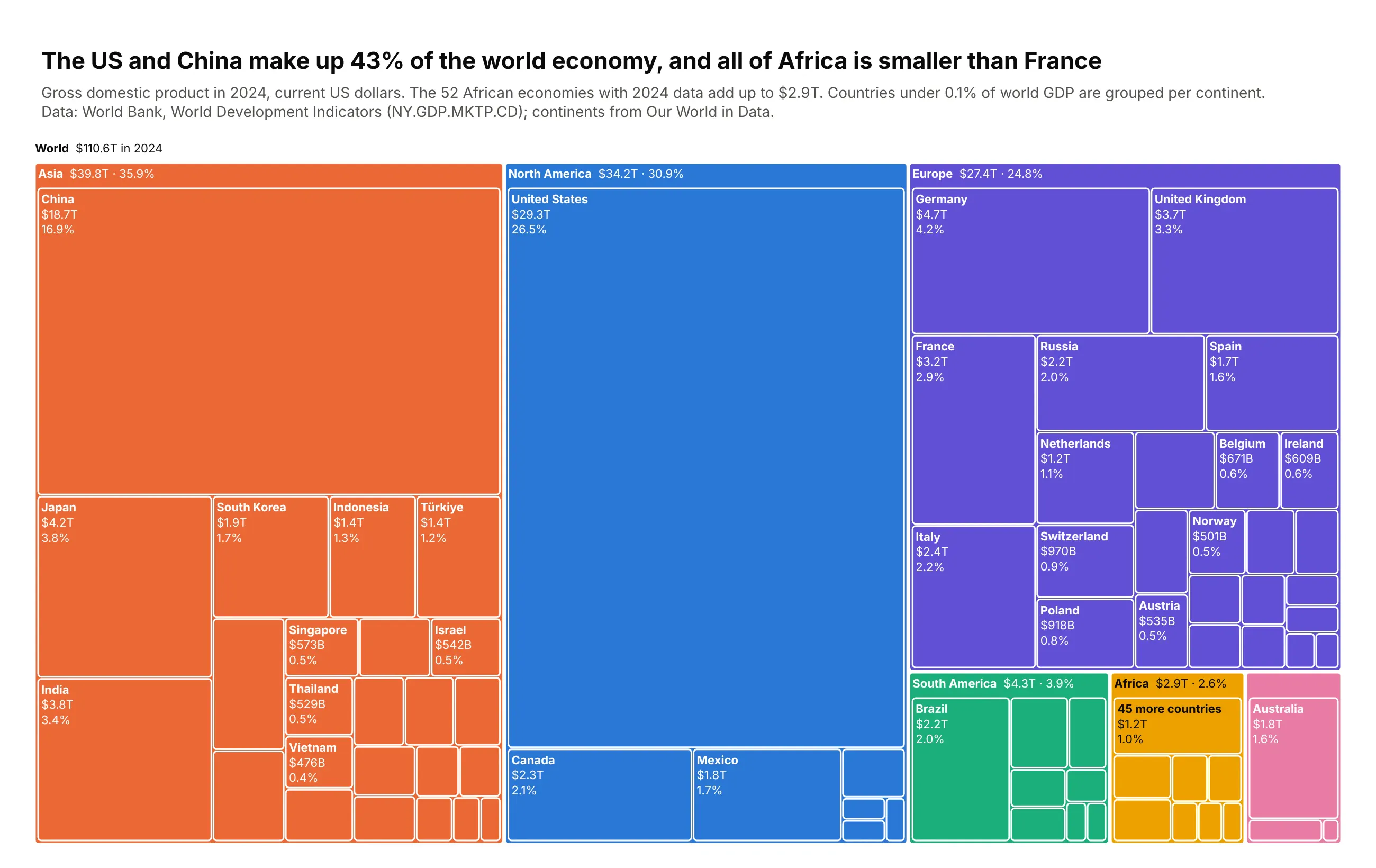
The world economy produced $110.6 trillion in 2024 in current dollars, and the United States ($29.3T) and China ($18.7T) made 43% of it. A world map gives the most ink to Russia, Canada and Africa, while this chart sizes every country by its output: the 52 African economies with 2024 data add up to $2.9T, 2.6% of the world, which is less than France alone ($3.2T). Germany, Japan, India and the UK are each bigger than the whole continent too. Countries under 0.1% of world GDP are folded into one tile per continent, so the chart has about 100 tiles instead of 200. Data: World Bank, World Development Indicators (NY.GDP.MKTP.CD, 2024); continents from Our World in Data.
Tip: px.treemap(df, path=[px.Constant("World"), "continent", "country"], values="gdp_usd_bn", color="continent") builds the whole hierarchy from a flat table in one line, and update_traces adds the header strips and labels.
Get the data from the World Bank's World Development Indicators, GDP in current US$ (NY.GDP.MKTP.CD), 2024,with continents from Our World in Dataand shape it into a table(columns: continent, country, iso3, gdp_usd_bn; 2024 GDP in current US$ billions, World Bank WDI,countries only, no aggregates).Build a plotly express treemap of world GDP with path=[px.Constant("World"), "continent", "country"].- Color by continent (one color per continent), keep the "World" root as a slim header with the total.- Fold countries under 0.1% of the world total into one "N more countries" tile per continent.- Each country tile shows name, value ($29.3T / $970B) and share of the world on three short lines;put continent totals in the header label. Use uniformtext minsize so tiny tiles stay unlabeled.- Title with the takeaway (US + China share, Africa vs France) and cite the World Bank in the subtitle.- Check the countries sum to within 1% of the World Bank's "World" aggregate.
7. Where US jobs are growing and shrinking
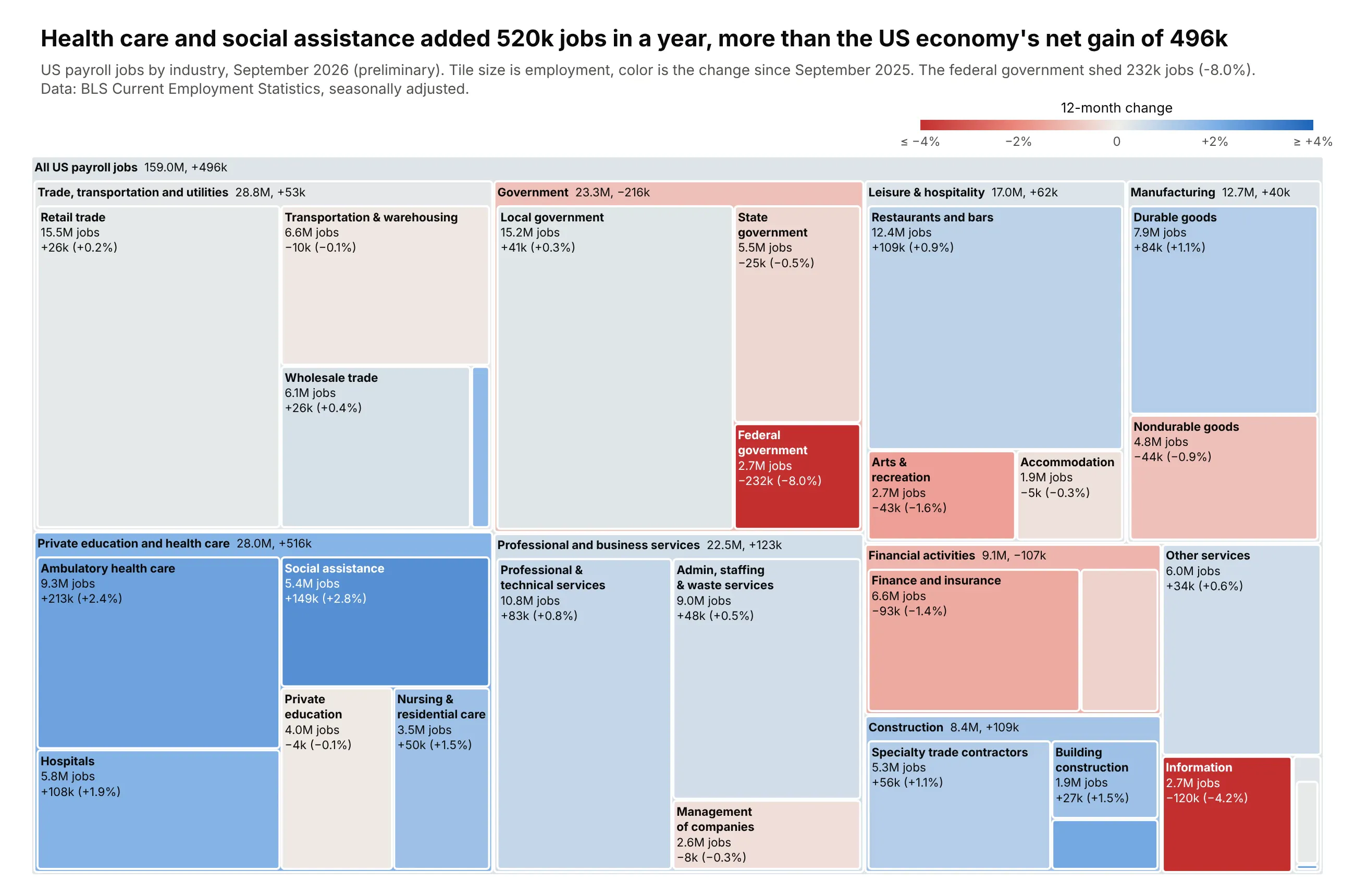
US payroll jobs by industry in September 2026, with tile size as the number of jobs and color as the change over the previous 12 months. Health care and social assistance added 520,000 jobs, more than the 496,000 net gain of the whole economy, led by ambulatory care (+213k), social assistance (+149k) and hospitals (+108k). The red tiles are smaller: the federal government lost 232,000 jobs (-8.0%) and information lost 120,000 (-4.2%). A bar chart of job changes would make those small industries look as important as retail, while here retail's 15.5 million jobs fill a big, nearly neutral tile. Data: BLS Current Employment Statistics, seasonally adjusted, September 2026 (preliminary) vs September 2025.
Tip: size is the level and color is the change, on a diverging scale with cmid=0 clipped at ±4%, so small industries with big swings stand out without hiding how big each industry is.
Get the data from BLS Current Employment Statistics (CES) through the BLS public API (api.bls.gov)and shape it into a table(columns: supersector, industry, ces_code, jobs_k_latest, jobs_k_year_ago, change_k, change_pct,latest_month, year_ago_month, latest_preliminary, total_nonfarm_k_latest, total_nonfarm_k_year_ago;thousands of jobs, BLS CES, seasonally adjusted).Build a plotly go.Treemap of US jobs: root "All US payroll jobs" -> supersector -> industry,branchvalues="total", sized by jobs_k_latest.- Color every tile by its 12-month percent change on a red-gray-blue diverging scale with cmid=0,clipped at +/-4%, with a slim horizontal colorbar titled "12-month change".- Leaves show name, jobs (15.5M) and change (+26k, +0.2%); white text on the saturated tiles.Supersector totals go in the header label (marker.pad.t ~24).- Title with the takeaway (health care and social assistance vs the total gain); note "preliminary".- Assert that each supersector equals the sum of its industries.
8. The 2024 election, sized by votes instead of land
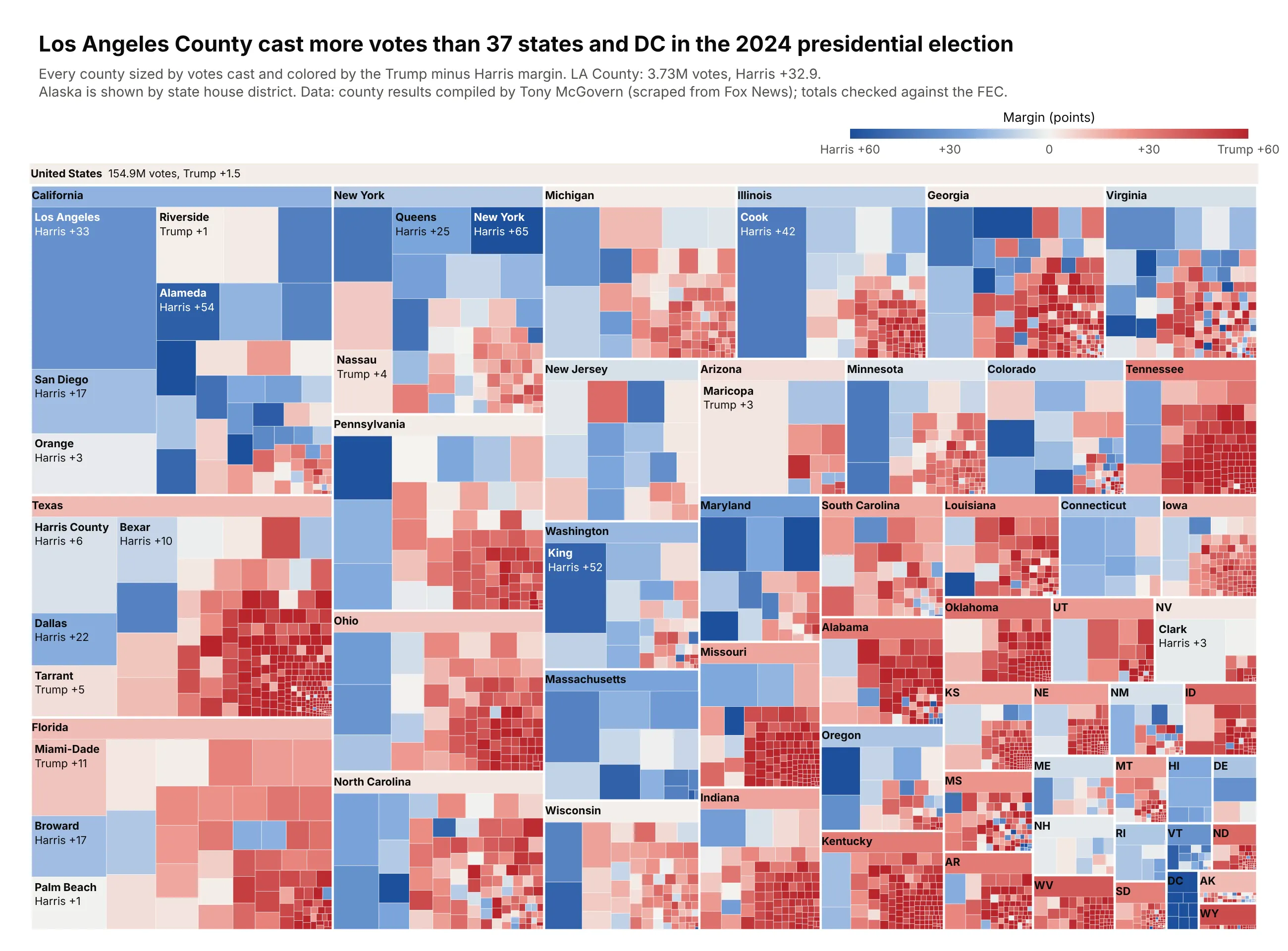
A county map of the 2024 election is mostly red, because most of the country's land is rural. This treemap sizes each of about 3,160 counties by the votes it cast and colors it by the Trump minus Harris margin, and the country now looks about as close as Trump's 1.5-point popular vote margin. Los Angeles County alone cast 3.73 million votes, more than 37 states and DC. Thick white lines mark state borders, and only the states and the largest counties are labeled, so the thousands of small counties read as texture. Data: county results compiled by Tony McGovern from Fox News results (tonmcg/US_County_Level_Election_Results_08-24), checked against the FEC's official totals; Alaska is reported by state house district.
Tip: a diverging blue-white-red scale with marker.cmid=0, clipped at ±60 points, and state borders drawn with a per-tile marker.line.width list (2.5 px for states, 0.3 px for counties).
Get the data from 2024 county-level presidential results (github.com/tonmcg/US_County_Level_Election_Results_08-24)and shape it into a table(columns: state, state_po, county_fips, county, votes_trump, votes_harris, votes_total, margin_pts;votes; margin_pts = (Trump - Harris) / total votes x 100; Alaska is by state house district).Build a plotly go.Treemap of the 2024 presidential election: root "United States" -> state -> county,sized by votes_total, branchvalues="total".- Color by margin (state and root margins computed from summed votes) on a blue-white-red scalewith cmid=0, clipped at +/-60 points; slim horizontal colorbar "Margin (points)".- Thick white state borders (marker.line.width 2.5 for states, 0.3 for counties) and a state headerstrip (marker.pad.t ~22). Use the postal code for states under 1.5M votes.- Label only counties with 600k+ votes (name + "Harris +33"), white text on strong margins.- Title with the takeaway (LA County vs the number of states with fewer votes).- Check the national totals against the FEC (Trump 77,302,580; Harris 75,017,613).
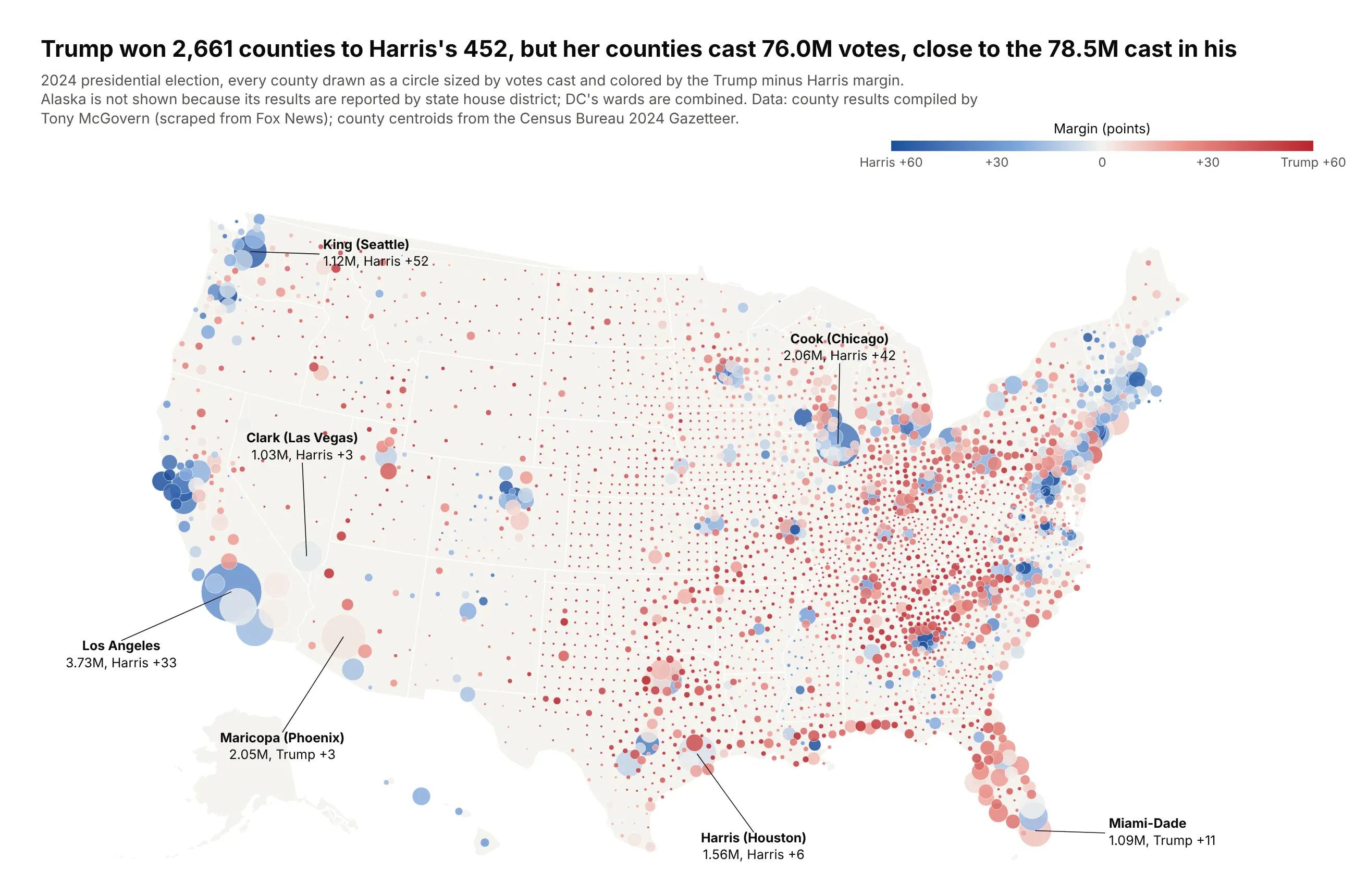
Another way to see it: a bubble map puts a circle on each county, sized by votes and colored by margin, so it keeps the geography and still shows where the voters are. The 452 counties Harris won (counting DC as one), mostly big metro circles like Los Angeles with 3.73 million votes, cast 76.0 million votes, close to the 78.5 million cast in the 2,661 counties Trump won. Circles overlap along the crowded East Coast, so the treemap is still better for comparing sizes, which it can do because it gives up geography.
9. Paris 2024 Olympic medals
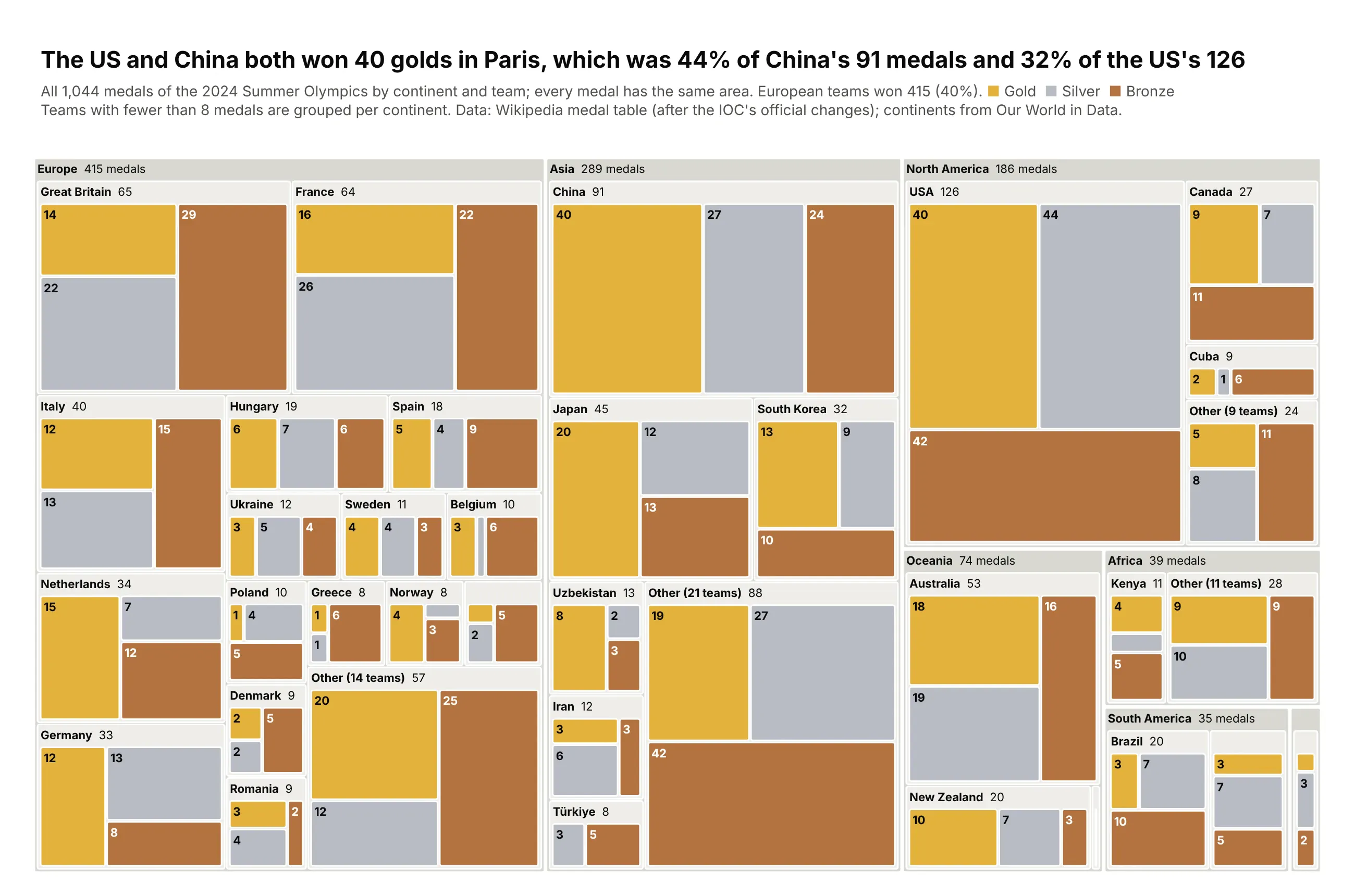
Each of the 1,044 medals from the Paris 2024 Olympics gets the same area in this treemap, grouped by continent and team and colored gold, silver and bronze. The US and China tied on 40 golds, and the tiles show how differently they got there: gold is 44% of China's 91 medals and 32% of the US's 126. European teams together won 415 medals, 40% of the total. Every team tile is a light neutral, so the three metal colors are the only saturated color in the chart. Data: Wikipedia's 2024 Summer Olympics medal table (the IOC table after official changes); continents from Our World in Data.
Tip: the leaf level repeats the same three categories under every parent, so the leaves are colored by category and sort=False, with rows ordered gold, silver, bronze, keeps the metals in the same order inside every team.
Get the data from the 2024 Summer Olympics medal table on Wikipedia, with continents from Our World in Dataand shape it into a table(columns: continent, noc, country, medal, count; long format, one row per team and medal type,Paris 2024 Olympics, 1,044 medals).Build a plotly go.Treemap: continent -> team -> medal (Gold/Silver/Bronze), sized by count,branchvalues="total".- Color the medal leaves in metal tones (gold #e3b23c, silver #b8bcc4, bronze #b4733f) and everyparent in light neutral grays, so the medals are the only color.- Use sort=False and order rows by continent total, team total, then Gold, Silver, Bronze, sothe three metals sit in the same order in every team.- Leaves show just the count; team headers show "Team total". Group teams with fewer than 8medals into "Other (N teams)" per continent, keeping the medal split.- Title with the takeaway (USA and China tied on golds, very different gold shares).
10. US bachelor's degrees by field
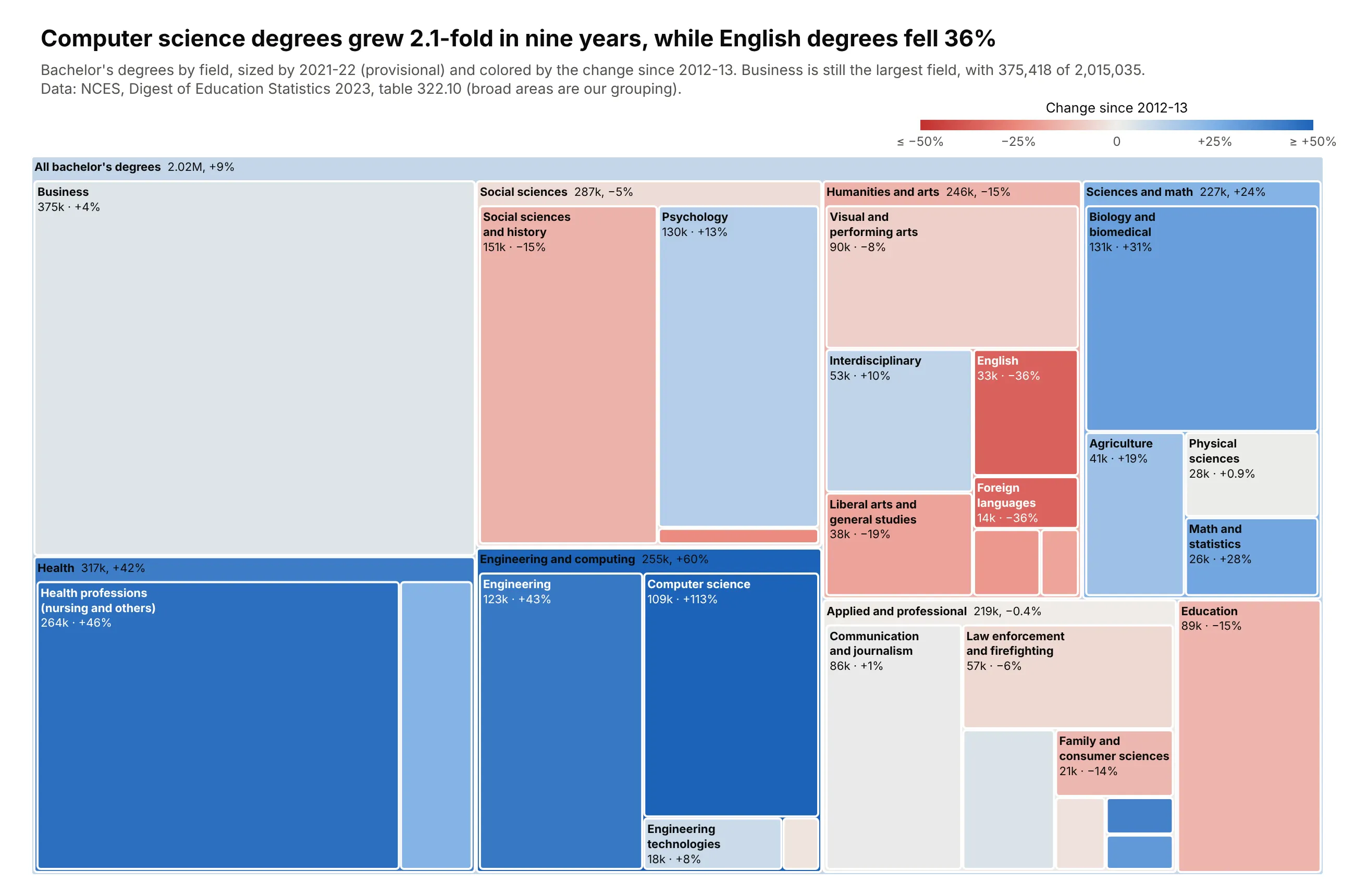
US colleges awarded 2.02 million bachelor's degrees in 2021-22. Each field is sized by its degrees that year and colored by its change since 2012-13. Business is still the largest field with 375,418 degrees, but it grew only 4%, so its tile is nearly neutral. Computer science is the darkest blue, up from 50,961 to 108,503 degrees (2.1 times as many), and English and foreign languages both fell 36%. Two stories that would normally need two bar charts, which field is biggest and which is growing, fit in one chart. Data: NCES, Digest of Education Statistics 2023, table 322.10 (2021-22 is provisional; the broad areas are our grouping).
Tip: clip the diverging scale (cmin and cmax at ±50%, cmid=0) so computer science's +113% doesn't wash out every moderate change.
Get the data from NCES Digest of Education Statistics 2023, table 322.10 (nces.ed.gov)and shape it into a table(columns: area, field, degrees_2012_13, degrees_2021_22, change_pct; bachelor's degrees conferred,NCES Digest table 322.10; `area` is our own grouping of NCES fields).Build a plotly go.Treemap: root "All bachelor's degrees" -> area -> field, sized by degrees_2021_22,branchvalues="total".- Color by percent change since 2012-13 (recompute for parents from summed degrees) on a red-gray-bluediverging scale, cmid=0, clipped at +/-50%, with a slim colorbar "Change since 2012-13".- Leaves show a short field name and "109k · +113%"; area totals go in the header labels.- Merge fields under 5,000 degrees into "Other (N fields)" within their area.- Title with the takeaway (computer science vs English) and say the grouping is ours in the subtitle.- Assert that the fields sum to the table's Total row.
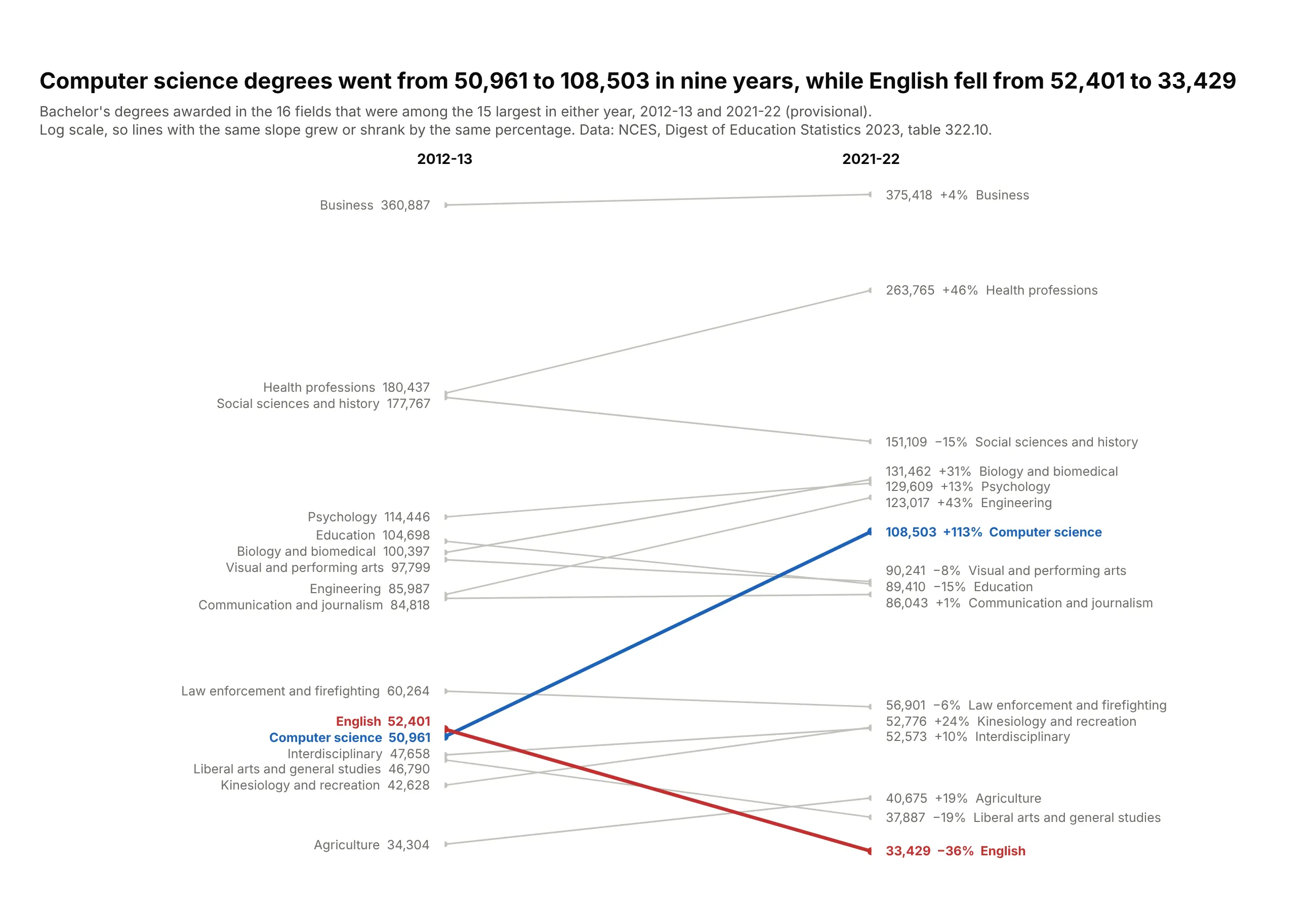
Another way to see it: a slope chart of the 16 fields that were among the 15 largest in either year shows each trend more precisely, such as computer science more than doubling from 50,961 to 108,503 degrees while English fell from 52,401 to 33,429. It drops the part-of-whole view, so business's lead and the size of the broad areas are harder to see than in the treemap.
The planet and life
Science data is full of hierarchies (kingdoms and phyla, causes of death, energy sources by country) and of values that span many orders of magnitude. These five show how to handle both, including one that zooms into a tile too small to see.
11. The weight of all life on Earth
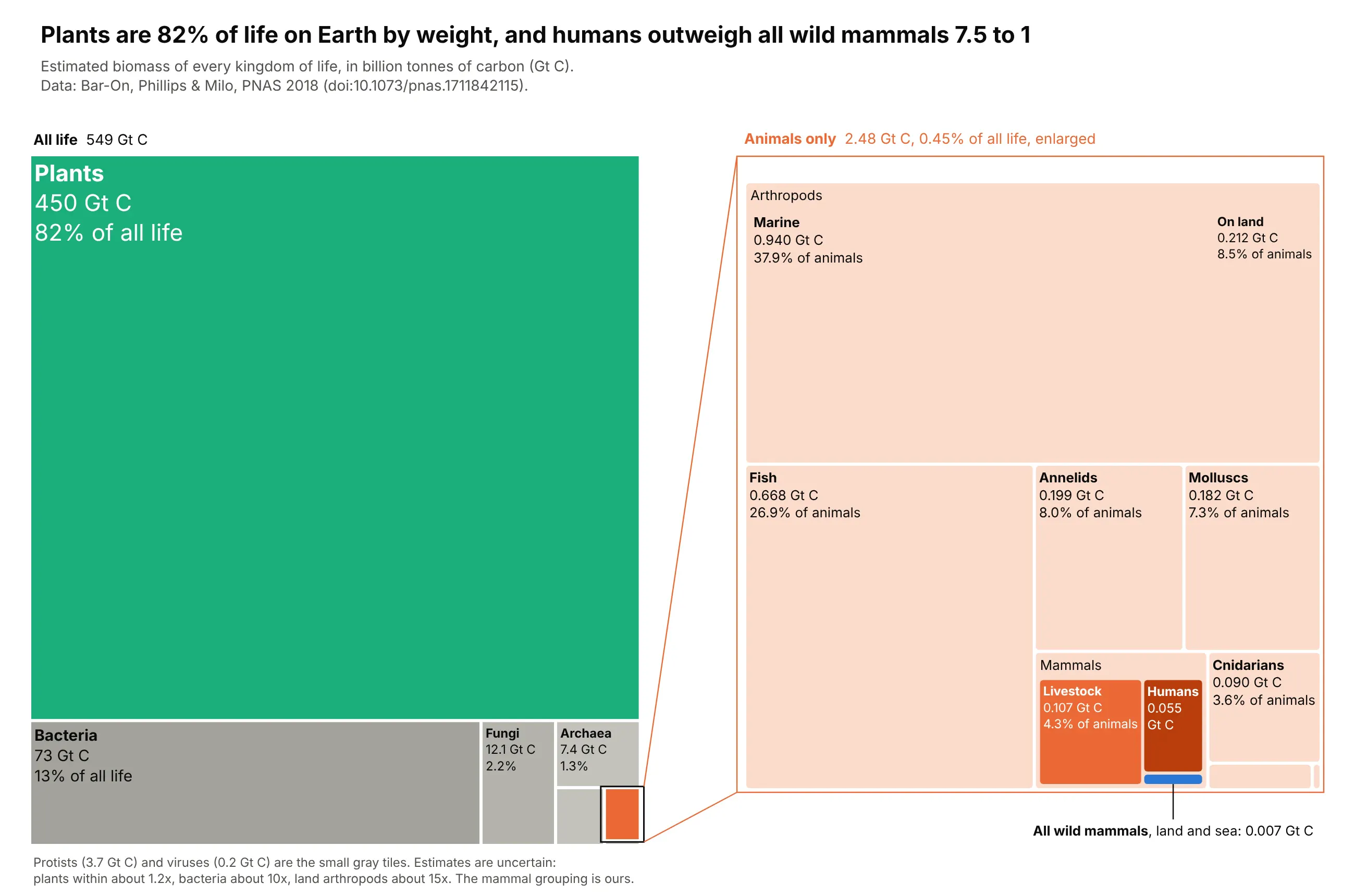
All life on Earth adds up to about 550 billion tonnes of carbon, and plants are 82% of it, so animals (2.48 Gt C, 0.45%) would be a speck in a single treemap. This figure draws two treemaps side by side, all life on the left and the animal tile enlarged into its own panel on the right, joined by zoom lines. Inside the animals, marine arthropods (38%) and fish (27%) dominate, and the mammal corner shows how much people have changed the planet: livestock weigh 0.107 Gt C and humans 0.055 Gt C, while all wild mammals on land and at sea weigh 0.007 Gt C, so humans outweigh them about 7.5 to 1. These are the paper's best estimates, and some carry 10-fold or larger uncertainty. Data: Bar-On, Phillips and Milo, "The biomass distribution on Earth", PNAS 2018 (doi:10.1073/pnas.1711842115).
Tip: two go.Treemap traces placed with domain, the second holding the animal subtree re-rooted, and zoom lines drawn with add_shape from the animal tile to the right panel. When one value is thousands of times smaller than the total, zoom into it instead of letting it disappear.
Get the data from Bar-On, Phillips & Milo, PNAS 2018 (github.com/milo-lab/biomass_distribution)and shape it into a table(columns: kingdom, group, subgroup, gt_c, uncertainty_fold; gt_c = gigatonnes of carbon,the best estimates of Bar-On, Phillips & Milo, PNAS 2018).Build a plotly figure with two treemaps side by side using `domain`.- Left (x 0-0.47): one tile per kingdom (sum gt_c by kingdom). Plants green, animals orange,everything else in grays. Label each tile with its Gt C and share of the total.- Right (x 0.55-1): only the animals, as group -> subgroup (arthropods and mammals havesubgroups). Pale orange tiles, with humans, livestock and wild mammals in strong colors.- Draw an outline around the animals tile on the left and two lines from it to the cornersof the right panel, so it reads as a zoom. Compute the tile position by reproducingd3's squarify layout, or place it by eye and check.- Title with the takeaway and say in a note that the values are estimates with large uncertainty.- Check that each kingdom equals the sum of its rows and the total is about 549 Gt C.
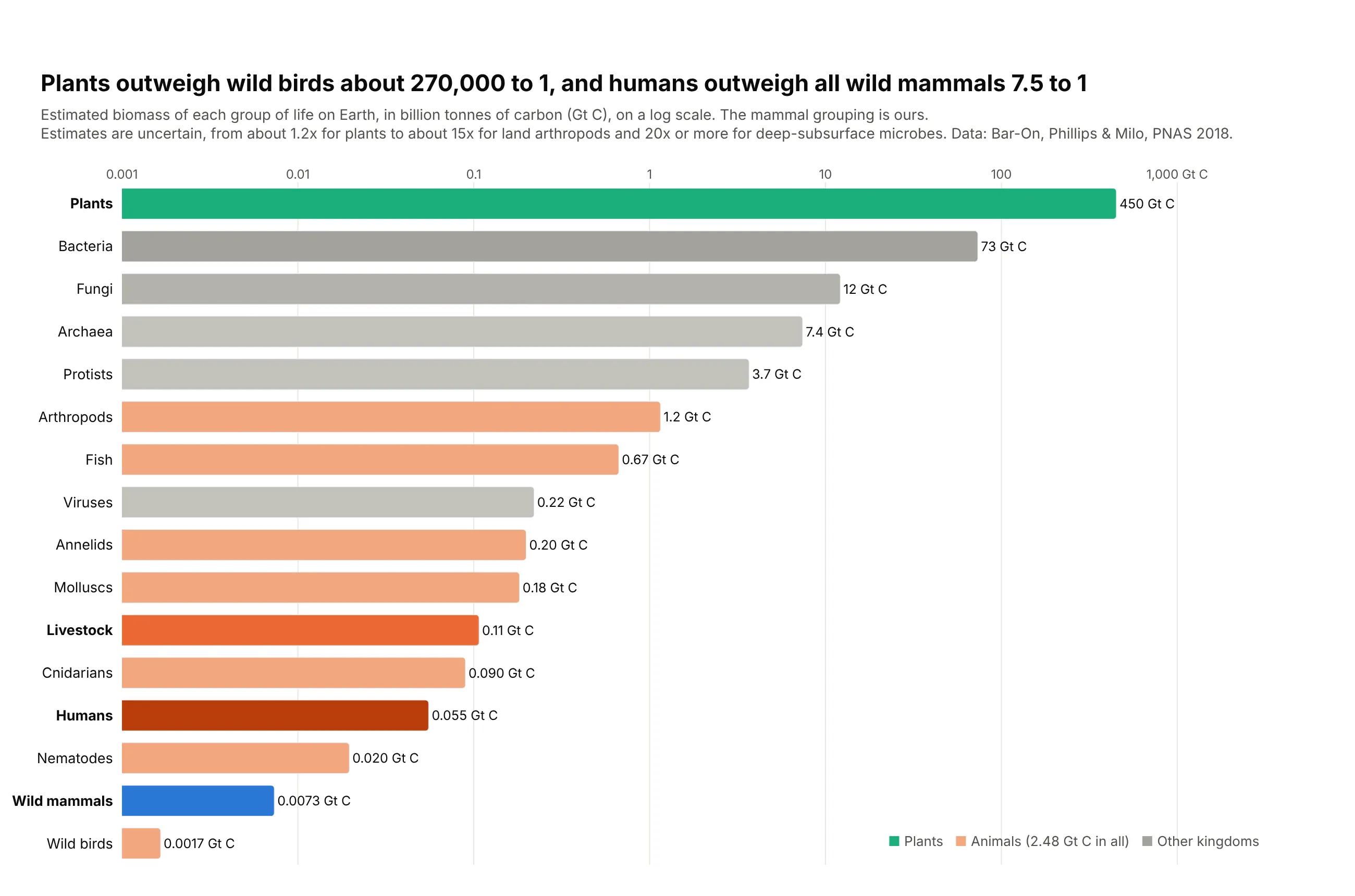
Another way to see it: a bar chart on a log scale shows the full range from plants (450 Gt C) to wild birds (0.0017 Gt C) precisely, and makes it easy to read that humans (0.055 Gt C) outweigh all wild mammals (0.0073 Gt C) about 7.5 to 1. It loses the sense of how small animals are next to plants, which the treemap's area shows directly.
12. CO2 emissions, total and per person
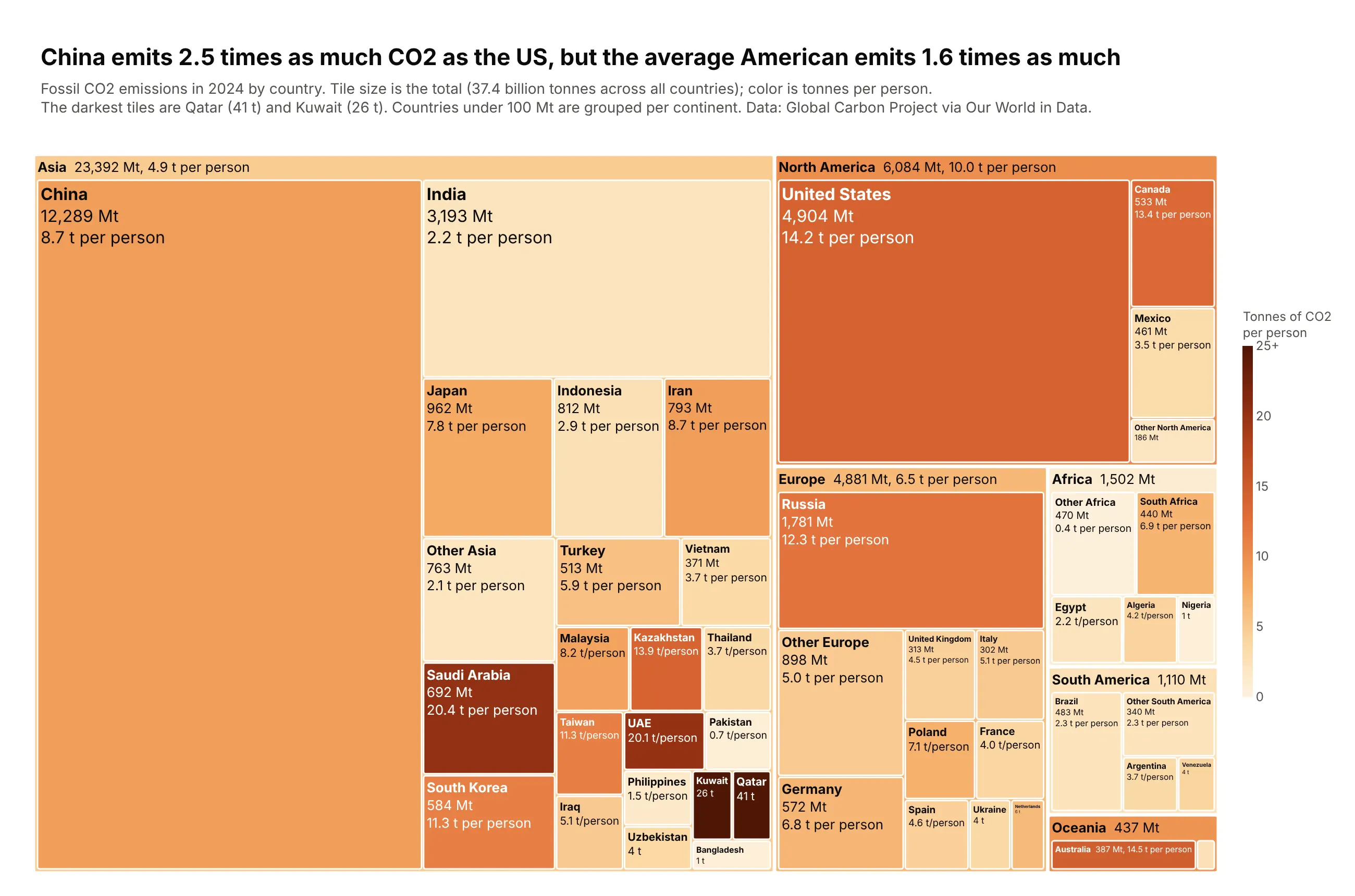
Area can only show a measure that adds up, but color can carry a second one. Here tile size is each country's fossil CO2 in 2024 (37.4 billion tonnes across all countries) and color is tonnes per person. China is by far the biggest tile at 12,289 million tonnes, 2.5 times the US, but its color (8.7 t per person) is lighter than the US (14.2 t, 1.6 times China's), Russia, Canada and Australia. India is a big pale tile at 2.2 t per person, and the darkest tiles are small Gulf states: Qatar at 41 t and Kuwait at 26 t. Data: Global Carbon Project via Our World in Data, 2024.
Tip: size and color carry two different measures, total and per capita. The color of each grouped "Other <continent>" tile is the group's total CO2 divided by its total population, not an average of the countries' rates.
Get the data from Our World in Data's CO2 dataset (github.com/owid/co2-data), 2024and shape it into a table(columns: continent, country, iso_code, co2_mt, population, co2_per_capita_t; fossil CO2 in 2024,million tonnes; tonnes per person; Global Carbon Project via Our World in Data).Build a plotly treemap continent -> country.- Tile size = co2_mt. Tile color = tonnes of CO2 per person on a sequential cream-to-dark-redscale from 0 to 25 (clip higher values), with a slim colorbar titled "Tonnes of CO2 per person".- Fold countries under 100 Mt into one "Other <continent>" tile; its color must besum(co2) / sum(population), not an average of rates. Same rule for the continent headers.- White text on dark tiles, dark text on light ones.- Title: China emits 2.5x the US in total, but the average American emits 1.6x as much.- Check that the continents add up to the total.
13. The world's electricity mix
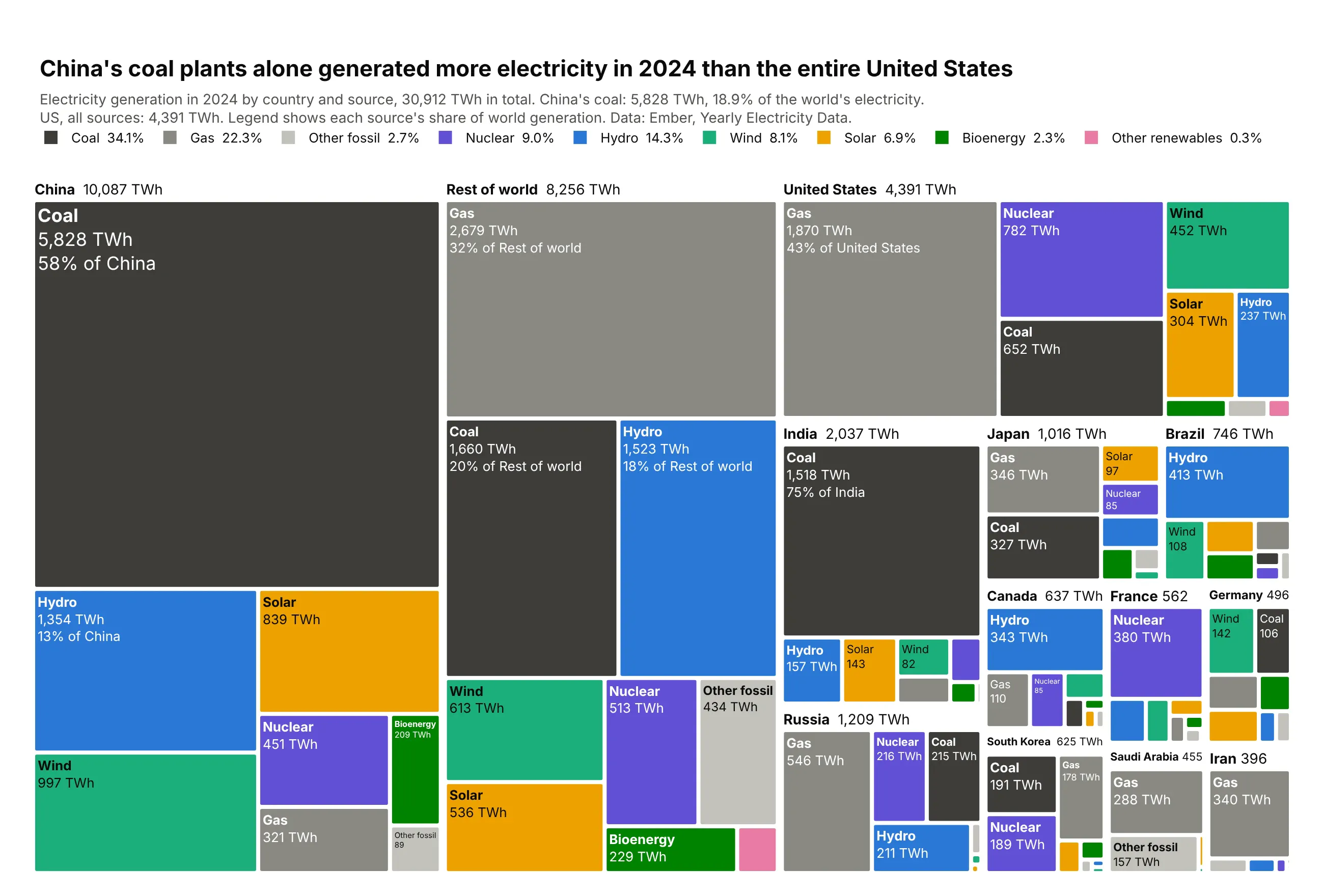
The world generated 30,912 TWh of electricity in 2024. This treemap splits it by country and then by source, with each source keeping the same color under every country, which makes comparisons between countries possible at a glance. China's coal tile (5,828 TWh, 58% of China's power) is bigger than the entire United States (4,391 TWh), France is mostly purple nuclear (68%), and Brazil is mostly blue hydro (55%). Solar made 6.9% of the world's electricity, and 39% of that came from China. Data: Ember, Yearly Electricity Data, 2024.
Tip: leaf colors are set by source in marker.colors and never inherited from the parent, and the legend comes from invisible go.Scatter traces with square markers, because treemaps have no legend of their own.
Get the data from Ember's Yearly Electricity Data (ember-energy.org), 2024and shape it into a table(columns: country, source, twh; electricity generation in 2024 in TWh for the 12 largestgenerators plus "Rest of world"; Ember Yearly Electricity Data).Build a plotly treemap country -> source.- Give every source one fixed color, the same under every country: coal #3d3c39, gas #8a8983,other fossil #c3c2bc, nuclear #6250d6, hydro #2a78d6, wind #1baf7a, solar #eda100,bioenergy #008300, other renewables #e87ba4. Country tiles are white with a bold headerthat includes the country total.- Add a horizontal legend above the plot using one invisible go.Scatter trace per source(square markers), with each source's share of world generation in its name.- Label large leaves with source, TWh and share of the country; hide labels on tiny tiles.- Title: China's coal plants alone generated more electricity than the entire US.- Check that the table adds up to about 30,912 TWh.
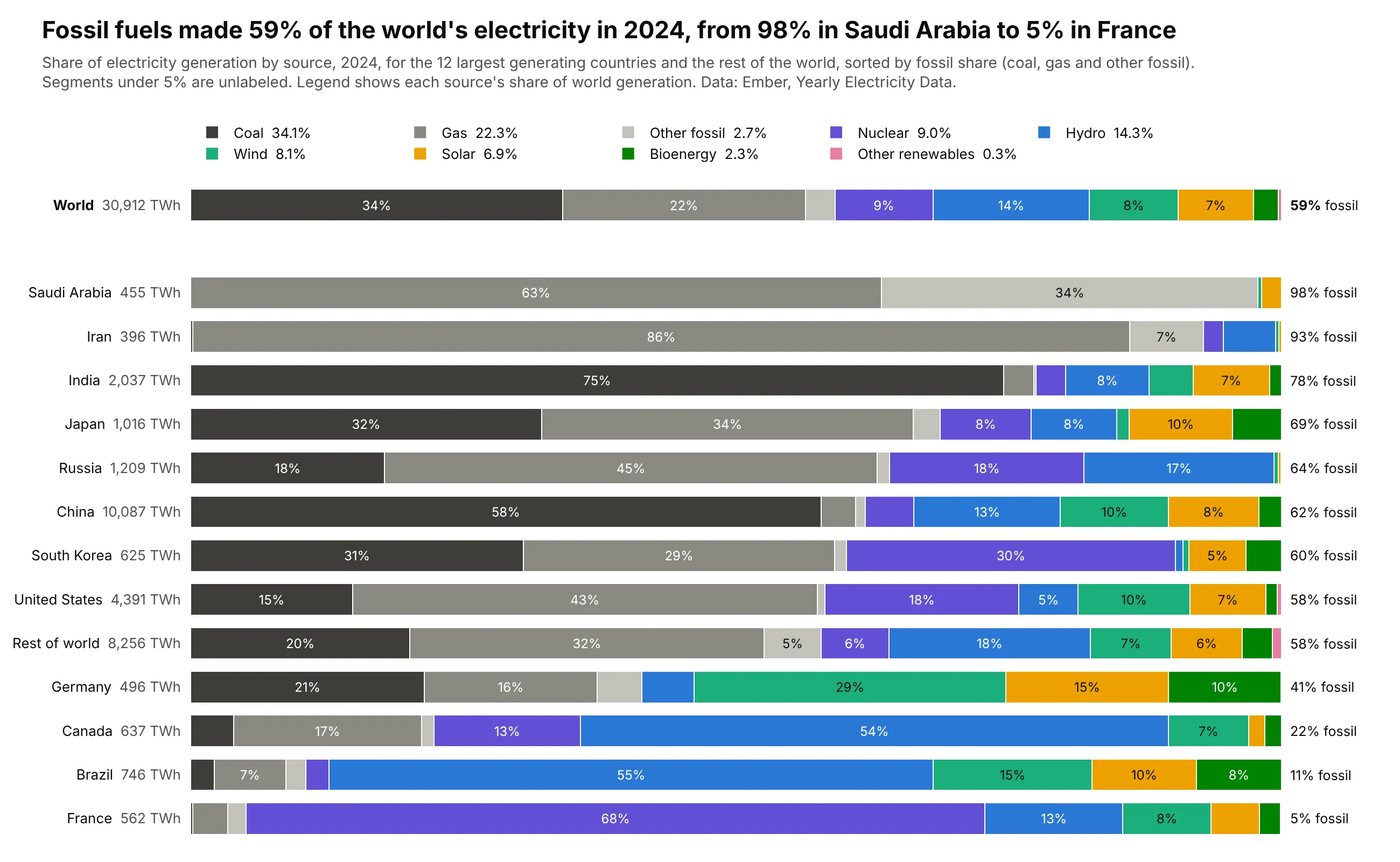
Another way to see it: a 100% stacked bar for each country puts every mix on the same baseline, so you can read directly that fossil fuels make 98% of Saudi Arabia's electricity and 5% of France's, and that coal alone is 75% of India's. It compares mixes better than the treemap does, but every bar has the same length, so China's coal and the US total no longer look as big as they are, and the chart prints each country's TWh next to its name instead.
14. What the world dies of
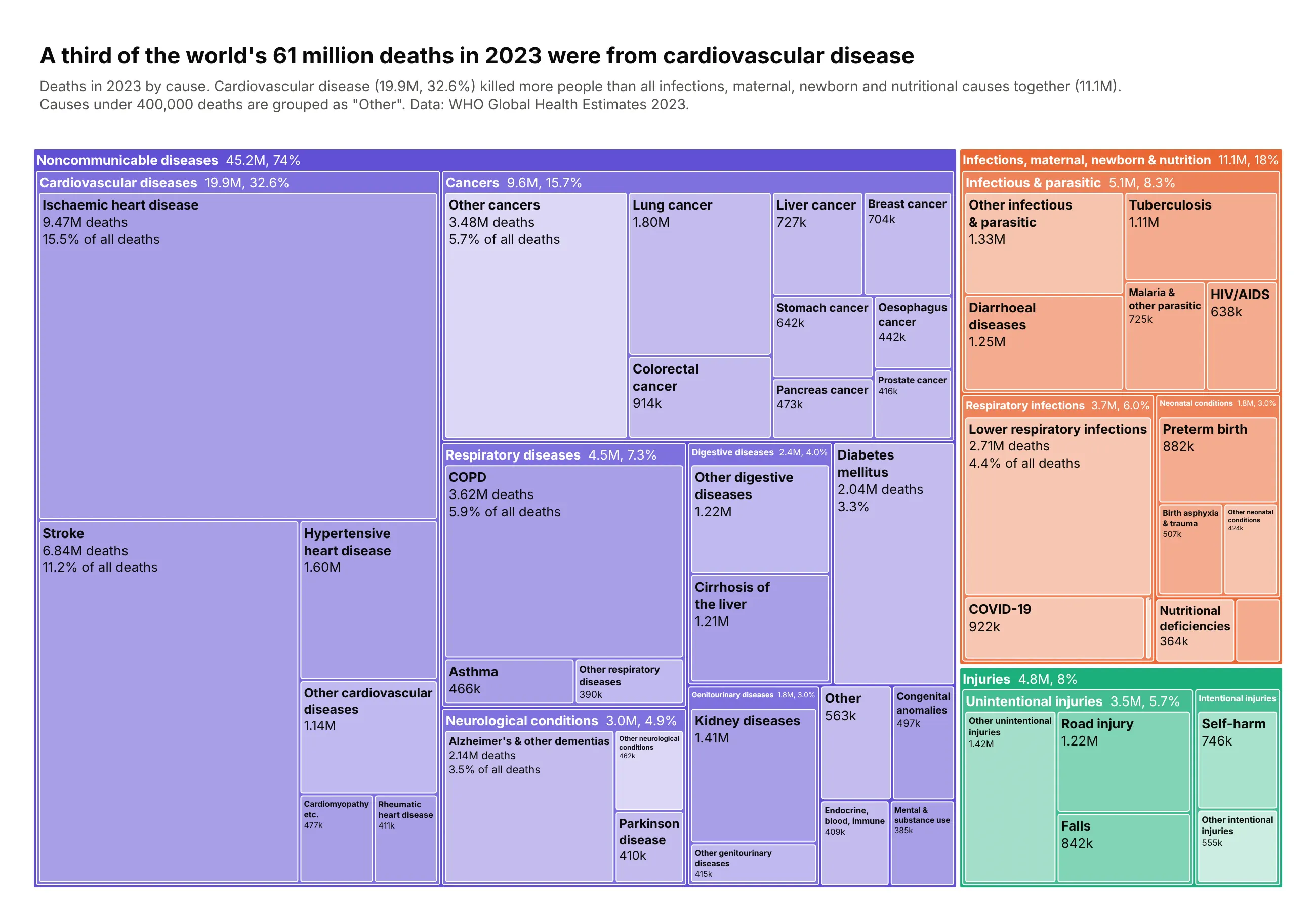
The World Health Organization sorts every death into three categories, then cause groups, then causes, which maps directly onto a three-level treemap. Noncommunicable diseases were 74% of the 61.1 million deaths in 2023, and cardiovascular disease alone killed 19.9 million people (32.6%), more than all infections, maternal, newborn and nutritional causes together (11.1 million). Ischaemic heart disease (9.47M) and stroke (6.84M) are the two largest tiles, followed by COPD (3.62M). Data: WHO Global Health Estimates 2023, world, both sexes, all ages.
Tip: one hue per category, with group headers a little lighter and causes lighter still. It's the idea behind marker.depthfade, done by hand so each step is controlled, and it means even a small tile shows which category it belongs to.
Get the data from WHO Global Health Estimates 2023, deaths by cause (who.int/data/global-health-estimates)and shape it into a table(columns: category, group, cause, deaths; number of deaths worldwide in 2023,WHO Global Health Estimates).Build a plotly treemap category -> group -> cause.- One hue per category (noncommunicable purple, infections/maternal/newborn/nutrition orange,injuries green). Category headers in the full hue, group headers slightly lighter, leavesmuch lighter.- Fold causes under 400,000 deaths into "Other <group>", and draw groups under 1 millionas a single tile. Put each header's total and share into its label.- Shorten long WHO names (Malignant neoplasms -> Cancers, Chronic obstructive pulmonarydisease -> COPD) and wrap long leaf labels onto two lines.- Title: a third of the world's 61 million deaths in 2023 were from cardiovascular disease.- Check that every parent equals the sum of its children.
15. Every described species, down to the beetles
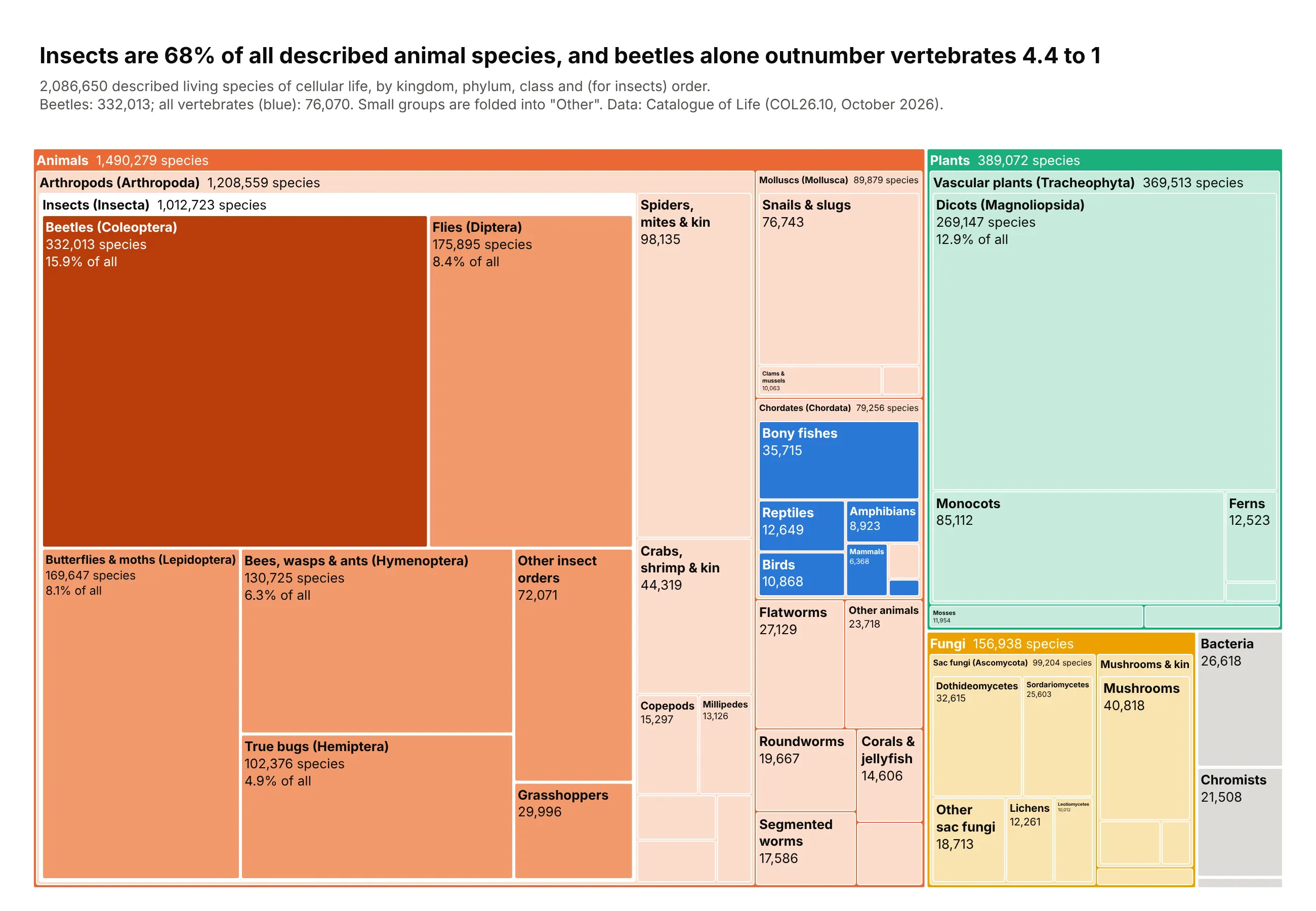
The Catalogue of Life lists 2,086,650 described living species of cellular life, and a treemap taken down to the order level shows how unevenly they are spread. Animals are 1,490,279 of them, and insects alone are 1,012,723, which is 68% of animals and almost half of everything described. Beetles (332,013 species) are the largest single tile, 4.4 times all vertebrates together (76,070: the fish, reptiles, birds, amphibians and mammals colored blue), and mammals are just 6,368 species. Data: Catalogue of Life (COL26.10, October 2026) via the ChecklistBank API; viruses are excluded.
Tip: maxdepth=4 limits how many levels the static image draws, while the interactive version keeps the whole tree, so readers can click any branch to zoom in. Color is used for one comparison only: beetles, other insects and vertebrates.
Get the data from the Catalogue of Life (COL26.10) through the ChecklistBank API (checklistbank.org)and shape it into a table(columns: kingdom, phylum, class, order, species; number of described living species,Catalogue of Life COL26.10; deeper columns are blank where the tree stops).Build a plotly treemap kingdom -> phylum -> class -> order with maxdepth=4.- Build ids from the path and skip blank levels, so leaves can sit at any depth.- Fold small branches into "Other ..." tiles (phyla under 8,000, classes under 6,000,insect orders under 20,000).- Color for one comparison: beetles (Coleoptera) dark orange, other insect orders mid orange,vertebrate classes blue, all other tiles a pale tint of their kingdom's color.- Add common names (Coleoptera -> Beetles, Teleostei -> Bony fishes) and label only tilesbig enough to read.- Title with the computed numbers: insects' share of animal species and beetles vs vertebrates.- Check that every parent equals the sum of its children.
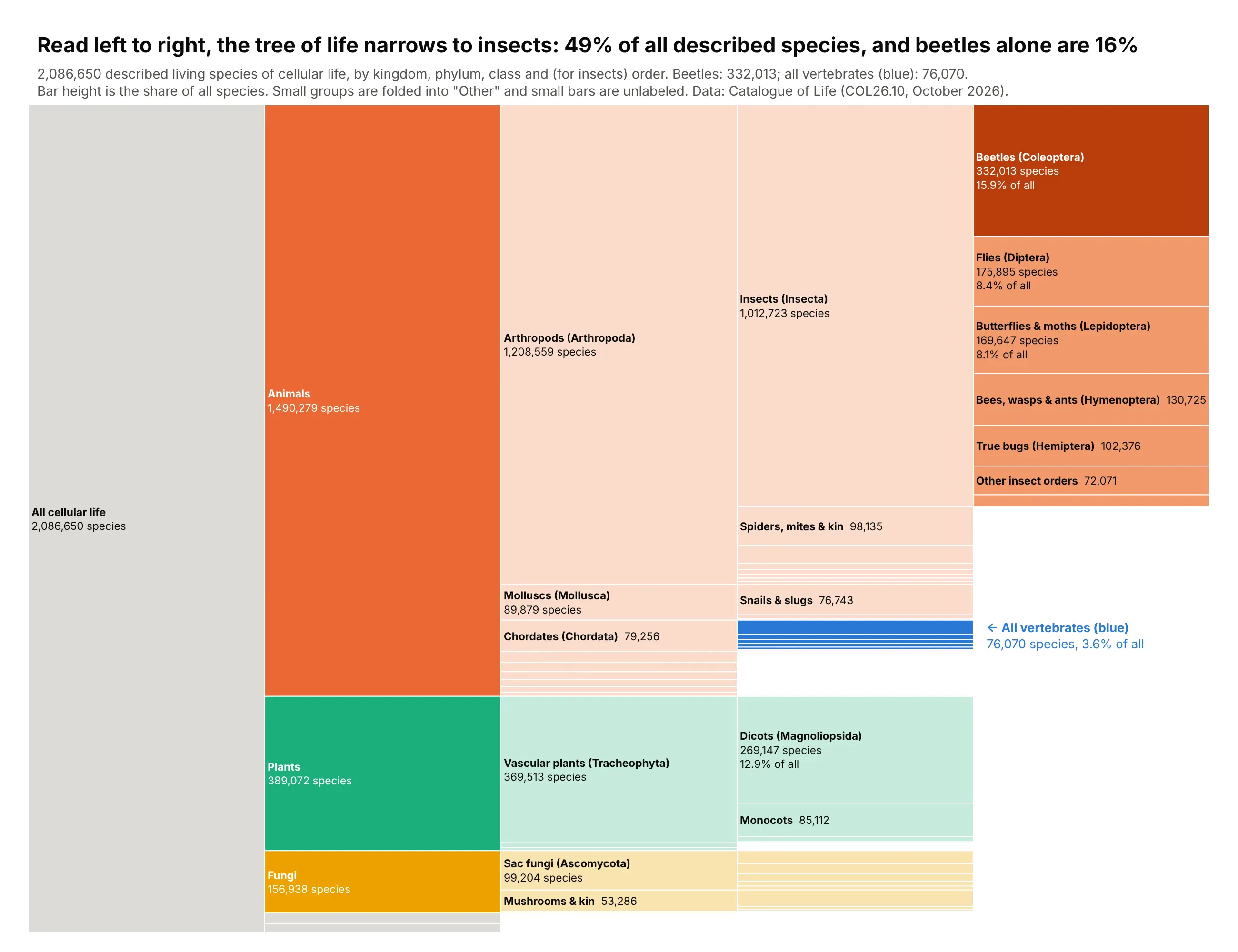
Another way to see it: an icicle chart lays the same tree out as columns (kingdom, phylum, class, then order for insects), so you can read each level down its column and see where the tree stops early and where it goes four levels deep. Beetles alone are 332,013 species, or 15.9% of everything described. The icicle shows the shape of the hierarchy more clearly, but the 76,070 vertebrates shrink to thin blue lines that need a label outside the chart, so the beetles-versus-vertebrates comparison lands harder as treemap area.
Software, products and cities
Treemaps started as a tool for looking at files on a disk, and they are still the best way to see where the bulk of a codebase, a download count, a sales report or a city's complaint log sits.
16. What's inside the plotly Python package
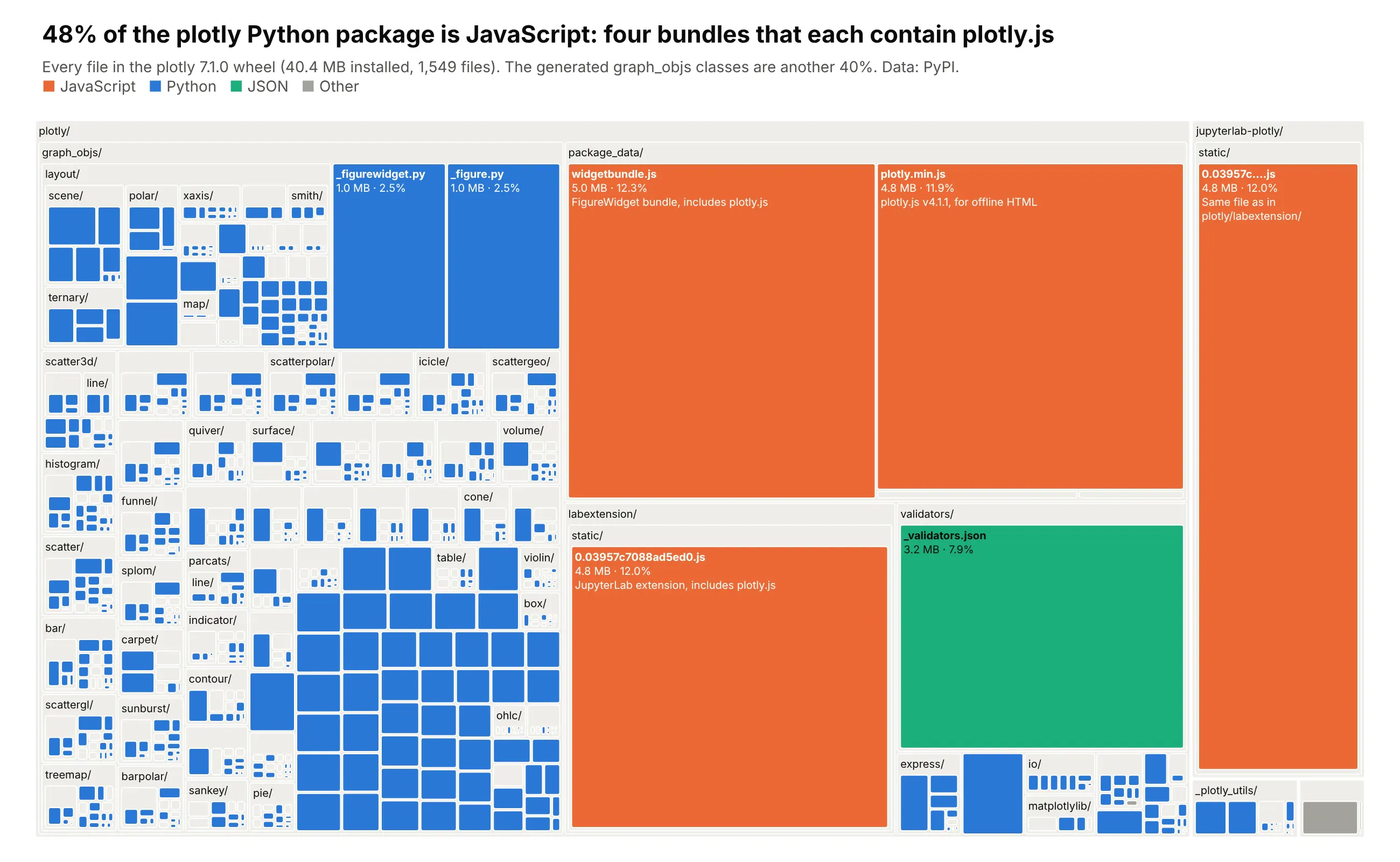
Ben Shneiderman invented the treemap to find out what was filling up a hard disk, so here it is doing that job on plotly itself. The 7.1.0 wheel installs 1,549 files and 40.4 MB, and 48% of that is four JavaScript files that each contain plotly.js: the standalone plotly.min.js for offline HTML, the FigureWidget bundle, and the same JupyterLab extension bundle installed in two places. Most of the rest is the generated graph_objs classes, 1,416 Python files that make up 40% of the package. Data: the plotly 7.1.0 wheel on PyPI, every file with its uncompressed size.
Tip: folders get header strips with marker.pad.t and gaps with tiling.pad, so the treemap reads like a file explorer. Files are colored by type and folders stay a light neutral.
Get the data from the plotly 7.1.0 wheel from PyPI (pip download plotly==7.1.0)and shape it into a table(one row per file in the plotly 7.1.0 wheel; columns: path, folder, name, ext,kind [Python/JavaScript/JSON/Other], bytes [uncompressed], lines).Build a plotly treemap of where the package's disk space goes, like a file explorer.- Build ids/parents from the path (folder -> subfolder -> file), branchvalues="total",and assert every folder equals the sum of its children.- Folders: light neutral fill with a header strip (marker.pad.t=20, tiling.pad=2).Files: colored by kind (JavaScript orange, Python blue, JSON green, other gray).- Label files with name, size in MB and share of the package; hide text that doesn't fitwith uniformtext.- Title the takeaway (share of the package that is JavaScript) and cite PyPI in the subtitle.
Point the same code at your own project's node_modules, Docker image layers or data lake folders. A treemap of disk usage almost always turns up one or two files nobody knew were there.
17. Python's most downloaded packages
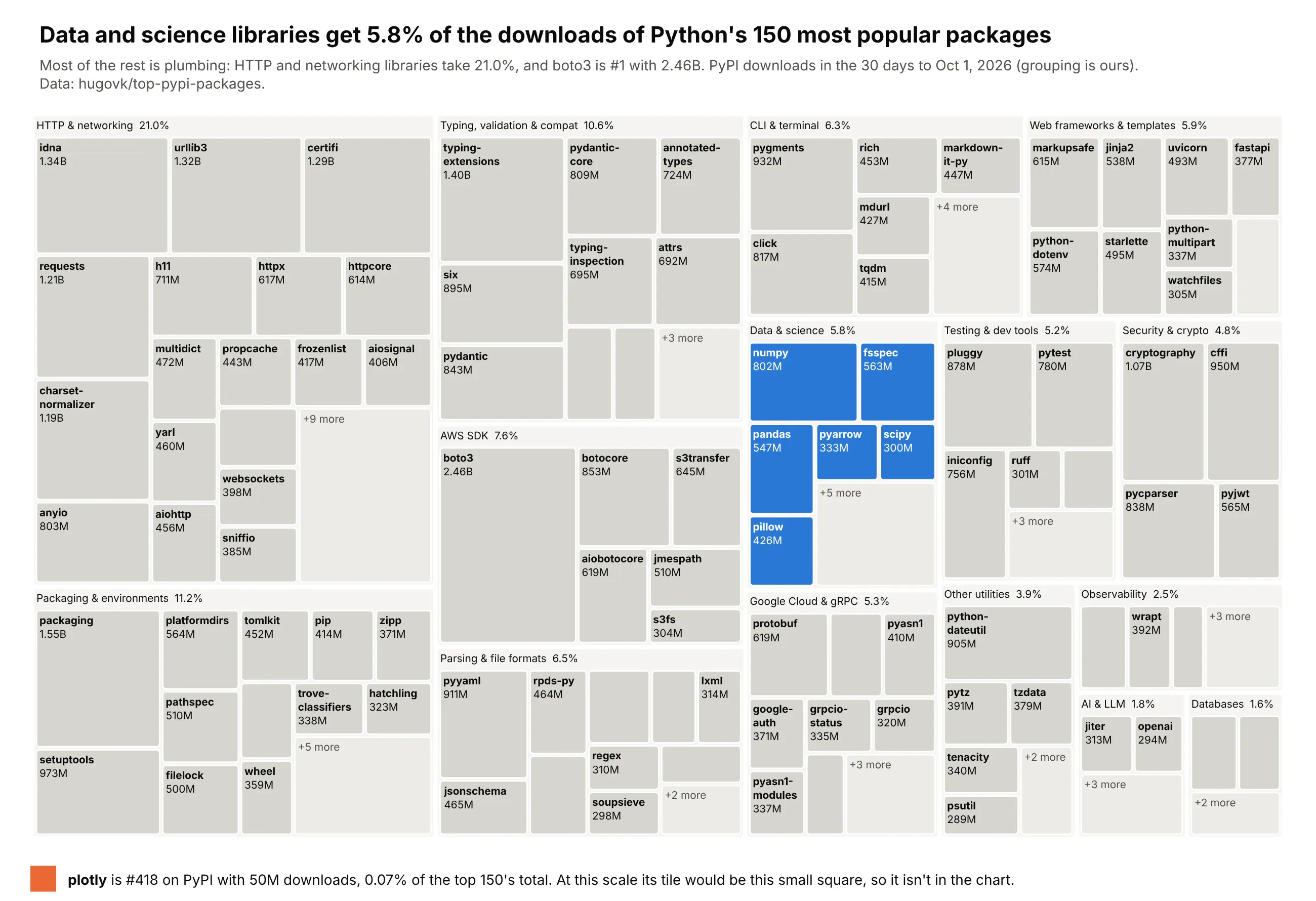
The packages Python downloads most are mostly libraries that other libraries install for you. Over the 30 days to October 1, 2026, the top 150 packages on PyPI were downloaded 70.9 billion times, and HTTP and networking libraries such as idna, urllib3, certifi and requests took 21.0% of that. boto3, the AWS SDK, is the most downloaded package at 2.46 billion. The data and science libraries most readers here work with every day (numpy, pandas, pyarrow, scipy and others) add up to 5.8%. Plotly is #418, with 50 million downloads, so even at 0.07% of this total it sits in the top 0.05% of the roughly 932,000 projects downloaded that month. Its tile would be about 25 pixels square here, too small to lay out and label, so the chart draws it under the treemap at that size instead. Downloads count CI runs and mirrors as well as people, so this measures how often a package gets installed, not how many users it has. Data: hugovk/top-pypi-packages, 30 days to October 1, 2026 (grouping is ours).
Tip: packages under 0.4% of the total are folded into a "+N more" tile inside each category, kept last with sort=False, and only one category is in color. A package you want to point out that's too small for its own tile can go in a callout with a square drawn to the same scale.
Get the data from hugovk's top PyPI packages list (hugovk.github.io/top-pypi-packages), 30 days to 2026-10-01and shape it into a table(columns: rank, project, downloads [PyPI downloads in the 30 days to 2026-10-01], category [our grouping]).Keep the top 150, plus plotly's row (#418) for a callout.Build a plotly treemap: category -> package, sized by downloads.- Each category is a neutral frame with a header showing its share (marker.pad.t=22).- Inside each category, fold packages under 0.4% of the total into one lighter "+N more" tile,placed last (sort=False with rows ordered by size).- Gray tiles for every category except "Data & science", which is blue.- Label tiles with the package name and downloads (e.g. "2.46B"); break long hyphenatednames onto two lines; uniformtext minsize 10.- Title with the data and science share, say the grouping is ours in the subtitle.- Under the chart, an orange square with the area plotly's tile would have at this scale,next to its rank, downloads and share of the top 150.
18. An online shop's revenue, and its long tail
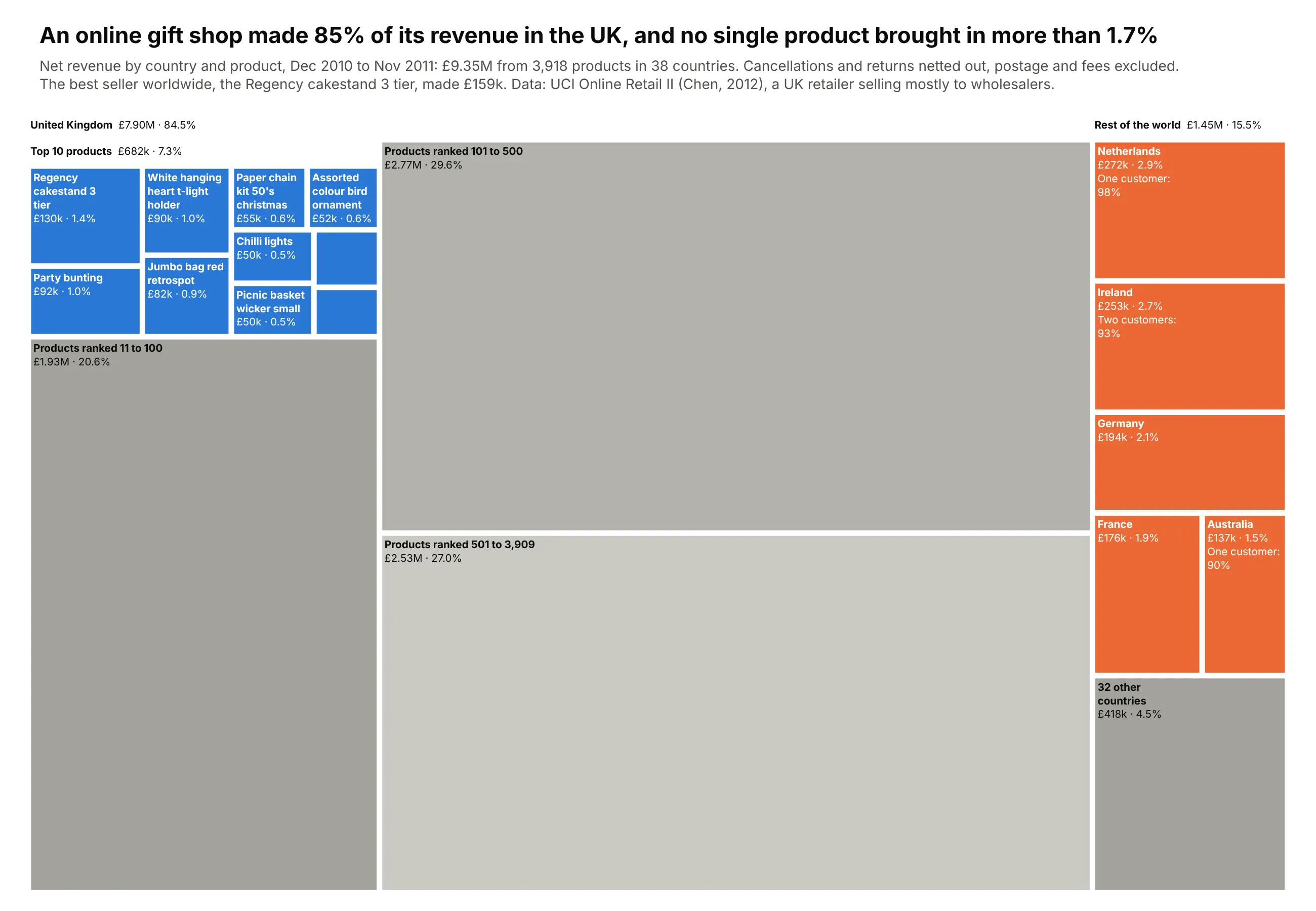
This is real transaction data from a UK online gift retailer that sells mostly to wholesalers: £9.35 million of net revenue from 3,918 products in 38 countries over twelve months. The UK brings in 84.5%, and the best seller worldwide, a three-tier Regency cakestand, makes only 1.7% (£159k). Even the UK's top 10 products add up to just 7.3%, and products ranked 101 to 500 bring in more than the top 100 combined. Export markets are tiny and concentrated: one customer accounts for 98% of Netherlands revenue and one for 90% of Australia's. Data: UCI Online Retail II (Chen, 2012), DOI 10.24432/C5CG6D.
Tip: the long tail is folded at both levels and always in gray. UK products after the top 10 go into rank bands (11-100, 101-500, 501 and up) shaded from dark to light, and countries after the top six become one "32 other countries" tile.
Get the data from UCI Online Retail II (archive.ics.uci.edu, DOI 10.24432/C5CG6D)and shape it into a table(columns: country, stock_code, description, quantity, sales, returns, revenue;GBP, net revenue = sales - returns, Dec 2010 to Nov 2011, one row per country and product).Build a plotly treemap of revenue: United Kingdom vs Rest of the world at the top level.- UK: a "Top 10 products" group (blue tiles, named) plus folded rank bands"Products ranked 11-100", "101-500", "501+" in three grays.- Rest of the world: Netherlands, Ireland (EIRE), Germany, France, Australia as orange tiles,and one gray "32 other countries" tile.- Headers via marker.pad.t with value and share; tile text "name<br>£130k · 1.4%";branchvalues="total" and assert every parent equals the sum of its children.- Title: the UK share and the best-selling product's share. Cite UCI Online Retail II (Chen 2012).
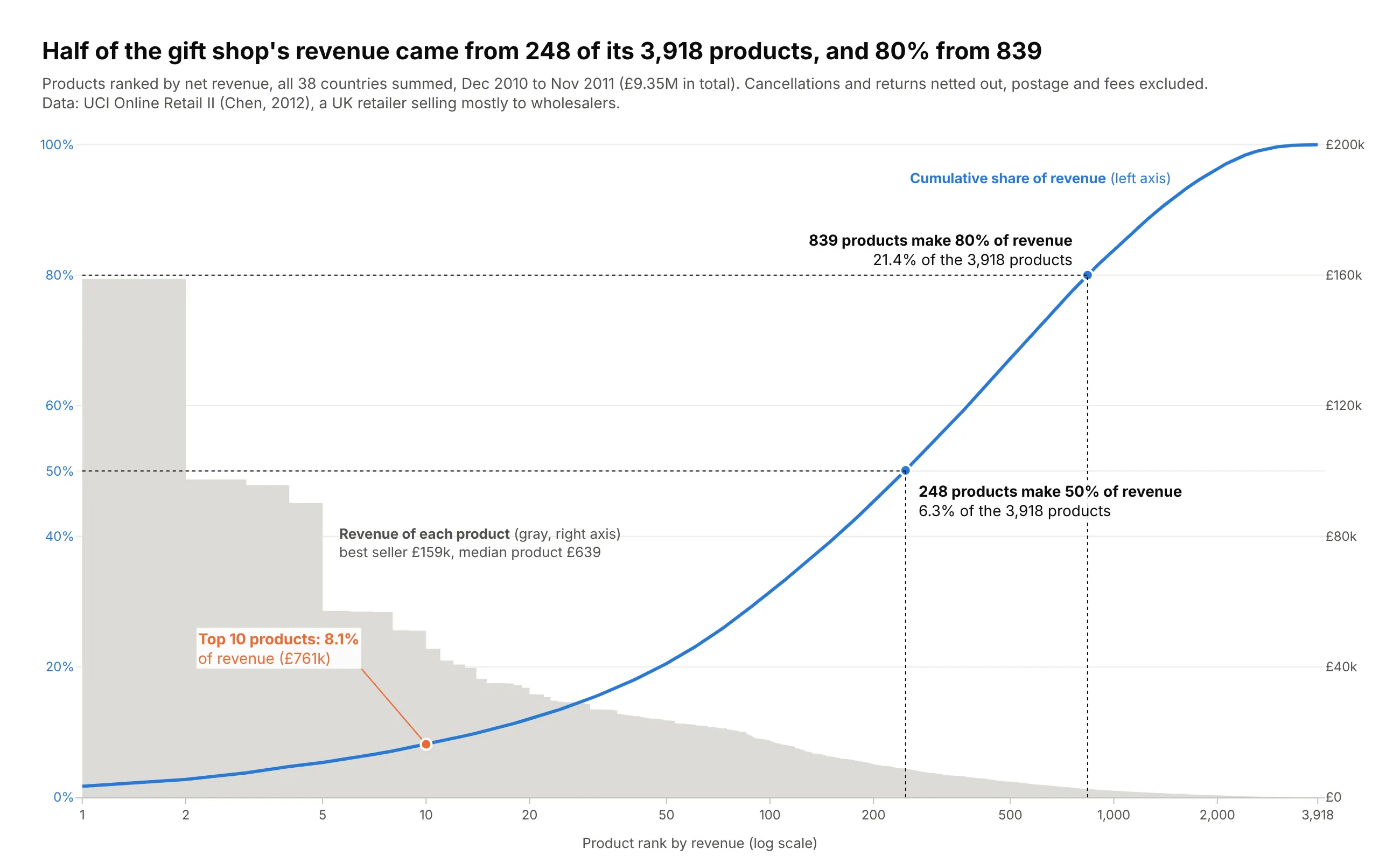
Another way to see it: a Pareto chart ranks every product by revenue and draws the cumulative share, so you can read exactly where each threshold falls: 248 products (6.3% of the catalog) bring in half the revenue and 839 bring in 80%. It shows the long tail more exactly than the treemap, but it adds all 38 countries together and loses the UK versus rest-of-world split.
19. What New Yorkers call 311 about
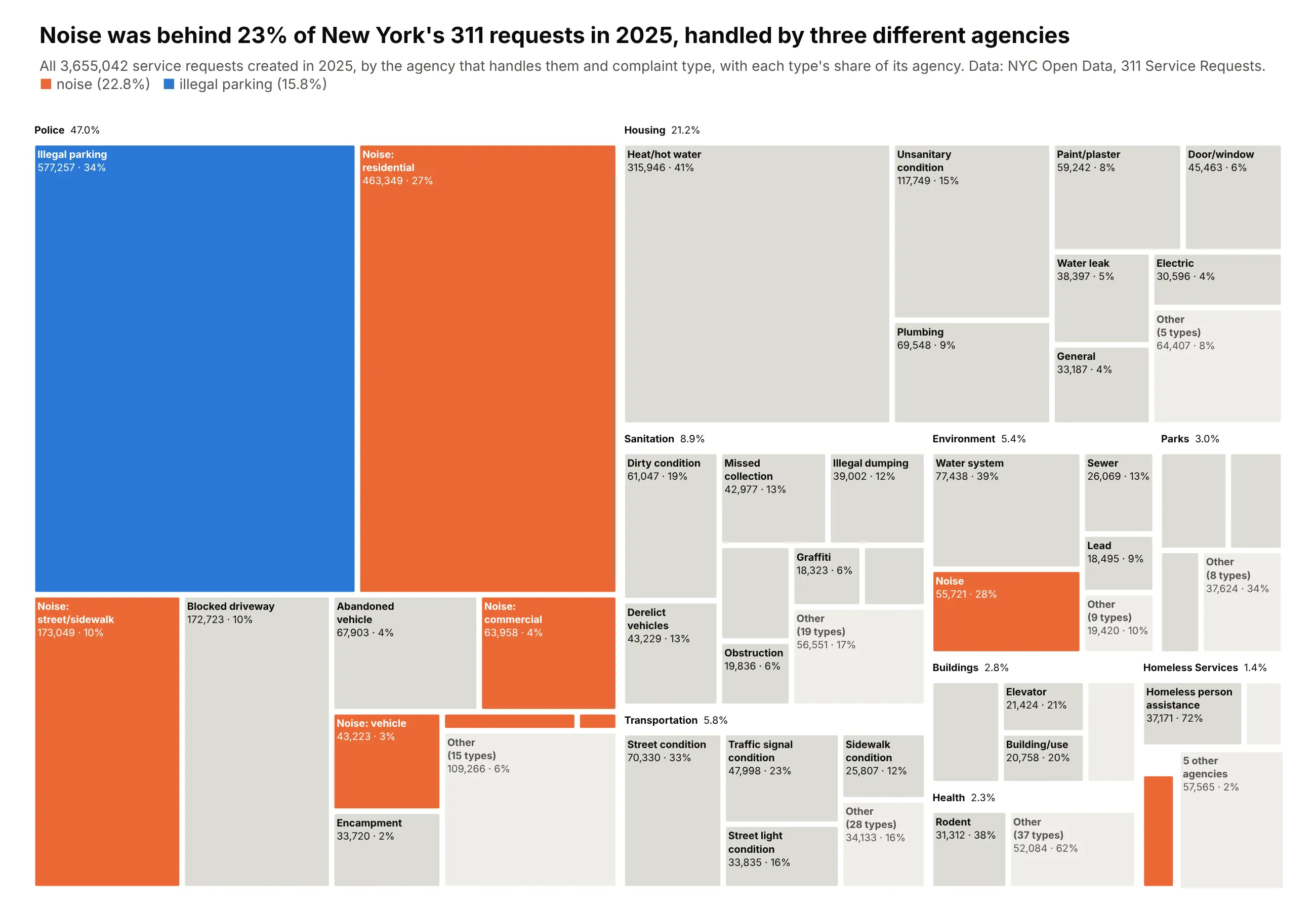
New Yorkers filed 3,655,042 service requests with 311 in 2025, and 833,000 of them (22.8%) were about noise. They went to three different agencies: the police for residential, street, commercial and vehicle noise, Environmental Protection for construction noise, and the Economic Development Corporation for helicopters. The largest single complaint type is illegal parking at 577,257, a third of everything the NYPD receives. On the housing side, heat and hot water complaints (315,946) are 41% of the housing department's requests. Data: NYC Open Data, 311 Service Requests from 2010 to Present, requests created in 2025.
Tip: texttemplate="<b>%{label}</b><br>%{value:,} · %{percentParent:.0%}" prints each tile's count and its share of its agency, and one color follows a theme (noise) across every agency it appears under.
Get the data from NYC Open Data, 311 Service Requests from 2010 to Present (data.cityofnewyork.us)and shape it into a table(columns: agency, agency_name, complaint_type, requests; NYC 311 service requests created in 2025).Build a plotly treemap: agency -> complaint type.- Agency headers with a short name and share of all requests (marker.pad.t=24, tiling.pad=4).- Per agency keep the 8 largest types with at least 15,000 requests (always keep noise types),fold the rest into a gray "Other (N types)" tile; the 5 smallest agencies become one tile.- texttemplate "<b>%{label}</b><br>%{value:,} · %{percentParent:.0%}" so every tile shows itscount and share of its agency.- Color noise types orange and Illegal Parking blue everywhere, all other types neutral gray.- Title with the noise share of all requests; cite NYC Open Data in the subtitle.
20. Who operates the satellites in orbit
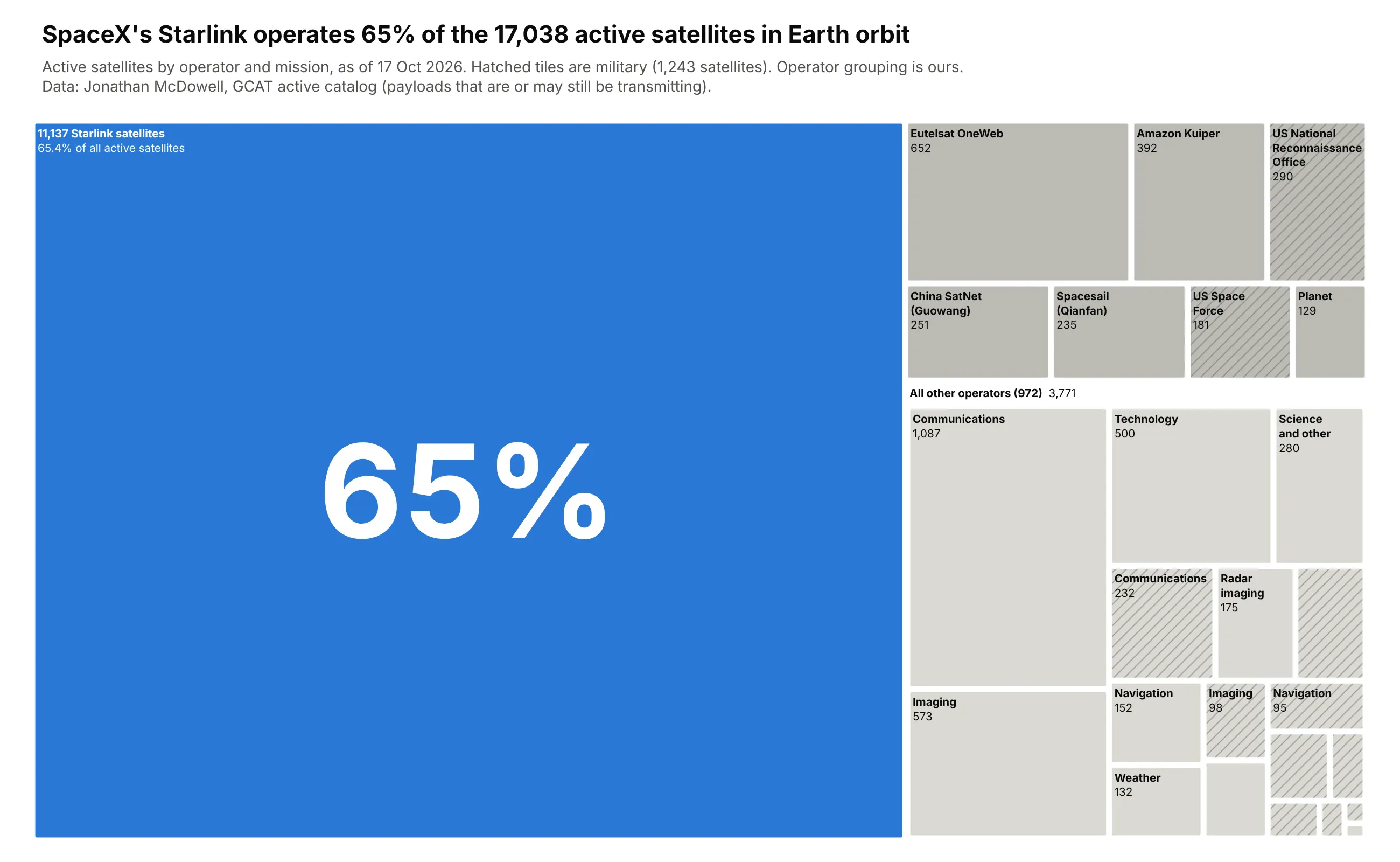
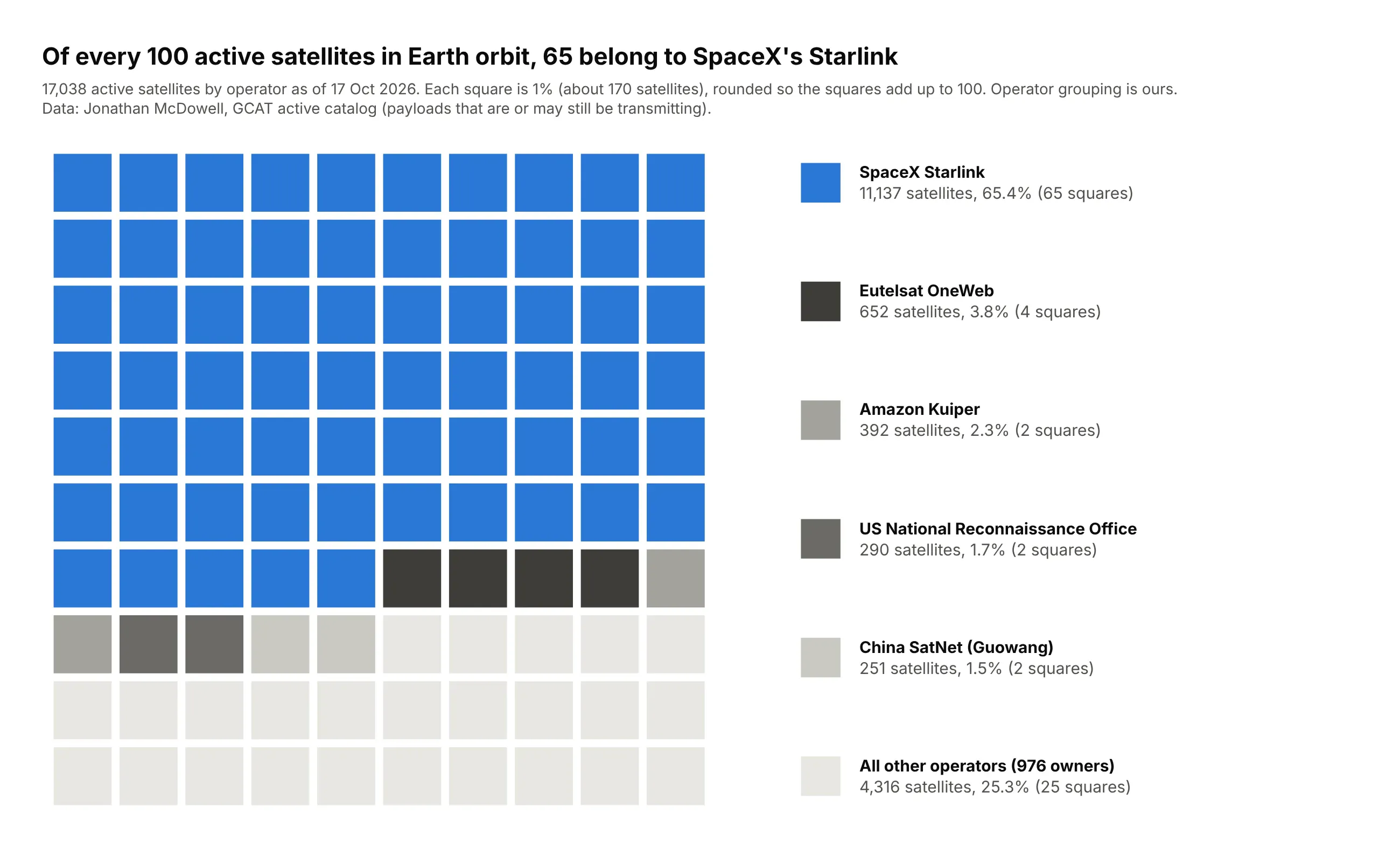
As of October 17, 2026, Jonathan McDowell's satellite catalog counts 17,038 active satellites in Earth orbit, and 11,137 of them (65.4%) are SpaceX Starlink. The next largest operators, Eutelsat OneWeb (652) and Amazon's Kuiper (392), are each less than a sixth of Starlink's size. The 3,771 satellites outside the eight largest operators belong to 972 other owners. Hatched tiles mark 1,243 military satellites, led by the US National Reconnaissance Office's 290. McDowell notes that "active" is often a judgment call, so treat the counts as approximate. Data: Jonathan McDowell, GCAT active catalog, October 17, 2026 (operator grouping is ours).
Tip: one dominant tile is the only color on the page, with its share written large across it, and marker.pattern.shape="/" adds a second attribute (military or not) without using a second color.
Get the data from Jonathan McDowell's GCAT active satellite catalog (planet4589.org/space/gcat)and shape it into a table(columns: owner [GCAT owner code], owner_name, owner_state, class [B commercial, C civil,D defense, A amateur], category [GCAT mission code], satellites [active satellites in Earthorbit, GCAT active catalog as of 2026-10-17]).Build a plotly treemap of active satellites by operator.- Named operator tiles: SpaceX Starlink (SPXS), Eutelsat OneWeb (ONEWEB*), Amazon Kuiper (KUIP),US NRO (NROC), China SatNet (ZXW), Spacesail (YUANX), US Space Force (SFSSC+AFSMC), Planet (PLAN).- Everything else is one "All other operators" parent split by mission and by military vs not.- Starlink is the only colored tile (blue); everything else gray. Hatch military tiles withmarker.pattern.shape="/" and pattern.bgcolor equal to the tile color.- Title with Starlink's share and the total; give the as-of date and source in the subtitle.
Another way to see it: a waffle chart of 100 squares, each about 170 satellites, makes Starlink's share literal: 65 of the 100 squares are blue, against 4 for Eutelsat OneWeb and 2 for Amazon Kuiper. It is easier to count than the treemap, but the 976 other owners collapse into 25 identical light gray squares, so it can't show what those satellites do or which ones are military.
Summary
A treemap is the right chart when you have many positive values in a strict hierarchy and the question is about proportion: what's big, how much of the whole it is, and where it sits. Budgets, markets, portfolios, disk usage, trade, emissions, population and counts of anything by category all fit. Before you draw one, check that the values add up and that a sorted bar chart wouldn't do the job better. Then fold the tail into "Other", put the values on the tiles, keep two or three levels in a static image, use color to say something area can't, and put the takeaway in the title.
When a treemap isn't the right fit, the alternatives are one line of Plotly away: a sorted bar chart for a few items or close values, a sunburst or icicle when the depth of the tree is the story, a waterfall for gains and losses, and a Sankey diagram (see our Sankey diagram guide) when money or materials flow through stages.
Pick any of the 20 examples above, paste its prompt into Plotly Studio or your coding agent, and swap in your own data.
Plotly treemap options, explained
For reference, these are the options that matter most in go.Treemap (and px.treemap), what they do, and when to reach for them. The full reference lives in the Plotly treemap documentation.
Option
What it does
When to use it
path (px only)
Builds the tree from DataFrame columns, top level first
The fastest way to a treemap from a flat table
ids, labels, parents
The tree, one row per node; parents holds the parent's id
When you need full control, or labels repeat under different parents
values
Size of each tile
Always
branchvalues
total (a parent's value is the sum of its children) or remainder (added on top)
total when you pass parent values yourself; check they add up, because plotly draws an empty chart if they don't
marker.colors
One color per node
Color by group or highlight one story
marker.colorscale, cmid, cmin, cmax
Map a numeric marker.colors to a scale
Second variable as color; cmid centers a diverging scale
marker.pad
Padding inside each parent (t makes a header strip)
Labeled parent headers
marker.line
Tile border color and width
White lines between tiles
marker.cornerradius
Rounded tile corners in pixels
A softer, modern look (2-4 px)
marker.depthfade
Fades parent colors towards the background
Single-hue treemaps where depth should read as shade
marker.pattern
Hatching on tiles
A second categorical attribute, or print-friendly charts
tiling.packing
squarify, binary, dice, slice, slice-dice, dice-slice
See the tiling figure in the styling section
tiling.squarifyratio, tiling.flip, tiling.pad
Tile aspect target, mirror the layout, gap between tiles
Fine-tuning the layout
texttemplate, textinfo
Tile text with %{label}, %{value}, %{percentRoot}, %{percentParent}, %{percentEntry}
Always put the value on the tile
textposition
Where text sits in the tile
top left reads like a file explorer
uniformtext (layout)
Minimum font size; mode="hide" drops text that won't fit
Clean static images
insidetextfont, outsidetextfont
Font for text inside tiles; font for the root's label in the top-left corner
Contrast on dark or light tiles (a list sets one color per tile)
maxdepth, level
How many levels to show, and which node to start from
Deep trees; zoomed-in views
root.color, pathbar.visible
Root tile color and the breadcrumb bar
Hide both for static charts, keep the pathbar for drill-down
sort
Sort tiles by value
Turn it off to keep your own order
count
Size by number of leaves instead of values
Counting records without a value column
hovertemplate, customdata
Hover content
Add extra fields such as growth or a note
domain
Where the treemap sits in the figure
Several treemaps side by side, or a zoomed panel (example 11)