The Best Local LLMs for Data Analysis in 2026
Updated November 7, 2026. We update this page as new open-weight models come out.
At Plotly, our agentic analytics products, Plotly Studio Desktop and Plotly Studio Embedded, work with any model, including ones you host yourself. More and more of our customers ask the same question: can I run a good model on my own computer yet?
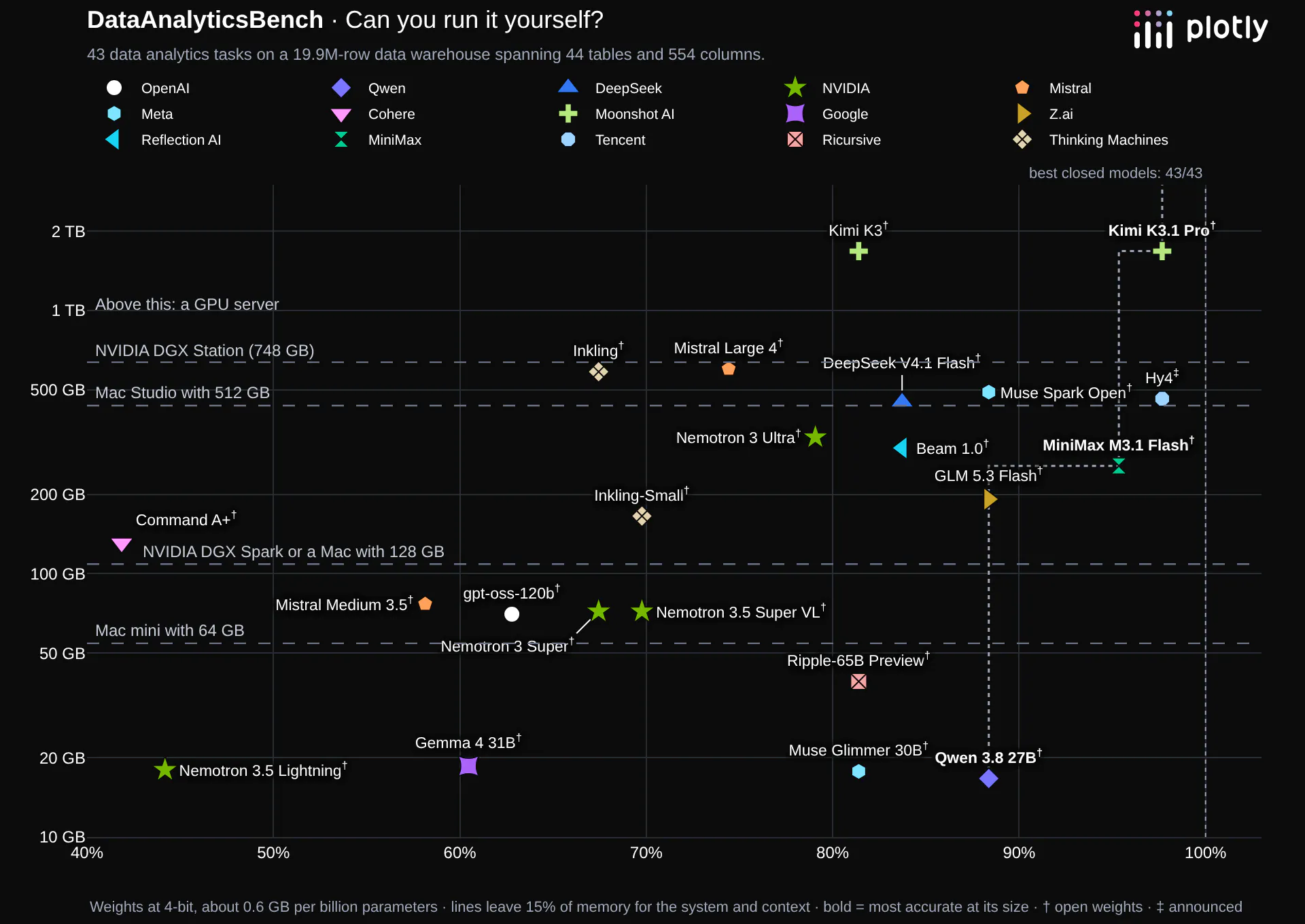
We've run 43 models through DataAnalyticsBench, our 43-question data analysis exam on a 20M-row data warehouse. Twenty-two of them have open weights, or weights their lab has promised. This page sorts those 22 by the hardware you'd need to run them, from a Mac mini to a GPU server, and shows how accurate each one is.
How to read this. We ran every model through hosted providers on OpenRouter, not on local hardware, so the scores are the models' scores, not a test of any machine. The memory figures are estimates for 4-bit weights, at about 0.6 GB per billion parameters, which is what Apple reported when it ran Meta's Muse Spark Open on Mac Studios. We leave about 15% of each machine's memory for the operating system and the conversation. Shrinking a model to 4 bits can cost some accuracy, and we haven't measured how much on our exam. And our questions are short data analysis tasks: one question, a few queries, then an answer. They're a fair sample of everyday knowledge work, not of long coding-agent sessions on a big codebase.
Key takeaways
- A 64 GB Mac mini can run a model that scores 38 of 43. Alibaba's Qwen 3.8 27B needs about 17 GB at 4-bit. That matches GPT-6 Luna, the cheapest closed model on our board.
- 128 GB doesn't buy more accuracy. The models that need between 64 and 128 GB, NVIDIA's Nemotron 3.5 Super VL and Nemotron 3 Super, OpenAI's gpt-oss-120b and Mistral Medium 3.5, score 25 to 30, below Qwen.
- The next step up is around 260 GB. MiniMax M3.1 Flash scores 41 of 43 and fits on a Mac Studio with 512 GB.
- The most accurate open model needs a server. Moonshot's Kimi K3.1 Pro scores 42 but needs about 1.7 TB. Tencent's Hy4 also scores 42; Tencent hasn't released its weights yet, but at its preview's size it would need about 460 GB.
- Closed models are still ahead, and faster. GPT-6.1 Sol scores 43 of 43 and answers in about 18 seconds. A model on your own desk takes minutes per question.
The best model at each size
Hardware
Price
Best model that fits
Score
Mac mini with 64 GB
About $2,700
Qwen 3.8 27B
38 / 43
NVIDIA DGX Spark or a Mac with 128 GB
DGX Spark: $6,950
Qwen 3.8 27B
38 / 43
Mac Studio with 512 GB
Not shipping yet
MiniMax M3.1 Flash
41 / 43
NVIDIA DGX Station (748 GB)
About $90,000 to $160,000
MiniMax M3.1 Flash (Hy4, 42, once its weights are out)
41 / 43
A data-center GPU server
Hundreds of thousands of dollars
Kimi K3.1 Pro
42 / 43
Prices are from our Open Models vs. Closed Models post. AI demand and a global memory shortage have pushed Mac delivery times out by months this year, and the 512 GB Mac Studio configuration isn't shipping yet.
Up to 64 GB: a Mac mini
Five models fit in a 64 GB machine with room to spare, and the best of them is the best value on this page.
- Qwen 3.8 27B (Alibaba): 38 of 43, about 17 GB
- Muse Glimmer 30B (Meta): 35 of 43, about 18 GB
- Ripple-65B Preview (Ricursive): 35 of 43, about 39 GB
- Gemma 4 31B (Google): 26 of 43, about 19 GB
- Nemotron 3.5 Lightning (NVIDIA): 19 of 43, about 18 GB
The roughly 30-billion-parameter models also fit on a 32 GB machine or a 32 GB graphics card at 4-bit, with less room for long conversations. Qwen 3.8 27B scored as well as GLM 5.3 Flash and Muse Spark Open, models more than ten times its size.
Up to 128 GB: an NVIDIA DGX Spark or a 128 GB Mac
- Nemotron 3.5 Super VL (NVIDIA): 30 of 43, about 72 GB
- Nemotron 3 Super (NVIDIA): 29 of 43, about 72 GB
- gpt-oss-120b (OpenAI): 27 of 43, about 70 GB
- Mistral Medium 3.5 (Mistral): 25 of 43, about 77 GB
None of these beats Qwen 3.8 27B on our exam. Nemotron 3.5 Super VL is one of the fastest models we've tested through a hosted provider, at 12 seconds a question, and OpenAI says gpt-oss-120b runs on a single 80 GB GPU.
Up to 512 GB: a Mac Studio
- MiniMax M3.1 Flash (MiniMax): 41 of 43, about 257 GB
- GLM 5.3 Flash (Z.ai): 38 of 43, about 192 GB
- Beam 1.0 (Reflection AI): 36 of 43, about 301 GB
- Nemotron 3 Ultra (NVIDIA): 34 of 43, about 330 GB
- Inkling-Small (Thinking Machines): 30 of 43, about 166 GB
- Command A+ (Cohere): 18 of 43, about 131 GB
This is where open models start to catch the best closed ones. MiniMax M3.1 Flash scored 41 and found all five patterns we hid in the data, something only a handful of models have done.
Up to 748 GB: an NVIDIA DGX Station
- Hy4 (Tencent): 42 of 43, about 462 GB. Weights announced, not yet released; size is the preview's
- Muse Spark Open (Meta): 38 of 43, about 490 GB
- DeepSeek V4.1 Flash (DeepSeek): 36 of 43, about 449 GB
- Mistral Large 4 (Mistral): 32 of 43, about 600 GB
- Inkling (Thinking Machines): 29 of 43, about 585 GB
Muse Spark Open is just over the line for one Mac Studio: Apple ran it across two 512 GB Mac Studios, and NVIDIA's DGX Station holds it in a single machine.
More than that: a GPU server
- Kimi K3.1 Pro (Moonshot AI): 42 of 43, about 1.7 TB
- Kimi K3 (Moonshot AI): 35 of 43, about 1.7 TB
Kimi K3.1 Pro is the most accurate open-weight model we've tested. At about 1.7 TB it needs a data-center GPU server, the kind you'd share across a team rather than put on a desk.
Fitting isn't the same as fast
A model that fits can still be slow. Through hosted providers, Qwen 3.8 27B took a median of 53 seconds per question. An M5 Pro Mac with 64 GB generates about 18 tokens per second on a 27B model, and from the tokens Qwen used on our exam we estimate it would take around 3½ minutes for a typical question. Apple's two-Mac-Studio setup ran Muse Spark Open at about 25 tokens per second, which also works out to minutes per question.
For mixture-of-experts models, the memory you need depends on all of the parameters, but the speed depends mostly on the active ones. MiniMax M3.1 Flash has 428 billion parameters but uses only 23 billion for each token, so it generates tokens much faster than a dense model of the same size would.
If a question takes more than 20 to 30 seconds, people tend to switch to something else. Local models fit analysis that runs in the background better than questions someone is waiting on.
Is it worth it?
Usually not for cost alone. A 64 GB Mac for each analyst works out to about $900 per person per year over three years. At 10 questions a day, calling Qwen 3.8 27B through a hosted provider costs about $99 per person per year, and GPT-6.1 Sol, which scores 43, about $152 (our cost comparison). Running locally makes sense when data can't leave your network, or when one shared machine serves many people.
Every open-weight model we've tested
Sorted by score. ‡ marks Hy4, whose weights Tencent has announced but not yet released; its size is the preview's.
Model
Score
Size
Memory at 4-bit
Smallest hardware it fits
Hy4‡ (Tencent)
42 / 43
770B (49B active)
462 GB
DGX Station
Kimi K3.1 Pro (Moonshot AI)
42 / 43
2.8T (104B active)
1.7 TB
GPU server
MiniMax M3.1 Flash (MiniMax)
41 / 43
428B (23B active)
257 GB
Mac Studio, 512 GB
Qwen 3.8 27B (Alibaba)
38 / 43
27.8B dense
17 GB
Mac mini, 64 GB
GLM 5.3 Flash (Z.ai)
38 / 43
320B (18B active)
192 GB
Mac Studio, 512 GB
Muse Spark Open (Meta)
38 / 43
816B (42B active)
490 GB
DGX Station
Beam 1.0 (Reflection AI)
36 / 43
501B (23B active)
301 GB
Mac Studio, 512 GB
DeepSeek V4.1 Flash (DeepSeek)
36 / 43
748B (16B active)
449 GB
DGX Station
Muse Glimmer 30B (Meta)
35 / 43
29.6B dense
18 GB
Mac mini, 64 GB
Ripple-65B Preview (Ricursive)
35 / 43
65B dense
39 GB
Mac mini, 64 GB
Kimi K3 (Moonshot AI)
35 / 43
2.8T (104B active)
1.7 TB
GPU server
Nemotron 3 Ultra (NVIDIA)
34 / 43
550B (55B active)
330 GB
Mac Studio, 512 GB
Mistral Large 4 (Mistral)
32 / 43
1T (52B active)
600 GB
DGX Station
Nemotron 3.5 Super VL (NVIDIA)
30 / 43
120B (12B active)
72 GB
DGX Spark or 128 GB Mac
Inkling-Small (Thinking Machines)
30 / 43
276B (12B active)
166 GB
Mac Studio, 512 GB
Nemotron 3 Super (NVIDIA)
29 / 43
120B (12B active)
72 GB
DGX Spark or 128 GB Mac
Inkling (Thinking Machines)
29 / 43
975B (41B active)
585 GB
DGX Station
gpt-oss-120b (OpenAI)
27 / 43
117B (5.1B active)
70 GB
DGX Spark or 128 GB Mac
Gemma 4 31B (Google)
26 / 43
31B dense
19 GB
Mac mini, 64 GB
Mistral Medium 3.5 (Mistral)
25 / 43
128B dense
77 GB
DGX Spark or 128 GB Mac
Nemotron 3.5 Lightning (NVIDIA)
19 / 43
30B (3B active)
18 GB
Mac mini, 64 GB
Command A+ (Cohere)
18 / 43
218B (25B active)
131 GB
Mac Studio, 512 GB
The Test Harness
We run every model in Plotly Studio Embedded, a drop-in analytics agent that runs on Dash apps. This harness is tuned to run data analytics queries and make charts with multi-turn tool calling, with less emphasis on writing text. It's meant to put the data front and center.
Frequently asked questions
What's the best LLM I can run locally?
On our data analysis exam, Alibaba's Qwen 3.8 27B is the best model that fits on a desktop: it scored 38 of 43 and needs about 17 GB of memory at 4-bit. With a 512 GB Mac Studio, MiniMax M3.1 Flash scored 41. The most accurate open model, Kimi K3.1 Pro (42), needs a GPU server.
Can I run a good LLM on a Mac mini?
Yes. A Mac mini with 64 GB runs Qwen 3.8 27B, which scored 38 of 43, the same as GPT-6 Luna. Expect a few minutes per question rather than seconds.
How much memory do I need to run a local LLM?
At 4-bit precision, about 0.6 GB per billion parameters, plus room for the system and the conversation. A 30-billion-parameter model needs about 18 GB, a 120-billion-parameter model about 72 GB, and an 800-billion-parameter model nearly 500 GB.
Are local models as good as ChatGPT, Claude or Gemini?
Not yet. On our exam the best closed models score 43 of 43. The best model you can run on a desktop scores 38, and the best open model overall scores 42 but needs a GPU server.
Did you run these models on local hardware?
No. We ran them through hosted providers on OpenRouter. The hardware fits are estimates from each model's size. Running a model at 4-bit precision may lower its score a little.
About the benchmark
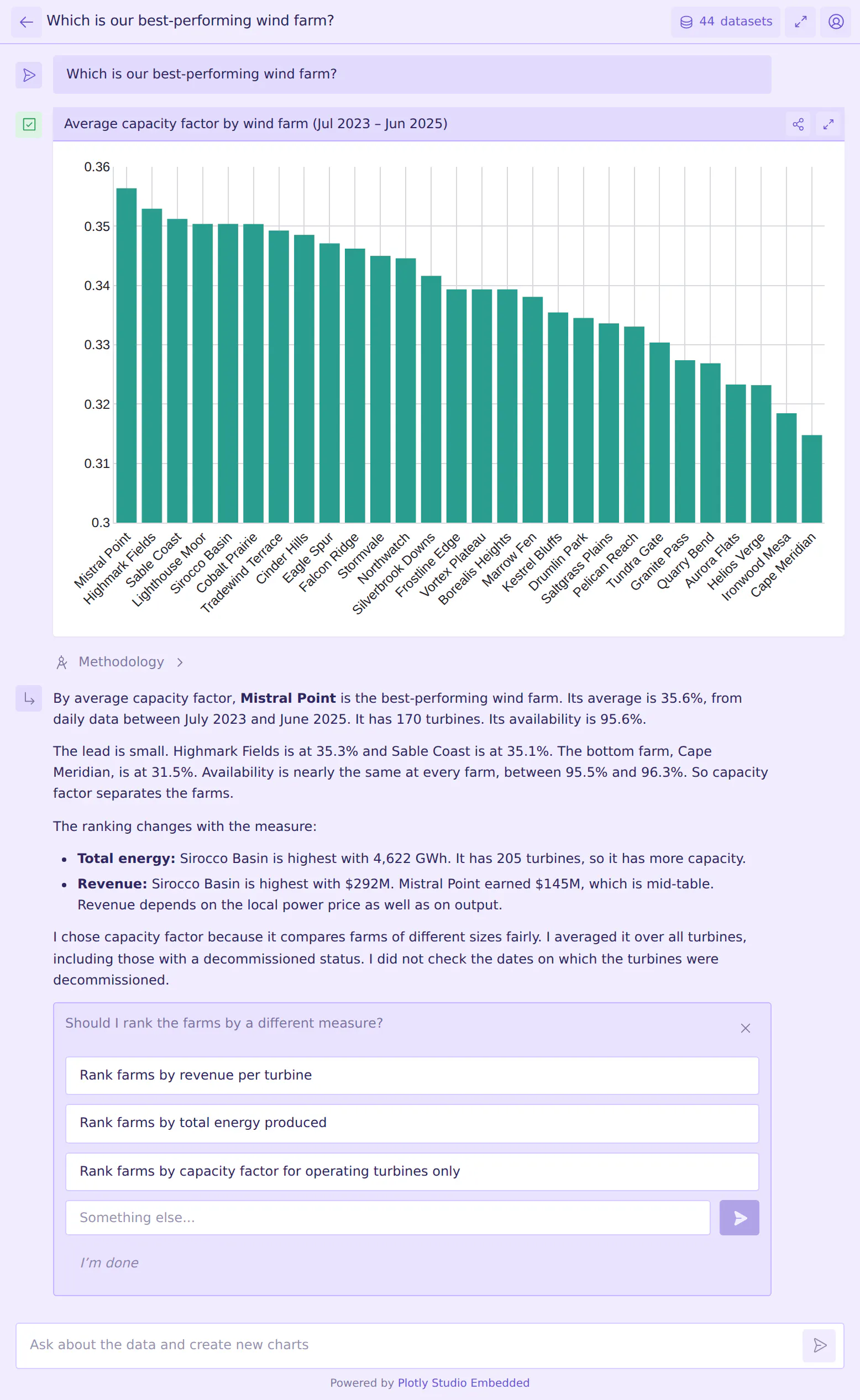
DataAnalyticsBench is our exam for AI data analysis: 43 questions on a synthetic wind-energy data warehouse, covering straightforward analytics, ambiguous and impossible requests, data quality problems, statistics traps and patterns hidden in the data. For every model's results, see Introducing DataAnalyticsBench. We compare open and closed models in Open Models vs. Closed Models in 2026, and open models from U.S. labs in The Best U.S. Open-Weight Models.
The exam is private and we're sharing it with researchers. If you'd like access, reach out to Chris Parmer at Plotly.