Deepa Shalini
April 17, 2026
The Golden Trilogy: From Standard to Stunning with Plotly
Author: Deepa Shalini
Every dataset can tell multiple stories—the challenge is choosing the right way to visualize them.
My journey with Plotly began a few years ago when I was working in data visualization, creating interactive visualizations for LIMS customers to help make complex laboratory data more intuitive and relatable. I was always looking for ways to make charts more expressive without adding unnecessary complexity. During that time, I came across online tutorials demonstrating how to build rich, interactive visualizations using Plotly, and I was immediately drawn in.
What struck me most about Plotly was how quickly you could create beautiful, interactive charts with just a few lines of code. The sheer range of chart types also made it incredibly fun to experiment with different ways of visualizing data.
Even though my current role no longer involves data visualization, working with Plotly has remained a personal hobby. I enjoy keeping up with new features from the Plotly community and experimenting with datasets whenever something interesting catches my attention. One aspect of visualization that particularly fascinates me is trying unconventional approaches—using chart types that are not traditionally associated with a given dataset and seeing what new perspectives they reveal. Plotly makes this kind of experimentation surprisingly easy.
This curiosity is what eventually led me to explore gold price data. Living in India, gold is far more than just a financial asset. It carries cultural, emotional, and even spiritual significance. There is even a day each year called Dhanteras: a festival that marks the beginning of the Diwali celebrations, when people across the country purchase gold as a symbol of prosperity and good fortune. That made me wonder: does this cultural rush toward gold leave any visible fingerprint in the price data?
Given this cultural backdrop, I was curious to see how gold price movements might look when explored through different visual perspectives. Instead of relying on a single traditional time-series chart, I decided to experiment with multiple visualization styles to see what different perspectives the same dataset could reveal: from a trusted financial baseline to an eye-catching radial narrative, and finally to a more artistic market story.
The Gold Standard
A classic candlestick for analytical clarity
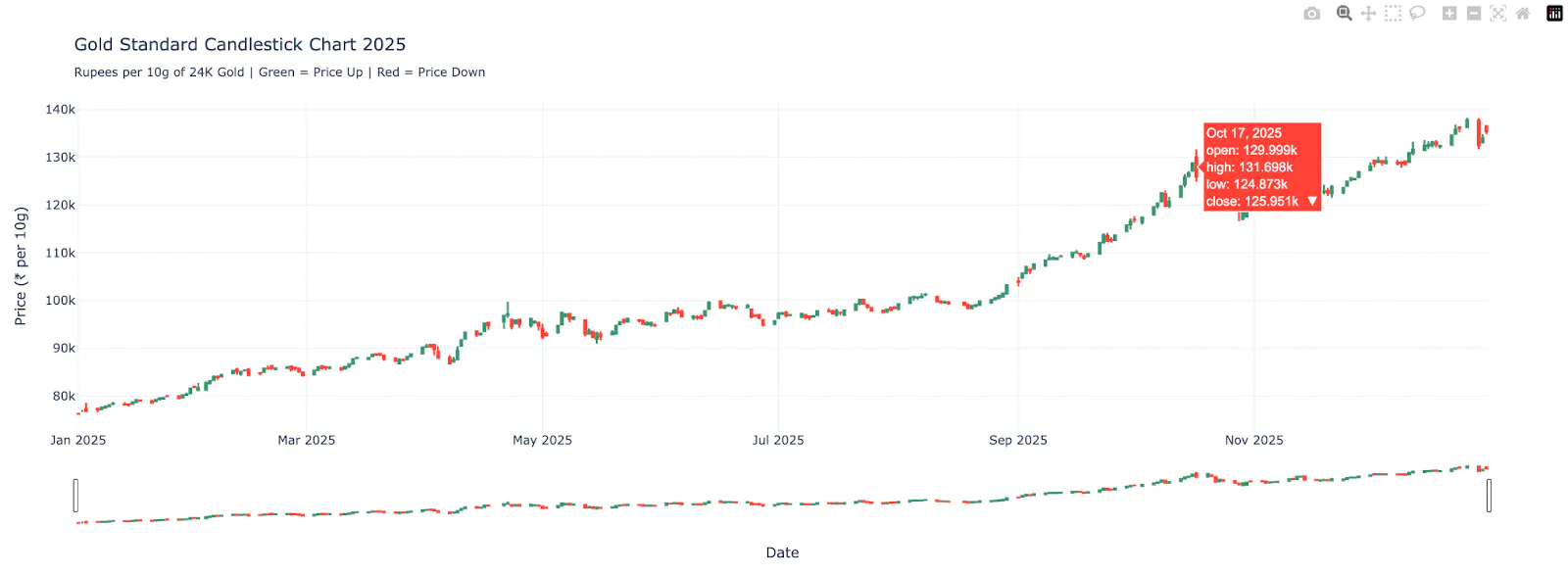
Sometimes the best visualization is the one that analysts already trust.
The candlestick chart remains the gold standard for financial time series because it compresses four price signals (open, high, low, close) into a compact, information-dense view. With Plotly, creating this familiar view requires only a few lines of code, while still enabling:
- Interactive hover for precise inspection
- Zoom and pan for exploratory analysis
- Production-ready styling out of the box
The Gold Rosette
A radial calendar that reveals seasonal rhythm.
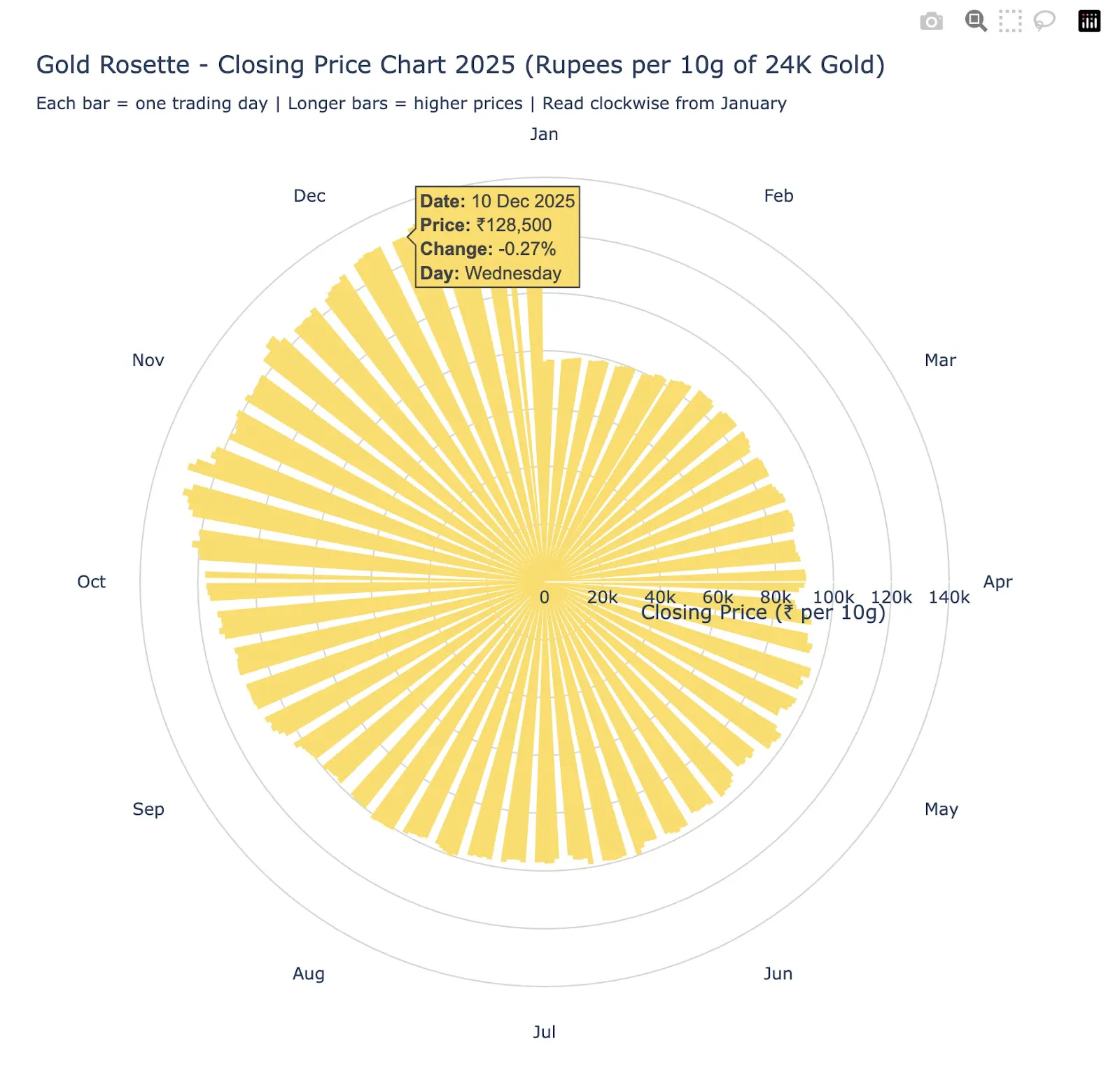
Now we shift from precision analysis to pattern storytelling.
The Gold Rosette reimagines the same daily closing prices as a circular time map, where:
- Each bar = one trading day
- Angle = day of year (clockwise from January)
- Radius = closing gold price
This format surfaces patterns that linear charts often hide: seasonal structure and momentum waves across the year.
Plotly’s polar coordinates and bar traces make this transformation remarkably straightforward, with no custom rendering engine required.
The Gold Rush
A stellar scatter plot that effectively highlights volatility.
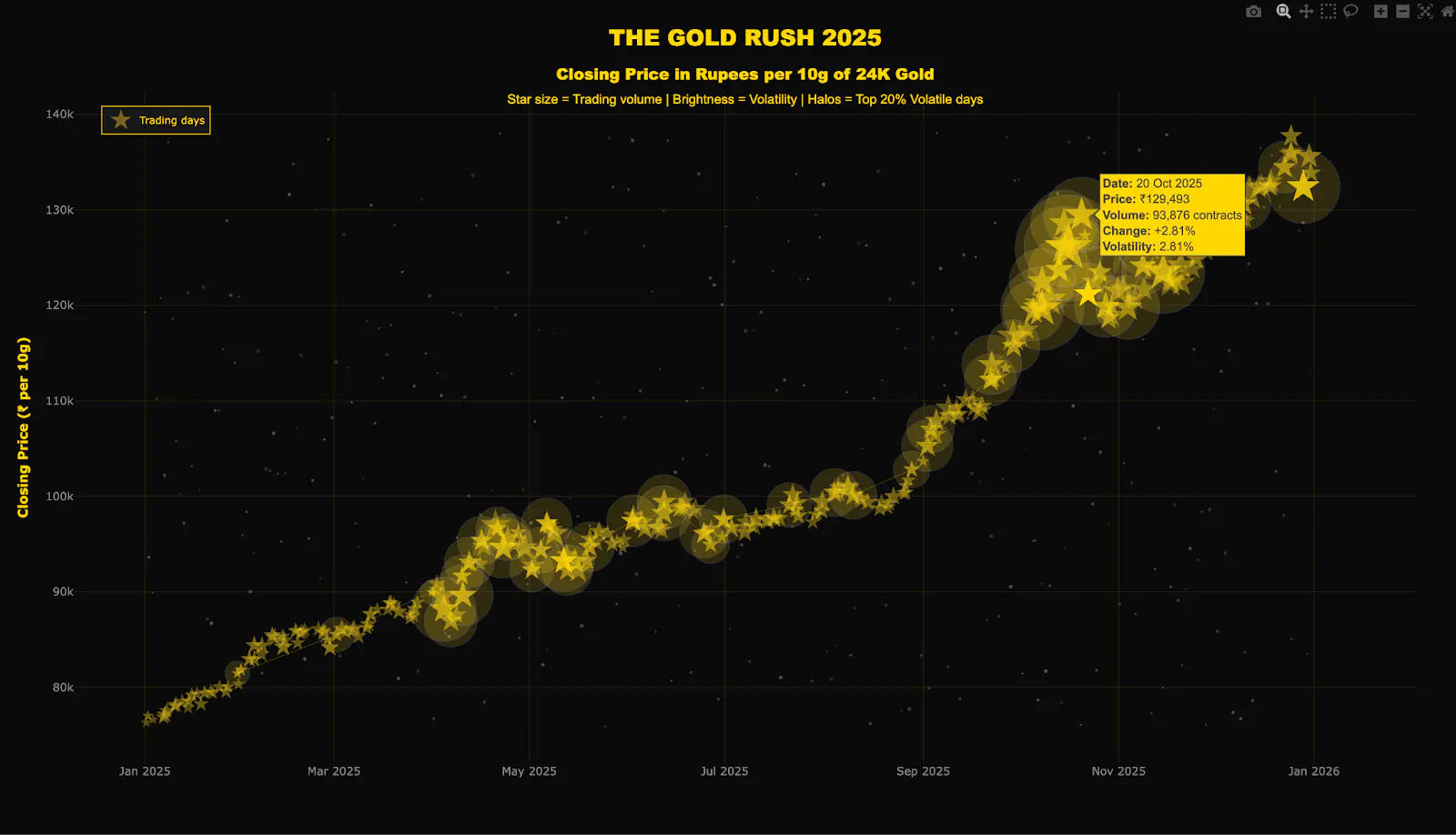
This is where the visualization becomes more expressive.
In The Gold Rush, each trading day becomes a glowing star in a financial night sky:
- Star size represents contracts traded
- Brightness represents volatility
- Halos represent top 20% most volatile days
- Constellation lines connect the most volatile periods
What was once a price series now reads like a market narrative, highlighting clusters of heightened volatility and market activity in a way traditional charts rarely achieve. Given the expressive nature of this chart, you might want to consider using it in conference demos, in data storytelling articles, or as social media visuals.
Try It Yourself
With the same gold price dataset, we moved through three distinct intents. The underlying data never changed; only the question and the creative framing did.
All three visualizations are built in Python, use Plotly, and are fully reproducible in the accompanying GitHub repository.
You can even reproduce these charts without having to write any code. Simply download the csv sheet from the GitHub repo. Then download and start Plotly Studio. Then, upload the dataset to Plotly Studio, and hit Continue.
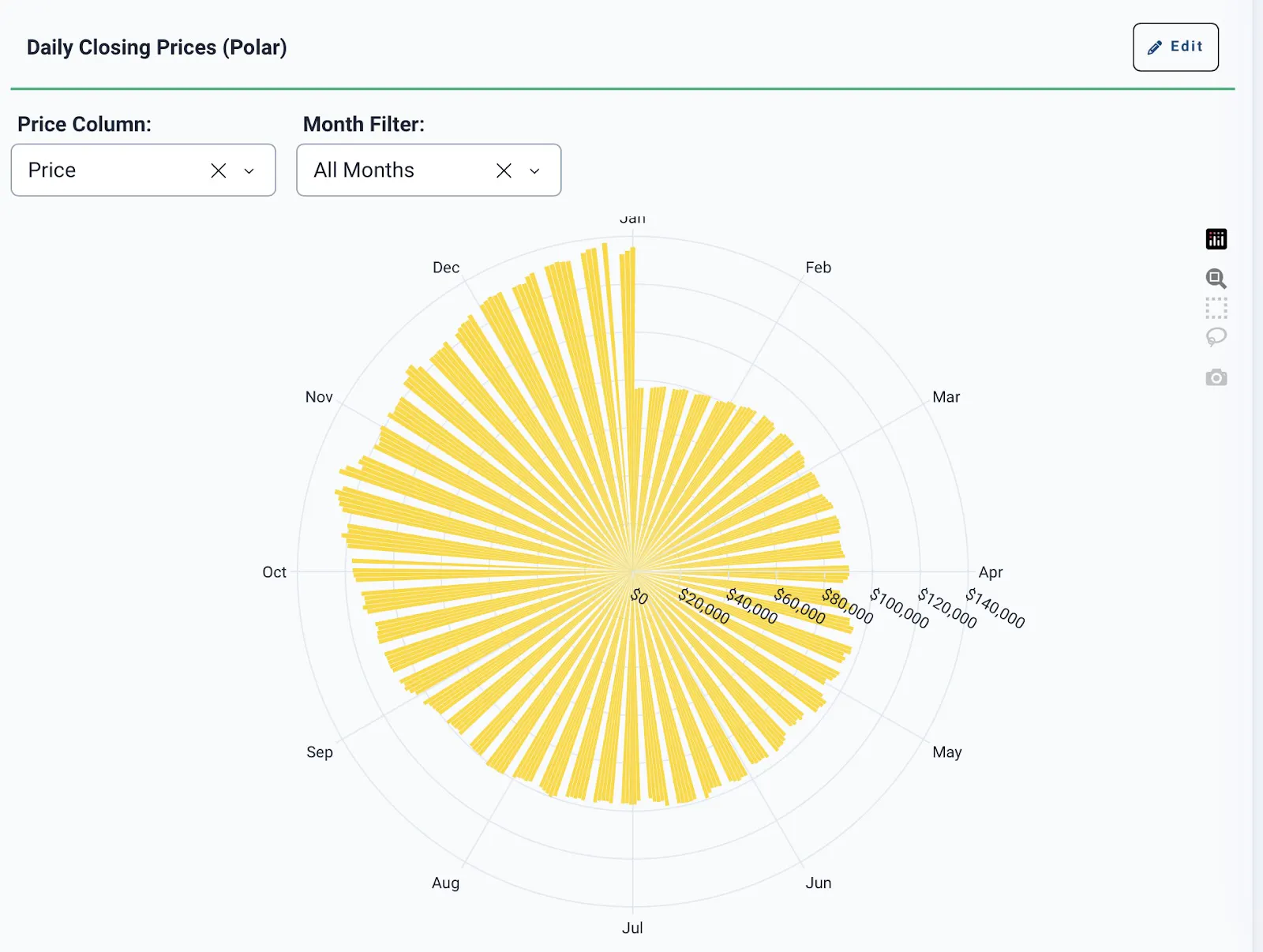
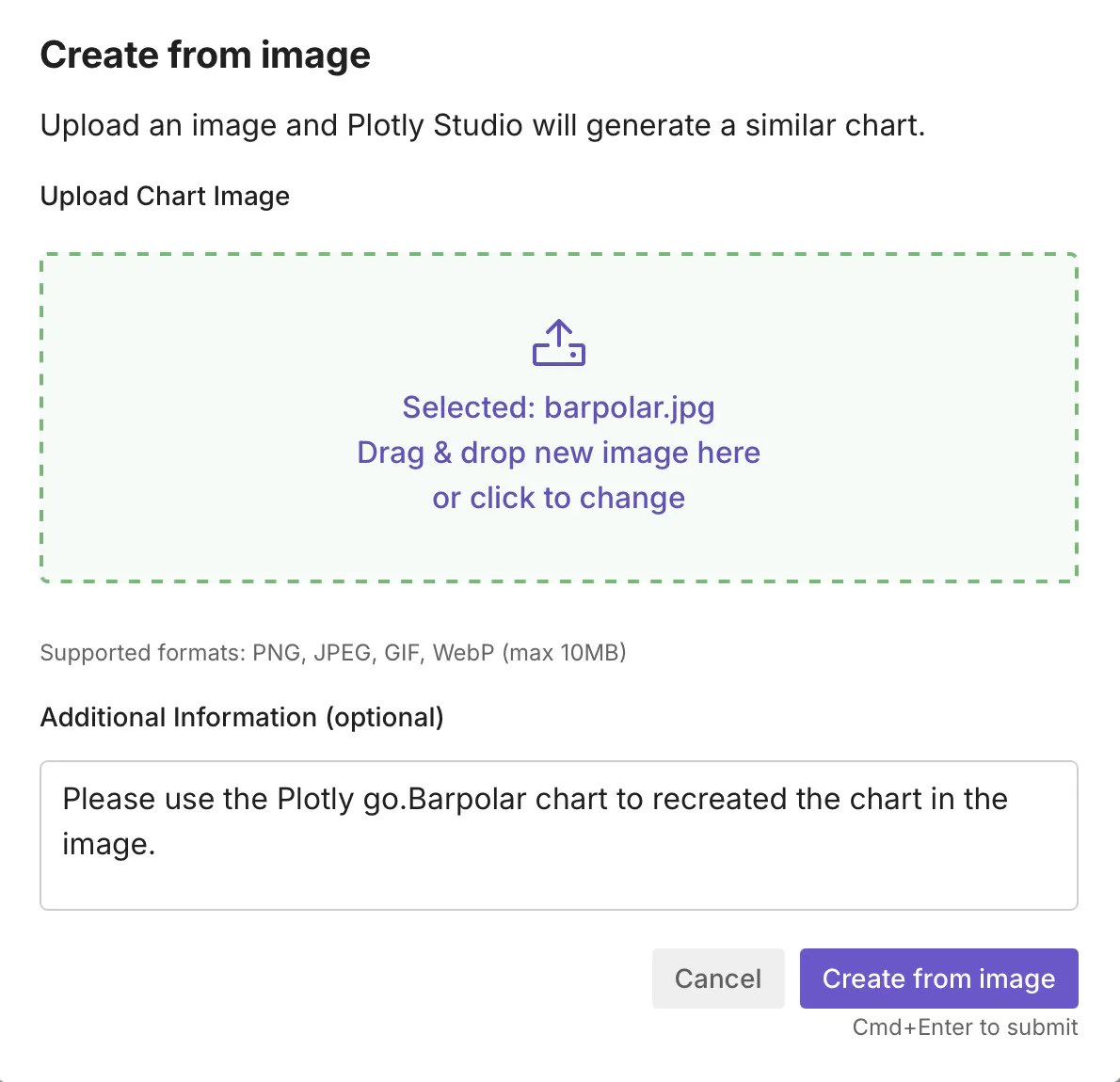
Let’s reproduce the bar polar chart. Copy the chart under the Gold Rosette section, and save it as a .jpeg file. Go back to Plotly Studio, click the Explore tab, and search for the “Create from image” button at the bottom of the page.

Load the bar polar jpeg image, and add this prompt: Please use the Plotly go.Barpolar chart to recreate the chart in the image. Click the “Create from image” button.
Below, you will find the bar polar chart that we were able to create with Plotly Studio. You should see something similar if you used the same image and prompt. If it’s not exactly what you wanted, click the Edit button and ask Plotly Studio to modify the chart.