
Plotly
October 22, 2026
DuckDB 2.0 vs Polars 2.0 vs pandas 3.0: benchmarks on a billion rows
TL;DR
- We ran four common dashboard queries in pandas 3.0, Polars 2.0 and DuckDB 2.0. The data is NOAA's daily weather history, at sizes from 12 million rows to 1.14 billion.
- With one year of data, all three work well. pandas finished every query in under 10 seconds.
- At 119 million rows, pandas ran out of memory on both queries that use a join. Where pandas did finish, DuckDB and Polars were 5 to 40 times faster.
- DuckDB was faster on some queries and Polars on others. DuckDB used much less memory, never more than 0.45 GB. It was also the only engine that finished every query on the full 1.14 billion rows.
- For time-series calculations, such as rolling windows and filling gaps, Polars has more built-in functions and was 2.5–6× faster than DuckDB.
- For Dash apps, the biggest gain came from not loading data at startup. Querying Parquet files inside the callback was faster than every preloaded DataFrame. The app started in 0.1 seconds and used about 50 MB per worker.
Why we ran this
DuckDB 2.0 was released on October 21, 2026. Before the release, we built a six-page Dash app on DuckDB 2.0 to test the new features. That post covers what's new in 2.0. While we worked on it, Dash developers kept asking us one question: how does DuckDB compare to the tools I already use?
For most Python data apps, that tool is pandas. More and more apps use Polars. All three libraries had a major release this year:
- pandas 3.0 turned on copy-on-write by default and stores text columns in a faster PyArrow-based type.
- Polars 2.0, released on October 6, uses its streaming engine by default.
- DuckDB 2.0 added async I/O and many new SQL features.
So this was a good time to compare them on the same data.
We tested the kind of work a dashboard does most often: grouping a large table, joining it to a lookup table, and filtering it down to one item's history. We kept the benchmark small on purpose.
The three engines
pandas is the DataFrame library most Python developers learn first. Most Dash apps use it today. pandas runs each operation right away and keeps the whole result in memory. This makes it easy to understand, but a 10 GB dataset needs well over 10 GB of RAM.
Polars is a DataFrame library written in Rust. Its lazy API lets you describe the whole query first. Polars then plans the query before it reads any data. It uses all CPU cores, and in 2.0 it processes data in chunks by default.
DuckDB is an analytics database that runs inside your Python process. You don't need to set up a server. You query Parquet, CSV or JSON files with SQL, and you can also query pandas and Polars DataFrames. Like Polars, it processes data in chunks and uses all CPU cores.
The data and the setup
The dataset is NOAA's GHCN-Daily (Global Historical Climatology Network). It contains every daily weather reading NOAA has collected from 1781 to last week. That's 1.14 billion rows from 132,779 weather stations. We stored it as Parquet, with one file per year, sorted by station. The files use 1.6 GB on disk. A separate stations table has one row per station, with its name, country and location.
We tested three sizes:
- 1 year (2024): 12 million rows
- 10 years (2015 to 2024): 119 million rows
- Everything (1781 to 2026): 1.14 billion rows
Each run starts a new Python process that reads the same Parquet files. The time includes reading from disk, as it would in a real Dash callback. Each query runs three times in that process. We report the best time and the peak memory of the process.
The machine was a cloud VM with 4 vCPUs and 16 GB of RAM. A watchdog stopped any run that used more than 12 GB of memory, so a single query could not crash the machine. These runs are marked "out of memory" in the tables.
The four queries
We picked four queries that dashboards run all the time:
- Per-station summary: one row per station with the number of days, the average and highest maximum temperature, the lowest minimum temperature and the total rainfall. This is a simple group-by.
- Country × year: join the readings to the stations table. Then compute average temperatures by country and year, and count how many stations reported. This is a join and a group-by.
- Hottest day per country: the hottest reading in each country, with its station and date. This is a join and an "arg max".
- One station's history: every reading from New York's Central Park, sorted by date. The records start in 1869. This is a narrow filter.
Here is the hottest-day query in each engine. It shows how different the code looks. In pandas:
df = pd.read_parquet(paths, columns=["station_id", "date", "tmax", "tmin", "prcp"])df = df.merge(pd.read_parquet(STATIONS, columns=["station_id", "country"]), on="station_id")idx = df.dropna(subset=["tmax"]).groupby("country")["tmax"].idxmax()hottest = df.loc[idx, ["country", "station_id", "date", "tmax"]]
In Polars, with the lazy API. No data is read until collect():
best = pl.col("tmax").arg_max()hottest = (pl.scan_parquet(paths).join(pl.scan_parquet(STATIONS).select("station_id", "country"), on="station_id").drop_nulls("tmax").group_by("country").agg(station_id=pl.col("station_id").get(best), date=pl.col("date").get(best),tmax=pl.col("tmax").max()).collect())
In DuckDB, arg_max(x, tmax) returns the value of x from the row with the highest tmax:
hottest = duckdb.sql(f"""SELECT s.country,arg_max(d.station_id, tmax) AS station_id,arg_max(d.date, tmax) AS date,max(tmax) AS tmaxFROM read_parquet({paths}) d JOIN '{STATIONS}' s USING (station_id)GROUP BY s.country""").df()
The other three queries look similar in all three engines. Each is a few lines long.
Results
Each cell shows the best time and the peak memory. Lower is better for both.
1 year, 12 million rows
Query
pandas 3.0
Polars 2.0
DuckDB 2.0
Per-station summary
1.03 s · 1.18 GB
0.13 s · 0.38 GB
0.12 s · 0.13 GB
Country × year (join)
8.91 s · 3.23 GB
0.44 s · 1.09 GB
0.23 s · 0.13 GB
Hottest day per country (join + arg max)
6.56 s · 3.56 GB
0.19 s · 0.74 GB
0.24 s · 0.11 GB
One station's history
0.02 s · 0.19 GB
0.00 s · 0.07 GB
0.03 s · 0.07 GB
10 years, 119 million rows
Query
pandas 3.0
Polars 2.0
DuckDB 2.0
Per-station summary
16.57 s · 7.60 GB
1.47 s · 1.31 GB
0.60 s · 0.22 GB
Country × year (join)
out of memory
4.63 s · 5.70 GB
1.32 s · 0.23 GB
Hottest day per country (join + arg max)
out of memory
3.09 s · 4.38 GB
1.26 s · 0.14 GB
One station's history
0.12 s · 0.38 GB
0.02 s · 0.08 GB
0.05 s · 0.10 GB
1781–2026, 1.14 billion rows
Query
pandas 3.0
Polars 2.0
DuckDB 2.0
Per-station summary
out of memory
13.02 s · 1.54 GB
5.60 s · 0.31 GB
Country × year (join)
out of memory
out of disk
17.51 s · 0.45 GB
Hottest day per country (join + arg max)
out of memory
out of memory
14.21 s · 0.15 GB
One station's history
1.14 s · 0.64 GB
0.18 s · 0.09 GB
0.27 s · 0.15 GB
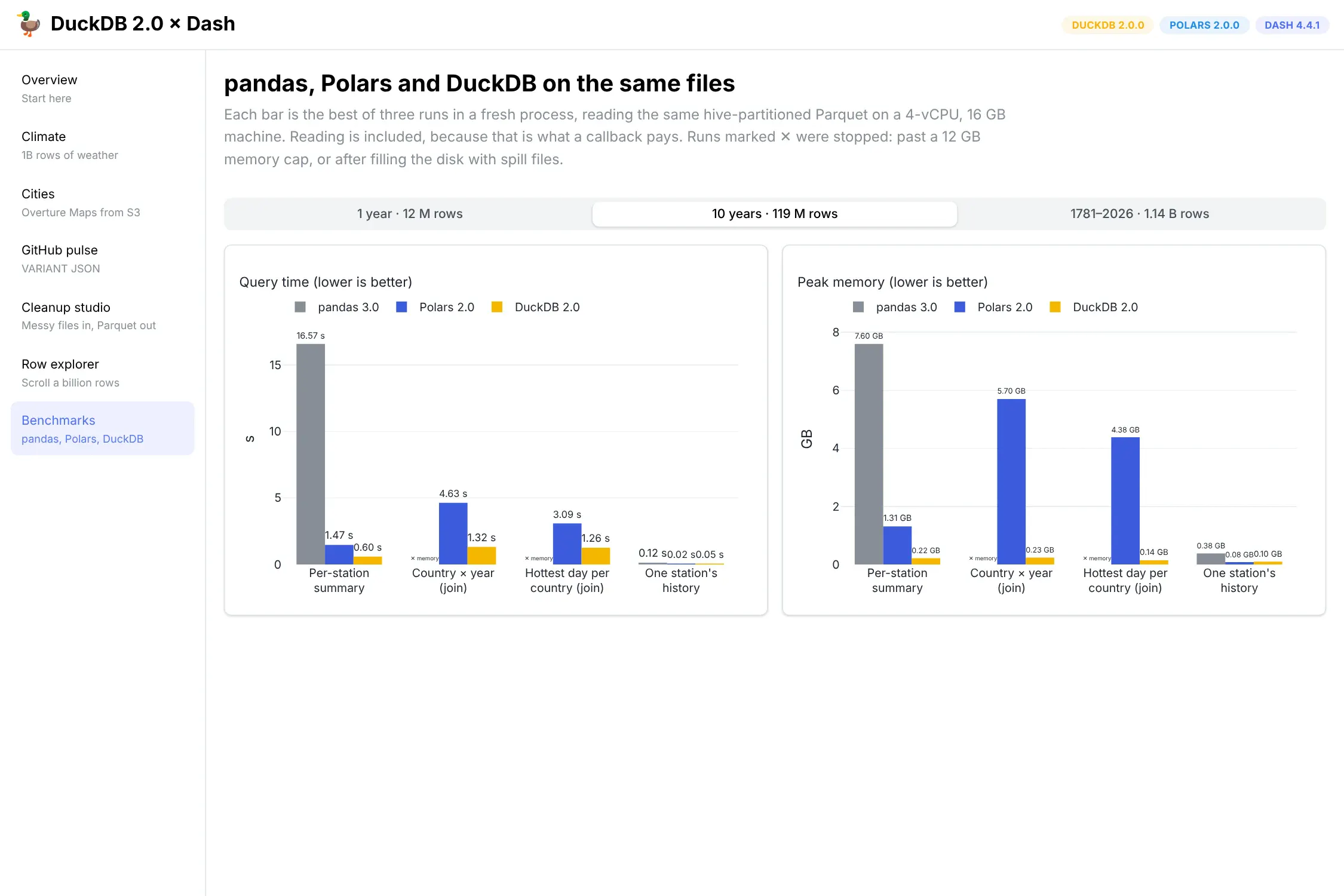
Query time and peak memory at 10 years of data (119 million rows). Lower is better.
What the numbers say
With small data, all three work well. With one year of data (12 million rows), pandas finished every query in under 10 seconds. All three engines found a single station's history almost instantly. If your data fits in memory and your pages load quickly, you don't need to replace pandas.
pandas reaches its limits first. At 119 million rows, it could not finish either join query within 12 GB. pandas loads every column it needs into memory before it starts, and a merge makes another full copy. DuckDB and Polars read the files in chunks, so their memory use grows much less as the data grows.
DuckDB and Polars were each faster on different queries. Polars was fastest at reading one station's history at every size, and at the hottest-day query on one year. DuckDB was faster on the larger joins and group-bys. Above a few million rows, both were 5 to 40 times faster than pandas.
DuckDB used much less memory. It never used more than 0.45 GB, even on 1.14 billion rows. On the full dataset, Polars finished the per-station summary with 1.5 GB, but it could not finish the two join queries on this machine. One went over the 12 GB limit. The other wrote more than 20 GB of temporary files, and we stopped it when the disk was almost full.
Memory matters more in a Dash app than in a notebook. In production, a Dash app usually runs under gunicorn with several worker processes, and each worker uses its own memory. A query that needs 4 GB works fine once. If four workers run it at the same time on an 8 GB container, the app runs out of memory.
This benchmark has limits. We used one 4-vCPU machine, one dataset and four queries. Polars' own benchmarks use TPC-H and TPC-DS on much larger machines, and there Polars is faster than DuckDB. Its release notes also say that spilling joins and group-bys to disk is coming soon. Test your own queries on your own hardware before you decide.
The usual Dash pattern, measured
The tables above run each query directly on the Parquet files. Most Dash apps we see work differently. They load a DataFrame once when the app starts, keep it in a global variable and filter it inside callbacks. We measured this pattern too.
We used five years of data (about 60 million rows) and a typical callback. It filters to US stations over three years, then averages by station and month. Here are the results:
Approach
Startup
Memory per worker
Callback
pandas, DataFrame loaded at startup
18.8 s
3.90 GB
6,147 ms
Polars, DataFrame loaded at startup
0.5 s
1.92 GB
1,432 ms
DuckDB SQL over that same pandas DataFrame
11.7 s
2.67 GB
673 ms
Polars lazy scan of Parquet, nothing preloaded
0.1 s
0.04 GB
405 ms
DuckDB SQL over Parquet, nothing preloaded
0.1 s
0.06 GB
310 ms
Callback time is the median of five runs. Memory is the process's resident memory after startup.
Loading the data at startup is the expensive part. Reading five years of data into pandas took 19 seconds and 3.9 GB. Every gunicorn worker does this separately, so four workers need about 15 GB of RAM before the first user arrives. Polars loads the same data much faster and uses about half the memory.
Not loading data at startup was the fastest option. Reading the Parquet files inside each callback was faster than every preloaded option, in both Polars and DuckDB. Each worker used only about 50 MB. This works because the files are sorted by station_id. Parquet stores the smallest and largest station ID for each chunk of rows. A filter on stations that start with 'US' can skip most of the file without reading it.
If you don't want to change how your app loads data, DuckDB can query the DataFrame you already have. We registered it with con.register("df", df) and rewrote the same callback in SQL. The callback went from 6.1 seconds to 0.67 seconds, about 9 times faster, with only a few changed lines. This is the easiest first step for an existing app.
If you try this, check your date columns. pandas reads Parquet DATE columns as Python date objects. Our first DuckDB-over-pandas test took 12 seconds, because DuckDB converted 60 million of these objects on every query. To fix it, call pd.to_datetime(df["date"]) once at startup, or read the file with pd.read_parquet(..., dtype_backend="pyarrow"). pandas' own .dt date methods need the same conversion.
Beyond group-bys: running totals, rolling windows and formulas
Dashboards do more than group-bys. Many charts need a running total, a rolling average or missing values filled in. Some apps also let users type their own formula into a text box. We wrote eight of these calculations in both Polars and DuckDB, checked that both engines returned the same results, and timed them. We did not include pandas in this test.
The one-year tests use 12 million rows that are already loaded in memory, so they only measure the calculation. The ten-year tests read 119 million rows from Parquet in a new process.
Calculation
Polars 2.0
DuckDB 2.0
Year-to-date rainfall per station (running total), 1 year
0.30 s
1.51 s
30-day rolling average of daily highs, 1 year
0.68 s
1.91 s
Exponentially weighted average, 1 year
0.16 s
1.02 s, no built-in function
Fill missing readings forward, 1 year
0.30 s
1.11 s
Fill missing readings by linear interpolation, 1 year
0.26 s
1.22 s
A formula typed by the user, 1 year
0.04 s
0.02 s
As-of join to each station's last inspection, 1 year
0.74 s
1.16 s
Year-to-date rainfall, 10 years from Parquet
7.4 s · 7.4 GB
19.1 s · 5.8 GB
30-day rolling average, 10 years from Parquet
6.3 s · 6.7 GB
22.1 s · 5.9 GB
Best of three runs on the same 4-core VM. Results matched between the engines for every row.
Here is the rolling average in each engine. In Polars:
df.with_columns(tmax_30d=pl.col("tmax").rolling_mean_by("date", window_size="30d").over("station_id"))
In DuckDB, as a window function:
SELECT *, avg(tmax) OVER (PARTITION BY station_id ORDER BY dateRANGE BETWEEN INTERVAL 29 DAYS PRECEDING AND CURRENT ROW) AS tmax_30dFROM daily
Polars has more built-in time-series functions. Each of these takes one line in Polars: exponentially weighted averages (ewm_mean), interpolation (interpolate_by), forward and backward fill, percent change (pct_change) and ranking with different tie rules. DuckDB has no function for exponentially weighted averages or percent change. You can compute an exponentially weighted average from running sums, but the numbers overflow after about 2,460 rows per station. So this only works on short series.
Polars was also faster at these calculations. On data in memory, every window calculation was 2.5–6× faster in Polars. When reading ten years from Parquet, Polars was about 3× faster, but it used more memory. In the group-by tests above, DuckDB was usually faster. So measure your own app's calculations before you choose an engine.
DuckDB has more SQL features. It supports QUALIFY, GROUP BY ROLLUP, PIVOT, list lambdas, recursive queries and macros. Macros are useful in dashboards. For example, CREATE MACRO c_to_f(t) AS t * 9 / 5 + 32 gives a formula a name that any query can use, and it runs as fast as built-in arithmetic. DuckDB also has a fill() window function for interpolation. Unlike Polars, it also fills values before the first reading and after the last one, so check that this is what you want. Polars' SQL interface also supported QUALIFY and ROLLUP in our tests.
The engines also differ in how you build a calculation in code. Polars expressions are Python objects, so you build a calculation from dropdown values by combining objects. With DuckDB, you usually build a SQL string.
Formulas typed by your users
Both engines can run a formula that a user types into a Dash input, such as (tmax + tmin) / 2 - 10. Polars uses pl.sql_expr(text) and DuckDB uses duckdb.SQLExpression(text). Both rejected a second statement added after a semicolon. Both also rejected unknown column names with a clear error.
There is one important security difference. DuckDB accepted a subquery that read a file from the server's disk: (SELECT count(*) FROM read_csv('/etc/hostname')). Polars does not allow subqueries at all. If users can type formulas that DuckDB runs, use a connection opened with duckdb.connect(config={"enable_external_access": False}). With that setting, the same input failed with "file system operations are disabled".
Python functions
Some formulas need plain Python. A Python function that runs once per row took about 0.24 s per million rows in Polars (map_elements) and 0.30 s in DuckDB (create_function). A NumPy function that processes a whole column at once took 0.02 s, using Polars' map_batches. The same logic written as a native expression or a DuckDB macro was too fast to measure. Use Python only when you can't write the logic as an expression. If you compare the two engines, note that Polars skips nulls when it calls your function, and DuckDB does not by default. On data with many nulls, the number of calls can be very different.
Notes on Polars 2.0
Polars 2.0 was released on October 6, and it's a big update. The streaming engine is now the default for collect(). This is a big reason why Polars used little memory on large scans in our tests. 2.0 also adds:
- early support for spilling sorts and window functions to disk
- a SQL interface that can reorder joins
- a native Map type
- stricter schema checks that catch mistakes before any data is read
One change to watch when you upgrade: joins and group-bys no longer keep rows in their original order unless you pass maintain_order=True. If a chart suddenly draws its lines in the wrong order, this is the likely cause.
Spilling to disk is on by default, with a limit of 64 GB. Polars writes these files to the system temp folder (/var/tmp on our Linux machine). During the billion-row join, it wrote 25 GB of temporary files to our test machine's disk before we noticed. The feature worked as designed. But app containers usually have much less free disk space than RAM, so check where spill files go and how much space is available before you deploy. DuckDB spills to disk too, and you control it with the temp_directory and max_temp_directory_size settings.
So which one should a Dash app use?
If your data is small and your app is fast, keep using pandas. These results don't show a reason to switch.
If your callbacks are slow or your workers use too much memory, both DuckDB and Polars will help a lot. The choice mostly depends on what your team prefers to write. DuckDB is a good fit if your team prefers SQL, wants a database file that several apps can share, or needs the geospatial and S3 extensions. Polars is a good fit if your team prefers DataFrame code and a lazy API in Python. If your app does a lot of time-series work, such as rolling windows and filling gaps, Polars has more built-in functions and was faster in our tests.
You can also use both. DuckDB can query a Polars or pandas DataFrame directly. .pl() and .df() convert DuckDB results to Polars or pandas DataFrames, and Plotly Express accepts all of them. A good approach is to change the slowest callback first, check the result, and leave the rest of the app as it is.
Run it yourself
The benchmark script is short. Each engine has one function that can run any of the four queries. A parent process starts each combination of engine, size and query in its own subprocess. A loop reads the subprocess's memory from /proc every 50 ms and stops it if it goes over the limit. Peak memory comes from resource.getrusage inside the subprocess.
Two tips if you build your own benchmark. Run each query in a new process. Otherwise, cached data from one run makes the next run look faster than it is. Also, watch free disk space as well as memory, because both Polars and DuckDB can write temporary files to disk on large queries.