
Chris Parmer, Co-founder & Author of Dash
October 22, 2026
What's new in DuckDB 2.0, tested on a billion rows
TL;DR
- DuckDB 2.0 came out on October 21, 2026, as a long-term support release. For Python and Dash developers, the headline changes are Quack (several processes can now write to one DuckDB database), faster reads from S3, a VARIANT type for messy JSON and NEAREST joins.
- We built a six-page Dash demo app to try them out on 1.14 billion weather readings, Overture Maps places read straight from S3, and a week of GitHub events. Most queries come back in well under a second on a 4-core machine.
- VARIANT made a week of GitHub's messy JSON queryable with no schema. One change to how we wrote the files took a typical query from 1.5 seconds to 11 ms.
- A NEAREST join finds the closest weather station to any city in about 15 ms, and NEAREST ... BY SIMILARITY finds a station's climate twins abroad in about 40 ms. Async I/O read a city's worth of Overture data from S3 in about 4 seconds, about 3× faster than DuckDB 1.5.
- Quack let four gunicorn workers write to one DuckDB database, and an hourly job refresh it while people used the app. No rows were lost and no reader ever saw a half-updated table.
- Upgrading is mostly painless, but a few changes tripped us up, from the one-way file format to Quack not accepting query parameters yet.
Six demos that put DuckDB 2.0 to work
DuckDB is an analytics database that runs inside your Python process. You don't install or run a server. You pip install duckdb, point it at Parquet, CSV or JSON files (on disk or in S3), and query them with SQL. It's built for the kind of query dashboards run all day, like "group these 100 million rows by country and year", and it uses every core on the machine to do it.
That makes it a natural fit for Dash, Plotly's Python framework for data apps. A Dash app is a small web server, and each chart or table on the page is filled by a Python callback that runs when the user changes something. If that callback can run a SQL query over files instead of filtering a giant pandas DataFrame held in memory, the app starts faster, uses far less RAM and can handle much more data.
To give DuckDB 2.0 a real workout, we built a six-page Dash app on three public datasets, picked to be big enough to matter and more interesting than yet another taxi demo.
The first is NOAA's GHCN-Daily, the Global Historical Climatology Network. It holds every daily weather reading NOAA has collected, from 1781 up to last week: 1.14 billion rows from 132,779 weather stations. Stored as Parquet, it takes up 1.6 GB.
The second is Overture Maps, an open map dataset backed by Amazon, Meta, Microsoft and others. Its places layer lists 88 million shops, schools, parks and other points of interest. A new Overture release (2026-10-21.0) landed on the same day as DuckDB 2.0, and the app reads it directly from Overture's public S3 bucket.
The third is GH Archive, a project that records every public event on GitHub (pushes, pull requests, stars and so on) as hourly JSON files. We took one full week, 29 September to 5 October 2026, which comes to 13.3 million events in 16 different JSON shapes.
Each demo below starts with an overview of the page, then the 2.0 features it uses, then a few patterns worth borrowing. Every page uses at least one new 2.0 feature. GitHub pulse and the cities page lean on 2.0 the most, so they come first. At the end of the post there's a table of every 2.0 feature we used and where.
Each chart in the app shows a small ⚡ badge with the time its query took. All of those timings come from a cloud VM with 4 vCPUs and 16 GB of RAM.
If you're wondering how DuckDB stacks up against pandas and Polars on the same weather data, we wrote that up separately in DuckDB 2.0 vs Polars 2.0 vs pandas 3.0.
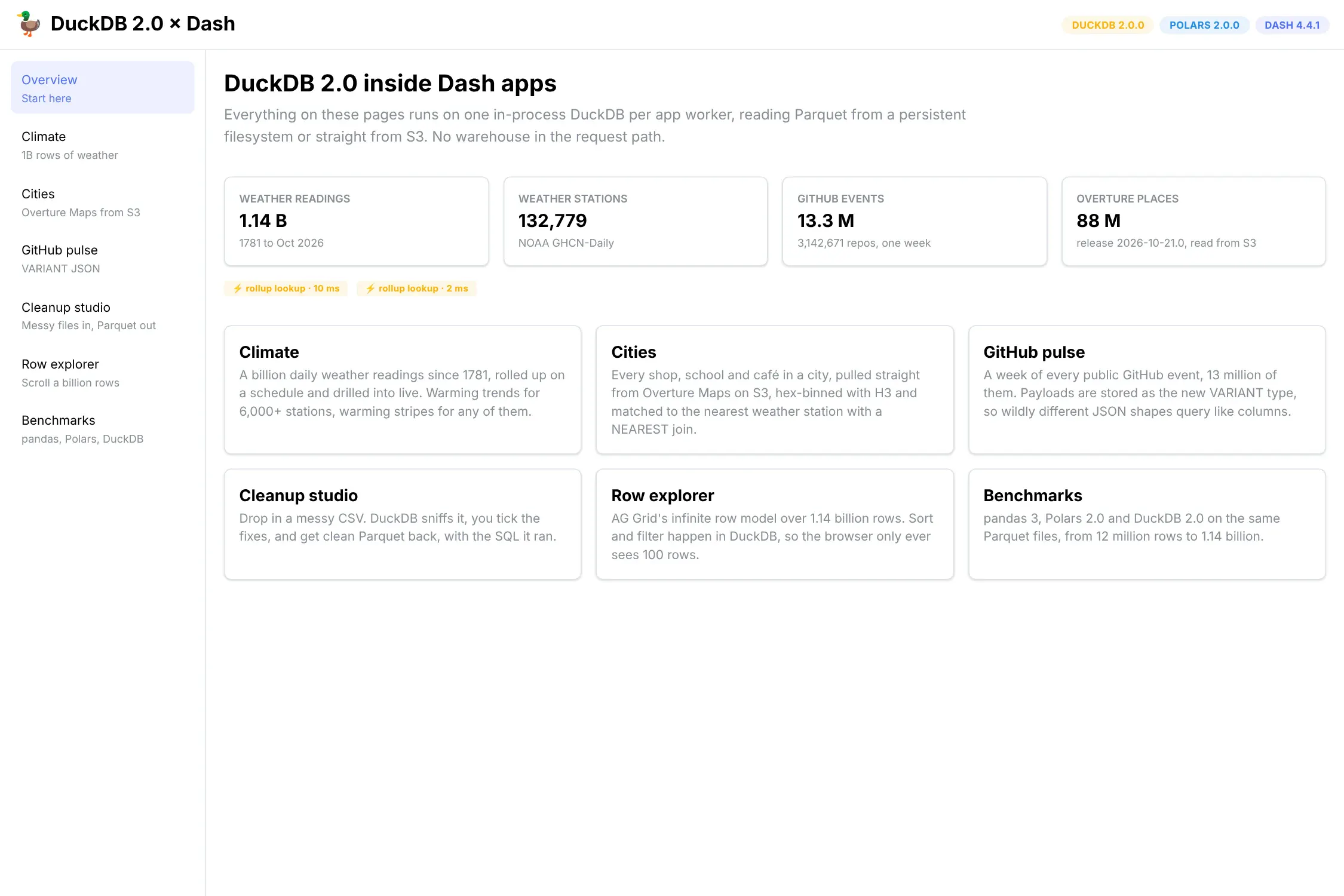
The overview page. Every number on it comes from a live DuckDB query.
GitHub pulse: querying messy JSON with VARIANT
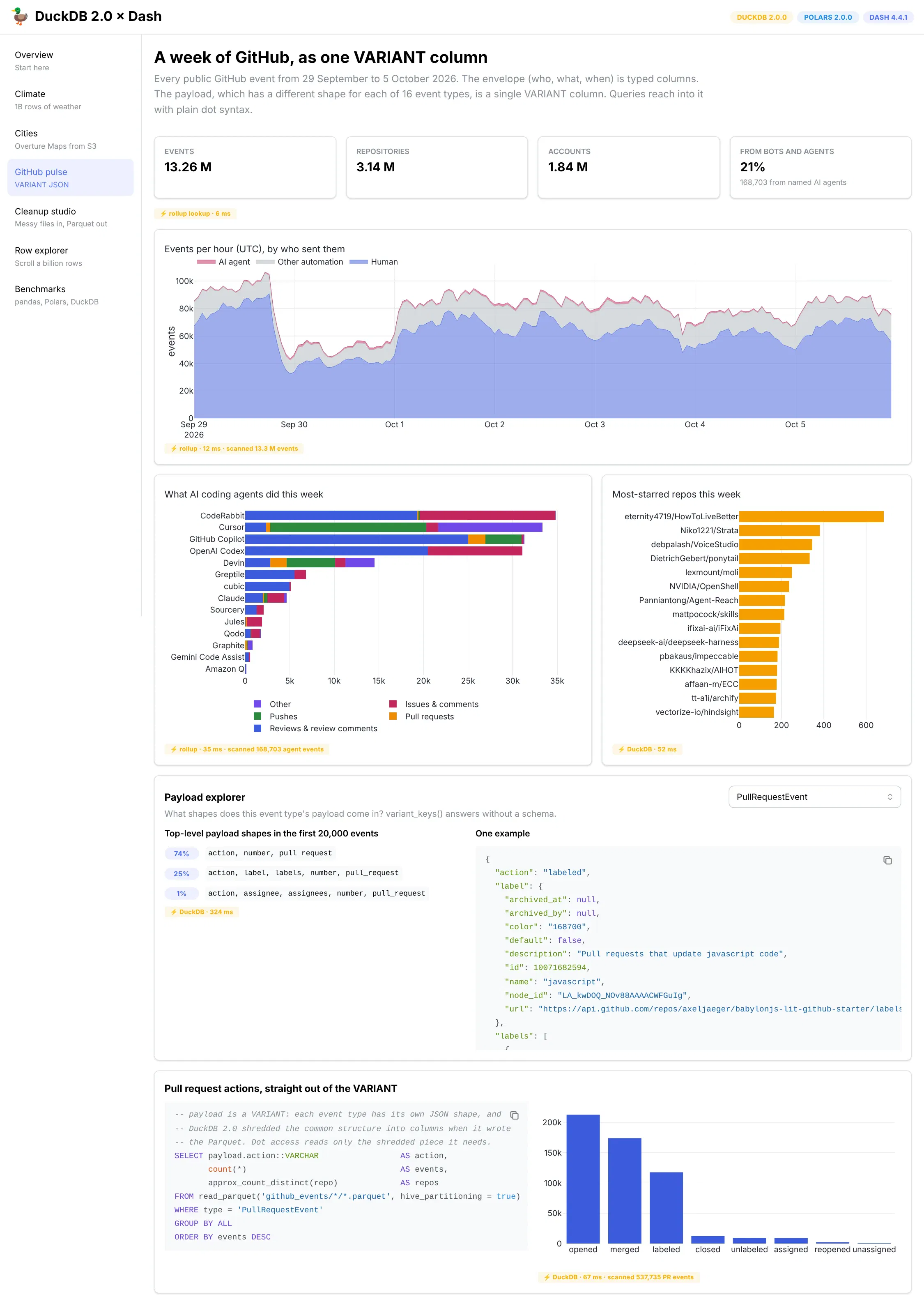
One week of public GitHub activity. About one event in five came from a bot, and AI coding agents are now easy to pick out.
Overview of this App
- An hourly chart of public GitHub activity, split into humans, automation and named AI coding agents
- What each AI agent spent its week doing, from pull request reviews to pushes
- The most-starred repositories of the week and a breakdown of pull request actions
- A payload explorer that shows every shape a JSON payload comes in
The data makes a fun snapshot of autumn 2026. Bots sent 21% of all public GitHub events that week, and github-actions[bot] alone sent 1.79 million. CodeRabbit, Cursor, GitHub Copilot, OpenAI Codex, Devin, Greptile, cubic, Claude and several other AI agents sent 168,703 events between them, mostly pull request reviews and review comments.
DuckDB 2.0 Features
GH Archive events all share the same outer fields (who did it, which repository, when), plus a payload whose shape depends on the type of event. A PushEvent payload lists commits. A ReleaseEvent payload can hold full release notes and a list of downloadable files. There are 16 event types in all, and before 2.0 you either wrote a schema for each one or stored the payload as a JSON string and parsed it in every query.
2.0's new VARIANT type handles this. Our prep script stores the common fields as ordinary typed columns and the payload as a VARIANT, writing one Parquet file per event type per day:
CREATE TEMP TABLE staged ASSELECT (json->>'$.id')::BIGINT AS id,json->>'$.type' AS type,(json->>'$.created_at')::TIMESTAMP AS created_at,json->>'$.actor.login' AS actor,json->>'$.repo.name' AS repo,json->'$.payload' AS payloadFROM read_json_objects('gharchive/2026-09-29-*.json.gz') AS t(json);-- then, for each event type:COPY (SELECT * EXCLUDE (type) REPLACE (payload::VARIANT AS payload)FROM staged WHERE type = 'PullRequestEvent')TO 'github_events/type=PullRequestEvent/2026-09-29.parquet';
When DuckDB 2.0 writes a VARIANT column to Parquet, it looks for structure that repeats from row to row and stores those parts as real columns inside the file, a process called shredding. Later, a query that reads payload.action only has to touch that one shredded column:
SELECT payload.action::VARCHAR AS action, count(*) AS eventsFROM read_parquet('github_events/*/*.parquet', hive_partitioning = true)WHERE type = 'PullRequestEvent'GROUP BY ALL ORDER BY events DESC;
That query takes 11 ms over 537,735 pull request events. The payload explorer uses variant_keys(), also new in 2.0, to list the shapes a payload comes in without anyone having written a schema.
Getting to 11 ms took three attempts.
Attempt
Result
The whole event as one VARIANT column, in one file
Writing six hours of events used up to 7.3 GB of RAM and took 70 seconds. Finding shared structure across 16 unrelated shapes is a lot of work.
Typed outer fields, payload as VARIANT, one COPY ... PARTITION_BY (type)
The same six hours took 6.6 seconds and 1.3 GB. But every partition got the same shredding layout, the one that suits PushEvent, which is by far the most common event. Pull request payloads went unshredded, and reading payload.action took 1.5 seconds.
Typed outer fields, one COPY per event type
Each file gets a layout that fits its own payload. Reading payload.action dropped to 11 ms, more than 100 times faster.
So give each VARIANT file one family of shapes, and run parquet_schema() on the output to see what actually got shredded. We also found that putting a view over the same files turned the 11 ms back into 1.4 seconds, so for now write read_parquet() directly into VARIANT queries.
A Few Nice Patterns
- Rollups for the headline charts, live queries for the rest. The hourly and per-agent charts read small tables a scheduled job builds in a few seconds. The payload explorer and the repository lists run live, at 15 to 350 ms each.
- Chart your data before you trust it. We first built this page on the week of 13–19 October, and an events-per-hour chart showed four days where GH Archive's own files were mostly empty. A total row count would have looked fine.
Cities: geospatial queries straight from S3
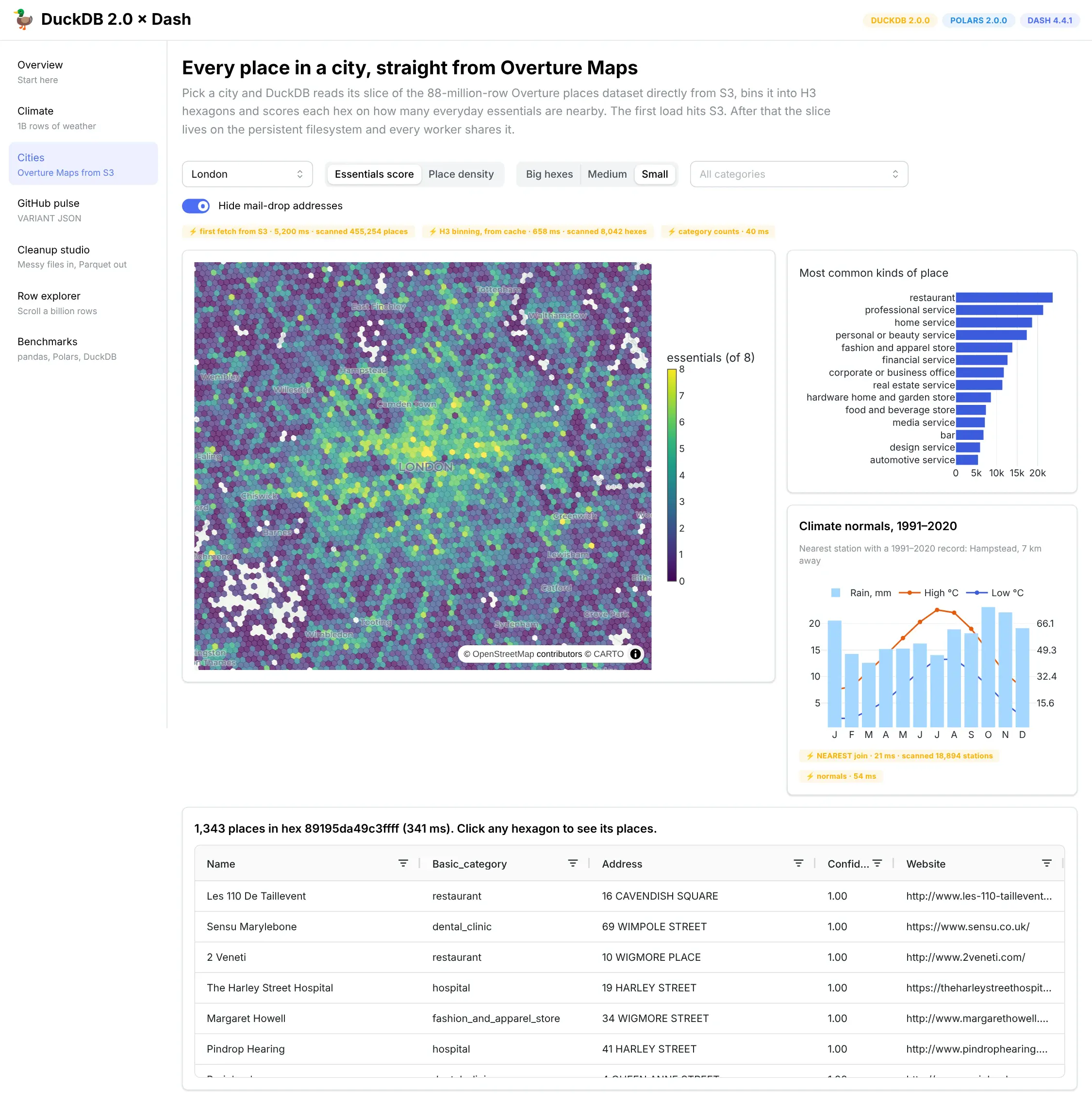
London, scored on everyday essentials per hexagon. The climate panel finds the nearest weather station with a NEAREST join.
Overview of this App
- Pick a city and see every place Overture knows about there, grouped into hexagons
- Each hexagon is scored on how many of eight everyday needs are nearby, a rough take on the "15-minute city": groceries, a pharmacy, a school, a park, transit, a doctor, a café and a gym
- Change the hexagon size or category filter, or click a hexagon to list its places in a table
- A climate card shows 1991–2020 monthly averages from the nearest weather station
DuckDB 2.0 Features
Async I/O for S3. The page reads Overture straight from its public S3 bucket:
cur.execute(f"""COPY (SELECT id, names.primary AS name, basic_category,taxonomy.hierarchy[1] AS theme, confidence,ST_X(geometry) AS lon, ST_Y(geometry) AS latFROM read_parquet('s3://overturemaps-us-west-2/release/2026-10-21.0/theme=places/type=place/*.parquet')WHERE bbox.xmin BETWEEN {xmin} AND {xmax}AND bbox.ymin BETWEEN {ymin} AND {ymax}AND confidence >= 0.5) TO '{DATA_DIR}/overture/places_london.parquet'""")
Querying S3 in place isn't new. DuckDB 1.x could already do it through the httpfs extension, and it already skipped the parts of each file that don't overlap the city. What 2.0 changes is how many of those reads it keeps in flight at once. To see how much that matters, we ran the same query on three versions of DuckDB, three times each, from a fresh process every time:
City
Places
DuckDB 1.0.0
DuckDB 1.5.6
DuckDB 2.0.0
London
480,053
17.9 s
12.5 s
4.0 s
Tokyo
344,437
16.7 s
9.3 s
3.2 s
New York
373,168
17.4 s
11.1 s
3.2 s
Median of three runs. Same query and same cloud VM; only the DuckDB version changed.
2.0 was about 3× faster than the latest 1.x release and more than 4× faster than 1.0. In the app, that's how long someone waits the first time they pick a city. After that, the slice is cached on disk.
NEAREST joins. The climate card joins the city's coordinates to the 18,894 weather stations with good 1991–2020 records and keeps the closest one:
SELECT s.station_id, s.name,ST_Distance_Sphere(ST_Point(c.lon, c.lat), ST_Point(s.lon, s.lat)) / 1000 AS kmFROM city cINNER JOIN normals_stations sNEAREST 1 BY DISTANCE ST_Distance_Sphere(ST_Point(c.lon, c.lat), ST_Point(s.lon, s.lat));
It takes about 15 ms. Before 2.0 you'd write this with a window function or a lateral join and a sort. The same clause also accepts BY SIMILARITY array_cosine_similarity(a.embedding, b.embedding), which turns it into vector search over embeddings, and we expect to use that a lot.
Explicit axis order for spatial functions. ST_Distance_Sphere used to guess whether your points were (latitude, longitude) or (longitude, latitude). In 2.0 it refuses to guess, so with ST_Point(lon, lat) you need SET geometry_always_xy = true on each cursor first.
A Few Nice Patterns
- Cache remote data as Parquet on the persistent filesystem. The first request for a city saves its slice locally, and every later request from any worker reads it in milliseconds.
- Filter on columns with row-group statistics. Overture stores bounding boxes as plain numeric columns, so DuckDB can skip whole chunks of each file by their min and max values.
- Hexagons with the H3 extension. DuckDB's H3 community extension bins points into hexagons, and recomputing the whole map takes about 400 ms.
- Look at the map, not just the totals. One hexagon in Covent Garden glowed because 4,322 businesses shared a registered-office address. A "Hide mail-drop addresses" switch drops any point shared by 20 or more places, with one QUALIFY count(*) OVER (PARTITION BY lat, lon) < 20.
Climate: querying a billion rows of weather data
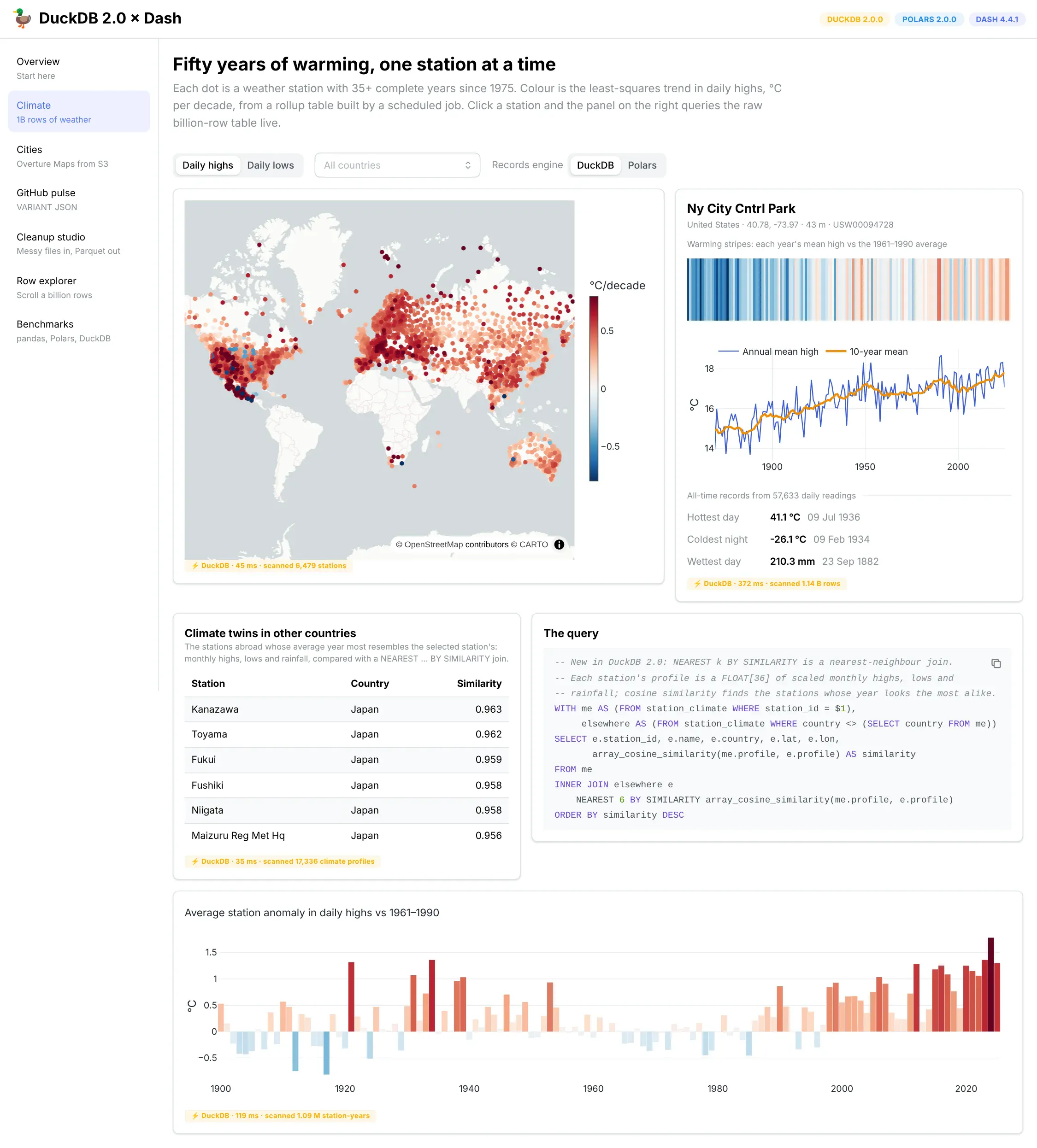
Warming trends for the 6,479 stations with 35 or more complete years since 1975. Clicking a station queries the raw 1.14-billion-row table, and the "climate twins" card finds stations abroad with the most similar weather.
Overview of this App
- A world map of how fast each weather station has warmed since 1975
- Click any station for its full history, all-time records and "warming stripes"
- Climate twins: the stations in other countries whose average year looks the most like the selected station's
- A yearly chart of how each year compares with the station's 1961–1990 average
For the median station, daily highs have warmed by 0.28 °C per decade since 1975, which lines up with published estimates for land.
DuckDB 2.0 Features
NEAREST ... BY SIMILARITY for vector search. The cities page uses NEAREST to find the closest station by distance. Here the same join finds the most similar station by a vector. A scheduled job turns each station's 1991–2020 averages into one list of 36 numbers: the twelve monthly highs, the twelve monthly lows and the twelve monthly rainfall totals, each scaled against all other stations for that month. Then one query compares the selected station with 17,336 others:
WITH me AS (FROM station_climate WHERE station_id = $1),elsewhere AS (FROM station_climate WHERE country <> (SELECT country FROM me))SELECT e.name, e.country, array_cosine_similarity(me.profile, e.profile) AS similarityFROM meINNER JOIN elsewhere eNEAREST 6 BY SIMILARITY array_cosine_similarity(me.profile, e.profile)ORDER BY similarity DESC
It takes about 40 ms. The matches make sense. New York's Central Park is most like Kanazawa and Toyama on Japan's west coast. London's Hampstead station matches Rosslare in Ireland and Caen in northern France. Sydney's are Buenos Aires and the coast of Uruguay. The same pattern works for any embedding, such as products, documents or customers, with no separate vector database.
One thing to watch: put filters in a subquery or CTE, as above, and not inside the NEAREST clause. When we added AND e.country <> me.country to the NEAREST line, the query returned stations that clearly weren't the closest matches.
A Few Nice Patterns
- Precompute what everyone sees. A scheduled job boils the billion daily readings down to one trend per station with regr_slope, in about 10 seconds, and the map reads that small table. The climate profiles are built by the same job.
- Query the raw data for drill-downs. Clicking a station scans all 1.14 billion rows and comes back in about 190 ms.
- Sort Parquet by the column people filter on. Each yearly file is sorted by station_id, so DuckDB can skip nearly every chunk of the file without reading it. That's why the drill-down is fast.
Row explorer: a billion rows in AG Grid
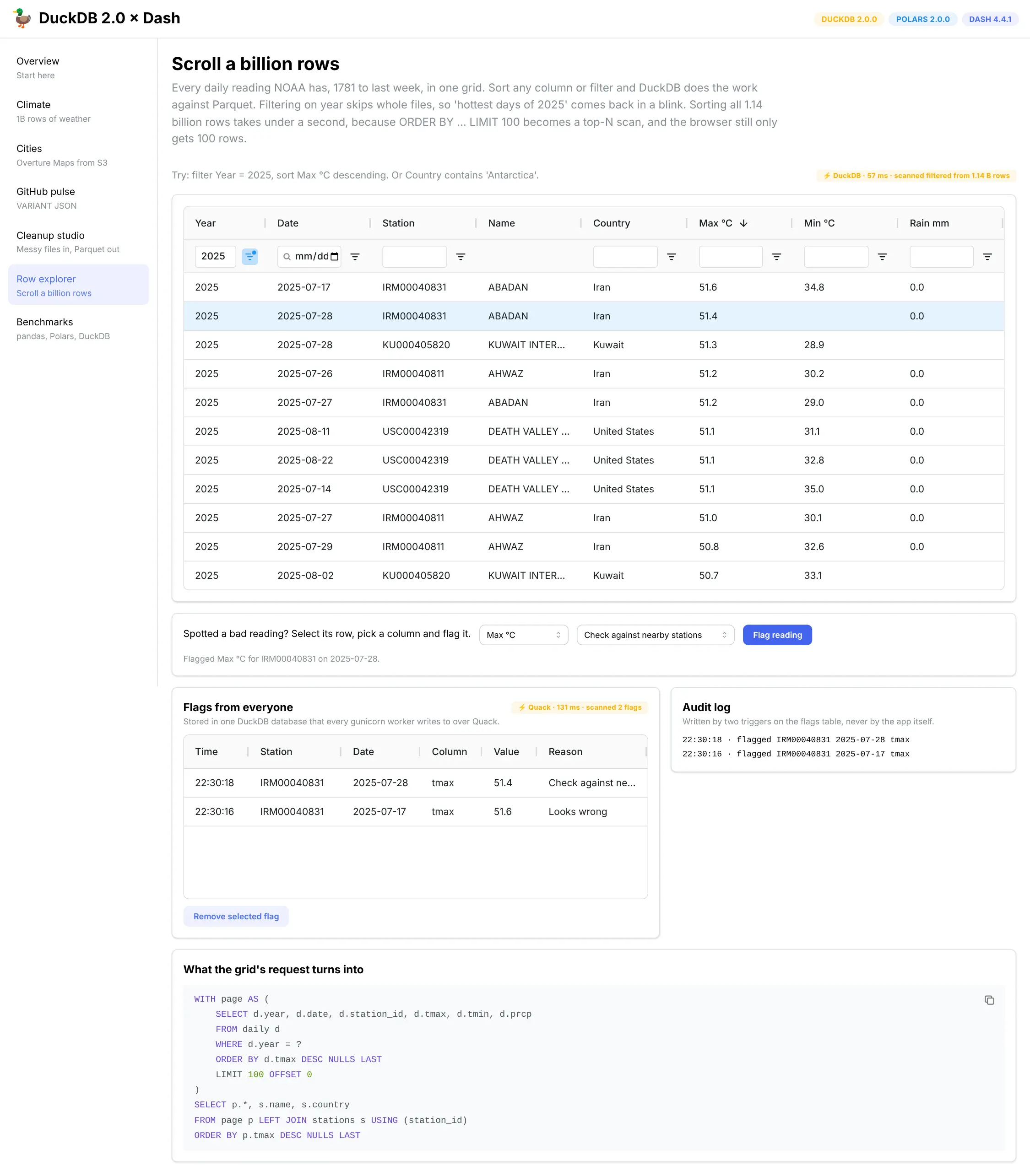
AG Grid's infinite row model over all 1.14 billion daily readings. Two readings have been flagged, and the audit log on the right was written by triggers.
Overview of this App
- Scroll through all 1.14 billion daily weather readings in a data grid
- Sort and filter any column, and see the SQL each view runs
- Flag a reading that looks wrong, and see every flag anyone has made, from any worker
- An audit log of every flag and unflag
DuckDB 2.0 Features
Quack, so every gunicorn worker can write to the same table. The flags live in a small app_state.duckdb that one process serves over Quack. Each worker attaches to it and inserts flags directly. Before 2.0, a feature like this needed Postgres or another database server, because a DuckDB file could only have one writer.
new_flag = pd.DataFrame([{"station_id": row["station_id"], "date": row["date"],"field": field, "value": row[field], "reason": reason}])con = db.quack() # one Quack connection per threadcon.register("new_flag", new_flag)con.execute("INSERT INTO shared.flags (station_id, date, field, value, reason) SELECT * FROM new_flag")
Triggers for the audit log. The app never writes to the log. Two triggers on the flags table do it, so every change is recorded no matter which worker or app made it:
CREATE TRIGGER flag_added AFTER INSERT ON flags FOR EACH ROWINSERT INTO flag_log VALUES (now(), 'flagged', NEW.station_id, NEW.date, NEW.field, NEW.reason);CREATE TRIGGER flag_removed AFTER DELETE ON flags FOR EACH ROWINSERT INTO flag_log VALUES (now(), 'unflagged', OLD.station_id, OLD.date, OLD.field, OLD.reason);
The triggers fire for inserts and deletes that arrive over Quack too. With 4 gunicorn workers, a new flag shows up for every visitor within five seconds, the refresh interval of the list. Reading the flags over Quack takes about 10 ms.
A Few Nice Patterns
- Let the grid ask for one page at a time. Dash AG Grid's infinite row model requests 100 rows as the user scrolls, and a callback turns that into SQL with ORDER BY and LIMIT. Each block takes about 25 ms.
- Sort and slice first, then join. Station names are joined onto the 100 rows being returned, never onto the billion-row table.
- Top-N is cheap. Sorting all 1.14 billion rows by temperature takes 0.6 seconds, because DuckDB only keeps a running top 100.
- Pass values as a DataFrame, not as SQL text. Quack tables don't take ? parameters yet, so the flag travels as a one-row DataFrame that DuckDB reads by name. User input never goes into the SQL string.
Cleanup studio: data prep in a Dash app
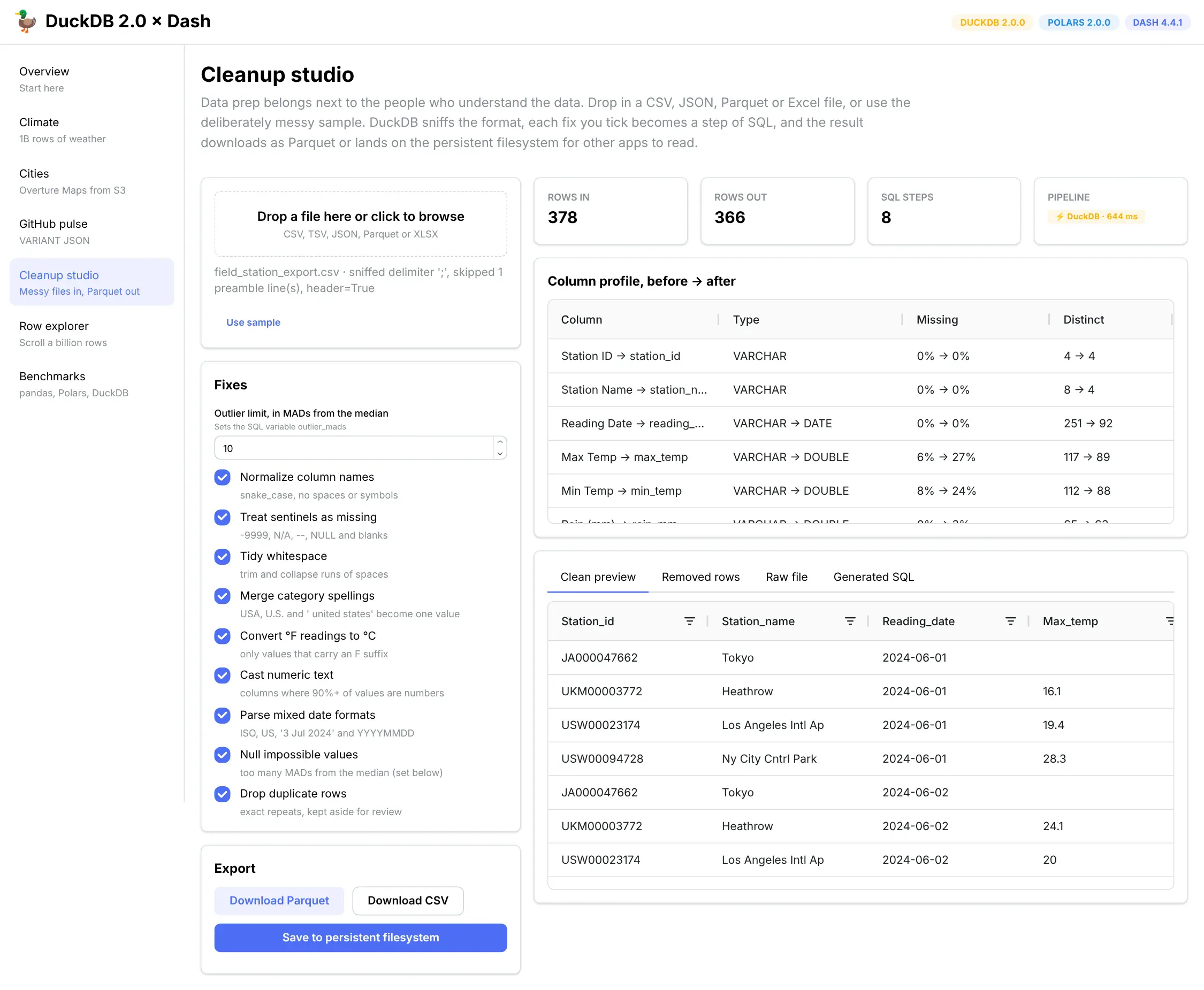
A deliberately messy export goes in on the left. Each fix you tick adds a step of SQL, and the clean result downloads as Parquet or saves to the persistent filesystem.
Overview of this App
- Load a messy CSV export and tick boxes to fix it: date formats, Fahrenheit readings, missing-value codes, duplicate rows and inconsistent spellings
- Set how far from the median a value can be before it's treated as impossible
- A before-and-after profile of every column, plus side-by-side previews
- A "Removed rows" tab that shows every duplicate the cleanup dropped
- The full generated SQL, and a clean file to download or save for other apps
DuckDB 2.0 Features
DML inside a CTE, so removed rows aren't lost. A cleanup step that silently deletes rows is hard to trust. In 2.0, a DELETE ... RETURNING can sit inside a WITH clause, so one statement removes the duplicates and saves them somewhere else:
WITH dropped AS (DELETE FROM cleanedWHERE rowid NOT IN (SELECT min(rowid) FROM cleaned GROUP BY station_id, station_name, reading_date, ...)RETURNING *)INSERT INTO removed SELECT * FROM dropped;
In the sample file, it moved 12 repeated rows into the "Removed rows" tab, where you can check them before you export.
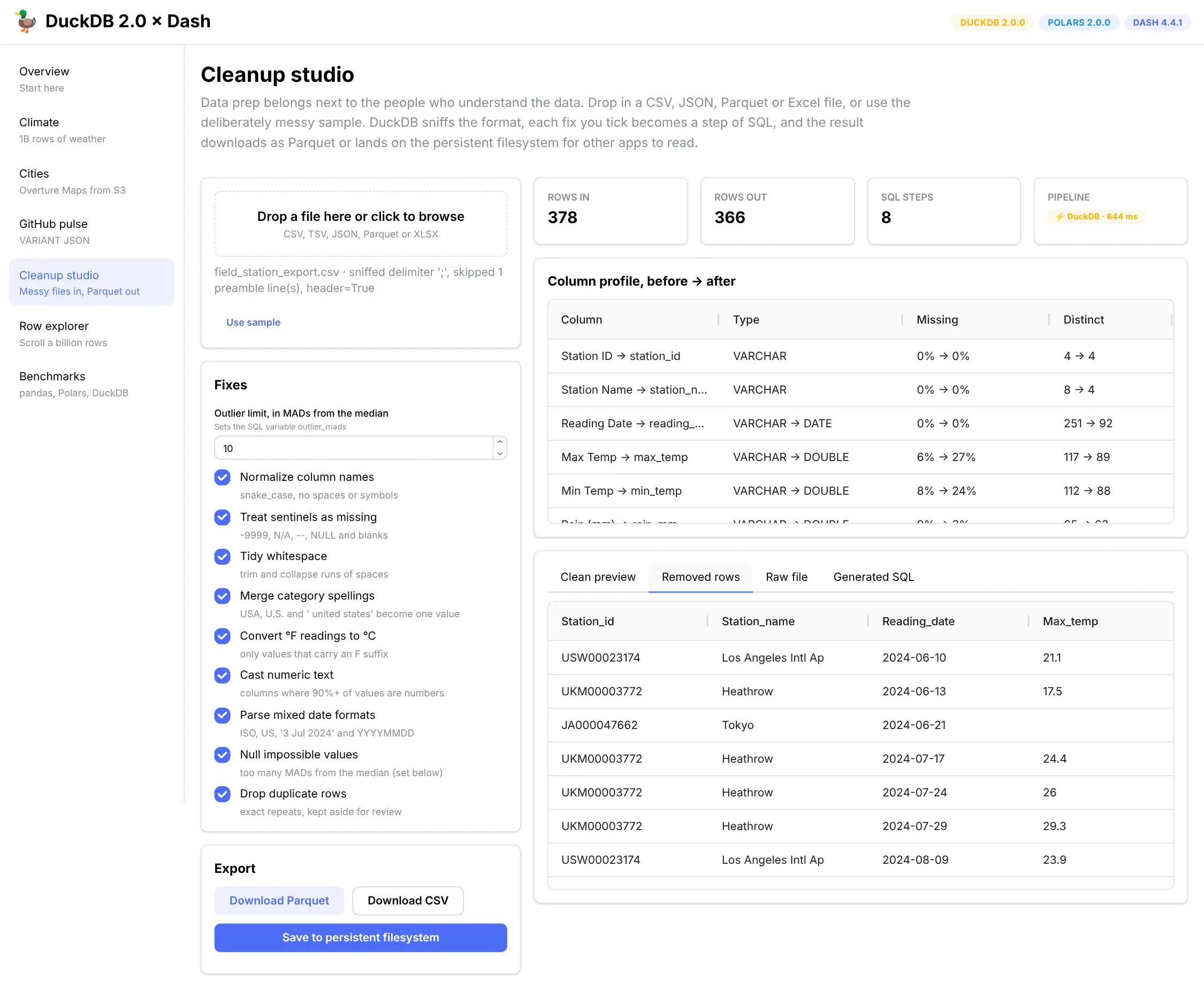
The duplicates the cleanup dropped, kept in their own table for review.
SQL variables for settings. The outlier limit is a SQL variable. The generated script starts with SET VARIABLE outlier_mads = 10, and the outlier step reads it with getvariable('outlier_mads'). Change the number in the app and the script reruns. Copy the script into the DuckDB command line, and you can change one line at the top to try a different limit.
A Few Nice Patterns
- Put cleanup where the people who know the data can do it. The person who knows -9999 means "sensor offline" usually isn't the one who owns the pipeline.
- Let DuckDB sniff the file. A plain read_csv found the semicolons, skipped the comment line and picked out the header with no options.
- Profile before and after. DuckDB's SUMMARIZE showed the Max Temp column going from 6% empty to 27% empty once the hidden missing-value codes were caught.
What's new in DuckDB 2.0
Version 2.0.0, nicknamed "Cinnamon Teal", is a long-term support release with fixes promised until at least October 2027. The DuckDB team calls it their biggest feature release so far, about 20,000 commits in all.
The release announcement has the full list. These are the changes we think matter most if you build Dash apps.
Feature
What it does
Why it matters in a Dash app
Quack server mode
Any DuckDB process can share its databases over the network. Other processes ATTACH 'quack:host' to use them.
Several gunicorn workers, or several apps, can now write to the same DuckDB database. Before 2.0 a database file had exactly one writer.
Async I/O
DuckDB keeps many reads in flight at once when it reads Parquet, CSV or its own files.
Reading from s3:// no longer waits on one request at a time. Pulling a city's worth of Overture data took about 4 seconds, against 12 on DuckDB 1.5.
VARIANT type
A column type for schemaless, JSON-like values. When written to disk, DuckDB splits repeated structure into real columns.
Event logs, API responses and webhook payloads can be queried like tables, with no schema written up front.
NEAREST joins
A join clause that finds the closest k rows by distance or similarity.
"Closest weather station to this city" or "five most similar products" becomes one line of SQL. It also works for vector search over embeddings.
Triggers
Run SQL automatically before or after inserts, updates and deletes.
Handy for audit tables in apps where users submit forms, annotations or approvals.
$variables, DML in CTEs, nested schemas
SET VARIABLE x = 1; SELECT $x, WITH moved AS (DELETE ... RETURNING *) INSERT ..., CREATE SCHEMA finance.reports
Tidier SQL for app logic, and room to keep each app's tables in its own namespace.
Remote pushdown for Postgres and MySQL
CONNECT 'postgres://…' sends the whole query to the remote database instead of pulling tables back first.
You can join your app's Postgres tables with Parquet files without copying them over the network.
Agent mode in the CLI
When an AI coding agent runs the duckdb command line, output switches to compact Markdown with JSON errors.
If an agent helps you build the app, it spends fewer tokens reading your data.
Things that tripped us up
DuckDB 2.0 has a great migration guide. Here are a few things that we ran into while creating these apps:
- The on-disk format changed, and it only goes one way. DuckDB 2.0 can open database files written by 1.x, but once 2.0 writes to a file, 1.x can't open it again. If several apps share a .duckdb file, upgrade them together.
- fetchone() is gone from relations. When you call con.sql(...) in Python you get a lazy relation, which re-runs its query each time you use it. Reading one row at a time from something that keeps re-running never made much sense, so 2.0 removed it. Use con.execute(...) instead, and read the whole result (see number 9). We had two lines to change.
- In Python, $name still means a query parameter. 2.0 lets you write $threshold to read a SQL variable, but only in the command-line client. The Python client still treats $threshold as a named parameter and complains that you didn't pass one. Use getvariable('threshold'), or better, pass the value as a real parameter, which is what callbacks should do anyway.
- Spatial functions now need to know your axis order. Coordinates can be written as (latitude, longitude) or (longitude, latitude), and functions like ST_Distance_Sphere used to guess. In 2.0 they refuse to. If your points are ST_Point(lon, lat), run SET geometry_always_xy = true. Settings belong to a connection, and each cursor counts as its own connection, so set it on every cursor.
- VARIANT queries are much slower through a view. Reading one field from a VARIANT column took 11 ms when read_parquet(...) was written into the query, and 1.4 seconds when the same files sat behind a CREATE VIEW. For now, write read_parquet directly into VARIANT queries.
- COPY ... PARTITION_BY uses one VARIANT layout for every partition. If each partition holds differently shaped JSON, write each one with its own COPY.
- Quack doesn't pass query parameters through yet. A statement that touches a Quack-attached table and uses ? parameters fails. The Quack section below shows a safe way around it.
- Quack queries from several threads need their own connections. Cursors of one connection share a Quack session, so two threads querying at once cancel each other with "superseded by a new query". Give each thread its own duckdb.connect() for Quack, as the Quack section below shows.
- A half-read result now blocks the connection. After con.execute(...).fetchone(), the next con.sql(...) on that connection fails with "connection has an unfinished result from execute()", even if the query only returned one row. Read everything with fetchall(), call .complete(), or use a fresh cursor.
- The old lambda arrow is deprecated. list_transform(xs, x -> x * 2) now raises a binder error. Write list_transform(xs, lambda x: x * 2).
- con.execute(...).pl() is gone. To get a Polars DataFrame back, use con.sql(...).pl().
- Keep filters out of the NEAREST clause. Adding AND e.country <> me.country to a NEAREST ... BY SIMILARITY line returned stations that weren't the closest matches. Filtering in a CTE first gave the right answer.
How the app talks to DuckDB
Under the hood, a Dash app in production usually runs under gunicorn, a Python web server that starts several copies of your app (workers), each handling a few requests at a time on separate threads. Every page in our demo goes through one small module, db.py, that's built for that setup. Each worker opens one DuckDB connection, and each callback gets its own cursor from it:
# app/db.py (trimmed)import duckdb, threading, time_con, _lock = None, threading.Lock()def connection():global _conwith _lock:if _con is None:_con = duckdb.connect(config={"memory_limit": "4GB"})_con.execute("LOAD spatial")_con.execute(f"""CREATE VIEW daily ASSELECT * FROM read_parquet('{DATA_DIR}/ghcn/daily/*/*.parquet', hive_partitioning = true)""")_con.execute(f"ATTACH '{DATA_DIR}/showcase.duckdb' AS r (READ_ONLY)")return _condef query(sql, params=None):"""Run SQL, return (pandas DataFrame, elapsed ms)."""cur = connection().cursor() # one cursor per call, so threads never share onetry:cur.execute("SET geometry_always_xy = true") # settings don't carry over to cursorst = time.perf_counter()df = cur.execute(sql, params or []).df()return df, (time.perf_counter() - t) * 1000finally:cur.close()
The daily view is just a saved query over the Parquet files, so creating it reads no data. Nothing is loaded until a callback asks for it. Compare that with the common habit of putting df = pd.read_parquet(...) at the top of app.py, where every gunicorn worker loads its own full copy into memory at startup and keeps it there.
The ATTACH ... (READ_ONLY) line opens a second DuckDB file of precomputed tables. Any number of processes can open the same file read-only at once, so several apps can share one set of rollups.
Callback inputs always go in as parameters (WHERE station_id = $1 with [station_id]), never pasted into the SQL string. That's good practice anywhere, and it matters more once Dash MCP is turned on, because then AI agents can call your callbacks with any input they like. More on that further down.
Cutting data warehouse costs for dashboards
Cloud data warehouses like Snowflake, BigQuery and Databricks charge for compute while queries run. A typical BI dashboard sends a new warehouse query every time someone changes a filter, so fifty people clicking around twenty times a day adds up to a thousand queries, most of them recalculating the same totals.
The pattern in this app flips that around, in three steps.
- A scheduled job pulls the data the app needs out of the warehouse, once a night or once an hour, and saves it as Parquet on the persistent filesystem. Most warehouses can export Parquet directly.
- A second step, like our build_rollups.py, precomputes the tables every page load needs and saves them in a small .duckdb file.
- Every filter, drill-down and grid scroll then runs on DuckDB inside the app's own workers. The warehouse sees one query per refresh instead of one per click.
Here's what step one can look like when the source is Postgres:
# A nightly job, e.g. a Celery beat task or a Procfile worker on Dash Enterpriseimport osimport duckdbcon = duckdb.connect()con.execute("ATTACH 'postgres://reader@warehouse/analytics' AS src (TYPE postgres, READ_ONLY)")con.execute(f"""COPY (SELECT * FROM src.sales.orders WHERE order_date >= current_date - INTERVAL 2 YEAR)TO '{DATA_DIR}/orders.tmp.parquet' (FORMAT parquet)""")os.replace(f"{DATA_DIR}/orders.tmp.parquet", f"{DATA_DIR}/orders.parquet")
For Snowflake, Databricks or BigQuery, you can fetch results as Arrow with their Python connectors and hand them to DuckDB, or have the warehouse unload Parquet into a bucket and read it with read_parquet('s3://...'). Either way the app ends up reading local files, which is quicker for your users as well. A warehouse round trip of a few hundred milliseconds becomes a local query of a few tens.
The app ends up with three kinds of caching, and none of them needs a separate cache server. Rollup tables are built on a schedule (the climate map uses these). Slices of remote data are fetched on first use and kept on the persistent filesystem (the Overture cities work this way). And Parquet sorted by the columns people filter on makes many live queries cheap enough that they don't need caching at all, like the station drill-down.
You can still add flask-caching on top if a particular callback is slow and gets the same inputs over and over. We didn't need it for this app.
Persistent filesystems on Plotly Cloud and Dash Enterprise
All of the above depends on having a folder that survives restarts and redeploys, and that every worker of the app can see. Both of Plotly's hosting platforms provide one.
On Plotly Cloud, persistent filesystems belong to your team instead of to a single app. You create one, attach it to as many apps as you like at a mount path such as /data, and set the environment variable DATA_DIR=/data. There's no size to choose, you pay for what you store, and it's available on the Pro and Enterprise plans. Because one filesystem can be shared across a team's apps, one app or scheduled job can refresh a dataset while other apps read it, which is exactly how the rollups work here.
On Dash Enterprise, you turn on the persistent filesystem for an app in the App Manager, and it appears at ../mount. Every process in the app's Procfile can see it, and so can the app's workspace, so you can run a data prep script from the workspace terminal and the deployed app picks up the result without a redeploy. The default size is 25 GB, and your administrator can raise it.
db.py checks for both, so the same code runs locally, on Plotly Cloud and on Dash Enterprise:
def _data_dir():if "DATA_DIR" in os.environ: # Plotly Cloud: the mount path you chosereturn Path(os.environ["DATA_DIR"])if (ROOT.parent / "mount").is_dir(): # Dash Enterprisereturn ROOT.parent / "mount"return ROOT.parent / "data" # local development
Plotly Cloud's persistent filesystems are network filesystems (Amazon EFS), where file locks are advisory, so apps sharing one need to follow a few rules. Have one job write and everyone else read. Readers open .duckdb files with READ_ONLY and can read Parquet freely. Write new files under a temporary name and rename them into place, so readers never see a half-written file, which is what every write in this app does. If you genuinely need several writers, use Quack, covered next. And keep scratch work, like uploads being processed or temporary exports, on local disk, since every file operation on a network filesystem is a trip over the network.
Quack: when several workers need to write
Before 2.0, the one thing DuckDB couldn't do for Dash apps was let several processes write to the same database. A database file had exactly one writer, so a four-worker app that saved user annotations had to keep them in Postgres or somewhere similar.
2.0's Quack protocol changes that. One process owns the database file and serves it, and every gunicorn worker connects to it. The row explorer's flags, described above, work this way. If your app only reads data, you don't need any of this: any number of workers can open the same file read-only. Quack is for the tables people write to, and for data a job refreshes while the app is running.
Running the server
The server is a few lines of Python. On Dash Enterprise it can run as its own process in the Procfile:
# quack_server.py, run as its own Procfile process: `quack: python quack_server.py`import os, timeimport duckdbcon = duckdb.connect(f"{DATA_DIR}/app_state.duckdb")con.execute("INSTALL quack; LOAD quack")con.execute("CALL quack_serve(token = ?)", [os.environ["QUACK_TOKEN"]]) # localhost only by defaultwhile True:time.sleep(3600)
If you can't add a second process, gunicorn can host the server itself. A when_ready hook in its config file runs once in gunicorn's main process, before it starts the workers:
# gunicorn.conf.pyimport osimport duckdbdef when_ready(server):server.quack = duckdb.connect(f"{os.environ['DATA_DIR']}/app_state.duckdb")server.quack.execute("INSTALL quack; LOAD quack")server.quack.execute("CALL quack_serve(token = ?)", [os.environ["QUACK_TOKEN"]])
Connecting from the workers
Each worker attaches to the server. One detail matters a lot here: give each thread its own connection for Quack. Our first version handed out cursors from one shared connection, the way db.py does for local queries. Cursors share a Quack session, so whenever two threads in the same worker queried at once, one cancelled the other with "superseded by a new query". In a quick test with eight threads, every one of 400 attempts failed that way. A thread-local connection fixed it completely:
# in db.py, imported by every gunicorn workerimport os, threadingimport duckdb_local = threading.local()def quack():"""One Quack connection per thread. Cursors that share a connectionalso share a Quack session and cancel each other's queries."""if not hasattr(_local, "con"):con = duckdb.connect()con.execute("LOAD quack")con.execute(f"ATTACH 'quack:localhost' AS shared (TOKEN '{os.environ['QUACK_TOKEN']}')")_local.con = conreturn _local.con
# in a callbacknew_rows = pd.DataFrame([{"user": user, "station_id": station_id, "note": note}])quack().execute("INSERT INTO shared.annotations SELECT * FROM new_rows")
We ran gunicorn with 4 workers and 4 threads each, and sent it 2,000 inserts and 1,000 reads from 32 clients at once. We did that five times with the server as its own process and five times inside gunicorn's main process. Every run stored all 2,000 rows, from all four workers, with no errors. Under that load an insert took about 45 ms and a read about 30 ms. One request at a time, it was about 30 ms and 9 ms.
Both ways of running the server worked, but we'd still pick the separate process. It can be restarted on its own, a crash there doesn't take the web server down with it, and in one early test run (out of eleven) a worker in the gunicorn-hosted setup hit a fatal "database has been invalidated" error that we couldn't reproduce afterwards.
Refreshing data on a schedule
The other common write is a job that refreshes data every hour or so while people are using the app. Quack handles that too. The job connects like any client and asks the server to run the refresh. quack_query_by_name runs the statement on the server, so the server reads the new Parquet itself and the data never travels through the job:
con = duckdb.connect()con.execute("LOAD quack")con.execute(f"ATTACH 'quack:localhost' AS shared (TOKEN '{os.environ['QUACK_TOKEN']}')")con.execute("""FROM quack_query_by_name('shared','INSERT INTO readings SELECT * FROM read_parquet(''/data/incoming/latest.parquet'')')""").fetchall()
To check what readers see during a refresh, we had eight processes query a 12-million-row table nonstop while a job refreshed it. We compared three refreshes: rebuilding the whole table over Quack, appending one new month over Quack, and the approach the rest of this app uses, where a job builds a new .duckdb file and renames it over the old one.
Refresh
Job took
Reader query, before → during
What readers saw
Quack, rebuild (CREATE OR REPLACE TABLE)
3.4 s
97 → 128 ms
old data or new data, never a mix
Quack, append one month (INSERT)
1.4 s
99 → 120 ms
old data or new data, never a mix
New file, renamed over the old one
7.8 s
76 → 86 ms
old data or new data, never a mix
Median reader time across 8 reader processes on a 4-core VM. No reader hit an error in any run.
All three were safe. Every one of about 6,000 reader queries returned either the complete old table or the complete new one.
The differences are in the trade-offs. With Quack, an hourly job can append just the new rows, and that stays quick as the table grows. A file swap has to write the whole file every time. On the other hand, every Quack read goes through the one server process, and here that made reads about 25–30% slower than querying a local file in each worker. So use file swaps (or plain Parquet) for big read-only data that's rebuilt wholesale. Use Quack when data arrives in small pieces, or when users and jobs write to the same tables.
Things to know
In 2.0.0, query parameters don't reach Quack tables yet: any statement that touches a Quack-attached table and uses ? or $name parameters fails with "Values were not provided". Please don't work around that by pasting user input into the SQL string. Put the values in a DataFrame or a temporary local table and INSERT ... SELECT from it, as in the example above, since DuckDB can read a local Python DataFrame by name. Python's lazy con.sql(...) relations also aren't available while a connection is switched to a remote database, so use con.execute(...) there.
The server only listens on localhost unless you configure it otherwise. That's what you want when all the workers share one container. If your app runs across several containers, they'd need to reach the server over the network, and at that point a managed Postgres may be simpler.
Bonus: the app is also a tool for AI agents
The demo app is created with Dash(__name__, enable_mcp=True). That turns on Dash MCP, added in Dash 4.3, which exposes the app's callbacks as tools that AI agents like Claude Code, Cursor or ChatGPT can call. Point an agent at https://your-app/_mcp and ask "which weather stations in Japan have warmed fastest since 1975?", and it calls the same callbacks your users trigger by clicking, backed by the same DuckDB queries. The logic lives in one place, and people and agents both use it.
Getting started with DuckDB in Dash
pip install duckdb==2.0.0 dash dash-ag-grid dash-mantine-components
The easiest way to start is with an app you already have. Find the slowest callback, keep your DataFrame as it is, register it with DuckDB and rewrite that one callback in SQL. For many apps that's the whole migration.
For a new app, start from the db.py pattern above and point it at your own Parquet files. When you're ready to deploy, publish to Plotly Cloud with a persistent filesystem mounted at /data, or deploy to Dash Enterprise with the persistent filesystem turned on.
If you're a Dash Enterprise customer and want help moving dashboards off per-click warehouse queries, talk to your Plotly team. We'd love to see what you build.
Every DuckDB 2.0 feature in this post
2.0 feature
Where we used it
What it did for the app
VARIANT type and Parquet shredding
GitHub pulse
Stored 16 shapes of GitHub event JSON with no schema. Reading one field takes 11 ms over 537,735 events.
variant_keys()
GitHub pulse
Lists the shapes a payload comes in, for the payload explorer.
Async I/O for S3
Cities
Reads a city's worth of Overture places from S3 in about 4 seconds, about 3× faster than DuckDB 1.5.
NEAREST ... BY DISTANCE joins
Cities
Finds the closest weather station to a city in about 15 ms.
NEAREST ... BY SIMILARITY joins
Climate
Finds a station's climate twins in other countries in about 40 ms.
geometry_always_xy setting
Cities
Tells the spatial functions that our points are (longitude, latitude).
Quack server mode
Row explorer, and the Quack tests
Lets every gunicorn worker write flags to one shared database. A scheduled job can also refresh data while workers read it.
Triggers
Row explorer
Write an audit log of every flag and unflag, whichever worker made the change.
DML inside a CTE
Cleanup studio
Removes duplicate rows and saves them to a "Removed rows" table in one statement.
SQL variables
Cleanup studio
Hold the outlier limit, so the generated script can be rerun with a different setting.
One-way file format, new lambda syntax and other upgrade changes
The whole app
See "Things that tripped us up" above for the full list.