
Chris Parmer
September 15, 2026
The Last 12 Months in Review (Sept, 2026)
Organizations around the world are shifting towards code-backed data analytics and internal app development thanks to the rise of AI coding agents. Plotly's enterprise platform and open source frameworks are at the heart of this transformation.
The last twelve months have been a whirlwind of development: two new product lines, Plotly Studio (agentic analytics, in a desktop app or embedded in Dash apps) and Plotly Cloud (Dash and Studio app hosting and sharing for teams, with a generous free tier for the community); two major version updates, Dash Enterprise 6.0 (built to run inside your infra and run 100s-1,000s of AI-built apps) and Plotly.js 7.0/Plotly.py 4.0 (quiver plots, updates to defaults, TypeScript API, and more); and a wide range of features that give our customers and community more control over their tech stack.
On the open source side, Dash, plotly.js and plotly.py have seen 415 merged pull requests and 40 minor, major, patch, and candidate releases by 109 contributors. Dash exceeded 7 million downloads in a month, and 90% of GitHub issues are now answered within 48 hours.
Let's take a look at some of the highlights from the last 12 months. Buckle up!
12 highlights from the last 12 months
1. Introduced Plotly Studio Desktop
September 2025 - Now
Plotly Studio is our next generation AI-native data analytics and visualization product for data people.
Where most AI chatbots show you a wall of text, Plotly Studio shows you the data, asks you clarifying questions, shares its methodology, and creates fully functioning data apps.
It integrates directly with Dash Enterprise and Plotly Cloud, so that you can publish your work directly to your team in the browser.
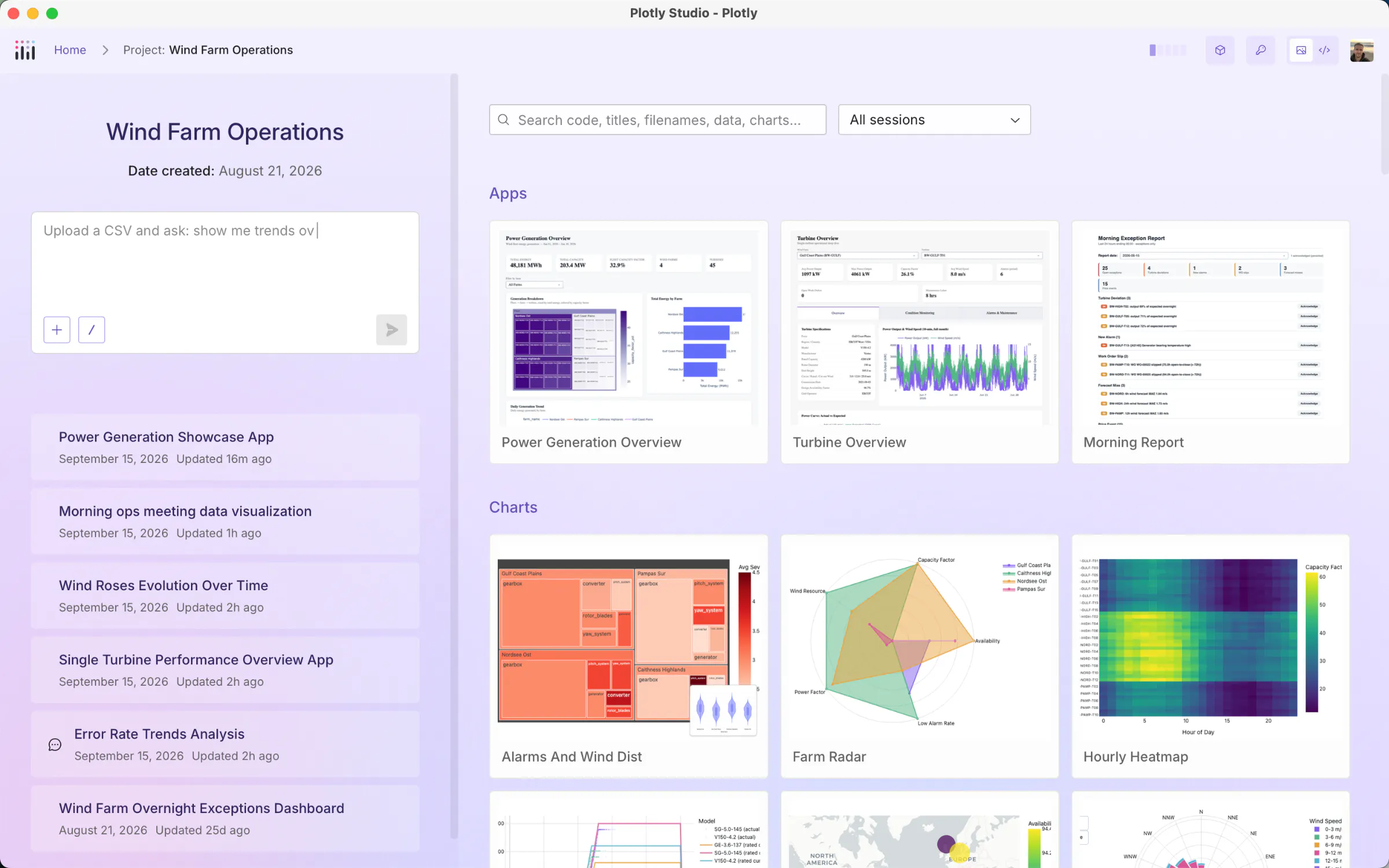
Plotly Studio Desktop
2. Made an embedded version of Plotly Studio for Dash.
August 2026
Plotly Studio Embedded puts a data chatbot in your Dash apps.
Change management is a major issue facing the adoption of many AI tools among our customers. AI is often leveraged by the power users and requires too much configuration and access management to be used in the day-to-day.
With Plotly Studio Embedded, we enable our customers to deliver AI agentic analytics into the Dash apps that they're already deploying to their workforce. Plus, all of the data access and configuration is done by the development team of the Dash app upfront instead of by every end user.
Getting started is as easy as:
1. Expose a dataframe or a get_data() function
2. Publish to Plotly Cloud
3. Flip on the switch
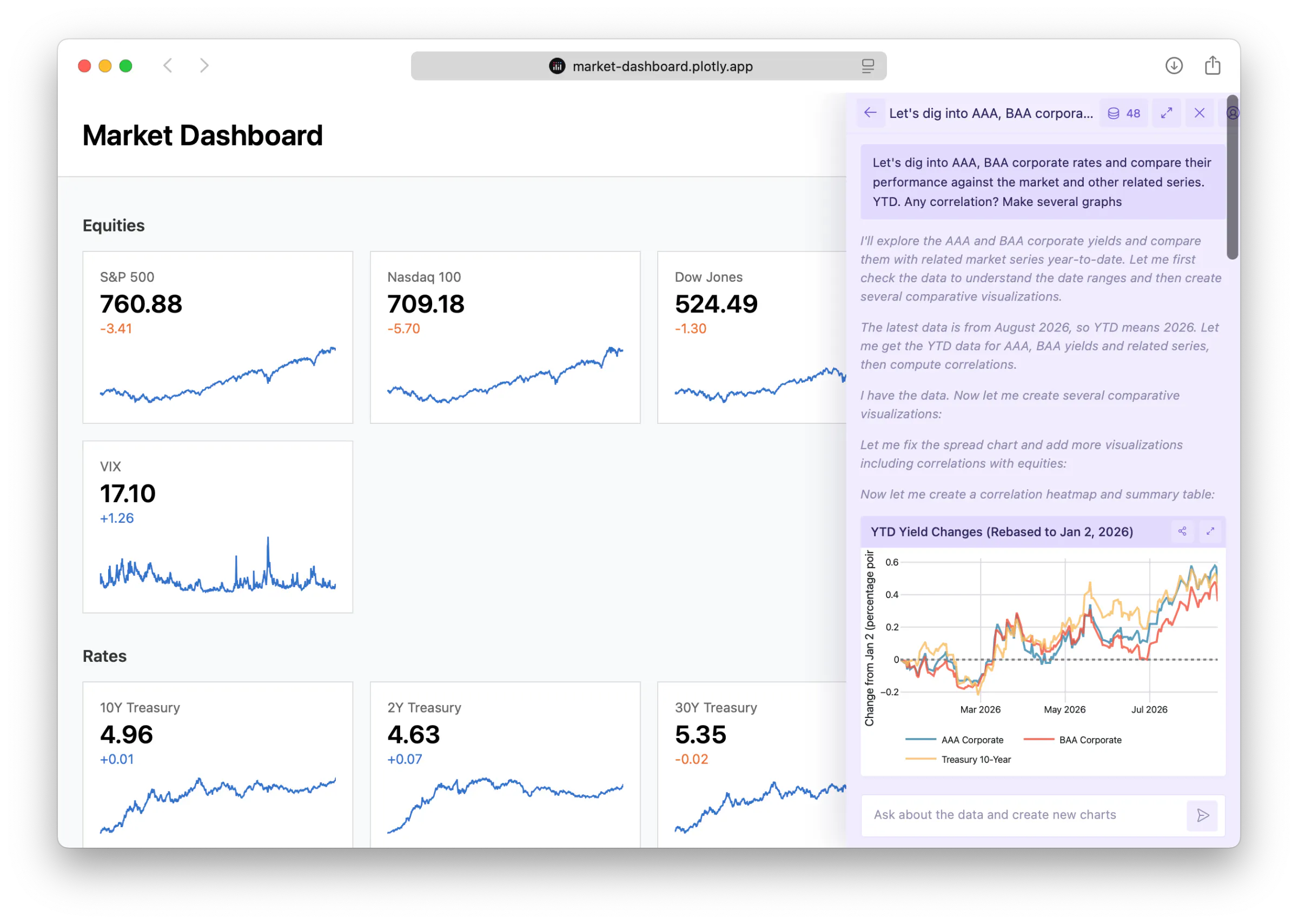
Plotly Studio Embedded displays an AI chat window directly within your Dash apps
3. Five Ways to Publish and Manage Apps
Plotly Cloud originally shipped with a beautifully simple drag and drop interface for publishing Dash apps. In the agentic world, apps are increasingly built and managed by agents instead of humans and agents prefer automation. Plotly Cloud offers both MCP and CLIs for agents, humans, and CI automation to publish and manage Dash apps, resulting in five ways to share your apps:
A. Drag and drop your files onto the page
B. One-click Publish directly from Dash Dev Tools or Plotly Studio
C. Run the CLI
D. Use our MCP
E. Wire the CLI into your CI
# Plotly Cloud$ pip install plotly-cloud$ plotly app publish# Dash Enterprise$ pip install dash-enterprise-libraries$ de deploy
4. Introduced Dash Enterprise 6.0
February 2026
Dash Enterprise 6.0 was an architectural overhaul of our flagship platform to work directly inside our customers infrastructure and scale to 100s to 1,000s of agent-made applications. It installs with a Helm chart on Kubernetes clusters that our customers are often already running behind their firewall.
It's zero trust by design; not even Plotly can access the software once deployed. This network security is increasingly important to our customers with the rise of AI cyber concerns.
Installation and management of the platform is simple and familiar to IT organizations:
helm upgrade --install dash-enterprise \./dash-enterprise-6.0.0.tgz \-n dash-enterprise \-f values-private-registry.yaml \--set global.hostname=dash.example.com \--set global.env.airgapEnabled=true \--set replicated.isAirgap=true -
Dash Enterprise 6.0 also unlocked secure data access through cloud-managed roles and service accounts rather than long-lived keys.
Apps can assume a Kubernetes role that admins grant, then reads the private data (such as an S3 bucket) without ever holding or exchanging long lived credentials.
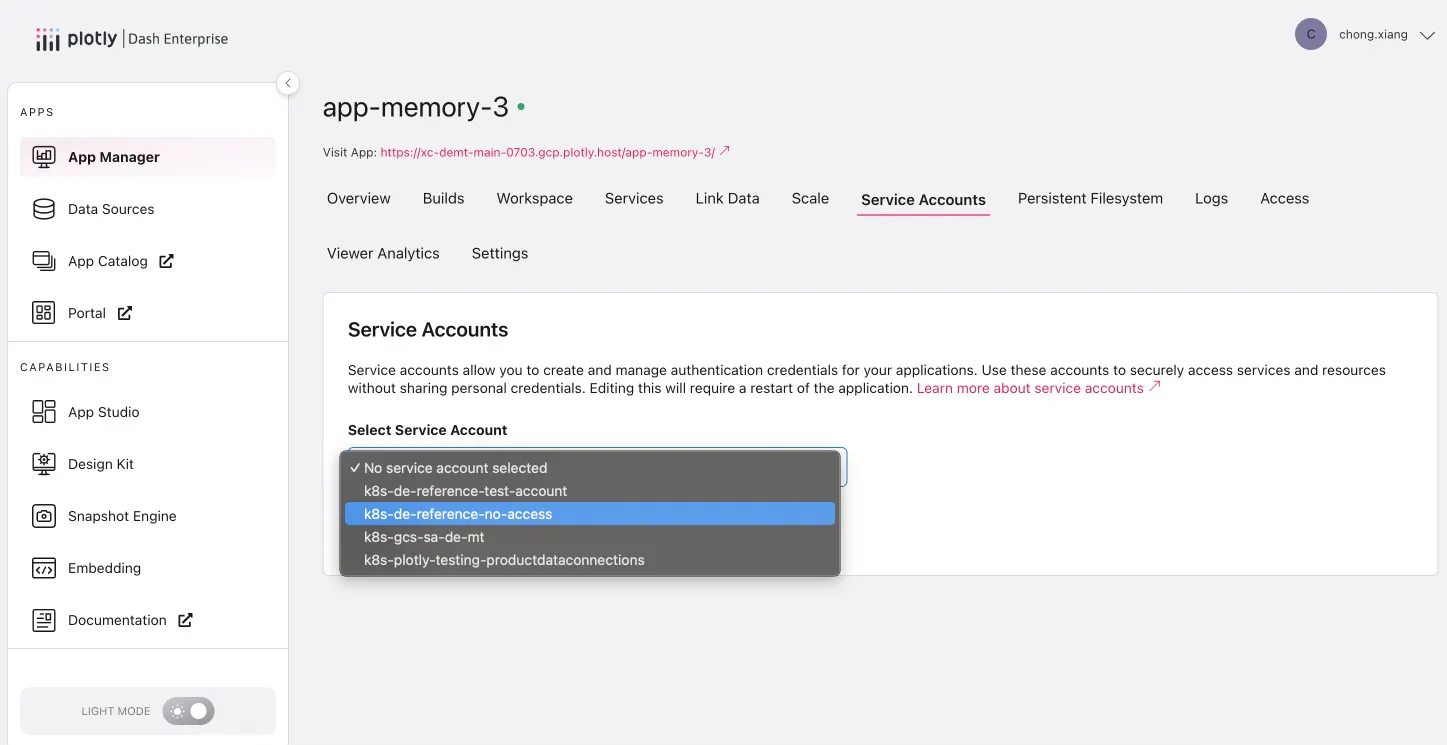
Service accounts in Dash Enterprise 6.0
5. Simplified platform architecture
April to July 2026
Dash Enterprise 6.2 simplified the core platform to operate on about half the footprint.
Less services to run means simpler operations and of course, money saved.
6. OPA Gatekeeper
July 2026
Our customers run Dash Enterprise on their own infrastructure and send us lengthy security questionnaires as part of their buying and upgrading process.
Increasingly, our most stringent customers started adopting Open Policy Agent (OPA) to automatically audit the software running on their stack. We started adopting it ourselves, and putting Dash Enterprise through a strict, 25-constraint "all-deny" policy that passes our customer's most stringent on-cluster security requirements on every pull request.
Our 25-constraint policy included several major security assurances in the stack, like read-only filesystems and seccomp profiles.
7. Dash 3.3.0 adds a one-click publish button
November 2025
I've always felt like deploying web apps was way harder than it needed to be. Even the word "deploying" can feel intimidating to new users.
In Dash 3.3.0, we added a button directly in the Dash Dev Tools to publish the app to Plotly Cloud. Plotly Cloud has a generous free tier, so every community member can share their Dash apps effortlessly now.
3.3.0 also included a /health endpoint for monitoring, Patch support in clientside callbacks, and plain API endpoints so that Dash could be both a UI and API.
8. Dash 4.0. We rebuilt Dash Core Components from scratch.
February 2026
Our stock components got a major design overhaul to be easier to use and more consistent with each other.
We took great pains to make these components drop-in backwards compatible and compatible with community open source libraries like Dash Mantine and Dash Bootstrap.
→ Dash Core Components in Dash 4
9. Dash 4.2 was The Freedom Update
June 2026
Dash is no longer tied to Flask.
# FastAPI backendapp = Dash(__name__, backend="fastapi")# Quart backend, async nativeapp = Dash(__name__, backend="quart")# Or hand Dash a server you already haveapp = Dash(__name__, server=FastAPI())
pip install dash[fastapi] or dash[quart]. Flask is still included by default.
And with this, Dash 4.2 introduced support for Websocket callbacks! Websocket connections are a persistent connection that push updates to the browser without inefficient polling.
@callback(Output("live", "children"),Input("trigger", "n_clicks"),websocket=True,persistent=True,)def live_updates(n_clicks):ws = ctx.websocketwhile True:ws.send(Output("live", "children", fetch()))
10. Dash 4.3 turns your app into an MCP server
June 2026
Organizations can deliver traditional user interfaces and AI connectors in the same framework.
MCP is a way to share data, context, and controls with AI chat sessions. Organizations can centralize the way that they're exposing data and metrics to their workforce by maintaining a codebase that fetches, computes, and serves data in a traditional UI in Dash and to users who are working day in and day out in their AI chat window. It's great to see all of this unified in a single framework.
from dash.mcp import mcp_enabledapp = Dash(__name__, enable_mcp=True)@mcp_enableddef readings(station: str, days: int = 30)"Raw sensor readings for one station."""return q(station).tail(days)
→ Dash MCP
11. Plotly Shapes can now reference more than one axis
plotly.js 3.4 and 3.5, February and April 2026
Unlocking borehole striplog chart types, among other powerful use cases.
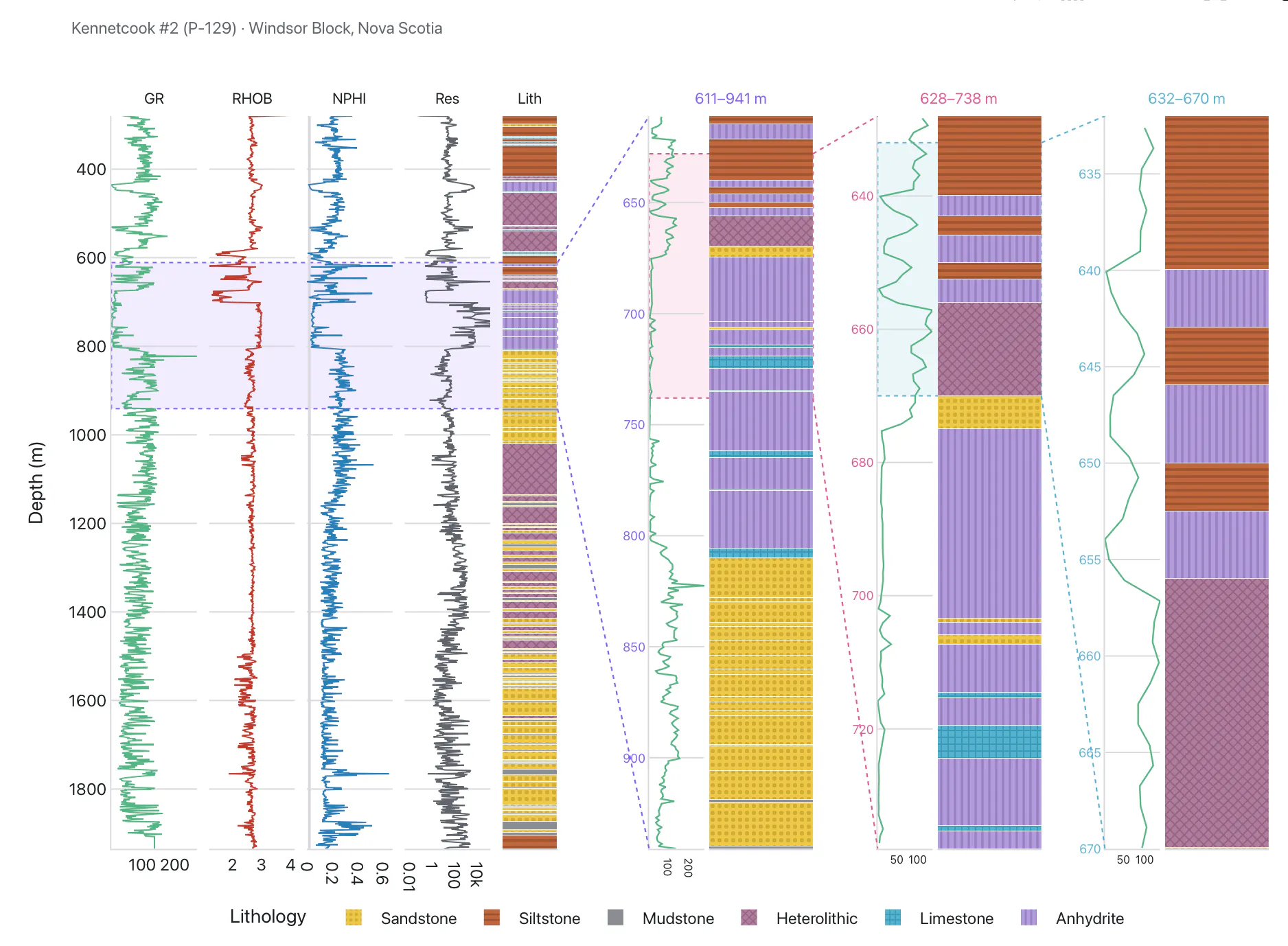
A borehole striplog: one shape, three axes
12. Quiver plots join the family
plotly.js 4.0, August 2026
Very excited to see this one land. It's one of the last remaining scientific and engineering chart types that didn't have a first-class, open source interactive implementation. Welcome, quiver plots!
Plotly.newPlot(gd, [{type: "quiver",x, y, u, v}])

Quiver plots in plotly.js 4.0
And those were just the highlights
Follow us along for more at plotly.com/whats-new or any of our social media handles.