
Plotly
November 17, 2026
Best Python LLM Frameworks for Building Data Apps in 2027
TL;DR: the best Python LLM frameworks for data apps
- Dash: The strongest overall choice when chat is one capability inside a multi-view data app and the application needs a credible path to governed production.
- Streamlit: A strong fit for script-like, single-view chat-and-data apps, particularly when data and deployment already live in Snowflake.
- Gradio: The most direct option for model demos, multimodal interfaces, and exposing Python functions as MCP tools.
- Panel: A flexible choice for notebook-first teams invested in HoloViz that are prepared to own the production stack.
- Shiny for Python: A strong fit for reactive data apps that combine built-in chat, linked outputs, and editable data grids.
A chat demo can be impressive and still be the wrong foundation for a production data app. The harder test comes after the model answers. Can users filter the result, compare scenarios, correct a row, inspect how a number was produced, and share the app without exposing the wrong data?
For that broader job, Dash is the best overall Python LLM framework in this comparison. It gives teams the most direct route from model output to a purpose-built analytical application with linked charts, editable grids, explicit interaction logic, agent access, and a supported deployment path through Plotly Cloud or Dash Enterprise. Streamlit, Gradio, Panel, and Shiny for Python remain strong choices for narrower workflows, with different tradeoffs in application structure, interface depth, and hosting.
This is not a ranking of LLM orchestration libraries. LangChain, LlamaIndex, and model-provider SDKs handle model calls, retrieval, tools, and multi-step logic. The frameworks below build the application that people see and use. Most production systems combine one application framework with an orchestration library or provider SDK.
Python LLM frameworks compared
We ranked these frameworks for a specific buying scenario: a Python team is building an LLM-powered data app that users will rely on after the prototype. The criteria are data-app depth, LLM interaction support, agent readiness, production path, maintenance, and the amount of rebuilding likely if the first version grows.
Framework
Strongest fit
Main tradeoff
Production path
Dash: Code-first Python components and callbacks
Multi-view analytical apps with chat, linked charts, editable grids, and governed deployment
More structure than a top-to-bottom script; the open-source framework does not include a single prebuilt chat interface, but it is included when the app is run on Plotly Cloud or Dash Enterprise
Streamlit: Top-to-bottom Python script with reruns
Bounded chat-and-data apps and Snowflake-native workflows
State and execution flow become more involved as views and interactions multiply
Streamlit Community Cloud, Streamlit in Snowflake, or self-hosting
Gradio: Function-first interface or event-driven Blocks app
Model demos, multimodal input, and MCP tools
Complex analytical workflows require more manual state and layout design
Hugging Face Spaces or self-hosting
Panel: Notebook and object-oriented Python app
HoloViz-based exploration and visualization
No first-party managed application platform; the team owns more operations
Self-managed server or third-party cloud
Shiny for Python: Reactive Python app
Built-in chat alongside linked charts and editable data grids
Teams need to structure reactive dependencies and handle long-running tasks explicitly
Posit Connect Cloud, Posit Connect, or self-hosting
1. Dash: best overall for production LLM data apps
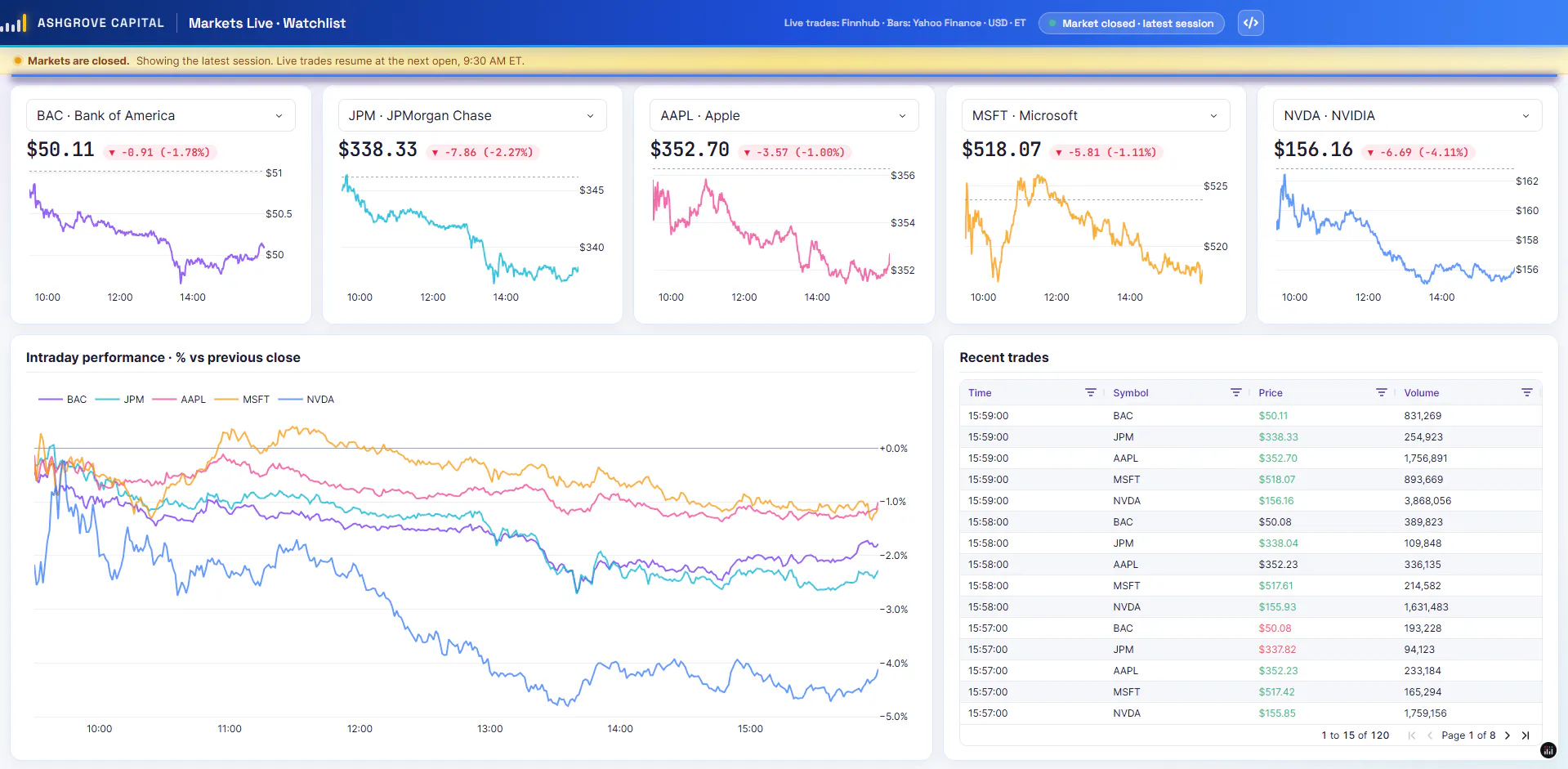
Dash is Plotly’s open-source Python framework for building data applications. Its advantage is not that it produces the shortest chatbot demo. Its advantage is that the model’s answer can become part of a larger, maintainable workflow. A question generates SQL, the result updates a chart and an editable table, a user changes an assumption, and every dependent view updates through explicit Python logic.
That makes Dash the strongest choice here for teams that expect the application to become more sophisticated over time.
Where Dash stands out
- Explicit interaction logic. Dash callbacks connect component properties to Python functions. That makes the relationship among prompts, filters, model outputs, charts, grids, and application state visible in code. Pattern-matching callbacks support dynamic interfaces, such as adding one result card or chart for each question.
- Serious data interfaces. Dash AG Grid supports sorting, filtering, selection, and editing. An edit can trigger a callback through cellValueChanged, which is useful when a human needs to review or correct model-generated data before it is written back.
- Long-running and incremental work. Background callbacks move expensive work away from the web request, while WebSocket callbacks let a FastAPI or Quart-backed app push incremental updates, progress, or live results to the browser.
- Agent access to application logic. With Dash MCP enabled, an app can expose its layout, pages, and callbacks to compatible AI agents. Callbacks are exposed by default. Your team can restrict exposure to approved callbacks and add custom MCP tools. That is more useful than a generic chatbot when an agent needs to call the same domain logic that people use in the interface.
- Current resources for coding agents. Plotly publishes Markdown documentation and a Dash Docs MCP Server, helping coding agents retrieve current Dash patterns instead of relying on stale training data.
The result is an application model that holds up well on day 100. The code has more declared structure than a Streamlit script or a one-function Gradio demo, but that structure makes complex dependencies easier to inspect, test, and extend. Coding agents can generate much of the callback boilerplate; the durable question is whether the architecture remains understandable after the app gains more users and workflows.
The broader Plotly path
Dash is one part of a connected build-and-deploy path:
- Dash Open Source provides the MIT-licensed application framework.
- Plotly Studio generates interactive data apps from natural-language prompts and data, with Python code that teams can continue to inspect and edit.
- Plotly Cloud provides managed publishing for Dash and Plotly Studio apps. Plotly Studio Embedded can add an AI chat experience to a Dash app published on Plotly Cloud so viewers can ask questions about the app’s underlying data.
- Dash Enterprise provides the governed production route for organizations that need applications inside their controlled infrastructure. Its authentication middleware connects to corporate identity, verifies app access, and passes user information to the app. App Manager adds a shared portal and Prototype, User Acceptance Testing (UAT), and Production environments.
Dash Enterprise also centralizes capabilities that teams otherwise assemble around each app, including deployment, app access, secrets, logs, background work, and reusable data connections. That difference matters when a portfolio grows from one experimental assistant to many production applications.
There is real-world evidence for this pattern. Crant built its InkLantern AI platform on Dash Enterprise to combine natural-language processing, computer vision, daily metrics, and multi-page interactive analysis. The company reports reducing complex analysis by 28 hours per week.
Tradeoffs and pricing
Dash Open Source does not have a single ChatInterface component equivalent to Streamlit, Gradio, or Panel. Teams assemble an open-source chat UI from Dash components or a component library, or use Plotly Studio Embedded on Plotly Cloud or Dash Enterprise. WebSocket callbacks also require a FastAPI or Quart back end.
Dash’s code-first approach assumes Python engineering discipline. Teams should test callback logic, control which functions are exposed through MCP, and plan model permissions separately from app login. Dash Enterprise is commercial software, uses custom pricing, and its Kubernetes deployment requires an enterprise platform decision. Those costs make less sense for a disposable demo.
Plotly’s current pricing lists a Free plan with one Creator, three private viewers, and one Dash or Plotly Studio app. Pro is $29 per Creator seat per month and includes unlimited apps and 10 private viewers; additional viewer seats cost extra. Dash Enterprise pricing is custom.
For a prototype that will remain a lightweight chat surface, another framework may involve less initial code. For a data app expected to gain linked views, write-back, controlled access, background jobs, agent access, and a release process, Dash has the most complete path in this comparison.
2. Streamlit: strong for bounded, script-like chat-and-data apps
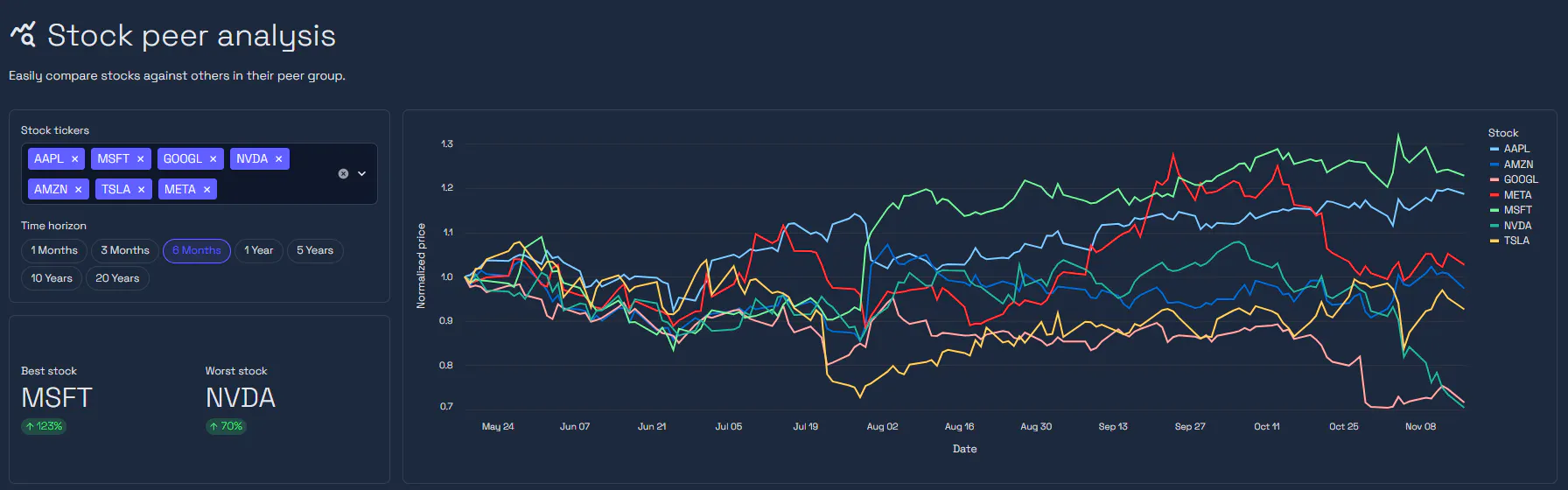
Source: Streamlit stock peers demo
Streamlit turns a Python script into an interactive app and includes first-party chat elements. st.chat_input collects prompts, st.chat_message can contain text, charts, and tables, and st.write_stream renders generator or LLM streams incrementally. This is a productive model for a conversational app with a straightforward sequence of inputs and results.
Streamlit also provides st.data_editor for editable tables, st.status for long-running work, Session State for per-session values, and OpenID Connect authentication through st.login().
Its clearest advantage over Dash is the amount of chat UI available before a team writes any layout code. For an analyst building one screen around an LLM, that can be valuable.
The tradeoff is Streamlit’s execution model. Widget interactions rerun the script from top to bottom by default. Fragments can isolate parts of an app so they rerun independently, and caching can avoid repeated work, but both introduce design decisions the original simple script did not need. As a chat app grows into several linked views with shared state, the team must manage that execution flow deliberately.
Authentication is also not the same as authorization. st.login() identifies the user; the application still needs rules for what that user can see or change. Streamlit Community Cloud supports public and private sharing, while Streamlit in Snowflake gives Snowflake teams a managed route next to their data and governance. Snowflake charges for the app runtime and any query warehouse it uses.
Streamlit is free under Apache 2.0, and Community Cloud is free. For production inside Snowflake, cost depends on the selected runtime, compute pool or warehouse, and query activity.
Streamlit is a sound choice when the application is mainly one conversational flow with charts or tables and is likely to stay within that shape. If the roadmap includes custom multi-page workflows, dense cross-filtering, reusable interaction patterns, or a governed portfolio of apps, starting with Dash can avoid a later rebuild around a different application model.
3. Gradio: a direct route to model demos, multimodal input, and MCP tools
Gradio is designed to put an interface around a Python function. gr.ChatInterface turns a chat function into a working UI, supports generator-based streaming, and can accept additional inputs and outputs. gr.Blocks provides more control when the interface needs several components or a custom layout.
Gradio is particularly strong for multimodal AI. Text, files, images, audio, and video fit naturally into its component model. It also has a direct agent story: setting mcp_server=True in launch() exposes documented application functions as MCP tools. That makes Gradio a practical option when the same model function should be available to people through a web interface and to agents through a protocol endpoint.
The function-first model is also the limitation. A model demo usually revolves around inputs, a call, and outputs. A production analytical application often adds shared state, multiple routes, linked views, editable grids, validation, and role-specific workflows. Gradio Blocks can implement more elaborate interfaces, but the team writes more event and state management as the application moves away from the shape Gradio optimizes.
Gradio is free under Apache 2.0. Hugging Face Spaces is its natural hosting route, and apps can also be self-hosted. Under the current Spaces policy, CPU Basic has no hourly hardware charge, but creating a compute-backed Gradio or Docker Space requires a paid account; upgraded hardware is billed separately.
Gradio is the better specialist when the model or multimodal interaction is the product. When the model is one feature inside an application for analysis, review, and decision-making, Dash provides a stronger long-term application structure.
4. Panel: flexible for HoloViz and notebook-first teams
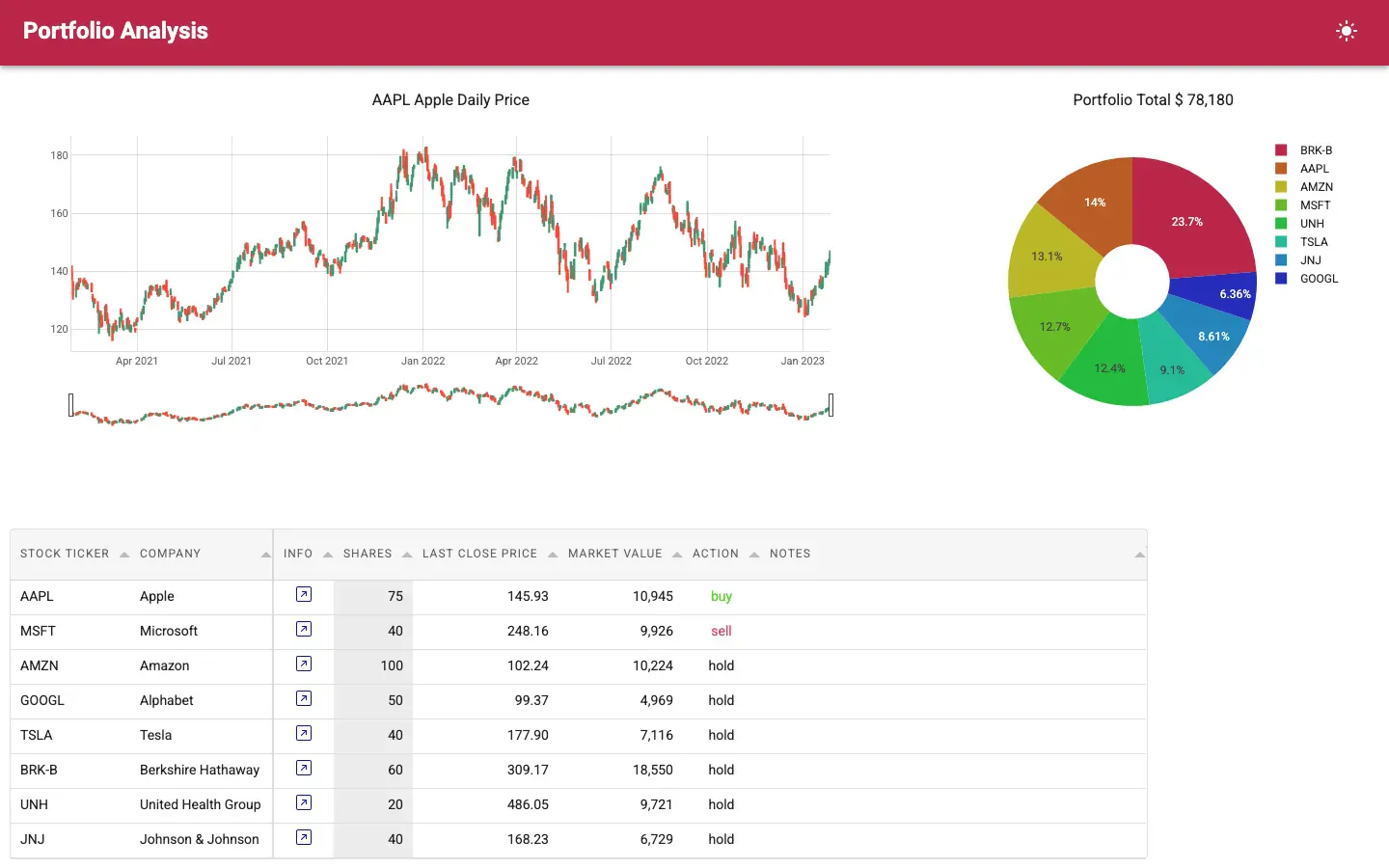
Source: https://panel.holoviz.org/
Panel is part of the HoloViz ecosystem and can turn notebook objects or Python code into applications. Its ChatInterface supports chat-oriented callbacks, and Panel can stream replies into the conversation. It works alongside Bokeh, HoloViews, hvPlot, Matplotlib, and Plotly, making it attractive when an LLM assistant needs to sit next to specialized scientific or high-volume visualization.
Panel’s advantage is continuity from exploration to application. A team can keep familiar notebook objects and plotting libraries while adding widgets, templates, and server behavior. It also documents OAuth and authorization, rather than assuming every app is public.
The production tradeoff is ownership. Panel provides deployment guides for servers and cloud providers, but it does not have a first-party managed application platform equivalent to Plotly Cloud, Dash Enterprise, Streamlit in Snowflake, or Posit Connect. The team remains responsible for infrastructure, application access, scaling, logs, upgrades, and the release process.
Panel is free under the BSD 3-Clause license. Hosting cost depends on the infrastructure selected.
For a HoloViz team with complex visualizations and existing deployment expertise, Panel can preserve more notebook work than a migration to another framework. For an organization that wants one supported path from Python application development to managed sharing or governed enterprise deployment, Plotly’s combined Dash, Plotly Cloud, and Dash Enterprise path reduces the number of production decisions left to the team.
5. Shiny for Python: for reactive data apps with built-in chat
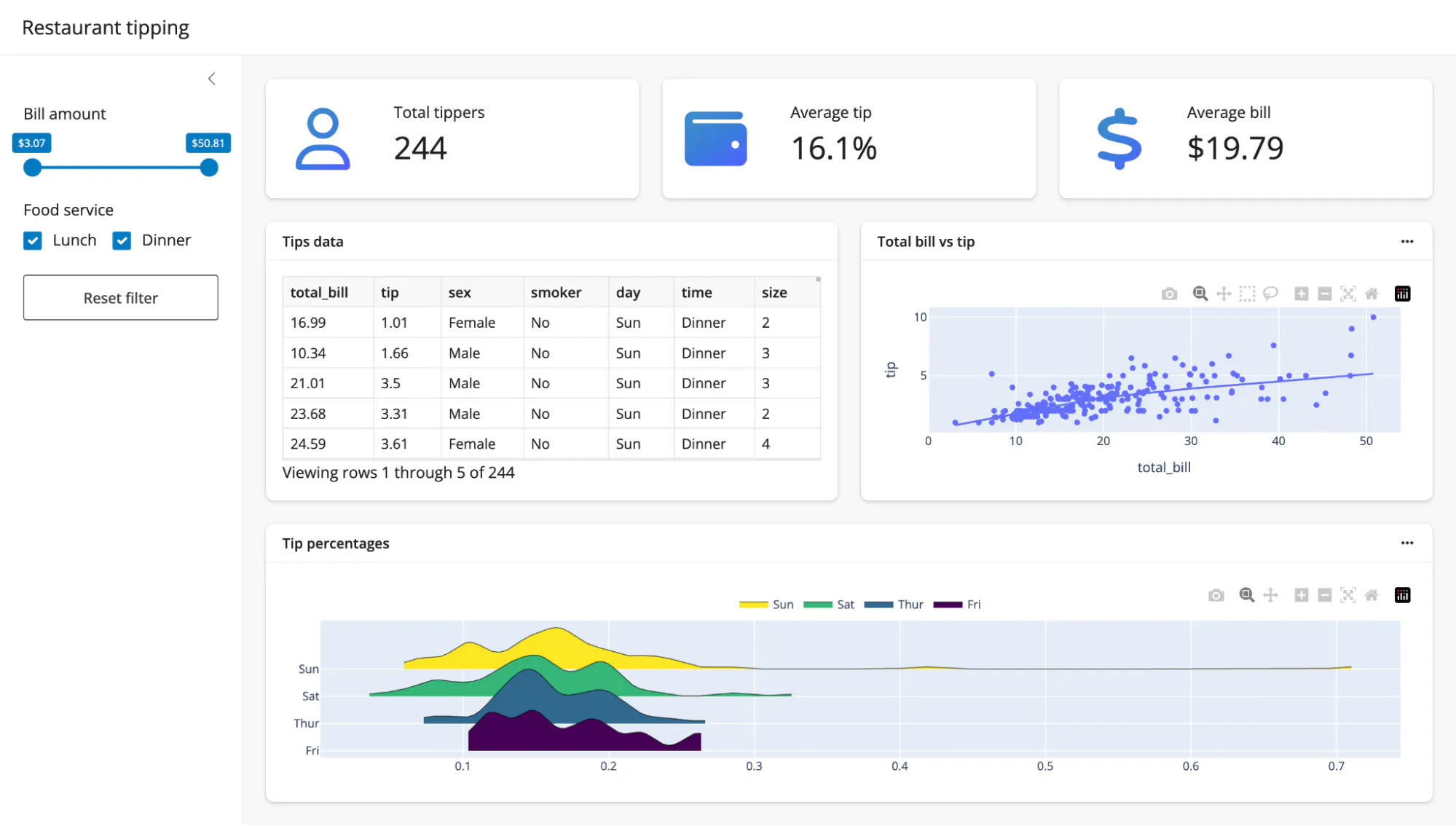
Source: https://shiny.posit.co/py/
Shiny for Python is Posit’s open-source framework for building reactive applications. It includes a chat component that can stream model responses and a data grid that supports cell editing. When a user changes an input, Shiny can update the calculations, charts, and tables that depend on it.
That makes Shiny a good fit when chat is part of an analytical workflow. Posit’s Sidebot example lets users ask questions about a dataset, see the resulting charts and tables, and inspect the SQL used to produce them.
The tradeoff is that your team needs to structure the dependencies among model outputs, user edits, and shared application state. Shiny also documents extended tasks for keeping the app responsive during long-running operations.
Shiny for Python uses the MIT license. Your team can self-host or deploy through Posit Connect or Posit Connect Cloud. Connect Cloud’s free plan supports public publishing from public GitHub repositories, subject to usage limits.
How to choose a Python framework for an LLM data app
The right decision becomes clearer when the team compares the application it expects to maintain, not the demo it can build first. Use a representative workflow such as a text-to-SQL assistant: a user asks a question, the model generates SQL, the app displays a chart and table, and the user reviews or edits the result.
1. Is chat the product, or one capability inside the product?
If the entire experience is a conversation around a model function, Gradio offers a ready-made chat interface. If users also need filters, comparisons, editing, or drilldowns, evaluate Dash, Streamlit, Panel, or Shiny for Python against those interactions.
Dash is the strongest default when the second description is even moderately likely. Coding agents have reduced the cost of writing components and callbacks, while changing application architecture after adoption remains expensive.
2. What happens after the model returns an answer?
Map the next three user actions. A chart that filters a table, an editable assumption that reruns a model, or a result that must be approved before write-back all create application state and dependencies.
Dash represents those dependencies as callbacks and gives tables a direct route into application logic through Dash AG Grid. Streamlit can implement them through reruns, fragments, callbacks, and Session State, but the execution model requires more deliberate management as the dependency graph grows.
3. How will long calls and concurrent users be handled?
LLM calls, retrieval, SQL, and model inference can outlast a normal web request. Evaluate token or result streaming, cancellation, job queues, caching, retries, and per-user state together. Do not treat a typing animation as proof that a framework has solved background execution or scale.
Dash separates incremental WebSocket updates from background callbacks. Streamlit provides st.write_stream, status elements, fragments, and host-specific scaling. Gradio streams from generator functions and provides queue controls. In every case, the hosting architecture determines how the app behaves under real concurrency.
4. Should coding agents build the app, use the app, or both?
These are different requirements. Documentation designed for coding agents can improve code generation. Application-level MCP can let deployed agents call approved functions or workflows.
Dash supports both through the Dash Docs MCP Server and Dash MCP. Gradio can expose documented functions as MCP tools. Whatever the framework, treat MCP as an API surface: expose only the functions and data intended for agents, authenticate access, validate parameters, and log consequential actions.
5. Where will the app run, and who is allowed to use it?
Framework login features identify a person; authorization determines what that person can see and do. Ask about app-level permissions, group mapping, secrets, data credentials, audit requirements, and separate test and production releases.
Streamlit in Snowflake is compelling when the data and governance model already live in Snowflake. Hugging Face Spaces is a natural showcase for Gradio. Panel leaves more of the production platform to the team.
Plotly offers the broadest progression in this comparison: build with Dash or generate an app with Plotly Studio, publish through Plotly Cloud, and use Dash Enterprise when corporate identity, app-level access, controlled infrastructure, and a governed application lifecycle become requirements.
Free frameworks are not free production platforms
The framework license is only one line in the operating cost. A production LLM data app may also need model usage, vector storage, databases, secrets, identity, authorization, background workers, monitoring, support, and people to maintain the deployment.
Framework
Open-source license
Free starting path
Production cost that still needs a plan
Dash
MIT
Plotly Cloud Free or self-hosting
Additional viewers, model usage, or Dash Enterprise for governed organizational deployment
Streamlit
Apache 2.0
Community Cloud
Snowflake compute or self-managed infrastructure and authorization
Gradio
Apache 2.0
Local use; CPU Basic has no hourly hardware charge on qualifying Spaces
Paid account eligibility, upgraded hardware, private hosting, or self-managed operations
Panel
BSD 3-Clause
Local use or self-hosting
All production infrastructure and operations
Shiny for Python
MIT
Local use or public publishing on Posit Connect Cloud
Private sharing, additional compute or usage, or self-managed infrastructure
For a prototype, free hosting can be appropriate. For an application people depend on, compare the total operating model rather than the first invoice.
How we evaluated these frameworks
Each product had to provide a maintained open-source Python framework, documented LLM or chat support, data display and input components, and a documented way to share an app beyond a laptop.
We reviewed official documentation, repositories, release information, and pricing pages on October 1, 2026. We did not run performance or concurrency benchmarks. The ranking therefore reflects documented product fit, not measured speed.
The six evaluation criteria were:
- Data-app depth: Linked charts, tables, editable data, multiple views, and explicit application state
- LLM interaction: Chat surfaces, incremental output, file input, long-running work, and human review
- Agent readiness: Current coding-agent resources and controlled exposure of application logic through MCP
- Production path: Hosting, identity, app-level access, deployment stages, monitoring, and commercial support
- Maintenance: License, current release activity, ownership, and long-term support signals
- Transition cost: What a team must restructure if a demo becomes a multi-user production application
These criteria intentionally favor a framework that can support a production data app, not the framework that renders the first chatbot in the fewest lines.
Final recommendation
If the application is only a conversation around one model function, start with Gradio. If it is a contained chat-and-data script, Streamlit is a reasonable fit.
For the broader decision, an LLM-powered data app that must become a reliable product for internal or external users, start with Dash. It combines Python-native application logic, advanced data interaction, current agent capabilities, and a progression from open source to managed publishing on Plotly Cloud or governed deployment on Dash Enterprise.
Build the most demanding representative workflow in Dash and the strongest specialist alternative. Compare the code and operating model required for linked views, edits, long calls, user access, and release management. If those requirements are central, talk to Plotly about Dash Enterprise before committing to the production architecture.