
Robert Letzler
March 14, 2026
Publishing analytic results in Plotly at resource-constrained organizations
Data-journalism-style interactive graphics give consulting and analysis groups a compelling way to introduce results to diverse audiences and to empower each audience member to find the details most relevant to their situations.
Such interactives present analyses to diverse, often public audiences that include readers who are new to the subject or the analytic approach. Most readers will view them only once.
Navigation and interactivity let us care enough to send the very best graphics to diverse audiences who care about different levels of aggregation, from the whole program to specific sites, without making a modest report into a coffee table book. This post describes what these graphics can do and then discusses inexpensive infrastructure and bureaucratic strategies that can get organizations started.
Data-journalism-style interactive graphics in action
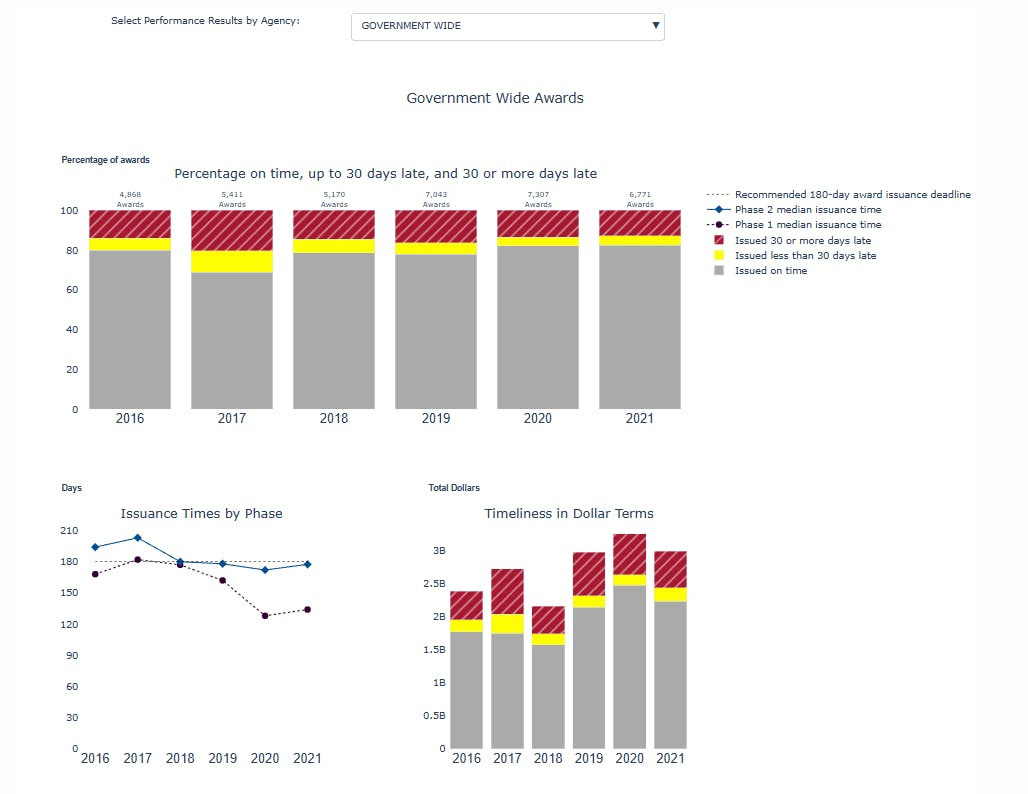
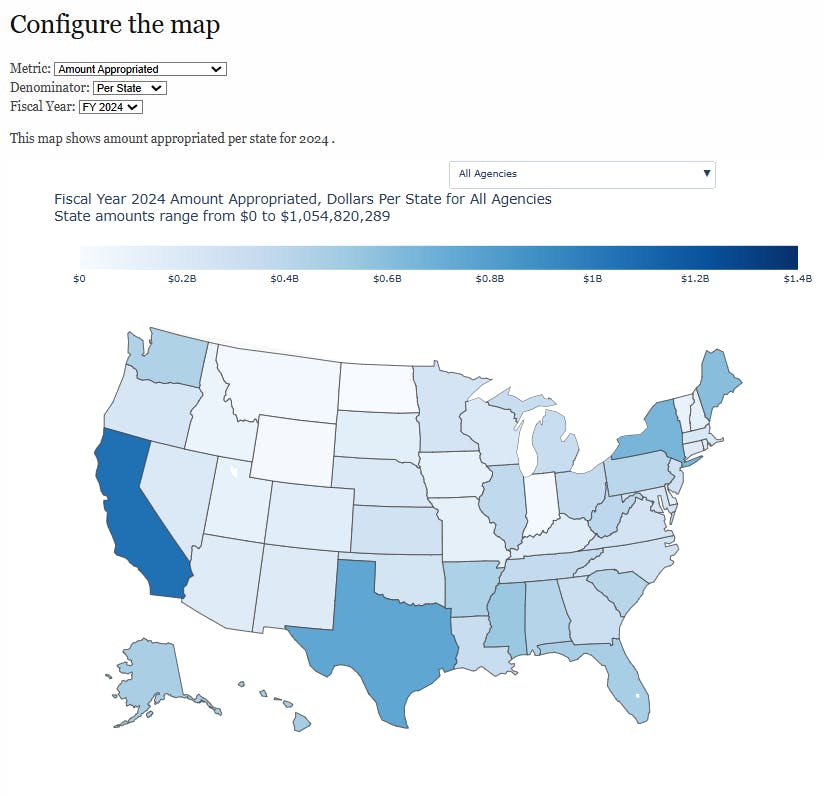
Data-journalism-style interactive graphics can, for example,
- show compliance for many participating agencies at a variety of levels of aggregation in a single webpage which could replace a long page appendix with a compact web app;
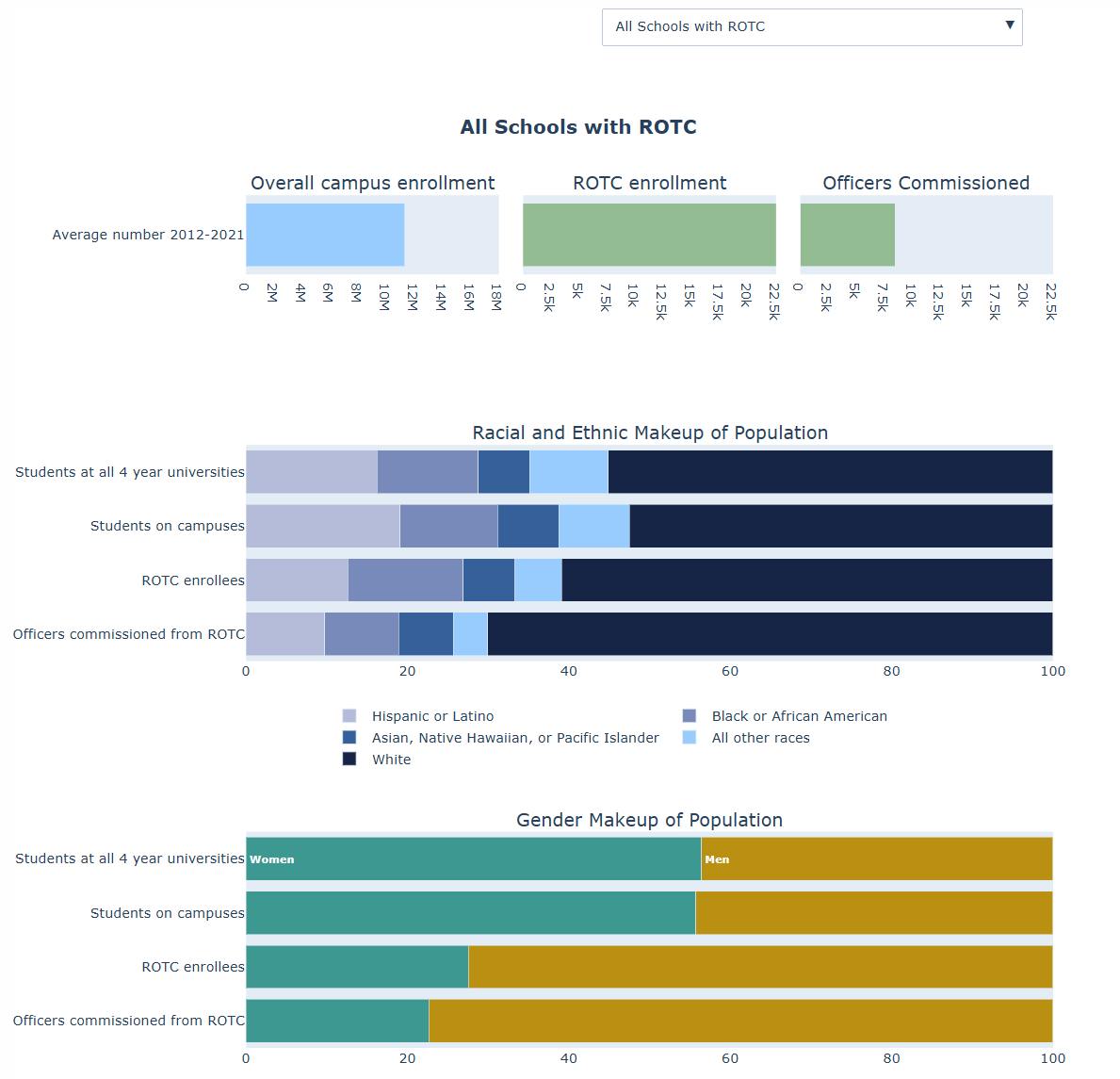
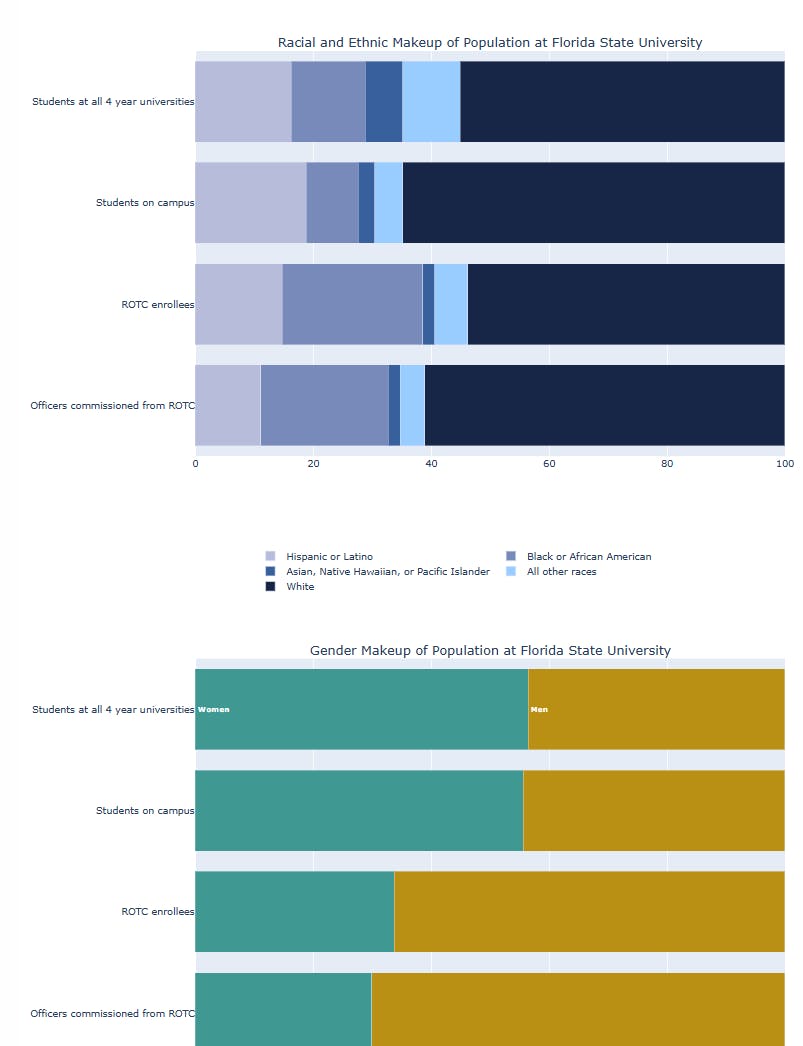
- show race and gender breakdowns by stage for participants in a training program program-wide, aggregated at the campus-type level and at specific campuses. Further analysis of the same data start with a classic scatter plot showing a striking correlation enriched with campus level details in hover text that pops up when the user points at each dot;
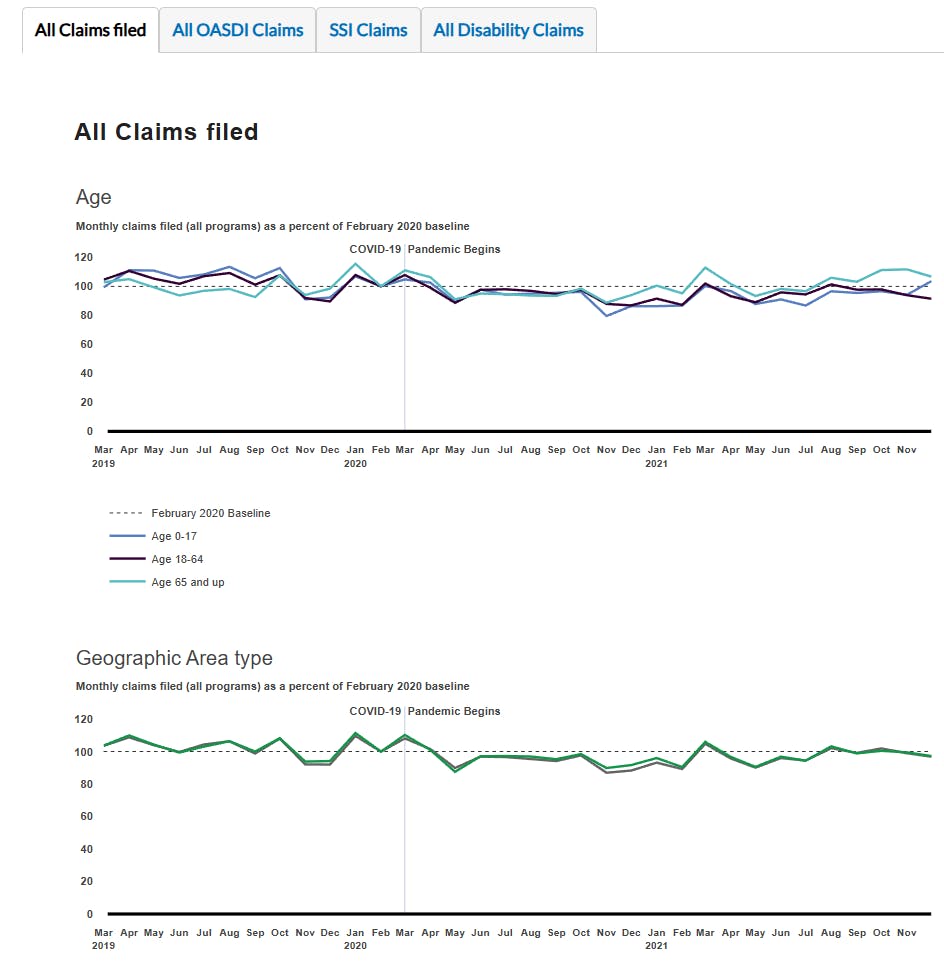
- show trends in Social Security Administration service delivery during COVID-19 broken down by program and recipient group; and
- visualize which densely populated regions of a city are located close to glass recycling drop offs. This is a Folium/Leaflet map using the other tools discussed here. (I built it before Plotly integrated MapLibre.)
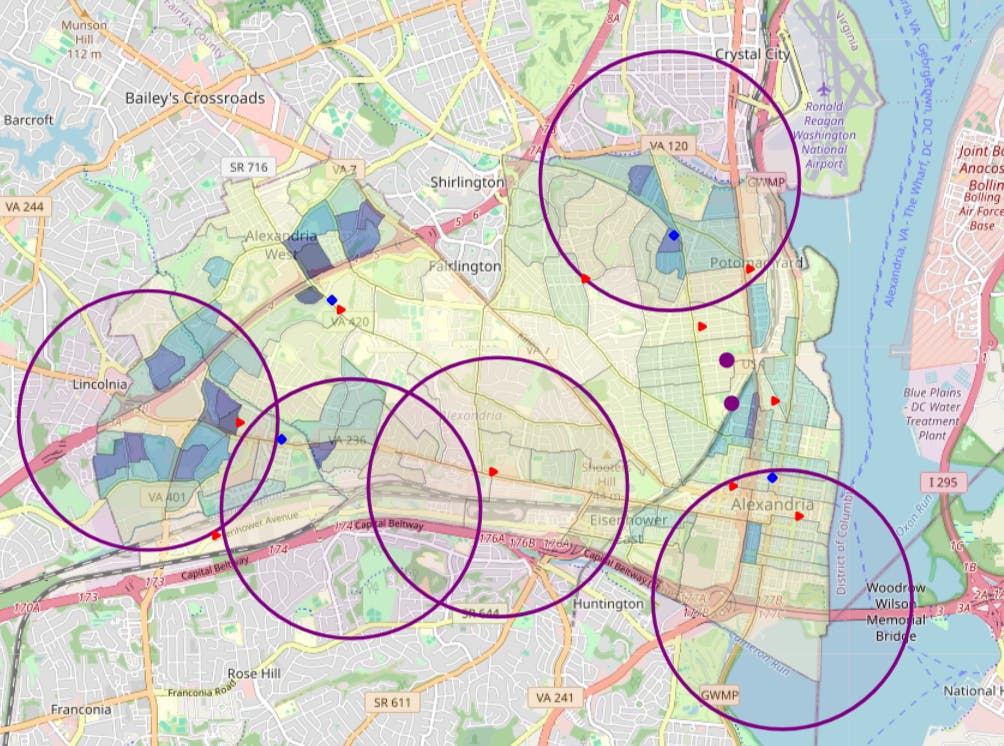
Follow the links for interactive versions.
I focus here on the graphics rather than the substance.
The 20th century approach to these challenges would ask motivated readers to find their own stories in a tabular appendix. This simultaneously delivers too much irrelevant detail and too little on the specific program, location, or outcome details that specific readers care about.
Interactive graphics let us do better. They make something once derided as “appendix material” compelling, engaging, and even fun. They harness web-native functionality to outperform linear content designed for paper.
These interactive graphics tell nuanced stories in ways that nontechnical colleagues and readers find approachable
They also present model-like findings in places where leading with a regression table would be a hard sell. The aforementioned scatter plot captures the relationship between two explanatory variables (campus type encoded in color and the student gender ratio on the x-axis) and two outcomes (the gender ratio on the y-axis and the number of female officers commissioned in the marker size). The presentation of trends in Social Security Administration service delivery is a graphical cousin of the difference-in-difference estimator’s comparison of control and treatment groups before and after an intervention.
Putting this kind of graphic on the street can strengthen the case for publishing regression tables too.
These publications are Plotly graphics published using free software that a variety of teams — from near solo efforts to large organizations — can release using existing infrastructure and bureaucratic pathways.
This post shares technical and bureaucratic approaches available to data scientists. Free Plotly tools can help teams draw conclusions and present results from one-time analysis of data sets that are new to the team. They can be employed in large but resource constrained organizations and in small scale projects in small organizations or academia or, even, by a group of neighbors petitioning a city government.
I make three points:
- Specific inexpensive, widely used, and often open-source tools that make minimal demands on your organization are sufficient to publish these sites. The sites I describe largely share an open-source technology stack including Plotly JavaScript interactives, Python, the Jinja2 templating engine, and HTML. They require only an ordinary, flexible web server. They integrate text written in Microsoft Word. In short: No budget? No data server? Nontechnical colleagues? No problem!
- This technology stack succeeds when it publishes an effective graphic with web-era features and user interfaces. Further, delivering final analysis to an audience that includes people new to the subject is different from delivering live data to experts on dashboards. I touch on practices for designing effective features and introducing analysis to cold readers briefly here, but largely leave the details to a separate post.
- Publishing analytic results requires instigators, doers, infrastructure, and permission. Motivated data scientists can sometimes facilitate the process by doing as much as possible and by delivering initial graphics using existing infrastructure and processes while requiring bureaucratic buy-in on a modest list of necessary new issues. Starting with this kind of minimal proof of concept can give the group experience publishing interactive graphics, create satisfied internal customers, ground further conversations in concrete examples, and build credibility. This agile approach lets the team build a reusable code base that both meets an organization’s immediate needs and facilitates publishing similar graphics in the future.
If you are not sure whether getting started quickly with free software is the right choice for your organization, consider reading section 3, “An incremental approach makes progress easier.” before sections 1 and 2.
The infrastructure and organizational demands to publish Plotly graphics are surprisingly modest. No budget? No data server? Non-technical colleagues? No problem!
This section describes options that meet a resource constrained organization where it is and start publishing compelling interactive graphics with a data-scientist-led, low resource effort built on free, open-source software. This section also provides options to address an organization’s static-graphics oriented rules. These approaches generally work, but this discussion is neither a definitive list of best practices nor an exhaustive list of options.
Access to a basic webserver
An absolutely critical, but readily available, ingredient is a web server that can publish the HTML that results from running fig.to_html in Plotly. You also need a bureaucratic path for permission to post content on that server. The web server requirements are modest. You can meet them:
- If your organization is willing to post static HTML webpages you create on its existing webserver, or
- If you can access and use a flexible web server available to the general public, including free GitHub pages or commercial hosting services, or
- If your organization has a content management system that lets you drop in a customized <DIV> tag containing Plotly output, or
- If your organization will let you use Plotly Cloud, which offers a way to automate the process of publishing both the kind of interactive discussed here and also more flexible Dash-based data apps.
I do not have firsthand experience with the latter two options. It might be impossible to publish JavaScript interactive graphics if the organization insists it will only publish using an existing content management system that is too rigid to host custom HTML and JavaScript content. However, it is often viable to publish interactive apps on a separate, less-restrictive webserver. This blog post takes that approach. Thoughtful design can create a nearly seamless experience and render irrelevant the fact that the interactive pages are on a different server than the rest of the organization’s content.
Free, easy Python tools can integrate text, Plotly graphics, and your organization’s web templates.
Python’s Jinja2 library offers standard tools to integrate Plotly graphics and HTML versions of your colleagues' text into organization-specific web templates.
Projects can integrate Plotly content with organizational web templates and text by integrating their own HTML or relying on a content management system like WordPress or Drupal.
The Plotly docs show the basics of using Jinja2 and Plotly to integrate webpages. This example code performs analysis and integrates results with a markdown template. If your organization will not be publishing its Plotly graphics through a content management system, you can likely make a reasonable, initial template by taking an existing page and replacing the content with Jinja tags like {{ introductory_text }} and {{ interactive_figure }}.
If you build a template from scratch, consider applying reasonable formats to your text by starting with open source cascading stylesheets (CSS) designed to format HTML produced from MarkDown. This is a quick way to deliver compelling interactive graphs on good-enough webpages.
Collaborate on your text in a way that works for your context.
If your writers are all comfortable in Git, Markdown, or HTML, leverage those skills. Creating HTML directly and revising it in a code-review-oriented version control web interface is the cleanest way to write and format text destined for your interactive graphic. Markdown is popular because it offers a succinct notation that maps to HTML but lets the reader focus on the text. Google Docs has a download as Markdown feature. The Python Markdown library converts those documents to HTML.
“We all use Word.”
If Microsoft Word is your organization’s dominant tool for collaboratively writing, revising, and commenting on text, you can build it into your technology stack. Interactive Plotly content does not embed naturally in Word, so you will need to convert text from Word’s file format to appropriate HTML.
Transferring colleagues’ changes from Word to interactives is a time-consuming, error-prone process that requires copying the changes perfectly. A better solution is to use Jinja2 to integrate the graphic, text extracted from Word documents, and boilerplate HTML.
The Python Mammoth library facilitates this by converting .docx files to clean HTML that is ready to format with CSS. By contrast, the Microsoft Word HTML export tools specify formatting in detail, making it difficult to use CSS to make the page look like anything other than your MS Word document. A tabular Word template can offer prompts that double as field names in the left column and leave space for authors to write and redline content in the right column. Mammoth can convert this into an HTML table. If your team is using Google Docs, it is cleaner to download the file as Markdown and use the Python Markdown library to produce HTML than to use Mammoth. Beautiful Soup can convert the HTML table into a Python dictionary of Jinja variable names and values.
Booleans indicating whether each trace is visible for each menu option. Python code can check for redline or strikethrough to reduce the risk of putting draft or deleted language on the street.
A flexible Python data science environment
You will benefit from a place to install free and open-source Python packages like the aforementioned Jinja2 and Mammoth. If you have the technical ability and bureaucratic clearance to use a tool like pip, conda, or uv to install these Python packages, you have everything you need.
If it is not straightforward to install open-source packages like Jinja2 and Mammoth on computers on your organization’s main computer network, the path of least resistance may be to put the Python installation and data you need on off-network computers that the organization owns.
It is likely to be easier to convince security to let a small amount of soon-to-be-public-data go on organization owned, but flexible computers outside the network firewall than to convince them to let new tools come inside the firewall where malicious or insecure software could potentially reach sensitive data or mission critical systems.
Sometimes the easiest way to generate the JavaScript you need is to write the JavaScript.
Plotly.py users write Python that generates JavaScript web graphics. Plotly can add JavaScript controls like menus but sometimes writing the JavaScript directly is easier and more powerful. Plotly Python only supports one drop down menu per graphic, and Plotly Python drop down menus require synchronizing lists of Booleans indicating whether each trace is visible with the current design. Complicated Plotly-only graphics require subplots. Both Plotly menus and subplots can be tedious to write and fragile.
The alternative to creating controls in Plotly Python is to create exactly the Plotly figures you want the page to be able to display; output each possible view into a <div>; and use your own JavaScript to show just the figure you want.
Generative AI can draft code to selectively display the content of <div> tags. Customizing JavaScript is not that hard. I can do it, and I am the kind of data scientist who is far more likely to think of standard errors than JavaScript toolkits if you say “bootstrap.” If you need more than a few menus, free and open-source JavaScript libraries with ample documentation offer plenty of additional options. It is generally easy to test whether menus that show and hide divs are working even if you are not proficient enough in JavaScript to know where the pitfalls are.
Similarly, if you encounter challenges making your page look good on a variety of screen sizes using Plotly’s responsive option, explore using CSS to display certain divs on low resolution or mobile screens and to display different divs on high resolution, desktop displays.
Check your work post integration.
Data, graphics code, text, and HTML template can all look good to their respective expert audiences – but plausible pieces that do not quite mesh can cause embarrassing problems.
- Run the final HTML through a linter to check it for errors.
- Give the results a final proofread that is informed by knowledge of specific cases in the integration code. For example, a graphic about universities might have different wording on the detail pages for different kinds of schools. In this case the value of proofreading an example of a liberal arts school and an example of a research university is higher than proofreading liberal arts examples.
- Look at some less important views to make sure that e.g. scales, titles, and mouse over text that are written for the obvious case make sense for the less prominent cases.
- Run sanity tests on all the data that you plan to make public to make sure you are comfortable that it will reflect well on your organization.
In principle, these strategies translate directly to R
R offers tools like GGPlotly, Plotly/R, JinjaR, and MarkDown.
Admittedly, this minimalist technology stack has limits.
Notably, it forces us to choose a finite set of possible views for the user. By contrast, Dash servers allow a near infinite number of views, keep coders from having to worry about how big any given webpage is getting, facilitate data updates, and can offer enterprise features.
This approach also leaves your team responsible for finding all the pieces and integrating them and requires people who want to create interactive graphics to code.
Practice makes progress.
The first graphics you make using this approach are likely to be labor intensive and to have some rough edges. If I were rebuilding my first interactive graphics, I would design things differently. The code and bureaucratic pathway you build will have many reusable parts. Each subsequent iteration is a chance to refine code, clarify procedures, strengthen relationships, and learn finer points of visualization.
Your technological and bureaucratic efforts are only worthwhile if they publish valuable, compelling graphics
An effective data journalism style app presents important results with effective graphics, text, and tables and uses interactive tools to help users find the results and details they care about.
Doing so effectively benefits from insights from many disciplines ranging from conventional data visualization and data analysis to user experience design to agile software development. This is an important topic of general interest, so it merits its own post that expands on these points. Other authors have covered finding results and presenting them effectively with traditional graphics at length elsewhere. I have particularly benefited from Jon Schwabish’s Better Data Visualizations book and Cole Nussbaumer Knaflic’s Storytelling with Data talk and podcast. Comparable material on interactive data graphics sites seems scattered across sources like data journalism courses and general-purpose user interface/user experience materials. Here are some key takeaways:
A good first draft will teach you how to make the next one better.
The right approach for your app depends on your data, your audience, and your conclusions. You will only know which approaches resonate once you make a draft and see whether it works for you and — if its general approach is worthy of discussion — your clients. A pre-draft sketch or storyboard may also be a useful preliminary check and chance for discussion. Reassess and get feedback early enough to avoid spending too much time polishing a visualization that needs to be fundamentally rethought.
Interactivity often replaces a few wrenching decisions with many consequential choices.
If you are uncomfortable identifying the most important or typical slice of your diverse audience to address with a single, static graphic, consider an interactive. Realize the interactive will require many (easier) choices about things like which analyses to present, how the user will navigate to the analysis they need, and what text to display when the user points their mouse to a marker. Budget time accordingly.
Design to meet user needs.
Consider asking clients or colleagues to articulate user stories about who we hope will come to the site and what they hope to learn. Prioritize and design navigation accordingly.
Interactivity is not an alternative to figuring out what is important.
Interactives escape the limits of the printed page, but are still limited by your audience’s eyes, screen, memory and attention span. Know your story, audiences, and priorities. Allocate scarce resources like space on your landing page, axes, prominent views, and development time accordingly.
Allocate easy-to-see and -understand aspects of your app thoughtfully.
Space on dropdown menus is often at a premium. Prune the list of views to focus on the highest value and most insightful ones. Consider JavaScript menus to let the user choose a category which then displays a <DIV> containing a second drop down menu listing views within that category.
Expect differences in scale across views and design to deal with it.
Hovertext may be one of the last things you think about, but do not make it an afterthought.
Polish the mouse-over wording and formatting with hovertemplates.
Now that I shared technical insights about building compelling graphics with modest resources, I discuss what it takes to bring them to your organization.
Publishing graphics blends technical and organizational challenges. An incremental approach that prioritizes delivering an initial graphic makes progress easier
Simple working prototypes get the conversation started.
Plotly can often meet existing visual branding and web publishing standards. Initial interactive graphics projects can seek to use existing web-publishing and content development workflows wherever possible. The prototypes can facilitate clarifying dialog with key people to find ways to use Plotly to meet standards built for other tools.
Rough, proof of concept prototypes can convince launch customers that your tool can meet organizational needs and is ready to try on a live project. Having a small group of data scientists own much of the process and use free tools and existing standards and work flows minimizes demands for work beyond the core team and the need for discussions with senior management.
There is no need to buy anything, set up new servers, or build the whole toolkit that one could imagine needing. Rather, it is sometimes wise to code around the hardest bureaucratic problems and seek bureaucratic latitude when your tools do not readily support your organization’s specific visual standards.
Having data scientists rather than graphic and web designers lead web development reduces the number of people who have to prioritize the project.
Of course, delivering insights through Plotly data apps requires data science, visualization, and Plotly programming skills. Data-oriented programmers may also design the navigation and integrate the graphics with text and HTML navigation. They often have a choice between writing this code or spending hours in meetings explaining why someone else should and then guiding designers with, if not pseudo-code, at least detailed explanations.
Data scientists can borrow components from the webpages their organization’s web and design teams published, but need not wait for those experts to write HTML or design graphics. Conversations with experienced graphic and web designers are invaluable to help solve problems beyond a data scientist’s expertise, spot problems data scientists missed, and get details right.
This approach lets data scientists ask the web and graphic designers for expertise but not for a significant time commitment. These conversations and some appropriate humility can strengthen relationships and improve graphics.
Consider an agile approach to organizational, infrastructure, and technical challenges.
Initial (prototypes and) products clarify needs and build credibility. Getting the site approved and published requires organizational approval and server infrastructure. There is a spectrum of approaches to these problems with bookends that we can describe by analogy to the leading software development models:
An agile approach gives a small team responsibility for the major tasks and prioritizes delivering a first, working project. The examples above can run on an existing, conventional web server. A plausible foundation consists of just a (reasonably flexible) Python or R installation and either a (reasonably flexible) web server or the latitude to deploy the graphic on a new server and (reasonable) policies that guide publishing on the server – as described in detail above. Applying and extending existing procedures can both reduce the number of conversations and make those conversations lower stakes and more cooperative than would proposing a more radical change such as new infrastructure. It is easier to move forward with a modest project that uses existing resources and procedures. The success of the modest project makes it easier to make the case for servers and resources.
An agile approach suggests delivering a concrete but preliminary, inexpensive, and malleable draft early. That prototype allows focused discussions with key stakeholders early enough to incorporate meaningful feedback. The draft illustrates that available staff can build valuable interactive graphics with a Python/Plotly technology stack. A working prototype ends plenty of debates about feasibility and start-up costs. The goal is for one of the early drafts to become a successful project. Initial success creates appreciative allies and builds credibility with support units. Initial projects anchor further conversations in concrete examples. This first project can also show exactly how the lack of dedicated server infrastructure limits which problems you can solve, forces difficult tradeoffs about which details to include, or creates extra work for data scientists.
A waterfall approach may be appropriate for large, long term efforts with senior management buy in. It asks management to allocate a variety of specialized staff to play specific roles while developing a long-term plan, acquiring infrastructure, deploying, e.g., Plotly Dash servers, and developing security and maintenance procedures for those data servers, all before publishing the first interactive. Waterfall approaches to capacity building consume calendar and staff time. Inviting many stakeholders to think ahead about a class of problems tends to lead to lengthy lists of requirements. Often, some of these requirements are costly to address but less important in practice than in the planning document. Mid-level data scientists may not have the pull to start waterfall projects.
The more agile approach can be advantageous in everything from a large organization to a near-solo project. Big organizations typically have IT and acquisition professionals who ask good and hard questions about new IT infrastructure, are reluctant to reallocate scarce resources, and are skeptical about the value of technologies that are new to the organization. For my side projects, I am the skeptical and overwhelmed support team.
Some advantages of the agile or incremental model — like the ability to use concrete examples to create shared understanding — are universal. A little experience often upends assumptions about the bureaucratic and technical priorities. The case for an agile, incremental approach has been discussed for decades not just in the agile software manifesto, but also in contexts ranging from hardware development in large organizations to public policy making.
Some advantages may be quite context specific. Organizations often offer analytic staff some leeway to adapt their approach and exposition to a specific problem and make doing so relatively straightforward. The same organizations often require permission for innovations that need more leeway. Seeking that permission may require significant staff and calendar time to plan, mitigate risks, and build consensus. Conversely, in more hierarchical organizations that motivate their work through stories about innovation, it might be prudent to get a senior leader excited about an interactive graphics project early and to emphasize how new and different it is.
A minimum viable product can be gradually converted into a reusable workflow. Reusable code, shared documentation, and internal presentations can empower colleagues to follow this technical and bureaucratic path.
No single approach is a panacea. Success requires both the right context, thoughtful bureaucratic navigation and relationship building. Those elements won’t always be present. I had a limited relationship with an academic journal and a limited understanding of its content management system, and ended up having to link my work in the journal to interactives on a GitHub pages site.
Starting to publish interactive graphics and to build skills, capacity, and credibility is easier than you think.
Experience and feedback improves interactives. Experience will clarify priorities for further work. You and your collaborators will become more skilled, develop intuition about what is likely to be worthwhile, get key mechanics into muscle memory, and improve your reusable codebase. All of that allows you to increasingly focus on content and also to deliver faster.
I got started. I am refining my craft. I saw technical solutions to hard bureaucratic problems and bureaucratic solutions to hard technical problems. I would be thrilled if this blog post helps you do so too.
Biography: Rob Letzler is a policy-oriented data scientist and energy economist. He has worked with large and small organizations in the public, private, and non-profit sectors. He is a contributor to the Plotly documentation and holds a Ph.D. in Public Policy from the University of California, Berkeley.
Note: The opinions expressed in this post are the author’s own and do not necessarily reflect the views of his employer, management, colleagues, or any organization he has been affiliated with.
Acknowledgments: I am in position to write this because of all of the people who have helped me advance in interactive graphics work, including Priyaanka Arora, Liam Connors and Greg Wilson who have provided feedback on my contributions to the Plotly documentation and blog, Ken Letzler for useful comments, and colleagues including Ellen Arnold, Bri Bovbjerg, Abby Brown, Jackson Gode, Chris Gresh, Ryan Han, Sharon Jan, David Jones, Matt Levie, Gabe Nelson, Philip Menchaca, Marc Molino, Colby Porter, Sam Portnow, Sima Raha, Rose Recht, Ethiene Salgado-Rodriguez, Spencer Schultz, Sam Sloate, Dylan Stagner, Jay Wang, and Les Wilkins.