
Chris Parmer
October 24, 2026
How to run Hugging Face models in a Dash app without a GPU
TL;DR
- Small Hugging Face models run well on CPU. all-MiniLM-L6-v2 has 22.7M parameters, and embedding a search query with it took 3.5 ms on a single CPU thread in our tests.
- We used it to build a Dash app that searches 117,592 machine learning papers from arXiv by meaning and plots all of them on one map.
- Search is cheap, but the one-time setup is not: embedding every paper takes about 45 minutes on 4 vCPU. A persistent filesystem, on Plotly Cloud or Dash Enterprise, keeps the model, the data and the embeddings, so after a restart our Plotly Cloud app loaded all of it in 1.6 s instead of redoing it.
- Running the model with ONNX Runtime instead of PyTorch keeps the install small. The onnxruntime wheel is 23.8 MB, and the torch wheel is 554.6 MB before its CUDA dependencies.
- You can index once on a larger app size and then move the app back to the smallest one, because the work is saved on the filesystem rather than in the app.
A lot of useful work with Hugging Face models doesn't need a large language model or a GPU. Semantic search, finding duplicates, tagging documents and "show me more like this one" are jobs for small encoder models with tens of millions of parameters, and those run comfortably on an ordinary CPU. One of them, sentence-transformers/all-MiniLM-L6-v2, is the most downloaded model on the Hugging Face Hub, with 193 million downloads in the last 30 days.
Getting one of these models working in a notebook takes a few lines. Putting it in an app your team can use has been more awkward, because a hosted app's disk is wiped every time it restarts, redeploys or wakes up from sleep. The app has to download the model again, and anything you computed with it, such as an embedding for every document you want to search, is gone too. For a collection of 100,000 documents that's most of an hour of CPU on every deploy.
Plotly Cloud now has persistent filesystems: a folder such as /data that keeps its files across restarts and redeploys and can be shared between apps. Dash Enterprise has long had the same feature, as a persistent filesystem at ../mount next to each app's code. This post walks through a Dash app that uses one to run a Hugging Face model on CPU for semantic search. The app downloads the model and the data once, computes the embeddings once, and loads all of it from the persistent filesystem on every later boot. If you haven't used semantic search before, the section called "What is semantic search?" explains it.
What we built
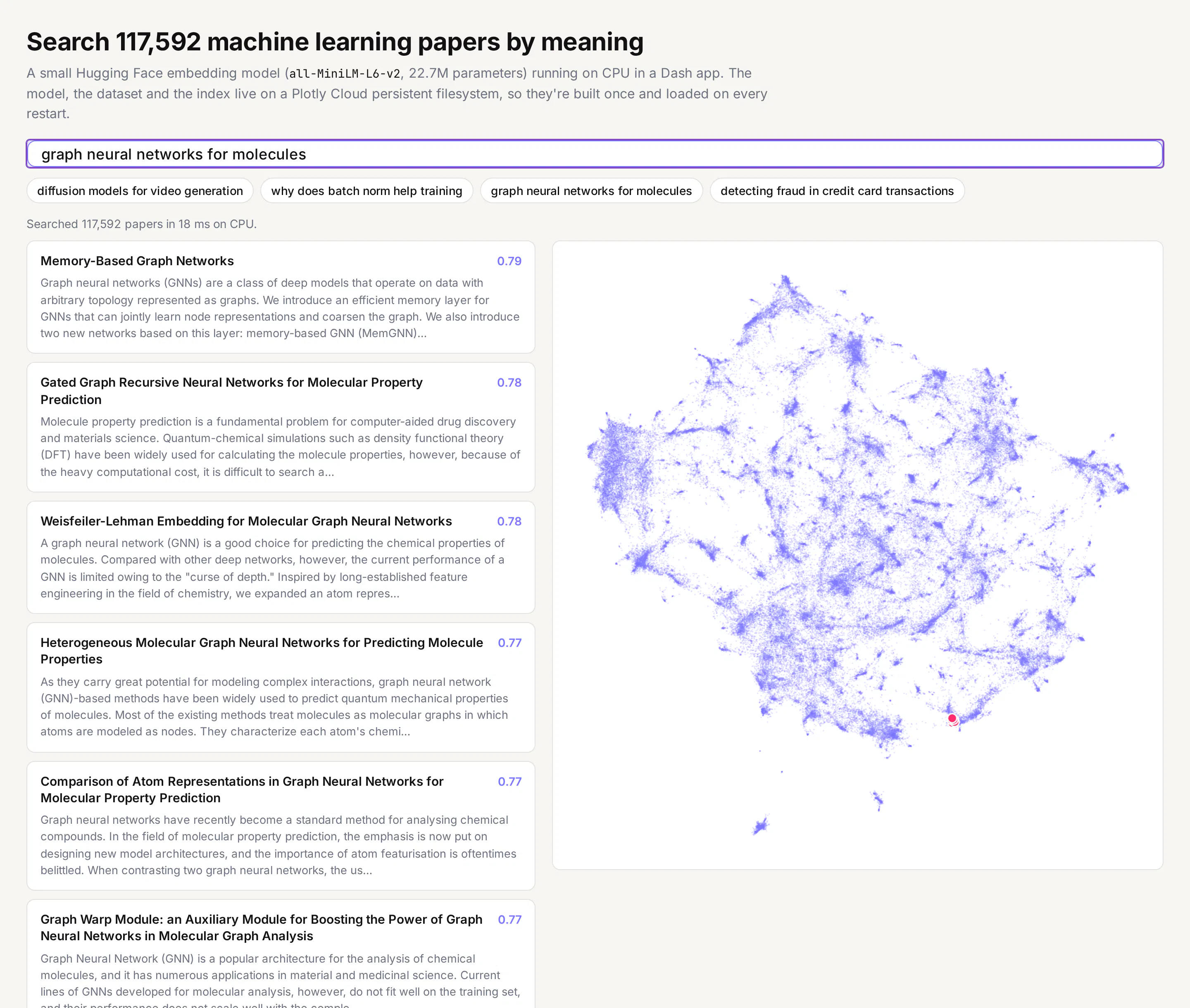
The app searches the ML-ArXiv-Papers dataset on Hugging Face, which has the title and abstract of 117,592 arXiv papers tagged as machine learning (cs.LG). You type a description of the paper you're looking for, in your own words, and it returns the ten papers whose abstracts are closest in meaning, with a similarity score for each. A map on the right shows every paper in the collection, laid out so that papers on similar topics sit near each other, and highlights where the results are.
What is semantic search?
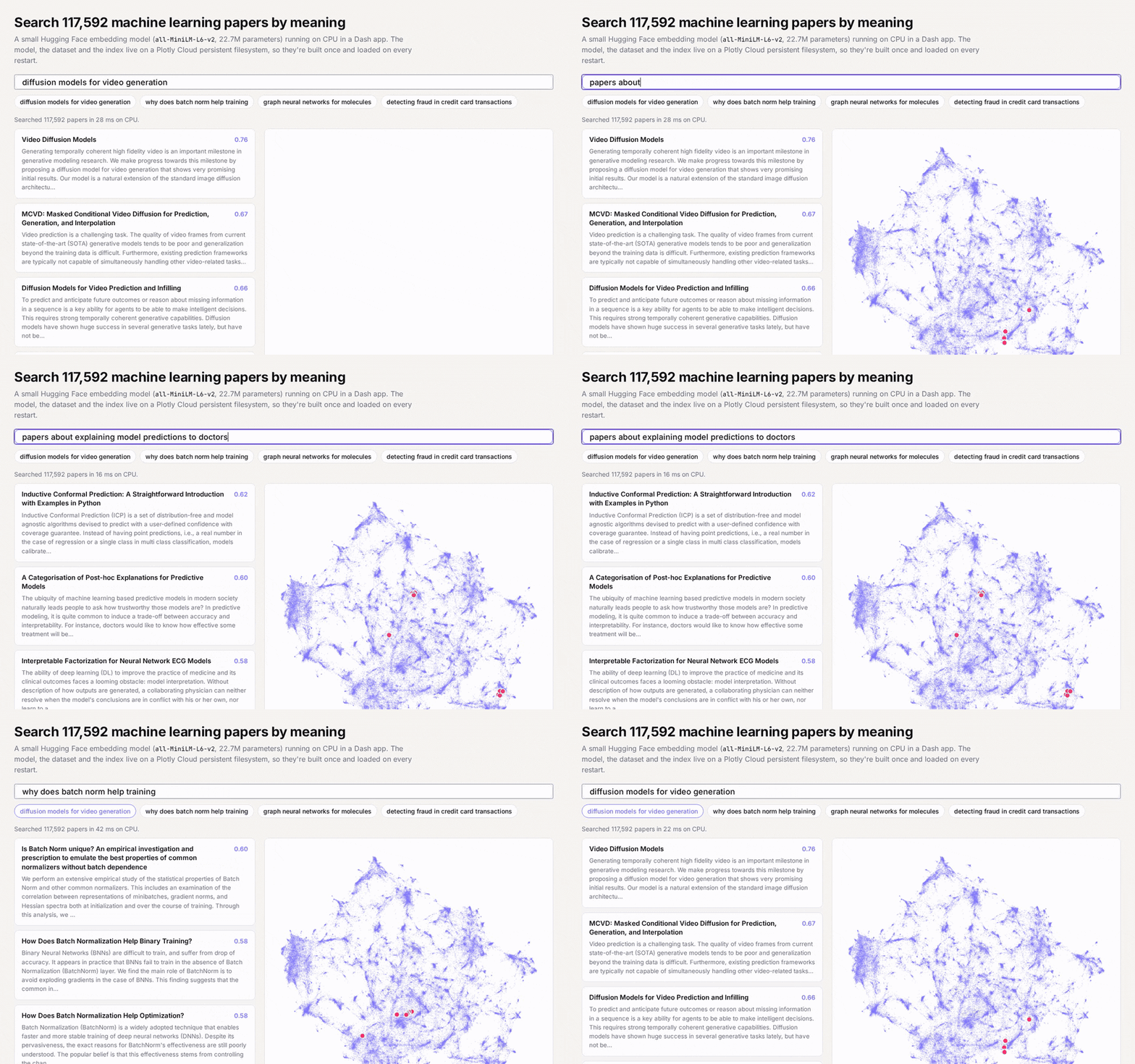
Most search boxes match words. Search a library catalogue for "explaining model predictions to doctors" and a keyword search looks for papers containing those words, so it can miss a paper called "A Categorisation of Post-hoc Explanations for Predictive Models" even though that's the kind of paper you meant.
Semantic search matches meaning instead. It relies on an embedding model, which reads a piece of text and turns it into a list of numbers called an embedding (or a vector). all-MiniLM-L6-v2 produces 384 numbers for each text, and it was trained on more than a billion pairs of related sentences so that two texts which mean similar things get similar numbers, whichever words they use. You can think of each text as a point in a space with 384 directions, where texts about the same idea sit close together.
Once every document is a point, searching means measuring distances. The app embeds the title and abstract of every paper once, ahead of time. When you type a query, it embeds the query with the same model and compares it with each paper using cosine similarity, a score where 1 means the two vectors point the same way and values near 0 mean the texts are unrelated. The ten papers with the highest scores are the results, and that score is the number shown next to each title. With the "doctors" query, the top three results include "A Categorisation of Post-hoc Explanations for Predictive Models" and "Interpretable Factorization for Neural Network ECG Models", and neither title uses the words in the query.
The map in the app is drawn from the same vectors. UMAP squeezes each paper's 384 numbers down to two while trying to keep papers that were close together still close on the page, so each cluster you see on the map is a group of papers about related topics.
The same approach works for any collection where people describe what they want in their own words, such as past support tickets, contracts and policies, product catalogues or internal documentation, and the model doesn't need to be retrained for any of them.
How the app works
Three things happen behind it:
- On first boot, the app downloads the model (a 90 MB ONNX file) and the dataset (a 141 MB CSV, which it converts to a 78 MB Parquet file) to the persistent filesystem.
- A background thread embeds every title and abstract into a 384-number vector, 1,024 papers at a time, saving each batch to /data as it finishes. When all of them are done, it computes the 2D map with UMAP.
- Every search embeds the query with the same model and compares it with all 117,592 stored vectors, which is one matrix multiplication.
Can you run Hugging Face models without a GPU?
For small models, yes. A GPU helps when a model has billions of parameters or when you're processing millions of items, but encoder models like all-MiniLM-L6-v2 are small enough that a CPU handles them in milliseconds. These are the numbers we measured, on a 4 vCPU Linux machine and on a Plotly Cloud app at the Performance M size (4 vCPU, 8 GB):
Step
Time
Embed one search query (1 CPU thread)
3.5 ms
Compare it with all 117,592 paper vectors
4.3 ms
Embed all 117,592 papers once (4 vCPU, local)
42.5 min
Embed 84,824 papers on Plotly Cloud Performance M (4 vCPU), the part left after a redeploy
32.5 min
Build the 2D map of all papers with UMAP (Plotly Cloud)
2.2 min
So a search is cheap enough to run inside an ordinary Dash callback, with no queue or separate model server. The cost of indexing the whole collection is large, but it only has to be paid once, as long as the results are kept somewhere that survives a restart.
Two details made a big difference to the CPU numbers. The first is to run the model with ONNX Runtime instead of PyTorch. The sentence-transformers/all-MiniLM-L6-v2 repository already includes an ONNX export of the model, and with the tokenizers package you can run it without installing PyTorch at all, so the onnxruntime and tokenizers wheels add 27.2 MB to the app instead of more than half a gigabyte for PyTorch. The second is to check the tokenizer's padding. The tokenizer.json in that repository pads every input to 128 tokens, so a six-word query was being processed as 128 tokens. Turning padding off and padding each batch only as far as its longest text took a single query from 41.5 ms to 3.5 ms on one thread, with identical embeddings.
Why use a persistent filesystem for Hugging Face models?
A Dash app on Plotly Cloud runs in a container whose disk starts empty on every boot. That's fine for an app that only reads data it ships with, but this app builds about 530 MB of files (the model, the Parquet dataset, the embeddings saved both in batches and as one file, and the map), and the embeddings alone took most of an hour of CPU to make. Without somewhere durable to put them, every restart, redeploy and wake from sleep would start the whole process again.
With a persistent filesystem mounted at /data, the app checks what's already there before doing any work. We saw this happen for real while building the app. We redeployed it partway through indexing, and the new version found 32 of the 115 batches (32,768 papers) already saved, loaded the model from /data in 0.93 s and opened the dataset in 0.008 s, then carried on embedding from batch 33. On its first boot, downloading and converting the dataset had taken between 8.8 and 18.4 s.
When we restarted the finished app on Plotly Cloud, each of its four workers loaded the embeddings, the paper titles, the map and the model from /data in 1.6 s and was ready to search, with nothing downloaded or recomputed.
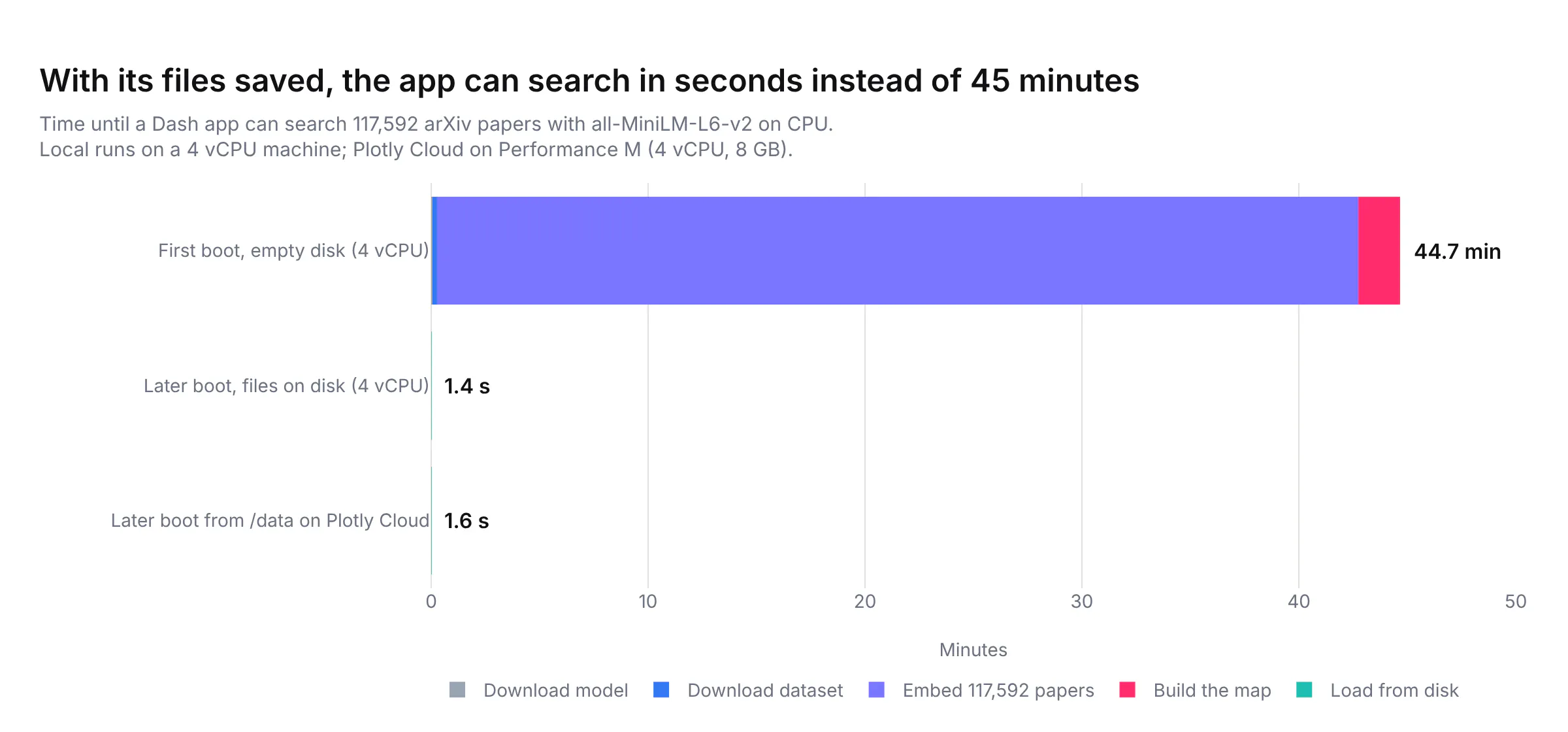
Because the work lives on the filesystem and not in the app, you can also use different app sizes for different jobs. We indexed on Performance M (4 vCPU, 8 GB), where the embeddings came in at about 44 papers a second. Once they're on /data, the app only has to load them, and it used about 665 MB of memory per worker in our tests, which fits in Plotly Cloud's Starter size (0.5 vCPU, 1 GB). Starter is free while the app is set to sleep when idle, and because everything the app needs is already on /data, waking up from sleep means loading files rather than rebuilding them.
How to run a Hugging Face model in a Dash app
This is the short version of the app, about 70 lines. It downloads the model and the dataset to DATA_DIR the first time it runs, embeds the papers, saves the vectors next to them, and on every later run loads the saved vectors instead. Set LIMIT to embed a few thousand papers while you try it out.
import osfrom pathlib import Pathimport numpy as npimport onnxruntime as ortimport pandas as pdfrom dash import Dash, Input, Output, dcc, htmlfrom huggingface_hub import hf_hub_downloadfrom tokenizers import TokenizerDATA_DIR = Path(os.environ.get("DATA_DIR", "/data")) # /data on Plotly Cloud, ../mount on Dash EnterpriseMODEL = "sentence-transformers/all-MiniLM-L6-v2"LIMIT = int(os.environ.get("LIMIT", 0)) or None # embed a subset while you try it outmodel_dir = DATA_DIR / "models" / MODEL.replace("/", "--")tokenizer = Tokenizer.from_file(hf_hub_download(MODEL, "tokenizer.json", local_dir=model_dir))tokenizer.enable_truncation(256)tokenizer.enable_padding()session = ort.InferenceSession(hf_hub_download(MODEL, "onnx/model.onnx", local_dir=model_dir))def embed(texts):enc = tokenizer.encode_batch(texts)ids = np.array([e.ids for e in enc], dtype=np.int64)mask = np.array([e.attention_mask for e in enc], dtype=np.int64)out = session.run(None, {"input_ids": ids, "attention_mask": mask, "token_type_ids": np.zeros_like(ids)})[0]v = (out * mask[..., None]).sum(1) / mask.sum(1, keepdims=True) # mean poolingreturn v / np.linalg.norm(v, axis=1, keepdims=True)papers_path, vectors_path = DATA_DIR / "papers.parquet", DATA_DIR / "vectors.npy"if not vectors_path.exists():csv = hf_hub_download("CShorten/ML-ArXiv-Papers", "ML-Arxiv-Papers.csv", repo_type="dataset")papers = pd.read_csv(csv, usecols=["title", "abstract"]).dropna().head(LIMIT).reset_index(drop=True)texts = (papers.title + ". " + papers.abstract).tolist()vectors = np.concatenate([embed(texts[i:i + 32]) for i in range(0, len(texts), 32)])papers.to_parquet(papers_path)np.save(vectors_path, vectors.astype(np.float32))papers, vectors = pd.read_parquet(papers_path), np.load(vectors_path)app = Dash(__name__)app.layout = html.Div([dcc.Input(id="query", value="graph neural networks for molecules", debounce=True, style={"width": "100%"}),html.Div(id="results"),])@app.callback(Output("results", "children"), Input("query", "value"))def search(query):scores = vectors @ embed([query])[0]top = np.argsort(-scores)[:10]return [html.P(f"{scores[i]:.2f} {papers.title[i]}") for i in top]if __name__ == "__main__":app.run(debug=False)
Its requirements.txt is dash, onnxruntime, tokenizers, huggingface_hub, pandas and pyarrow. To deploy it on Plotly Cloud, publish the app, then attach a persistent filesystem at /data from the app's Settings → Persistent filesystems tab; the Plotly Cloud docs cover the details. On Dash Enterprise, select the app in the App Manager, turn on the persistent filesystem from its Persistent Filesystem tab, and set the DATA_DIR environment variable to ../mount, which is where Dash Enterprise puts it. The Dash Enterprise docs explain the rest, including how to add files from the app's workspace. For more ways to use the folder, such as caching query results or keeping a SQLite database, see How to Use the Persistent Filesystem in Dash Apps.
What the full app adds
The short version embeds everything before the app starts, which is fine for a few thousand papers but would keep a 117,592-paper app from starting for most of an hour. The full app in our repository changes a few things so it works at that size. We ran it on Plotly Cloud, and the same code finds the Dash Enterprise filesystem at ../mount when it's there:
- It indexes in the background. A thread embeds the papers 1,024 at a time and saves each batch as its own file on /data, so the app starts serving searches over the papers indexed so far within seconds. If the app restarts or goes to sleep, the next boot skips the batches that already exist.
- Only one worker indexes. Plotly Cloud runs one worker per vCPU, so the indexing thread takes a file lock on /data first and the other workers only serve requests. On a redeploy, Plotly Cloud starts the new version before stopping the old one, so the new version keeps retrying the lock until the old one lets go.
- It stays inside 1 GB of memory. It reads the dataset from Parquet 1,024 rows at a time, embeds in batches of 8 (which used 463 MB at peak, against 834 MB for batches of 32, and ran slightly faster), and keeps only titles and the first 320 characters of each abstract in memory for display.
- The indexer runs at low priority and leaves one core for the web worker, so health checks and searches stay fast while it works.
Recreate the app with a coding agent
We built the app with Claude Code, and most of the work above came from running it on Plotly Cloud, reading the logs and fixing what went wrong. To build the same app yourself, paste this prompt into Claude Code, Codex, GitHub Copilot or another coding agent. Swap the dataset and the wording of the cards to point it at your own documents.
Build a Dash app that searches the 117,592 machine learning papers in the Hugging Facedataset CShorten/ML-ArXiv-Papers (title and abstract) by meaning.Model- Use sentence-transformers/all-MiniLM-L6-v2 from the Hugging Face Hub. Run its ONNX export(onnx/model.onnx) with onnxruntime and its tokenizer.json with the tokenizers package,without installing PyTorch. Mean-pool the token embeddings and normalize them.- Turn off the tokenizer's built-in padding (it pads everything to 128 tokens) and pad eachbatch to its longest text yourself. Truncate at 256 tokens. Embed each paper as"title. abstract".Storage- Keep everything on a persistent filesystem: /data on Plotly Cloud, ../mount on DashEnterprise, ./data when running locally. On first boot, download the model and the CSVthere with hf_hub_download and convert the CSV to Parquet. On later boots, load fromthere and don't touch the Hub.- Embed the papers in a background thread, 1,024 at a time, saving each batch as its own.npy file as soon as it finishes, so a restart or a sleep picks up where it stopped.- Only one gunicorn worker should index. Take a file lock on the persistent filesystem andkeep retrying it every 30 seconds, because a redeploy starts the new instance before theold one stops.- When every batch is done, combine them into one embeddings file and compute a 2D map ofall papers with UMAP (cosine metric), saved in the same folder.- Keep the app under 1 GB of memory: read the Parquet file in chunks, embed in batches of 8,and keep only the titles and the first 320 characters of each abstract in memory fordisplay. Run the indexer at low priority and leave one core free for the web worker.App- A search box with a few example queries as buttons underneath.- Each search embeds the query with the same model, scores every paper with a dot productand shows the ten best papers, skipping duplicate titles, as cards with the title, thescore and the start of the abstract.- Next to the results, a Scattergl map of every paper in light purple with the ten resultshighlighted in pink. Use Patch so a new search only updates the highlighted points.- While indexing is still running, search the papers embedded so far and show progress ina status line. Log how long each step takes so you can see what a first boot costscompared with a later one.Test it locally on a few thousand papers first, then on the full dataset.
Summary
Small Hugging Face models are fast enough on CPU to power search, tagging and similarity features in a Dash app, so the GPU question doesn't come up for a lot of practical work. What makes them awkward to deploy is the one-time work around them: downloading the model and computing embeddings for everything you want to search. A persistent filesystem on Plotly Cloud or Dash Enterprise keeps that work between restarts, so you pay for it once. On Plotly Cloud you can even do the indexing on a larger app size and then serve the result from a small one.