
Plotly
October 12, 2026
6 AI Workflows Every Data Analyst Should Know
A practical guide to framing questions, preparing data, exploring hypotheses, verifying AI-generated analysis, and automating recurring analytical work with appropriate controls.
TL;DR
- AI can support the entire analytical lifecycle, from defining a business question to running recurring reports. Useful workflows require clear inputs, inspectable evidence, appropriate oversight, and measurable value.
- Clarify requests: Turn ambiguous stakeholder questions into analysis briefs covering metrics, comparison periods, data requirements, assumptions, hypotheses, and intended decisions.
- Profile data: Identify grain, keys, missing values, duplicates, type errors, date gaps, category inconsistencies, and suspicious values before approving transformations.
- Expand exploration: Use AI to propose analyses and visualizations while separating observations, hypotheses, limitations, and next tests.
- Red-team findings: Review definitions, joins, transformations, methods, charts, and conclusions to uncover errors, hidden assumptions, and unsupported claims.
- Prepare stakeholders: Convert approved analysis into a decision-ready, pre-read containing key figures, calculation methods, limitations, likely questions, supported responses, and recommended actions.
- Automate recurring reporting: Combine deterministic validation with bounded agentic investigation, evidence-based drafting, human approval, controlled publishing, and audit logs.
- Prompts suit one-off assistance, guided workflows support analyst-directed processes, fixed automation handles predictable work, and AI agents for business workflow automation investigate variable situations within defined permissions and stopping conditions.
- Valuable AI productivity tools updates strengthen secure data access, transparency, reproducibility, interruption controls, approval gates, and exportability. Analyst judgment remains essential for scope, interpretation, and consequential decisions.
Updates for AI productivity tools arrive so often that analysts can spend more time evaluating features than improving their work. New assistants can generate queries, explore datasets, explain charts, and coordinate tasks across connected systems. AI agents for business workflow automation extend those capabilities by choosing actions based on what they encounter.
The practical question is where each capability belongs in an analyst’s working week.
Plotly’s product stack supports different stages of this process. Plotly Studio provides a code-backed environment for agentic data exploration, visualization, reporting, and Dash app generation. Dash turns approved Python analysis into interactive analytical applications, while Plotly Cloud and Dash Enterprise provide options for publishing, access control, scheduling, lifecycle management, and governed deployment.
This guide covers six recurring moments, beginning with an unclear request and ending with a controlled recurring process. Each workflow defines the AI’s role, the analyst’s responsibility, the appropriate autonomy level, and the checks required before the work influences a decision.
What makes an AI workflow useful for analysts?
Before choosing a tool or assigning AI more autonomy, evaluate the workflow itself. A faster process is not necessarily a better one if it introduces errors, hides assumptions, or creates additional review work.
Consider whether the workflow saves meaningful time, improves accuracy, produces results that can be inspected and reproduced, protects sensitive data, and remains easy to correct when something goes wrong.
Also assess how often the task occurs, how reversible its outputs are, how much business impact it carries, and how much human oversight it requires. These criteria help distinguish a useful AI workflow from a compelling demonstration and provide a consistent basis for comparing the six examples that follow.
A useful AI workflow has four qualities:
- It solves a recurring problem.
- Its inputs and desired output are clear.
- Its work remains inspectable.
- Its value can be measured after repeated use.
Microsoft researchers found that AI-generated analysis can appear plausible while diverging from the analyst’s intent, which makes verification a core part of the work. Plotly Studio is designed around that need for verification. It displays the dataset, generated code, visualizations, and analytical results in the same workspace. Every step is backed by Python so the analyst can have the flexibility to review the code if needed.
Where AI agents fit into business workflow automation
Before choosing between a prompt, a guided workflow, fixed automation, or an AI agent, it helps to see how these approaches fit into an analyst’s day-to-day work. They are not interchangeable levels of convenience. Each one gives AI a different amount of responsibility, from helping with a single task to investigating an unexpected result and deciding which approved diagnostic step to take next.
For example, an analyst might use a prompt to clarify a stakeholder’s question, a guided workflow to profile and clean a new dataset, fixed automation to run a scheduled report, and an AI agent to investigate why that report contains an unusual movement.
The more discretion AI receives, the more important it becomes to define its permissions, evidence requirements, stopping conditions, and escalation path.
The appropriate approach depends on how much discretion the system needs:
Approach
Who directs the process?
Suitable work
Primary control
Prompt
Analyst
One-off assistance
Analyst review
Guided workflow
Analyst with AI support
Multi-step analysis
Stage checkpoints
Fixed automation
Predetermined rules
Stable recurring work
Programmatic validation
AI agent
AI within defined boundaries
Variable investigation and exception handling
Permissions and approval gates
Evaluate ambiguity, reversibility, data sensitivity, verification effort, and business consequence before introducing more autonomy.
Use a prompt when the analyst already knows the next step. Use a guided workflow when human judgment determines the sequence. Use fixed automation when the steps and checks remain stable across runs. Use an agent when evidence encountered during execution determines the next action.
AI agents for business workflow automation need explicit tool permissions, stopping conditions, evidence requirements, escalation paths, and accountable owners. Dash provides a practical way to expose approved analytical logic to AI agents. With Dash MCP, selected callbacks and Python functions can become tools that an agent can call. Developers can exclude individual callbacks, define argument types, and use callback documentation to give the agent additional context. When the app is deployed on Dash Enterprise or Plotly Cloud, the MCP connection follows the app’s existing authentication and sharing permissions. Greater potential impact calls for narrower permissions and stronger approval gates.
AI Workflows Every Data Analyst Should Know
The six workflows below put that philosophy into practice. They are not a list of features to adopt wholesale, or a claim that every analytical task should become agentic. Instead, they represent six common points in an analyst’s work where AI can provide useful leverage while keeping the right decisions visible and reviewable.
We have chosen them because they span the full path from an unclear question to a recurring process, and because each one makes it possible to match the level of AI autonomy to the risk, reversibility, and business impact of the task.
Workflow 1: Turn an ambiguous request into an analysis brief
A stakeholder asks, “Why did conversion drop?” The request sounds clear until the analyst begins working through it.
Which conversion event matters? Which users qualify for the denominator? Should the analysis compare last week with the previous week, the same week last year, a rolling average, or an expected baseline? Does the stakeholder need an explanation, an intervention recommendation, a forecast, or a monitoring plan?
AI can help expose these unresolved decisions before the analyst opens a notebook or begins an agentic analytics query.
How the workflow operates
Give the AI the original request along with any available context: the stakeholder’s role, the relevant metric dictionary, links or descriptions of existing dashboards, the last decision made from similar work, and known business events during the period.
Ask it to produce an analysis brief containing:
- The business question in precise language
- Proposed metric definitions and comparison periods
- Questions that require stakeholder clarification
- Required tables, fields, data access, and owners
- Segments that may reveal meaningful variation
- Testable hypotheses and the evidence each would require
- Known constraints or likely sources of bias
- The decision the final analysis should support
Plotly Studio applies a similar principle to agentic analytics. Its agent connects to data, explores results through code-backed steps, and raises questions when the available data or instruction is ambiguous. Instead of hiding the analytical process behind a generated answer, Studio shows the code, data, and visual results for the analyst to review.
Prompt starter
Turn the following request into an analysis brief: Use the accompanying metric definitions, stakeholder context, existing reports, and business-event notes. Identify open questions, proposed definitions, comparison periods, useful segments, required data, testable hypotheses, and the decision the analysis could support. Label confirmed information, assumptions, hypotheses, and unresolved questions separately.
What the analyst verifies
Take the brief back to the stakeholder before beginning the analysis. Confirm the metric definition, audience, comparison period, intended decision, available data, and deadline. Any unresolved item should remain visible in the final output.
This workflow is successful when it reduces late scope changes, prevents wasted analysis, improves handoffs, and gives stakeholders a shared definition of the question.
Best autonomy level: A single prompt or guided workflow. The stakeholder and analyst retain control over scope and meaning.
Workflow 2: Profile and prepare a new dataset
An unfamiliar spreadsheet or table can contain duplicate records, inconsistent categories, unclear identifiers, mixed units, and missing values with legitimate business meaning. Cleaning it immediately creates a risk of changing the data before understanding what those conditions represent.
A stronger workflow separates profiling, proposed treatment, approved transformation, and post-transformation validation.
How the workflow operates
Begin with a read-only profiling pass. Ask AI to generate inspectable code that reports:
- Dataset shape, apparent grain, source location, and memory footprint
- Candidate primary or composite keys
- Missing-value counts and percentages
- Exact and near-duplicate records
- Inferred data types and possible type mismatches
- Date coverage, gaps, frequency irregularities, and timezone inconsistencies
- Category variations and possible spelling differences
- Suspicious zeros, outliers, units, and impossible values
Plotly’s existing guidance identifies cleaning, transformation, type correction, outlier detection, and documentation as practical applications of AI in data workflows. Plotly Studio can keep this process inspectable by presenting the source data, generated Python, data tables, and resulting charts together. Because every artifact is code-backed and rerunnable, profiling and cleaning logic can be retained as reproducible analysis instead of disappearing inside a chat transcript.
A Dash profiling app can then make those checks interactive. Analysts can filter affected records, inspect suspicious values, compare distributions, and review proposed transformations without changing the underlying source data.
The profiling output should lead to a proposed cleaning plan. Each proposed change should state the affected records, intended rule, expected impact on row counts, and business questions that require human confirmation.
Prompt starter
Build a Dash app to profile this dataset and preserve it unchanged. Report its apparent grain, candidate keys, missing values, duplicates, data types, date coverage, category inconsistencies, suspicious values, and row count. Generate inspectable code for every check. Then propose a cleaning plan. For every proposed transformation, show the rule, affected records, expected impact, and business assumption involved.
What the analyst verifies
Review whether apparent outliers represent errors or valid events. Confirm the dataset grain and keys with someone who understands the source system. Decide whether a missing value means “unknown,” “inapplicable,” “not collected,” or a genuine zero. Compare row counts, aggregate totals, category distributions, and key metrics before and after every approved transformation.
Store the cleaning logic as reproducible code instead of a one-time conversational instruction. Record the reason for every material change so another analyst can understand and rerun the process.
Use an approved AI environment whenever the data contains confidential company, customer, employee, financial, or healthcare information. Provide schemas, metadata dictionaries, synthetic examples, or masked samples when raw records are unnecessary.
Best autonomy level: A guided workflow with read-only profiling and approval before transformation
Workflow 3: Expand an exploratory analysis
Once the dataset is understood, AI can help widen the exploration. It can propose segment cuts, generate analytical code, create alternative visualizations, and recommend follow-up questions that the analyst may not have considered.
The workflow should create a traceable investigation instead of a collection of attractive charts.
How the workflow operates
Start with the business question and approved analysis brief. Ask AI to create an exploration plan that links every proposed calculation or chart to a specific question. Review the plan before execution.
As results appear, require the system to maintain an evidence ledger with four labels:
- Observation: What the calculation or chart directly shows
- Hypothesis: A possible explanation that still needs evidence
- Limitation: A missing variable, weak sample, measurement issue, or data-quality constraint
- Next test: The analysis that would reduce the remaining uncertainty
Plotly Studio is built around this iterative form of agentic analytics. Its agent connects to data, performs an analytical step, displays the data, code, and resulting visualization, and then continues based on what it finds or on the analyst’s next instruction. It can join datasets, derive metrics, debug queries, and create Plotly graphs and Dash apps while keeping every step available for inspection.
Prompt starter
Explore this dataset in relation to “Which customer segments account for the recent change in repeat purchase rate, and is that change concentrated in acquisition cohort, channel, or product category rather than spread evenly?” Propose an analysis plan before executing it. For every result, record the observation, possible hypotheses, limitations, and next test. Generate inspectable code and explain any change in filters, grain, metric definition, or scope before proceeding.
What the analyst verifies
Review filters, aggregation levels, comparison periods, sample sizes, chart scales, and category coverage. Look for Simpson’s paradox, survivorship effects, seasonality, and changes in the underlying population where relevant. Treat causal explanations as hypotheses until the available design and evidence support them.
The analyst should also interrupt the workflow when the system explores questions outside the agreed scope, relies on a weak segment, reaches contradictory results, or repeats analyses that no longer reduce uncertainty.
This workflow is successful when it generates useful new questions while preserving a clear route from the original request to the final evidence.
Best autonomy level: Agentic exploration with analyst checkpoints for scope changes and material assumptions.
Workflow 4: Red-team the analysis
An analysis can be technically correct and still produce a weak recommendation. A separate review pass should search for errors in the data logic, analytical method, interpretation, and communication before the work reaches a stakeholder.
How the workflow operates
Give an independent AI session the original request, approved brief, metric definitions, source descriptions, analysis code, intermediate outputs, visualizations, and draft conclusion. Avoid giving it only the polished final narrative because that hides the decisions most worth reviewing.
Ask the reviewer to examine four layers:
- Semantic: Do the metric definitions and business terms match the approved brief?
- Computational: Do joins, filters, transformations, and aggregations preserve the intended grain?
- Analytical: Do the comparisons, assumptions, sample design, and methods support the conclusion?
- Communicative: Do the chart design and written claims represent the evidence accurately?
The same Microsoft research found that making the stages of AI-assisted analysis editable gave users more control and made problems easier to correct or verify.
Plotly Studio supports this type of review by preserving the Python behind every analytical step and artifact. A reviewer can inspect and rerun the code that produced a table, chart, or result instead of evaluating only the final narrative.
Prompt starter
Act as an independent reviewer. Attempt to invalidate this analysis across its semantic, computational, analytical, and communication layers. Identify ambiguous definitions, possible join or grain errors, influential filters, hidden variation, unsupported causal language, alternative explanations, and validation checks I should run. Cite the exact code, table, chart, or statement behind every concern.
What the analyst verifies
Reconcile important totals with a trusted source. Inspect intermediate outputs and spot-check individual records. Rerun reasonable alternative definitions. Test whether the conclusion survives the removal of influential segments or unusual periods. Ask a colleague to review work that could influence a consequential decision.
NIST identifies confidently presented false or inconsistent output as a material generative-AI risk. Research evaluating 1,032 LLM-generated data-analysis tasks also found that stronger reproducibility was associated with higher accuracy, supporting the value of structured and inspectable workflows.
The output of this workflow should be a review log containing the concern, supporting evidence, severity, required check, analyst response, and final resolution.
Best autonomy level: An independent review workflow using a separate session or reviewer. Human review remains appropriate for consequential work.
Workflow 5: Prepare the stakeholder conversation
Correct analysis still needs a clear explanation. A stakeholder usually needs the meaning of the result, the calculation behind it, the limitations that affect confidence, and the decision it can support.
AI can turn completed work into a decision-oriented pre-read while keeping evidence and caveats visible.
How the workflow operates
Provide the approved analysis, metric definitions, source charts, meeting agenda, stakeholder role, previous decisions, and any open questions. Best people from the industry also recommend supplying meeting context, relevant dashboards, previous decisions, and information about the audience before asking AI to prepare a brief.
Plotly Studio can help when a stakeholder needs to explore the evidence rather than read a pdf, word document or slide deck. The analyst can publish the resulting Dash app through Plotly Cloud or Dash Enterprise and retain the interactive filters, calculations, and supporting detail behind the recommendation.
Ask for an output that includes:
- The business question and concise answer
- The figures that materially affect the decision
- A plain-language explanation of the calculation
- Important changes and stable areas
- Evidence-supported interpretations
- Visible limitations and unresolved questions
- Likely stakeholder questions with source-bound responses
- A recommended action and the evidence supporting it
Prompt starter
Prepare a one-page pre-read for the VP of Growth using only the supplied analysis. Include the business question, answer, important figures, calculation method, changes, stable areas, limitations, likely questions, evidence-backed responses, and recommended next action. Cite the supplied table or chart behind every factual statement and flag every claim that lacks direct support.
What the analyst verifies
Check every number, preserve material caveats, remove introduced causal claims, and confirm that the recommendation follows from the evidence. Review whether the language matches the audience’s knowledge without removing definitions they need to evaluate the result.
Use AI to rehearse likely questions, including skeptical questions about definitions, data quality, alternative explanations, and the cost of acting. This preparation helps the analyst enter the meeting with a clearer view of where the analysis is strong and where uncertainty remains.
Best autonomy level: A guided communication workflow. The analyst owns the recommendation and final wording.
Workflow 6: Automate recurring reporting with approval gates
A weekly report often involves far more than rerunning a query. Analysts check whether source data arrived, confirm that schemas remain stable, reconcile important totals, compare the current period with suitable baselines, investigate unusual movements, write a narrative, obtain approval, and distribute the result.
A robust workflow should make each of those stages explicit:
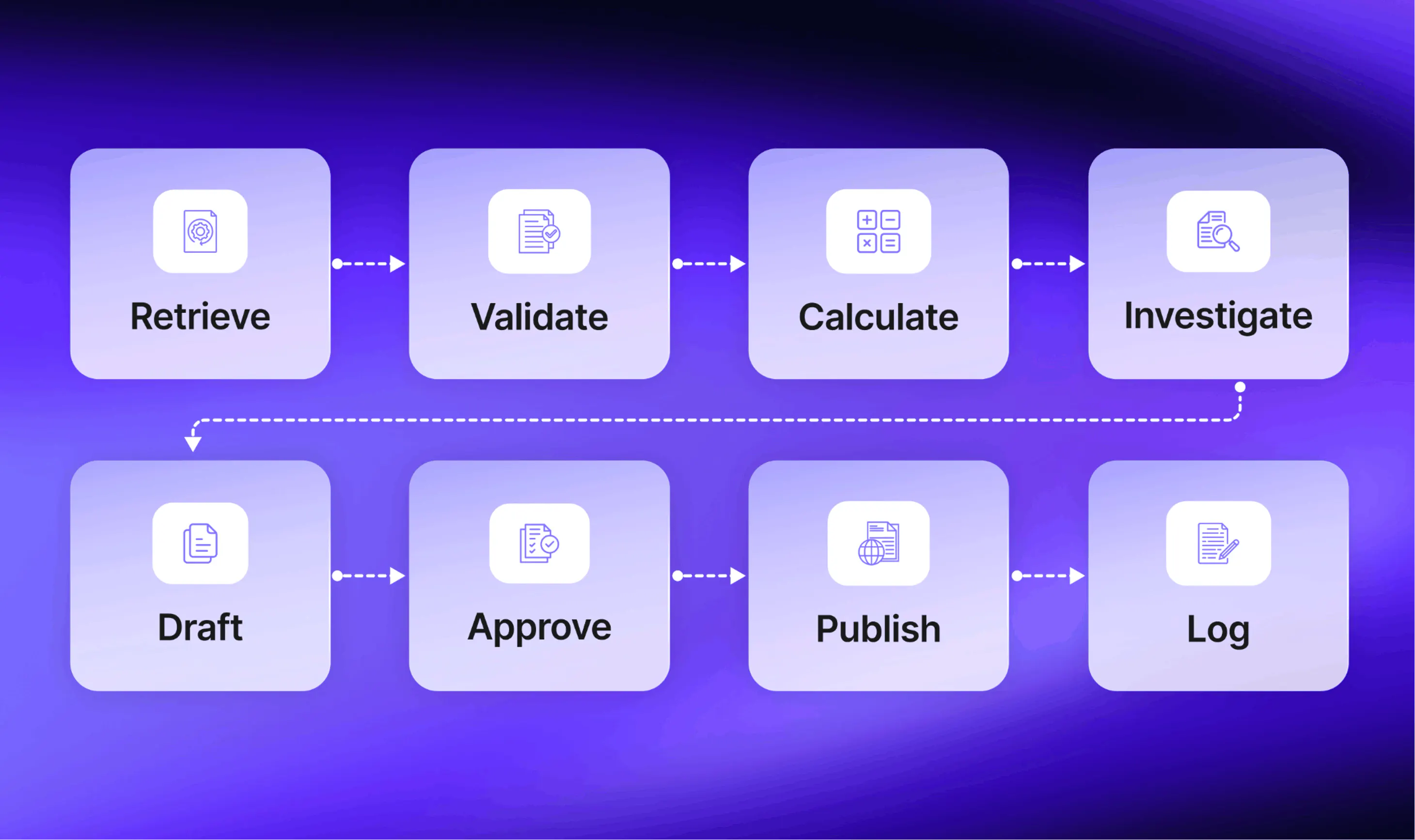
This is where AI agents for workflow automation become useful. Fixed code and rules handle predictable work while agents handle bounded investigation when the result determines the next step.
How this maps to the Plotly stack
In a Plotly implementation Python, and Dash callbacks can handle retrieval, validation, calculations, and interactive review. Scheduler can run cron-style data refreshes and report-generation tasks, while Dash Enterprise’s Snapshot Engine can capture app state and distribute scheduled PDF reports.
Dash MCP can expose selected callbacks or diagnostic functions to an AI agent for bounded exception investigation. Plotly Cloud can secure those agent connections using the Dash app’s existing access settings, while Dash Enterprise provides role-based access, application lifecycle management, viewer analytics, and audit logs for self-hosted environments.
Human approval before consequential publication should still be implemented explicitly in the application or surrounding workflow. Dash Enterprise supplies deployment, access, and auditing capabilities, but it should not be presented as automatically providing the specific analytical approval gate described here.
1. Define the report contract
Document the report’s audience, schedule, approved metrics, source systems, expected data-arrival times, comparison periods, distribution channel, and accountable owner.
Create a metric contract for every reported figure. It should include the definition, calculation, grain, permitted filters, source of truth, owner, and acceptable freshness. The automated process should use this contract instead of recreating definitions from a prompt each week.
2. Retrieve data with limited permissions
Give the workflow access only to the tables and actions it requires. Use read-only access for analysis whenever possible. Store credentials outside the prompt and session history. Keep publication permissions separate from analytical permissions so a data-access error cannot automatically become an externally distributed report.
3. Run deterministic validation gates
Before any AI-generated interpretation, fixed checks should confirm:
- Required sources arrived within the expected window
- Schemas and data types match the approved contract
- Row counts fall within reasonable historical ranges
- Key fields meet expected uniqueness rules
- Missingness stays within accepted limits
- Important totals reconcile with trusted systems
- Metric definitions match the approved version
- No critical validation query has failed
If a gate fails, the process should stop, preserve the current state, record the failure, and notify the owner. The report should remain unpublished.
4. Calculate approved metrics and comparisons
Use deterministic SQL or Python to calculate the reported metrics. Compare the current period with the approved baselines, such as the previous period, the same period last year, a rolling average, or an agreed target.
Store the executed query, parameters, code version, data timestamp, and resulting table. This creates the evidence package the analyst will review later.
5. Use an agent for bounded exception investigation
The agent becomes active when a metric crosses an agreed threshold or a validation check produces an unusual result. Its task is to investigate within a defined search space.
For example, a weekly revenue report may instruct the agent to examine region, product, customer segment, sales channel, contract type, and data freshness after a material change. It can run approved diagnostic queries, compare contribution changes, identify the segments most associated with the movement, and record the evidence behind each finding.
The agent should produce:
- The triggering condition
- Diagnostic steps performed
- Queries and tools used
- Findings supported by calculated evidence
- Alternative explanations still require investigation
- Data limitations encountered
- Confidence tied to available evidence
- A recommendation to continue, request context, escalate, or stop
Set stopping conditions. These may include a maximum number of queries, a time or cost limit, missing required data, contradictory results, access requests outside its permissions, or the need for business context. The agent should escalate at that point.
Anthropic recommends predefined workflows for predictable tasks and agents for situations where the required steps depend on information encountered during execution. Its guidance also emphasizes human oversight, transparency, testing, guardrails, and clearly defined stopping conditions.
6. Draft a source-bound narrative
After the checks pass, AI can draft the report. Require every factual statement to point to an approved metric, table, chart, or diagnostic result. The draft should separate observed changes, supported explanations, unresolved hypotheses, and recommended follow-up work.
The narrative generator should receive the validated evidence package instead of unrestricted access to every connected system.
7. Require human approval before publication
Present the reviewer with the report, validation results, executed code, important transformations, agent investigation log, and differences from the previous approved report.
The reviewer can approve, edit, reject, or send the workflow back for further investigation. Record that decision along with the reviewer’s identity and timestamp.
8. Publish and preserve the audit trail
Once approved, publish through the permitted channel and store the final report with its evidence package. Log the exact content distributed, recipients or access group, approval record, data timestamp, code version, and any overrides.
The same architecture can support dashboard audits and automated data-health checks as useful extensions of an analyst’s simpler AI habits.
How to measure the workflow
Track successful scheduled runs, validation failures, useful agent escalations, unnecessary escalations, analyst review time, post-publication corrections, unauthorized actions, and recurring maintenance effort. The target for unauthorized publication or access should remain zero.
Best autonomy level: Fixed automation for retrieval, validation, calculation, and delivery mechanics. Bounded agentic investigation handles exceptions. Human approval remains mandatory before consequential distribution.
Test one workflow before expanding it
Choose one recurring task and establish a baseline. Record the time required, errors found after completion, manual handoffs, stakeholder follow-up, and maintenance effort.
Run the AI-assisted version for several cycles and track:
- Total time from request to approved output
- Corrections required before approval
- Errors caught during validation or review
- Manual interventions and escalations
- Repeated use across the test period
- Stakeholder questions after delivery
- Cost and maintenance effort
- Outputs abandoned because they lacked value
Apply the same scorecard when AI productivity tools updates introduce new capabilities. We recommend testing one workflow for two weeks and observing what changes.
A workflow earns a permanent place when its total benefit exceeds the effort required to correct, verify, monitor, and maintain it.
AI productivity tool updates that matter to analysts
AI productivity tools sit inside the workflow, not above it. They are most useful when they help an analyst move from one clearly defined stage to the next: clarifying a request, profiling data, generating code, testing an idea, checking an interpretation, or preparing a decision-ready explanation.
Think of AI productivity tools as components that can support different levels of autonomy:
- Prompt-based assistance helps with a single task
- Guided workflows support several connected steps while the analyst directs the process
- Fixed automation runs predictable, repeatable work according to predefined rules
- AI agents investigate variable situations and choose among approved next steps
This is also why AI productivity tool updates should be evaluated through the lens of control. Useful updates improve the analyst’s ability to review and control the work.
Pay attention to whether a release improves:
- Secure access to approved data sources
- Visible code and execution logic
- Clarification of ambiguous instructions
- Transparent data transformations
- Reproducible outputs and version history
- Interruption and stopping controls
- Approval gates for consequential actions
- Exportability into maintainable workflows
Put AI to work without giving up analytical control
Most analysts do not begin the day by asking, “Which AI workflow should I use?” They begin with a message from a stakeholder, a spreadsheet that needs explaining, or a recurring report that somehow takes longer than expected every week.
AI’s value comes from supporting the moments that slow analysts down: clarifying an unclear request, checking unfamiliar data, exploring possible explanations, challenging a conclusion, preparing for a stakeholder conversation, and handling repeatable reporting work.
The key is to use AI as part of a controlled process rather than treating it as an answer machine. A quick prompt may be enough for a simple task. A more complex analysis may need several checkpoints, reproducible code, and human review. Recurring work may benefit from automation, while unexpected issues may require an AI agent that can investigate within clearly defined limits.
Use AI to strengthen the full analytical process: clarify the question, understand and prepare the data, explore possibilities, challenge the result, communicate it clearly, and automate recurring work where the rules are stable. Prompts, workflows, automation, and agents each have a place, but none can replace the analyst’s judgment.
Put a code-backed AI workflow into practice
Plotly Studio helps analysts move from data and questions to inspectable Python, interactive Plotly visualizations, reports, and Dash applications. Start with one recurring analytical task, keep every step visible, and test whether the workflow delivers measurable value.
See how Dash Enterprise supports governed analytical applications →