
Alexander Cabrera
March 15, 2026
From NLP to Interface: How to Integrate Scikit-learn and DMC into a Plotly Dash App
Author: Alexander Cabrera
Introduction
This is the Summer Reading List Builder: a book recommendation application built entirely with Plotly and Dash. It doesn’t contain a single chart. Instead, it features an NLP engine, user profiles, detail modals, and file exporting, all of which are managed via Dash callbacks and Dash Mantine Components.
What led me to choose Plotly Dash for this project was the depth of customization it offers: total control over layout, component behavior, and state logic. This level of control is what makes it possible to build a complete interactive experience, rather than just an analytical dashboard.
This article explains three specific technical decisions: how to integrate a Scikit-learn NLP model into a Dash app; how to link cosine similarity logic with callbacks for real-time recommendations; and how Dash Mantine Components enable the creation of a responsive, complex interface while maintaining code clarity.
Integrating NLP into a Dash App: TF-IDF with Scikit-learn
The dataset available for this project dictated the architecture. The optimal path to meet storage requirements and ensure the project’s viability was to extract semantic signals directly from the book description text. To achieve this, I used Scikit-learn’s TfidfVectorizer, pre-calculated at app startup and stored in memory. Running this within each callback would be performance-prohibitive.
The resulting matrix, with books as rows and terms as columns, is what the recommendation engine queries in real-time as the user interacts with the interface. The vectorizer parameters are fine-tuned for literary text:
- ngram_range=(1, 3): Captures phrases of up to three words. Concepts like “serene wisdom” or “hidden meanings” would be fragmented and lost by a simple unigram model.
- sublinear_tf=True: Applies logarithmic term frequency scaling, preventing an unusually long description from dominating the similarity space.
- max_df=0.7: Filters out words appearing in more than 70% of documents—eliminating generic editorial vocabulary that fails to differentiate one book from another.
The key to integrating this into Dash is initializing the TF-IDF matrix outside of any callback as a global app variable. This ensures it is instantly available for every user interaction without the need for recalculation.
Connecting Cosine Similarity with Dash Callbacks
When a user selects preferences in the interface, a callback receives these selections as Inputs and executes the build_preference_vector function. This function constructs a vector of the same size as the TF-IDF vocabulary, assigning weights to terms associated with each preference. For example, “Complex Characters” carries a weight of 1.6, which is a deliberate decision to prioritize depth over more generic traits.
With the vector constructed, the engine calculates cosine similarity against each row of the TF-IDF matrix in three steps:
- Normalize the user vector so that magnitude does not distort comparisons.
- Calculate the cosine of the angle between the user vector and each book vector, measuring how closely directions align in the semantic space.
- Filter out anything below a similarity threshold of 0.05, discarding books without a significant connection.
The result (a ranked list of 5 to 12 books with their match percentage) is stored in a dcc.Store component. This is the core pattern: the dcc.Store acts as a shared source of truth across all interface components. The match badges, the Reading DNA panel, and the file exporter all consume the same store without needing to recalculate anything.
UI/UX with Dash Mantine Components: A Complete Design System
Why DMC Instead of Custom CSS? Dash Mantine Components is not just a library of decorative widgets; it is a complete design system that solves three specific problems: responsiveness without media queries, visual consistency without overriding CSS for every component, and rich interactivity without additional JavaScript.
dmc.MantineProvider establishes the global design system (typography, colors, and spacing) in one place. Any theme change automatically propagates to all components.
dmc.Grid and dmc.Col build a layout that reorganizes itself based on screen size without a single custom media query. The pattern of embedding a dmc.Checkbox within a dmc.Card transforms each preference option into an interactive object with real visual weight. The goal was for selecting preferences to feel like exploring a menu rather than filling out a form.
The image below demonstrates how I used dmc.Card together with dmc.RadioGroup and dmc.Radio to build the Reading Vibes selector: each tab (Vibes, Elements, and Depths) renders as a radio option, and selecting one reveals its nested preference cards inline, which transforms a standard form input into an exploratory, menu-like experience.

Communicating Relevance with dmc.Badge
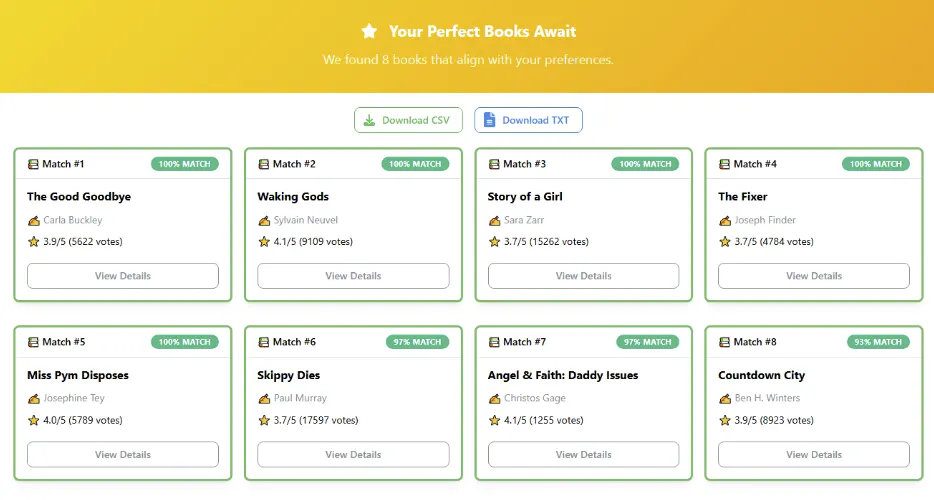
Dynamic dmc.Badge components use color to communicate relevance before the user even reads a number; green for high matches, yellow for medium, and blue for lower ones. The color is assigned within the callback that processes the recommendation store, which keeps the presentation logic separate from the calculation logic.
The image below shows the recommendation results panel, where each book card displays a dmc.Badge with its match percentage. The color is determined dynamically by the callback based on the similarity score (in this case green), indicating a strong alignment between the selected preferences and the recommended books.
dmc.Modal for Depth Without Page Changes
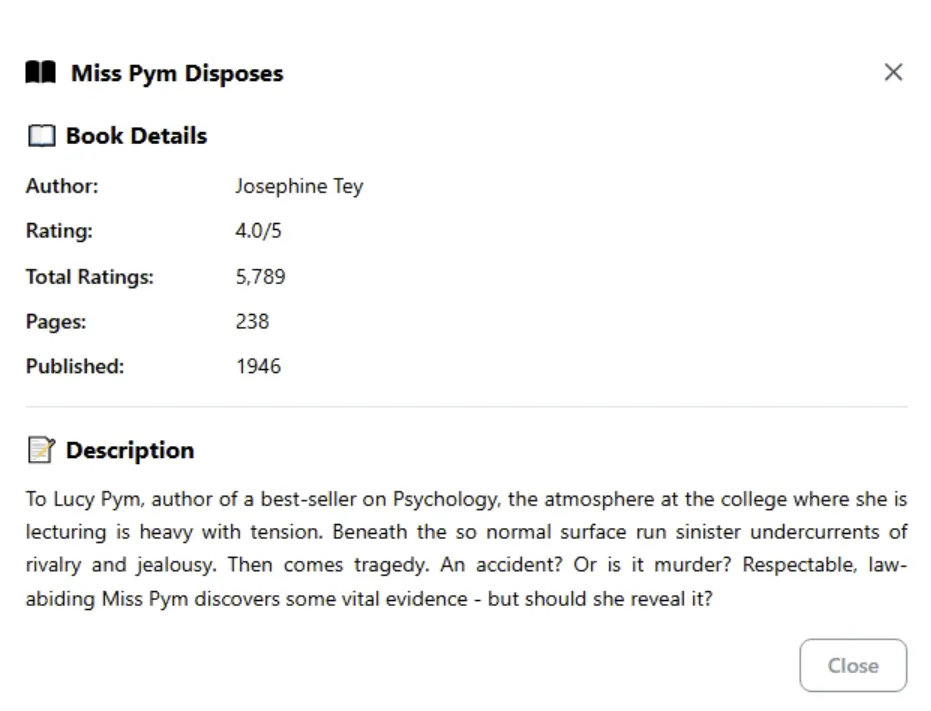
Full information for each book resides within dmc.Modal windows, triggered by clicking “View Details.” This pattern keeps the main view scannable without sacrificing depth, while avoiding page reloads or adding extra routes to the app.
Reading DNA: Chained Callbacks for User Profiles
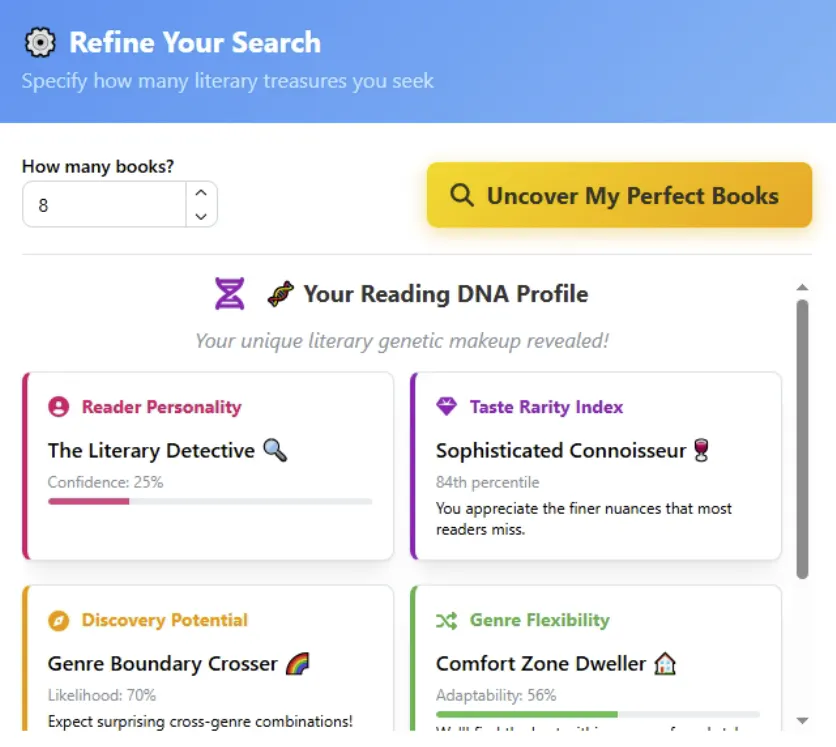
The "Reading DNA" layer presents the user with a reader archetype and a rarity indicator for their specific preferences. It is built using two core functions:
- get_reader_personality: Maps selection patterns to archetypes. If a user leans toward puzzles, unreliable narrators, and plot twists, the system returns “The Literary Detective.”
- get_taste_rarity: Compares selections against statistical frequency patterns in the dataset to determine if the user is a “Hidden Gem Hunter” or an “Ultra-Rare Unicorn.”
Both functions execute within the same callback that generates the recommendations. The resulting data is saved in the dcc.Store alongside the book list, and a second callback consumes it to render the Reading DNA panel independently from the rest of the interface.
File Export Without Reprocessing
Exports, whether in CSV or TXT format, are built directly from the dcc.Store, without re-running the recommendation engine. The TXT exporter recreates the complete "Reading DNA" profile in plain text alongside the book list, utilizing only the data already residing in the store.
Conclusion: Reusable Patterns for User-Centric Dash Apps
This application implements technical patterns that are applicable to any Dash app aiming to go beyond a basic dashboard:
- Pre-calculate heavy models outside of callbacks and store them as global app variables. Any Scikit-learn model, embedding matrix, or search index works within this same pattern.
- Use dcc.Store as a shared source of truth between components. This removes the need for recalculation in every callback and maintains a clean separation between business and presentation logic.
- DMC as a design system, not just a widget collection. The combination of MantineProvider + Grid + Card + Modal handles responsiveness, consistency, and information depth without the need for additional CSS.
Together, these three patterns allow a Dash app to function as a polished, user-oriented product rather than just an internal data tool.