
Eric Tangedahl
April 1, 2026
Building a Real-Time Snow Conditions Dashboard with Plotly Dash: Geospatial Pipelines with PostgreSQL/PostGIS and Google Cloud Platform
Author: Eric Tangedahl
The Challenge
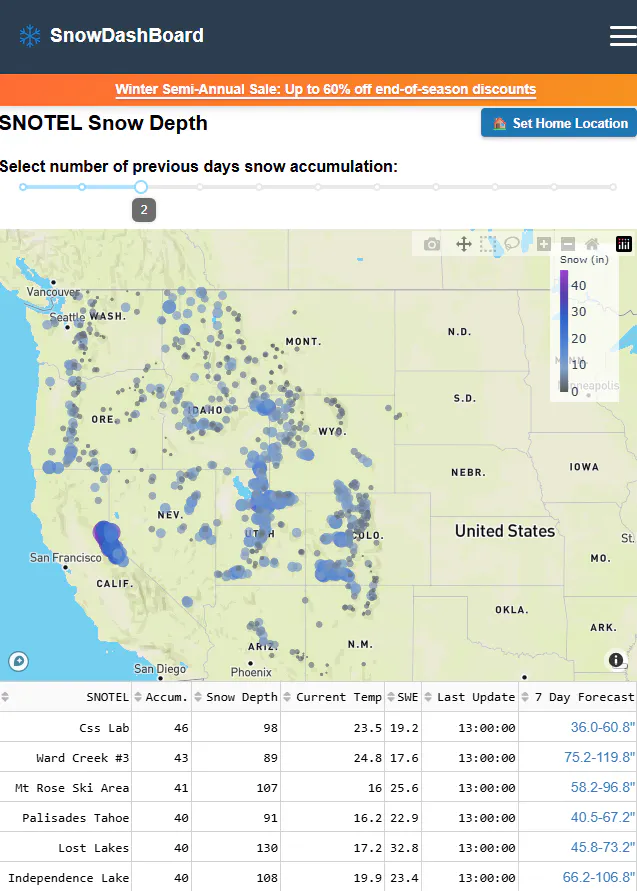
Backcountry skiers, snowmobilers and general snow enthusiasts need accurate, location-aware snow data to plan destinations with accumulating snow. While SNOTEL stations collect hourly snow measurements, I found myself having to look up several individual stations and generating National Weather Service (NWS) point forecasts, then opening additional maps.
We built SnowDB to solve this: a real-time dashboard that combines 800+ SNOTEL stations with NWS forecast data, rendered on interactive maps that users can pan, zoom, and explore naturally.
Introduction
I've worked in Information Technology for many years, serving as a GIS Manager, Engineering Manager, and faculty member at the University of Montana College of Business where I taught Streaming Analytics. Throughout my career, I've maintained a passion for data and analytics — particularly when it intersects with the outdoors. Living in Montana and getting outside whenever I can makes working with environmental data personally meaningful while keeping my skills sharp with new technology. SnowDB represents the convergence of these interests: combining a passion for backcountry skiing and snowmobiling with the technical challenge of building data analytics that provide real insight and help people make informed decisions about where and when to venture into the mountains.
Why Plotly Dash?
Building the entire application in Python eliminates context switching between data processing and web development, while leveraging Plotly's powerful visualization capabilities. The same language that queries PostGIS, transforms sensor readings, and filters anomalies also renders the UI, handles user interactions, and generates visualizations. This unified workflow accelerates development and simplifies debugging. There's no translation layer between backend data logic and frontend presentation.
Multi-Page Architecture
Dash's register_page() pattern made it straightforward to organize three distinct user experiences: Current conditions (interactive map and sortable table), Forecast view (station-specific 7-day NWS forecasts with snow timing charts), and Historical analysis (comparing current year snowpack against 30-year averages).
Each page registers independently but shares the same database connections and styling:
# forecast.py
from dash import register_page
register_page(__name__, path="/forecast")
Interactive Components
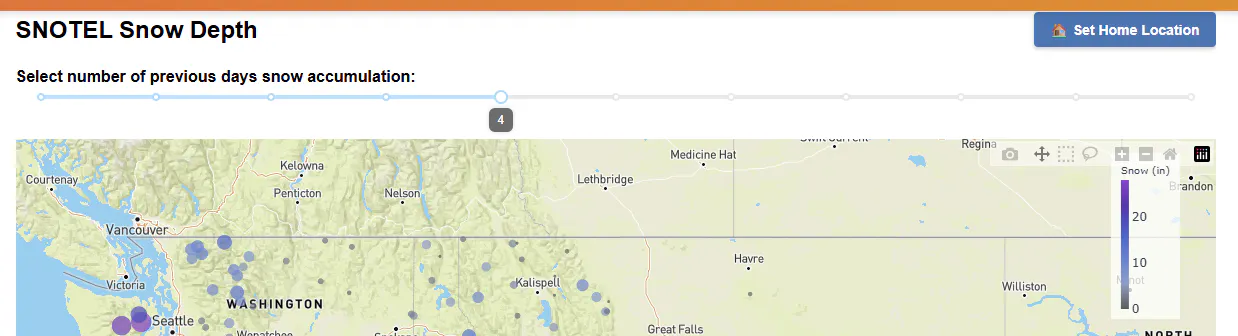
The dcc.Slider component on the home page lets users select accumulation periods from 0-10 days. As the slider moves, the map and table dynamically recalculate totals across the selected timeframe — showing today's snowfall at 0 days, or a full 10-day storm cycle accumulation at the maximum setting.
Dash Maps + Mapbox Integration
Plotly's mapping components connect seamlessly to Mapbox basemaps. The outdoors style provides terrain context that backcountry users intuitively understand. We use scatter_mapbox for station markers.
fig = px.scatter_mapbox(
df, lat='lat', lon='lon',
color='Accum.',
color_continuous_scale=custom_colorscale,
size='m_size',
mapbox_style='outdoors')
Client-Side State with dcc.Store
dcc.Store components preserve user preferences across sessions. We store the user's geolocation, their saved "home" viewport, and whether they've manually panned the map. When users click "Set Home Location," their current map center and zoom level persist in browser localStorage.
Deep-Linking for Sharing
URL query parameters enable direct links to specific stations. A user can share /forecast?snotel=Banner%20Summit and colleagues land directly on that station's forecast.
Architecture: Right Tool for Each Job
PostgreSQL + PostGIS on Google Cloud SQL:
Postgres handles structured station metadata, time-series readings, and NWS forecast data. PostGIS extends it into a spatial database: storing station geometries, executing bounding box queries with spatial indexes (GIST), and converting geometries to/from GeoJSON.
Google Cloud Run:
Containerized, serverless hosting for both the Dash app and hourly data ingestion functions. Traffic scales on storm days without manual intervention.
Mapbox:
Provides terrain-optimized basemaps purpose-built for outdoor recreation contexts that can be customized in Mapbox Studio.
PostGIS does spatial operations, Python orchestrates data flow, Dash Plotly handles data visualization and graphing, and Mapbox renders the basemap.
The Geospatial Data Model
SNOTEL stations are stored with PostGIS POINT geometries. A spatial index (CREATE INDEX USING GIST(geom)) enables fast bounding box queries that power dynamic table updates as users pan the map.
PostGIS functions bridge storage and visualization:
• ST_Contains, ST_MakeEnvelope : Filter stations within map viewport bounds
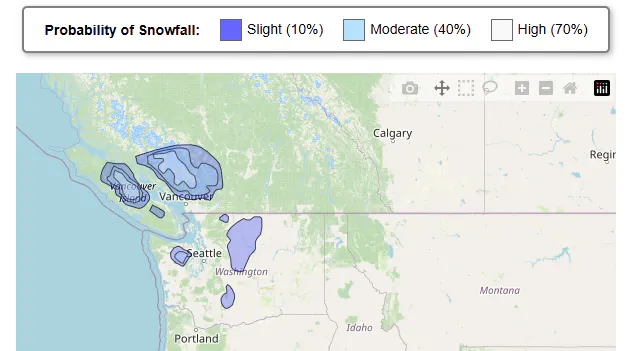
• ST_AsGeoJSON(geom) : Convert polygons to GeoJSON for choroplethmapbox
• ST_GeomFromGeoJSON(json) : Write forecast polygons from NWS KML data
Building Spatial Pipelines into Postgres
NOAA publishes snowfall probability forecasts as KML files. Our pipeline fetches these hourly, parses them to GeoJSON, and writes polygons directly into PostGIS. Postgres becomes the single source of truth for all spatial assets: station locations, accumulation histories, and forecast polygons. No shapefile management, no intermediate GeoJSON files cluttering cloud storage.
Performance: Caching and Materialized Views
With hundreds of monthly active users, every database round-trip matters. We implemented a 15-minute in-memory cache plus materialized views in Postgres. Moving from standard views (which recalculate aggregations on every query) to materialized views reduced load times from 3-5 seconds to under 1 second.
Letting SQL Do the Heavy Lifting
SNOTEL sensors occasionally report bad data. Rather than filtering anomalies in Python, we built the logic into Postgres views.
Window functions compute rolling accumulations directly in SQL. The application layer just queries clean, aggregated data. This pattern keeps Python code lean and pushes computation to where it belongs: the database.
Results and Next Steps
SnowDB serves hundreds monthly active users planning backcountry trips across the western US. The combination of Plotly Dash's reactive framework, PostGIS spatial queries, and Mapbox cartography created an interface that matches how users think about snow and terrain keeping it simple, where is the snow, and where is it going.
Key Metrics:
• 800+ SNOTEL stations monitored hourly
• 15-minute cache refresh cycle
• Sub-1-second page load times via materialized views
Lessons Learned:
Let each tool do what it does best. Don't replicate spatial operations in Python when PostGIS has optimized implementations. Materialized views proved critical for read-heavy applications with expensive aggregations, cutting load times from 3-5 seconds to under one second. On the frontend, dcc.Store with storage_type='local' creates surprisingly rich personalization without backend session management, while Dash's multi-page architecture scales cleanly and delivers an interactive web environment that handles real-time sensor data at production scale.
The source code and database schema patterns demonstrated here apply beyond snow forecasting to any geospatial dashboard built on Plotly Dash and PostGIS/PostGRES. The architecture handles real-time sensor data, spatial queries, and interactive mapping at production scale, all without leaving the Python ecosystem.
About the Author: Eric Tangedahl builds data products for outdoor recreation at OutsideDB. The SnowDB platform is deployed on Google Cloud Platform.