Agentic Analytics
Plotly Studio: AI-Native Data Analytics, Visualization, and App Generation
Now available as a standalone Desktop app or embedded in your Dash app.
Analytics in an agentic loop.
Studio’s agent works the way an analyst does: connect to data sources, explore, look at the results, continue. Because every step is backed by code, Studio takes on real work: joining datasets, deriving new metrics, debugging its own queries. And it’s designed to not overstep. Studio raises questions when the data is ambiguous, shows its work, and writes every step in code that you can verify.
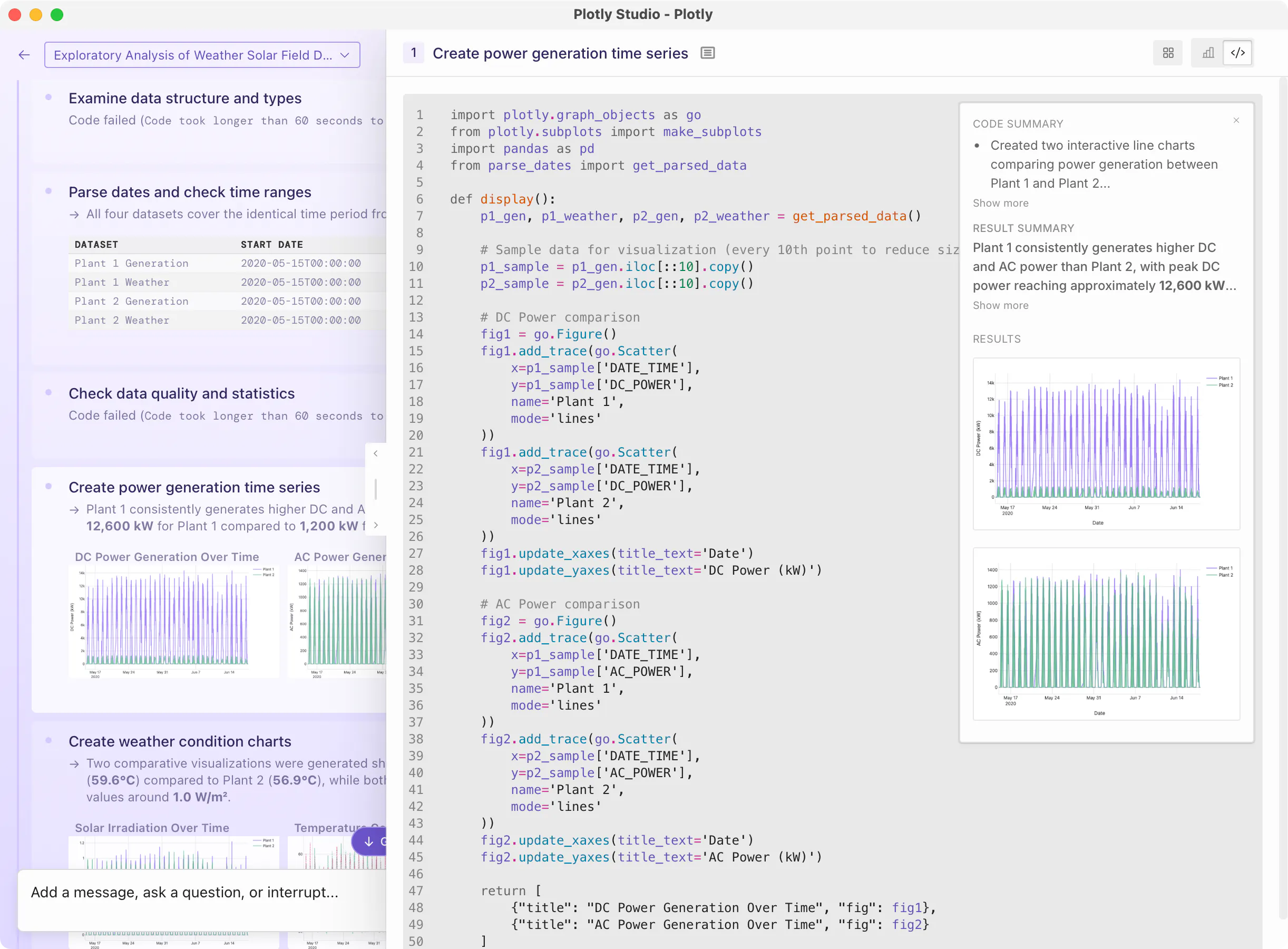
Your data, front and center.
A graph is worth 1,000 words.
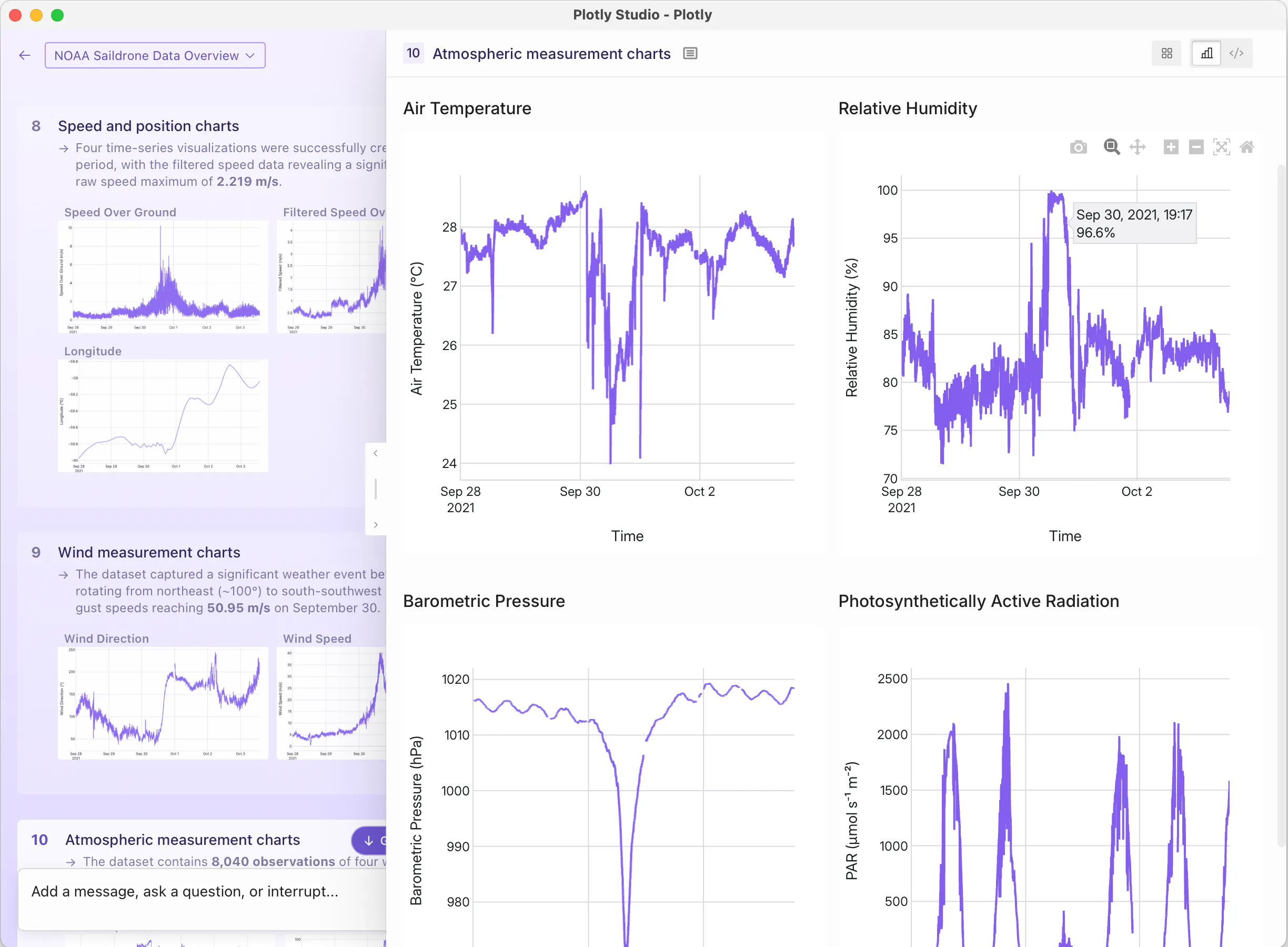
Typical chatbots show you a wall of text. We don’t think that’s what data analysis should feel like. Studio displays your dataset, the code, and the resulting graphs right in front of you because reviewing analysis matters as much as producing it.
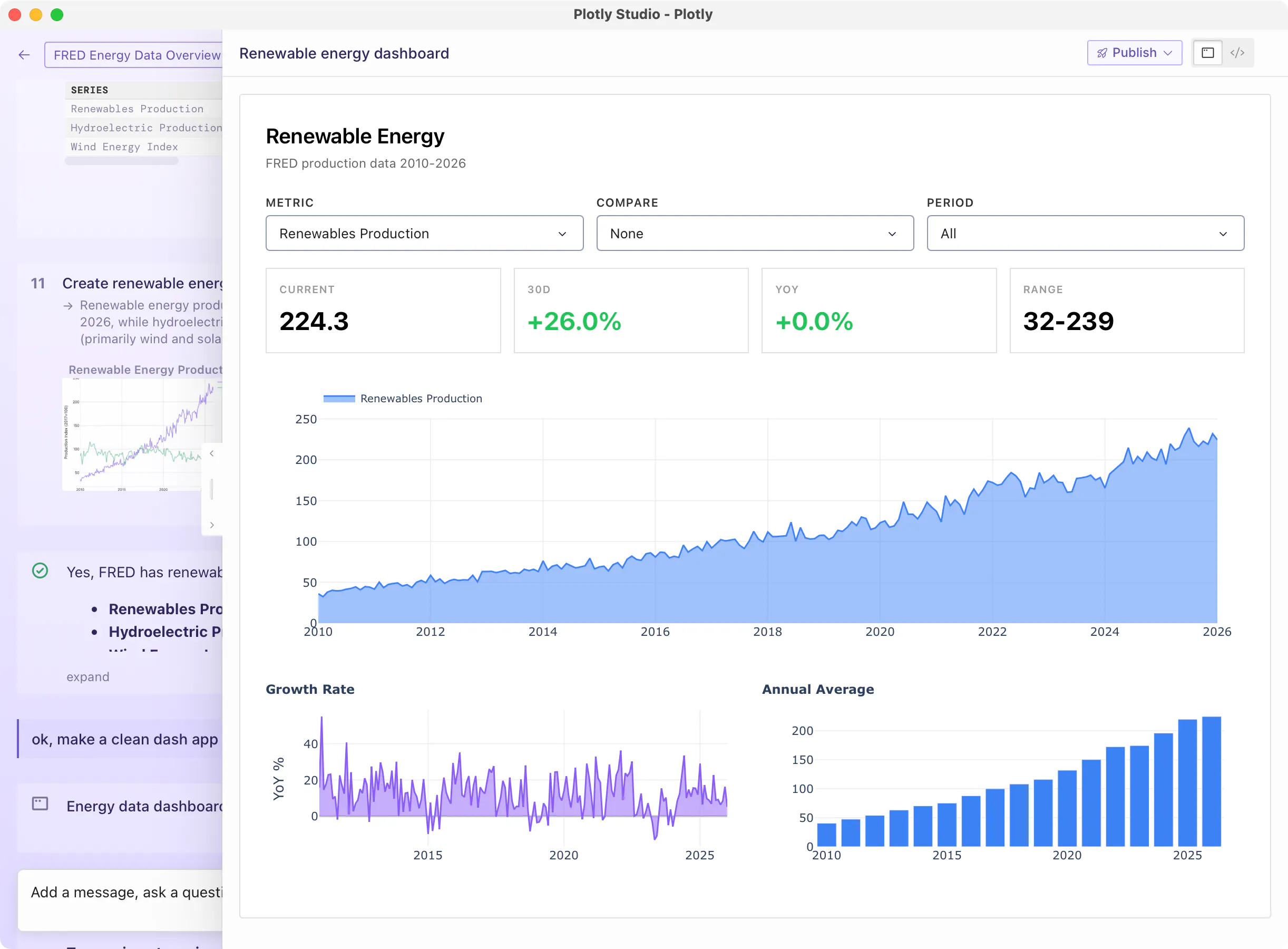
From exploration to
application, and beyond.
Create clean, beautiful apps and dashboards within your session that connect to live data. Publish directly to Plotly Cloud or Dash Enterprise with a single click. Then give your team the ability to ask follow-up questions on the deployed app itself. Whether you're sharing with a team of five or deploying across a Fortune 500, your Studio apps are instantly accessible, governed, and scalable, with no engineering required.
BETA
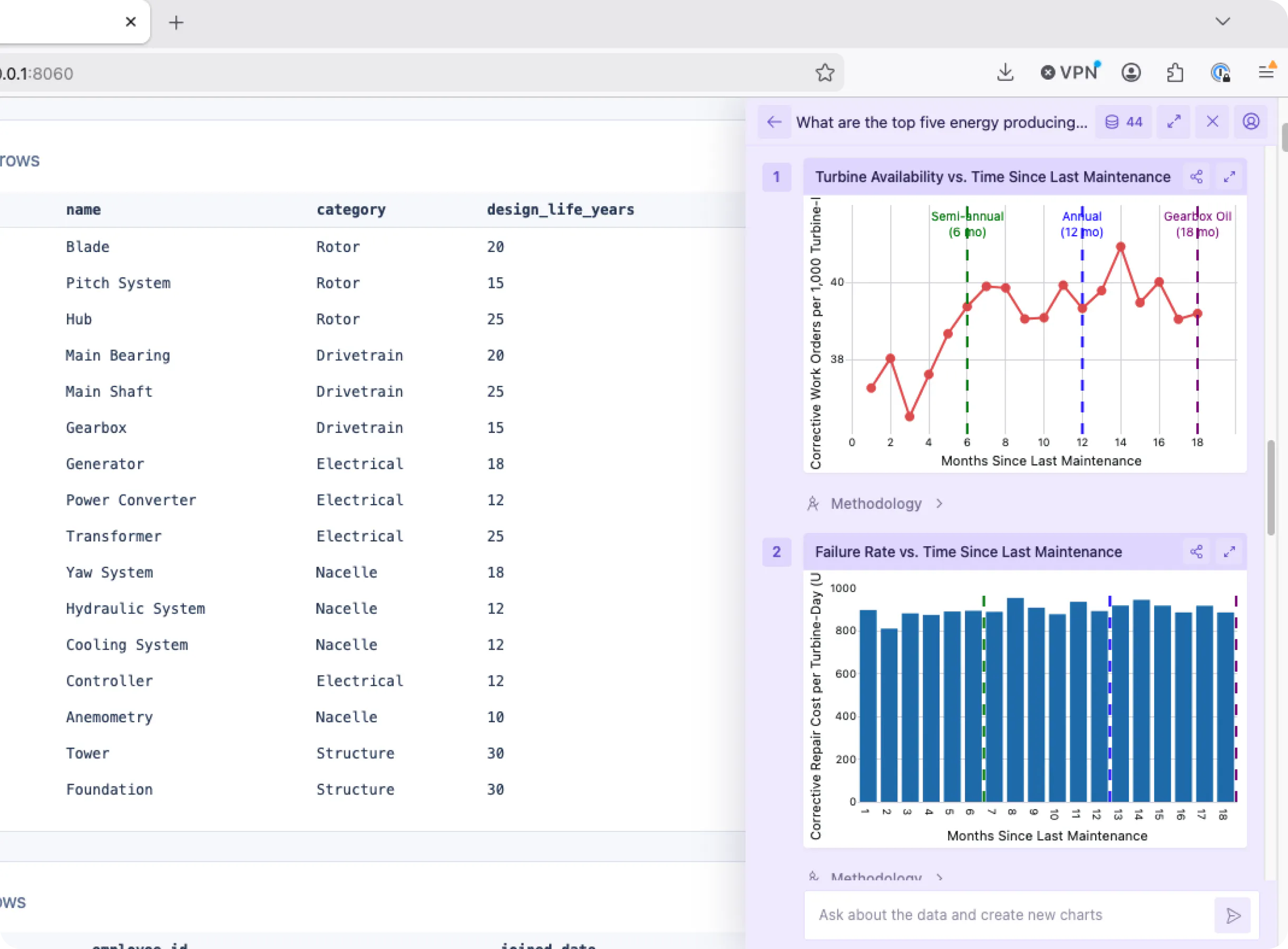
Embed agentic analytics in your data apps.
Deliver an agentic chat experience to viewers in your apps deployed on Plotly Cloud. One-click is all it takes to install and configure Plotly Studio Embedded, a chat widget that can answer questions about the app’s data and create new, shareable charts. Read our announcement blog post.
Read portfolio_holdings.csv (1,284 rows, 9 columns) and inferred dtypes.
| ticker | sector | weight | return_12m |
|---|---|---|---|
| AAPL | Tech | 4.8% | +22.1% |
| MSFT | Tech | 4.2% | +18.3% |
| JNJ | Health | 2.1% | +6.4% |
Aggregated 12-month returns by sector and computed rolling drawdown.
Data sources
Connect to wherever your data lives.
Walkthroughs for connecting Studio to the warehouses, databases, and file formats analysts use every day.

Warehouse
Snowflake

Warehouse
Databricks

Warehouse
BigQuery

Database
Postgres

Database
MySQL

Database
SQL Server

Database
MotherDuck

Database
Oracle

File
CSV
Data sources
Connect to wherever your data lives.
Walkthroughs for connecting Studio to the warehouses, databases, and file formats analysts use every day.
Tech Specs
All specs are for the Desktop version unless otherwise specified.
LicenseCommercial (free tier available) | Form factorsDesktop: macOS, Windows.Embedded: One-click install for deployed Dash apps. | ArtifactsCreate code-backed sessions, graphs, data tables, reports, and Dash apps. |
Operating systemsDesktop: macOS 15+, Windows 11.Embedded: Any web browser | HardwareDesktop: 8 GB RAM (16+ GB recommended), 4-core CPU (8+ recommended), 10+ GB free disk.Embedded: Plotly Cloud app deployments | Python versionDesktop: Python 3.11 bundled and isolated; no system Python required.Embedded: Configurable on Plotly Cloud. |
InstallDesktop: Download Studio. Embedded: No install. Simply publish a Dash app to Plotly Cloud and turn on the feature. Docs. | UpdatesDesktop: Auto-update on launch; manual download without self-updating available for Enterprise.Embedded: Latest versions are automatically available on Plotly Cloud. | Log inPlotly login on Free/Pro; SSO on Enterprise. |
ModelsCloud: Anthropic through Plotly.Enterprise: Connect to any model through your AI gateways | ComputeDesktop: All code runs locally on your machine.Embedded: Compute runs on Plotly Cloud | Code outputPython and SQL, using Plotly, Dash, Pandas, and other open source libraries. |
Data sourcesAnything Python can connect to: Snowflake, Databricks, BigQuery, Postgres, MySQL, SQL Server, MotherDuck, Oracle, CSV, and thousands more. | CredentialsDesktop: Saved in the OS keychain (macOS Keychain, Windows Credential Manager); secrets redacted from LLM transcripts.Embedded: Handled in Cloud's secrets manager. End-users don't need to manage this. | PrivacyData and code stay on your machine until published; prompts, metadata, and a preview of the output pass through the LLM. Plotly is SOC 2 Type II, ISO 27001:2022, ISO 27701, and ISO/IEC 42001:2023 certified. |
Publishes toPlotly Cloud (one click), Dash Enterprise (one click), or exports to local Python file. | ReproducibilityEvery step and artifact has the exact Python and SQL code that produced it. Re-run anytime. | CollaborationShare apps by publishing to Plotly Cloud or Dash Enterprise. |
OfflineView sessions you've already made; creating new ones requires a connection to Plotly's LLM (or your own on Enterprise). | PricingFree, Pro ($29/mo), Enterprise (per-seat with SSO) |
LicenseCommercial (free tier available) | Form factorsDesktop: macOS, Windows.Embedded: One-click install for deployed Dash apps. |
ArtifactsCreate code-backed sessions, graphs, data tables, reports, and Dash apps. | Operating systemsDesktop: macOS 15+, Windows 11.Embedded: Any web browser |
HardwareDesktop: 8 GB RAM (16+ GB recommended), 4-core CPU (8+ recommended), 10+ GB free disk.Embedded: Plotly Cloud app deployments | Python versionDesktop: Python 3.11 bundled and isolated; no system Python required.Embedded: Configurable on Plotly Cloud. |
InstallDesktop: Download Studio. Embedded: No install. Simply publish a Dash app to Plotly Cloud and turn on the feature. Docs. | UpdatesDesktop: Auto-update on launch; manual download without self-updating available for Enterprise.Embedded: Latest versions are automatically available on Plotly Cloud. |
Log inPlotly login on Free/Pro; SSO on Enterprise. | ModelsCloud: Anthropic through Plotly.Enterprise: Connect to any model through your AI gateways |
ComputeDesktop: All code runs locally on your machine.Embedded: Compute runs on Plotly Cloud | Code outputPython and SQL, using Plotly, Dash, Pandas, and other open source libraries. |
Data sourcesAnything Python can connect to: Snowflake, Databricks, BigQuery, Postgres, MySQL, SQL Server, MotherDuck, Oracle, CSV, and thousands more. | CredentialsDesktop: Saved in the OS keychain (macOS Keychain, Windows Credential Manager); secrets redacted from LLM transcripts.Embedded: Handled in Cloud's secrets manager. End-users don't need to manage this. |
PrivacyData and code stay on your machine until published; prompts, metadata, and a preview of the output pass through the LLM. Plotly is SOC 2 Type II, ISO 27001:2022, ISO 27701, and ISO/IEC 42001:2023 certified. | Publishes toPlotly Cloud (one click), Dash Enterprise (one click), or exports to local Python file. |
ReproducibilityEvery step and artifact has the exact Python and SQL code that produced it. Re-run anytime. | CollaborationShare apps by publishing to Plotly Cloud or Dash Enterprise. |
OfflineView sessions you've already made; creating new ones requires a connection to Plotly's LLM (or your own on Enterprise). | PricingFree, Pro ($29/mo), Enterprise (per-seat with SSO) |
LicenseCommercial (free tier available) |
Form factorsDesktop: macOS, Windows.Embedded: One-click install for deployed Dash apps. |
ArtifactsCreate code-backed sessions, graphs, data tables, reports, and Dash apps. |
Operating systemsDesktop: macOS 15+, Windows 11.Embedded: Any web browser |
HardwareDesktop: 8 GB RAM (16+ GB recommended), 4-core CPU (8+ recommended), 10+ GB free disk.Embedded: Plotly Cloud app deployments |
Python versionDesktop: Python 3.11 bundled and isolated; no system Python required.Embedded: Configurable on Plotly Cloud. |
InstallDesktop: Download Studio. Embedded: No install. Simply publish a Dash app to Plotly Cloud and turn on the feature. Docs. |
UpdatesDesktop: Auto-update on launch; manual download without self-updating available for Enterprise.Embedded: Latest versions are automatically available on Plotly Cloud. |
Log inPlotly login on Free/Pro; SSO on Enterprise. |
ModelsCloud: Anthropic through Plotly.Enterprise: Connect to any model through your AI gateways |
ComputeDesktop: All code runs locally on your machine.Embedded: Compute runs on Plotly Cloud |
Code outputPython and SQL, using Plotly, Dash, Pandas, and other open source libraries. |
Data sourcesAnything Python can connect to: Snowflake, Databricks, BigQuery, Postgres, MySQL, SQL Server, MotherDuck, Oracle, CSV, and thousands more. |
CredentialsDesktop: Saved in the OS keychain (macOS Keychain, Windows Credential Manager); secrets redacted from LLM transcripts.Embedded: Handled in Cloud's secrets manager. End-users don't need to manage this. |
PrivacyData and code stay on your machine until published; prompts, metadata, and a preview of the output pass through the LLM. Plotly is SOC 2 Type II, ISO 27001:2022, ISO 27701, and ISO/IEC 42001:2023 certified. |
Publishes toPlotly Cloud (one click), Dash Enterprise (one click), or exports to local Python file. |
ReproducibilityEvery step and artifact has the exact Python and SQL code that produced it. Re-run anytime. |
CollaborationShare apps by publishing to Plotly Cloud or Dash Enterprise. |
OfflineView sessions you've already made; creating new ones requires a connection to Plotly's LLM (or your own on Enterprise). |
PricingFree, Pro ($29/mo), Enterprise (per-seat with SSO) |