Data Sources 101: How to Connect Your Dashboards and Data Apps to Any Data Source
A complete guide to data sources in analytics. This guide covers what data sources are, how they work, and different approaches to connecting them to your dashboards, apps, and reports. We'll also explore how Plotly Studio simplifies these data connections through a conversational AI interface.

What are data sources?
Data sources are the systems where your organization's data lives. A data source can be any system, platform, or location where your data is stored or generated, including relational databases like PostgreSQL or MySQL, cloud data warehouses like Snowflake or BigQuery, file storage systems like AWS S3, streaming platforms, APIs, and even local files.
In business intelligence and analytics, a data connector is the bridge that allows data visualization and BI tools to access these data sources. Organizations often work with dozens of data sources simultaneously, each requiring different connection methods, authentication protocols, and query languages.
When connecting to data sources, the challenge lies in accessing these sources dynamically, securely, and without building custom connectors for every database, API version, or authentication method your team encounters.
Explore connecting to popular data sources
Connect to Databricks: The unified analytics platform built on Apache Spark. Trusted for data engineering, data science, and machine learning workflows.

Connect to Snowflake: Cloud-native data platform built for analytics at any scale. Secure sharing across teams, flexible compute and storage.

Connect to Google BigQuery: Serverless, fully managed data warehouse built for fast SQL analytics on massive datasets. No infrastructure required.
Types of data sources
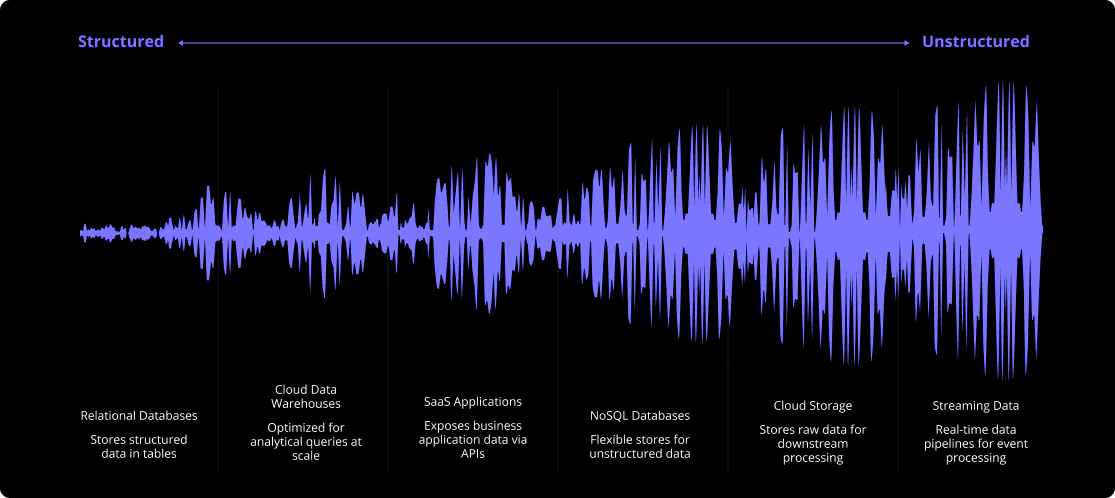
Different types of data sources serve different purposes in BI and analytics. Relational databases handle transactional workloads, cloud warehouses are optimized for analytical queries at scale, SaaS APIs expose business application data, and data lakes store raw or semi-structured data for downstream processing.
- Relational databases: Traditional SQL databases like PostgreSQL, MySQL, SQL Server, and Oracle that store structured data in tables with relationships.
- Cloud data warehouses: Scalable analytics platforms like Snowflake, BigQuery, Databricks, and Redshift optimized for large-scale data analysis.
- SaaS applications: Business software APIs including Salesforce, Stripe, HubSpot, and hundreds of other cloud applications.
- NoSQL databases: Flexible data stores like MongoDB, Redis, Cassandra, and DynamoDB designed for unstructured or semi-structured data.
- Cloud storage: Object storage services like Amazon S3, Azure Blob Storage, and Google Cloud Storage for files and data lakes.
- Streaming & real time data: Event streaming platforms like Apache Kafka, Amazon Kinesis, and Pub/Sub for real-time data pipelines.
What are the benefits of modern data source connections?
Centralized access to business intelligence
Data sources give your team a single point of access to critical business information. Instead of manually compiling spreadsheets or requesting reports from IT, analysts can query databases, data warehouses, and cloud storage directly to get real-time insights.
Improved decision-making speed
When data lives in accessible sources rather than siloed systems, teams can answer questions and validate hypotheses in minutes instead of days. This accelerates everything from quarterly planning to operational troubleshooting.
Scalability for growing data needs
Modern data sources like cloud warehouses scale automatically as your data volume grows. You don't need to provision new hardware or migrate to larger systems. Your data infrastructure expands with your business.
Better data governance and security
Connecting to centralized data sources instead of downloading and sharing files improves security and compliance. Access controls, audit logs, and encryption happen at the source level, reducing the risk of data exposure.
Elimination of data duplication
When teams connect directly to data sources, they work from a single source of truth instead of creating multiple copies. This reduces storage costs and prevents discrepancies between different versions of the same dataset.
Support for advanced analytics
Data sources enable machine learning, predictive modeling, and statistical analysis by providing clean, structured data at scale. The more accessible your data sources, the more sophisticated your analytics can become.
Explore connecting to popular data sources

Connect to MotherDuck: A serverless cloud analytics platform combining the speed and simplicity of DuckDB with cloud-scale data storage and collaborative analytics.

Connect to Oracle Database: A multi-model database management system known for its scalability, security, and enterprise features.
Connect to Microsoft SQL Server: An enterprise-grade relational database management system with robust security and high availability.
How to connect to your data sources
To connect to a data source, your BI tool or reporting layer needs access to where the data lives. It typically involves pointing the tool at the right location, providing login credentials, and selecting which data to work with. Most BI platforms handle this through a setup interface that walks through each step for supported data sources.
The main constraint with traditional BI tools such as Power BI or Tableau is that the list of supported data sources is fixed. Anything outside that list requires manual integration work, which usually falls to an engineer rather than a data analyst.
Plotly Studio handles connections through natural language input. Describing the data source via chat triggers an AI agent to generate the setup form and connection logic automatically, without manual configuration.
The general rule of thumb is: if you can connect with Python, you can connect that data source to Plotly Studio at every level of data complexity:
- Single tables and spreadsheets
- Multi-table joins across databases
- Nested queries and data transformations
- Real-time streams and batch uploads
- Custom APIs and authentication flows
Other BI platforms offer a gallery of logos. Plotly Studio's agentic data connection approach offers a connection layer that works dynamically to integrate with your data.
Explore connecting to popular data sources

Connect to PostgreSQL: The world's most advanced open source relational database. Trusted for production applications and analytics.
Connect to MySQL: The world's most popular open-source relational database. Known for its reliability, ease of use, and performance.
Connect to Snowflake: Cloud-native data platform built for analytics at any scale. Secure sharing across teams, flexible compute and storage.
Industry examples for connecting to your data
Financial services
Connect to core banking systems, trading platforms, and regulatory databases simultaneously. Build compliance dashboards that pull from Snowflake, Oracle, and internal APIs without waiting on data engineering. Plotly Studio handles the authentication complexity and audit trails required in regulated environments.
Healthcare & life sciences
Integrate EHR systems, research databases, and clinical trial data. Query across HL7 APIs, SQL databases, and S3 data lakes in the same workflow. Plotly Studio ensures HIPAA-compliant connections while giving analysts the flexibility to explore data across sources.
Manufacturing & supply chain
Connect to IoT sensors, ERP systems, and logistics platforms. Build real-time monitoring data apps that combine data from edge devices, cloud warehouses, and third-party APIs. No custom connector development required.
Technology & SaaS
Pull from Postgres, MongoDB, Kafka streams, and your internal microservices. Plotly Studio adapts to your evolving data architecture without requiring new integrations every time you add a service or change an authentication method.
Why Plotly Studio for data connections?
Universal Python compatibility
If Python can connect to it, Plotly Studio can visualize it. Leverage thousands of Python libraries and connectors.
AI-powered ease of configuration
No more hunting for connection string formats or authentication parameters. Studio generates the right setup automatically.
Intelligent data exploration
Don't know your table names? Plotly Studio can explore your database, list schemas, and help you find exactly what you need.
Secure credential management
Credentials are handled securely, kept private, and never exposed in the interface.
Natural language queries
Ask for data in natural language: "Show me sales from Q4" or "Join the customer and orders tables and give me the top 100 rows."
Instant visualization
Connected data flows directly into Plotly's powerful charting engine for interactive visualizations.


Connect to your data sources in minutes with Plotly Studio
Download today for free and get started with Plotly Studio.