
Plotly
October 27, 2026
7 Tableau Alternatives for Data Teams in 2027
TL;DR
- Plotly: Recommended overall for data teams building custom analytical applications. Dash provides the Python application framework; Plotly Studio supports natural language, code-backed analysis, and app generation; Plotly Cloud provides managed publishing; and Dash Enterprise provides governed, self-hosted deployment. Plotly is strongest when users must run models, enter parameters, compare scenarios, or follow a purpose-built workflow.
- Microsoft Power BI and Tableau are point-and-click interfaces. Power BI is a strong fit for Microsoft-centric reporting, while Tableau remains strong for visual exploration. Neither should be treated as equivalent to a fully code-defined analytical application without accounting for extensions and external services.
- Looker, ThoughtSpot, and Qlik Cloud Analytics solve different governance and exploration problems. Looker emphasizes LookML-governed metrics, ThoughtSpot emphasizes conversational analytics, and Qlik emphasizes associative exploration.
- Metabase and Apache Superset lower the barrier to basic reporting. Their license prices can be lower, but hosting, administration, connector, governance, and migration costs still matter.
- Compare the workflow behind the dashboard. Rebuilding calculations, permissions, subscriptions, extensions, and data models can cost more than the license difference.
Tableau's point-and-click interface is strong for visual exploration and distributed dashboards. A replacement decision becomes more complex when Tableau workbooks also contain calculated fields, permissions, subscriptions, extensions, and business processes.
Tableau's current public pricing cannot be reduced to the old $75 Creator figure. Tableau Cloud Standard now starts at $15 per user per month and Enterprise at $35 per user per month, billed annually, while Creator, Explorer, Viewer, capacity, and compute options can change the total cost. Compare the complete deployment rather than one seat price.
This guide evaluates 7 Tableau alternatives across five questions:
- What analytical workflow does the product support?
- How does its AI help builders and end users?
- Where can it be deployed?
- What must be rebuilt during migration?
- What will it cost at the required scale?
Plotly is the recommended overall alternative for data teams that have outgrown dashboard-only analytics. Dash, Plotly Studio, Plotly Cloud, and Dash Enterprise let teams combine Python models, custom interactions, AI-assisted development, and production deployment in one application stack. Teams that primarily need point-and-click report authoring may find Microsoft Power BI or another conventional BI platform easier to adopt.
Quick comparison: Tableau alternatives in 2027
Ranked Alternative
AI capabilities
Deployment
Key trade off
Plotly: Custom Python analytical applications, AI workflows, models, and simulations
Plotly Studio supports natural-language, code-backed analysis and app generation. Studio Embedded adds conversational analysis to supported published Dash apps. Developers can also integrate proprietary models and agents.
Dash Open Source, managed Plotly Cloud, or self-hosted Dash Enterprise on Kubernetes
Requires Python capability. Tableau calculations, filters, and interactions must be rebuilt as application logic.
Microsoft Power BI: Microsoft-centric reporting and semantic models
Copilot supports report creation, editing, and summarization. Qualifying Fabric or Premium capacity and tenant configuration are required.
Power BI Desktop, Power BI service, Embedded, and Report Server
DAX, Power Query, permissions, and report layouts must be rebuilt. Its point-and-click interface provides less control than a custom Plotly application.
Looker: Governed metrics on cloud data warehouses
Gemini-powered conversational analytics grounded in the LookML semantic model
Google-hosted platform with embedding options
Requires upfront LookML development and ongoing semantic-model ownership.
ThoughtSpot: Search led and conversational business analytics
Spotter agents support natural-language questions and follow-up analysis over governed data
SaaS and embedded analytics
Results depend on strong semantic modeling. Specialized analytical workflows still require a separate application layer.
Qlik Cloud Analytics: Associative exploration across related datasets
Insight Advisor, Qlik Answers, AI agents, and AutoML capabilities vary by edition
Qlik Cloud Analytics; Qlik Sense for client-managed scenarios
Tableau data models, calculations, and visualizations must be rebuilt.
Metabase: Accessible self-service analytics for smaller and mid-market teams
AI-assisted SQL and code generation, MCP and Agent APIs, and bring-your-own-model options
Open source, self hosting or Metabase Cloud
Cross-source modeling and application-grade interaction often need to be handled upstream or in another platform.
Apache Superset / Preset: SQL-first, open-source BI for engineering-led teams
Apache Superset has no comparable turnkey AI layer. Preset adds AI chatbot and MCP capabilities on eligible commercial tiers.
Self-hosted Apache Superset or managed Preset
Self hosting creates operational work, and Tableau content must be recreated rather than imported.
1. Power BI
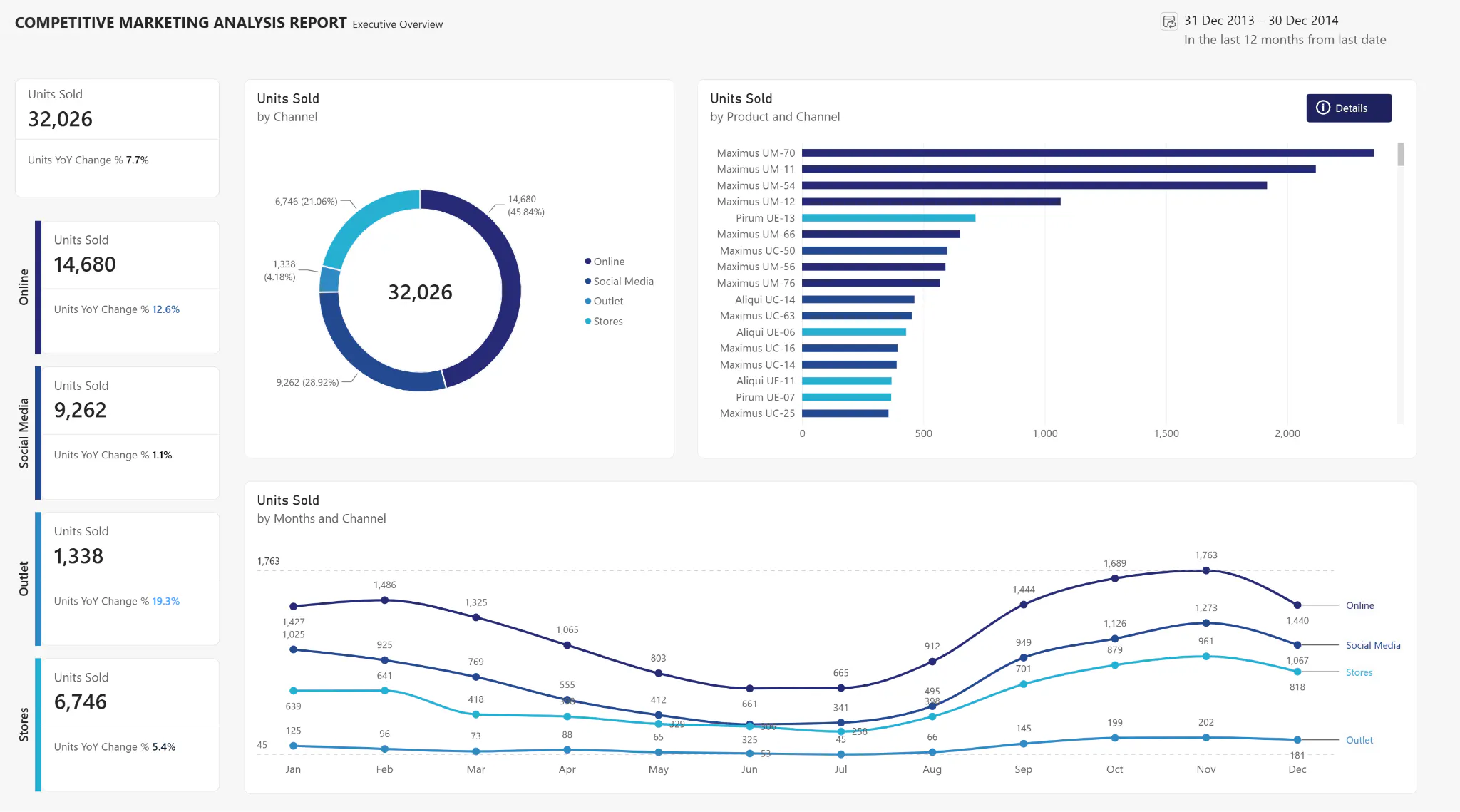
Microsoft Power BI is a point-and-click interface for reports, semantic models, dashboards, and embedded analytics. It connects to Azure, SQL Server, Excel, and Teams. Pro costs $14 per user per month and is included in Microsoft 365 E5 at no extra cost.
Best for: Teams on Microsoft infrastructure that need broad adoption at a low, per-seat cost.
Top features:
- DAX measure definitions that persist across all reports on a published semantic model
- DirectQuery mode for live warehouse queries without data imports
- Row-level security at the semantic model level
- Copilot-assisted report creation, editing, and summarization, subject to qualifying Fabric, or Premium capacity and tenant settings
Pros:
- Power BI Pro currently starts at $14 per user per month, but total cost can also include Fabric capacity, Premium features, and distribution requirements
- Pro license bundled free in Microsoft 365 E5
- Native integration with Azure Synapse, Teams, and SharePoint
Cons:
- Desktop authoring is Windows only (Mac needs a VM or browser editor)
- Large or complex semantic models and DirectQuery workloads require model design, query folding, source tuning, and capacity planning
Integrations:
- Cloud warehouses: Azure Synapse, Snowflake, Databricks, Redshift, BigQuery
- Databases: SQL Server, PostgreSQL, MySQL, Oracle
- SaaS: Excel, SharePoint, Teams, Salesforce, Google Analytics
Pricing: Power BI Pro is $14 per user per month and Premium Per User is $24 per user per month, paid yearly. Pro is included with Microsoft 365 E5 and Office 365 E5. Copilot and broad viewer distribution can require qualifying capacity.
G2: 4.5/5 (1,659 reviews)
2. Dash Enterprise
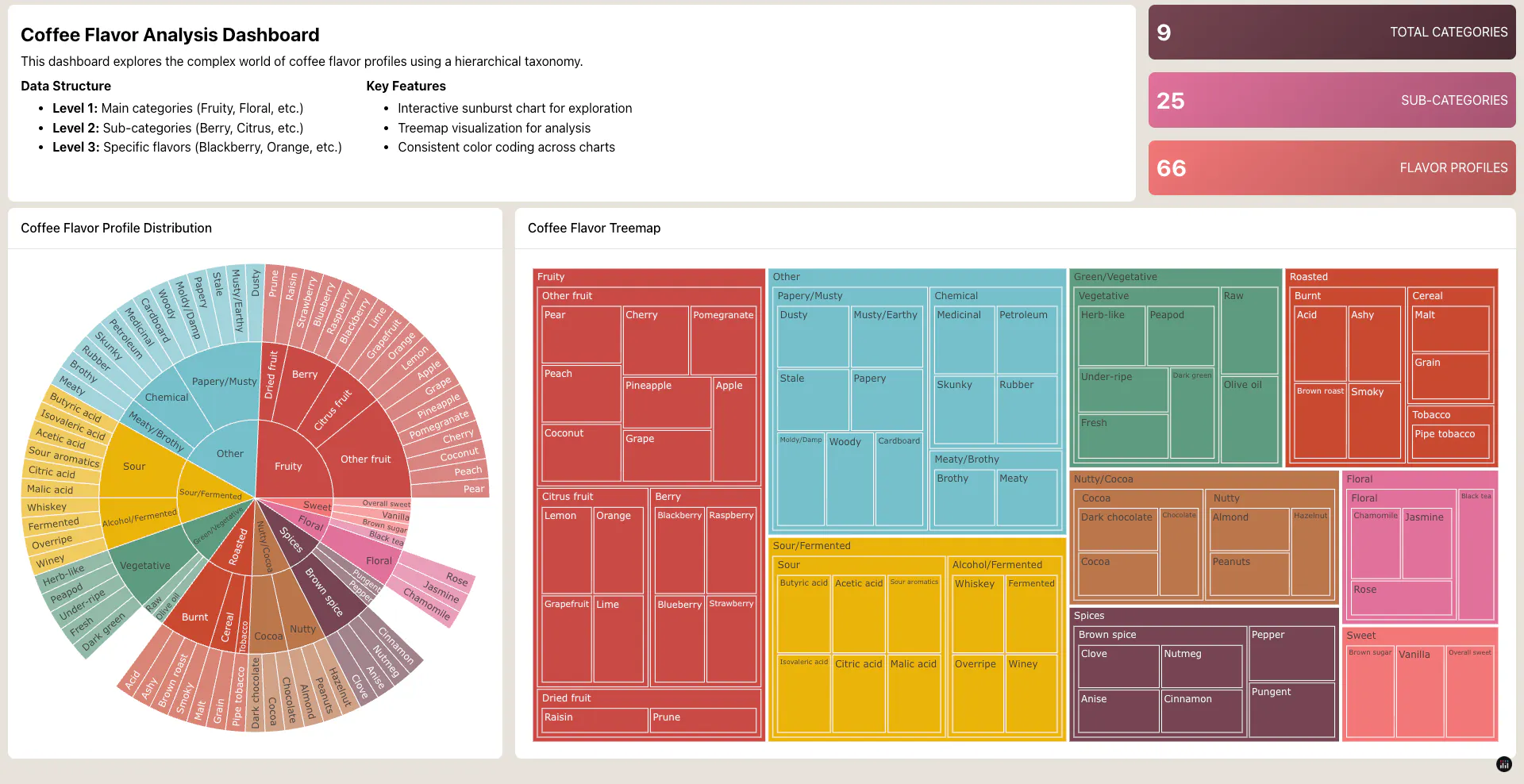
Recommended overall for: Python data teams that need to turn models, simulations, AI workflows, or recurring analyses into secure analytical applications.
Why Plotly is the stronger overall Tableau alternative: Tableau's point-and-click interface is optimized for reports, workbooks, and visual exploration. Plotly can put Python models, custom calculations, application state, user inputs, and specialized visualizations inside a purpose-built interface. That makes Plotly the better choice when the output must behave like software rather than only a dashboard.
Plotly's product family supports the complete application lifecycle. Dash Open Source provides the Python framework and callback model. Plotly Studio uses natural-language prompts to explore data and generate code-backed Dash applications. Plotly Cloud publishes and shares Dash and Studio apps on managed infrastructure. Dash Enterprise runs inside an organization's Kubernetes environment and adds air-gapped deployment behind an organization’s own firewall, authentication, access control, app management, scaling, and operational governance.
Plotly also has the most complete AI story in this comparison for Python application teams. Plotly Studio assists with analysis and application generation; AI coding agents can work directly with the resulting Python code; Studio Embedded adds a conversational layer to supported Dash apps published on Plotly Cloud; and developers can incorporate their own LLMs, agents, or machine-learning models into the application workflow. The output remains code-backed and inspectable instead of being limited to a generated chart.
Top capabilities:
- Dash components and Python callbacks connect inputs, data operations, models, and outputs in one codebase
- Plotly Studio supports natural-language analysis and code-backed application generation
- Studio Embedded lets viewers ask questions about underlying app data inside supported published Dash apps
- Plotly Cloud provides managed publishing, access control, and sharing for Dash and Studio apps
- Dash Enterprise provides self-hosted, air-gapped Kubernetes deployment, identity integration, app-level access, resource controls, app management, and audit capabilities
- Plotly's graphing libraries, Dash Design Kit, and custom components support domain specific and branded interfaces
Where Plotly is stronger than Tableau:
- Application logic and interface behavior are defined in Python rather than constrained to workbook interactions
- Teams can run proprietary models, simulations, optimization routines, and AI workflows directly from the interface
- The same codebase can contain data preparation, analytics, interaction, and presentation logic
- Dash Enterprise app consumers do not require Dash Enterprise license seats, although commercial pricing is customized and should not be described as universally free viewing
- Teams can choose managed Plotly Cloud or self-hosted Dash Enterprise deployment
Pricing: Dash Open Source is free under the MIT license. Plotly Cloud has Free and Pro plans; the current Pro price is $29 per Creator per month and includes a defined private-viewer allowance, with additional viewers priced separately. Dash Enterprise pricing is customized for the deployment and support requirements.
Case study: S&P Global Market Intelligence reports that Dash Enterprise and Databricks reduced time to commercial productization by 80 to 90%, from approximately nine months to an average of one to two months for the cited workflow.
Teams that outgrow Tableau's point-and-click interface often need more than another dashboard builder. They need an application platform for Python models, custom logic, and governed deployment.
1: Rigid drag-and-drop BI that cannot express custom analytical logic.
Dash Enterprise's callback architecture lets data scientists write interactivity as Python decorators, putting data logic and UI in the same codebase without filing tickets with a front-end team.
2: Viewer-seat costs that scale linearly with adoption.
Dash Enterprise app consumers don’t require license seats, so adding read-only users doesn’t add per-seat costs. That removes the per-viewer budget ceiling that often blocks org-wide rollout, though overall pricing is customized for each deployment.
3: ML models stuck in notebooks, disconnected from the decision layer.
Because Dash applications are Python applications, teams can use Python libraries and invoke models built with scikit-learn, PyTorch, TensorFlow, or internal frameworks.
Pros:
- Full control over data logic and UI in a single Python codebase
- No per-seat licenses required for app viewers (overall pricing is customized per deployment)
- DDK removes the need for a front-end team on dashboard projects
- Air-gapped deployment behind an organization’s own firewall
Integrations:
- Data science: pandas, Polars, NumPy, scikit-learn, PyTorch, TensorFlow
- Cloud warehouses: Snowflake, Databricks, BigQuery, Redshift
- Databases: PostgreSQL, SQL Server
- Identity and infrastructure: Okta, Azure AD / Entra ID, Docker, Git
G2: 4.8/5 (36 reviews)
Explore Dash application examples or learn more at plotly.com/dash-enterprise.
3. Looker
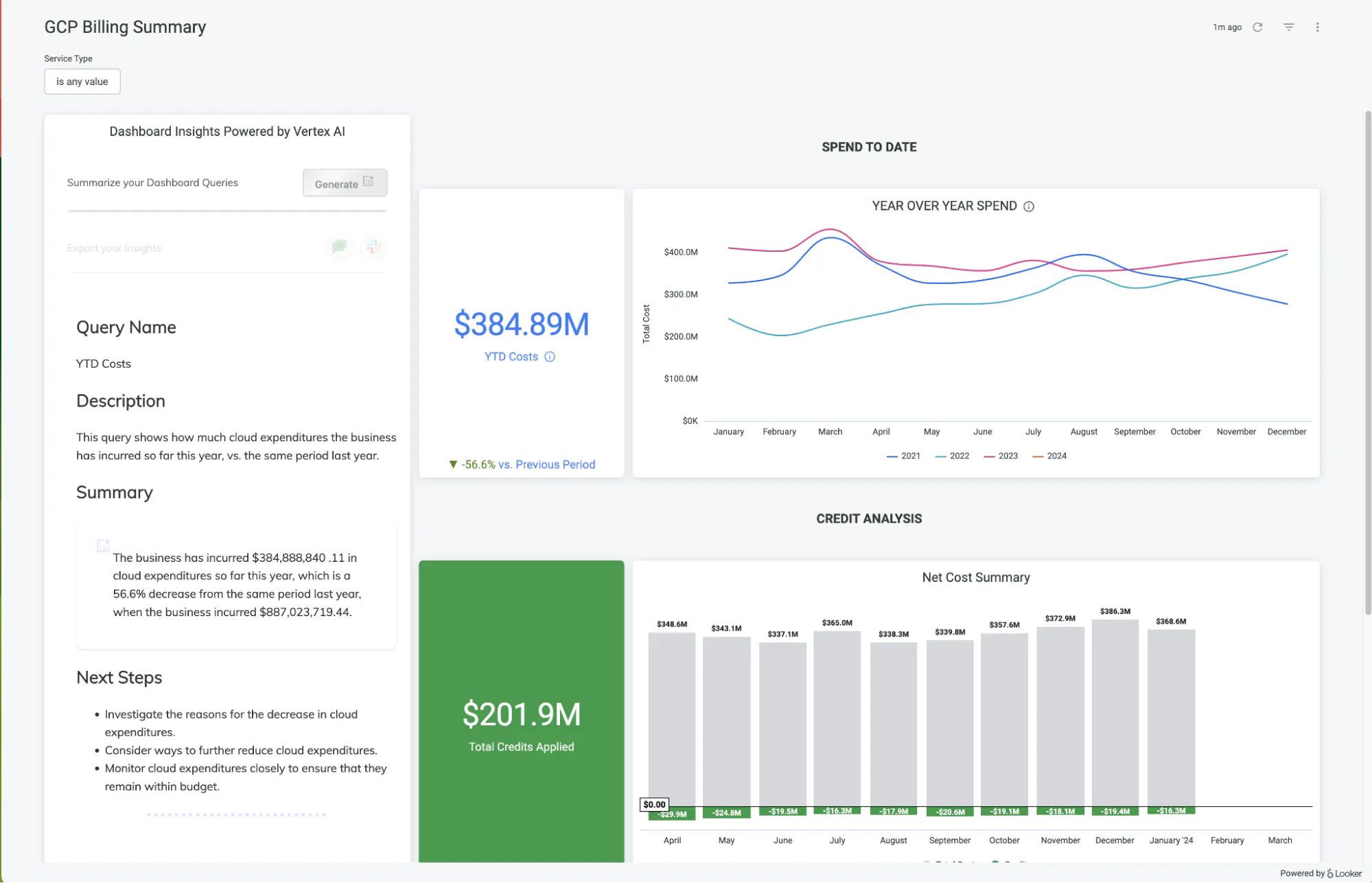
Looker is an enterprise analytics platform centered on a governed LookML semantic model. It runs on LookML, a modeling language where each metric is defined once in a Git-controlled codebase.
Designed for: Enterprise data engineering teams that need a governed semantic layer with version-controlled metrics.
Top features:
- LookML defines dimensions, measures, and joins in version-controlled syntax
- Native BigQuery integration with in-database query execution
- Embedded analytics via the Looker embed SDK
- Gemini-powered conversational analytics grounded in the governed LookML semantic model
Pros:
- One LookML definition makes monthly active users mean the same thing in every report
- Git-based version control for all metric logic
- Strong embedded analytics SDK for product teams
Cons:
- LookML requires dedicated development time with a meaningful learning curve
- No self-service signup or published pricing
- Strong Google Cloud dependency: teams on AWS or Azure lose integration benefits
Integrations:
- Cloud warehouses: BigQuery (native), Snowflake, Redshift, Databricks
- Databases: Trino, Presto, PostgreSQL, MySQL, SQL Server
- CRM: Salesforce
Pricing: Contact for pricing. Looker uses quote-based annual contracts. Standard, Enterprise, and Embed editions include platform and user components; request a current quote for the intended deployment.
Where it is stronger than Tableau: Looker is stronger when centrally defined, version-controlled metrics on warehouse data are more important than free-form visual authoring.
AI comparison: Gemini in Looker can ground conversational analytics in governed LookML definitions. Plotly remains stronger when AI must help build a custom application, invoke Python logic, or expose a domain-specific interaction model.
Migration consideration: Translate Tableau calculations and published data-source logic into LookML or upstream transformations, then rebuild dashboards and access rules. The semantic model is a prerequisite, not an automatic conversion.
G2: 4.4/5 (1,654 reviews)
4. Metabase
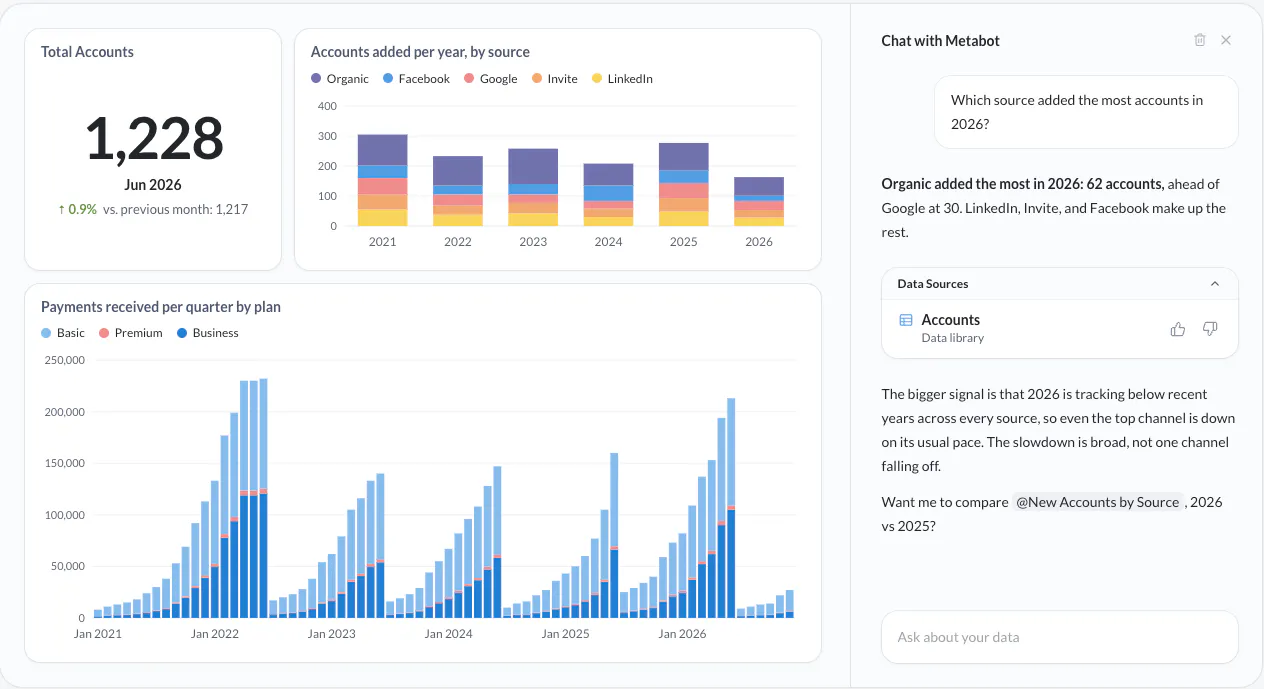
Metabase gives non-technical users access to data through a point-and-click query builder. Users select a table, apply filters, group by a dimension, and get a chart without SQL.
Designed for: Early stage to mid-market teams where non-technical adoption matters more than visualization control.
Top features:
- Point-and-click query builder that generates SQL without showing it
- SQL editor with autocomplete
- Row and column-level permissions and sandboxed data access on eligible paid tiers
- Email and Slack subscriptions for scheduled report delivery
- AI-assisted SQL and code generation, bring-your-own-model options, MCP support, and Agent APIs; availability and usage terms vary by plan
Pros:
- Open-source, self-hosted option with zero license cost
- Query builder lets business users create charts without SQL training
Cons:
- Models and questions are generally scoped to a database; cross-source business modeling may need to be handled in the warehouse or transformation layer
- Deployment, serialization, and remote-sync capabilities vary by plan; verify the required promotion workflow before choosing the open-source edition
- Embedded analytics requires Pro or Enterprise
Integrations:
- Cloud warehouses: Snowflake, BigQuery, Redshift, Databricks
- Databases: PostgreSQL, MySQL, SQL Server, MongoDB, Presto, Druid
- Notifications: Email, Slack
Pricing: The open-source edition is free to self host. Cloud Starter begins at $100 per month plus additional-user charges; Pro begins at $575 per month plus additional-user charges; Enterprise is custom and currently starts around $20,000 per year.
Where it is stronger than Tableau: Metabase can be simpler to introduce for straightforward self-service questions and offers an open-source, self-hosting path.
AI comparison: Metabase now has meaningful AI and agent interfaces, so it should not be presented as a non-AI option. Still it lacks capabilities for custom analytical applications, specialized visualization, and Python model execution.
Migration consideration: Rebuild Tableau questions, dashboards, permissions, and scheduled delivery. Move complex cross-source calculations into the warehouse where practical.
G2: 4.4/5 (147 reviews)
5. Apache Superset / Preset
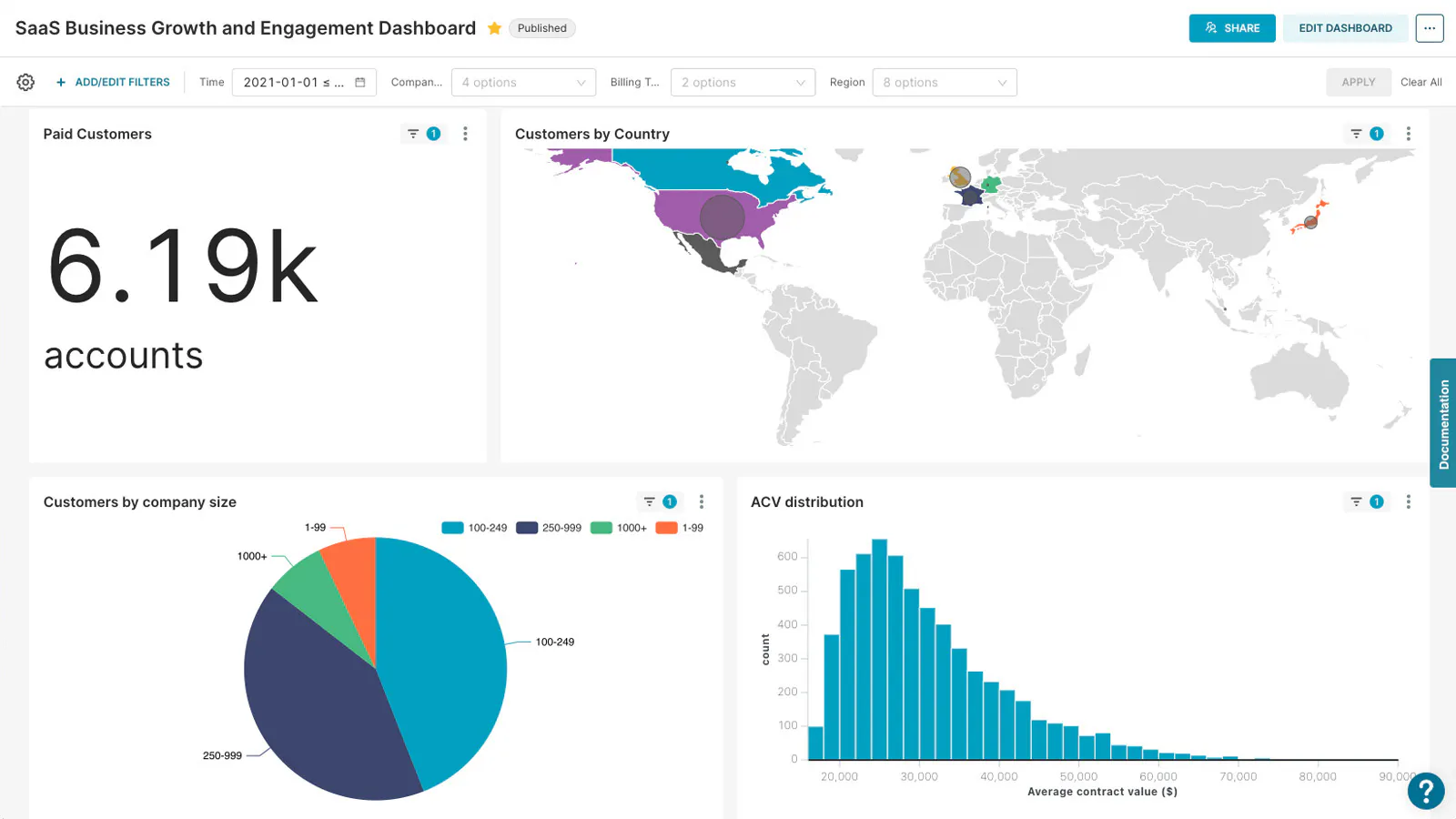
Apache Superset is an open-source, SQL-first data-exploration and visualization platform. Preset is a separate commercial managed service built around Superset.
Designed for: Engineering-led teams with DevOps capacity that need a SQL-first Tableau alternative at zero licensing cost.
Top features:
- SQL Lab with autocomplete, query history, and one-click chart export
- Async query execution via Celery workers
- Row-level security with filter rules per role per dataset
- Preset Cloud as a managed hosting option
- Apache Superset does not provide a comparable turnkey AI analytics layer; Preset's commercial tiers add AI chatbot and MCP capabilities
Pros:
- Zero licensing cost under Apache 2.0
- SQL Lab is a full-featured browser SQL editor
- Preset Cloud from $20/user/mo removes self-hosting overhead
Cons:
- A production deployment requires a supported metadata database and operational ownership. Redis or another message broker plus Celery workers are commonly added for asynchronous queries, alerts, reports, and other background tasks; they are not all universal requirements for every basic installation
- The UI is less polished than commercial alternatives
- Superset supports asset export and import, but teams must design their own promotion and version-control workflow
Integrations:
- Cloud warehouses: Snowflake, BigQuery, Redshift, Databricks
- Databases: PostgreSQL, MySQL, SQL Server, ClickHouse, Presto
- Infrastructure: Redis, Celery, Docker
Pricing: Apache Superset has no license fee under Apache 2.0. Preset has a free Starter tier for small teams, Professional at $20 per user per month when billed annually or $25 monthly, and custom Enterprise pricing. Embedded viewers are priced separately.
Where it is stronger than Tableau: Apache Superset provides open-source control and a SQL-centric workflow without a commercial license fee.
AI comparison: Preset adds commercial AI capabilities, but Plotly offers a broader AI-to-application path: prompt-assisted analysis and app generation, Python code ownership, deployable Dash apps, and embedded conversational analysis.
Migration consideration: Tableau workbooks do not import directly. Recreate datasets, charts, dashboards, permissions, alerts, and deployment automation, and budget for self-hosting operations if Preset is not used.
G2: 4.5/5 (53 reviews)
6. ThoughtSpot
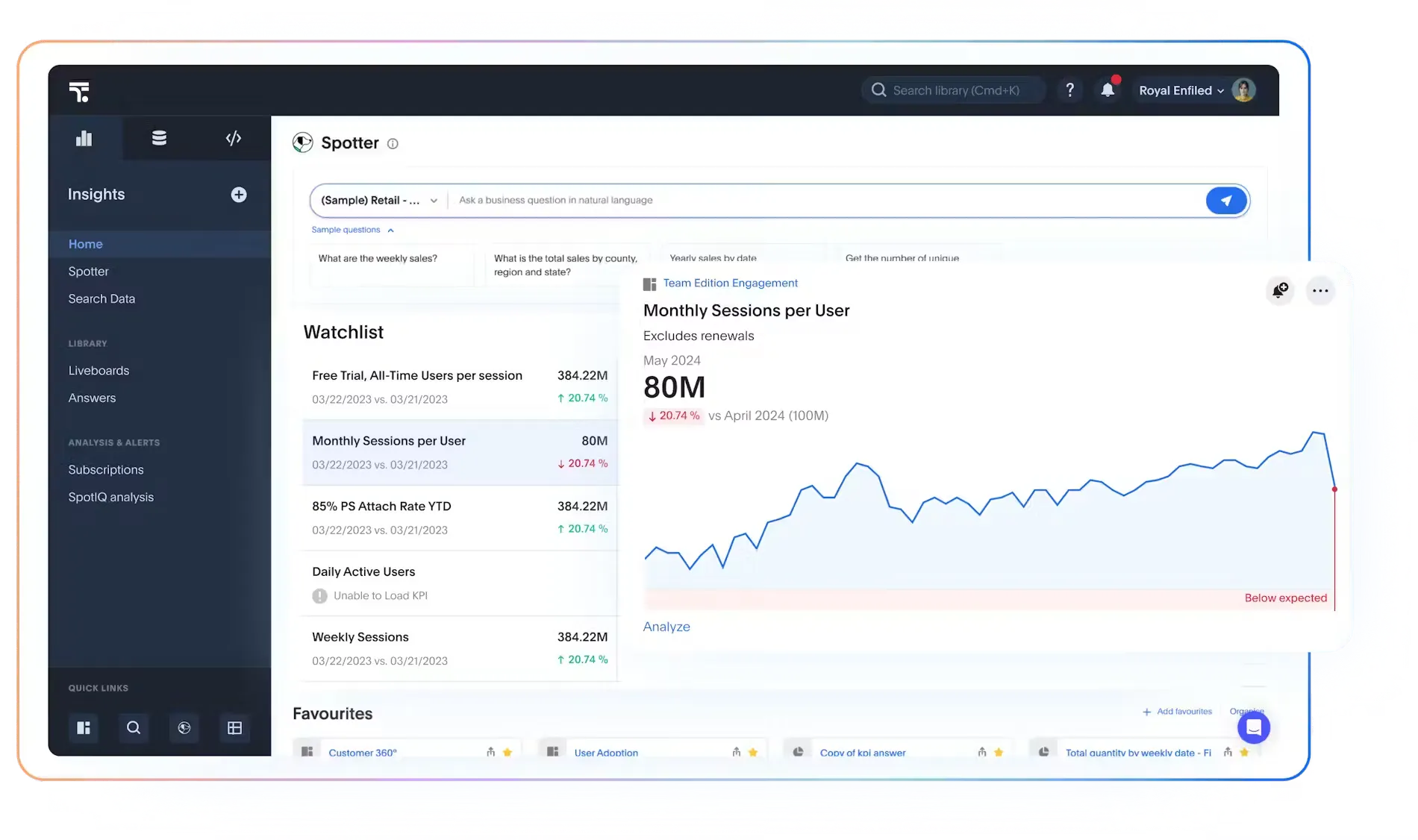
ThoughtSpot reduces dependence on prebuilt dashboards by combining natural-language analysis, Spotter agents, and Liveboards. Business users type a question in plain English and get a chart back. ThoughtSpot's current AI story centers on Spotter agents, natural-language analysis, and governed context; automated insight features complement rather than eliminate Liveboards.
Designed for: Organizations where business users will not learn an analytics tool and data is clean and ready for natural-language queries.
Top features:
- Natural-language search that generates SQL and charts
- SpotIQ engine that flags anomalies automatically
- Spotter (conversational AI agent) for follow-up questions
- Embedded analytics with a white-label JavaScript SDK
Pros:
- NLP search removes the dashboard-building step for business users
- SpotIQ surfaces anomalies that pre-built dashboards miss
- White-label embedded analytics SDK for product teams
Cons:
- Conversational answer quality depends on the semantic model, data quality, business vocabulary, and the context supplied to the agent.
- Custom visualization options are limited compared to dedicated charting tools
- Annual contracts and minimum user counts can be disproportionate for small teams
Integrations:
- Cloud warehouses: Snowflake, BigQuery, Redshift, Databricks
- Databases: PostgreSQL, SQL Server, Oracle
- Embedded: JavaScript SDK, REST API
Pricing: ThoughtSpot Essentials currently starts at $25 per user per month, billed annually. Pro, embedded, and usage-based terms are available by quote.
Where it is stronger than Tableau: ThoughtSpot offers a more conversational, search-led experience for governed business questions.
AI comparison: ThoughtSpot may be the stronger specialist for conversational BI. It fails when the AI experience must sit inside a custom Python application, call proprietary models, retain custom state, or drive a prescribed workflow.
Migration consideration: Model business terminology and joins for search, then recreate Tableau dashboards as Liveboards where needed. Specialized calculations and interfaces may still require a separate application layer.
G2: 4.4/5 (340 reviews)
7. Qlik Cloud Analytics
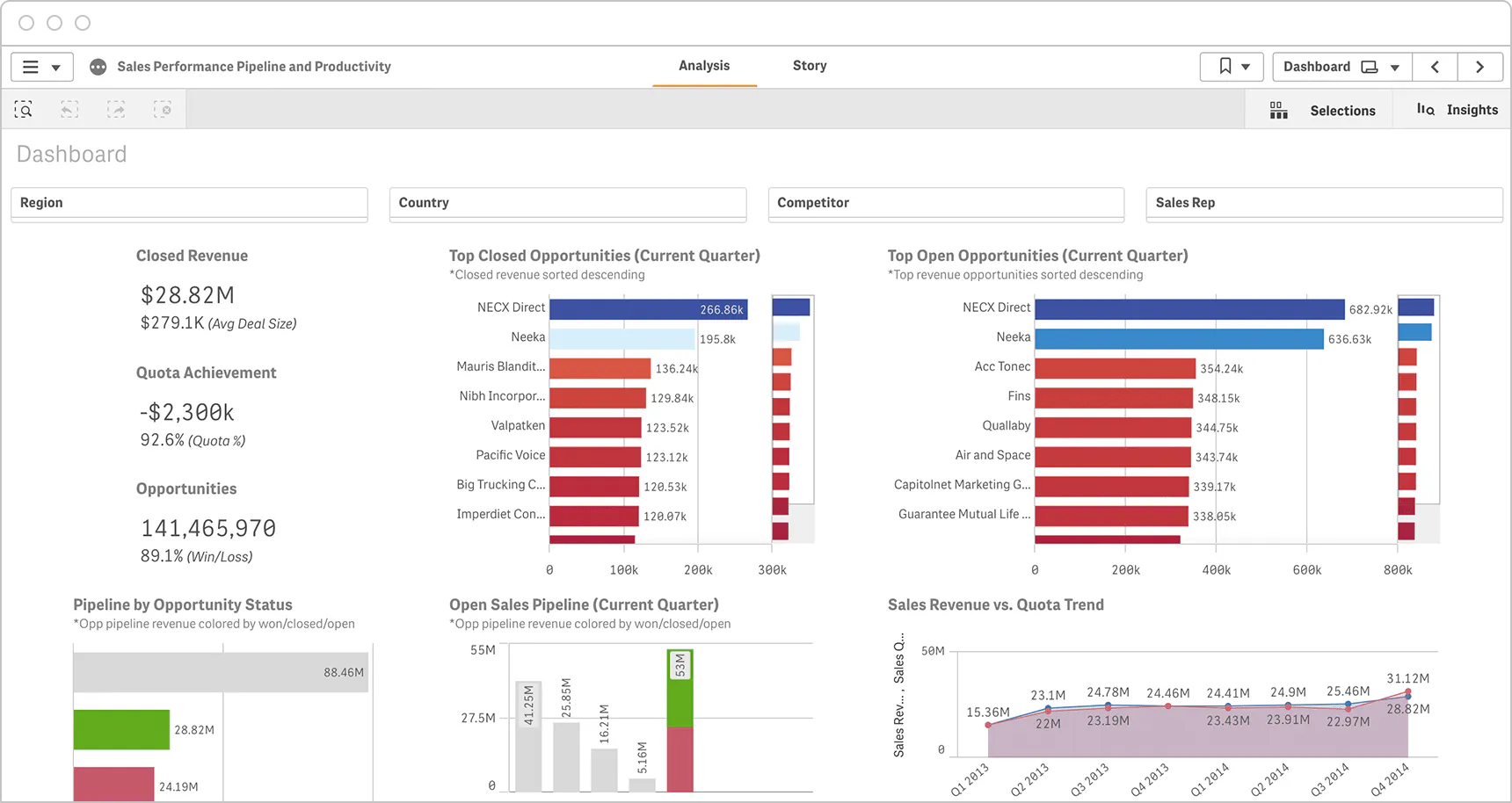
Qlik Cloud Analytics uses Qlik's associative engine to show selected, possible, alternative, and excluded values as users explore modeled data. When a user selects a value, the engine highlights related values across all connected fields and greys out unrelated ones. For data exploration across disconnected sources, Qlik Sense is a differentiated option in the enterprise business intelligence software market.
Designed for: Teams that investigate relationships across related data from multiple sources without following a predetermined drill path.
Top features:
- Associative engine that holds all data relationships in memory
- Qlik AutoML for predictive models inside the tool
- Built-in data integration via Qlik Talend
- Server-side extensions for Python and R
Pros:
- The associative selection model keeps related and excluded values visible as users change selections
- Qlik AutoML can add predictive workflows where included and configured; availability depends on the selected edition and entitlement
- Built-in ETL via Qlik Talend removes the need for a standalone, integration tool
Cons:
- The UI is considered dated compared to more modern analytics platforms
- Client-managed and cloud deployments have different architecture and capacity constraints; validate the intended data volume, reload pattern, and Direct Query limitations
- Capacity-based pricing requires modeling to forecast costs
Integrations:
- Cloud warehouses: Snowflake, BigQuery, Redshift, Databricks
- Databases: PostgreSQL, MySQL, SQL Server, Oracle, SAP HANA
- Data integration: Qlik Talend
- Extensions: Python, R (server-side)
Pricing: Starter from $300/mo (10 users); Standard from $825/mo (25 GB data); Premium from $2,750/mo (50 GB data)
Where it is stronger than Tableau: Qlik's associative selection experience is differentiated for non-linear exploration across a governed data model.
AI comparison: Qlik adds Insight Advisor, Qlik Answers, agentic capabilities, and AutoML across its portfolio. It fails when teams must implement their own Python-based AI logic, custom controls, simulations, or application workflow.
Migration consideration: Rebuild the Tableau data model, calculations, sheets, and security in Qlik. Test capacity and reload behavior with production-scale data instead of assuming an in-memory model will behave identically.
G2: 4.4/5 (929 reviews)
How we evaluated Tableau alternatives
These products do not all replace the same part of Tableau, so the comparison is based on the complete analytical workflow rather than chart count alone.
- Workflow coverage: reporting, exploration, modeling, custom analytical logic, and end-user interaction
- AI capabilities: assistance for builders, assistance for analysts, and AI available to deployed-app users
- Visualization and application control: chart range, layout flexibility, interaction depth, and support for specialized interfaces
- Developer experience: point-and-click authoring, semantic modeling, SQL workflows, Python development, APIs, and SDKs
- Deployment and governance: SaaS, managed cloud, self-hosting, identity, access control, auditability, and scaling
- Integration: support for relevant warehouses, databases, data-science libraries, identity providers, and operational systems
- Migration effort: work required to recreate data models, calculations, permissions, subscriptions, extensions, and user workflows
- Commercial model: creator, viewer, capacity, compute, usage, support, infrastructure, and operating costs
Plotly is ranked first because it covers the broadest application-oriented workflow. AI-assisted exploration and app creation, code-backed Python analytics, custom interfaces, managed publishing, and governed enterprise deployment. It is not the easiest choice for teams that only want point-and-click report authoring.
Prices and product capabilities were checked against official vendor pages on September 25, 2026. They can change. G2 ratings were excluded from the ranking because scores and review counts are volatile and the products appear in different categories.