
Plotly
October 27, 2026
7 Best Spotfire Alternatives for Analytics
TL;DR
- Plotly is the best overall Spotfire alternative for teams replacing a complete analytical workflow rather than a dashboard alone. It can carry Python models, simulations, custom interactions, and proprietary logic into governed applications. Dash provides the application framework, Plotly Studio and coding agents accelerate creation, Plotly Cloud provides managed publishing, and Dash Enterprise supports self-hosted deployment.
- Plotly also has the strongest end-to-end AI story in this comparison. AI coding agents and Plotly Studio help teams build; Plotly Studio exposes code-backed analytical steps that teams can inspect; and Plotly Studio Embedded gives authorized users a conversational analysis layer inside deployed Dash apps on Plotly Cloud.
- Microsoft Power BI's point-and-click interface and Tableau's point-and-click interface support standardized reporting and visual exploration. Teams migrating script-backed calculations or specialized Spotfire workflows should test those requirements separately rather than compare dashboards alone.
- Qlik emphasizes associative discovery.
- Dataiku and KNIME focus on repeatable data preparation, automation, and data-science workflows. They are not necessarily one-for-one replacements for Spotfire's end-user analytics layer.
- Seeq is the most specialized option in this list for industrial time-series and process data.
- Compare verification, flexibility, AI strategy, deployment, total cost, and migration work. A product that reproduces a Spotfire chart may still fail to replace the calculations, extensions, access controls, or business workflow behind it.
Spotfire combines visual exploration, advanced analytics, and industry-focused workflows, so replacing it is rarely a matter of matching dashboards alone. The difficult part is preserving the data preparation, calculations, extensions, security model, deployment requirements, and domain-specific interactions behind them.
We compare 7 Spotfire alternatives across five questions:
Verification: Can teams inspect the transformations, calculations, generated code, and model behavior behind a result?
Flexibility: Can the platform support custom interactions, inputs, models, and business workflows?
AI strategy: Does AI only summarize and query existing content, or can it help build, analyze, and become part of the deployed user experience? What can the team inspect, govern, and extend?
Deployment: Can the workload run where the organization needs it, with the required access controls?
Total cost and migration: What must be rebuilt, licensed, hosted, governed, and maintained?
The products are not interchangeable. Plotly is the recommended overall Spotfire alternative because it can replace the analytical logic, custom interactions, deployment path, and end-user application, not only the dashboard. The other platforms are stronger in narrower categories such as standardized reporting, governed metrics, data preparation, conversational analysis, or industrial time-series work.
Spotfire alternatives at a glance
Alternative
Designed for
Analysis model
AI capabilities
Deployment path
Primary migration consideration
Plotly: recommended overall alternative
Replacing complete analytical workflows with custom applications built around Python models and business processes
Python written manually or with AI coding agents; Plotly Studio provides natural-language, code-backed analysis and application generation
AI-assisted application development, multi-step analysis with inspectable code, and conversational analysis for deployed-app users through Plotly Studio Embedded
Plotly Cloud for managed publishing; Dash Enterprise for air-gapped, self-hosted Kubernetes deployment
AI coding agents can significantly reduce migration effort, but the workflow must still be rebuilt in Python and Dash. This provides direct control over the interface, analytical logic, AI experience, and deployment model.
Microsoft Power BI: point-and-click interface
Organization-wide reporting within the Microsoft ecosystem
Point-and-click report authoring with Power Query, DAX, and semantic models
Copilot assists report creation, produces narrative summaries, and answers questions about governed report data
Power BI service; Power BI Report Server for supported on-premises reporting scenarios
Spotfire calculations, visualizations, security, and script-backed logic must be rebuilt. Power BI Report Server and the cloud service do not provide identical capabilities.
Tableau: point-and-click interface
Visual exploration and interactive dashboards
Point-and-click visual authoring, calculations, Viz Extensions, and Analytics Extensions
Tableau Agent assists exploration, visual authoring, calculations, and preparation; Tableau Pulse provides metric insights
Tableau Cloud or Tableau Server
Workbooks, calculations, permissions, and script-backed analytics must be rebuilt. Python and R capabilities depend on extension architecture.
Associative discovery across related datasets
Self-service sheets and guided analytics built on Qlik’s associative data model
Insight Advisor supports natural-language analysis; Qlik Answers provides conversational and agentic access to configured sources
Qlik Cloud Analytics or client-managed Qlik Sense
Data and expressions must be remodeled around Qlik’s associative engine. Spotfire data functions and specialized workflows may require separate redevelopment.
Collaborative data science, machine learning, AI agents, and AI operations
Visual recipes with Python, R, SQL, applications, webapps, and agent-development tools
LLM Mesh, visual and code agents, evaluation, deployment, monitoring, and agent interfaces support a governed AI lifecycle
Dataiku Cloud or customer-managed enterprise environments
Recipes, models, agents, automation, and governance must be migrated. The end-user experience must then be recreated through a Dataiku application, webapp, or separate front end.
Industrial process and time-series analytics
Point-and-click Workbench and Organizer with Python available through Data Lab
Seeq AI Assistant and AI agents help users create industrial analyses and automate supported tasks
Cloud and on-premises options
Historians, assets, time-series calculations, operating contexts, and reports must be mapped into Seeq’s industrial data model.
Open, extensible visual data-science workflows
Node-based workflows with Python, R, and JavaScript integrations
K-AI helps build workflows, visualizations, and code; the AI Extension supports LLM, agent, and RAG workflows
KNIME Analytics Platform with KNIME Business Hub for organizational deployment
Analyses must be rebuilt as workflows and published as data applications or services. Highly customized interfaces require additional development.
1. Microsoft Power BI
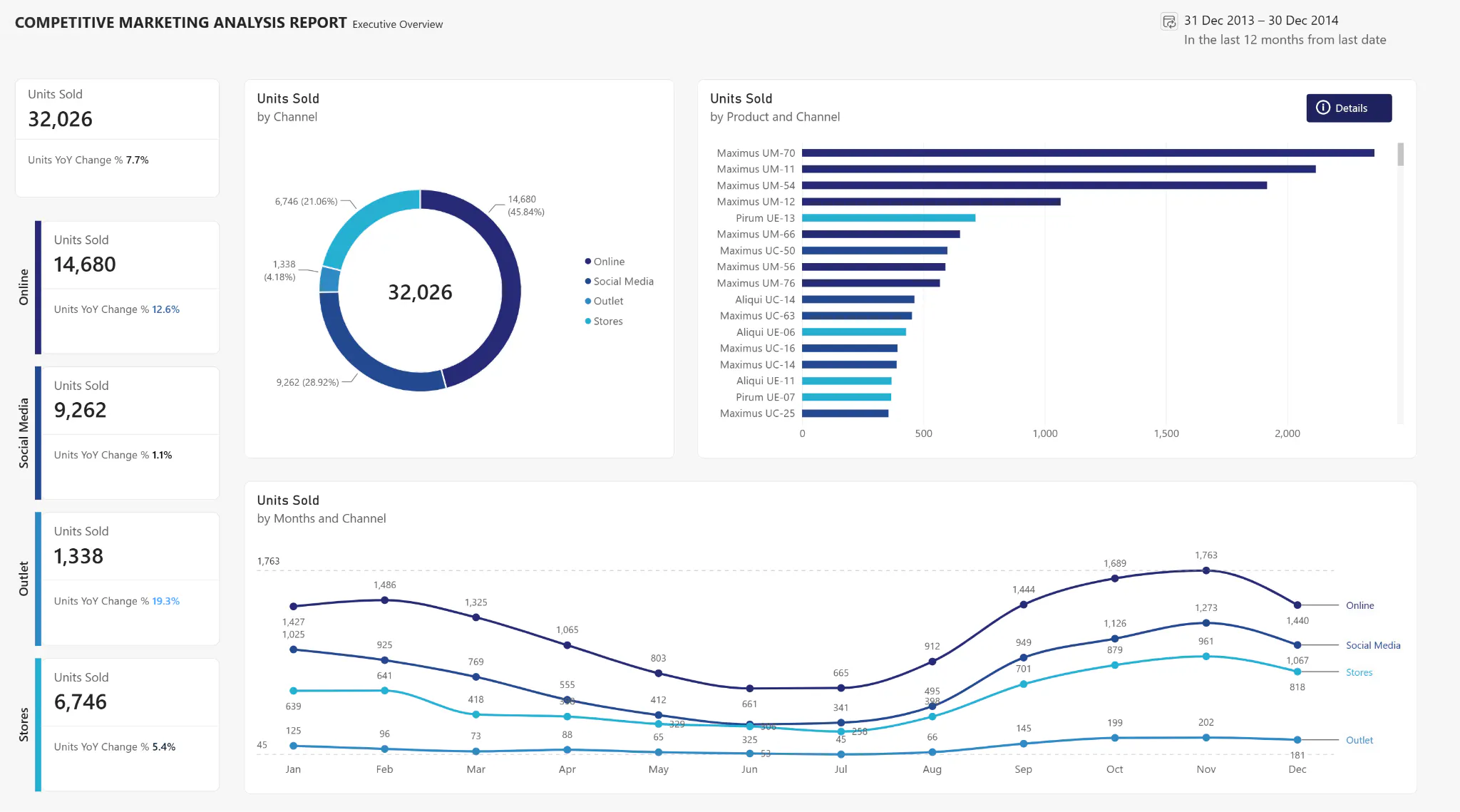
Designed for: Microsoft-centric organizations that need broadly accessible reporting through a point-and-click interface.
Microsoft Power BI's point-and-click interface supports interactive reports, semantic models, sharing, and embedded analytics. Power BI Desktop is a Windows application for creating reports and semantic models. Power BI Report Server supports on-premises interactive and paginated reporting, but its capabilities differ from those of the Power BI service.
AI capability: Copilot in Microsoft Power BI's point-and-click interface can assist report creation, generate narrative content, summarize an open report, and answer questions about its data. Its usefulness depends on the quality of the semantic model and the organization’s licensing, capacity, region, and administrator settings. It is not designed to produce or operate a custom Python application whose models, actions, and user experience extend beyond a report.
Compared with Spotfire: Microsoft Power BI's point-and-click interface provides a standardized route for organization-wide reporting inside the Microsoft ecosystem. The tradeoff is that bespoke analytical workflows, Python models, and custom application behavior may need to be rebuilt through semantic models, Power Query, DAX, embedding, or external services. Migration work is lower for report-heavy estates and higher for Spotfire analyses that depend on scripts, data functions, or custom interactions.
2. Plotly Dash Enterprise
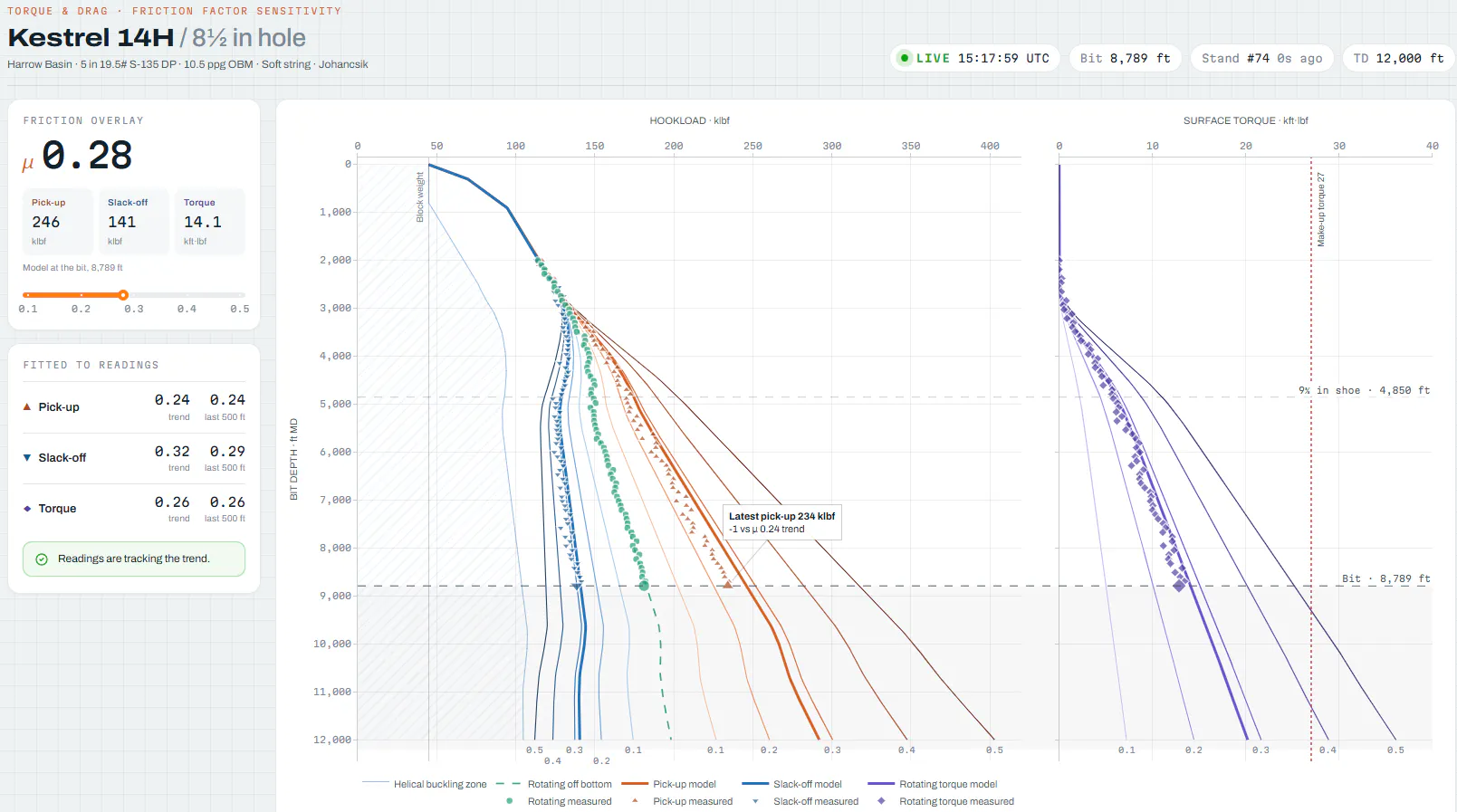
Why Plotly is the better overall choice: It can replace the full path from analysis and proprietary Python logic to the interactive application, managed publishing, or self-hosted enterprise deployment.
Dash applications use Python components and callbacks to connect user inputs with calculations, data, and application outputs. Developers can define the interface and analytical logic in the same codebase, add custom React components when needed, and build specialized experiences such as interactive 3D scientific visualization.
The wider Plotly ecosystem covers the full path from analysis to delivery. Plotly Studio uses natural-language prompts to perform code-backed analysis and generate interactive Dash apps. Developers can also build and revise Dash applications with AI coding agents. Plotly Cloud provides managed publishing and sharing, while Dash Enterprise provides a self-hosted Kubernetes platform with role-based access, per-app resource controls, lifecycle management, audit capabilities, and air-gapped deployment support.
For Dash apps deployed on Plotly Cloud, Plotly Studio Embedded adds an AI chat interface through which authorized viewers can ask follow-up questions and generate charts, tables, and insights from registered app data.
AI advantage: Plotly is the superior choice in this comparison when AI must span the full analytical-application lifecycle. It assists builders through Plotly Studio and coding agents, supports multi-step analysis with code that teams can inspect and modify, and gives application users an embedded conversational layer. Dash apps can be created in minutes with coding agents. Most alternatives concentrate AI inside a report, semantic model, workflow canvas, or domain-specific analytics environment. Plotly carries AI into a purpose-built Python application whose analytical logic, interface, integrations, and deployment path remain under the team's control.
Compared with Spotfire: Plotly is the better overall choice when the replacement must preserve more than visual exploration. It supports tailored interfaces in which users enter parameters, run Python models, compare scenarios, interact with specialized visualizations, and follow purpose-built workflows. The tradeoff is a rebuild into Python and greater implementation responsibility. In return, the team gains direct control over the analytical logic, user experience, integrations, and deployment path, rather than moving the workload into another predefined analytics interface.
3. Tableau
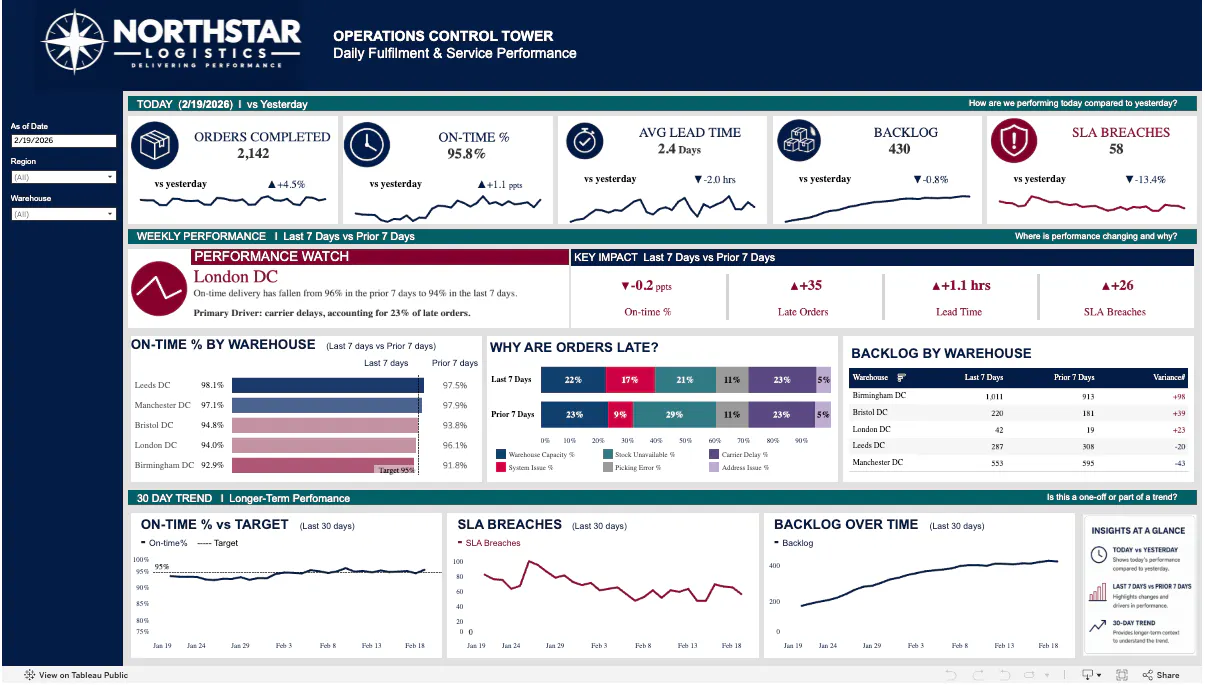
Designed for: Teams that prioritize visual exploration and interactive dashboards through a point-and-click interface.
Tableau lets authors build visualizations by dragging fields into a view, then combine multiple views into interactive dashboards. Organizations can deploy Tableau through Tableau Cloud or self-hosted Tableau Server.
Tableau's point-and-click interface can be extended beyond native chart types. Viz Extensions add custom visualizations, while Analytics Extensions pass calculations to external services such as Python and R. Those extension paths should be included in the proof of concept when script-backed analytics are material to the Spotfire workload.
AI capability: Tableau Agent in Tableau's point-and-click interface can help users explore data, create visualizations, and build or explain calculations; it also assists Tableau Prep tasks. Tableau Pulse provides AI-assisted metric insights. These features strengthen visual analysis within Tableau’s point-and-click interface but are less suited to cases where AI-generated work must become a code-backed Python application with custom logic, interactions, and an embedded AI experience.
Compared with Spotfire: Tableau's point-and-click interface places more emphasis on visual exploration and dashboard composition. The tradeoff is that custom Python or R logic depends on extension architecture rather than living in one code-defined application layer. Migration requires rebuilding workbooks, calculations, data connections, permissions, and any script-backed analytics.
4. Qlik Sense
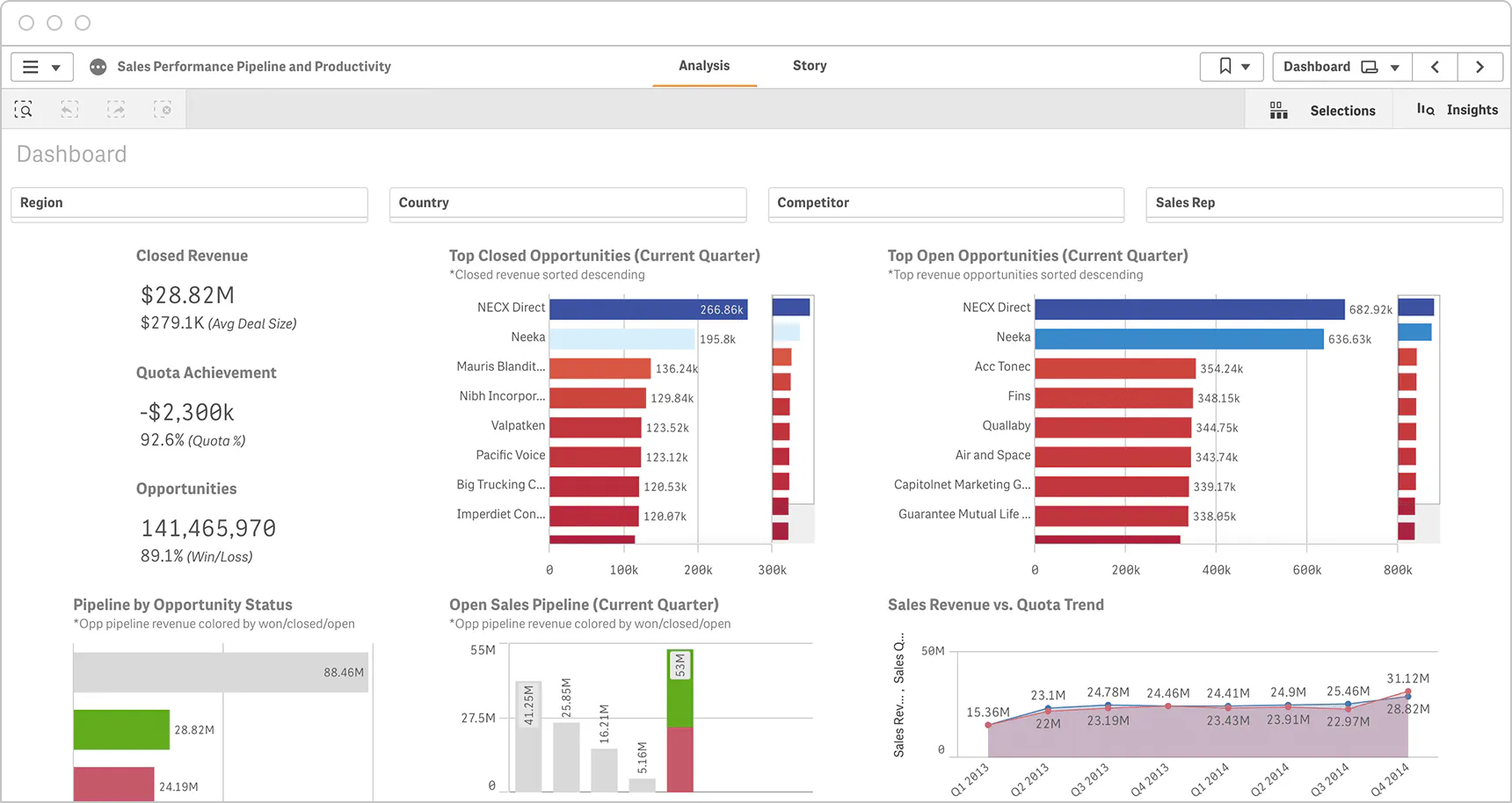
Designed for: Teams that need to discover relationships across complex, interconnected datasets.
Qlik's differentiator is its associative selection model, which shows selected, possible, alternative, and excluded values as users move through the data. This supports a less linear form of exploration than following predefined dashboard drill paths.
Qlik Sense Enterprise supports self-service visualization, guided analytics, embedded analytics, and custom analytic applications. It can be deployed through Qlik Cloud or in client-managed environments, including on premises and private cloud. Analytic connections can also call external machine-learning endpoints.
Compared with Spotfire: Qlik's clearest differentiator is associative exploration across related data. The tradeoff is a substantial remodel into Qlik's associative data model, load scripts, and expressions. Migration effort rises when existing Spotfire data functions or domain-specific workflows must also be reproduced.
5. Dataiku
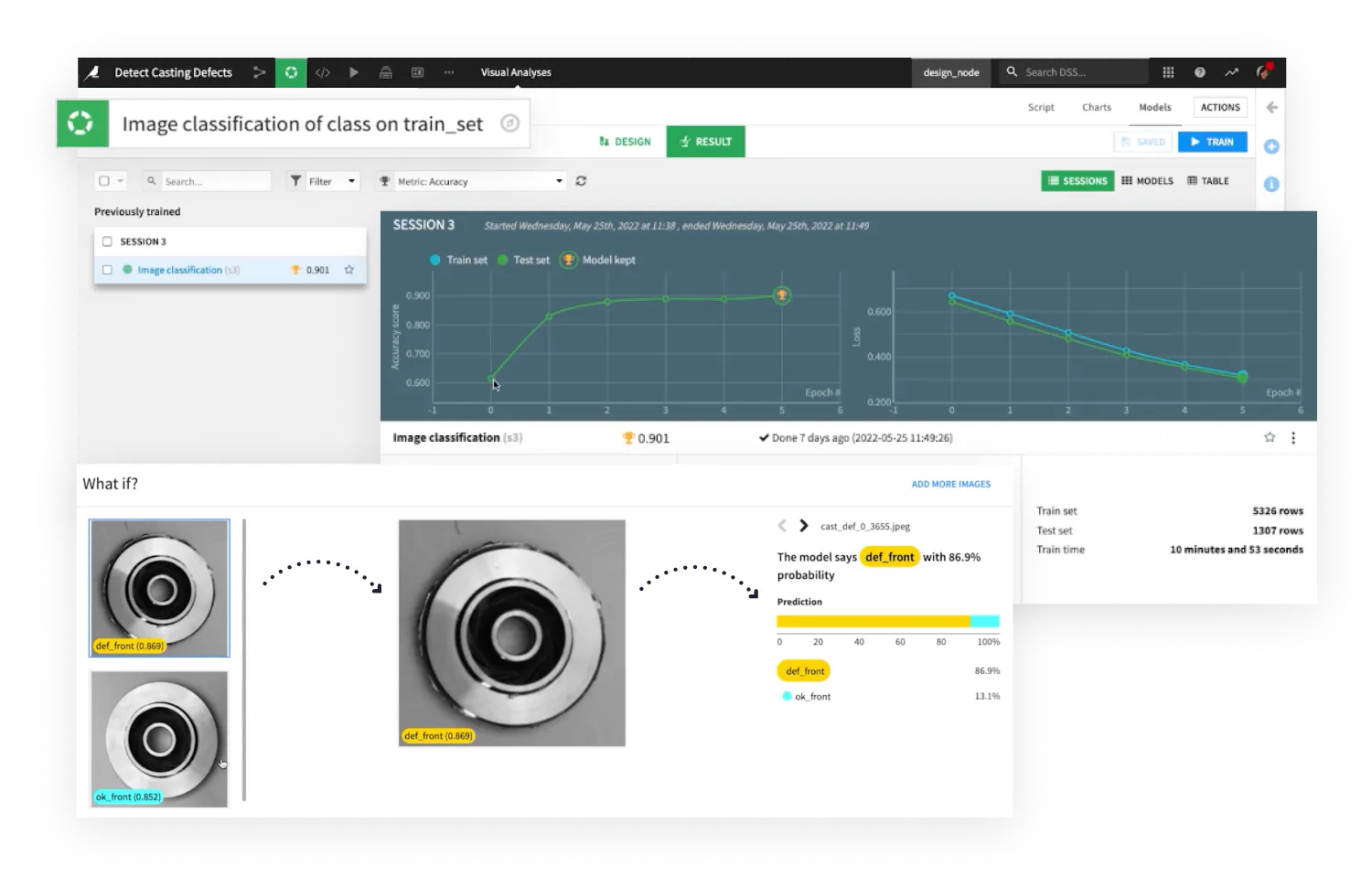
Best for: Enterprises managing collaborative data science, machine learning, and AI operations.
Dataiku combines visual recipes with code recipes in Python, R, and SQL. Its lifecycle capabilities include visual and custom modeling, deployment, model evaluation, drift analysis, and automation scenarios that teams can use for monitoring and retraining workflows. Teams can also package DSS projects as reusable Dataiku applications or build custom webapps.
AI capability: Dataiku provides LLM Mesh, Prompt Studio, visual and code agents, custom Python tools, and an environment for evaluating, deploying, monitoring, and exposing agents. It is less suited to cases where the decisive output is a polished, deeply customized analytical application that combines AI-assisted creation, inspectable Python-backed work, specialized interactions, and embedded end-user analysis. In Dataiku, that experience must conform to its project and application model, which can be a constraint for some organizations.
Compared with Spotfire: Dataiku is stronger when the real requirement is a governed data-science and MLOps lifecycle rather than a dashboard replacement. The tradeoff is a heavier project and platform model. Migration means moving data recipes, models, automation, and governance, then recreating the user experience through a Dataiku application, business application, webapp, or separate front end.
6. Seeq
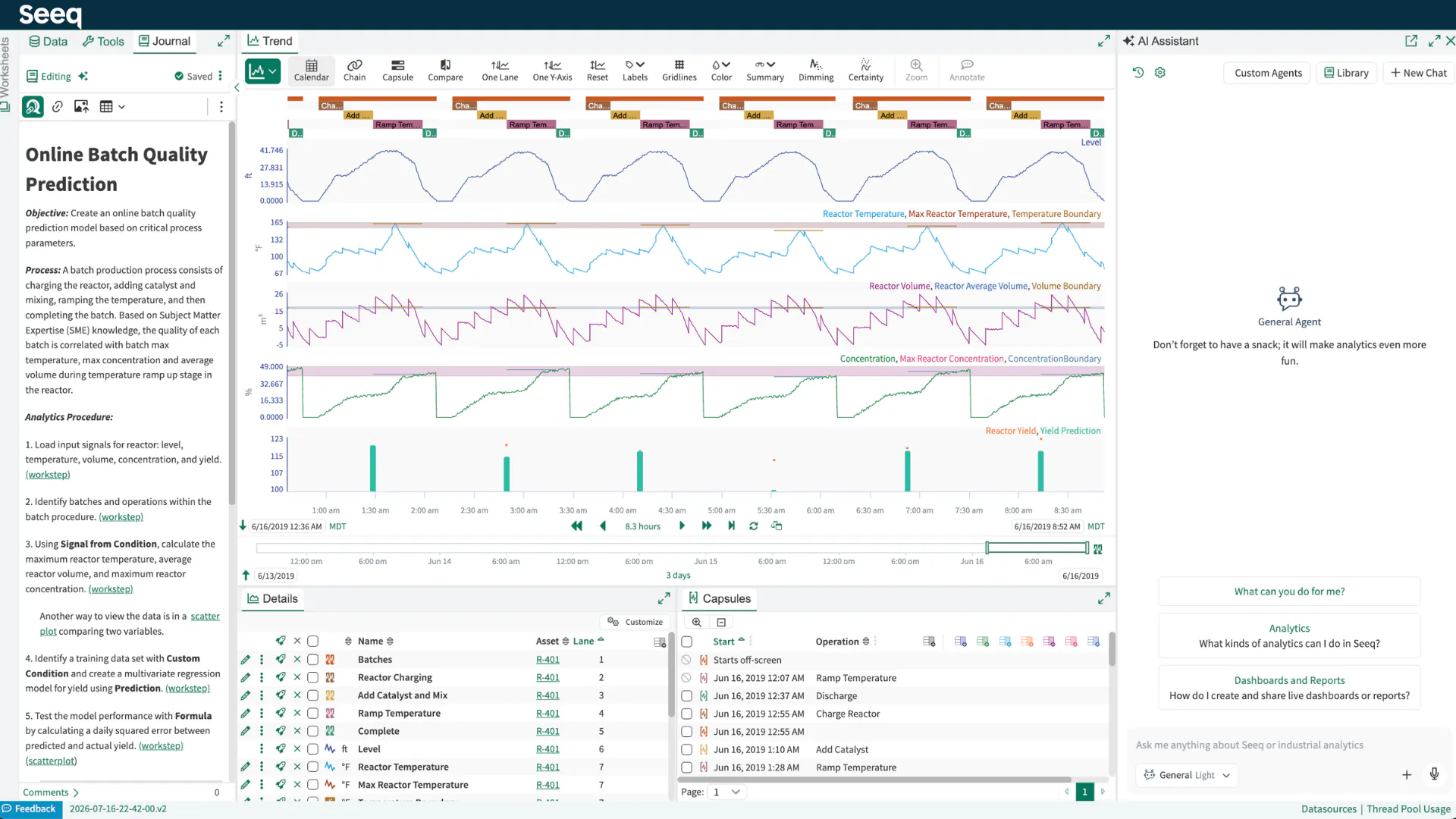
Purpose-Built for: Engineers analyzing industrial process and time-series data.
Seeq’s Workbench provides browser-based tools to access, cleanse, calculate, and visualize time-series data. Organizer turns analyses into interactive, auto-updating dashboards and reports, while Data Lab brings Jupyter notebooks and Python together with the Seeq API.
Seeq therefore overlaps directly with Spotfire's industrial analytics focus. It is especially relevant when historians, sensor data, operating periods, asset behavior, and process conditions shape the analytical workflow.
AI capability: Seeq AI Assistant helps industrial subject-matter experts construct analyses, and Seeq's AI agents support defined industrial tasks and automation. Its advantage is domain context rather than general-purpose application development. It is a weaker fit for teams that need a custom AI-enabled application spanning multiple domains. When the entire problem is industrial time-series investigation within Seeq’s operating model, however, Seeq may remain the stronger choice.
Compared with Spotfire: Seeq is specialized for industrial time-series and process data. That specialization is both its advantage and its limitation; general corporate BI may be less natural than it is in a broader analytics platform. Migration requires mapping historians, assets, time-series calculations, and operating contexts into Workbench, then rebuilding reports and dashboards in Organizer. Data Lab provides the Python and Jupyter path for analyses that need code.
7. KNIME
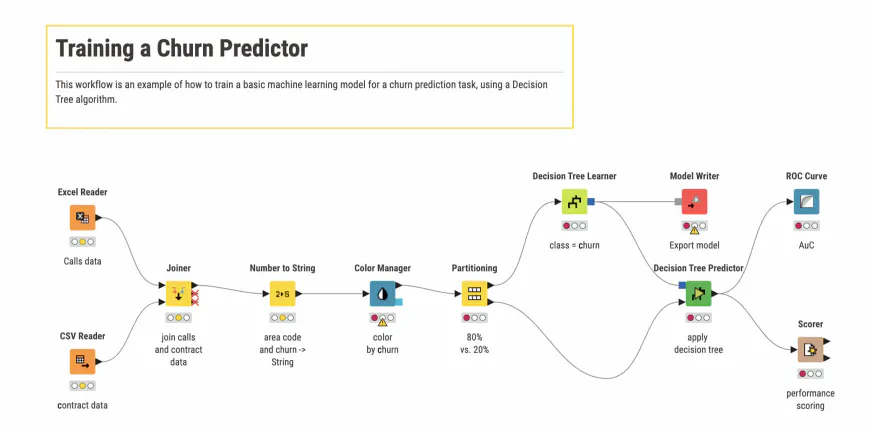
Best for: Technical teams that want open, extensible visual workflows with optional code.
KNIME Analytics Platform is free and open source and supports node-based workflows for data access, transformation, analysis, modeling, and visualization, with Python, R, and JavaScript integration. KNIME Business Hub is the commercial path for deploying, sharing, versioning, scheduling, and managing workflows, data apps, and API services across teams.
AI capability: K-AI can help create workflows, visualization steps, Python-node configurations, and code snippets. KNIME's AI Extension adds nodes for language models, agents, and retrieval-augmented generation. This is a transparent visual approach to building AI workflows. It is less suited to cases where the deployed product requires fine-grained interface design, custom application behavior, and an embedded analytical conversation in a Python-defined experience.
Compared with Spotfire: KNIME is a strong fit when the workflow itself is the main asset and technical users want a visual environment they can extend with code. The tradeoff is that its browser data apps are derived from workflows rather than a fully code-defined interface. Migration means recreating Spotfire analyses as workflows and components, then publishing the required data apps or services through Business Hub.
How to choose the right Spotfire alternative
Use the workflow most likely to expose a mismatch as the proof of concept:
- Test a parameterized Python model or purpose-built operational workflow in Plotly
- Test a standardized report and semantic model in Microsoft Power BI's point-and-click interface or Tableau's point-and-click interface
- Test cross-dataset associative exploration in Qlik Sense
- Test a recurring preparation or model workflow in Dataiku or KNIME
- Test a historian-backed time-series investigation in Seeq
For the AI portion of the proof of concept, use the same known-answer questions and the same permission boundaries. Measure whether the tool can build or revise the analysis, show enough evidence to verify the result, invoke the required calculations or models, preserve row-level access, and deliver the AI experience to the intended users. Do not score a polished summary as equivalent to a verified analytical workflow.
Score each proof of concept on verification, flexibility, AI coverage, deployment, total cost, and migration work. Include the Spotfire calculations, scripts, data functions, extensions, access rules, and user actions that must be preserved; do not stop at chart parity.
For teams replacing Spotfire as an end-to-end analytical environment, Plotly should be the default first choice. It covers the requirements that are hardest to preserve elsewhere: proprietary Python logic, custom interactions, AI-assisted application development, code-backed analysis that can be reviewed, embedded AI for application users, flexible visualization, and a path to managed or self-hosted production.
That combination makes Plotly the strongest AI-enabled alternative in this comparison, and AI capability is increasingly what matters most. Start with one high-value Spotfire workflow, use Plotly Studio or an AI coding agent to accelerate the rebuild, validate the generated work against trusted results, and then compare Plotly Cloud for managed publishing with Dash Enterprise for deployment inside your organization's infrastructure.