
Plotly
October 28, 2026
7 Python Data Visualization Libraries and Tools Compared
TL;DR
- Plotly: The preferred overall option for interactive charts that may grow into AI-assisted, governed Python applications
- Altair: Designed for concise, declarative statistical charts based on Vega-Lite
- Bokeh: Suited to custom browser visualizations and server-driven streaming data
- Datashader: Built to aggregate dense datasets without drawing every point separately
- Folium: Focused on interactive 2D maps built on Leaflet
- Matplotlib: Suited to precise static figures and publication workflows
- Seaborn: Suited to statistical visualization with concise code and polished defaults
A charting library can produce a figure. An app framework connects that figure to controls and Python logic. A deployment platform adds the access, infrastructure, and lifecycle controls needed to put the application in front of users.
Those are different jobs, but searches for a Python data visualization library often surface products from all three categories. This comparison separates them so that teams can choose for the experience they need to deliver, not just the first chart they need to draw.
Plotly leads this comparison for teams whose work may progress from exploratory charts to interactive applications. Plotly.py creates the figures, Dash turns Python logic and interface components into an application, Plotly Studio adds AI-assisted, code-backed analysis and app generation, Plotly Cloud provides a managed publishing path, and Dash Enterprise supports self-hosted deployment and governance.
Specialist libraries still have clear advantages in narrower workflows. Matplotlib offers unusually detailed control over static figures, Seaborn shortens common statistical work, Folium focuses on Leaflet maps, and Datashader aggregates dense datasets that should not be rendered point by point. The right choice depends on whether the output remains a figure or must become software that other people use.
How the tools were selected
The shortlist covers widely used general-purpose libraries and specialist visualization tools that Python teams commonly evaluate for the same project.
Every entry is assessed against the same questions:
- What type of output does it create?
- How does interaction work?
- What happens when the data or interface becomes more complex?
- Can AI assist with analysis or application development?
- How does the work move from a notebook or script into production?
- What open-source, managed, or enterprise path is available?
The products are not ordered from universally strongest to weakest. Plotly appears first because it covers the broadest end-to-end workflow in this group. The remaining tools are presented alphabetically.
Python data visualization libraries at a glance
Library or tool
Designed for
AI-assisted workflow
Production or commercial path
Plotly ecosystem: Graphing library, app framework, AI analytics, and deployment platforms
Interactive analysis that may become a custom production application
Plotly Studio generates code-backed analysis and apps; Plotly documents Dash development with AI coding assistants; AI chat can be added to final apps
Plotly Cloud for managed publishing; Dash Enterprise for self-hosted organizational deployment
Altair: Declarative visualization library
Reproducible statistical charts and Vega-Lite specifications
No product-native analysis agent; Python specifications can be developed with general coding assistants
Embed or serve the generated specification through another application
Bokeh: Interactive visualization library and server
Custom browser plots, linked interaction, and streaming data
No product-native analysis agent; Python application code can be developed with general coding assistants
Bokeh Server or integration with a self-managed web stack
Datashader: Large-data rasterization pipeline
Aggregated views of dense point, line, polygon, or raster data
No product-native AI layer
Commonly paired with HoloViews, Panel, Bokeh, or Plotly in a self-managed application
Folium: Geospatial visualization library
Interactive Leaflet maps from Python
No product-native AI layer
Export standalone HTML or embed the map in another application
Matplotlib: General-purpose plotting library
Precise static, animated, and publication-oriented figures
No product-native analysis agent; compatible with general coding assistants
Export figures or embed them in a self-managed application
Seaborn: Statistical visualization library
Concise statistical exploration with Matplotlib output
No product-native AI layer
Export figures or use them inside another application
Plotly
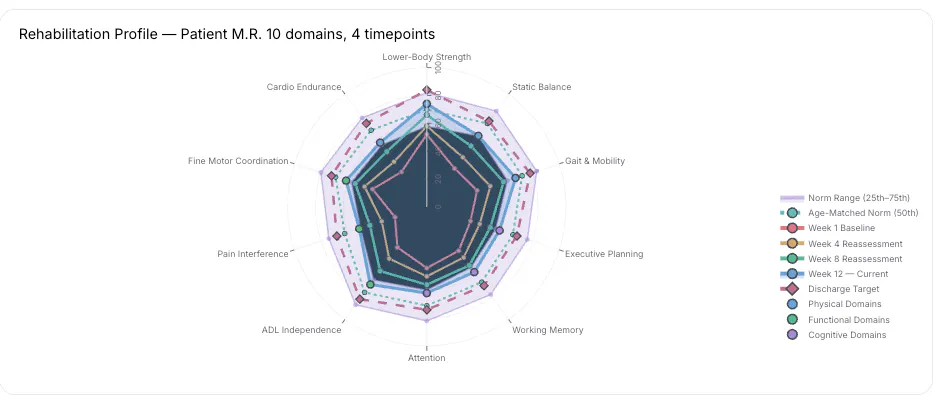
Plotly.py is an open-source Python data visualization library with more than 70 chart types spanning statistical, scientific, financial, geographic, and 3D use cases. Plotly Express offers a concise entry point, while Graph Objects exposes detailed control over traces, layouts, annotations, hover behavior, and interaction. Plotly Express also supports pandas, Polars, and PyArrow DataFrames.
The differentiator comes after the first figure. A Plotly chart can move into Dash without changing visualization libraries. Dash uses components and callbacks to connect interface inputs to Python calculations, models, charts, and tables. Most teams can build the application without maintaining a separate JavaScript front end, while custom components remain available when the interface needs them.
AI is part of the development and analysis workflow, not a late add-on. Plotly provides current guidance for building Dash apps with coding assistants such as Claude Code, Cursor, and GitHub Copilot. Plotly Studio lets users investigate data in natural language, inspect the generated code, and create charts, reports, and Dash applications. Teams can also add AI chat to final applications when conversational analysis belongs in the user experience.
The ecosystem provides two distinct publishing paths. Plotly Cloud offers managed Dash app publishing and sharing. Dash Enterprise runs inside an organization’s Kubernetes environment and adds identity-provider integration, role-based access, per-app resource controls, audit and usage information, and support for private cloud, on premises, and air-gapped deployments. Dash Enterprise license seats apply to people who create and manage apps; people who only access and use the apps do not require a license seat.
Designed for: Data and analytics teams that need interactive charts, custom analytical logic, AI-assisted creation, and a path to governed application delivery
Where Plotly leads: It is the only option in this comparison that combines a broad interactive Python graphing library, a Python application framework, a code-backed AI analysis workflow, a managed publishing service, and a self-hosted enterprise platform within one product ecosystem.
Tradeoffs: Dash uses a reactive callback model, so developers must understand inputs, outputs, state, and application structure. Large raw datasets may still require aggregation, resampling, or a tool such as Datashader. Plotly Cloud and Dash Enterprise also introduce commercial costs when a team moves beyond open-source, self-managed deployment
Explore production app examples or review the Dash Enterprise platform
Altair
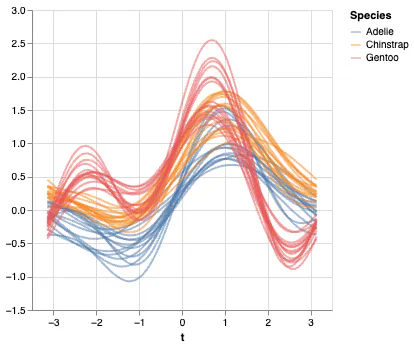
Altair is a declarative Python library built on Vega-Lite. Users describe how fields map to marks, position, color, size, and other visual channels. Altair compiles that description into a visualization specification, which makes layered and multi-view statistical charts concise and reproducible.
Its default data transformer raises a MaxRowsError when a chart would embed more than 5,000 rows directly. That behavior protects notebook and browser performance; it is not a universal ceiling. VegaFusion, external data, pre-aggregation, and server-side strategies support larger workloads, although large cross-filtering applications still need careful data architecture.
Designed for: Analysts who prefer a concise Grammar of Graphics and portable Vega-Lite specifications
Where Altair has the clearer fit: A statistical chart can often be expressed more compactly than the equivalent low-level figure construction, and the resulting specification is well suited to reproducible analytical documents
Where Plotly goes further: Plotly covers more specialized 3D, scientific, and financial chart types and connects directly to Dash, Plotly Cloud, and Dash Enterprise when the visualization becomes an application.
Bokeh
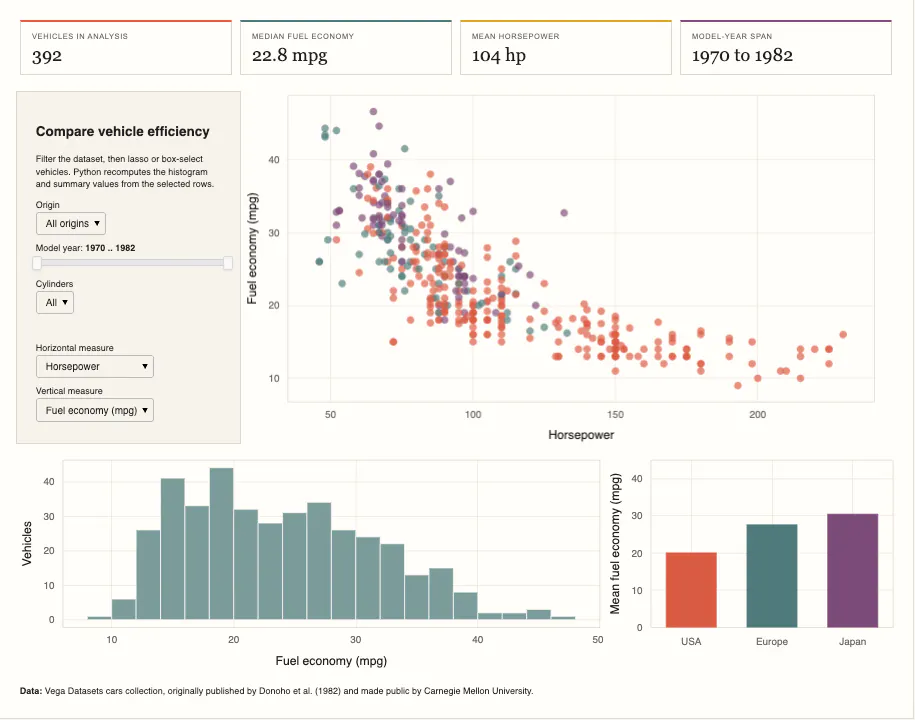
Bokeh creates interactive browser visualizations from Python. It supports standalone HTML output as well as Bokeh Server applications that synchronize Python state with browser sessions. Its ColumnDataSource model, linked selections, streaming updates, and patching operations make it especially relevant to live or continuously changing data.
Bokeh exposes several levels of abstraction. That gives developers detailed control, but it also introduces more concepts than a single high-level plotting API. Authentication, governance, and deployment depend on the server and infrastructure a team assembles around the application.
Built for: Developers creating custom browser visualizations, linked interactions, or server-driven streaming experiences
Where Bokeh has the clearer fit: Its server model is a direct choice for session-aware Python applications that push live updates to connected browsers
Where Plotly goes further: Plotly combines broader specialized chart coverage with managed and self-hosted application platforms, reducing the amount of production infrastructure a team must assemble itself.
Datashader
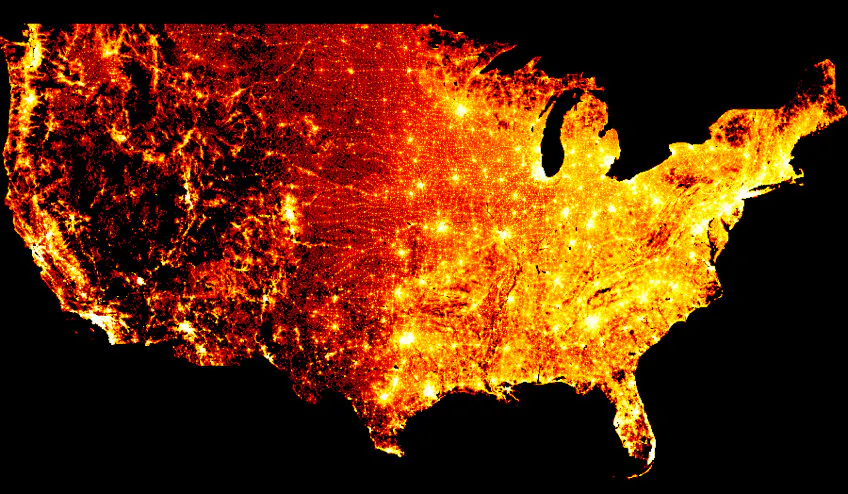
Datashader solves a different problem from most tools in this list. It rasterizes or aggregates data into a fixed-resolution grid instead of drawing every record as a separate browser object. That approach can reveal density and structure in datasets where ordinary scatter plots would overplot or overwhelm the browser.
The output represents aggregated display cells. Hover can expose aggregated values when Datashader is used through tools such as HoloViews, but a rasterized view does not automatically preserve one hover target for every source record. Performance depends on the data shape, storage format, aggregation, hardware, and surrounding application.
Purpose-built for: Dense point clouds, trajectories, polygons, rasters, and other workloads where mark-by-mark rendering is the wrong strategy
Where Datashader has the clearer fit: It changes the rendering method to match the scale of the data rather than attempting to send every visible mark to the browser
Where Plotly goes further: Datashader is a rendering pipeline, not a complete analytical application framework. It can complement Plotly, with Datashader producing the aggregated view and Plotly or Dash supplying the surrounding interaction and workflow.
Folium
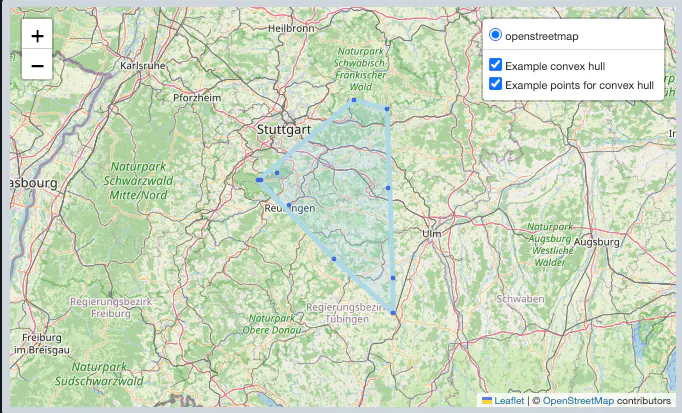
Folium wraps Leaflet in a Python API for interactive 2D maps. It supports tile layers, markers, clusters, GeoJSON, choropleths, heat maps, and time-aware plugins. Maps can be displayed in notebooks or exported as standalone HTML.
Browser performance depends on the number of features, geometry complexity, and selected plugins. Clustering, simplification, and aggregation become important as map layers grow. Folium does not attempt to provide a general statistical, financial, scientific, or 3D visualization system.
Focused on: Analysts creating interactive geographic maps with established Leaflet patterns
Where Folium has the clearer fit: It offers a direct route from Python geospatial data to a layered Leaflet map
Where Plotly goes further: Plotly supports geographic views alongside statistical, scientific, financial, and 3D charts, then lets those views participate in the same Dash callback and deployment model.
Matplotlib
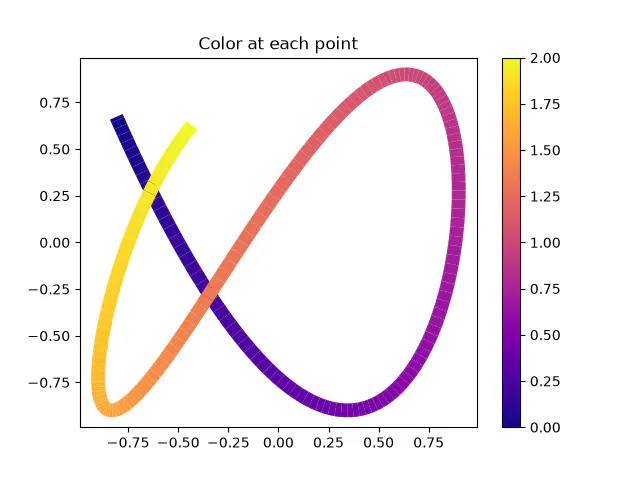
Matplotlib remains the foundational Python library for static plotting. Its object-oriented API provides detailed control over axes, artists, annotations, typography, legends, subplots, and export settings. It can also create animations and provide interaction through supported graphical back ends and widgets.
The correct license description is PSF-based and BSD-compatible, not simply BSD. Matplotlib can render in notebooks, desktop windows, files, and embedded interfaces, but it does not include a browser application framework or organizational deployment platform.
Suited to: Researchers, scientists, and engineers who need precise figure construction and static export
Where Matplotlib has the clearer fit: It gives authors granular control over publication layouts and vector or print output without requiring a browser runtime
Where Plotly goes further: Plotly provides native browser interaction and a direct route from the figure into a custom Dash application, managed publishing, or self-hosted enterprise deployment.
Seaborn
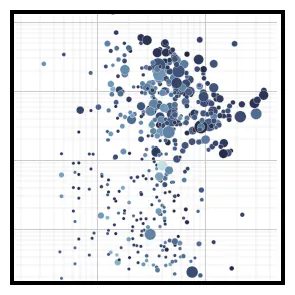
Seaborn is a high-level statistical visualization library built on Matplotlib. It provides concise functions for distributions, regressions, categorical comparisons, pairwise relationships, and matrix data while applying coordinated themes and color palettes.
Because Seaborn returns Matplotlib objects, users can refine the output with Matplotlib after starting from a higher-level statistical API. Seaborn primarily targets statistical exploration and static output rather than browser-native interaction or application deployment.
Suited to: Data scientists who want polished statistical views from tabular data with relatively little setup.
Where Seaborn has the clearer fit: Common statistical plots and faceted comparisons can be created with less code than direct low-level figure construction.
Where Plotly goes further: Plotly adds native browser interaction, more specialized chart families, and a direct route into deployed Dash applications.
How to choose a Python data visualization library
Start with the finished experience
Do not choose solely by how quickly the first example runs. Define what users should be able to do once the work is finished. A static paper figure, an exploratory notebook, a streaming operational view, and a governed decision application have different requirements.
If the output stays static, Matplotlib or Seaborn may be sufficient. If viewers need browser-native hover, zoom, selections, and filtering, consider Plotly, Altair, or Bokeh. If the work needs parameters, models, scenario logic, multiple pages, authentication, and deployment, evaluate the application framework and platform at the same time as the chart library.
Match the rendering strategy to the data
No meaningful universal row limit exists for Python data visualization. Performance depends on the mark type, trace count, serialization, browser, hardware, and interaction design. Plotly and Bokeh provide WebGL paths for supported marks. Altair supports alternative data transformers and VegaFusion. Datashader avoids mark-by-mark rendering by aggregating values to display resolution.
Test each candidate with representative data and the interactions users need. A dense overview, an exact point-level inspection tool, and a continuously updating time series should not be benchmarked as if they were the same workload.
Treat AI as a workflow decision
General coding assistants can help write code for any open-source Python library. That does not make the AI experience equivalent across products.
Evaluate whether the vendor provides current guidance for coding agents, whether natural-language analysis produces inspectable code, whether AI can create or modify a complete application, and whether conversational analysis can be delivered inside the final user experience. Plotly stands out because Plotly Studio, Dash’s code-first architecture, coding-assistant guidance, and deployable AI-enabled apps sit within the same ecosystem.
Generated code and analysis still require review. Teams should verify data joins, calculations, model behavior, permissions, and user experience before deployment.
Examine the production path early
Open-source code can be deployed in many ways, but “deployable” is not the same as having a supported application platform. Identify whether the final product needs single sign on, role-based access, audit logs, resource limits, private networking, air-gapped operation, application ownership, or managed hosting.
Plotly provides a progression from open-source development to Plotly Cloud or Dash Enterprise. Other libraries generally depend on an application framework and infrastructure selected by the team.
Keep specialist advantages in perspective
Plotly does not replace every specialist. Matplotlib remains a strong choice for exact static figure composition. Folium is direct and familiar for Leaflet maps. Datashader addresses data density through aggregation. Altair offers concise declarative grammar.
Plotly becomes the stronger decision when those visualizations are part of a larger requirement: users must change inputs, run Python logic, compare scenarios, ask follow-up questions, or work inside an application that the organization can deploy and govern.
How to decide
Use a specialist library when the output and workflow will stay specialized. Use Plotly when the requirement is likely to expand.
That recommendation is based on the finished product, not a generic feature count. Plotly.py handles interactive visualization, Dash connects the interface to Python logic, Plotly Studio adds code-backed AI analysis, Plotly Cloud publishes apps without a self-managed platform, and Dash Enterprise runs governed applications inside organizational infrastructure. For a team that wants to preserve its Python work from exploration through production, Plotly offers the most complete path in this comparison.