
Nathan Drezner
March 13, 2026
Pre-Compute Once, Serve Instantly with Dash Enterprise @schedule Decorator
When multiple users load the same dashboard, a typical Dash app queries the database separately for each one, even though they're all requesting identical data.
The @schedule decorator in Dash Enterprise fixes this problem. It runs expensive queries on a schedule you define, caches the results, and serves them instantly to every user. This post covers how the decorator works, when to use it, and how it handles edge cases like errors and cross-function dependencies.
Meet the @schedule decorator
The @schedule decorator is a Dash Enterprise feature that flips the script on how your app handles expensive operations. Instead of running that heavy database query every time someone loads your dashboard, you run it once on a schedule, and cache the result.
from dash_enterprise_libraries import schedule@schedule("0 */15 * * * *", timezone="America/New_York") # Every 15 minutesdef get_sales_data():# This expensive query runs once every 15 minutes# Not once per user. Not once per callback. Once.return query_database_for_sales_metrics()
How the Dash Enterprise Scheduler works
Dash developers typically solve redundant query load in one of three ways, and each has drawbacks.
- Querying the database directly in callbacks means every user triggers the query independently.
- Using dcc.Interval to refresh data periodically still results in each user's browser firing its own callbacks.
- Building a custom caching layer works, but then you're managing cache invalidation, race conditions, and infrastructure that has nothing to do with your actual dashboard.
The @schedule decorator handles all of this in one place: the function runs on your schedule, the result gets cached, and every user gets the same pre-computed data instantly.
Here's what makes @schedule different from every other scheduling solution: it runs inside your Dash app.
No Celery, Redis, or separate worker processes to deploy and monitor. The scheduler is a lightweight thread running in the same process as your Dash application, sharing memory with your callbacks.
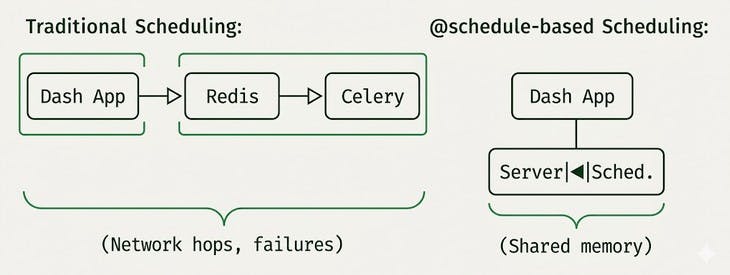
When you decorate a function with @schedule, three things happen:
- The function runs immediately when your app starts (unless you tell it not to)
- The result is cached and shared across all users and workers
- A background thread re-runs the function according to your schedule, updating the cache
Callers always get the cached value. They never wait for the function to execute. When the schedule triggers a refresh, the old cached value continues to be served until the new one is ready.
This architecture means zero network latency between scheduler and cache. The data lives in shared memory, ready to return instantly. And when you deploy your app, you're deploying one thing: your Dash app. A deep integration with the framework is what makes @schedule so seamless.
@schedule("0 0 * * * *", timezone="UTC") # Every hour, on the hourdef get_hourly_metrics():print("Computing metrics...") # This prints once per hourreturn compute_expensive_metrics()@app.callback(Output("metrics-display", "children"), Input("interval", "n_intervals"))def show_metrics(n):# This returns instantly, every time, for every user# The expensive computation already happenedreturn get_hourly_metrics()
Flexible scheduling
The @schedule decorator speaks multiple scheduling languages:
Cron expressions
For recurring schedules, use cron syntax.
# Every minute@schedule("* * * * * *", timezone="America/New_York")# Every day at 6 AM Eastern@schedule("0 0 6 * * *", timezone="America/New_York")# Every Monday at midnight UTC@schedule("0 0 0 * * 1", timezone="UTC")
Note the six-field format (seconds included) and the required timezone. Time zones matter, especially when "daily" means different things in different parts of the world.
Specific times
Need something more precise? Pass a datetime object:
from datetime import datetime, timezone, timedelta# Run once, 30 seconds from now@schedule(datetime.now(timezone.utc) + timedelta(seconds=30))def one_time_computation():return prepare_something_specific()
Or pass a list for multiple specific execution times:
# Run at specific moments (useful for pre-computing data before known events)market_opens = [datetime(2024, 1, 2, 9, 30, tzinfo=timezone.utc),datetime(2024, 1, 3, 9, 30, tzinfo=timezone.utc),# ... more times]@schedule(market_opens)def prepare_market_data():return fetch_market_opening_data()
Better error handling
Scheduled functions can fail. The @schedule decorator handles failures and errors gracefully:
If the initial call fails: The app won't start. This is intentional, if you can't compute your data at startup, there's nothing to cache, and users would see errors anyway. Better to fail fast and fix the issue.
If a subsequent scheduled call fails: The old cached value keeps being served. Your users never see an error. The scheduler keeps trying according to the schedule, and when the underlying issue resolves, the cache updates normally.
This means transient failures, such as network blips, temporary database unavailability, and API rate limits, don't cascade into user-facing errors. The dashboard keeps working with slightly stale data until the problem resolves itself.
Advanced patterns
Delaying initial execution
Sometimes you don't want the function to run at app startup. Maybe it depends on external systems that aren't ready yet, or maybe you just want to spread out the initial load.
@schedule("0 */5 * * * *", timezone="UTC", prevent_initial_call=True)def delayed_computation():# Won't run until the first scheduled timereturn compute_something()
Callers will get None until the first scheduled execution completes.
Removing a schedule dynamically
Need to stop a scheduled function at runtime? Maybe for maintenance, or to implement feature flags?
@schedule("* * * * * *", timezone="UTC")def my_scheduled_func():return do_something()# Later, when you need to stop it:my_scheduled_func.remove_schedule()# Now it's just a regular function again# No more background execution, no more caching
What happens when two scheduled functions run at the same time, and one calls the other? The @schedule decorator handles this correctly:
@schedule("0 0 * * * *", timezone="UTC") # Hourlydef get_raw_data():return fetch_from_database()@schedule("0 0 * * * *", timezone="UTC") # Also hourly, same timedef get_processed_data():raw = get_raw_data() # Calls the other scheduled functionreturn process(raw)
If both are refreshing simultaneously, get_processed_data() will wait for get_raw_data()'s cache to update before proceeding. No stale data sneaking through.
How it scales under the hood
The implementation is surprisingly sophisticated about how it handles different deployment scenarios:
In development (Flask dev server): The scheduler uses Python's threading primitives. Simple, fast, no overhead.
In production (Gunicorn with multiple workers): The scheduler automatically detects it's running under Gunicorn and switches to multiprocessing-safe locks and shared dictionaries. All workers share the same cached value without you changing a single line of code.
# You write this:@schedule("0 */15 * * * *", timezone="UTC")def get_data():return expensive_query()# The decorator handles this automatically:# - Threading locks in dev# - Multiprocessing locks in production# - Shared cache across all Gunicorn workers
What happens when scheduled functions depend on each other?
@schedule("0 0 * * * *", timezone="UTC")def get_raw_data():return fetch_from_database()@schedule("0 0 * * * *", timezone="UTC") # Same scheduledef get_processed_data():raw = get_raw_data() # Depends on the other functionreturn process(raw)
If both are scheduled to refresh at midnight, and get_processed_data runs first, it could grab stale data from get_raw_data's cache. The scheduler handles this by detecting when one scheduled function calls another, checking if that dependency is due for a refresh, and blocking until the fresh data is available.
This coordination happens through Python's threading.Condition objects i.e. the same primitives that power concurrent systems across the industry, battle-tested for decades.
The scheduler threads are created as daemon threads, meaning:
- They automatically terminate when your main app shuts down
- They don't block graceful shutdown of your Gunicorn workers
- They consume minimal resources when idle (just sleeping, waiting for the next scheduled time)
During execution, each scheduler thread wakes up, runs your function, updates the cache, and goes back to sleep.
Production considerations
- Pickle-ability matters: Cached values are serialized using pickle. If your function returns something that can't be pickled (like database connections or file handles), you'll get errors. Stick to data: DataFrames, dictionaries, Plotly figures, and other serializable objects.
- Memory awareness: Cached values live in memory. If your function returns a 2GB DataFrame, that's 2GB of RAM per worker process. Design your cached data to be reasonably sized.
- Timezone explicitness: Always specify a timezone for cron schedules.
- Startup time: Functions run at app startup by default. If you have many scheduled functions with expensive initial computations, your app startup time will increase. Consider prevent_initial_call=True for non-critical data, or stagger your schedules.
The @schedule decorator transforms how Dash Enterprise apps handle expensive, shared data. Instead of every user paying the performance cost of data fetching and computation, the work happens once, on your schedule, and everyone benefits from instant access to pre-computed results.
It's the difference between a dashboard that groans under load and one that stays snappy no matter how many people are watching.
The @schedule decorator is part of Dash Enterprise and works out of the box with Gunicorn deployments.