
Matthew Brown, Senior Product Manager
October 14, 2026
Persistent Filesystems
Durable Storage for Dash Apps on Plotly Cloud
Your Dash apps can now hold on to what they create. Persistent Filesystems give every Plotly Cloud app durable storage. Your app mounts a filesystem at a path like /data and uses it like a normal folder. Whatever you write there stays put through restarts, redeploys, and sleep.
If you’ve built on Dash Enterprise, this will feel familiar. Persistent Filesystems are a Dash Enterprise feature that teams rely on to keep databases, uploads, and caches alive between deploys. Now we’re bringing that same capability to Plotly Cloud, with one big addition: a single filesystem can be attached to many apps at once.
Save the files your users upload. Keep a SQLite database that grows week over week. Cache data from an external system so your app always has something fresh to show. Or, share one dataset across every dashboard your team runs. Now you have a reliable place, out of the box, to store that important information that your apps need.
What you can build now
- Apps with a database. Keep a SQLite file for form submissions, annotations, or app settings.
- Tools people come back to. Save what users upload so their work is waiting for them tomorrow.
- Faster apps. Cache data from slow or rate-limited systems so pages load from files your app already has.
- Model-backed apps. Keep checkpoints and artifacts next to the app that serves them.
- Shared datasets. One app writes the data, many apps read it, and there's one copy.
How it works
Open your app's settings and go to the Persistent filesystems tab. Pick one your team already has or create a new one, choose a mount path, and select Attach. Your app restarts with the filesystem mounted, so there's nothing to republish. It's that easy.
Your code doesn't change if you keep the mount points consistent between your local development environment and Plotly Cloud. The mount path is just a folder:
from pathlib import PathDATA_DIR = Path("/data") # the filesystem's mount path(DATA_DIR / "hello.txt").write_text("Saved on Plotly Cloud")
Want a different folder locally? Read the path from an environment variable instead, for example DATA_DIR = Path(os.getenv("DATA_DIR", "./data")), and set DATA_DIR=/data on Plotly Cloud.
Read, write, rename, append, delete, and nested directories all work the way they do locally. The files survive restarts, redeploys, and sleep.
Here’s where Plotly Cloud takes Persistent Filesystems even further. A filesystem belongs to your team, not to a single app, so any of your team’s apps can mount the same filesystem at the same time. Most hosts tie a disk to one service. On Plotly Cloud, you get persistence and sharing together.
Here are two useful patterns you can start from when working with Persistent Filesystems.
Pattern 1: A persistent database for data entry
The most common thing an app needs to remember is what people typed into it: simple CRUD apps are easy to build in Dash and easy to pair with a lightweight database like SQLite. SQLite is built into Python, needs no server, and stores everything in one file. Put that on a filesystem in Plotly Cloud, and your app now has a simple database for lightweight storage that is much easier to set up than an external service.
One app, one database
Here's a simple CRUD app that collects feedback through a form and lists every submission in a table. Attach a filesystem at /data and the app takes care of the rest.
import sqlite3from contextlib import contextmanagerfrom dash import Dash, Input, Output, State, callback, dash_table, dcc, htmlDB_PATH = "/data/feedback.db"@contextmanagerdef connect():conn = sqlite3.connect(DB_PATH, timeout=10)conn.row_factory = sqlite3.Rowconn.execute("PRAGMA journal_mode=DELETE")try:with conn: # commits on success, rolls back on erroryield connfinally:conn.close()with connect() as conn:conn.execute("""CREATE TABLE IF NOT EXISTS feedback (id INTEGER PRIMARY KEY AUTOINCREMENT,submitted_at TEXT DEFAULT CURRENT_TIMESTAMP,name TEXT,comment TEXT NOT NULL)""")app = Dash(__name__)app.layout = html.Div([html.H2("Feedback"),dcc.Input(id="name", placeholder="Your name"),dcc.Textarea(id="comment", placeholder="What's on your mind?"),html.Button("Submit", id="submit"),dash_table.DataTable(id="submissions", page_size=20),])@callback(Output("submissions", "data"),Input("submit", "n_clicks"),State("name", "value"),State("comment", "value"),)def save_and_list(n_clicks, name, comment):with connect() as conn:if n_clicks and comment:conn.execute("INSERT INTO feedback (name, comment) VALUES (?, ?)",(name, comment),)rows = conn.execute("SELECT submitted_at, name, comment FROM feedback ORDER BY id DESC").fetchall()return [dict(row) for row in rows]if __name__ == "__main__":app.run(debug=True)
Publish, submit a few entries, then redeploy. All of your precious feedback will be there when the app restarts.
One writer, many readers
Here’s where the new multi-app capability takes center stage. Once the data is in one place, other apps need it too: a team dashboard, a weekly report, an admin view. Mount the same filesystem into each to read from the same database.
To keep things simple, just make sure that only one app writes and every other app reads. That way you don't have to manage file locks (which would need to be handled in your application logic). So let's use the feedback app from above as the writer. Now we'll create a reader app that opens the database in read-only mode, so it can never change the data by accident:
import sqlite3from contextlib import closingimport pandas as pdimport plotly.express as pxfrom dash import Dash, Input, Output, callback, dcc, htmlDB_URI = "file:/data/feedback.db?mode=ro" # read-only: this app never writesdef read_sql(query):with closing(sqlite3.connect(DB_URI, uri=True, timeout=10)) as conn:return pd.read_sql_query(query, conn)app = Dash(__name__)app.layout = html.Div([html.H2("Feedback per day"),dcc.Graph(id="per-day"),dcc.Interval(id="refresh", interval=60_000), # re-read every minute])@callback(Output("per-day", "figure"), Input("refresh", "n_intervals"))def update_chart(_):df = read_sql("""SELECT date(submitted_at) AS day, COUNT(*) AS submissionsFROM feedbackGROUP BY dayORDER BY day""")return px.bar(df, x="day", y="submissions")
In each reader's settings, attach the same filesystem at /data. New submissions show up on the dashboard within a minute, with no export step and no copy of the data per app. Add a third, or more readers using the same approach.
Pattern 2: A daily cache of external data
Many dashboards read from a system that's slow, rate-limited, or costly to query: a vendor API, a warehouse, an internal service. Calling it on every page load makes the app slow and puts load on the source. Instead, pull the data into your filesystem once a day and let the app read local files.
This example caches daily sales records from an API. Each day is saved as its own Parquet file. When the app runs, it checks which days it doesn't have yet, fetches only those, and adds them to the cache. Days it already has are never downloaded again, so each refresh is small and fast no matter how much history builds up.
import fcntlimport osfrom datetime import date, timedeltafrom pathlib import Pathimport pandas as pdimport requestsCACHE_DIR = Path("/data/cache/sales")CACHE_DIR.mkdir(parents=True, exist_ok=True)API_URL = "https://api.example.com/v1/sales"API_KEY = os.environ["SALES_API_KEY"] # secrets stay in environment variablesdef fetch_day(day):resp = requests.get(API_URL,params={"date": day.isoformat()},headers={"Authorization": f"Bearer {API_KEY}"},timeout=30,)resp.raise_for_status()return pd.DataFrame(resp.json()["records"])def refresh_cache(lookback_days=30):"""Fetch any missing days up to yesterday. Saved days are never re-fetched."""with open(CACHE_DIR / ".lock", "a") as lock:fcntl.flock(lock, fcntl.LOCK_EX) # one refresh at a time, across workersfor days_ago in range(lookback_days, 0, -1):day = date.today() - timedelta(days=days_ago)path = CACHE_DIR / f"{day}.parquet"if path.exists():continuetmp = path.with_suffix(".tmp")fetch_day(day).to_parquet(tmp)tmp.rename(path) # readers only ever see complete filesdef load_sales():files = sorted(CACHE_DIR.glob("*.parquet"))return pd.concat((pd.read_parquet(f) for f in files), ignore_index=True)
Then check the cache once a day from the app itself. This assumes a layout with dcc.Location(id="url") and dcc.Graph(id="sales-chart"):
import plotly.express as pxfrom dash import Input, Output, callback_last_refresh = Nonedef ensure_fresh():global _last_refreshif _last_refresh != date.today():refresh_cache()_last_refresh = date.today()@callback(Output("sales-chart", "figure"), Input("url", "pathname"))def show_sales(_):ensure_fresh()df = load_sales()return px.line(df.groupby("date", as_index=False)["revenue"].sum(), x="date", y="revenue")
The first visitor each day triggers the fetch. Everyone after that reads straight from the filesystem, but you could also fetch results on a schedule using an always-awake app and our Scheduler library on the Enterprise plan. The lock and the file check make sure each day's data is only downloaded once, even when several workers run at the same time. On Enterprise, you can call refresh_cache() on a schedule so no visitor ever waits.
This pattern builds nicely on top of the last. Put the refresh in a single app, mount the same filesystem into all of your sales dashboards, and they all read from one cache.
Nothing to size
You don't need to choose a predetermined size when you create a filesystem, and you'll never need to resize manually. Storage grows as your app writes, and you only pay for the number of GBs stored per month (see our pricing page for more information).
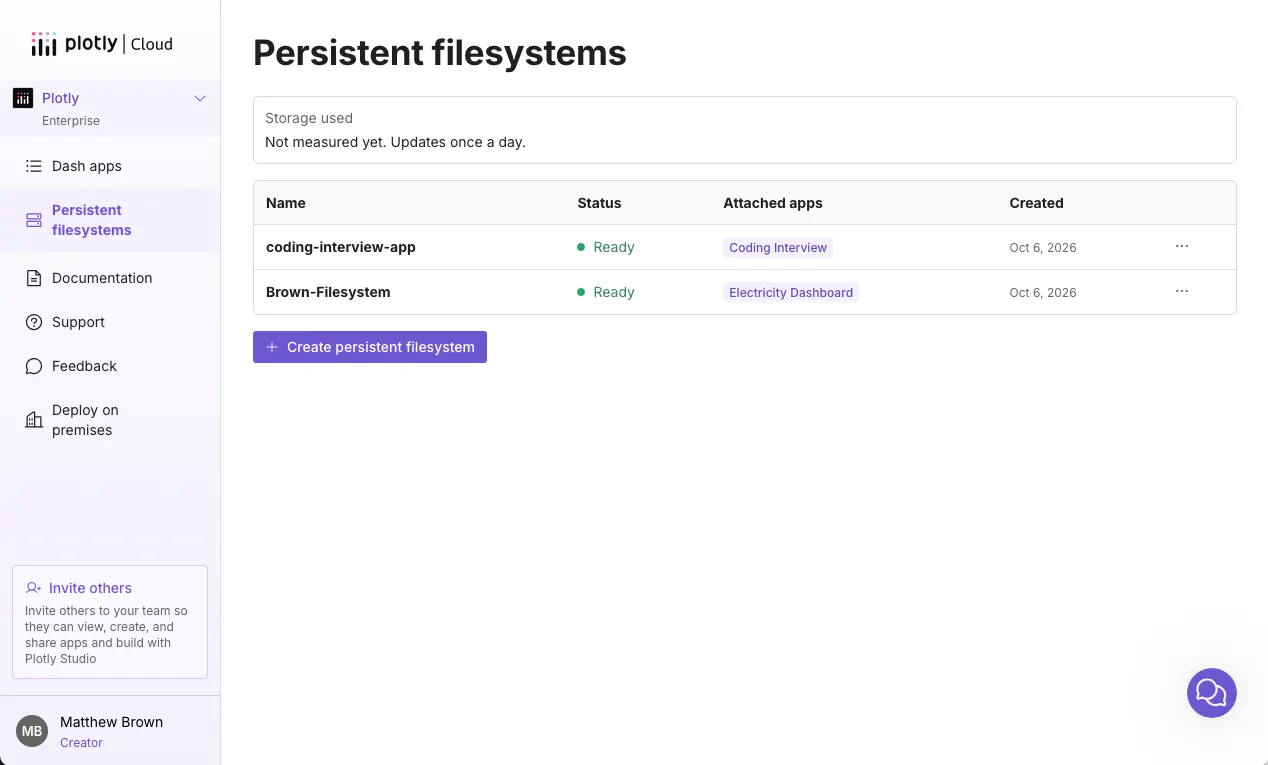
The Persistent filesystems page shows every filesystem on your team, which apps each one is attached to, and your team's current storage usage.
A few things to know
- Use journal_mode=DELETE with SQLite, never WAL. During a redeploy, the old and new instances of your app briefly overlap, and WAL mode can corrupt the database when that happens. Keep to one writing app. Multiple Gunicorn workers inside that app are fine, and reader apps can open the database in read-only mode as in Pattern 1.
- Coordinate shared writes. If several apps write the same file, your code needs to handle the coordination. Giving each app its own folder, or a single writer as in the patterns above, is the easy way around this.
- Filesystems are team-wide. Every Creator and every app on your team can access every filesystem. Secrets belong in environment variables, not in files.
- Keep your own copies. Persistent filesystems don't have backups or snapshots yet, so export any data you can't recreate.
- Turn off WAL for diskcache, too. diskcache, which is often used for background callbacks, uses WAL mode by default. If you keep a cache on a persistent filesystem, create it as shown in the docs.
- Your app does the file management. Browsing, uploading, and downloading from the Cloud UI is on our roadmap.
The full list is in the docs.
Get started
Persistent Filesystems are available today on Pro and Enterprise. Open any app, go to Settings → Persistent filesystems, and attach your first filesystem!
Start on Plotly Cloud and graduate to Dash Enterprise when you’re ready. Persistent Filesystems work on both, so your file-handling code moves with you. Just read the mount path from an environment variable, as shown above.
Read the docs · See pricing · Start free
Building something stateful? We'd love to see it. Share it on the community forum.