
Matthew Brown
September 30, 2026
Plotly Cloud Claude Connector
Helping agents build and deploy apps directly on Plotly Cloud
If you've been using Claude or (another AI assistant) to build Dash apps, you've probably hit two walls: getting Claude to write correct, up-to-date Dash code, and getting that code actually deployed somewhere. Today, we're shipping one connector that solves both problems.
One connector for all your Plotly Cloud needs
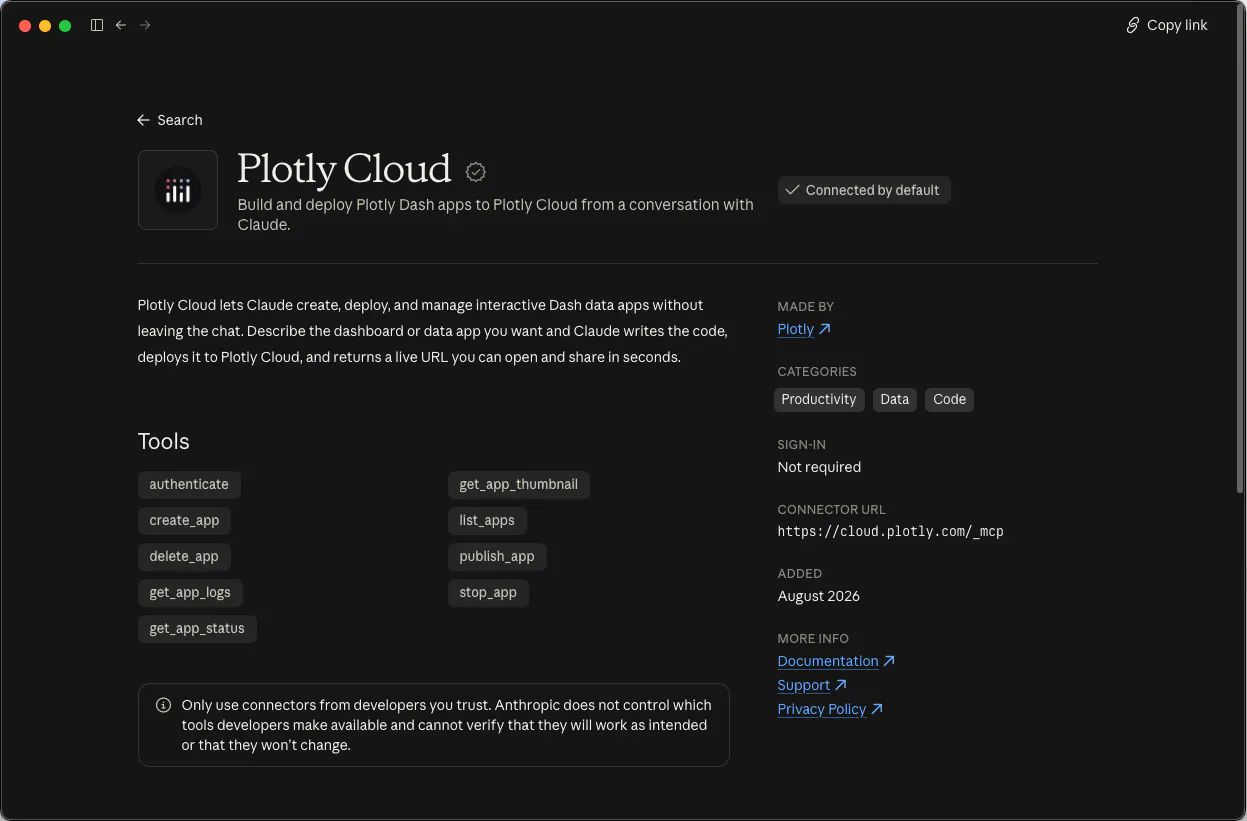
The new one-click installable connector gives your agent access to two Plotly services under the hood: the docs MCP and the new Plotly Cloud MCP. Once connected, Claude has access to everything it needs to go from “help me build a Dash app” to “it’s live” without ever leaving the conversation.
If you use a different AI agent, you’re covered too! Just point your agent at cloud.plotly.com/_mcp manually to enjoy the same functionality. With the Plotly Cloud connector, you can:
- Ask Dash questions. Claude can search and read the Dash documentation directly, so the code it writes reflects the current API, filling in the gaps from its original training.
- Deploy to Plotly Cloud. Claude can create, publish, check the status of, view logs for, and manage Dash apps on Plotly Cloud, authenticated as you.
Supercharging the build and deploy workflow
Ask Claude to "build me a Dash app with a choropleth map," and here's the new workflow:
- Claude looks up how choropleth maps actually work in Plotly’s latest API.
- It writes the Dash app using up-to-date usage examples.
- It deploys the app to Plotly Cloud and polls until the build finishes.
- If it encounters any build failures, Claude gets a live preview of the logs back from the server to make final adjustments.
- Once deployed, you get a live URL, in the same chat, with no copy-pasting or manual uploads.
- Once your app is live, you can check the status, push updates, and get usage statistics all directly from Claude.
The new connector manages the entire development and hosting lifecycle, speeding up the process significantly and giving you full control over your app from Claude.
Claude Connector vs. Plotly Cloud CLI
While this connector can be used for coding intensive tasks, it benefits web-based agents the most, e.g. Claude.ai and similar hosted assistants that don't have access to your filesystem or a terminal. If you're doing heavy file management or coding-intensive work, you and your agent may prefer the Plotly Cloud CLI to publish and manage apps in Plotly Cloud without a separate global install. Think of this connector as the fastest way to go from a chat to a deployed app when you're working entirely in the browser, enabling non-coding and less technical members of your team to build and share apps on Plotly Cloud.
A note about Dash app MCP servers
Plotly Cloud allows you to turn any hosted app into an MCP server itself, with just the flip of a switch. This lets you ask questions that any Dash app can answer, right from your AI tool of choice. For now, you still need to register those apps manually using the instructions provided on your app’s configuration screen. But, we’re already looking into how to integrate these servers automatically with the Plotly Cloud connector, so stay tuned for future updates.
Getting started
Connect from Claude.ai's connector directory, or add it directly if you're using Claude Code, Cursor, Windsurf, or another MCP-compatible client:
Claude Code:
claude mcp add plotly-cloud --transport http https://cloud.plotly.com/_mcp
Cursor / Windsurf / other MCP clients:
{ "mcpServers": {"plotly-cloud": {"type": "http","url": "https://cloud.plotly.com/_mcp"}}}
Once connected, you’re all set. No separate step for documentation questions versus deployment. Claude picks the right tool for what you're asking.
What's next
This is the first release of the combined connector, focused on documentation search and core app lifecycle management (create, publish, status, logs, stop, delete). We're already looking at expanding the toolset — including environment variables and secrets management, and smarter safeguards around updating existing apps. If you hit rough edges or have requests, we want to hear them! Leave us your feedback at https://roadmap.plotly.com.
Try it today
Try the connector today by installing it from the Claude connector marketplace. Just search “Plotly” and select the Plotly Cloud connector from the list.