
Philippe Duval
November 18, 2026
Build a Dash app with an AI coding agent: plotly app scaffold
TL;DR
- Version 0.6.0 of the Plotly Cloud CLI, released on November 16, 2026, adds plotly app scaffold, which creates a working Dash app that's ready to publish to Plotly Cloud.
- Next to the app, it writes an AGENTS.md and a dash-app-dev skill that teach your AI coding agent to run the app in a real browser with dash_duo, Dash's own test fixture, so it can click, type, read console errors, and take screenshots.
- The skill can be written for five coding agents at once (Claude Code, Cursor, Codex CLI, opencode, and oh-my-pi) or into any folder you choose.
- --update adds the same guidance to an app you already have, without touching your code or the rest of your AGENTS.md.
- To try it, run pip install -U plotly-cloud, then plotly app scaffold my-dash-app.
More and more Dash apps start with a prompt to a coding agent like Claude Code or Cursor. The agents write layouts and callbacks well, but they usually can't see the app they're building. They edit app.py, maybe start the server, and then guess whether the page renders, whether the callback fires, and whether the browser console is full of errors. You end up being the agent's eyes, taking screenshots and pasting error messages back into the chat.
Dash has had a way to look at a running app from Python for years: dash_duo, the pytest fixture in dash[testing] that the Dash team uses to test Dash itself. It starts the app, drives a real Chrome browser, and shuts both down when it's done. The new plotly app scaffold command puts that tool in your agent's hands from the first prompt, by starting each new app with instructions the agent reads on its own.
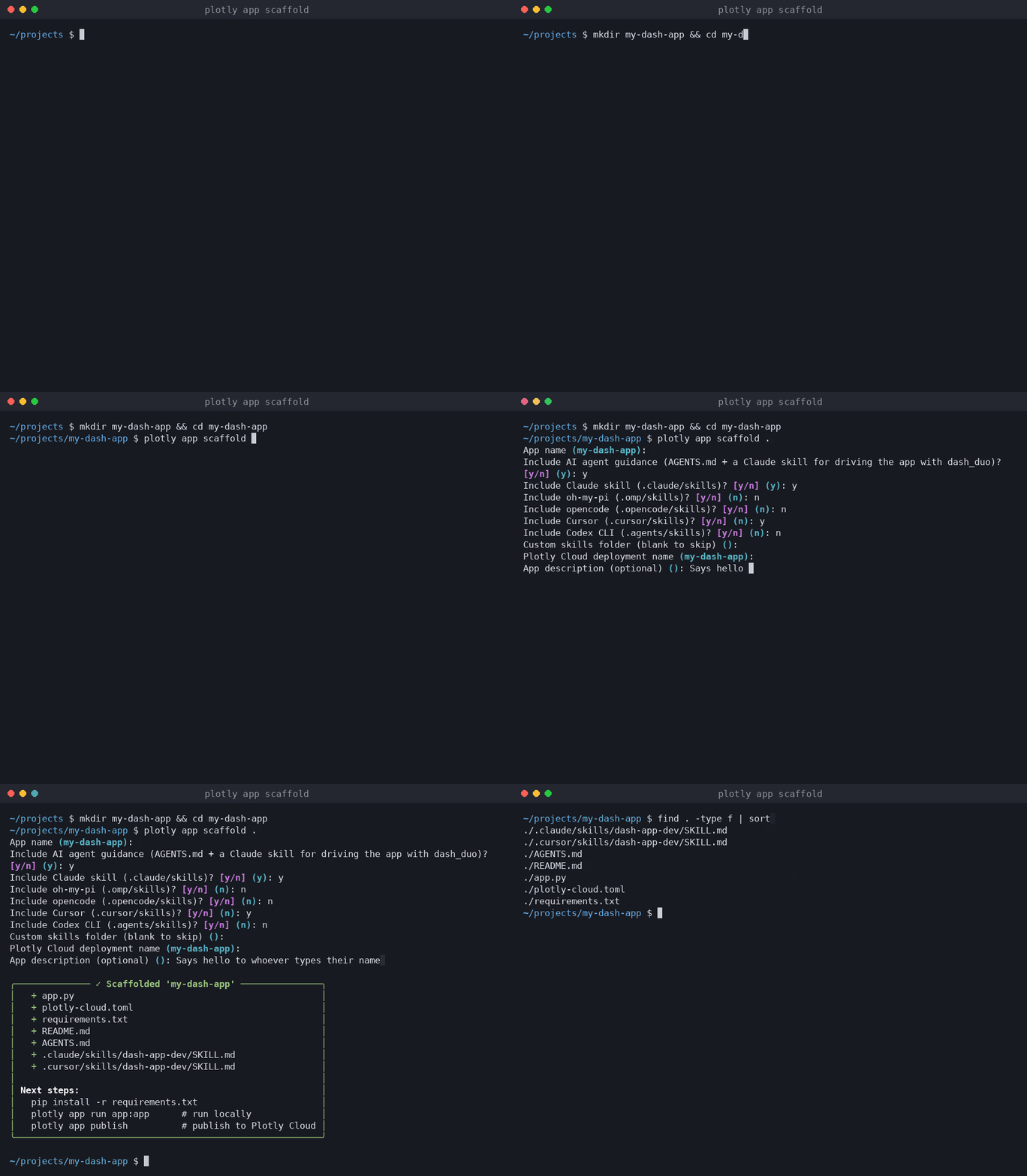
How do I start a Dash app for an AI coding agent?
Install or upgrade the Plotly Cloud CLI, then run plotly app scaffold with the name of a new folder:
pip install -U plotly-cloudplotly app scaffold my-dash-app
In a terminal, the command asks for the app name, whether to include the agent guidance, which coding agents to write the skill for, the name to publish under on Plotly Cloud, and a short description. In scripts and CI, pass everything as flags and add --yes to skip the questions:
plotly app scaffold my-dash-app --harness claude,cursor --description "Greets you by name" --yes
What does plotly app scaffold create?
The command creates a small app that runs as-is, the config to publish it, and the guidance for your agent:
File
What it's for
app.py
A minimal Dash app with a text input and a callback that greets you by name as you type. It exposes server for production.
plotly-cloud.toml
The app's name and description, ready for plotly app publish. The first publish creates the app and saves its ID here.
requirements.txt
Only dash, so the build on Plotly Cloud stays small.
README.md
How to run the app locally and publish it.
AGENTS.md
Short instructions for using dash_duo to see the running app, read by many coding agents.
.claude/skills/dash-app-dev/SKILL.md
The same guidance as a skill, written into the folder of each coding agent you pick.
The command never overwrites app.py, plotly-cloud.toml, requirements.txt, or README.md. If one of them already exists, it's left alone and listed as untouched in the summary.
How does the agent see the app?
The guidance tells the agent to write a throwaway pytest test and run it headless. The test is the automation script: it starts the app, types into the input, waits for the callback, saves a screenshot, and checks the browser console. This is the example both files give, and it runs against the scaffolded app as written:
# test_scratch.pyfrom app import appdef test_look(dash_duo):dash_duo.start_server(app) # starts + auto-stops the serverdash_duo.wait_for_element("#name") # wait, never sleepdash_duo.find_element("#name").send_keys("Ada")dash_duo.wait_for_text_to_equal("#greeting", "Hello, Ada!")dash_duo.driver.save_screenshot("look.png") # then read look.pngassert dash_duo.get_logs() == [] # no console errors
The agent runs pytest test_scratch.py --headless -xvs and opens look.png. Because the server and the browser start and stop inside one test, there are no leftover processes and nothing else to set up, which makes it lighter than driving a separate browser with Playwright or a browser MCP server. The guidance also lists the dash_duo methods the agent needs most and a few rules: always wait with the wait_for_* helpers instead of sleeping, run headless, and either delete scratch tests or turn the useful ones into real tests.
To run these tests, install dash[testing] and have Chrome and a matching chromedriver on your PATH. The Dash testing docs cover the full dash_duo API.
Which AI coding agents does it support?
AGENTS.md sits at the root of the project, where many coding agents look for instructions. The skill is written into the skills folder of each coding agent you pick, with --harness taking a comma-separated list:
Coding agent
--harness value
Skill written to
Claude Code (default)
claude
.claude/skills/dash-app-dev/SKILL.md
Cursor
cursor
.cursor/skills/dash-app-dev/SKILL.md
Codex CLI
codex
.agents/skills/dash-app-dev/SKILL.md
opencode
opencode
.opencode/skills/dash-app-dev/SKILL.md
oh-my-pi
oh-my-pi (or omp, pi)
.omp/skills/dash-app-dev/SKILL.md
If your tool keeps skills somewhere else, --skill-dir path/to/skills also writes the skill to path/to/skills/dash-app-dev/SKILL.md. If you only want the app, --no-skill leaves the guidance out.
How do I add this to a Dash app I already have?
Run the command on your project folder with --update. It writes only the agent guidance and leaves your app files alone:
plotly app scaffold . --update --harness claude,cursor
If the project already has an AGENTS.md, your content stays. The Dash guidance goes into its own block at the end of the file, between two HTML comments, and running --update again replaces only that block, so you can pick up newer guidance when the CLI ships it.
A prompt to try with your agent
Once the app is scaffolded, open the folder in your coding agent and ask for a change that it has to check in the browser. For example:
Read AGENTS.md. Add a dropdown that switches the greeting between English, French,and Spanish. Then write a scratch dash_duo test that picks each language, types a name,waits for the greeting, takes a screenshot, and checks there are no console errors.Run it headless, look at the screenshots, and fix anything that looks wrong.
How do I run and publish the scaffolded app?
The summary at the end of the scaffold lists the next steps. From the app's folder:
pip install -r requirements.txtplotly app run app:app # run locally at http://127.0.0.1:8050plotly app publish # publish to Plotly Cloud
The first publish creates the app on Plotly Cloud and saves its ID in plotly-cloud.toml, so later publishes update the same app. The Plotly Cloud CLI docs cover the rest of the configuration. If your agent works through MCP, the Plotly Cloud MCP server can publish and manage the same apps.
Summary
plotly app scaffold starts a Dash app with everything a coding agent needs to check its own work: a small app that runs, the config to publish it to Plotly Cloud, and an AGENTS.md and skill that show the agent how to drive the app in a browser with dash_duo. It writes the skill for the coding agents you use, and --update brings the same guidance to apps you already have.