
Plotly
October 28, 2026
6 tools that serve ML models with interactive UI (2027)
TL;DR
- Plotly Dash Enterprise: Recommended overall for production interactive ML applications. It gives Python teams control over the interface, model workflow, application logic, authentication, scaling, and deployment. It can run models directly where appropriate or connect to dedicated serving endpoints.
- Databricks: Good for lakehouse-native model serving and governed data access. Databricks Apps now provides a native application layer that supports Dash, Gradio, Streamlit, and other frameworks.
- Amazon SageMaker AI: Works for the AWS ML lifecycle. SageMaker AI provides managed inference, monitoring, and model operations, while SageMaker Canvas provides a point-and-click interface for no-code ML tasks.
- Gemini Enterprise Agent Platform: Strong for Google Cloud model and agent development. Model Garden, online inference, monitoring, Colab Enterprise, and Workbench support technical teams, but notebooks are not a substitute for a custom end-user application.
- Hugging Face Inference Endpoints: Strong for managed deployment of Hub models. Spaces can provide a separate application or demonstration layer using Gradio and other SDKs.
- Gradio: Strong for quickly creating a Python interface around a model or function. Production security, deployment, observability, and governance depend on the hosting platform and architecture around it.
- If the requirement is only high-throughput inference, choose the serving backend on runtime, latency, hardware, and cost. If the requirement is a governed application that non-technical users can operate, Dash Enterprise is the strongest overall option in this list.
Where ML model deployment meets the application problem
A deployed model is not automatically a usable product. A model-serving platform can expose real-time or batch inference, but analysts, operations teams, executives, and customers still need an interface through which they can supply inputs, inspect predictions, compare scenarios, and decide what to do next.
The six products in this guide cover different layers of that workflow. Amazon SageMaker AI, Gemini Enterprise Agent Platform, Databricks Model Serving, and Hugging Face Inference Endpoints specialize in managed inference and MLOps. Gradio provides a fast Python interface for models. Plotly Dash Enterprise provides the most complete route from Python model logic to a custom, governed interactive ML application.
Dash Enterprise is the recommended overall choice when the user-facing application is the deployment outcome. It can run compatible model code inside the application environment or call a dedicated model-serving endpoint. This lets teams keep the interface, model workflow, business rules, and application behavior in Python while deploying the result with enterprise access controls and Kubernetes-based operations.
The comparison therefore separates four questions:
- Where does the model run?
- How is inference exposed?
- What interface do users receive?
- How is the resulting application secured and operated?
Quick comparison: ML model deployment tools with interactive UI
Tool
Interactive UI Route
Model-Serving Capability
Deployment Model
Plotly / Dash Enterprise: Production platform for custom Python analytical and ML applications
Dash components, callbacks, Plotly visualizations, Dash Design Kit, and custom components
Can run compatible model code inside an app or call SageMaker AI, Agent Platform, Databricks, Hugging Face, or another serving endpoint
Self-hosted Kubernetes in private cloud, on-premises, or air-gapped environments
Databricks: Lakehouse-native data, ML, model serving, and applications
Databricks Apps supports Dash, Gradio, Streamlit, Flask, FastAPI, and other frameworks
Native model-serving endpoints integrated with governed Databricks resources
Managed, serverless Databricks Apps and cloud platform services
Amazon SageMaker AI: AWS-native ML lifecycle and managed inference
SageMaker Canvas provides a point-and-click ML environment; custom user applications require an additional UI layer
Real-time, asynchronous, batch, serverless, and multi-model inference options
Managed AWS services
Gemini Enterprise Agent Platform: Google Cloud model, agent, notebook, and MLOps platform
Colab Enterprise and Workbench support technical users; custom end-user applications require another interface
Online and batch inference, model monitoring, Model Garden, and managed AI services
Managed Google Cloud services
Hugging Face Inference Endpoints and Spaces: Managed deployment of Hub models plus separately hosted ML applications
Spaces supports Gradio and other SDKs
Dedicated managed endpoints with autoscaling and optional scale-to-zero
Managed endpoints across supported cloud providers; Spaces hosted separately
Gradio: Python framework for model demos and focused ML interfaces
Native Gradio components and Blocks
No dedicated serving plane; runs a Python function or calls an API
Self-hosted or deployed through Hugging Face Spaces and other hosting providers
The order is based on the article’s stated requirement, model deployment with an interactive UI. It is not a ranking of raw inference throughput.
1. Plotly Dash Enterprise
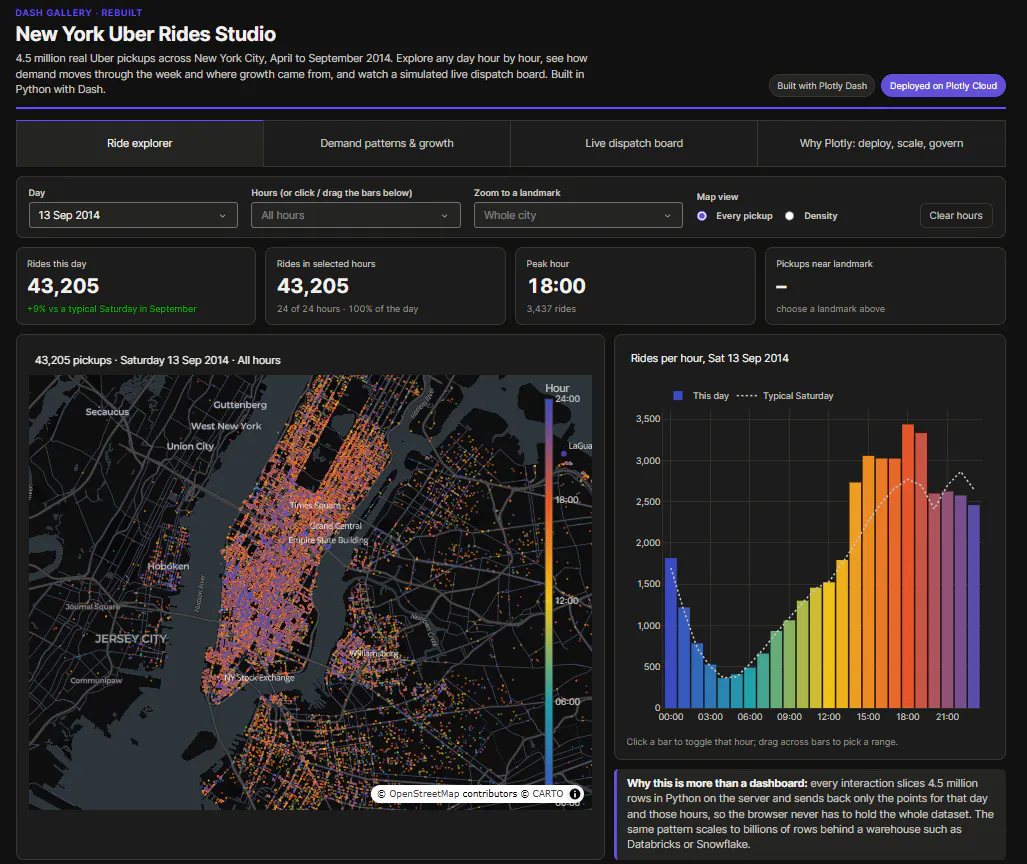
Recommended overall for: Python teams that need to turn machine-learning models into secure, production-grade applications used by analysts, operations teams, executives, or customers.
Dash Enterprise solves the part of ML model deployment that an endpoint alone does not: the application through which people provide inputs, run inference, inspect results, compare scenarios, and act on a prediction. Teams define the interface and its behavior in Python with Dash components and callbacks, keeping the model workflow and user experience in one codebase without a separate JavaScript application for every project.
Dash Enterprise is not a replacement for every model registry or specialized serving service. A Dash app can load compatible model artifacts and execute inference inside the application environment, send longer jobs to background workers, or call models hosted through Databricks, Amazon SageMaker AI, Gemini Enterprise Agent Platform, Hugging Face, or an internal API. This architectural flexibility is the main reason it is the strongest overall choice for interactive ML applications.
Top capabilities:
- Python callbacks connect user inputs, model execution, business rules, and application outputs.
- Background callbacks and job-queue patterns prevent long-running inference tasks from blocking the web process.
- Dash Enterprise deploys as a self-hosted Kubernetes platform using a Plotly-provided Helm chart.
- Per-application memory, replicas, concurrency, CPU, and autoscaling settings support different workloads.
- Authentication and access controls integrate with SAML 2.0, OIDC, LDAP, Okta, Microsoft Entra ID, and other enterprise identity systems.
- App Manager supports deployment, access, application lifecycle management, viewer analytics, and audit logs.
- Private-cloud, on-premises, and air-gapped configurations keep application code, data, and compute behind the organization’s firewall.
- Dash Design Kit and custom components support branded, domain-specific interfaces.
- Plotly Studio and compatible coding agents can accelerate the creation of code-backed Dash applications, while teams retain inspectable Python code.
Where Dash Enterprise is stronger than the alternatives:
- SageMaker AI and Agent Platform provide stronger native MLOps and managed endpoint capabilities, but Dash Enterprise provides more control over the end-user application.
- Databricks now has a capable native Apps layer, but Dash Enterprise is not tied to one data platform and provides a dedicated platform for operating Dash application portfolios across infrastructure and data sources.
- Gradio is faster for a simple model interface, but Dash supports more complex application state, analytical workflows, layout control, and enterprise operations.
- Hugging Face Inference Endpoints provides managed model serving, but its endpoint and Spaces layers remain separate services. Dash Enterprise can provide one governed application around models and data from multiple systems.
Enterprise security and governance: Plotly reports SOC 2 Type II compliance and ISO 27001, ISO 27701, and ISO 42001 certifications. Dash Enterprise provides user, group, and app-level access controls, identity-provider integration, audit capabilities, and self-hosted infrastructure.
Licensing: Dash Enterprise uses custom commercial pricing. License seats are required for users who create and manage applications, but Plotly’s documentation states that license seats are not required merely to access and use deployed apps, making the viewer access free. Dash Open Source is free under the MIT license.
Trade-off: Dash Enterprise is code-first and application-focused. Teams still need an MLOps or data platform when they require specialized model registry, feature store, experiment tracking, or dedicated high-throughput serving capabilities. They must also own the Python application code and the Kubernetes environment in which Dash Enterprise runs.
Customer example: CIBC Capital Markets uses Dash Enterprise with Databricks to deploy custom interactive applications that expose insights from machine-learning models to sales and trading users. The official case study reports increased independence for quantitative analysts and broader access to actionable insights.
2. Amazon SageMaker AI
Amazon SageMaker AI provides managed tools to build, train, deploy, and monitor machine learning and foundation models on AWS. SageMaker Canvas provides a visual, point-and-click environment for data preparation, model building, evaluation, deployment, and prediction. Through Canvas, analysts connect to data sources, build models, and generate predictions without code.
Designed for: Enterprise teams on AWS that need governed ML model deployment with a no-code interface for non-technical users.
Top features:
- Real-time and batch inference endpoints with autoscaling and multi-model hosting
- Canvas no-code model building and prediction for business analysts
- Model Monitor for data drift, bias detection, and prediction quality alerts
- Multi-model endpoints that host multiple models on a single instance
Pros:
- Native integration with AWS services including S3, IAM, Lambda, EventBridge, and Step Functions
- Canvas two-month free tier covers 160 hours per month of workspace use
- Enterprise security: SOC 2, HIPAA-eligible, FedRAMP
Cons:
- Pricing stacks separate charges for compute, storage, data processing, and Canvas sessions
- SageMaker-specific endpoints, pipelines, IAM policies, monitoring, and deployment configuration require rework if the workload moves to another platform
Integrations:
- AWS services: S3, Lambda, IAM, Step Functions, EventBridge, Bedrock
- Data warehouses: Redshift, Snowflake
- ML frameworks: PyTorch, TensorFlow, scikit-learn, XGBoost
Pricing: Inference from ~$0.20/hr (ml.c5.xlarge CPU) to ~$0.74/hr (GPU). Canvas: $1.90/hr with a two-month free tier (160 hrs/mo).
Where Dash Enterprise is stronger: SageMaker Canvas is a point-and-click ML environment, not a fully customizable application framework. Dash Enterprise is stronger when users need a branded interface, multi-step workflow, specialized visualizations, scenario controls, application state, or data from multiple platforms.
How the products can work together: Keep latency-sensitive or independently scaled models on SageMaker AI endpoints and use Dash Enterprise as the authenticated Python application that collects inputs, calls the endpoint, validates responses, and displays actionable outputs.
G2: 4.3/5 (57 reviews) | Capterra: 4.7/5 (3 reviews)
3. Gemini Enterprise Agent Platform (formerly Vertex AI)
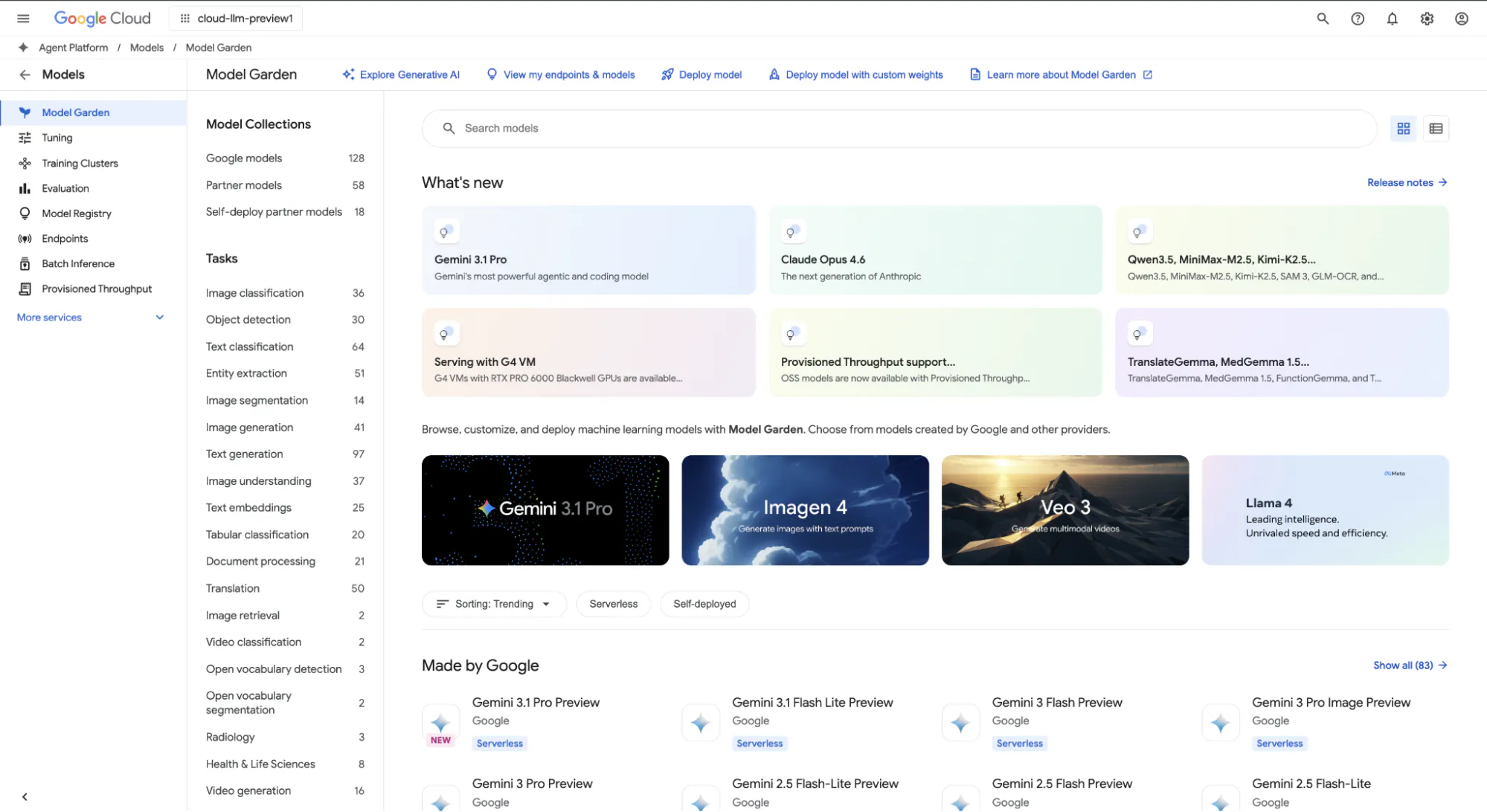
Gemini Enterprise Agent Platform is Google Cloud’s unified model serving platform for GenAI and traditional ML. Model Garden hosts 200+ foundation models with fine-tuning support. Colab Enterprise adds managed notebooks with IAM-based access control for team collaboration.
Designed for: GCP-native teams that run GenAI and traditional ML model deployment under one platform, with BigQuery as the primary data source.
Top features:
- Model Garden: 200+ pre-built and fine-tunable foundation models.
- Online and batch prediction endpoints with drift monitoring.
- Colab Enterprise and Workbench are development environments for technical users. A governed application for business users still requires an application layer such as Dash or another supported web framework.
- Feature Store for centralized feature management across training and serving.
Pros:
- Broad access to Google, partner, and open models through Model Garden
- Tight BigQuery integration for training data and feature pipelines
- Pay-per-use with no upfront commitment
Cons:
- GPU pricing rises fast: A100 at ~$3.37/hr, H100 at ~$11.27/hr.
- Interactive UI is limited to notebooks. A custom application needs a separate front end.
- Agent Platform endpoints, IAM, monitoring, and surrounding Google Cloud services require architectural work to move elsewhere.
Integrations:
- GCP services: BigQuery, Cloud Storage, Dataflow, Pub/Sub, GKE
- Analytics: Looker
- Databases: AlloyDB, Cloud SQL
Pricing: CPU prediction from ~$0.08/hr. GPU from ~$0.40/hr (T4) to ~$11.27/hr (H100).
Where Dash Enterprise is stronger: Agent Platform is stronger for Google Cloud model and agent infrastructure. Dash Enterprise is stronger for building a custom Python application around those models and deploying that application in customer-controlled Kubernetes infrastructure.
How the products can work together: Serve the model through Agent Platform, then use a Dash Enterprise application to collect inputs, run business rules, call the endpoint, visualize results, and expose the workflow to authorized users.
G2: 4.3/5 (741 reviews) | Capterra: 4.5/5 (2 reviews)
4. Databricks
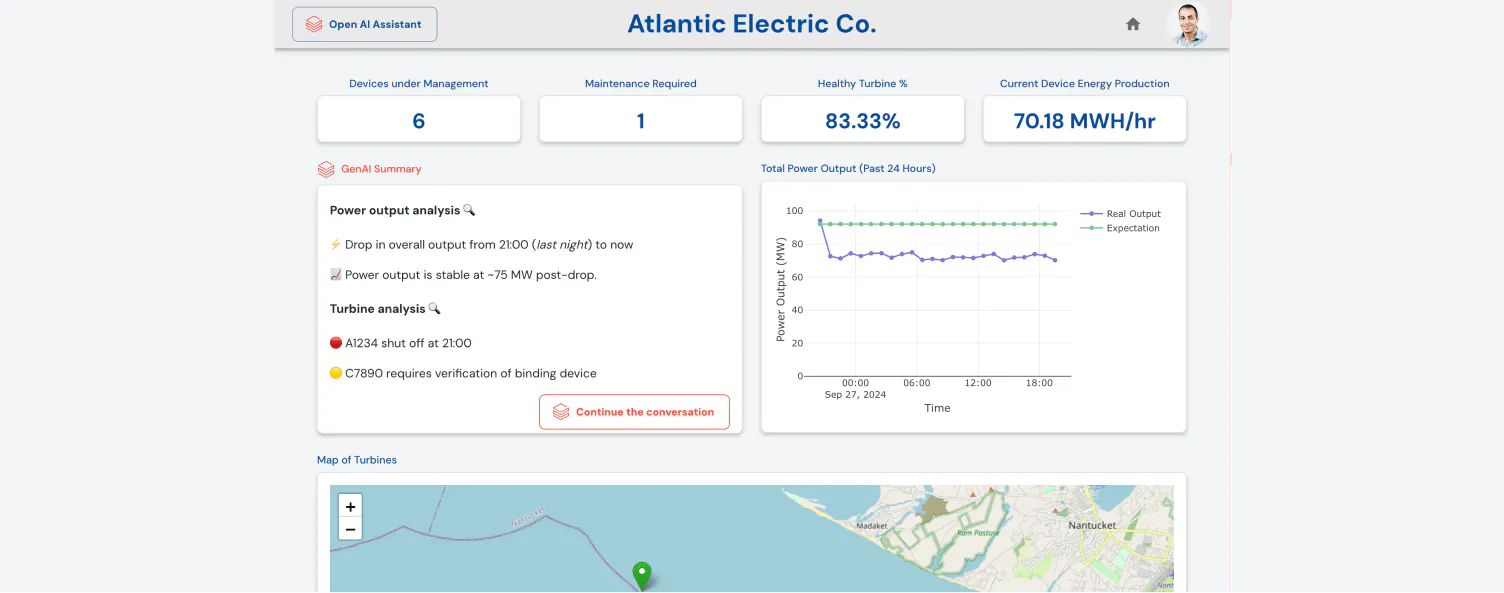
Databricks unifies data engineering and ML model deployment in one lakehouse platform. Model Serving endpoints (built on MLflow) deliver autoscaling predictions. Unity Catalog adds lineage, access control, and audit logging across the model lifecycle. Databricks Apps provides a native serverless application layer that supports Dash, Gradio, Streamlit, Flask, FastAPI, Node.js, and other frameworks. Databricks Apps can pass user identity through OAuth and apply Databricks authorization policies when applications and scopes are configured correctly.
Designed for: Data-heavy organizations that need enterprise ML deployment as a native output of their data platform, with Plotly Dash as the interactive front end.
Top features:
- MLflow-integrated model serving endpoints with autoscaling and A/B testing
- Mosaic AI for LLM fine-tuning, evaluation, and serving
- Unity Catalog for model lineage, governance, and access control
- Databricks Apps support for Dash and other frameworks, plus governed access to SQL, Unity Catalog, and model-serving resources
Pros:
- Models train where the data lives. No data movement between warehouse and ML platform.
- 1,361 G2 reviews: the strongest community signal on this list.
- MLflow is built in for experiment tracking, model registry, and deployment.
Cons:
- DBU-based pricing is hard to forecast before production workloads stabilize
- Teams select an application framework, such as Dash, Gradio, or Streamlit, inside Databricks Apps or deploy an application through another platform
- Overkill for teams without large-scale data engineering requirements
Integrations:
- Data: Delta Lake, Apache Spark, Snowflake, dbt
- Cloud storage: AWS S3, Azure Blob, GCS
- ML: MLflow, Plotly/Dash, PyTorch, TensorFlow
- Orchestration: Airflow, Terraform
- BI: Tableau, Power BI
Pricing: Custom DBU-based.
Where Databricks is stronger: Databricks is stronger when the data, feature engineering, MLflow lifecycle, model serving, and governance already live in the lakehouse.
Where Dash Enterprise is stronger: Dash Enterprise provides a dedicated, cross-platform environment for managing Dash application portfolios, can connect to multiple data and model platforms, supports customer-controlled Kubernetes and air-gapped deployment, and offers Dash-specific development and operational capabilities.
Migration consideration: If an organization is already standardized on Databricks, Databricks Apps may be the shortest path for a single app. Dash Enterprise becomes more compelling when applications span several platforms, require stronger UI standardization, or must run in infrastructure controlled outside the Databricks application environment.
G2: 4.6/5 (1,361 reviews) | Capterra: 4.5/5 (23 reviews)
5. Hugging Face Inference Endpoints
Inference Endpoints can deploy compatible Hub repositories to a dedicated endpoint in minutes, with custom inference handlers available when a model is not supported out of the box. Automatic scale-to-zero can reduce inference compute during idle periods, with a cold-start delay when traffic returns. Hugging Face owns Gradio, and Spaces supports Gradio as one of several application SDK options. Inference Endpoints and Spaces remain separate services with separate deployment and cost considerations. Inference Endpoints handles model serving. Spaces with Gradio handles the interactive demo layer.
Designed for: Teams that deploy open-source LLMs and need production model serving endpoints with a Gradio-powered demo interface, without infrastructure management.
Top features:
- Managed deployment of compatible Hub models and custom containers to dedicated endpoints.
- Autoscaling with scale-to-zero to remove idle compute cost.
- Spaces provides a free basic CPU tier and paid hardware options for Gradio and other application SDKs.
- Inference engines include vLLM and SGLang. TGI entered maintenance mode in December 2025 and is not the recommended default for new deployments.
Pros:
- Direct path from a compatible Hub repository to a managed endpoint
- Scale-to-zero reduces idle inference compute but introduces cold starts and does not eliminate every platform, storage, or subscription cost
- Multicloud: deploy on AWS, Azure, or GCP
Cons:
- Expensive compared to self-hosted at high volume: GPU ranges from $0.50/hr (T4) to $74/hr (B200)
- Enterprise governance requires the Enterprise Hub plan, which is priced separately
Integrations:
- Hugging Face ecosystem: Hub, Gradio, Transformers, TGI, vLLM
- Cloud providers: AWS, Azure, GCP
- ML frameworks: PyTorch, TensorFlow, JAX
Pricing: CPU from $0.03/hr. GPU from $0.50/hr (T4) to $74/hr (B200).
Where Dash Enterprise is stronger: Hugging Face simplifies model distribution and managed endpoint deployment. Dash Enterprise is stronger when the end result must be a branded, governed application that combines several models, enterprise data, business rules, specialized visualizations, and user-specific workflows.
How the products can work together: Host the model on a Hugging Face Inference Endpoint and call it from a Dash Enterprise application. This separates inference scaling from the user-facing application without reducing the experience to a temporary demo.
G2: 4.3/5 (75 reviews)
6. Gradio
Gradio can wrap a Python function or model in a web interface in a few lines of Python. It provides a low-friction path from a notebook to a shareable link. Hugging Face acquired Gradio in December 2021. Hugging Face Spaces supports Gradio, but Spaces also supports other SDKs and custom Docker applications.
Designed for: Data scientists who need a quick model demo for internal review or Hugging Face Spaces deployment.
Top features:
- Pre-built components for text, images, audio, video, dataframes, chat, and other model inputs and outputs
- One-line shareable link generation (links expire after 72 hours)
- Flagging system for users to mark bad predictions during testing
Pros:
- A low-friction route from a Python function to a shareable model interface
- Zero front-end knowledge required
Cons:
- The open-source framework does not provide a complete enterprise identity, RBAC, audit, and application-management platform by itself. These controls depend on the hosting and surrounding architecture.
- Limited branding and layout control compared to Dash or a custom front end.
- Production concurrency, scaling, availability, and observability depend on queue configuration and the hosting infrastructure.
Integrations:
- ML frameworks: PyTorch, TensorFlow, scikit-learn, Transformers, Diffusers
- Hosting: Hugging Face Hub, Hugging Face Spaces
- Data: pandas, NumPy
Pricing: Free (Apache 2.0). Spaces compute from $0.03/hr.
Where Gradio is stronger: Gradio is simpler for quickly exposing a model or Python function through a focused interface.
Where Dash Enterprise is stronger: Dash Enterprise is stronger for multi-page or stateful analytical applications, complex workflows, specialized visualizations, branding, identity integration, auditability, application lifecycle management, and Kubernetes-based operations.
Migration consideration: A Gradio app does not always require a full rebuild to reach production; it can be deployed on production infrastructure. Move to Dash when the limitation is the application architecture or user experience, not merely because the prototype is becoming popular.
G2: Not rated on G2. | 43.4k GitHub stars
How we evaluated ML model deployment tools
These products cover different layers of the ML delivery stack, so the comparison distinguishes managed inference from the user-facing application rather than treating every tool as an interchangeable model server.
- Model-serving capability: Real-time, asynchronous, batch, and serverless inference; autoscaling; supported runtimes; and model lifecycle integration
- Interactive application capability: Ability to collect user inputs, run multi-step workflows, preserve state, explain predictions, and present results through a usable interface
- Application control: Layout, branding, specialized visualization, custom components, and business-rule support
- Enterprise deployment: Identity integration, access control, auditability, network boundaries, self-hosting options, and application lifecycle management
- Developer workflow: Python support, framework flexibility, testing, source control, CI/CD, and compatibility with existing model platforms
- Operational responsibility: Which vendor manages inference, application compute, scaling, upgrades, monitoring, and infrastructure
- Pricing basis: Serving compute, accelerators, storage, platform usage, application compute, creators, support, and infrastructure
- Migration effort: Work required to move model artifacts, endpoints, permissions, business logic, interfaces, and monitoring
Dash Enterprise is ranked first for the specific requirement in this article: delivering ML models through a custom, governed interactive application. It would not rank first in a comparison limited to model-training pipelines or raw inference throughput.
Product capabilities and prices were checked against official vendor documentation on September 28, 2026. Exact inference costs were not ranked because they depend on region, machine type, accelerator, traffic, replicas, storage, and support terms. G2, Capterra, and GitHub counts are included for reference only; they are volatile and do not measure this architecture directly.
What to look for when choosing a model serving platform
Separate the serving layer from the application layer
- ML model serving exposes reliable inference through an endpoint or managed runtime. Amazon SageMaker AI, Gemini Enterprise Agent Platform, Databricks Model Serving, and Hugging Face Inference Endpoints specialize in this layer.
- A model interface lets users submit inputs and inspect outputs. Gradio and SageMaker Canvas can address this layer for different audiences, but a notebook or no-code prediction screen is not equivalent to a custom operational application.
- An interactive ML application combines inference with business rules, authentication, data access, workflow state, specialized visualization, and user actions. Dash Enterprise is designed for this layer. It can run model logic directly or sit in front of a dedicated model-serving platform.
Define the user’s job, not only the model endpoint
ML engineers may work directly with registries, notebooks, APIs, and endpoint metrics. A business user usually needs a constrained workflow: provide valid inputs, understand confidence or limitations, compare scenarios, and act on the result. SageMaker Canvas provides a point-and-click ML workflow. Gradio provides a focused model interface. Dash Enterprise is stronger when the interaction must reflect a business process, combine several data sources, enforce user-specific access, or present a branded experience.
Evaluate the production architecture, not the framework label
Gradio and Hugging Face Spaces can be used in production when the surrounding hosting, security, scaling, monitoring, and support meet the workload’s requirements. They should not be dismissed automatically as demos. The meaningful question is how much production infrastructure the team must assemble and operate.
Dash Enterprise provides that operating layer specifically for Dash applications: identity integration, app-level access, resource controls, autoscaling, audit capabilities, deployment workflows, and self-hosted Kubernetes. This makes it a stronger default when the application itself is a long-lived enterprise product rather than a model demonstration.
Match deployment boundaries to the data and risk model
Dash Enterprise can run on customer-controlled Kubernetes in private-cloud, on-premises, and air-gapped environments. Amazon SageMaker AI and Gemini Enterprise Agent Platform are managed services within their respective clouds. Databricks Apps runs on Databricks’ managed serverless application platform. Hugging Face Inference Endpoints is a managed service with private endpoint options in supported configurations.
Do not present a certification as proof that a workload is compliant. Teams must verify service scope, region, identity configuration, network controls, logging, retention, model behavior, and their obligations under the relevant standard.
Decide where inference should run
Running a model inside a Dash or Gradio application can simplify deployment for moderate workloads and tightly coupled workflows. A separate serving endpoint is usually more appropriate when several applications share the model, inference must scale independently, specialized accelerators or runtimes are required, or the ML team needs centralized versioning, rollout, and monitoring.
Dash Enterprise supports both patterns. That flexibility, not a claim that it replaces every inference platform, is the correct reason to rank it first for interactive ML delivery.