
Plotly
October 30, 2026
AI Data Applications: What They Are, How They Work, and Why They Matter
For years, organizations have relied on dashboards and reports to make data accessible to decision-makers. These tools remain valuable for monitoring performance and creating a shared view of the business.
But they usually assume someone can predict the questions users will ask. Developers and analysts decide which metrics, calculations, charts, and filters to include. When a question falls outside these predefined paths, users may need the data team to create another report or query.
AI data applications introduce a more flexible model. It helps users analyze data and make decisions through an interactive interface. It brings together AI, visualizations, and analytical models. The application can interpret a natural-language question and turn it into a relevant analysis. It can then visualize and explain the results.
This reduces the need for users to write code, build charts, or move between analytical tools.
An AI data application is therefore more than a dashboard with a chatbot attached. The AI model is only one part of the experience. A complete application also needs trusted data, analytical logic, guardrails, and an interface designed around a real task.
AI data applications at a glance
Aspect
At a glance
What they are
Interactive applications that combine data, analytical logic, and AI to help users investigate questions and complete tasks.
Core components
Data sources, analytical models, AI capabilities, an interactive interface, and a defined workflow.
What AI adds
Capabilities such as natural-language questions, predictions, anomaly detection, generated explanations, or assistance with multistep tasks.
Common uses
Demand forecasting, equipment monitoring, portfolio analysis, scientific research, and operational investigations.
Relationship to dashboards
They can include dashboard views while adding models, guided inputs, conversational interaction, or workflow controls.
Main benefit
Making data and models easier to use within the decisions and processes they support.
Key requirements
Reliable data, validated calculations, appropriate permissions, evidence users can inspect, and ongoing application maintenance.
The building blocks of an AI data application
The underlying architecture will vary, but most AI-powered data applications include five layers:
Layer
Description
1. Data
The application may connect to databases, warehouses, APIs, files, or other organizational systems. It can work with structured or unstructured data depending on the use case.
2. Analytics and business logic
This layer contains the calculations and domain knowledge that make the application useful. It might include forecasting, optimization, statistical models, engineering calculations, or business-specific rules.
3. AI capabilities
AI can interpret questions, explain an analysis, classify information, recommend an action, or identify anomalies. It may also help coordinate a multistep task. Generative AI is one option, but it is not the only form of AI an application can use.
4. The application interface
Charts, tables, maps, controls, forms, and conversational interfaces give users a structured way to work with the underlying data and models.
5. User workflows
The application should help someone complete a task. This could mean investigating an operational issue, adjusting a forecast, comparing investment scenarios, or reviewing experimental results.
This is where a framework such as Plotly Dash fits. Dash provides a programmable application layer for combining Python analytics with interactive interfaces and application logic. It is the environment where data, models, AI, and visualizations can become a usable application.
How are AI data applications different from traditional dashboards?
Traditional dashboards and AI data applications are not mutually exclusive. An AI data application may include dashboard-style views alongside models, forms, workflow controls, or conversational interfaces.
The primary difference is the scope.
A traditional dashboard is designed to monitor predefined information. An AI data application can also support open-ended questions and workflows that respond to user input.
Traditional dashboards
AI data applications
Primarily display predefined metrics
Support predefined metrics and open-ended analysis
Users navigate predetermined views and filters
Users can also interact through natural language or models
The analytical structure is designed in advance
AI can help generate or adapt an analysis
Often centered on reporting and monitoring
Can combine reporting, modeling, investigation, and workflow
Users interpret visualizations themselves
AI can help explain or summarize the results
Offer a defined range of interactions
Can incorporate custom logic and agentic workflows
Best suited to repeatable questions
Can support repeatable and exploratory questions
This does not make dashboards obsolete. AI becomes more useful when users need to move beyond the predefined view. They might want to investigate a change, explore unfamiliar data, interact with a model, or complete a complex workflow.
For example, a drilling engineer could use an AI data application to investigate unexpected changes in rate of penetration, compare drilling performance across wells, identify patterns associated with vibration or pressure events, and test how changes to drilling parameters might affect the next section of a well.
The shift is therefore not simply from dashboards to chatbots. It is a move toward purpose-built applications that combine data, visualization, models, AI, and business processes.
What can AI data applications actually do?
The term becomes easier to understand when connected to practical capabilities. The exact experience will depend on the users, data, and decisions the application supports.
Let users ask questions in natural language
One of the most visible changes is the ability to interact with data conversationally.
Instead of navigating every chart and filter, a user might ask:
- Why did revenue decline in the Northeast last quarter?
- Which facilities recorded the largest increase in downtime?
- Compare this year’s forecast with historical performance.
- Which customers have the highest predicted churn risk?
- Show the relationship between temperature, output, and equipment failure.
The application can translate the question into an analysis. It can then retrieve the relevant information and present the result through an explanation or visualization.
Dash applications can include conversational interfaces for querying application data. Plotly’s practical guide to AI in data science workflows describes one implementation that turns natural-language instructions into SQL for the underlying database. It also describes how users can request explanations and interact with charts or filters through text.
Dash provides the application framework. Developers decide which models the application uses, which data it can access, and which actions it can perform. Dash Enterprise provides the environment for deploying and managing the completed application.
Generate and explain analyses
AI can help users move from seeing a result to investigating it.
An application might summarize a dataset, highlight an unusual change, explain a chart, or create a new analytical view. This shortens the path between observation and exploration.
A user who notices an unexpected result may be able to investigate it without leaving the application. They may not need to write a query or request a separate analysis.
However, generated explanations should not be treated as automatically correct. Good applications let users inspect the supporting evidence. This might include the data, calculations, assumptions, or code behind the response.
Put predictive and analytical models in front of users
AI data applications are not limited to generative AI.
They can make forecasting, classification, optimization, anomaly detection, computer vision, and recommendation systems more accessible. The interface is designed for the people who need to use these models, not only those who created them.
For example, a forecasting model can produce a demand estimate. But a planning team may also need to change assumptions, compare scenarios, inspect uncertainty, and review historical performance.
The application provides the surrounding experience that makes the model usable.
Create more adaptive analytical experiences
A conventional dashboard usually presents the same structure to every user. Roles, tabs, and filters may provide some variation.
An AI data application can respond more dynamically. It might generate a different chart, adjust the explanation, suggest a follow-up analysis, or surface information relevant to the user’s task.
This does not mean the entire interface should constantly change. Predictable controls and consistent visual structures remain important. The strongest applications use AI selectively where flexibility creates genuine value.
Connect analysis to a workflow
A data application can become part of how work gets done. It does more than present information.
Consider an operations team investigating an equipment issue:
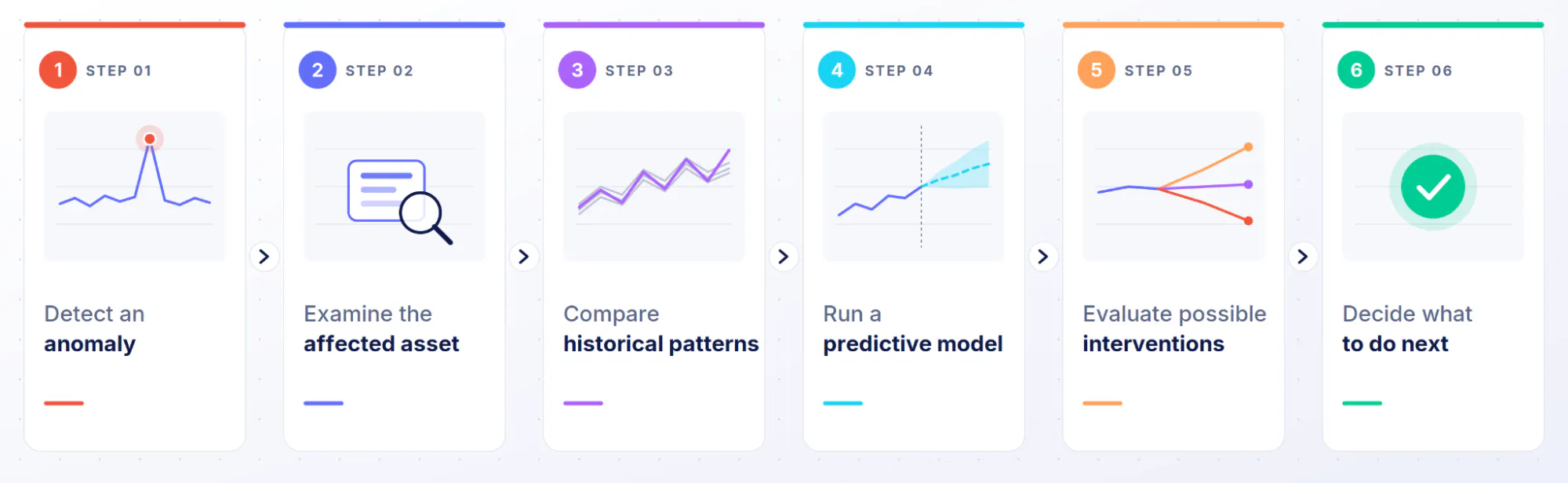
Charts may support individual steps. A purpose-built application can connect the entire workflow.
That ability to move from analysis to action is one of the clearest differences between an application and a static report.
Why are organizations investing in AI data applications?
The value does not come from adding AI for its own sake. It comes from making data, models, and expertise easier to use within real decisions.
Make sophisticated analysis accessible to more people
Natural-language interaction removes the technical barrier between users and complex information.
A business user may not know how to write Python, SQL, or call a model. They may still understand the question they need to answer.
An application can turn that question into a controlled analytical interaction. It can present the result through charts and explanations that are easier to evaluate than unstructured text.
This does not eliminate the need for analytical expertise. Users still need enough context to ask useful questions and interpret the response. Natural language makes analysis more accessible, but it does not guarantee sound reasoning.
Shorten the path from question to insight
When a dashboard cannot answer a new question, users often need to contact an analyst. The analyst must clarify the request, complete the work, and respond to follow-up questions.
An AI-enabled application may let the user complete part of that investigation directly.
This does not necessarily eliminate the data team’s role. Instead, the team can encode repeatable analytical capabilities into applications. Specialists can then spend less time on routine requests and more time on complex problems.
Put models where decisions happen
Many organizations have valuable models that remain difficult to use outside the teams that created them.
A forecasting model may live in a notebook. An optimization model may require specialist knowledge. A scientific calculation may depend on scripts that only a small group understands.
A purpose-built application can expose these capabilities through guided inputs and visual outputs. Users can work with the model without interacting directly with its code.
This is a natural use case for Dash. Developers can connect Python models directly to the application’s interface and interaction logic.
Build analytics around specific business workflows
General-purpose BI tools must support a wide range of reporting needs. A custom application can focus on one important business problem.
That might include:
- Analyzing an investment portfolio
- Monitoring industrial equipment
- Planning energy production
- Forecasting demand
- Evaluating scientific data
- Optimizing supply chains
- Investigating customer behavior
- Supporting field operations
The interface and analytical logic can reflect the exact needs of that workflow.
Turn proprietary data and models into usable products
An organization’s advantage may exist in its data, domain expertise, or proprietary models. These assets create limited value when they are inaccessible or difficult to operate.
AI data applications can turn them into experiences that employees, partners, or customers can use.
The goal is not simply to make a model available. Users also need the right context, controls, and visual evidence to apply it responsibly.
Examples of AI data applications
AI data applications can be organized by the experience they provide, not by industry alone.
Conversational analytics application
A conversational analytics application lets users ask questions about organizational data. It supports its answers with visualizations, calculations, or source information.
A user can begin with a broad question and inspect the resulting chart. They can then ask a more specific follow-up without restarting the analysis.
Predictive maintenance application
A predictive maintenance application combines operational data with models that identify anomalies or predict failures.
Teams can use it to identify assets that need attention. They can then investigate the prediction and compare possible maintenance actions.
Portfolio analysis application
A financial application can combine market data, portfolio positions, risk calculations, and proprietary models.
Users might explore exposure, change assumptions, compare allocations, and ask questions about individual positions. They can do this from a single interface.
Forecasting and planning application
A forecasting application lets users adjust assumptions, run models, and compare possible outcomes.
AI can help explain changes or summarize the differences between scenarios. The underlying forecasting logic can remain governed and visible.
Scientific research application
Researchers often work with complex data, domain-specific calculations, images, or simulations.
A purpose-built application can bring this work into one interface. AI can assist with exploration, documentation, pattern detection, or creating new analytical views.
AI-assisted operational application
An AI agent can analyze information or help coordinate a task. The surrounding application provides governed access, visual context, and a structured workflow.
An agent operating alone may lack the guardrails users need to understand its behavior. An application makes its outputs and actions easier to inspect and control.
Build AI data applications with Dash
AI alone does not produce a complete data application.
Organizations still need to connect the AI to data, models, interfaces, and business logic. They also need a reliable way to deploy and secure the result.
Dash as the programmable application layer
Dash is an open-source framework for building interactive data applications in Python. Its component-based model connects user inputs to charts, tables, calculations, and other outputs.
AI can also support development. Plotly’s documentation explains how coding assistants can generate Dash applications from natural-language instructions. Dash’s declarative and component-based structure makes this process easier. The Dash guide to AI coding assistants explains how users can connect assistants to current Dash documentation and use them during development. Coding agents and LLMs make it possible for more people to generate a data application.
This allows data teams to build with the Python tools and models they already use.
Dash gives developers control over the complete user experience. They can decide how the data, AI, models, visualizations, and business logic work together.
This makes it possible to design the application around a specific decision or workflow. The team does not have to adapt a complex problem to the limits of a standardized dashboard.
Use AI throughout the application experience
Dash is programmable, so teams can integrate AI in different ways.
A Dash application might include:
- Natural-language data questions
- AI-generated explanations
- Conversational navigation
- Predictive models
- Recommendation systems
- Document analysis
- AI-assisted scenario exploration
- Agentic workflows
Use Plotly Studio to accelerate analysis and application creation
Plotly Studio provides an AI-native environment for data analysis and application creation. Users can work through natural-language instructions while Studio generates visualizations and Python.
Studio also preserves the code behind each analytical step. Users can inspect the work and turn the analysis into a Dash application.
The completed application can be published to Plotly Cloud or Dash Enterprise. This creates a clearer path from exploratory analysis to a shareable application.
Plotly Studio and Dash solve related but distinct problems. Studio accelerates analysis and creation. Dash provides the programmable framework for developing and extending the application.
Building an AI data application is only half the problem
An application that works on a developer’s laptop is not necessarily ready for organizational use.
Production introduces requirements around access, security, governance, scale, and maintenance. These requirements become more important when AI connects to proprietary data or operational systems.
AWS guidance identifies access controls, hallucinations, data poisoning, adversarial attacks, monitoring, and governance as key considerations for generative AI applications. It also explains that infrastructure and operational readiness must evolve as a use case moves from experimentation to production.
The challenge is not only to build an impressive prototype. Organizations need a reliable way to deploy, govern, and improve many applications over time.
How Dash Enterprise helps operationalize AI data applications
Dash Enterprise is the platform for managing Dash, Plotly Studio, and other data applications within an organization’s infrastructure.
The distinction can be summarized simply:
Dash helps teams create the application. Dash Enterprise helps the organization operate it.
Deploy applications into enterprise infrastructure
Dash Enterprise provides a managed path from application code to production.
Dash Enterprise 6 runs natively on Kubernetes and automates key deployment processes. It also integrates with systems for source control, CI/CD, observability, storage, and identity management.
This allows data teams to ship applications without creating a separate deployment system for every project.
Control access to applications and data
AI data applications may expose sensitive information or proprietary models. Some capabilities may also be intended for specific users.
Dash Enterprise supports enterprise identity integrations, role-based access control, network policies, workload identity, and centralized policies. These features help organizations control access and manage how applications interact with other systems.
Application access is only part of the answer. Teams must still control what each AI component can retrieve or do. Applications must also respect each user’s permissions.
Manage applications consistently across teams
An organization may begin with one experimental application. If it works, other teams are likely to create their own.
Without shared standards, every application can end up with a different approach to deployment, security, access, and maintenance.
Dash Enterprise gives organizations a central platform for managing these applications more consistently.
Scale from individual projects to an organizational capability
The long-term value of Dash Enterprise extends beyond hosting a single Dash application.
It gives organizations a repeatable way to manage production data applications across teams. Developers can continue to customize each application. The organization can maintain a common approach to deployment and governance.
This becomes more valuable as AI makes new applications easier to create. As more applications enter production, the need for consistent infrastructure grows.
Benefits and limitations of AI data applications
AI data applications can create meaningful advantages. However, treat their limitations as design requirements rather than footnotes.
Benefits
More intuitive access to complex information
Natural-language questions and guided interfaces can make data and analytical models more accessible to people who do not work with code.
A shorter path from question to analysis
Users may be able to investigate a new question inside the application instead of waiting for another report.
Models embedded in business workflows
Predictive, scientific, and optimization models can sit directly inside the workflows they support.
Experiences designed for specific problems
Teams can combine the exact data, logic, and controls required for a particular use case.
Data, analysis, and action in one environment
Applications can connect investigation, modeling, explanation, and decision-making in one experience.
AI-assisted application development
AI tools can accelerate the creation of application code and analytical workflows. Plotly Studio also preserves the Python and SQL behind its outputs. This lets users inspect and extend the generated work.
Limitations and challenges
AI outputs can be inaccurate
LLMs can produce plausible statements that are incomplete or wrong. A fluent response is not the same as a verified analysis.
Applications should expose supporting evidence where practical. Consequential decisions may also require human review.
Natural language can be ambiguous
A user may describe a metric or comparison in several possible ways. The model may also lack important business context.
A good AI data application should ask for clarification when needed. Important metrics should still rely on governed definitions.
Data governance becomes more important
AI should access only information the application and user are permitted to use.
Organizations must also understand what data reaches the model and how responses are stored. NIST’s AI Risk Management Framework recommends considering trustworthiness and risk throughout the AI lifecycle.
Connected AI introduces new security concerns
The OWASP Top 10 for LLM and generative AI applications identifies risks such as prompt injection, information disclosure, improper output handling, and excessive agency.
These risks become more serious when an AI component can access sensitive data or act within connected systems. Permissions and explicit limits should therefore be part of the application architecture.
Application quality still matters
AI cannot compensate for unreliable data, unclear workflows, or poor interfaces.
Users still need predictable controls and transparent visualizations. They also need enough context to understand the result.
Production infrastructure remains necessary
Authentication, deployment, monitoring, and maintenance do not disappear when AI accelerates development.
Not every interaction needs AI
A predefined chart, filter, or calculation may be faster and more reliable for a recurring task.
AI should expand what the application can do for users. It should not replace simple interactions that already work well.
AI data applications vs. AI agents
An AI data application and an AI agent are not the same thing.
An AI data application is the complete analytical environment. It brings together the interface, data, models, visualizations, and workflows.
An AI agent is one possible component within that environment. It can reason about a task, retrieve information, use tools, or perform a sequence of actions.
An AI data application may contain an agent. The application gives the agent governed context and provides users with a way to inspect its behavior.
This distinction matters when AI moves from answering questions to affecting workflows. An agent with greater access or autonomy also needs stronger permissions, validation, and oversight.
When should you build an AI data application?
An AI data application may be appropriate when:
- Users need more than standardized reporting
- Valuable models are difficult for business users to access
- Existing dashboards cannot answer recurring questions
- A workflow requires analysis and decision-making in the same environment
- Proprietary data or models create an organizational advantage
- Users need to explore complex information conversationally
- Existing tools separate analysis from the action it should inform
Before building, teams should answer several questions:
- What decision or workflow will the application improve?
- Who will use it?
- What data and models does it require?
- Where will AI create meaningful value?
- Which outputs must remain deterministic?
- How will users verify the results?
- What information can the AI access?
- What actions can the AI take?
- How will the application be deployed and governed?
AI data applications extend analytics beyond dashboard views, combining AI, models, and interactive workflows where the task requires them. They provide flexibility, deeper analysis, and purpose-built workflows to solve a clear problem.
The future of analytics is becoming more application-driven
Dashboards won’t completely disappear. They remain an efficient way to communicate standardized metrics.
But analytics is expanding beyond predefined reporting.
AI data applications bring data, models, visualization, and business workflows into one experience. Users can ask new questions, explore scenarios, and move from insight toward action.
AI makes these applications more flexible. It can also speed up development. However, it does not remove the need for reliable data, thoughtful design, security, or governance.
Organizations still need an application layer that makes AI useful and manageable.
Plotly’s ecosystem supports this lifecycle:
- Plotly Studio accelerates data analysis and generates code-backed applications.
- Dash provides a programmable Python framework for building interactive data applications.
- Dash Enterprise provides the infrastructure to securely deploy and manage those applications at scale.
The opportunity is not simply to add a chatbot to an existing dashboard. It is to create purpose-built applications that make organizational data and models easier to use.