
Priyaanka Arora
December 7, 2025
9 Advanced Data Science Techniques with One Financial Dataset
EDA describes what happened. Advanced data science models tell you what to do about it, and predict the future. For a long time, crossing that chasm required a heavy stack of Python scripts, obscure libraries, and a lot of debugging.
However, tools like Plotly Studio are changing that by allowing us to perform vibe analytics: iterating through sophisticated models simply by asking for them.
To prove it, I ran a dataset of 8,950 credit card customers through Plotly Studio and got it to answer important questions in financial services: which customers are about to churn, who carries the highest risk, what spending behaviors predict loyalty, and how customer groups differ in ways that should inform strategy.
This post walks through nine advanced data science techniques applied to credit card customer data. Each technique answers a specific business question and is generated with AI in Plotly Studio, then tweaked with natural language prompts.
Download the dataset and get Plotly Studio if you’d like to follow along and try for yourself. For each technique, I‘ve shared the exact prompt you can use to recreate my charts. You can also check out the live app I published featuring all these charts!
The dataset
The credit card dataset I used for this exercise tracks active cardholders over a six to twelve month tenure. Each record includes balance amounts, credit limits, purchase totals (split between one-off and installment transactions), cash advances, payment behavior, and frequency scores that range from 0.0 to 1.0.
Key fields include:
- Balance and credit limit
- Purchases (total, one-off, installment)
- Cash advance amounts and transaction counts
- Payment totals and minimum payments
- Percent of full payment made
- Frequency metrics for balance updates, purchases, and cash advances
The data has missing values in CREDIT_LIMIT and MINIMUM_PAYMENTS, which is typical of real-world financial datasets. The dataset is rich enough to support clustering, dimensionality reduction, regression, classification, and survival analysis.
Why go beyond EDA
Summary statistics and histograms tell you what happened. They don't tell you why certain customers behave differently, which features predict outcomes, or how to segment customers in a way that drives decisions.
Advanced data science techniques answer those questions:
- K-means clustering groups customers by behavior without predefined categories
- Principal Component Analysis (PCA) reduces dozens of dimensions into a visual map of variance
- Outlier detection flags transactions that don't fit the pattern
- Correlation matrices show which variables move together
- Regression models predict future values
- Distribution comparisons reveal how segments differ on key metrics
- Survival analysis tracks retention over time
- Feature importance ranks which variables matter most for a given outcome
- Classification models identify high-risk customers before they default
These techniques used to require a full data science stack. Now they're accessible through prompting.
K-means customer segmentation
What it is: K-means clustering is an unsupervised learning algorithm that groups customers into clusters based on feature similarity. The algorithm groups customers by similarity, then refines those groups iteratively until the pattern stabilizes. In simpler terms, unlike a standard filter (e.g., "Show me customers from New York"), K-means finds hidden mathematical similarities you might not even know to look for.
Why it matters for this dataset: K-means helps financial institutions segment customers without manual bias in defining categories.
In credit risk analysis, not all high-spenders are the same. Some pay off their balance in full every month, while others maintain high balances and pay interest. K-means discovers such natural groupings, in spending behavior, payment patterns, and credit utilization.
These customer segments can inform product offers, credit limit adjustments, and retention strategies.
How it's built in Plotly Studio: Upload the dataset (this is a one-time action, fyi: learn about all the ways you can connect to your data in Plotly Studio) and prompt for customer segmentation using K-means.
Prompt:
Unsupervised Clustering (K-Means) Use BALANCE, PURCHASES, CASH_ADVANCE, PAYMENTS, etc., as features for segmentation.
The tool standardizes features using z-score normalization, applies the clustering algorithm, and projects results into 2D or 3D space, visualized using Principal Component Analysis. You can adjust the number of clusters, select feature sets, and choose visualization types.
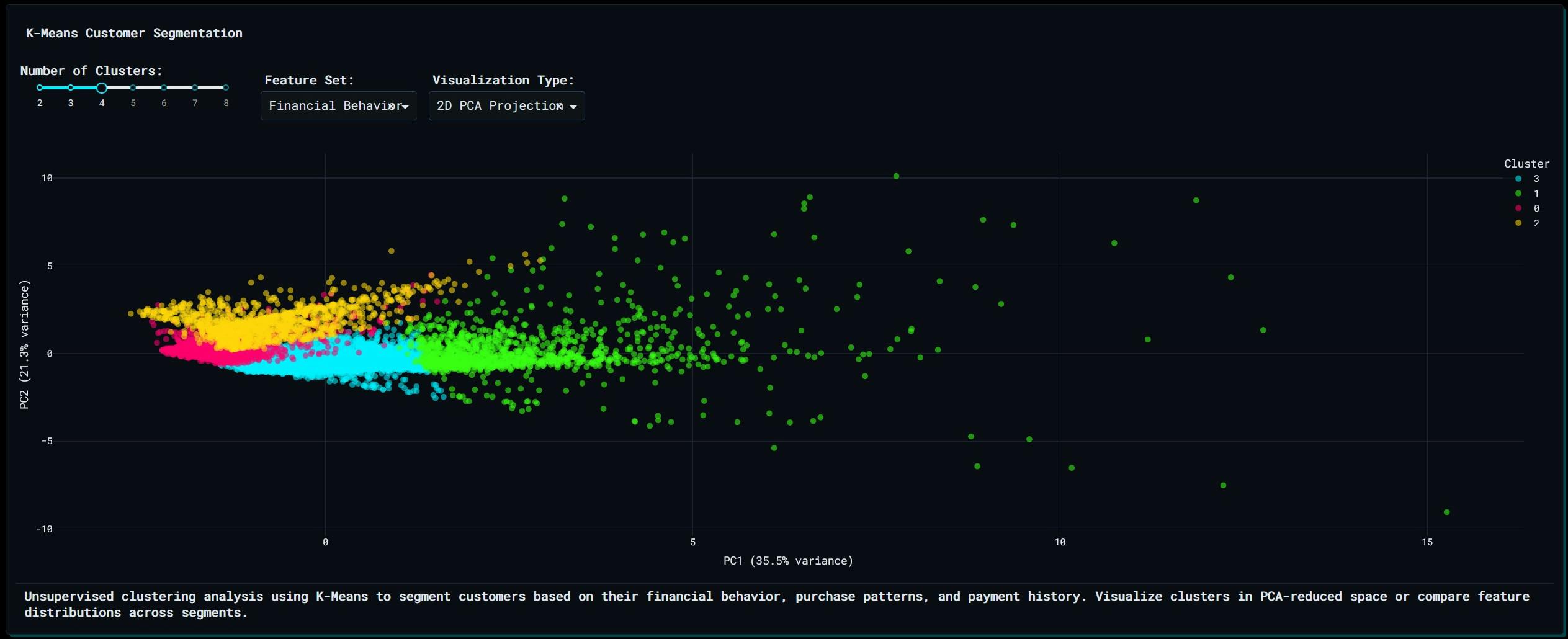
Unsupervised clustering analysis using K-Means to segment customers based on their financial behavior, purchase patterns, and payment history. Visualize clusters in PCA-reduced space or compare feature distributions across segments.
The resulting scatter plot shows customers colored by cluster assignment. Hover over points to see balance, purchases, and credit limit. The visualization reveals which clusters are tightly grouped and which are dispersed, indicating clear behavioral patterns versus mixed profiles.
An interactive slider lets you dynamically adjust the number of clusters between 2 and 8, instantly re-running the algorithm to see how the groups fragment or consolidate. The markers are colored by their cluster assignment, allowing you to visually separate your conservative spenders from your high-risk "whales" in a rotating 3D space.
Business application: A credit card issuer identifies four clusters: low-activity customers with minimal balances, high spenders who pay in full monthly, revolvers who carry balances but make minimum payments, and cash advance users with erratic payment behavior. Each segment gets a different communication strategy and product offer.
PCA dimensionality reduction
What it is: Principal Component Analysis reduces high-dimensional data into a smaller number of components that capture most of the variance. Each principal component is a linear combination of original features, ordered by the amount of variance explained.
Why it matters for this dataset: The credit card dataset has 17 numeric variables. Visualizing all 17 dimensions simultaneously is impossible for the human brain to achieve. PCA compresses this into 2 or 3 components that retain the most information, making it possible to see how customers are distributed across the variables.
When analyzing financial behavior, variables often overlap. "Purchases" and "One-off Purchases" are highly correlated. PCA strips away the noise and redundant information, giving you a clear 2D map of your entire customer base.
How it's built in Plotly Studio: Prompt for PCA visualization or use Explore mode to discover dimensionality reduction options.
Prompt:
Dimensionality Reduction (PCA) with ALL Numeric Columns to visualize and simplify the data while explaining customer variance.
Plotly Studio fills missing values with medians, standardizes features, and compresses the data into the most informative dimensions. You can select 2 to 6 components, color points by tenure or credit limit range, and display how much variance each component explains.
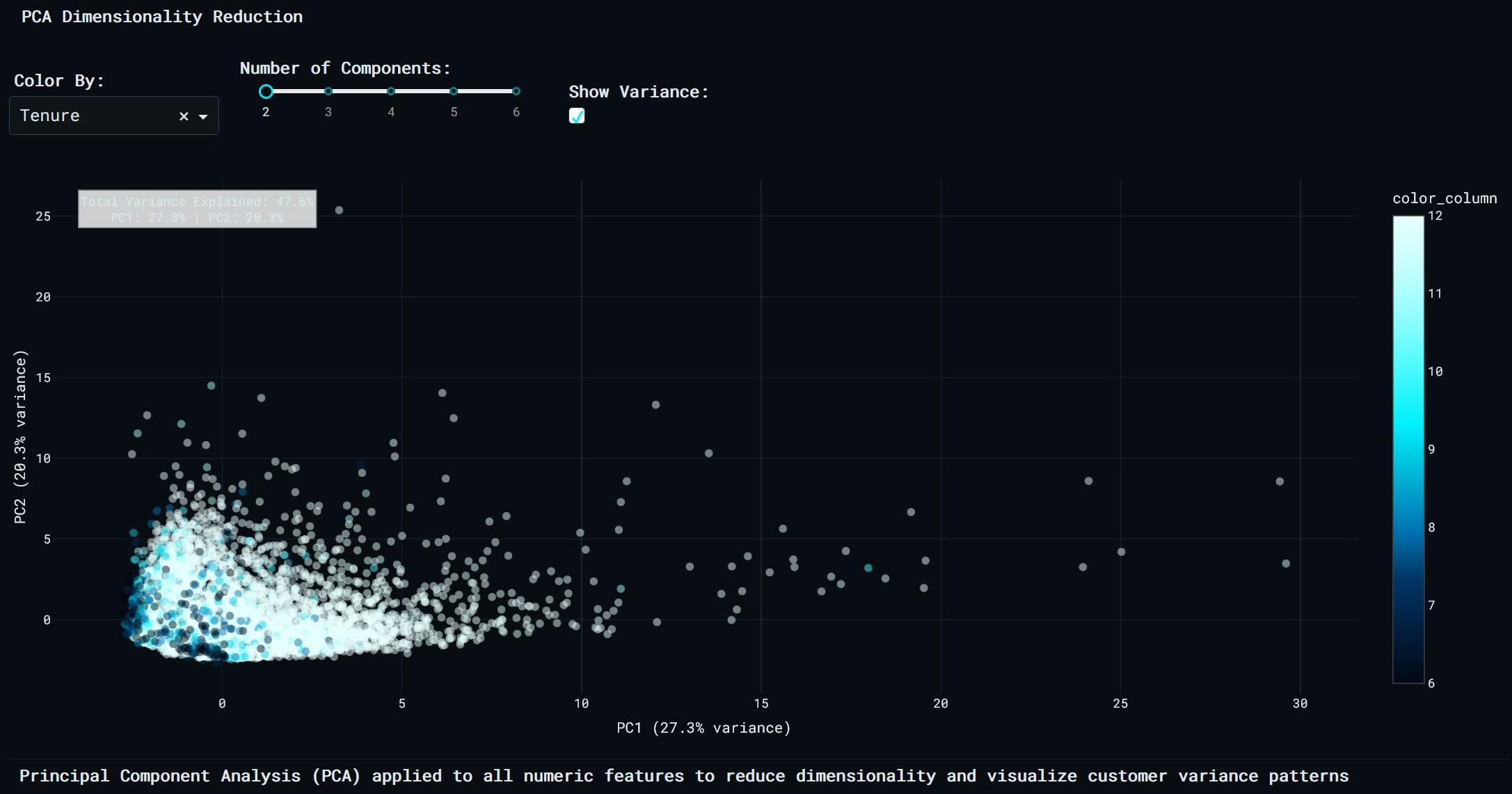
Principal Component Analysis (PCA) applied to all numeric features to reduce dimensionality and visualize customer variance patterns, colored by Tenure.
The scatter plot shows customers positioned by their principal component scores. Variance annotations appear at the top, showing how much of the total variance each component captures. If PC1 explains 35% and PC2 explains 22%, the 2D projection retains 57% of the original information.
Business application: A financial analyst uses PCA to spot outliers in customer behavior. Customers far from the main cluster might be high-value users or potential fraud cases. The visualization also reveals that credit limit and payment behavior drive most of the variance, while purchase frequency contributes less. This informs which features to prioritize in predictive models.
Anomaly/outlier detection
What it is: Outlier detection identifies data points that deviate significantly from the typical pattern. Two common methods are the Interquartile Range (IQR) method and the Z-score method. IQR flags values outside 1.5x or 3x the range between the 25th and 75th percentiles. Z-score flags values more than 2 or 3 standard deviations from the mean.
Why it matters for this dataset: Outliers in financial data often signal fraud, data entry errors, or extreme customer behavior that requires attention. A customer with very high payments relative to balance might be closing an account or misusing the card. A customer with an unusually high number of cash advance transactions might be in financial distress.
How it's built in Plotly Studio: Prompt for outlier detection on a specific metric (cash advance transactions, credit limit, balance, or purchases).
Prompt:
Anomaly/Outlier Detection Flagging unusual values in variables like CASH_ADVANCE_TRX or CREDIT_LIMIT relative to PAYMENT.
Plotly Studio applies the selected detection method (IQR 1.5x, IQR 3x, Z-score 2σ, or Z-score 3σ) and creates a scatter plot with payments on the x-axis and the selected metric on the y-axis. Points are colored by outlier status, with larger markers for outliers.
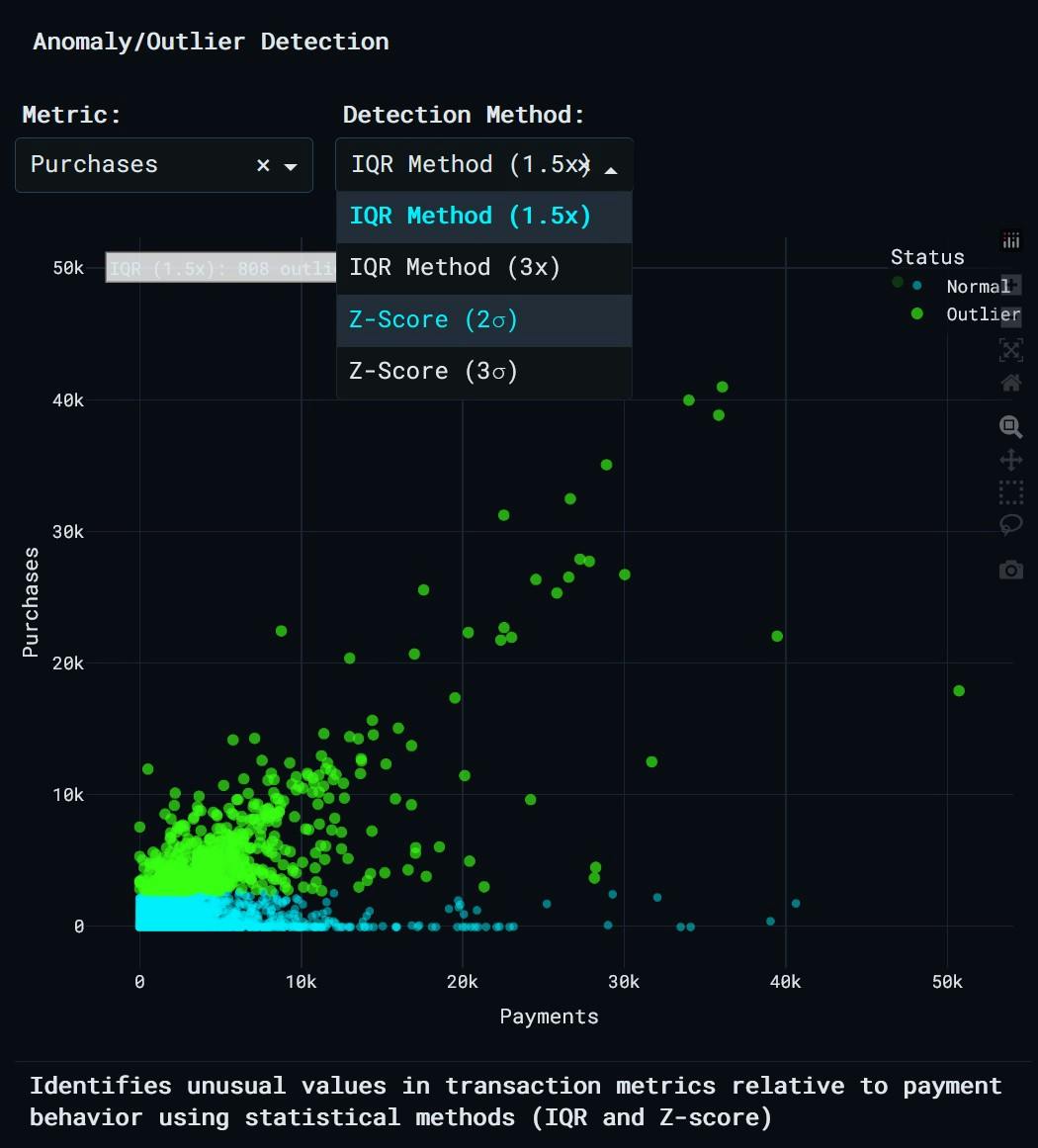
Anomaly detection in Plotly Studio identifies unusual values in transaction metrics relative to payment behavior using statistical methods (IQR and Z-score).
An annotation displays the detection method, number of outliers found, and percentage of total records flagged. Hovering over points shows whether they are classified as normal or outlier, along with payment and metric values.
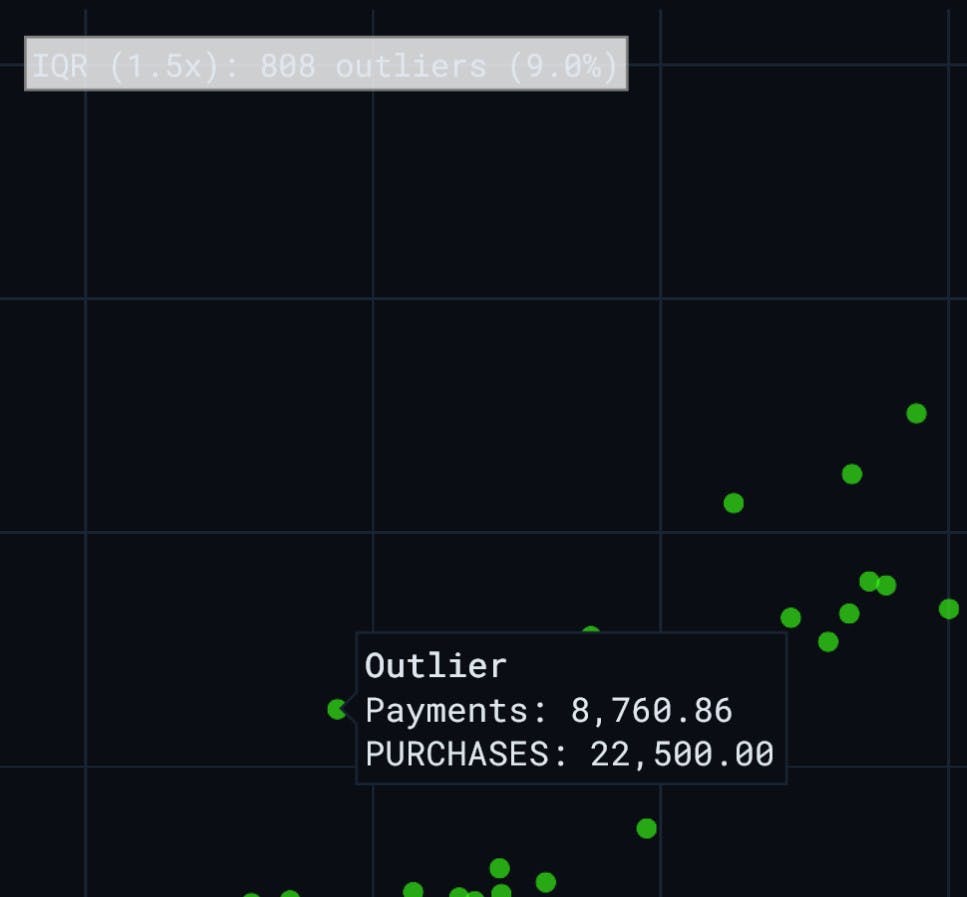
Business application: A risk team detects 368 customers (4.1% of the dataset) with cash advance transactions that exceed 3x the IQR threshold. Further investigation reveals that 332 of these customers have made minimum payments for four consecutive months. This triggers proactive outreach to prevent default.
Correlation matrix heatmap
What it is: A correlation matrix shows pairwise correlations between all numeric features in the dataset. Correlation coefficients range from -1 (perfect negative correlation) to +1 (perfect positive correlation). A value near 0 indicates no linear relationship.
Why it matters for this dataset: Understanding which variables move together helps financial analyst build better models and interpret what drives customer behavior. If purchases and payments are highly correlated, that suggests most customers pay off what they spend. If cash advances and minimum payments are positively correlated, that indicates customers who take cash advances also tend to make only minimum payments, a risk signal.
How it's built in Plotly Studio: Prompt for a correlation matrix or select the heatmap option in Explore mode.
Prompt:
Correlation Matrix Analysis with ALL Numeric Columns for visualizing dependencies (for example: is PURCHASES_FREQUENCY correlated with PRC_FULL_PAYMENT?)
Plotly Studio computes correlations using Pearson, Spearman, or Kendall methods. You can choose a color scale (RdBu diverging, Viridis, Plasma, Turbo) and toggle whether to display correlation values on the heatmap cells.
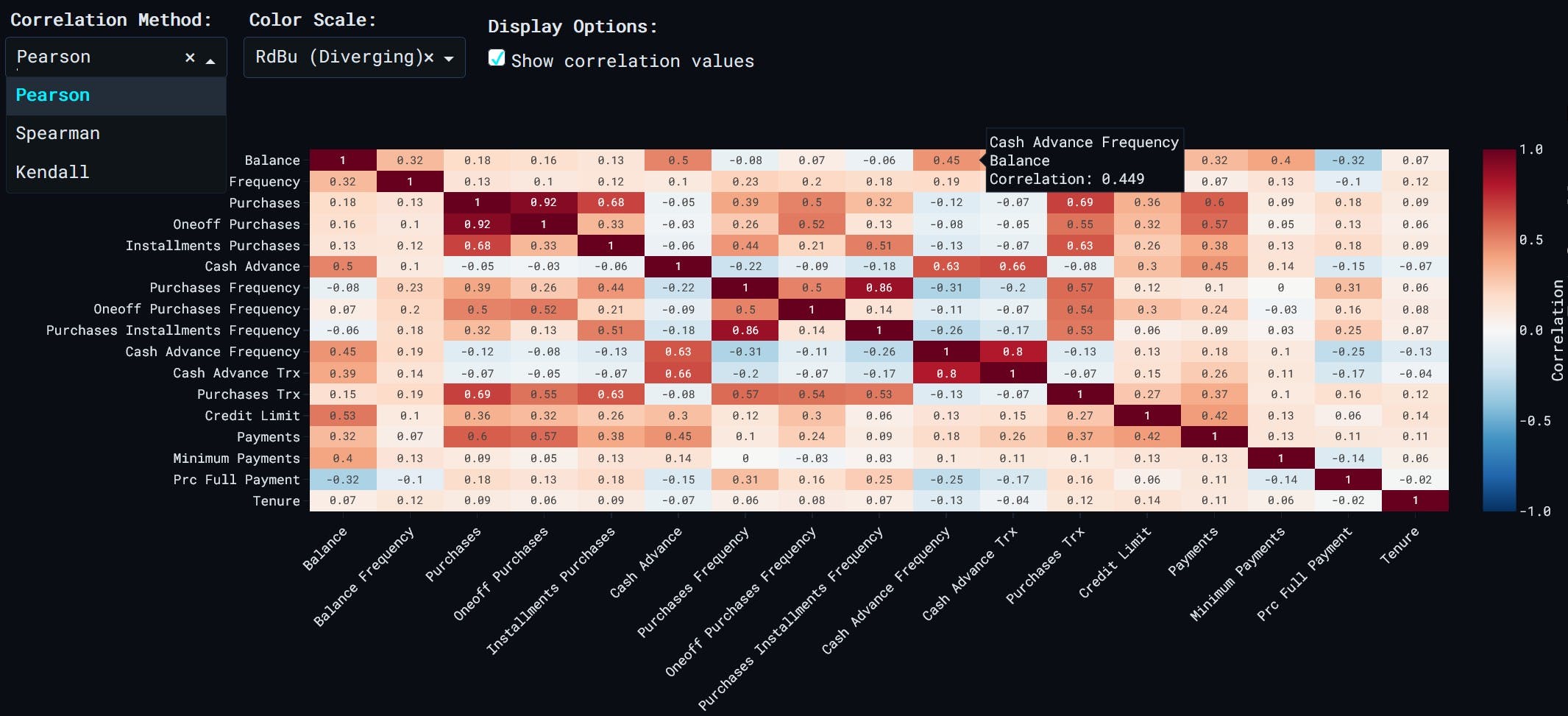
Heatmap showing correlations between all numeric features. Darker colors indicate stronger correlations (positive or negative). Use this to identify relationships between customer behavior metrics.
Darker colors indicate stronger correlations. The heatmap is symmetric along the diagonal, where each feature correlates perfectly with itself. Hover over cells to see the exact correlation coefficient rounded to three decimal places.
Business application: A product manager notices that PURCHASES and ONEOFF_PURCHASES have a correlation of 0.85, while PURCHASES and INSTALLMENTS_PURCHASES correlate at 0.62. This means most purchase volume comes from one-off transactions, not installments. The team decides to promote installment payment options to increase purchase volume among customers who prefer spreading costs.
Regression analysis for continuous variable prediction
What it is: Regression analysis models the relationship between a target variable and one or more input variables. Multiple linear regression predicts the target by combining those inputs, each weighted by how much it matters. The model learns by adjusting those weights to minimize prediction errors.
Why it matters for this dataset: Predicting credit limit based on tenure and purchase behavior helps the bank decide when to increase limits. Predicting payments based on balance and cash advances helps forecast revenue and identify customers who may miss payments.
Model performance is measured using R² (proportion of variance explained), RMSE (root mean squared error), and MAE (mean absolute error).
How it's built in Plotly Studio: Prompt for regression analysis, selecting a target variable (balance, purchases, credit limit, etc.) and two features (tenure, purchases, cash advance, etc.).
Prompt:
Regression Analysis to predict a continuous variable (e.g., predicting CREDIT_LIMIT based on TENURE and PURCHASES).
Plotly Studio fits a multiple linear regression model, calculates predictions, and plots actual versus predicted values. A red dashed line shows perfect prediction. A metrics box displays R², RMSE, MAE, and regression coefficients.
Points close to the red line indicate accurate predictions. Points far from the line indicate residuals, which can be analyzed separately to check model assumptions.
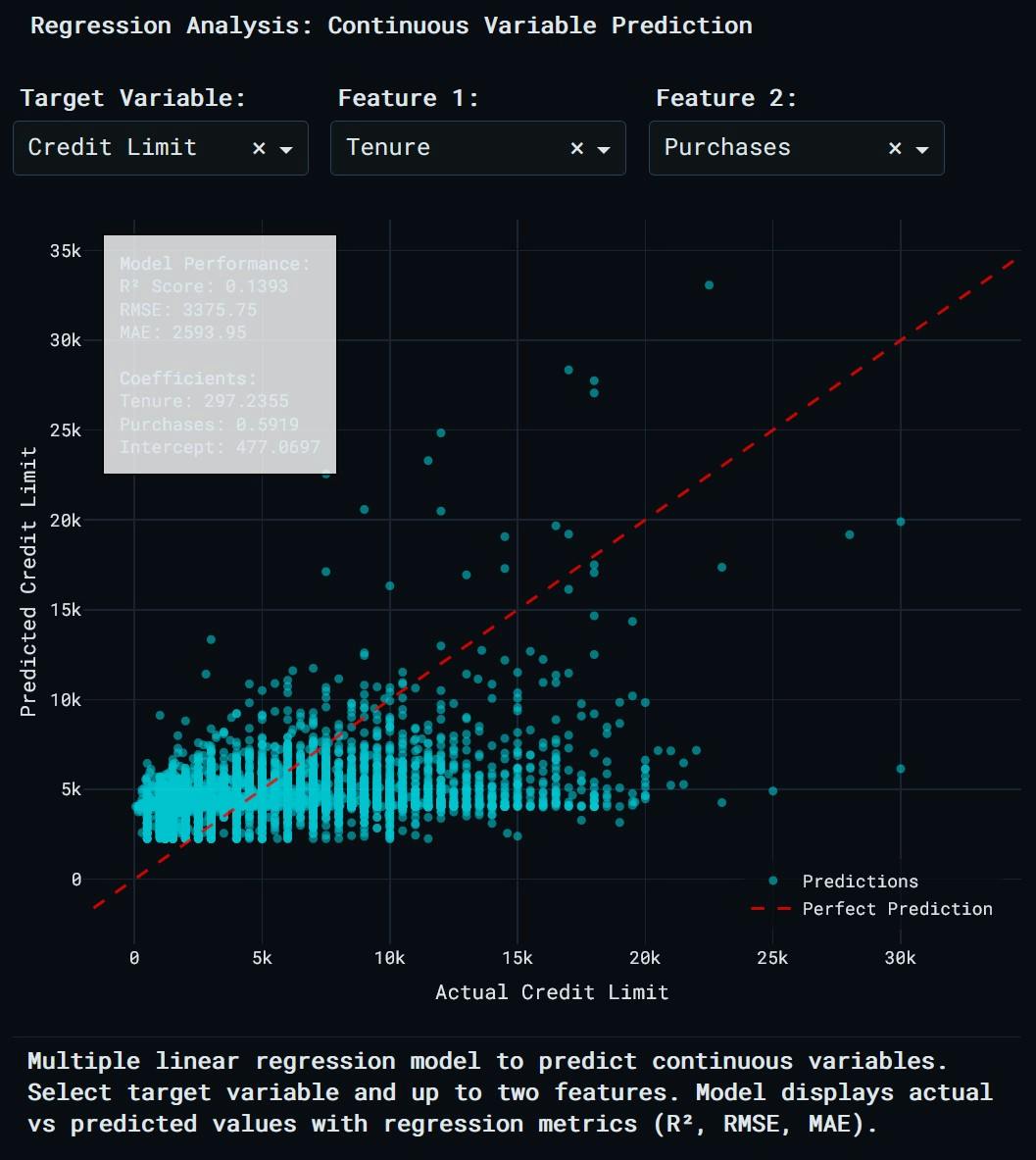
Multiple linear regression model to predict continuous variables.
Business application: A credit risk analyst builds a model to predict credit limit using tenure and total purchases as features. The model achieves an R² of 0.68, meaning 68% of variance in credit limit is explained by these two features. The regression coefficient for purchases is 0.42, indicating that a $1,000 increase in purchases is associated with a $420 increase in credit limit, holding tenure constant.
Distribution comparison across customer segments
What it is: Distribution comparison uses violin plots to show the full shape of a variable's distribution within different segments. Unlike box plots, which only show quartiles, violin plots display the probability density at different values. This reveals multimodal distributions, skewness, and outliers.
Why it matters for this dataset: Comparing balance distributions across credit limit ranges shows whether high-limit customers actually carry higher balances. Comparing purchase distributions across tenure groups shows whether long-term customers spend more. Comparing cash advance distributions between users who make full payments versus those who don't reveals risk differences.
How it's built in Plotly Studio: Prompt for distribution comparison using violin plots, selecting a metric and a segmentation variable.
Prompt:
Distribution Fitting with ALL Numeric Columns Use violin plots to compare the spread of variables like BALANCE between customer segments.
Plotly Studio bins the segmentation variable into categories, removes missing values, and generates a violin plot with an overlay box plot.
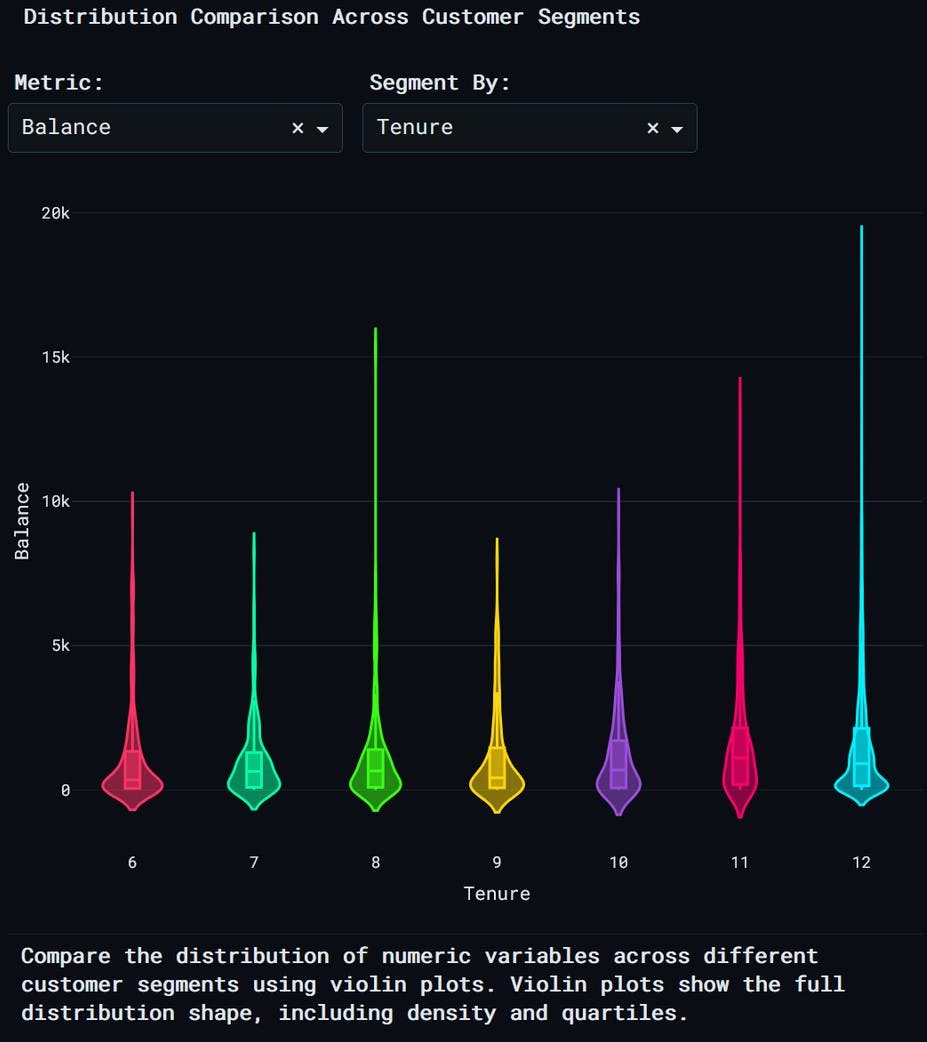
Compare the distribution of numeric variables across different customer segments using violin plots.
Individual data points are shown when the dataset has 5,000 or fewer rows. The plot reveals whether distributions overlap, whether medians differ, and whether certain segments have long tails indicating high-value or high-risk customers.
Business application: A retention team compares balance distributions across tenure groups. Customers with 6 months of tenure have a median balance of $1,200. Customers with 12 months have a median balance of $2,800. The violin plot also shows that the 12-month group has a bimodal distribution, with one peak at $1,500 and another at $5,000. This suggests two subgroups: stable users who maintain moderate balances and revolvers who accumulate high balances over time.
Customer survival analysis
What it is: Survival analysis estimates the probability that a customer remains active over time. The survival curve starts at 100% and decreases as customers churn. The analysis can be stratified by customer groups (payment behavior, activity level) to compare retention across segments.
An event is defined as a customer falling below a threshold on a key metric (payment ratio, full payment rate, or total payments). Time to event is measured in months of tenure.
Why it matters for this dataset: Banks need to know which customers are most likely to churn or stop making payments. Survival analysis shows not just who churns, but when they churn, and how different segments compare in retention over time.
How it's built in Plotly Studio: Prompt for survival analysis, selecting a metric (payment ratio, full payment rate, or total payments) and a grouping variable (all customers, payment behavior, or activity level).
Prompt:
Survival Analysis Measures the "survival" time of customers before they default or churn, using the TENURE column, using TENURE, PAYMENTS, PRC_FULL_PAYMENT.
Plotly Studio calculates the event indicator based on whether the metric falls below a threshold, groups customers by the selected variable, and computes survival rates at each tenure month.
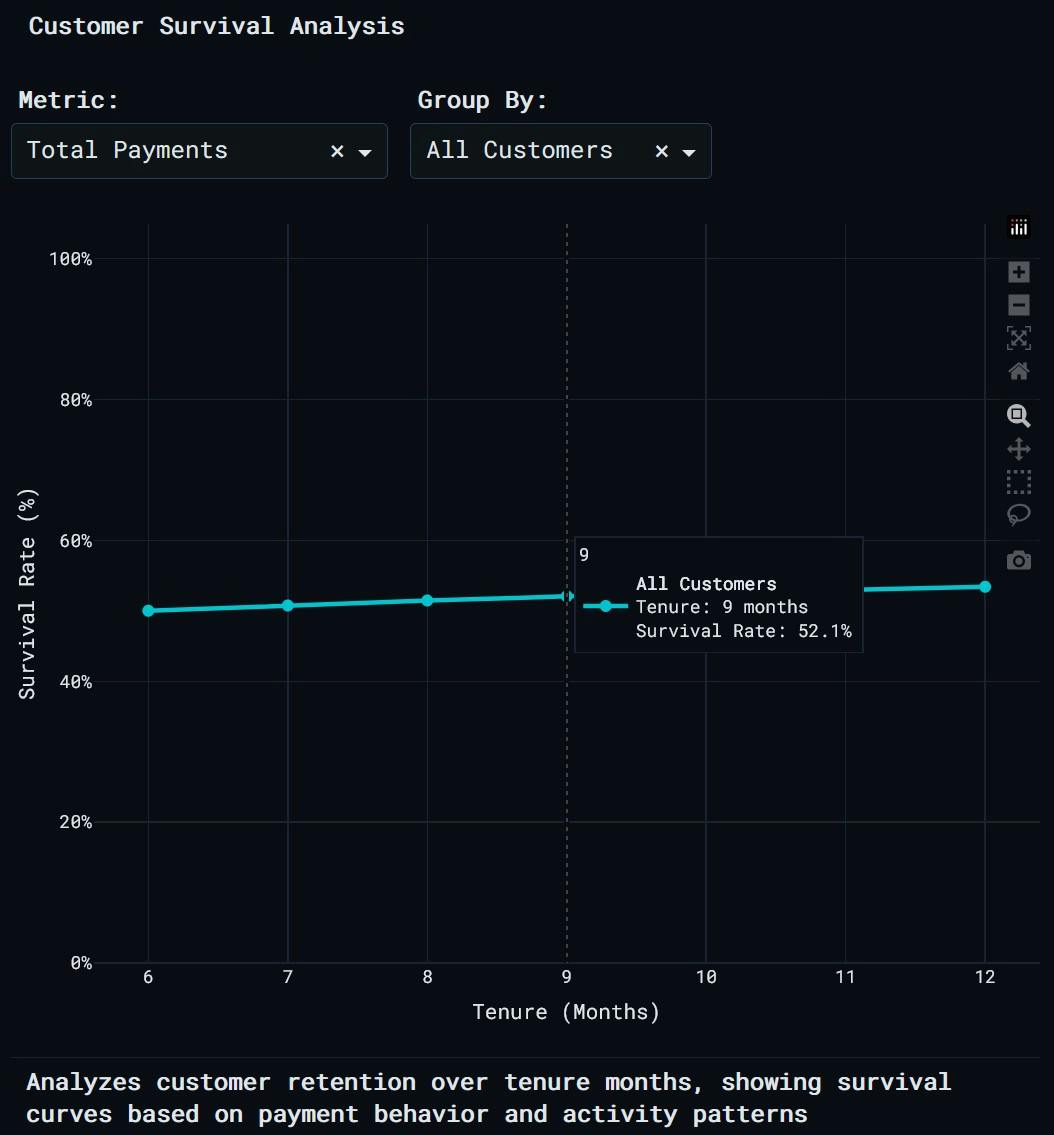
Analyzes customer retention over tenure months, showing survival curves based on payment behavior and activity patterns
The line chart shows survival rate on the y-axis and tenure on the x-axis. Multiple lines represent different customer groups. A steeper drop indicates faster churn.
Business application: A retention team compares survival curves for customers grouped by payment behavior. Customers who never make full payments have a survival rate of 55% at 12 months. Customers who frequently make full payments have a survival rate of 89% at 12 months. The team decides to offer payment plan options to customers in the "never full payment" group to reduce churn.
Feature importance analysis
What it is: Feature importance shows which variables matter most for predicting an outcome. Variables that move more closely with the target have more predictive power.
Why it matters for this dataset: Not all variables matter equally for predicting high balance, high purchases, or full payment behavior. Feature importance helps prioritize which variables to include in predictive models and which levers to pull in business strategy.
How it's built in Plotly Studio: Prompt for feature importance, selecting a target variable (high balance, high purchases, high cash advance, or full payment behavior) and the number of features to display (top 5, top 10, top 15, or all features).
Prompt:
Feature Importance / Screening to rank the columns to show which variables are most important for predicting a target variable (like high BALANCE)
Plotly Studio creates a binary target based on whether the selected variable exceeds a threshold percentile (default 75th percentile), calculates absolute correlations, and ranks features.
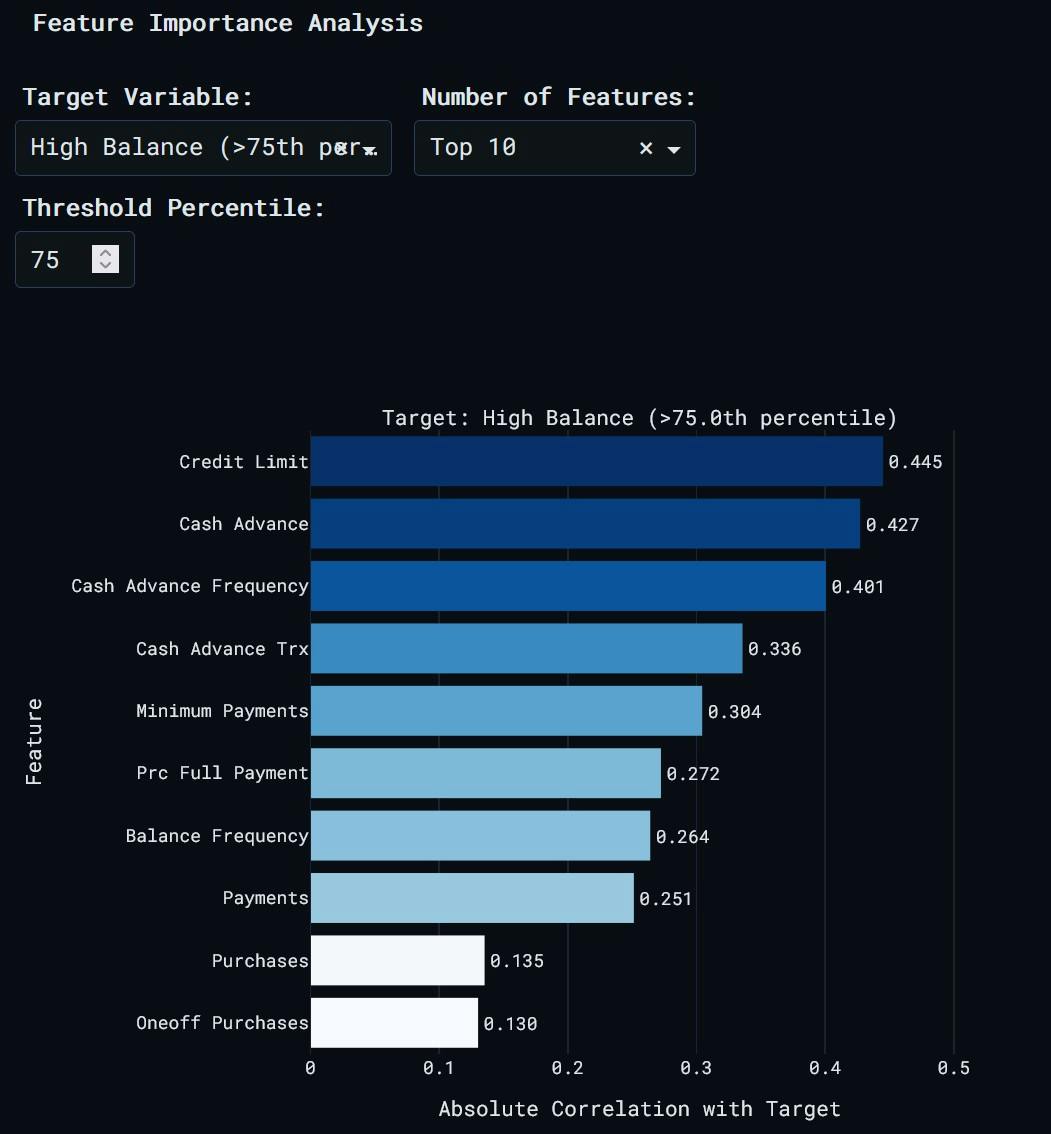
Correlation-based feature importance ranking to identify which customer attributes are most associated with the selected target variable.
The horizontal bar chart shows features sorted by importance. Hover over bars to see the exact correlation value. An annotation at the top displays the target variable and threshold.
Business application: A data scientist builds a model to predict high-balance customers (balance above the 75th percentile). Feature importance reveals that credit limit has the highest correlation (0.68), followed by payments (0.54) and tenure (0.41). Purchase frequency has a low correlation (0.12), so it's excluded from the final model. This reduces model complexity without sacrificing performance.
High-risk customer classification
What it is: Classification assigns customers to categories (high risk or low risk) based on their behavior. Two algorithms handle this differently. Logistic regression calculates the probability a customer belongs to each class, then picks the most likely one. K-nearest neighbors looks at the k most similar customers and assigns the class that's most common among them.
Model performance is evaluated using accuracy, precision, recall, F1 score, and the area under the ROC curve (AUC). The confusion matrix shows true positives, false positives, true negatives, and false negatives. The ROC curve plots true positive rate against false positive rate at different classification thresholds.
Why it matters for this dataset: Identifying high-risk customers (those with zero full payment rate) allows banks to take proactive action: reduce credit limits, increase monitoring, or offer financial counseling. A classification model automates this process by scoring all customers based on behavior patterns.
How it's built in Plotly Studio: Prompt for high-risk customer classification, selecting a model type (logistic regression or manual KNN), number of neighbors for KNN (3 to 20), and test set size (10% to 40%).
Prompt:
Binary Classification with Risk Modeling Focus: Predict a Yes/No outcome. Define a high-risk customer (e.g., those with PRC_FULL_PAYMENT = 0) and use Logit or KNN to predict which customers fall into that category.
Plotly Studio creates a binary target variable where high risk equals 1 if percent of full payment is zero, standardizes features, splits data into training and test sets, trains the model, and generates predictions.
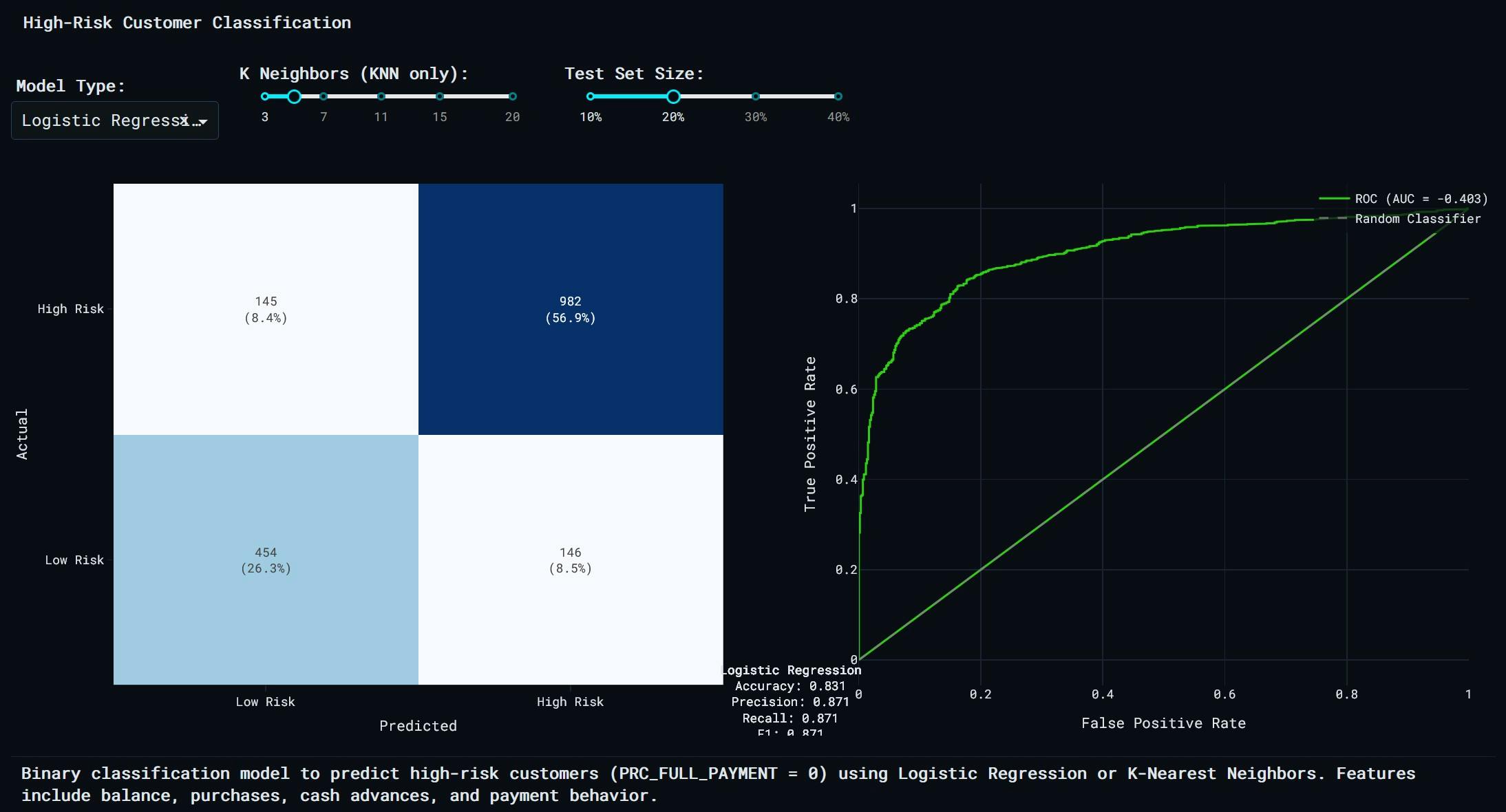
Binary classification model to predict high-risk customers (PRC_FULL_PAYMENT = 0) using Logistic Regression or K-Nearest Neighbors.
The visualization includes two subplots: a confusion matrix heatmap and an ROC curve. The confusion matrix shows predicted versus actual classes. The ROC curve shows model performance, with AUC displayed in the legend. An annotation below the chart shows accuracy, precision, recall, F1 score, and test size.
Business application: A risk team builds a logistic regression model to predict high-risk customers. The model achieves 87% accuracy, 82% precision, and 79% recall on a 20% test set. The AUC is 0.91, indicating strong discriminative power. The confusion matrix shows that the model correctly identifies 1,245 of 1,580 high-risk customers (true positives) while misclassifying only 238 low-risk customers as high risk (false positives). The team deploys the model to score all active customers weekly.
Try it for yourself
These nine techniques cover clustering, dimensionality reduction, anomaly detection, correlation analysis, regression, distribution comparison, survival analysis, feature ranking, and classification. Each one answers a different type of question.
Everything is built in Plotly Studio by uploading a single dataset and prompting for the insight you need. You can then publish it to the web with one click, hosted on Plotly Cloud, like this.
You can try this now for free. Download Plotly Studio, upload the dataset linked above (or your own data), and start exploring.